

Thread
RADEON 9800 Pro Retail CD with updated Mac OS 9 extensions?
this is a partial list, for the other half of the list see the thread:
os9 Compatible Audio Interfaces (with midi i/o) http://macos9lives.com/smforum/index.php?topic=362.0
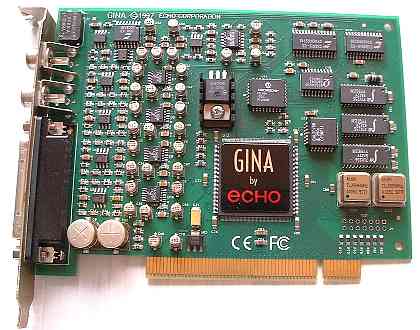
Echo Gina (20-bit) (1997) (B&W g3 + yikes! g4 compatible with pci graphics macs only)
****new info regarding hardware compatibility
connects via PCI, compatible with pci powermac (beige+yosemite)g3/g4(yikes)...agp/adc powermac g4's are NOT COMPATIBLE due to motherboard electrical issue
os9 driver: http://files.echoaudio.com/drivers/mac/install_echo_card_4.0.hqx
article: http://www.soundonsound.com/sos/1997_articles/dec97/eventgina.html
driver downloads: http://echoaudio.com/pages/mac-os-x-software (scroll to the very bottom option)
manual: http://files.echoaudio.com/manuals/gina_mac_manual.pdf
Echo Digital Audio assumes no liability or responsibility for damages caused or loss incurred as a result of you downloading and using these drivers. You use this software solely at your own risk.
m-audio delta 410 (2001)


connects via PCI | DOES NOT ALLOW USE OF PRO TOOLS M-POWERED ON MAC (except on xp using cracked mp7)
can be combined with up to 3 other delta cards to add addtional i/o
IF USING MULTIPLE CARDS ON MAC OS 8/9 YOU **MUST** USE THE "M-Audio Delta 3.1.0 (1011a).sit" DRIVER
be sure to remove all other drivers first before installing, use sherlock to find + delete all the old files, install + reboot and you should see combined input+output count (16,24,32 outputs)
emagic audiowerk2 (1999)
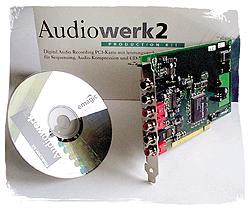
connects via pci | developed for os9 | EASI drivers are Emagic's own proprietary driver (like ASIO)
article: http://www.soundonsound.com/sos/jul99/articles/audiowerk.htm
driver : http://mac.brothersoft.com/emagic-audiowerk-driver-download.html
not reccomended but could work out great if bought for a low price
m-audio duo (2002)

connects via USB
more info: http://www.soundonsound.com/sos/oct02/articles/maudio.asp
RME Digi 9652 Project Hammerfall (1999)
http://www.soundonsound.com/sos/sep99/articles/rmehammer.htm
RME DIGI 96/8 PAD (2002)
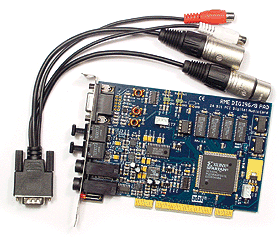
http://www.rme-audio.de/download/968pae.pdf
http://www.soundonsound.com/sos/feb02/articles/rmedigi0202.asp
edirol UA5 (march 2002)
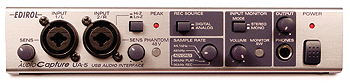
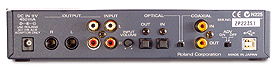
http://www.soundonsound.com/sos/mar02/articles/edirolua5.asp
M-audio Delta 66 /w Omni I/O breakout box option (january 2001)

http://www.soundonsound.com/sos/jan01/articles/maudio.asp
the cable connecting the delta + omni i/o box is called a male to female db15 cable you can buy a longer cable for more distance between the card + the breakout box
motu 828 (2001)
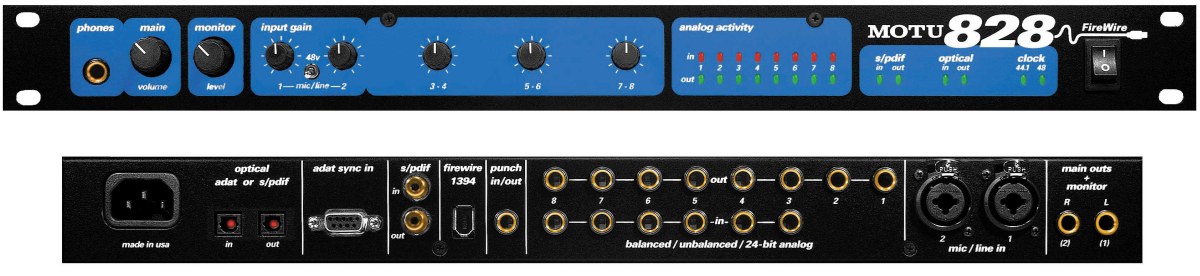
more info: http://www.soundonsound.com/sos/jul01/articles/motu828.asp
more info: http://www.soundonsound.com/sos/apr01/articles/applenotes.htm
motu 896
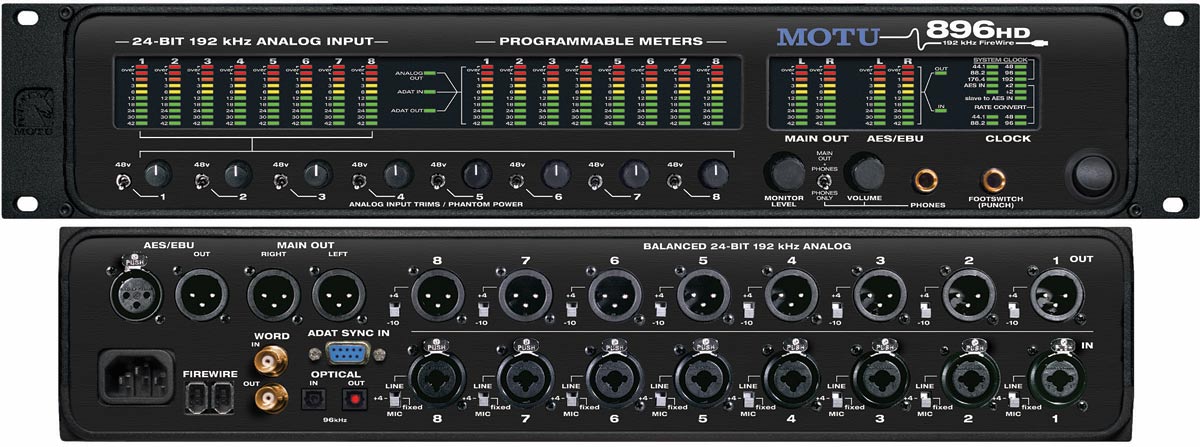
more info: http://www.soundonsound.com/sos/jul02/articles/motu896.asp
 wordclock compatible
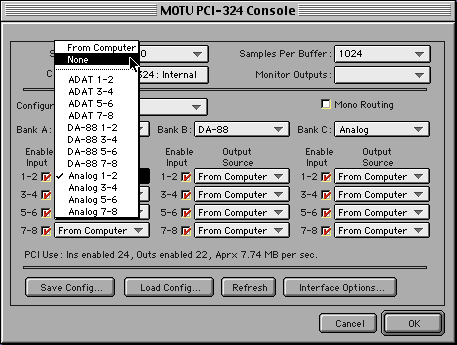
motu 1224 (1999)
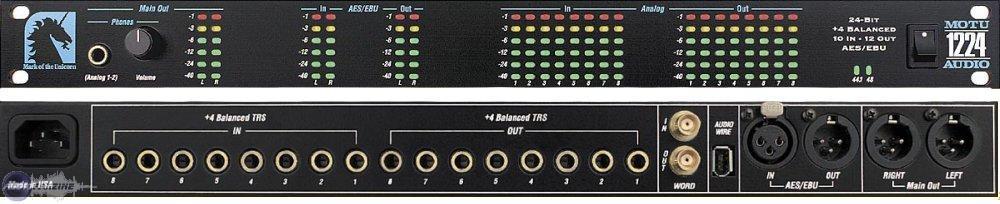
connects via 324 PCI card | can combine with the 2408 + other motu systems
driver download : http://cdn-data.motu.com/downloads/pci424/pci_os9.hqx
Contains audio drivers and application consoles for MOTU PCI-424/324 audio hardware, which includes the 2408 mk3, 24 I/O and HD192.Double-click installer and follow on-screen instructions.
wordclock compatible
Motu 2408 (feb 1999)


eight, 20-bit analogue inputs and outputs
article: http://www.soundonsound.com/sos/feb99/articles/motu2408.654.htm
wordclock compatible
Motu 2408 Mk2 (2000)
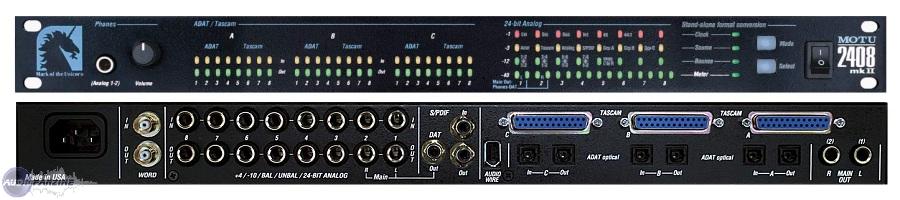
http://www.sonicstate.com/digital/model.cfm?modelID=1299&manid=57&manuf=57
The mkII version is no different from the original except that the analog in/out has been upgraded to 24bit on balanced TRS connectors.
wordclock compatible
Motu 2408 Mk3 (2003)
http://www.soundonsound.com/sos/oct03/articles/motu.htm
opcode datport
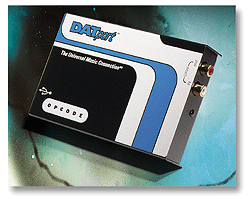
http://www.soundonsound.com/sos/jul99/articles/opcodedat.htm
digidesign mbox (2002)
connects via usb | allows use of pro tools LE software (under os9 + mac osx)

MORE INFO: http://www.soundonsound.com/sos/jun02/articles/digidesgnmbox.asp
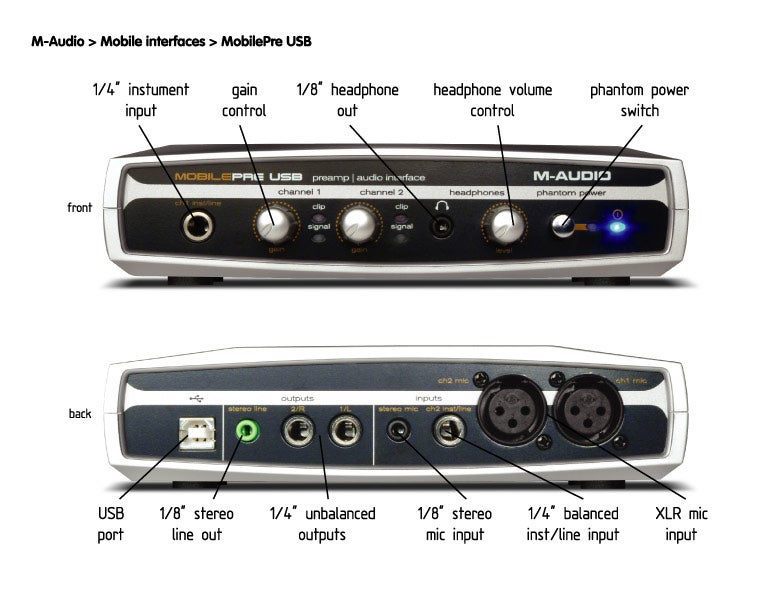
m-audio Mobile Pre USB (2003)
EASILY CONFUSED WITH THE AUDIOPHILE USB~! MOBILE PRE HAS NO MIDI
compatible with os9 | allows use of pro tools m-powered 7+ (under mac os x 10.4+)
driver download: http://akmedia.digidesign.com/support/compressed/MobilePre_USB_Installer_1_5_2f1_77194.sit
firstgen:

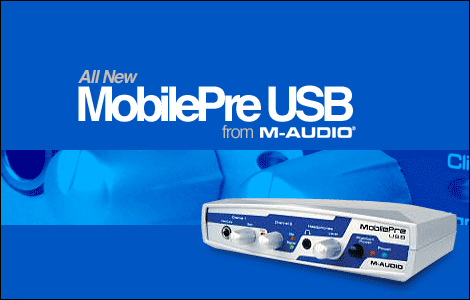
http://web.archive.org/web/20030401224338/http://www.m-audio.com/products/m-audio/mobilepre.php
press release: http://www.m-audio.ca/images/en/press_releases/M-Audio_MobilePre2_PR.pdf
revision looked like this:
M-audio transit
compatible with os9 | allows use of pro tools m-powered 7+ software (under mac os x 10.4+)
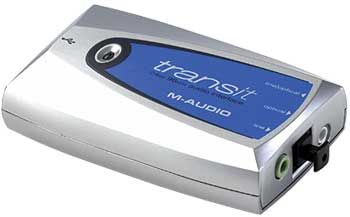
larger image: http://cdn.head-fi.org/e/e7/e71fe538_Transit+(01).JPG
M-audio groovelab

manual: http://www.m-audio.ca/images/global/manuals/GrooveLab_Quickstart.pdf
roland m1000 digital mixer audio interface

connects via usb | 4 spdif inputs + 1 stereo analog input = 10 channels
manual: http://lib.roland.co.jp/support/en/manuals/res/1811166/M-1000_Manual_e1.pdf
http://c1.zzounds.com/media/quality,85/M-1000_R-79ab0526f7d26301f8e57f726eae36ad.jpg
http://www.soundonsound.com/sos/jun03/articles/rolandm1000.asp
edirol m-100fx
The M-100FX is a 10-channel Audio mixer with a number of useful Voice & Sound Processing effects.
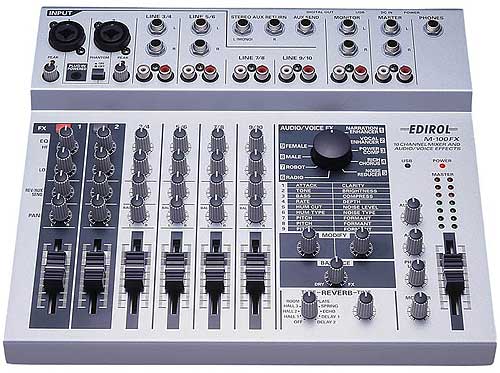
connects via usb | not bus powered
rear image: http://www.roland.com/products/en/M-100FX/images/image_02_L.jpg
manual: http://www.roland.com/support/article/?q=manuals&p=M-100FX&id=1811410
driver: http://www.roland.com/support/article/?q=downloads&p=M-100FX&id=1812824
edirol ua1ex
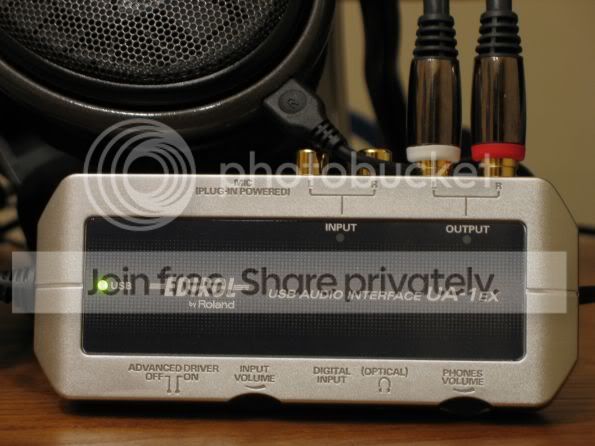
edirol UA-3FX

roland UA-5 (2001)


http://lib.roland.co.jp/support/en/manuals/res/1811507/UA-5_egfis3.pdf
Echo Gina (24-bit)(1999)
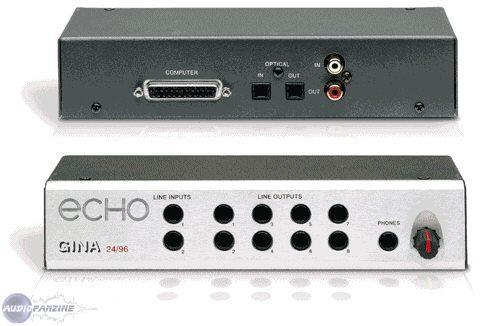
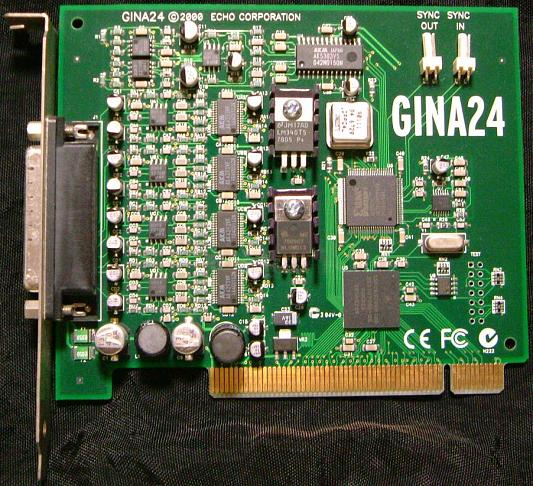 (revision of the pci card)
http://files.echoaudio.com/manuals/echo24_mac_manual.pdf
driver: http://files.echoaudio.com/drivers/mac/install_echo24_6.04.hqx
Echo Darla (24-bit) (1999)


http://files.echoaudio.com/manuals/darla_mac_manual.pdf (original darla model)
http://files.echoaudio.com/manuals/darla24_mac_manual.pdf (24bit model)
http://www.pcrecording.com/darla.htm
emagic audiowerk8 (1997)
EASI drivers are Emagic's own proprietary driver (like ASIO)
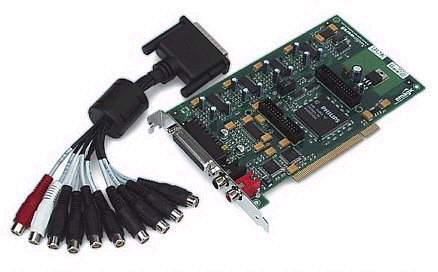
not reccomended but could work out great if bought for a low price
audiomedia III (1996)

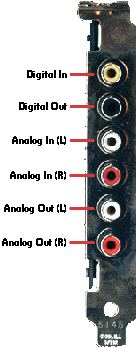
specs: http://archive.digidesign.com/support/specs/toolbox_specs.html
driver: http://archive.digidesign.com/download/sndrvr/
allows use of pro tools LE software up to version 5.1.1 os9 | 6.2.3 osx | 6.1.1 winxp
g3/g4 compatibility info: http://archive.digidesign.com/compato/osx/tb/am3.cfm
more info: http://www.soundonsound.com/sos/1996_articles/jul96/digidesignsession.html
yamaha ds2416 (1998)
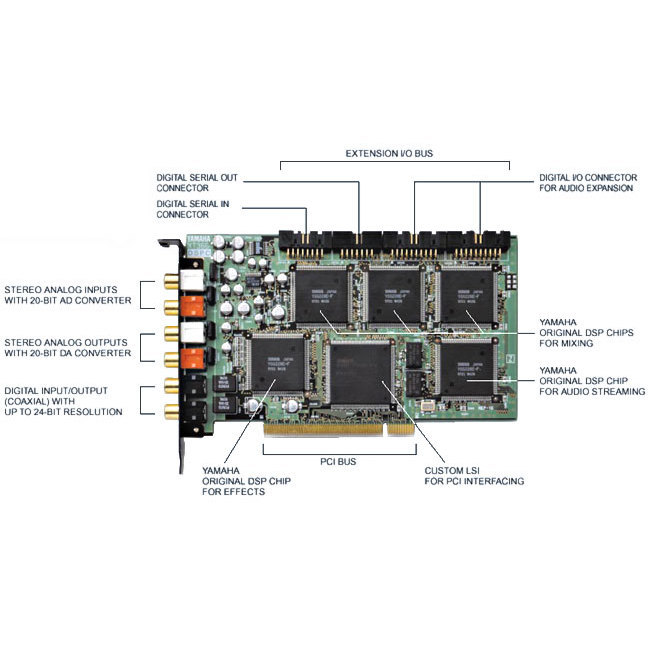
connects via pci
article: http://www.soundonsound.com/sos/oct98/articles/yamahadspf.html
manual: http://www.ds2416.org/xpisoftware/Manual/DS2416.pdf
driver info: http://www.sonicstate.com/news/2001/04/06/new-mac-drivers-for-yamaha-cards/
driver downloads: http://www.megatrade.ru/English/Yamaha_Support.html
terratec-producer-phase-26-usb

manual : http://ftp.terratec.com/Producer/PHASE/PHASE26USB/Manual/PHASE26USB_Manual_GB.pdf
The MAC OS 9 drivers.The PHASE 26 USB System is equipped with a special ASIO driver. The MIDI port is notavailable under MAC OS 9. Furthermore, the Sound Manager is not supported. Thefunctions of the ASIO ControlPanel are pretty much identical to those of the WindowsVersion. In the version that is currently being shipped, direct monitoring is not supportedby the MAC OS9 ASIO driver
opcode DATport
http://www.soundonsound.com/sos/jul99/articles/opcodedat.htm]http://www.soundonsound.com/sos/jul99/articles/opcodedat.htm
opcode SONICport
opcode SonicPort
http://web.archive.org/web/19991006112043/http://www.opcode.com/products/sonicport/
http://www.soundonsound.com/sos/apr04/articles/terratecphase88.htm
esi gigaport (2002-2006)
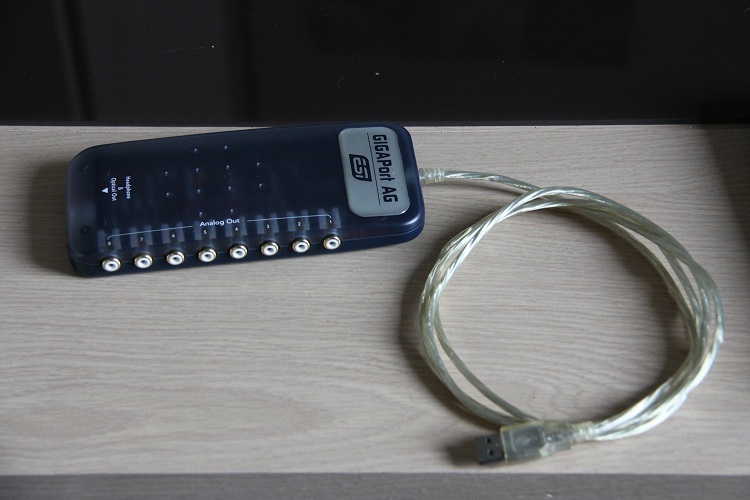
http://download.esi-audiotechnik.com/download/esi/gigaport_ag/gigaport_ag-english.pdf
8 output USB Audio Interface
Sonorus StudI/O (1998)

http://www.soundonsound.com/sos/sep98/articles/sonorus.html
manual : http://www.sonorus.com/studiomanual.pdf
http://www.sonorus.com/
driver: http://www.sonorus.com/STUDIO18.sit
http://web.archive.org/web/20030218061302/http://www.sonorus.com/backplate.box/
http://web.archive.org/web/20010630172924/http://www.sonorus.com
syncing two sonorus cards
Alesis ADAT edit (1999)
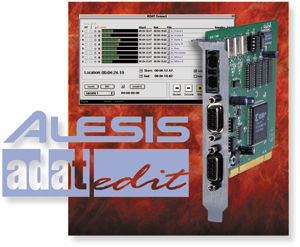
an adat interface card for mac os 9.. comes with software made by emagic
article : http://www.soundonsound.com/sos/aug99/articles/alesisadat.htm
http://www.sweetwater.com/publications/sweetnotes/sn-latesummer99/page11.html
http://alesis.com/stuff/contentmgr/files/0/9d2b1fc3c579211a294dbd112724fbbe/file/adatedit_manual.pdf
roland rpc-1

http://www.rolandus.com/products/details/344
os9 Compatible Audio Interfaces (with midi i/o) http://macos9lives.com/smforum/index.php?topic=362.0
Echo Gina (20-bit) (1997) (B&W g3 + yikes! g4 compatible with pci graphics macs only)
****new info regarding hardware compatibility
connects via PCI, compatible with pci powermac (beige+yosemite)g3/g4(yikes)...agp/adc powermac g4's are NOT COMPATIBLE due to motherboard electrical issue
os9 driver: http://files.echoaudio.com/drivers/mac/install_echo_card_4.0.hqx
article: http://www.soundonsound.com/sos/1997_articles/dec97/eventgina.html
driver downloads: http://echoaudio.com/pages/mac-os-x-software (scroll to the very bottom option)
manual: http://files.echoaudio.com/manuals/gina_mac_manual.pdf
Quote
WARNING: Not all Darla 20, Gina 20, Layla 20, and Darla24 cards are compatible with Power Macs. Unfortunately, this is a hardware incompatibility; as such, it cannot be worked around in software. When using these products, you may experience lockups or your Power Mac may not function reliably. Consequently, Echo Digital Audio will not provide technical support for these drivers.
Echo Digital Audio assumes no liability or responsibility for damages caused or loss incurred as a result of you downloading and using these drivers. You use this software solely at your own risk.
m-audio delta 410 (2001)
connects via PCI | DOES NOT ALLOW USE OF PRO TOOLS M-POWERED ON MAC (except on xp using cracked mp7)
can be combined with up to 3 other delta cards to add addtional i/o
IF USING MULTIPLE CARDS ON MAC OS 8/9 YOU **MUST** USE THE "M-Audio Delta 3.1.0 (1011a).sit" DRIVER
be sure to remove all other drivers first before installing, use sherlock to find + delete all the old files, install + reboot and you should see combined input+output count (16,24,32 outputs)
emagic audiowerk2 (1999)
connects via pci | developed for os9 | EASI drivers are Emagic's own proprietary driver (like ASIO)
article: http://www.soundonsound.com/sos/jul99/articles/audiowerk.htm
driver : http://mac.brothersoft.com/emagic-audiowerk-driver-download.html
not reccomended but could work out great if bought for a low price
m-audio duo (2002)
connects via USB
more info: http://www.soundonsound.com/sos/oct02/articles/maudio.asp
RME Digi 9652 Project Hammerfall (1999)
http://www.soundonsound.com/sos/sep99/articles/rmehammer.htm
RME DIGI 96/8 PAD (2002)
http://www.rme-audio.de/download/968pae.pdf
http://www.soundonsound.com/sos/feb02/articles/rmedigi0202.asp
edirol UA5 (march 2002)
http://www.soundonsound.com/sos/mar02/articles/edirolua5.asp
M-audio Delta 66 /w Omni I/O breakout box option (january 2001)
http://www.soundonsound.com/sos/jan01/articles/maudio.asp
the cable connecting the delta + omni i/o box is called a male to female db15 cable you can buy a longer cable for more distance between the card + the breakout box
motu 828 (2001)
more info: http://www.soundonsound.com/sos/jul01/articles/motu828.asp
more info: http://www.soundonsound.com/sos/apr01/articles/applenotes.htm
motu 896
more info: http://www.soundonsound.com/sos/jul02/articles/motu896.asp
wordclock compatiblemotu 1224 (1999)
connects via 324 PCI card | can combine with the 2408 + other motu systems
driver download : http://cdn-data.motu.com/downloads/pci424/pci_os9.hqx
Contains audio drivers and application consoles for MOTU PCI-424/324 audio hardware, which includes the 2408 mk3, 24 I/O and HD192.Double-click installer and follow on-screen instructions.
wordclock compatibleMotu 2408 (feb 1999)
eight, 20-bit analogue inputs and outputs
article: http://www.soundonsound.com/sos/feb99/articles/motu2408.654.htm
wordclock compatibleMotu 2408 Mk2 (2000)
http://www.sonicstate.com/digital/model.cfm?modelID=1299&manid=57&manuf=57
The mkII version is no different from the original except that the analog in/out has been upgraded to 24bit on balanced TRS connectors.
wordclock compatibleMotu 2408 Mk3 (2003)
http://www.soundonsound.com/sos/oct03/articles/motu.htm
opcode datport
http://www.soundonsound.com/sos/jul99/articles/opcodedat.htm
digidesign mbox (2002)
connects via usb | allows use of pro tools LE software (under os9 + mac osx)
MORE INFO: http://www.soundonsound.com/sos/jun02/articles/digidesgnmbox.asp
m-audio Mobile Pre USB (2003)
EASILY CONFUSED WITH THE AUDIOPHILE USB~! MOBILE PRE HAS NO MIDI
compatible with os9 | allows use of pro tools m-powered 7+ (under mac os x 10.4+)
driver download: http://akmedia.digidesign.com/support/compressed/MobilePre_USB_Installer_1_5_2f1_77194.sit
firstgen:
http://web.archive.org/web/20030401224338/http://www.m-audio.com/products/m-audio/mobilepre.php
press release: http://www.m-audio.ca/images/en/press_releases/M-Audio_MobilePre2_PR.pdf
revision looked like this:
M-audio transit
compatible with os9 | allows use of pro tools m-powered 7+ software (under mac os x 10.4+)
larger image: http://cdn.head-fi.org/e/e7/e71fe538_Transit+(01).JPG
M-audio groovelab
manual: http://www.m-audio.ca/images/global/manuals/GrooveLab_Quickstart.pdf
roland m1000 digital mixer audio interface
connects via usb | 4 spdif inputs + 1 stereo analog input = 10 channels
manual: http://lib.roland.co.jp/support/en/manuals/res/1811166/M-1000_Manual_e1.pdf
http://c1.zzounds.com/media/quality,85/M-1000_R-79ab0526f7d26301f8e57f726eae36ad.jpg
http://www.soundonsound.com/sos/jun03/articles/rolandm1000.asp
edirol m-100fx
The M-100FX is a 10-channel Audio mixer with a number of useful Voice & Sound Processing effects.
connects via usb | not bus powered
rear image: http://www.roland.com/products/en/M-100FX/images/image_02_L.jpg
manual: http://www.roland.com/support/article/?q=manuals&p=M-100FX&id=1811410
driver: http://www.roland.com/support/article/?q=downloads&p=M-100FX&id=1812824
edirol ua1ex
edirol UA-3FX
roland UA-5 (2001)
http://lib.roland.co.jp/support/en/manuals/res/1811507/UA-5_egfis3.pdf
Echo Gina (24-bit)(1999)
(revision of the pci card)http://files.echoaudio.com/manuals/echo24_mac_manual.pdf
driver: http://files.echoaudio.com/drivers/mac/install_echo24_6.04.hqx
Quote
a note on combining multiple echo 24bit devices
Esync cables come with Gina24, and can be used to daisy chain several 24-bit Echo cards together. Esync is a
proprietary form of super clock that allows you to sync together multiple 24-bit
Echo products. Simply attach the Esync cable to the two-prong “Esync Out”
connector on the Layla24/Mona/Gina24 PCI card, and attach the other end to
the “Esync In” connector on your Gina24 PCI card.
Echo Darla (24-bit) (1999)
http://files.echoaudio.com/manuals/darla_mac_manual.pdf (original darla model)
http://files.echoaudio.com/manuals/darla24_mac_manual.pdf (24bit model)
http://www.pcrecording.com/darla.htm
emagic audiowerk8 (1997)
EASI drivers are Emagic's own proprietary driver (like ASIO)
Quote
Audiowerk8 is a Digital Audio Recording PCI-card for MacOS or Windows with Digital I/O (S/P-DIF), 8 analog Outputs, 2 analog Inputs.article: http://www.soundonsound.com/sos/1997_articles/jul97/audiowerk8.html
Cascading 3 cards is possible, which will give the user 2 Ins and 24 physical Outs.
not reccomended but could work out great if bought for a low price
audiomedia III (1996)
specs: http://archive.digidesign.com/support/specs/toolbox_specs.html
driver: http://archive.digidesign.com/download/sndrvr/
allows use of pro tools LE software up to version 5.1.1 os9 | 6.2.3 osx | 6.1.1 winxp
g3/g4 compatibility info: http://archive.digidesign.com/compato/osx/tb/am3.cfm
more info: http://www.soundonsound.com/sos/1996_articles/jul96/digidesignsession.html
yamaha ds2416 (1998)
connects via pci
article: http://www.soundonsound.com/sos/oct98/articles/yamahadspf.html
manual: http://www.ds2416.org/xpisoftware/Manual/DS2416.pdf
driver info: http://www.sonicstate.com/news/2001/04/06/new-mac-drivers-for-yamaha-cards/
driver downloads: http://www.megatrade.ru/English/Yamaha_Support.html
terratec-producer-phase-26-usb
manual : http://ftp.terratec.com/Producer/PHASE/PHASE26USB/Manual/PHASE26USB_Manual_GB.pdf
The MAC OS 9 drivers.The PHASE 26 USB System is equipped with a special ASIO driver. The MIDI port is notavailable under MAC OS 9. Furthermore, the Sound Manager is not supported. Thefunctions of the ASIO ControlPanel are pretty much identical to those of the WindowsVersion. In the version that is currently being shipped, direct monitoring is not supportedby the MAC OS9 ASIO driver
opcode DATport
http://www.soundonsound.com/sos/jul99/articles/opcodedat.htm]http://www.soundonsound.com/sos/jul99/articles/opcodedat.htm
opcode SONICport
opcode SonicPort
http://web.archive.org/web/19991006112043/http://www.opcode.com/products/sonicport/
http://www.soundonsound.com/sos/apr04/articles/terratecphase88.htm
esi gigaport (2002-2006)
http://download.esi-audiotechnik.com/download/esi/gigaport_ag/gigaport_ag-english.pdf
8 output USB Audio Interface
Sonorus StudI/O (1998)
http://www.soundonsound.com/sos/sep98/articles/sonorus.html
manual : http://www.sonorus.com/studiomanual.pdf
http://www.sonorus.com/
driver: http://www.sonorus.com/STUDIO18.sit
http://web.archive.org/web/20030218061302/http://www.sonorus.com/backplate.box/
http://web.archive.org/web/20010630172924/http://www.sonorus.com
syncing two sonorus cards
Alesis ADAT edit (1999)
an adat interface card for mac os 9.. comes with software made by emagic
article : http://www.soundonsound.com/sos/aug99/articles/alesisadat.htm
http://www.sweetwater.com/publications/sweetnotes/sn-latesummer99/page11.html
http://alesis.com/stuff/contentmgr/files/0/9d2b1fc3c579211a294dbd112724fbbe/file/adatedit_manual.pdf
roland rpc-1
http://www.rolandus.com/products/details/344
The RADEON 9800 Pro AGP Mac Edition Retail CD 180-G01453-200 I have (from new purchase of graphics card *), only has an OS X installer; The included ATI RADEON 9800 Pro AGP Mac Edition Retail manual P/N117-40155-50 states that an Mac OS 9 installer is also included, but it's not on the CD.
Anyone have one of the RADEON 9800 Pro Retail CDs with the updated Mac OS 9.2.2 extensions installer?
It might be ATI RADEON 9800 Pro AGP Mac Edition Retail CD 180-G01453-100
- mtq
* ATI Technologies RADEON 9800 PRO MAC EDITION 4x/2x AGP Ultra High Performance Dual Head Video Card W/ DVI, VGA and S-Video Ports, 128MB. New, for PowerMac G4s, with 1yr ATI Warranty. (ATI100435068) OS X 10.2.5 or later
http://eshop.macsales.com/item/ATI%20Technologies/100435068/
Info under OS X from installed RADEON 9800 PRO MAC EDITION:
RADEON 9800 Pro
ATI Radeon 9800 Pro (retail):
Name: ATI,ApacheParent
Chipset Model: ATY,R350
Type: Display
Bus: AGP
Slot: SLOT-1
VRAM (Total): 128 MB
Vendor: ATI (0x1002)
Device ID: 0x4e48
Revision ID: 0x0000
ROM Revision: 113-A0750A-201
Other information:
<snip>
Mac Radeon 9800 Pro FAQ:
What OS versions are supported by the RADEON 9800 Pro? Will it work in Mac OS 9?
OS X 10.2.5 and later are supported. The release software for the RADEON 9800 Pro includes drivers that will install on versions 10.2.5 and
10.2.6 of OS X. ATI Displays and its required files will continue to install on any future releases. Versions of OS X beyond 10.2.6 contain support built-in for the RADEON 9800 Pro, and future updates will be available on the ATI.COM web site. The CD release includes updated Mac OS 9 extensions that allow the card to boot, but no acceleration or other features will be available. OS X 10.2.5 is the base OS for RADEON 9800 class graphics products and their new technology.
<snip>
_________________
Always interested in Mac OS 8.6, Mac OS 9.0.4 - Mac OS 9.2.2, OS X 10.3.9, and OS X 10.4.11 (PPC), and in softwares for all the aforementioned...
Anyone have one of the RADEON 9800 Pro Retail CDs with the updated Mac OS 9.2.2 extensions installer?
It might be ATI RADEON 9800 Pro AGP Mac Edition Retail CD 180-G01453-100
- mtq
* ATI Technologies RADEON 9800 PRO MAC EDITION 4x/2x AGP Ultra High Performance Dual Head Video Card W/ DVI, VGA and S-Video Ports, 128MB. New, for PowerMac G4s, with 1yr ATI Warranty. (ATI100435068) OS X 10.2.5 or later
http://eshop.macsales.com/item/ATI%20Technologies/100435068/
Info under OS X from installed RADEON 9800 PRO MAC EDITION:
RADEON 9800 Pro
ATI Radeon 9800 Pro (retail):
Name: ATI,ApacheParent
Chipset Model: ATY,R350
Type: Display
Bus: AGP
Slot: SLOT-1
VRAM (Total): 128 MB
Vendor: ATI (0x1002)
Device ID: 0x4e48
Revision ID: 0x0000
ROM Revision: 113-A0750A-201
Other information:
<snip>
Mac Radeon 9800 Pro FAQ:
What OS versions are supported by the RADEON 9800 Pro? Will it work in Mac OS 9?
OS X 10.2.5 and later are supported. The release software for the RADEON 9800 Pro includes drivers that will install on versions 10.2.5 and
10.2.6 of OS X. ATI Displays and its required files will continue to install on any future releases. Versions of OS X beyond 10.2.6 contain support built-in for the RADEON 9800 Pro, and future updates will be available on the ATI.COM web site. The CD release includes updated Mac OS 9 extensions that allow the card to boot, but no acceleration or other features will be available. OS X 10.2.5 is the base OS for RADEON 9800 class graphics products and their new technology.
<snip>
_________________
Always interested in Mac OS 8.6, Mac OS 9.0.4 - Mac OS 9.2.2, OS X 10.3.9, and OS X 10.4.11 (PPC), and in softwares for all the aforementioned...
Mac OS 9.2.2 has been having problems with Finder crashes since the install of this AGP RADEON 9800 Pro Retail graphics card.
Additionally, if Video Mirroring is turned on, and I boot into Mac OS 9.2.2 on my G4 MDD tower, all I get on my computer monitor, is a screen with a small, blank gray rectangle in the middle, against a backdrop of black, and nothing else is visible or usable.
Upon researching, I find that part of the issue may be related to:
<snip>
Finder may crash in Mac OS 9 with ATI Universal Installer installed
This issue can affect all ATI products for PowerMac systems.
After installing Mac OS 9 or Apple updates to Mac OS 9, the Mac OS 9 Finder may crash.
Mac OS 9 includes ATI driver components for ATI products in Apple computers. Mac OS 9 installs these components, overwriting the ATI drivers installed, but does not overwrite the complete set of ATI drivers, thereby causing a mismatch of components.
To resolve this issue, update to the newest ATI Universal Installer for Mac OS 9.
To locate current drivers for your ATI product, please visit our MAC Support section. http://support.atitech.ca/products/mac/index.html
<snip>
Note: Since the purchase of ATI by AMD http://support.atitech.ca/ and a host of other ATI Macintosh support URLs for both Mac OS 8.6 - Mac OS 9.2.2 and for OS X, no longer exist, and most of the Macintosh ATI installers and updaters for both Mac OS 8.6 - Mac OS 9.2.2 and for OS X, are also gone from the ATI/AMD site.
Michael 'Mike' Breeden (of XLR8 http://www.xlr8yourmac.com/) has also pointed out that AMD has now set up a trap (that gives a "leech check" blocking message) that is blocking listed ATI download URLs (including from XLR8, VersionTracker, Pure Mac, MacUpdate.com, and from Google searches...), ATI tech support pages, and mirrors (AMD is also working to block access to archives of older ATI pages of any of the aforementioned).
I've since obtained some individual newer Mac OS 9.x.x ATI files piecemeal from various locations:
Mac OS 9.2.2 :
Applications (Mac OS 9) :
Utilities :
ATI Utilities :
ATI OS9 RADEON Update.html
System Folder (Mac OS 9.2.2) :
Control Panels :
ATI Displays (version 3.2)
Extensions :
ATI 3D Accelerator (version 7.0.4)
ATI 8500 3D Accelerator (version 7.1.0)
ATI Driver Update (version 2.9.0)
ATI Extension (version 2.9.0)
ATI Graphics Accelerator (version 5.7.0)
ATI Guide (version 2.4.1)
--
ATI Help (Folder for ATI Help version 1.1 files) :
ATI Help (version 1.1)
ATI Help idx
ATI Help.htm (version 1.1)
gfx :
3d Compression.gif
3D memory.gif
3D Quality.gif
3D Sync.gif
ATI_icon.gif
ATI_Logo.gif
ATIHelp.gif
Botbar.gif
cmd.gif
deskscape.gif
gspacer.gif
keyboard.gif
Mac2TV.gif
Monitor.gif
Monitors.gif
ResConStrip.gif
Topbar.gif
VGA.gif
Rad :
DefRtoc.htm (version 1.1)
r_about_ATIMenu.htm
r_about_displays.htm
r_about_rad.htm
r_adTVimag.htm
r_appmon.htm
r_changecolor.htm
r_check3d.htm
r_CRTdim.htm
r_DFP.htm
r_DFPdim.htm
r_DisplayTV.htm
r_enablepopup.htm
r_impsw.htm
r_kboardscuts.htm
r_max3D.htm
r_mmonitors.htm
r_Montype.htm
r_moveimg.htm
r_multimons.htm
r_removesw.htm
r_resmac2tv.htm
r_sathuebright.htm
r_SelectVid.htm
r_sharptip.htm
r_trblfeatures.htm
r_trblmonitor.htm
r_TVimagcolor.htm
r_TVimagcontrast.htm
r_TVimagdcrawl.htm
r_TVimagflicker.htm
r_TVimagsharp.htm
r_VGA.htm
r_vidformats.htm
radRtoc.htm
shrd :
Ablend.htm
antial.htm
Artfact.htm
Aspect.htm
atipop.htm
Backbuf.htm
Bifilter.htm
Bitmap.htm
Bmap.htm
bright.htm
Buffer.htm
CATV.HTM
cdpth.htm
Closed.htm
Composite.htm
Contrast.htm
Cpyrt.htm
CRT.htm
Cspace.htm
Dcrawl.htm
DDC.htm
DFP.htm
Fbuffer.htm
FixedF.htm
Flckr.htm
Fog.htm
Gshade.htm
hue.htm
Mfreq.htm
MIPmap.htm
Offmem.htm
OpenGL.htm
Pixel.htm
QT.htm
Refresh.htm
res.htm
shigh.htm
svid.htm
TriFilter.htm
txtcmprs.htm
txtmap.htm
txture.htm
vidtext.htm
zbuff.htm
toc.htm
--
ATI Mac2TV Monitor (version 2.8.5)
ATI Monitor (version 3.2.1)
ATI MPP Manager (version 1.2)
ATI Radeon 3D Accelerator (version 6.4.7)
ATI Rage 128 3D Accelerator (version 6.4.7)
ATI Resource Manager (version 3.2.1)
ATI ROM Xtender (version 1.2)
ATI Video Accelerator (version 4.9.1)
ATI Video Accelerator Update (version 1.0.2)
ATI Video Digitizer (version 4.3.7)
OpenGLRendererATI (version 1.3.5)
I perceive, that I really do need that ATI AGP RADEON 9800 Pro Retail Mac OS 9 installer, from ATI RADEON 9800 Pro AGP Mac Edition Retail CD 180-G01453-100, or any ATI AGP RADEON 9800 Pro Retail Mac OS 9 installer that is newer than one on ATI RADEON 9800 Pro AGP Mac Edition Retail CD 180-G01453-100, if there is one.
ATI RADEON 9800 Pro AGP Mac Edition Retail CD 180-G01453-200 CD has zero ATI Mac OS 9 installers and zero Mac OS 9.2.2 files included, quite contrary to the documentation and the ATI RADEON 9800 Pro AGP Mac Edition manual, included in the retail box of this new purchase.
- mtq
P.S. Here is what information I get on the graphics card under OS X:
ATI Radeon 9800 Pro Mac Edition AGP (retail):
Name: ATI,ApacheParent
Chipset Model: ATY,R350
Type: Display
Bus: AGP
Slot: SLOT-1
Revision ID: 0x0000
VRAM (Total): 128 MB
Vendor: ATI (0x1002)
Device ID: 0x4e48
Revision ID: 0x0000
ROM Revision: 113-A0750A-201
Additionally, if Video Mirroring is turned on, and I boot into Mac OS 9.2.2 on my G4 MDD tower, all I get on my computer monitor, is a screen with a small, blank gray rectangle in the middle, against a backdrop of black, and nothing else is visible or usable.
Upon researching, I find that part of the issue may be related to:
<snip>
Finder may crash in Mac OS 9 with ATI Universal Installer installed
This issue can affect all ATI products for PowerMac systems.
After installing Mac OS 9 or Apple updates to Mac OS 9, the Mac OS 9 Finder may crash.
Mac OS 9 includes ATI driver components for ATI products in Apple computers. Mac OS 9 installs these components, overwriting the ATI drivers installed, but does not overwrite the complete set of ATI drivers, thereby causing a mismatch of components.
To resolve this issue, update to the newest ATI Universal Installer for Mac OS 9.
To locate current drivers for your ATI product, please visit our MAC Support section. http://support.atitech.ca/products/mac/index.html
<snip>
Note: Since the purchase of ATI by AMD http://support.atitech.ca/ and a host of other ATI Macintosh support URLs for both Mac OS 8.6 - Mac OS 9.2.2 and for OS X, no longer exist, and most of the Macintosh ATI installers and updaters for both Mac OS 8.6 - Mac OS 9.2.2 and for OS X, are also gone from the ATI/AMD site.
Michael 'Mike' Breeden (of XLR8 http://www.xlr8yourmac.com/) has also pointed out that AMD has now set up a trap (that gives a "leech check" blocking message) that is blocking listed ATI download URLs (including from XLR8, VersionTracker, Pure Mac, MacUpdate.com, and from Google searches...), ATI tech support pages, and mirrors (AMD is also working to block access to archives of older ATI pages of any of the aforementioned).
I've since obtained some individual newer Mac OS 9.x.x ATI files piecemeal from various locations:
Mac OS 9.2.2 :
Applications (Mac OS 9) :
Utilities :
ATI Utilities :
ATI OS9 RADEON Update.html
System Folder (Mac OS 9.2.2) :
Control Panels :
ATI Displays (version 3.2)
Extensions :
ATI 3D Accelerator (version 7.0.4)
ATI 8500 3D Accelerator (version 7.1.0)
ATI Driver Update (version 2.9.0)
ATI Extension (version 2.9.0)
ATI Graphics Accelerator (version 5.7.0)
ATI Guide (version 2.4.1)
--
ATI Help (Folder for ATI Help version 1.1 files) :
ATI Help (version 1.1)
ATI Help idx
ATI Help.htm (version 1.1)
gfx :
3d Compression.gif
3D memory.gif
3D Quality.gif
3D Sync.gif
ATI_icon.gif
ATI_Logo.gif
ATIHelp.gif
Botbar.gif
cmd.gif
deskscape.gif
gspacer.gif
keyboard.gif
Mac2TV.gif
Monitor.gif
Monitors.gif
ResConStrip.gif
Topbar.gif
VGA.gif
Rad :
DefRtoc.htm (version 1.1)
r_about_ATIMenu.htm
r_about_displays.htm
r_about_rad.htm
r_adTVimag.htm
r_appmon.htm
r_changecolor.htm
r_check3d.htm
r_CRTdim.htm
r_DFP.htm
r_DFPdim.htm
r_DisplayTV.htm
r_enablepopup.htm
r_impsw.htm
r_kboardscuts.htm
r_max3D.htm
r_mmonitors.htm
r_Montype.htm
r_moveimg.htm
r_multimons.htm
r_removesw.htm
r_resmac2tv.htm
r_sathuebright.htm
r_SelectVid.htm
r_sharptip.htm
r_trblfeatures.htm
r_trblmonitor.htm
r_TVimagcolor.htm
r_TVimagcontrast.htm
r_TVimagdcrawl.htm
r_TVimagflicker.htm
r_TVimagsharp.htm
r_VGA.htm
r_vidformats.htm
radRtoc.htm
shrd :
Ablend.htm
antial.htm
Artfact.htm
Aspect.htm
atipop.htm
Backbuf.htm
Bifilter.htm
Bitmap.htm
Bmap.htm
bright.htm
Buffer.htm
CATV.HTM
cdpth.htm
Closed.htm
Composite.htm
Contrast.htm
Cpyrt.htm
CRT.htm
Cspace.htm
Dcrawl.htm
DDC.htm
DFP.htm
Fbuffer.htm
FixedF.htm
Flckr.htm
Fog.htm
Gshade.htm
hue.htm
Mfreq.htm
MIPmap.htm
Offmem.htm
OpenGL.htm
Pixel.htm
QT.htm
Refresh.htm
res.htm
shigh.htm
svid.htm
TriFilter.htm
txtcmprs.htm
txtmap.htm
txture.htm
vidtext.htm
zbuff.htm
toc.htm
--
ATI Mac2TV Monitor (version 2.8.5)
ATI Monitor (version 3.2.1)
ATI MPP Manager (version 1.2)
ATI Radeon 3D Accelerator (version 6.4.7)
ATI Rage 128 3D Accelerator (version 6.4.7)
ATI Resource Manager (version 3.2.1)
ATI ROM Xtender (version 1.2)
ATI Video Accelerator (version 4.9.1)
ATI Video Accelerator Update (version 1.0.2)
ATI Video Digitizer (version 4.3.7)
OpenGLRendererATI (version 1.3.5)
I perceive, that I really do need that ATI AGP RADEON 9800 Pro Retail Mac OS 9 installer, from ATI RADEON 9800 Pro AGP Mac Edition Retail CD 180-G01453-100, or any ATI AGP RADEON 9800 Pro Retail Mac OS 9 installer that is newer than one on ATI RADEON 9800 Pro AGP Mac Edition Retail CD 180-G01453-100, if there is one.
ATI RADEON 9800 Pro AGP Mac Edition Retail CD 180-G01453-200 CD has zero ATI Mac OS 9 installers and zero Mac OS 9.2.2 files included, quite contrary to the documentation and the ATI RADEON 9800 Pro AGP Mac Edition manual, included in the retail box of this new purchase.
- mtq
P.S. Here is what information I get on the graphics card under OS X:
ATI Radeon 9800 Pro Mac Edition AGP (retail):
Name: ATI,ApacheParent
Chipset Model: ATY,R350
Type: Display
Bus: AGP
Slot: SLOT-1
Revision ID: 0x0000
VRAM (Total): 128 MB
Vendor: ATI (0x1002)
Device ID: 0x4e48
Revision ID: 0x0000
ROM Revision: 113-A0750A-201
With a lot of links going dead over time, and drivers being especially hard to track down sometimes, I spent awhile making notes on various audio interfaces. I figured I may as well share with everyone else
Mods - please feel free to let me know if theres a better way to share this
(Incoming posts below)
Mods - please feel free to let me know if theres a better way to share this
(Incoming posts below)
** Lynx L22 **
-PCI Card
-superb audio quality
-24bit 192Khz capable on analog I/O
-24bit 96Khz capable on digital I/O
-4-channel architecture
-Can add channel I/O’s using optional LS-ADAT and LS-AES LStream daughter cards
-Offers 2 channels of Lynx 192kHz conversion
-=BREAKOUT CABLES=-
CBL-L22Audio
CBL-L22Sync
-=SPECS=-
-Analog: Two inputs /Two outputs; Electronically balanced or unbalanced, XLR connectors on L2Audio Cable
-Digital: One input and one output AES/EBU or S/P DIF format, transformer coupled, XLR connectors on L2Sync Cable
-Dynamic range: 117dBA (input), 117dBA (output).
-Signal-to-noise ratio: 116dBA (input), 117dBA (output)
-Digital I/O: AES-EBU or S/PDIF, transformer-coupled, on XLR flying lead connectors
-=DRIVERS=-
MacOS 9
Macintosh ASIO 2.0 driver (no SoundManager a.k.a. system sound)
ASIO Driver v1.0b9
https://web.archive.org/web/20060114093351/http://www.lynxstudio.com:80/drivers/LynxTWOv1.0Build9.sit
The card ships from the factory with Windows firmware installed. The driver requires the latest Macintosh firmware to be loaded first
OS 9 Firmware Updater:
https://web.archive.org/web/20060114091910/http://www.lynxstudio.com:80/drivers/L2Update21.sit
OS X Firmware Updater:
https://web.archive.org/web/20060114095136/http://www.lynxstudio.com:80/drivers/L2UpdateX21a.sit
-=LITERATURE=-
User Manual:
https://cdn.lynxstudio.com/go/wp-content/uploads/LynxL22Manual.pdf
https://web.archive.org/web/20030620221022/http://lynxstudio.com:80/reviews/LynxL22Manual.pdf
Brochure:
https://web.archive.org/web/20030414185556/http://www.lynxstudio.com:80/reviews/LynxL22Brochure.pdf
-= REVIEWS=-
MIX Magazine:
https://www.mixonline.com/technology/field-test-lynx-l22-pci-audio-card-369947
Archimago’s Musings:
https://archimago.blogspot.com/2017/04/retro-measure-2002-lynx-l22-pci-audio.html
MacWorld, Dec 2004
https://web.archive.org/web/20041214135144/http://www.macworld.com:80/2004/12/reviews/audioconverters/index.php
-PCI Card
-superb audio quality
-24bit 192Khz capable on analog I/O
-24bit 96Khz capable on digital I/O
-4-channel architecture
-Can add channel I/O’s using optional LS-ADAT and LS-AES LStream daughter cards
-Offers 2 channels of Lynx 192kHz conversion
-=BREAKOUT CABLES=-
CBL-L22Audio
CBL-L22Sync
-=SPECS=-
-Analog: Two inputs /Two outputs; Electronically balanced or unbalanced, XLR connectors on L2Audio Cable
-Digital: One input and one output AES/EBU or S/P DIF format, transformer coupled, XLR connectors on L2Sync Cable
-Dynamic range: 117dBA (input), 117dBA (output).
-Signal-to-noise ratio: 116dBA (input), 117dBA (output)
-Digital I/O: AES-EBU or S/PDIF, transformer-coupled, on XLR flying lead connectors
-=DRIVERS=-
MacOS 9
Macintosh ASIO 2.0 driver (no SoundManager a.k.a. system sound)
ASIO Driver v1.0b9
https://web.archive.org/web/20060114093351/http://www.lynxstudio.com:80/drivers/LynxTWOv1.0Build9.sit
The card ships from the factory with Windows firmware installed. The driver requires the latest Macintosh firmware to be loaded first
OS 9 Firmware Updater:
https://web.archive.org/web/20060114091910/http://www.lynxstudio.com:80/drivers/L2Update21.sit
OS X Firmware Updater:
https://web.archive.org/web/20060114095136/http://www.lynxstudio.com:80/drivers/L2UpdateX21a.sit
-=LITERATURE=-
User Manual:
https://cdn.lynxstudio.com/go/wp-content/uploads/LynxL22Manual.pdf
https://web.archive.org/web/20030620221022/http://lynxstudio.com:80/reviews/LynxL22Manual.pdf
Brochure:
https://web.archive.org/web/20030414185556/http://www.lynxstudio.com:80/reviews/LynxL22Brochure.pdf
-= REVIEWS=-
MIX Magazine:
https://www.mixonline.com/technology/field-test-lynx-l22-pci-audio-card-369947
Archimago’s Musings:
https://archimago.blogspot.com/2017/04/retro-measure-2002-lynx-l22-pci-audio.html
MacWorld, Dec 2004
https://web.archive.org/web/20041214135144/http://www.macworld.com:80/2004/12/reviews/audioconverters/index.php
** DIGI 32 Series **
-PCI Card
-24 bit / 48 kHz Digital Audio (96 kHz for later Pro model)
-32-48 kHz Sample Rate (96 kHz for later Pro model)
-Strictly digital I/O (except Analog Line Out for Pro model)
-Optical In and Out, Coaxial In and Out, Internal In and Out
-Multiple cards can be run in parallel
-= VARIANTS =-
DIGI 32 (2-channel stereo)
DIGI 32/8 (8 channels via optical (ADAT)
DIGI Pro (2-channel Stereo, Up to 96 kHz (48 kHz for earlier versions), 20 Bit Analog line out)
-= DRIVERS =-
Drivers v1.3b4
Mar 2000
Possibly MacOS 7.6+
https://web.archive.org/web/20010706085426/http://www.rme-audio.de:80/download/mac32_5.sit
-=User Manuals (PC)=-
DIGI 32
https://archiv.rme-audio.de/old/english/download/32e.pdf
https://web.archive.org/web/20040101082436/http://www.rme-audio.com/english/download/32e.pdf
DIGI 32/8
https://archiv.rme-audio.de/old/english/download/328e.pdf
https://web.archive.org/web/20040101054233/http://www.rme-audio.com/english/download/328e.pdf
DIGI 32 Pro
https://archiv.rme-audio.de/old/english/download/32pe.pdf
https://web.archive.org/web/20040101164832/http://www.rme-audio.com/english/download/32pe.pdf
-=Website=-
DIGI32
https://web.archive.org/web/19990901222552/http://www.rme-audio.com/english/digi32/digi32.htm
DIGI32/8
https://web.archive.org/web/19990502111101/http://www.rme-audio.com/english/digi32/digi328.htm
DIGI32 PRO
https://web.archive.org/web/19990502123312/http://www.rme-audio.com/english/digi32/digi32pr.htm
MacOS Info Page
https://web.archive.org/web/19990218171205/http://www.rme-audio.com/english/mac/index.htm
MacOS Driver Info
https://web.archive.org/web/19990502215352/http://rme-audio.com/english/mac/mac32.htm
Reviews
https://web.archive.org/web/19990222151058/http://rme-audio.com/english/reviews.htm
Configuring Logic, Samplitude, and Cubase (PC)
https://web.archive.org/web/19990428000356/http://rme-audio.com/english/techinfo/setup.htm
Configuring Cakewalk and SAWPlus 32 (PC)
https://web.archive.org/web/19990428002452/http://rme-audio.com/english/techinfo/setup2.htm
FAQ
https://web.archive.org/web/19990901233722/http://www.rme-audio.com/english/faq/faq32e.htm
-PCI Card
-24 bit / 48 kHz Digital Audio (96 kHz for later Pro model)
-32-48 kHz Sample Rate (96 kHz for later Pro model)
-Strictly digital I/O (except Analog Line Out for Pro model)
-Optical In and Out, Coaxial In and Out, Internal In and Out
-Multiple cards can be run in parallel
-= VARIANTS =-
DIGI 32 (2-channel stereo)
DIGI 32/8 (8 channels via optical (ADAT)
DIGI Pro (2-channel Stereo, Up to 96 kHz (48 kHz for earlier versions), 20 Bit Analog line out)
-= DRIVERS =-
Drivers v1.3b4
Mar 2000
Possibly MacOS 7.6+
https://web.archive.org/web/20010706085426/http://www.rme-audio.de:80/download/mac32_5.sit
-=User Manuals (PC)=-
DIGI 32
https://archiv.rme-audio.de/old/english/download/32e.pdf
https://web.archive.org/web/20040101082436/http://www.rme-audio.com/english/download/32e.pdf
DIGI 32/8
https://archiv.rme-audio.de/old/english/download/328e.pdf
https://web.archive.org/web/20040101054233/http://www.rme-audio.com/english/download/328e.pdf
DIGI 32 Pro
https://archiv.rme-audio.de/old/english/download/32pe.pdf
https://web.archive.org/web/20040101164832/http://www.rme-audio.com/english/download/32pe.pdf
-=Website=-
DIGI32
https://web.archive.org/web/19990901222552/http://www.rme-audio.com/english/digi32/digi32.htm
DIGI32/8
https://web.archive.org/web/19990502111101/http://www.rme-audio.com/english/digi32/digi328.htm
DIGI32 PRO
https://web.archive.org/web/19990502123312/http://www.rme-audio.com/english/digi32/digi32pr.htm
MacOS Info Page
https://web.archive.org/web/19990218171205/http://www.rme-audio.com/english/mac/index.htm
MacOS Driver Info
https://web.archive.org/web/19990502215352/http://rme-audio.com/english/mac/mac32.htm
Reviews
https://web.archive.org/web/19990222151058/http://rme-audio.com/english/reviews.htm
Configuring Logic, Samplitude, and Cubase (PC)
https://web.archive.org/web/19990428000356/http://rme-audio.com/english/techinfo/setup.htm
Configuring Cakewalk and SAWPlus 32 (PC)
https://web.archive.org/web/19990428002452/http://rme-audio.com/english/techinfo/setup2.htm
FAQ
https://web.archive.org/web/19990901233722/http://www.rme-audio.com/english/faq/faq32e.htm