
Thread
G3 B&W 450 Is not detecting ATA100 or 133 hard drives
My Mac Plus is stored at my parent's place and I don't have any plan to make a 400-ish miles trip just to get the Mac Plus. I did find the 20MB hard drive with the disk drive cable. Currently I have a Powerbook Duo 280 and floppy dock which takes a square powerbook style connector, a Wallstreet and iMac with no disk drive, and a Centris 610 with only internal disk drive. System 7.1 is the lowest System I have, other being 7.6 and OS 9.2
Can I jury-rig an adapter and connect the hard drive to my Centris' internal disk drive port? Or did Apple leave the support out? Any way to test it beside plugging the power in and checking for smoke?
Can I jury-rig an adapter and connect the hard drive to my Centris' internal disk drive port? Or did Apple leave the support out? Any way to test it beside plugging the power in and checking for smoke?
My G3 B&W 450 has a Rev 2 motherboard and the CDM402 IDE controller chip. It works OK with an EIDE ATA33 hard drive but cannot pick up either an ATA100 5400rpm Maxtor from an eMac, or an ATA133 WD 7200 rmp hard drive. Both are 40GB so well under the 128GB limitation.
An ATA33 Quantum Fireball CR 6GB is detected. Are modern IDE Hard drives compatible with older EIDE Hard drive controllers? or is my CMD402 chip frazzled? javascript:emoticon(' ')
')
I have a similar problem when I install a SuperDrive Pioneer DVR-111BP, as this is not detected, yet the Sony CRX-140 CD Burner from my old G4 is detected.
Will a PCI hard disk controller card solve my problems? OWC are doing some good deals on both IDE and SATA controllers.
I would like to replace the old Quantum drive with a larger , faster hard drive and install Mac OS 9.2.2.
Any suggestions?
_________________
G3 iMac Rev D 333 MHz Grape - 10.4.11
G3 B&W 450 MHz - 9.2.2
G4 iMac 17" 1 GHz - 10.5.6
G5 Dual 2.0 GHz - 10.5.6
Intel iMac 20" 2.167GHz - 10.5.6
An ATA33 Quantum Fireball CR 6GB is detected. Are modern IDE Hard drives compatible with older EIDE Hard drive controllers? or is my CMD402 chip frazzled? javascript:emoticon('
')
I have a similar problem when I install a SuperDrive Pioneer DVR-111BP, as this is not detected, yet the Sony CRX-140 CD Burner from my old G4 is detected.
Will a PCI hard disk controller card solve my problems? OWC are doing some good deals on both IDE and SATA controllers.
I would like to replace the old Quantum drive with a larger , faster hard drive and install Mac OS 9.2.2.
Any suggestions?
_________________
G3 iMac Rev D 333 MHz Grape - 10.4.11
G3 B&W 450 MHz - 9.2.2
G4 iMac 17" 1 GHz - 10.5.6
G5 Dual 2.0 GHz - 10.5.6
Intel iMac 20" 2.167GHz - 10.5.6
Assuming that you are on top of the jumpering for master and slave drives (beware the drives that have a 'single' jumper when they are alone), and that you are using good-quality 80-wire cables, there is little further that you can do but invest in an ATA-133 PCI card. Not only may you then have future 48-bit LBA capacity for drives of more than 128GB, but also, in case the present controller is playing up, an ATA controller that is independent of the MLB's controller.
Good luck.
de
_________________
(60x) 13DT + 3PB + PTPro; (G3) 7DT/MT; (G4) 3T + PB. System 8.1 to OS 10.5.8
Good luck.
de
_________________
(60x) 13DT + 3PB + PTPro; (G3) 7DT/MT; (G4) 3T + PB. System 8.1 to OS 10.5.8
No.
512K, 512Ke, Plus, and SE. SE FDHD (1.44MB drive upgrade) I'm not sure about.
There was discussion about a strange INIT for the SE/30, but nobody has it anywhere. The Mac II is still up on the air: I seem to recall something about the HD20 with the Mac II. You'd probably need some kind of NuBUS card because the Mac II doesn't have a floppy drive port, or hack some kind of weird thing which hooks into one of the floppy connectors on the motherboard. IFAIK the Classic II was the last one to have a port on the back for an external FDD. Even if you could plug it in, the ROMs won't have support for the HD20 in the first place.
512K, 512Ke, Plus, and SE. SE FDHD (1.44MB drive upgrade) I'm not sure about.
There was discussion about a strange INIT for the SE/30, but nobody has it anywhere. The Mac II is still up on the air: I seem to recall something about the HD20 with the Mac II. You'd probably need some kind of NuBUS card because the Mac II doesn't have a floppy drive port, or hack some kind of weird thing which hooks into one of the floppy connectors on the motherboard. IFAIK the Classic II was the last one to have a port on the back for an external FDD. Even if you could plug it in, the ROMs won't have support for the HD20 in the first place.
Hi Thanks for the info.
I have actually tried using 2 of the EIDE 40 ribbon cables and 2 of the Ultra ATA 80 ribbon cables and got the same results.
It actually died on Saturday, so I'm planning on using the tower to house a PC project. I have kept the processor, ATI Graphics Card, should I ever come across another B&W.
It did well to last 10 years, so I'm well chuffed.
Looks like I'll have to use my G3 iMac to run Mac OS 9.
Cheers
Pete
_________________
G3 iMac Rev D 333 MHz Grape - 10.4.11
G3 B&W 450 MHz - 9.2.2
G4 iMac 17" 1 GHz - 10.5.6
G5 Dual 2.0 GHz - 10.5.6
Intel iMac 20" 2.167GHz - 10.5.6
I have actually tried using 2 of the EIDE 40 ribbon cables and 2 of the Ultra ATA 80 ribbon cables and got the same results.
It actually died on Saturday, so I'm planning on using the tower to house a PC project. I have kept the processor, ATI Graphics Card, should I ever come across another B&W.
It did well to last 10 years, so I'm well chuffed.
Looks like I'll have to use my G3 iMac to run Mac OS 9.
Cheers
Pete
_________________
G3 iMac Rev D 333 MHz Grape - 10.4.11
G3 B&W 450 MHz - 9.2.2
G4 iMac 17" 1 GHz - 10.5.6
G5 Dual 2.0 GHz - 10.5.6
Intel iMac 20" 2.167GHz - 10.5.6
I remember reading that there is some init for the IIfx to use a HD20 (you had to take it apart and connect it directly to the logicboard)
Cant for the life of me remember where though...
I wouldn't try connecting it to a unsupported mac. i do remember the guide for using one with the IIfx essentially said "it's a bad idea and may void your warrenty, but will let you get your data"
Cant for the life of me remember where though...
I wouldn't try connecting it to a unsupported mac. i do remember the guide for using one with the IIfx essentially said "it's a bad idea and may void your warrenty, but will let you get your data"
Hi
I've tried a variety of drives including EIDE, ATA66, ATA100 and ATA133 but none are working now.
I've just sold the machine for parts on eBay, as it's not worth spending AUS$100 for a machine that goes for $30 here on eBay.
I've also just got a Classic II running Mac OS 7 and Word 5.5. I'll use my G3 iMac for all my Mac OS 9 stuff.
Cheers
_________________
G3 iMac Rev D 333 MHz Grape - 10.4.11
G3 B&W 450 MHz - 9.2.2
G4 iMac 17" 1 GHz - 10.5.6
G5 Dual 2.0 GHz - 10.5.6
Intel iMac 20" 2.167GHz - 10.5.6
I've tried a variety of drives including EIDE, ATA66, ATA100 and ATA133 but none are working now.
I've just sold the machine for parts on eBay, as it's not worth spending AUS$100 for a machine that goes for $30 here on eBay.
I've also just got a Classic II running Mac OS 7 and Word 5.5. I'll use my G3 iMac for all my Mac OS 9 stuff.
Cheers
_________________
G3 iMac Rev D 333 MHz Grape - 10.4.11
G3 B&W 450 MHz - 9.2.2
G4 iMac 17" 1 GHz - 10.5.6
G5 Dual 2.0 GHz - 10.5.6
Intel iMac 20" 2.167GHz - 10.5.6
Here's the info from Apple's support page.
http://support.apple.com/kb/TA40360?viewlocale=en_US
Support of the serial HD-20s is not tied to System Software, but to the ROM
in the respective systems.
The following Macintosh models have support for the serial (non-SCSI) HD-20
built into ROM:
* Macintosh 512Ke
* Macintosh Plus
* Macintosh SE
* Macintosh Classic
* Macintosh IIci
* Macintosh Portable
The following Macintosh models do NOT have this support built in:
* Macintosh SE/30
* Macintosh II
* Macintosh IIx
* Macintosh IIcx
* Macintosh IIsi
* Macintosh IIfx
* Macintosh LC
http://support.apple.com/kb/TA40360?viewlocale=en_US
Support of the serial HD-20s is not tied to System Software, but to the ROM
in the respective systems.
The following Macintosh models have support for the serial (non-SCSI) HD-20
built into ROM:
* Macintosh 512Ke
* Macintosh Plus
* Macintosh SE
* Macintosh Classic
* Macintosh IIci
* Macintosh Portable
The following Macintosh models do NOT have this support built in:
* Macintosh SE/30
* Macintosh II
* Macintosh IIx
* Macintosh IIcx
* Macintosh IIsi
* Macintosh IIfx
* Macintosh LC

here was an interesting link on the HD20 and the FloppyEMU and the use of a dougg3 rom.
https://68kmla.org/forums/index.php?/topic/21368-floppy-emu-emulating-hd20/
https://68kmla.org/forums/index.php?/topic/21368-floppy-emu-emulating-hd20/
Recently I bought another HD20 and tried to initialize it with Macintosh SE and it froze the SE or give me error message no mather how much I tried and tried with diferent System Software versions. I tought, oh no another dead HD20 I have no luck, anyway I then conected it to the Mac Plus to see if the drive is really bad but it worked immediately ...
From now on I would not try to test or initialize HD20 on other Mac than Plus
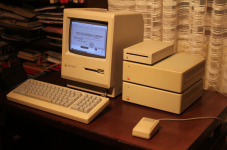
From now on I would not try to test or initialize HD20 on other Mac than Plus
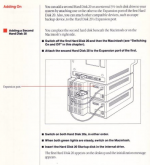
i hear ya
Paralel
Yeah a HD20 emu would be super awesome! Would be great to use with all the scsi-less compacts.
BMOW's final word on this project was, "its been moved to the back burner" so that is slightly promising.
maybe he will get some spare time this winter and make some progress with it.
Paralel
Yeah a HD20 emu would be super awesome! Would be great to use with all the scsi-less compacts.
BMOW's final word on this project was, "its been moved to the back burner" so that is slightly promising.
maybe he will get some spare time this winter and make some progress with it.