Home Documents Macintosh Macintosh Allegro Common LISP Foreign Function Interface
Macintosh Allegro Common LISP Foreign Function Interface

Macintosh Allegro Common LISP Foreign Function Interface
Macintosh · PDF
FilenameMacintosh_Allegro_Common_LISP_Foreign_Function_Interface.pdf
Size1.44 MB
Subsection developer / Macintosh_Allegro_Common_LISP
Downloads2
Enjoying MacTrove? Anonymous downloads are free and unlimited. Create a free account to track favorites, contribute metadata corrections, and join the community chat.
Reader
Macintosh Allegro Common LISP Foreign Function Interface
/
Loading…
OCR / Text contents
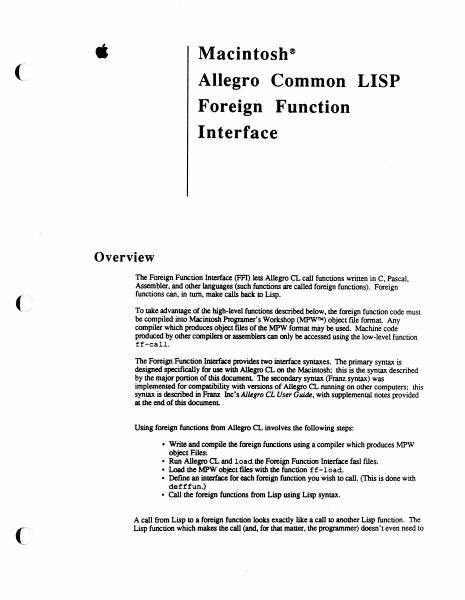
é Macintosh? Allegro Common LISP Foreign Function Interface Overview The Foreign Function Interface (FFI) lets Allegro CL call functions written in C, Pascal, Assembler, and other languages (such functions are called foreign functions). Foreign functions can, in turn, make calls back to Lisp. To take advantage of the high-level functions described below, the foreign function code must be compiled into Macintosh Programer’s Workshop (MPW™) object file format. Any compiler which produces object files of the MPW format may be used. Machine code produced by other compilers or assemblers can only be accessed using the low-level function ff-call. The Foreign Function Interface provides two interface syntaxes. The primary syntax is designed specifically for use with Allegro CL on the Macintosh; this is the syntax described by the major portion of this document. The secondary syntax (Franz syntax) was implemented for compatibility with versions of Allegro CL running on other computers; this syntax is described in Franz Inc’s Allegro CL User Guide, with supplemental notes provided at the end of this document. Using foreign functions from Allegro CL involves the following steps: * Write and compile the foreign functions using a compiler which produces MPW object Files. ¢ Run Allegro CL and load the Foreign Function Interface fas! files. ¢ Load the MPW object files with the function f£-1load. * Define an interface for each foreign function you wish to call. (This is done with defffun.) Call the foreign functions from Lisp using Lisp syntax. A call from Lisp to a foreign function looks exactly like a call to another Lisp function. The Lisp function which makes the call (and, for that matter, the programmer) doesn’t even need to Allegro Foreign Function Interface know that the function called was written in a different language. Installation The files required to use the foreign function interface are found in the folder "Foreign Function Folder." You may wish to move the files "££.fasi" and "defforeign.fas1" into a directory included in your *module-search-path*. To use the foreign function interface, run Allegro CL and load the file "££.fasl". If you wish to use Franz syntax, you must also load the file "defforeign.fasl". Foreign Function Interface Operations £f£-load files &key :entry-names :libraries [Function] :library-entry-names :ffenv-name :replace loads the MPW object files specified by files, and returns a foreign function environment. The foreign function environment returned consists of code segments, a jump table, a static data area, and a collection of active entry point names. Dead code removal is performed so that only code and data reachable from the active entry points will be included in the environment. files should be a filename, pathname or a list of filenames and pathnames of MPW object files. :entry-names a list of strings naming all the entry points in files which should be active. If :ent ry-names is not specif…

Showing first 3,000 characters of 22,104 total. Open the full document →
Home Documents Macintosh Macintosh Allegro Common LISP Version 1.2 Release Notes
Macintosh Allegro Common LISP Version 1.2 Release Notes

Macintosh Allegro Common LISP Version 1.2 Release Notes

Macintosh · PDF
FilenameMacintosh_Allegro_Common_LISP_Version_1.2_Release_Notes.pdf
Size4.03 MB
Subsection developer / Macintosh_Allegro_Common_LISP
Downloads2
Enjoying MacTrove? Anonymous downloads are free and unlimited. Create a free account to track favorites, contribute metadata corrections, and join the community chat.
Reader
Macintosh Allegro Common LISP Version 1.2 Release Notes
/
Loading…
OCR / Text contents
é Macintosh® Allegro Common LISP Version 1.2 Release Notes Overview This is the first Apple release of Macintosh Allegro Common Lisp Version 1.2 (software version 1.2.2). This product was previously sold in three separate modules by Coral Software; Allegro CL Version 1.2, Foreign Function Interface, and Stand-Alone Application Generator. Any references to Coral Software are inadvertent and should be disregarded. The sections in this document follow the same order as the chapter of the Allegro CL User’s Guide. Getting Started Installation This section supersedes the section “Installing Allegro CL” on page ii of the main manual. The following procedure installs Allegro CL as well as the Foreign Function Interface and the Stand-Alone Application Generator. Allegro CL ships on two floppy disks. Neither disk includes a system file. To use Allegro CL, you will need a hard disk with a system file installed. Simply copy the files from both Allegro CL disks to a single folder on your hard disk. If you have older versions of Allegro CL on your disk, you may wish to remove (or archive) them. This will guarantee that when you double-click a document, it will open with the right version of Allegro CL. The Help File Allegro CL now includes documentation strings and argument list information for many built in functions (though not all of them). These are accessible through the Fred commands control-x control-d (documentation) and control-x control-a (argument list). The documentation strings are stored in a separate file, Allegro Help. If this file is not in the cel; logical directory, Allegro will ask you to help locate it the first time you attempt to use documentation strings or argument lists. Allegro CL 1.2 Release Notes The disassembler Because of size constraints, the disassemble feature has been moved from the main Allegro CL application into a fasl file. This file is in the library folder. It will be loaded automatically (using require) when disassemble is called. The only constraint is that it be kept ina folder directly accessible to Allegro CL. *abort-character* The variable *abort-character* has been removed from Allegro CL. This function is now only performed by command-period. The variable was removed so that control-g could be used by ed-abort-listener- input. This command, when typed in the Listener, aborts the current input and prints a new Listener prompt. The old input is not deleted, so that you can go back to it later. Allegro CL Menus There have been several changes in the arrangement of the menubar. In the Edit, the Change Font and Insert Killed String... menu-items have been removed. These are now available as example files. The Documents... menu-item has been removed (because the ccl-doc folder has also been removed). In the Eval menu, menu items have been added for step and trace. The Step... menu-item lets the user input a string, which is read and then stepped. The Trace... menu-item brings up a dialog box gi…

Showing first 3,000 characters of 23,686 total. Open the full document →

Home Documents Macintosh Macintosh Allegro Common LISP Stand Alone Application Generator
Macintosh Allegro Common LISP Stand Alone Application Generator

Macintosh Allegro Common LISP Stand Alone Application Generator

Macintosh · PDF
FilenameMacintosh_Allegro_Common_LISP_Stand_Alone_Application_Generator.pdf
Size0.25 MB
Subsection developer / Macintosh_Allegro_Common_LISP
Downloads2
Enjoying MacTrove? Anonymous downloads are free and unlimited. Create a free account to track favorites, contribute metadata corrections, and join the community chat.
Reader
Macintosh Allegro Common LISP Stand Alone Application Generator
/
Loading…
OCR / Text contents
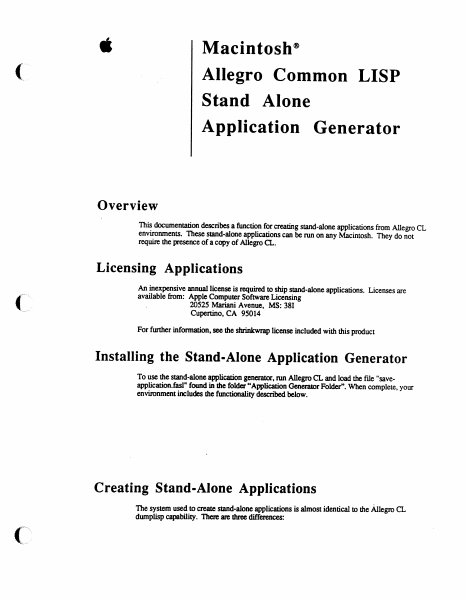
é Macintosh® Allegro Common LISP Stand Alone Application Generator Overview , This documentation describes a function for creating stand-alone applications from Allegro CL environments. These stand-alone applications can be run on any Macintosh. They do not require the presence of a copy of Allegro CL. Licensing Applications An inexpensive annual license is required to ship stand-alone applications. Licenses are available from: Apple Computer Software Licensing . 20525 Mariani Avenue, MS: 381 Cupertino, CA 95014 For further information, see the shrinkwrap license included with this product Installing the Stand-Alone Application Generator To use the stand-alone application generator, run Allegro CL and load the file "save- application. fas" found in the folder “Application Generator Folder”. When complete, your environment includes the functionality described below. Creating Stand-Alone Applications The system used to create stand-alone applications is almost identical to the Allegro CL dumplisp capability. There are three differences: Stand Alone Applications * the function save-application is used, instead of dumplisp. * the resulting image can be run without a copy of Allegro CL. * some tools are missing from the resulting application (for example, the inspector and compiler). Before reading further, you should be familiar with the Dumplisp section of the Allegro CL User’s Guide. save-application pathname &key :compress [Function] stoplevel-function creates a stand-alone application containing the functionality of the current Lisp environment. When save-applicat ion is finished, Allegro CL exits to the Finder. The syntax and semantics of save-application are identical to those of dumplisp. pathname a pathname specifying the directory and filename of the application to be created. If there is already a file with that name, it will be deleted before the save-application is performed. :compress if true (the default), then the heap image stored with the application is compressed as it is written. Compressed applications are smaller, but they take somewhat longer to boot. :toplevel-function the toplevel function to be set up when the application is booted. Toplevel functions are described in the Dumplisp section of the Allegro CL User Guide. This argument defaults to the current toplevel function. If supplied, the toplevel function must be a compiled function object; it cannot be a symbol naming a function. The functions contained on the lists *save-exit-functions* and *restore-lisp- functions * perform the same operation as for dumped images. This process is described in the Dumplisp section of the Allegro CL User Guide. If there is not enough room for the application on the selected disk, Allegro CL will error or simply quit to the Finder. Applications have a base size of about 700K. Saving an application can take over 5 minutes (300 seconds) on 68000-based Macintoshes running from floppy disks. During this time, moving the mou…

Showing first 3,000 characters of 4,793 total. Open the full document →

Home Documents Macintosh Macintosh Allegro Common LISP
Macintosh Allegro Common LISP

Macintosh Allegro Common LISP

Macintosh · 1989 · PDF
FilenameMacintosh_Allegro_Common_LISP_1989.pdf
Size25.56 MB
Year1989
Subsection developer / Macintosh_Allegro_Common_LISP
Downloads2
Enjoying MacTrove? Anonymous downloads are free and unlimited. Create a free account to track favorites, contribute metadata corrections, and join the community chat.
Reader
Macintosh Allegro Common LISP
/
Loading…
OCR / Text contents
@ Macintosh® Allegro Common LISP APPLE COMPUTER, INC. This manual and the software described in it are copyrighted, with all rights reserved. Under the copyright laws, this manual or the software may not be copied, in whole or in part, without written consent of Apple, except in the normal use of the software or to make a backup copy of the software. The same proprietary and copyright notices must be affixed to any permitted copies as were affixed to the original. This excep-tion does not allow copies to be made for others, whether or not sold, but all of the material purchased (with all backup copies) may be sold, given, or loaned to another person. Under the law, copying includes translating into another lan-guage or format. You may use the software on any computer owned by you, but extra copies cannot be made for this purpose. The Apple logo is a registered trademark of Apple Computer, Inc. Use of the “keyboard” logo (Option-Shift-K) for commercial purposes without the prior written consent of Apple may constitute trademark infringement and unfair competition in violation of federal and state laws. © Apple Computer, Inc., 1983- 1989 20525 Mariani Avenue Cupertino, CA 95014 (408) 996-1010 Apple, the Apple logo, Laser Writer, Macintosh, and MacApp are registered trademarks and trademarks of Apple Computer, Inc. Adobe Illustrator and POSTSCRIPT are registered trademarks of Adobe Systems Incorporated. Allegro CL is a registered trademark of Franz,Inc. ImageStudio is a trademark of Esselte Pendaflex Corporation in the United States, of LetraSet Canada Limited in Canada, and of Esselte LetraSet Limited elsewhere. ITC Garamond and ITC Zapf Dingbats are registered trademarks of International Typeface Corporation. Linotronic is a registered trademark of Linotype company. MacPaint and MacWrite are registered trademarks of Claris Corporation. Microsoft is a registered trademark of Microsoft Corporation. QMS is a registered trademark of QMS, Inc. Smalitalk-80 is a registered trademark of the Xerox Corporation. Apple Computer, Inc., acknowledges the contributions of Franz, Inc. in the creation of this product. Simultaneously published in the United States and Canada. Table of Contents Introduction Documentation Running Allegro CL Installing Allegro CL Launching Allegro CL 1. Getting Started Overview The Allegro CL Environment The Menubar 2. Fred the Editor Overview Fred and Packages Editing Macintosh Style Editing Emacs Style 3. Object Lisp Overview Tutorial Object Lisp Functions 4. Macintosh Basics Overview Points Font Specs Turnkey Dialogs Miscellaneous 5. Menus Overview Menubars Menus Menu-items 6. Windows Overview Window Functions and Variables Supporting Undo Supporting Save and Save As... 7. Dialogs Overview Dialog Functions Dialog Items Specialized Dialog-items Table-dialog-items Specialized Table-dialog-items 8. Events Overview Event Handlers Event Information Functions The Event Management System Cursor Handling 9. …

Showing first 3,000 characters of 8,827 total. Open the full document →

Home Documents Macintosh Macintosh Allegro Common LISP Dump LISP
Macintosh Allegro Common LISP Dump LISP

Macintosh Allegro Common LISP Dump LISP

Macintosh · PDF
FilenameMacintosh_Allegro_Common_LISP_Dump_LISP.pdf
Size0.55 MB
Subsection developer / Macintosh_Allegro_Common_LISP
Downloads3
Enjoying MacTrove? Anonymous downloads are free and unlimited. Create a free account to track favorites, contribute metadata corrections, and join the community chat.
Reader
Macintosh Allegro Common LISP Dump LISP
/
Loading…
OCR / Text contents
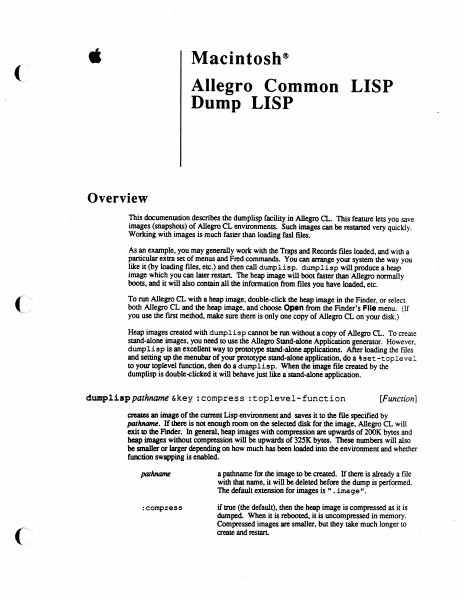
é Macintosh® Allegro Common LISP Dump LISP Overview This documentation describes the dumplisp facility in Allegro CL. This feature lets you save images (snapshots) of Allegro CL environments. Such images can be restarted very quickly. Working with images is much faster than loading fasl files. As an example, you may generally work with the Traps and Records files loaded, and with a Particular extra set of menus and Fred commands. You can arrange your system the way you like it (by loading files, etc.) and then call dumplisp. dumplisp will produce a heap image which you can later restart. The heap image will boot faster than Allegro normally boots, and it will also contain all the information from files you have loaded, etc. To run Allegro CL with a heap image, double-click the heap image in the Finder, or select both Allegro CL and the heap image, and choose Open from the Finder’s File menu. (If you use the first method, make sure there is only one copy of Allegro CL on your disk.) Heap images created with dump1isp cannot be run without a copy of Allegro CL. To create stand-alone images, you need to use the Allegro Stand-alone Application generator. However, dump1isp is an excellent way to prototype stand-alone applications. After loading the files and setting up the menubar of your prototype stand-alone application, doa ¢set -toplevel to your toplevel function, then do a dumplisp. When the image file created by the dumplisp is double-clicked it will behave just like a stand-alone application. dumplisp pathname &key :compress :toplevel-function [Function] creates an image of the current Lisp environment and saves it to the file specified by pathname. If there is not enough room on the selected disk for the image, Allegro CL will exit to the Finder. In general, heap images with compression are upwards of 200K bytes and heap images without compression will be upwards of 325K bytes. These numbers will also be smaller or larger depending on how much has been loaded into the environment and whether function swapping is enabled. pathname a pathname for the image to be created. If there is already a file with that name, it will be deleted before the dump is performed. The default extension for images is ". image". :compress if true (the default), then the heap image is compressed as it is dumped. When it is rebooted, it is uncompressed in memory. Compressed images are smaller, but they take much longer to create and restart. DumpLisp stoplevel-function ; the toplevel function to be set up when the heap image is A restarted. Toplevel functions are described below. This i. argument defaults to the current toplevel function. If supplied, the toplevel function must be a compiled function object. (It cannot be a symbol.) Before dumping a heap image, dump1isp executes all the functions in the list *save- exit-functions*, This list initially contains a single function which closes all windows, takes down and stores the current menubar, and dispose…

Showing first 3,000 characters of 11,602 total. Open the full document →

Subscribe to Macintosh_Allegro_Common_LISP
mp.ls