Home Documents Macintosh Powerbook 100 Developers Note
Powerbook 100 Developers Note

Powerbook 100 Developers Note
Macintosh · 1991 · PDF
FilenamePowerbook_100_Developers_Note_1991.pdf
Size0.29 MB
Year1991
Subsection powerbook / 100
Downloads3
Enjoying MacTrove? Anonymous downloads are free and unlimited. Create a free account to track favorites, contribute metadata corrections, and join the community chat.
Reader
Powerbook 100 Developers Note
/
Loading…
OCR / Text contents
® Macintosh PowerBook 100 Developer Note ® Developer Note Developer Technical Publications © Apple Computer, Inc. 1991 APPLE C OMPUTER , I NC. © 1991, Apple Computer, Inc. All rights reserved. No part of this publication may be reproduced, stored in a retrieval system, or transmitted, in any form or by any means, mechanical, electronic, photocopying, recording, or otherwise, without prior written permission of Apple Computer, Inc. Printed in the United States of America. The Apple logo is a registered trademark of Apple Computer, Inc. Use of the “keyboard” Apple logo (Option-Shift-K) for commercial purposes without the prior written consent of Apple may constitute trademark infringement and unfair competition in violation of federal and state laws. Apple Computer, Inc. 20525 Mariani Avenue Cupertino, CA 95014-6299 408-996-1010 Apple, the Apple logo, APDA, AppleLink, AppleTalk, LaserWriter, and Macintosh are trademarks of Apple Computer, Inc., registered in the United States and other countries. Apple Desktop Bus, Balloon Help, PowerBook, and SuperDrive are trademarks of Apple Computer, Inc. Adobe Illustrator and PostScript are registered trademarks of Adobe Systems Incorporated. ITC Garamond and ITC Zapf Dingbats are registered trademarks of International Typeface Corporation. MacDraw is a registered trademark of Claris Corporation. Microsoft is a registered trademark of Microsoft Corporation. Sony is a trademark of Sony Corporation. LIMITED WARRANTY ON M EDIA AND REPLACEMENT If you discover physical defects in the manual or in the media on which a software product is distributed, APDA will replace the media or manual at no charge to you provided you return the item to be replaced with proof of purchase to APDA. ALL IMPLIED WARRANTIES ON THIS MANUAL, INCLUDING IMPLIED WARRANTIES OF MERCHANTABILITY AND FITNESS FOR A PARTICULAR PURPOSE, ARE LIMITED IN DURATION TO NINETY (90) DAYS FROM THE DATE OF THE ORIGINAL RETAIL PURCHASE OF THIS PRODUCT. Even though Apple has reviewed this manual, APPLE MAKES NO WARRANTY OR REPRESENTATION, EITHER EXPRESS OR IMPLIED, WITH RESPECT TO THIS MANUAL, ITS QUALITY, ACCURACY, MERCHANTABILITY, OR FITNESS FOR A PARTICULAR PURPOSE. AS A RESULT, THIS MANUAL IS SOLD “AS IS,” AND YOU, THE PURCHASER, ARE ASSUMING THE ENTIRE RISK AS TO ITS QUALITY AND ACCURACY. IN NO EVENT WILL APPLE BE LIABLE FOR DIRECT, INDIRECT, SPECIAL, INCIDENTAL, OR CONSEQUENTIAL DAMAGES RESULTING FROM ANY DEFECT OR INACCURACY IN THIS MANUAL, even if advised of the possibility of such damages. THE WARRANTY AND REMEDIES SET FORTH ABOVE ARE EXCLUSIVE AND IN LIEU OF ALL OTHERS, ORAL OR WRITTEN, EXPRESS OR IMPLIED. No Apple dealer, agent, or employee is authorized to make any modification, extension, or addition to this warranty. Some states do not allow the exclusion or limitation of implied warranties or liability for incidental or consequential damages, so the above limitation or exclusion may not apply to you. This warranty gives you specific legal…

Showing first 3,000 characters of 56,784 total. Open the full document →
Home Documents Macintosh PowerBook 100 Service Source
PowerBook 100 Service Source

PowerBook 100 Service Source

Macintosh · PDF
FilenamePowerBook_100_Service_Source.pdf
Size0.88 MB
Subsection powerbook / 100
Downloads3
Enjoying MacTrove? Anonymous downloads are free and unlimited. Create a free account to track favorites, contribute metadata corrections, and join the community chat.
Reader
PowerBook 100 Service Source
/
Loading…
OCR / Text contents
K Service Source PowerBook 100 K Service Source Specifications PowerBook 100 Specifications Processor - 1 Processor CPU Addressing Motorola 68HC000, 16-bit CMOS microprocessor 15.6672 MHz 32-bit internal registers 24-bit address bus 16-bit data bus Specifications Memory - 2 Memory RAM 2 MB of 100 ns pseudostatic RAM (PSRAM) standard, expandable to 8 MB ROM 256K (two 128K by 8-bit devices); 150 ns access time; addressing supports up to 4 MB PRAM 128 bytes of parameter memory VRAM 32K of pseudostatic video display memory Clock/Calendar CMOS custom chip with long-life lithium battery Specifications Disk Storage - 3 Disk Storage Floppy Drive (Optional) 20 MB Hard Drive 40 MB Hard Drive External Macintosh HDI-20 1.4 MB drive 4.5 W startup power; 1.25 W random operation; 50 mW idle 20 MB formatted capacity Apple SCSI interface; 2.5 in. mechanism 23 msec average access time (maximum) 5.0 W startup power; 2.7 W random operation 40 MB formatted capacity Apple SCSI interface; 2.5 in. mechanism <19 msec average access time (maximum) 5.0 W startup power; 2.25–2.5 W random operation; 1.3–1.5 W idle Specifications I/O Interfaces - 4 I/O Interfaces Floppy Drive One HDI-20 floppy drive port for external 1.4 MB drive SCSI One HDI-30 SCSI port; 1.5 MB/sec. transfer rate Supports five devices maximum Apple Desktop Bus One Apple Desktop Bus (ADB) port; low-speed serial interface Serial Two RS-422 ports, one external and one internal 230.4 Kbaud minimum Asynchronous, synchronous, and AppleTalk protocols supported Internal connector supports Macintosh PowerBook Fax/Data modem Specifications Sound I/O Interfaces - 5 One sound output port for external audio amplifier Specifications I/O Devices - 6 I/O Devices Keyboard Built-in keyboard; ADB interface Dimensions: 10.6 in. length, 3.5 in. width, .5 in. depth Pitch: .73 in. horizontal; .71 in. vertical Trackball Dual-button trackball; 25 mm diameter; ADB interface Mouse (Optional) Low-power mouse; ADB interface Floppy Drive (Optional) External Macintosh HDI-20 1.4 MB floppy drive Specifications Sound and Video - 7 Sound and Video Sound Video Display Apple Sound Chip; one- or four-voice mono (one or two voices in stereo) with 4-bit digital-to-analog conversion using 22-kHz sampling rate 9 in. (229 mm) diagonal screen Film-compensated Super Twist Nematic (FSTN), backlit flatpanel display 640 by 400 pixels; 75 dpi Specifications Electrical - 8 Electrical Main Battery Backup Batteries Sealed lead-acid battery (7 V) 2.5 hrs. maximum capacity Three 3.5 V lithium cells Industry-standard CR-2430 batteries 110–220 V Frequency 50–60 Hz ADB Power Requirements Maximum current draw for all ADB devices is 50 mA (maximum of three ADB devices recommended) Specifications Power Adapter Sound Electrical - 9 Input voltage: 85–270 VAC (100/240 nominal); 48–62 Hz (50/ 60 nominal) Output voltage: 7.0–7.6 V (7.5 nominal); 5 mA–2 A (1.5 nominal) One sound output port for e…

Showing first 3,000 characters of 39,229 total. Open the full document →

Home Documents Macintosh PB100 Schem Jan1991
PB100 Schem Jan1991

PB100 Schem Jan1991

Macintosh · 1991 · PDF
FilenamePB100_Schem_Jan1991.pdf
Size2.31 MB
Year1991
Subsection powerbook / 100
Downloads2
Enjoying MacTrove? Anonymous downloads are free and unlimited. Create a free account to track favorites, contribute metadata corrections, and join the community chat.
Reader
PB100 Schem Jan1991
/
Loading…
OCR / Text contents
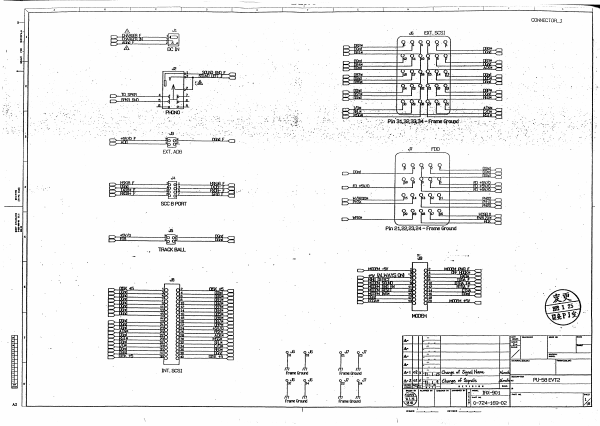
~_ _ _, - - - _ . ' - - - - - C - - - - ' - - - - ; C - - - --,.----c----~-- ---c----,-----~--.-!.r_:-----,_--__Co__--__,__---_::_--_,----,---t-------- , ~--~~---~----~----~--~~---L----~----L---~-----L----~----L---~----~----~--~----~----~--~~ __ - L _ _ _ _~ _ _ _ _~ CONNECTOR-.J EXT. SCSI '.: . 11- 'f'I-{N). '- - . ,; ::.' .. ...13 -. - .'- . _.... 0- OOxIfO :',' . -'. '. "~' •• !: -:.- .... -.; -.. : '. ,,' . '.' , ..- .~ FDD Jl EXT.ADS .',', J4 -{I§ SCCBPCRf " Pin 21.22.23.24 - Frame Ground ...-n:M __ KJB.f Ao'R F II WII.YS(JIII ~ ~ - >= >- rtI< 'i II MTI'M~ ~ - II II t-=< II II II lJ fJ II '- '------ INT. SCSI PU--58EVT2 A2 4iiiiiii CONNECTCR-2 0- J17 r- i 1 • ** ! * lUX ::l- I"" " " i-o< ."""" I'-' " W,WAYS QI8 ~ -" :.:-.-. ·...... " . ~ ',,; . '. ..... .". - .... F '--- LCD Ju §~flfmfWR~~ J19 A ~m~~ ~~I*~Ul I MAINBlJS-2 A2 I MISC.GLU :.- .. .. :;. - ..~. .fjt~~-:-~~~ ."~ ' -"~" ..• ..• "".~ " ... : . >~:. "~.: . .. 4 ~. " " ... , ;.. . " '.'. .. : R41 - 1001< . . -... =:= C108 = = CiO!l 33p ~33p .... .A2 - nun PU-58EVT2 ...... -===~=====r====~====r===~=====c====~====c===~====~=~=.=~~~i:~=~==~====~====~==~====~====~====r===~=====r====~=====1 ~'r-------C-----'-----:O--- - CPUGLU ~ 1 i .' ~~.. +; tv \t5V/oJ 'N~; 1001{ R4 ~v~' . *UB~C08l Pin14 - i5V !ALWAYS a..o Pin7-00nd PU-58EVT2 _ca.wr ......'1'.,.. It'Y"'." SIOI. -------- . . .. . .' . . ... ,. :......,..•. =' ....... ."". - . ~O) r!e5 j>. ~47 !nld ~3 ~.t:lA'" 00vl A2 PI..I-58 EVT2 " ...... SOl.NJ lNTrnFACE a '0 i 0, d~1'.· '': .. :.. ":. '. ". .470 '. . C3'0 ·o~r~oOp·.. o. . ."' ~~. . . ~. :.-~. . ..... ...,...--~ :. .- .... ..... ".", .';.... ~ U17 '.": = A201 100K __ 2 ~ r AS1. 2 va: .J~;~ iZA,J:1R. l<B YB r::::=:l u;tR. . :-.y..--". r----'l ~YC j1L- ;~ ~I· _ Ii A2 .MIDIS\Il...El!I. " ::::KUM~~m~WWL_------------~------~---------~------lr--~~~~=== R57 :B< RiB ~ ~ 1~ IBI ~ lfi:m.m d eIA9.E l...!ID. w: mil r n o .-.. :B< ~ .' . U32!11" 0 • £~ . . ...... . ". . ',." .'~'- . ' sec. SCSI&ISM U12 L ~ l!U34 rrc7S04fl PinS - ¥3V !ALWAYS a-Jl Pin3 - OGnd "'"~ .~~;:;;e4~~~:;··;;;;~t;;;;;~;;;;t;;;~~~~~~~~~~4~~~~w~~I~~im·~·III&~~4~~~~41[r~==~~~~~~.~,¥-i~-~~~.~~~~~~~~~.~.~~~~~~~~~~.::::~'~W:-: l!... F01 B~I:~~~~~~~~~~JEW:II~·II~~~~~~~I;~~~ !?= 1~ ~ ~~~~~==t=~====~·.=+==~=.. ==~1 ~. . nATAt,.,,,, " -.-: ~~ , .,".:'. - . :~'--' - -. • . rRIII ~ -.-' . .., -.. .. .- _. .". :-~.;-.-:.~- . .. .. -:-. >= i lID L.-' " .T. ,. .1o K2z. . .1~ rrl7r~~ w:<:VN"""'u:1J8.,.!L .... ;..;.L .. :::,::.. ..•. _ ~. ..;:.~'~.. __ C>~~~--r-~~r--------------------~~============~~~~~~~~~~;~~~~1IifrJl~~~~F~~~~~~~~~~~F~~ ~ ~a'M¥ A1~m~ ~C>~~~--t---t-i-----~--------------.----------------------~~~~~-L~~ ~~~~~§f~~~------------~~~~W£~~~ """ cwo. ::f ~ Wt f- ~~~~~--lt--lt-t~==…

Showing first 3,000 characters of 12,339 total. Open the full document →

Home Documents Macintosh Repair Apple Macintosh PowerBook 100 Goughs Tech Zone
Repair Apple Macintosh PowerBook 100 Goughs Tech Zone

Repair Apple Macintosh PowerBook 100 Goughs Tech Zone

Macintosh · 2016 · PDF
FilenameRepair__Apple_Macintosh_PowerBook_100_Goughs_Tech_Zone.pdf
Size2.37 MB
Year2016
Subsection powerbook / 100
Downloads2
Enjoying MacTrove? Anonymous downloads are free and unlimited. Create a free account to track favorites, contribute metadata corrections, and join the community chat.
Reader
Repair Apple Macintosh PowerBook 100 Goughs Tech Zone
/
Loading…
OCR / Text contents
Reversing the mindless enslavement of humans by technology. Home The VHS Corner The CPU Corner The Optical Disc Corner Other Pages Project FAX About Me Gough’s Review Challenge Interesting Links ← Achievement Unlocked: PhD in Civil and Environmental Engineering Review, Tested: Generic USB FM Transmitter (FM_MIC_V5.0.9) → Repair: Apple Macintosh PowerBook 100 “Gotta re-cap ’em all!” Posted on September 24, 2016 by lui_gough In the last part of this little project, I managed to refurbish the two PowerBook 100 power supplies to a working condition. The next step is to refurbish the main unit itself. Even though I was equipped with the service manual, I was a little hesitant owing to the My Links About Me Publications and Appearances Contact Me Legacy Site Facebook Twitter YouTube LinkedIn possibility of breaking something which could be hard to source, or making it worse than it already is. Nothing ventured, nothing gained, I suppose. Google Scholar I’m aware that others have done the same to their PowerBook 100s and seen positive impacts. It’s hardly surprising when you consider its age. Some were even nice enough to draw out capacitor maps for the boards. Even though I’ve seen them, I decided to “go it alone” and instead base my repair on my own teardown and analysis. Terms of Use & Privacy Policy This post will seem a little “jumpy” as both teardown and repair are interspersed, but I feel that’s probably the best way to present it. Required Material and Methodology ORCID ID element14 Community Blog Interesting Links Categories Audio Computing DIY Electronics Event Flash Memory Lighting Obituary Opinion Photography Power Bank I suppose if you’ve never done any soldering or re-capping of electronics, it’s probably not a good idea to start with a piece of equipment that you value. That being said, from my experience working with the PowerBook 100, it definitely rates a moderate-to-hard difficulty compared with some other work I’ve done. Radio Raspberry Pi Salvage Satellite Tablet Tech Flashback In order to get the job done, the tools you should have include: Telecommunications Travel Uncategorized A set of Phillips head screwdrivers of various sizes for laptop disassembly. A fine-tipped soldering iron, preferably of the temperature regulated sort. Some solder, 60/40 tin-lead type works well. High quality desoldering braid – I personally use Chemtools branded wick, but formerly used Goot which varies a little in quality. Good wick really makes the job easier, bad wick can leave you very frustrated. Desoldering bulb (or solder sucker) – the bulb type seems to be more useful as you can “blow” the holes open or “suck” them clean, whereas the pen type is really “one shot” with one hand and hardly easy to get into position. Hot air gun (preferable, but not essential) for removing the SMD components with more ease. Foil (I didn’t have this, but I probably should have) to mask sensitive portions of the board during hot air rewo…

Showing first 3,000 characters of 33,191 total. Open the full document →

Subscribe to 100
mp.ls