Home Documents Lisa MacWorksPlusInstall
MacWorksPlusInstall

MacWorksPlusInstall

Lisa · PDF
FilenameMacWorksPlusInstall.pdf
Size0.72 MB
Subsection sun_remarketing
Downloads3
Enjoying MacTrove? Anonymous downloads are free and unlimited. Create a free account to track favorites, contribute metadata corrections, and join the community chat.
Reader
MacWorksPlusInstall
/
Loading…
OCR / Text contents
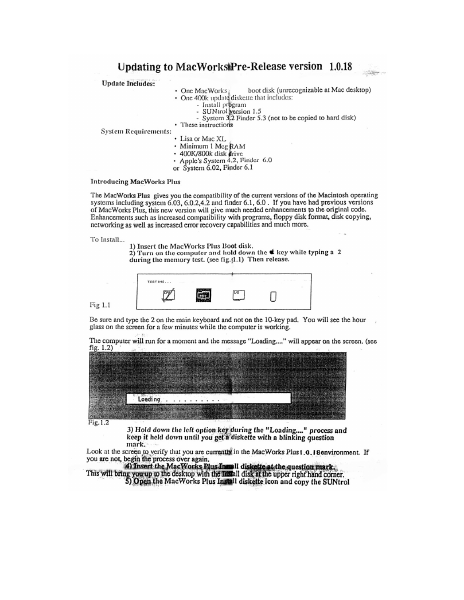
Updating to MacWorkstPre-Release version 1.0.18 Update Includes: + One MacWorks boot disk (unrecognizable at Mac desktop) * One 400k updatg diskette that includes: - Install program - SUNtrol Version 1.5 - System 3,2 Finder 5.3 (not to be copied to hard disk) + These instructions System Requirements: * Lisa or Mac XL + Minimum 1 Meg RAM + 400K/800k disk rive + Apple's System 4.2, Finder 6.0 or System 6.02, Finder 6.1 Introducing MacWorks Plus The MacWorks Plus gives you the compatibility of the current versions of the Macintosh operating systems including system 6.03, 6.0.2,4.2 and finder 6.1, 6.0. If you have had previous versions of MacWorks Plus, this new version will give much needed enhancements to the original code. Enhancements such as increased compatibility with programs, floppy disk format, disk copying, networking as well as increased error recovery capabilities and much more. To Install... 1) Insert the MacWorks Plus Boot disk. . 2) Turn on the computer and hold down the € key while typing a 2 during the memory test. (see fig.{1.1) Then release. TESTING. .. 2meaia Fig 1.1 ; Be sure and type the 2 on the main keyboard and not on the 10-key pad. You will see the hour glass on the screen for a few minutes while the computer is working. The computer will run for a moment and the message “Loading...” will appear on the screen. (see fig. 1.2) * Loadi ng 3) Hold down the left option key during the "Loading..." process and keep it held down until you get # diskette with a blinking question mark, Look at the screen to verify that you are currently in the MacWorks Plus1.¢.1@environment, If you are not, begin the process over again, ‘)Insert ic Wor Hl di e. question mark. This will ; myn ees iam dake upright and ea ‘Open.the MacWorks Plus Ingtill diskette icon and copy the SUNtrol 1.5 icon to the system folder on the hard disk. After the copy is ” 6) Double click on MacWorks Elus maenl program: The progam wil sn begin and the first screem you see pean yor thet this program cc ies bee : rio System to.thé hil disk and asks you.on which device you to ave it 5 7) Select the device that you wish to install the Macworks Plus on. or select “Cancel” if you wish to cancel. If you only have one hard disk connected, “Internal Hard Disk” will be your only choice other then “Cancel”. The next screen will ask if you want to “Update”, “Tnitialize” or “Cancel”. The Initialize option will completely reformat your hard disk. A reformat will crase the entire hard disk. For aa ar of this update, we suggest you update. }) Choose “ Update” If you choose to initialize, the uter will rentind you that the disk is about to be erased and will give you a second chance to cancel The process of updating will take a few minutes. After the update has completed you will be given the option to "Continue" back to the finder or to "Shut Down" and restart the m: ¢ under 1.0.14. We su; that you shut down. 9) Select "Shut down" From this point you can turn …

Showing first 3,000 characters of 5,161 total. Open the full document →
Home Documents Lisa 12 Text Building Block
12 Text Building Block

12 Text Building Block

Lisa · 1984 · PDF
Filename12_Text_Building_Block.pdf
Size1.48 MB
Year1984
Subsection toolkit_3.0 / Package_2_Examples
Downloads4
Enjoying MacTrove? Anonymous downloads are free and unlimited. Create a free account to track favorites, contribute metadata corrections, and join the community chat.
Reader
12 Text Building Block
/
Loading…
OCR / Text contents
Text Building Block To: From: Date: Subject: Users of the TOOlKit's Text Building BloCk 21 Marcr! 1984 How to use the Text Building Block (TK8E) (draft version 3) ==============================================:====================-========:== When reading this document it is suggested that you have a copy of the UText interface available for reference. The Text Building Block allows users to specify an LRect in their view irl w~ii:~;ri m..Jltiple paragraphs may be entered either from the keyooara or pasted frOlT tne clipboard. "i thin this box, te>tt klill word klrap based on the bounos of t!'"l~ b:JY and optional 1ndentation fields 1n the TPara=ornet object. Trlese fields oe-foiJl t to zero, thus if the values are not Changed, the text kl1ll fit tig!"ltly 11.:1 tnir: the LRect specified. (Currently only left justified text is supported so trtere klill be a ragged right edge.) Application programmers must create a TTextlmage for eaCh separate grouo Of te~t they wiSh to display. The CREATE method expects an LReet within its vie~. Ir: adOi tion, the 1sGro~le ooolea!! parameter speCifies Whether or not tr,e LRect can grow at the bottom if text that is oisplayea cannot fit in the spe:ifiEJ LRect. Textlmages display TText Objects. A TText Object contains a list Of TParagr~~ oOjects. EaCh TParaglaph Object contains the characters ana typeStyle 1nformation for one paragraprl. Associated wit~ eaCh paragraph is a TParaImage wrl1c~ 1s stored 1n a list Of TParaImages in TTextlnage. A TParaImage cO;ltains all Of the display specific information about a particular paragraptl suerl a~ where each line ends and tne pixel height of the displayed paragratJn. Wrte:-I a TIextlmage is created, 1t nust have an 1nit1al TText object. Ttle next oeject, in turn, rust nave at least one paragraph 1n its paragraph l1st. Also, eaCf, paragrap~ points to a TParaFormat, Whicrl spec1fies margins, taos, paragraph spacing and other formatting Characteristics. TParaFormats are stored in a TStyleSheet, WhiCh is simply a list Of TParaFormats. Since the list is an indexed list, one can store commonly U$eo form&ts at known posi tioras in ttte list for rapia retrieval when reformatting a part1CUlar paragraph. Typically, app11cations store a single styleSrleet in a fie10 Of their applicat10n windOW. Eacn TText ooject, 1n adaition to containing a 11st -Of paragraphS also points to a styleSheet. By storing ttle styleSheet in the w1naow, eaCh next Object can refer-ence tr.e sarne styleStleet. Text Butldlrtg BlOCk ••••••••••••••.•••.•.••.•..•..•...•....•.....••••.•.....•.•..••.....•••.•................... PaQe 1 The typical order of allocation is then: Create a waraFormat. tnen create a TStyleSheet and install the paraFormat in its list. Set TAppllnaow.styleSheet to tne ne:J) stylesr'eet. create a paragraptl, passing the paraFormat just createa. Create a next ObJect and install the parag~ just created in its paragraphs list and trle set styleSheet field to the new styleSheet. Now cr…

Showing first 3,000 characters of 69,498 total. Open the full document →

Home Documents Lisa IO Slot Cards Jul84
IO Slot Cards Jul84

IO Slot Cards Jul84

Lisa · PDF
FilenameIO_Slot_Cards_Jul84.pdf
Size0.02 MB
Downloads2
Enjoying MacTrove? Anonymous downloads are free and unlimited. Create a free account to track favorites, contribute metadata corrections, and join the community chat.
Reader
IO Slot Cards Jul84
/
Loading…
OCR / Text contents
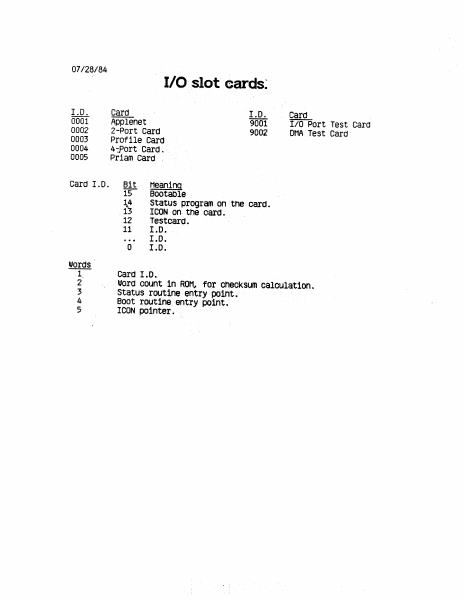
07/28/84 1.D. 0001 0002 0003 0004 0005 Card 1.0. Words VPUN Card I.D. Applenet 9001 2-Port Card 9002 Profile Card 4-Port Card. Priam Card . Bit Meaning 15 —- Bootable 14 Status program on the card. 13 ICON on the card. 12 Testcard. 11 I.D. oe I.D. 0 I.0. Card 1.0. -V/O slot cards: Card_ I/O Port Test Card DMA Test Card: Word count in ROM, for checksum calculation. Status routine entry point. Boot routine entry point. ICON pointer. —
Home Documents Lisa Lisa 2 Owners Guide
Lisa 2 Owners Guide

Lisa 2 Owners Guide

Lisa · 1983 · PDF
FilenameLisa_2_Owners_Guide_1983.pdf
Size8.50 MB
Year1983
Subsection owners_manual
Downloads2
Enjoying MacTrove? Anonymous downloads are free and unlimited. Create a free account to track favorites, contribute metadata corrections, and join the community chat.
Reader
Lisa 2 Owners Guide
/
Loading…
OCR / Text contents
Lisa 2 Owner's Guide 029-0497-A Lisa 2 Owner's Guide $ $\ 029-0462-A $ Warning: This equipment generates, uses, and can radiate radio frequency energy and, if not installed and used in accordance with the instructions manual, may cause interference to radio communications. This equipment has been tested and found to comply with the limits for a Class A computing device pursuant to Subpart J of Part 15 of FCC Rules, which are designed to provide reasonable protection against such interference when operated in a commercial environment. Operation of this equipment in a residential area is likely to cause interference, in which case the user, at his or her own expense, will be required to take whatever measures may be required to correct the interference. Customer Satisfaction If you discover physical defects in the manuals distributed with a Lisa product or in the media on which a software product is distributed, Apple will replace the documentation or media at no charge to you during the 90-day period after you purchased the product. Limitation on Warranties and Liability All implied warranties concerning this manual and media, including implied warranties of merchantability and fitness for a particular purpose, are limited in duration to ninety (90) days from the date of original retail purchase of this product. Even though Apple has tested the software described in this manual and ~eviewed its contents, neither Apple nor its software suppliers makes any warranty or representation, either express or implied, with respect to the software described in this manual, its quality, performance, merchantability, or fitness for any particular purpose. As a result, this software is sold "as is," and you the purchaser are assuming the entire risk as to its quality and performance. The warranty and remedies set forth above are exclusive and in lieu of all others, oral or written, express or implied. No Apple dealer, agent, or employee is authorized to make any modification, extension, or addition to this warranty. Some states do not allow the exclusion or limitation of implied warranties or liability for incidental or consequential damages, so the above limitation or exclusion may not apply to you. This warranty gives you specific legal rights, and you may also have other rights that vary from state to state. License and Copyright The manual and the software (computer programs) described in it are copyrighted by Apple or by Apple's software suppliers, with all rights reserved, and they are covered by the Lisa Software License Agreement signed by each Lisa owner. Under the copyright laws and the License Agreement, this manual or the programs may not be copied, in whole or in part, without the written consent of Apple, except in the normal use of the software or to make a backup copy. This exception does not allow copies to be made for others, whether or not sold, but all of the material purchased (with all backup copies) may be sold, given, or loan…

Showing first 3,000 characters of 255,162 total. Open the full document →

Home Documents Lisa Lisa Owners Guide
Lisa Owners Guide

Lisa Owners Guide

Lisa · 1983 · PDF
FilenameLisa_Owners_Guide_1983.pdf
Size9.96 MB
Year1983
Subsection owners_manual
Downloads3
Enjoying MacTrove? Anonymous downloads are free and unlimited. Create a free account to track favorites, contribute metadata corrections, and join the community chat.
Reader
Lisa Owners Guide
/
Loading…
OCR / Text contents
Lisa Owner's Guide 029-0212-A Lisa Owner's Guide @ @ @ 029-0087-A @ ® Warning: This equipment has been certified to comply with the limits for a Class B computing device, pursuant to Subpart J of Part 15 of FCC rules. Only peripherals (computer input/output devices, terminals, printers, and the like) certified to comply with the Class B limits may be attached to this computer. Operation with noncertified peripherals is likely to result in interference to radio and TV reception. Customer Satisfaction If you discover physical defects in the manuals distributed with a Lisa product or in the media on which a software product is distributed, Apple will replace the documentation or media at no charge to you during the 90-day period after you purchased the product. In addition, if Apple releases a corrective update to a software product during the 90-day period after you purchased the software, Apple will replace the applicable diskettes and documentation with the revised version at no charge to you during the six months after the date of purchase. In some countries the replacement period may be different; check with your authorized Lisa dealer. Return any item to be replaced with proof of purchase to Apple or to an authorized Lisa dealer. Limitation on Warranties and Liability All implied warranties concerning this manual and media, including implied warranties of merchantability and fitness for a particular purpose, are limited in duration to ninety (90) days from the date of original retail purchase of this product. © 1983 by Apple Computer, Inc. 20525 Mariani Avenue Cupertino, California 95014 (408) 996-1010 Even though Apple has tested the software described in this manual and reviewed its contents, neither Apple nor its software suppliers make any warranty or representation, either express or implied, with respect to the software described in this manual, its quality, performance, merchantability, or fitness for any particular purpose. As a result, this software is sold "as is," and you the purchase are assuming the entire risk as to its quality and performance. In no event will Apple or its software suppliers be liable for direct, indirect, special, incidental, or consequential damages resulting from any defect in the software or manual, even if they have been advised of the possibility of such damages. In particular, they shall have no liability for any programs or data stored in or used with Apple products, including the costs of recovering or reproducing these programs or data. The warranty and remedies set forth above are exclusive and in lieu of all others, oral or written, express or implied. No Apple dealer, agent, or employee is authorized to make any modification, extension, or addition to this warranty. Some states do not allow the exclusion or limitation of implied warranties or liability for incidental or consequential damages, so the above limitation or exclusion may not apply to you. This warranty gives you specific le…

Showing first 3,000 characters of 283,161 total. Open the full document →
Home Documents Lisa Lisa 2 Owners Guide
Lisa 2 Owners Guide

Lisa 2 Owners Guide

Lisa · 1984 · PDF
FilenameLisa_2_Owners_Guide_1984.pdf
Size4.68 MB
Year1984
Subsection owners_manual
Downloads2
Enjoying MacTrove? Anonymous downloads are free and unlimited. Create a free account to track favorites, contribute metadata corrections, and join the community chat.
Reader
Lisa 2 Owners Guide
/
Loading…
OCR / Text contents
Lisa 2 Owner's Guide Copyright This manual and the software described in it are copyrighted with all rights reserved. Under the copyright laws, this manual or the software may not be copied, in whole or part, without written consent of Apple, except in the normal use of the software or to make a backup copy. The same proprietary and copyright notices must be affixed to any permitted copies as were affixed to the original. This exception does not allow copies to be made for others, whether or not sold, but all of the material purchased (with all backup copies) may be sold, given, or loaned to another person. Under the law, copying includes translating into another language or format. You may use the software on any computer owned by you , but extra copies cannot be made for this purpose. For some products, a multiuse license may be purchased to allow the software to be used on more than one computer owned by the purchaser, including a shared·disk system. (Contact your authorized Apple dealer for information on multiuse licenses.) ©1983, 1984 Apple Computer, Inc. 20525 Mariani Ave. Cupertino, CA 95014 (408)996·1010 Apple, Lisa, ProFile, and the Apple logo are trademarks of Apple Computer, Inc. Simultaneously published in the U.S.A. and Canada. Warning This equipment complies with the requirements in Part 15 of FCC Rules for a Class Acomputing device. Operation of this equipment in a residential area may cause unacceptable interference to radio and TV reception requiring the operator to take whatever steps are necessary to correct the interference. Reorder Apple Product # A6L0303 Limited Warranty on Media and Manuals If you discover physical defects in the media on which the software included with this Lisa is distributed, or in the manuals distributed with the software, Apple will replace the media or manuals at no charge to you, provided you return the item to be replaced with proof of purchase to Apple or an authorized Apple dealer during the 90·day period after you purchased the software. In some countries the replacement period may be different; check with your authorized Apple dealer. ALL IMPLIED WARRANTIES ON TIlE MEDIA AND MANUAL, INCLUDING IMPLIED WARRANTIES OF MERCHANTABILITY AND FITNESS FOR A PARTICULAR PURPOSE, ARE UMITED IN DURATION TO NINETY (90) DAYS FROM TIlE DATE OF TIlE ORIGINAL RETAIL PURCHASE OF nus PRODUCT. Even though Apple has tested the software and reviewed the documentation, APPLE MAKES NO WARRANTY OR REPRFSENTATION, EITIIER EXPRESS OR IMPLIED, WITII RESPECT TO nus SOFTWARE, ITS QUALITY, PERFORMANCE, MERCHANTABILITY, OR FITNESS FOR A PARTICULAR PURPOSE. AS A RFSULT, nus SOFTWARE IS SOLD "AS IS," AND YOU, TIlE PURCHASER, ARE ASSUMING TIlE ENTIRE RISK AS TO ITS QUALITY AND PERFORMANCE. IN NO EVENT WILL APPLE BE LIABLE FOR DIRECT, INDIRECT, SPECIAL, INCIDENTAL, OR CONSEQUENTIAL DAMAGES RFSULTING FROM ANY DEFECT IN TIlE SOFTWARE OR ITS DOCUMENTATION, even if advised of the poSSibility of such damages. In particular, App…

Showing first 3,000 characters of 111,993 total. Open the full document →

Home Documents Lisa Macintosh XL Screen Kit
Macintosh XL Screen Kit

Macintosh XL Screen Kit

Lisa · 1985 · PDF
FilenameMacintosh_XL_Screen_Kit_1985.pdf
Size1.56 MB
Year1985
Subsection macintosh_xl
Downloads3
Enjoying MacTrove? Anonymous downloads are free and unlimited. Create a free account to track favorites, contribute metadata corrections, and join the community chat.
Reader
Macintosh XL Screen Kit
/
Loading…
OCR / Text contents
MacintoshTMXL Screen Kit •••••••••••••••• • • •••• ••••••••• •••••• •••••• •••••• •••••• •••••• •••••• •••••• •••••• •••••• • •• •• ••••• '. D . .... ~---- I • • - I Copyright This manual and the software described in it are copyrighted with all rights reserved. Under the copyright laws, this manual or the software may not be copied, in whole or part, without written consent of Apple, except in the normal use of the software or to make a backup copy. The same proprietary and copyright notices must be affixed to any permitted copies as were affixed to the original. This exception does not allow copies to be made for others, whether or not sold, but all of the material purchased (with all backup copies) may be sold, given, or loaned to another person. Under the law, copying includes translating into another language or format. You may use the software on any computer owned by you, but extra copies cannot be made for this purpose. For some products, a multiuse license may be purchased to allow the software to be used on more than one computer owned by the purchaser, including a shared-disk system. (Contact your authorized Apple dealer for information on multiuse licenses.) ©1985 Apple Computer, Inc. 20525 Mariani Ave. Cupertino, CA 95014 (408) 996-1010 Apple and the Apple logo are registered trademarks of Apple Computer, Inc. Macintosh is a trademark of McIntosh Laboratory, Inc., and is used with express permission of its owner. Written by Lynnea Johnson of Apple Macintosh User Education. Simultaneously published in the USA and Canada. Reorder Apple Product #MA6G0001 Limited Warranty on Hardware APPLE COMPUTER, INC. (" Apple") warrants the Macintosh XL Screen Modification Kit against defects in materials and workmanship for a period of NINErY (90) DAYS from the date of original retail purchase. If you discover a defect, Apple will, at its option, repair, replace, or refund the purchase price of the product at no charge to you, provided you return it during the warranty period, transportation charges prepaid, to the authorized Apple dealer from whom you purchased it or to any other authorized Apple dealer within the country of original retail purchase. (You can obtain additional information from Apple directly at the address printed in the inside front cover of this manual.) Please attach your name, address, telephone number, a description of the problem and a copy of the bill of sale bearing the appropriate Apple serial numbers as proof of date of original retail purchase, to each product returned to warranty service. This warranty applies only to hardware products; Apple software media and manuals are warranted pursuant to a separate written statement. This warranty does not apply if the product has been damaged by accident, abuse, misuse or misapplication, has been modified without the written permission of Apple, or if any Apple serial number has been removed or defaced. ALL IMPLIED WARRANTIES, INCLUDING IMPLIED WARRANTIES OF MERCHANTA…

Showing first 3,000 characters of 30,684 total. Open the full document →

Home Documents Lisa Lisa Workshop 3.0 Users Guide
Lisa Workshop 3.0 Users Guide

Lisa Workshop 3.0 Users Guide

Lisa · 1984 · PDF
FilenameLisa_Workshop_3.0_Users_Guide_1984.pdf
Size12.97 MB
Year1984
Subsection workshop_3.0
Downloads3
Enjoying MacTrove? Anonymous downloads are free and unlimited. Create a free account to track favorites, contribute metadata corrections, and join the community chat.
Reader
Lisa Workshop 3.0 Users Guide
/
Loading…
OCR / Text contents
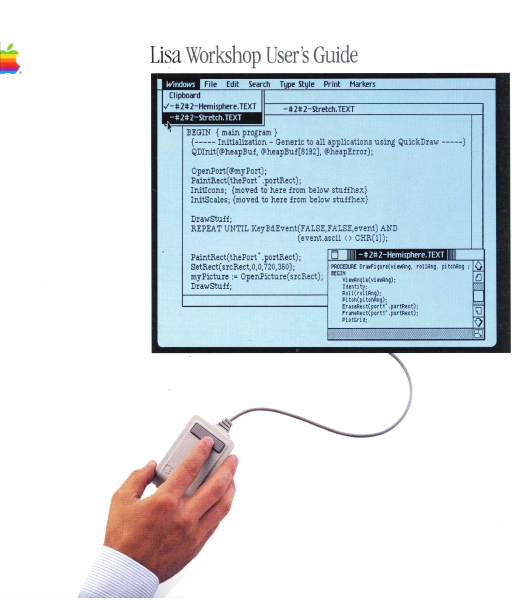
Li~a .Workshop User's Guide BEGIN {main program} {----- Initialization - Generic to all applications using QuickDraw -----} QDInit(@heapBuf, @heapBuf[8192], @heapError); OpenPort(@myPort); PaintRect(thePort' .portRect); InitIcons; {moved to here from below stuffhex} InitScales; {moved to here from below stu££hex} DrawStuff; REPEAT UNTIL KeyBdEvent(FALSE,FALSE,event) AND (event.ascii <> CHR(l)); PaintRect(thePort' .portRect); PROCEDURE Dr awfi gure(vi twAng, rollAng, pi tChAng : SetRect(srcRect,O,O,720,360) ; myPicture := OpenPicture(srcRect); BEGINVi ewAngl e(vi ewAng); Identi ty; DrawStuff; Roll(rollAng); Pi tch(pi tChAng); Er mRect( port1" . portRect); Fr iMeRect( portl" . portRect); PI otGri d; Workshop User's Guide for the Usa Copyri.- in This manual and the software described it are copyrighted with all rights reserved. Under the copyright laws, this manual or the software may not be copied, in whole or in part, without the written consent of Apple, except in the normal use of the software or to make a backup copy. The same proprietary and copyright notices must be affixed to any permitted copies as were affixed to the original. This exception does not allow copies to be made for others, whether or not sold, but all the material.purchased (with all backup copies) may be SOld, given, or loaned to another person. Under the law, copying includes translating into another language or format. You may use the software on any computer owned by you, but extra copies cannot be made for this purpose. For some products, a multiuse license may be purchased to allow the software to be used on more than one computer owned by the purchaser, including a shared-disk system. (Contact your authorized Apple dealer for information on multiuse licenses.) licensing Requiremerts fer Software Developers Apple has a low-cost licensing program, which permits developers of software for the Lisa to incorporate Apple-developed libraries and object codes into their products. 80th in-house and external distribution require a license. 8efore distributing any products that incorporate Apple software" please contact Software Licensing at the address below for both licensing and technical information. i1983, 1984 Apple Computer, Inc. 20525 Mariani ProJe. Cupertino, CA 95014 (408) 996-1010 Apple, Lisa, ProFile, MacWorks, and the Apple logo are trademarks of Apple Computer, Inc. Macintosh is a trademark licensed to Apple Computer, Inc. Priam is a registered trademark of Priam" Inc. Sony is a registered trademark of Sony Corporation. Centronics is a registered trademark of Centronics Data Computer Corporation. VT52 and VT 100 are trademarks of Digital Equipment Corporation. Simultaneously published in the U.S.A. and Canada. Reorder Apple Product 1620-6148-8. Limited W8mriy on Media and Manuals If you discover physical defects in the media on which this software is distributed, or in the manuals distributed with the software, Apple will replace the media or manuals a…

Showing first 3,000 characters of 500,000 total. Open the full document →

Home Documents Lisa Release 3.0 Notes For The Operating System Reference Manual For The Lisa
Release 3.0 Notes For The Operating System Reference Manual For The Lisa

Release 3.0 Notes For The Operating System Reference Manual For The Lisa

Lisa · PDF
FilenameRelease_3.0_Notes_for_the_Operating_System_Reference_Manual_for_the_Lisa.pdf
Size0.22 MB
Subsection workshop_3.0
Downloads2
Enjoying MacTrove? Anonymous downloads are free and unlimited. Create a free account to track favorites, contribute metadata corrections, and join the community chat.
Reader
Release 3.0 Notes For The Operating System Reference Manual For The Lisa
/
Loading…
OCR / Text contents
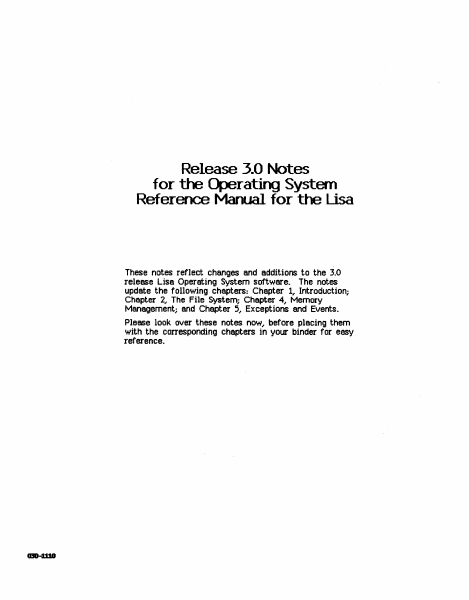
Release 3.0 Notes for the Operating System Reference Manual for the Lisa These notes reflect changes and additions to the 3.0 release Lisa Operating System software. The notes update the following chapters: Chapter 1, Introduction; Chapter 2, The File System; Chapter 4, Memory Management; and Chapter 5, Exceptions and Events. Please look over these notes now, before placing them with the corresponding chapters in your binder for easy reference. Operating System .J.O Notes Introduction Olapter 1 Introduction Using the SYSCILL Unit If a Pascal program contains Operating System user-interface procedure calls, then the program's USES clause must specify the SYSCALL unit, contained in the SysCall.Obj file: ProgrSll ttyProg; l5ES {SU SYSCAlLJEJ} 5ysCalli Notes 1-1 Operating S}·'Stem J~O Notes The File System Dlapter 2 The File System New Hierarchical File S\IStem Each mounted disk volume now has a hierarchically arranged directory structure. The root directory of a volume is always present, and subdirectories may be created to contain collections of files that are logically related. Path Names (See Section 2.1) A particular file or directory is specified to the file system with a path n8l71e. A path name is a sequence of directory names, separated by dashes (-), ending in a file or directory name. For example, the path name -Jower-memos-conference.te,rt specifies that the root directory of the disk volume lower be searched for the directory memos,. and then memos be searched for the file conference.text. File and directory names are limited to 32 characters in length, and are truncated to 32 characters if too long. The 'Nm"king Oirectmy (See Section 2.2) A working directory is associated with each process in the system. When a process is created, its working directory is the root directory of the boot disk volume. A process may reassign its working directory through the SET_WORKING_DIR call. The GET_fNORKING_DIR call returns the path name of the working directory in a printable string. A path name submitted to the file system by a process may be specified relative to the process's working directory. This is done by omitting the initial dash from the path name. Suppose that the working directory is -Jower-docLJments-memos in the directory hierarchy shown below. The path name maiJ-netfo.1al1.te,rt specifies that the working directory be searched for the directory mlli~. and then mail be searched for the file netfo.1lliJ.text.. The path name conference.text specifies that the working directory be searched for the file conference.text.. The plus delimiter (+) may be substituted for the dash within a path name to indicate that the next directory in the path name is the parent of the preceding directory. The plus delimiter is typically used to trace a path by moving upward in the directory tree relative to the working directory. Again suppose that the working directory is -Jower-documents-memos. The path name +documents-boole-chap3 specifies th…

Showing first 3,000 characters of 8,126 total. Open the full document →

Home Documents Lisa 050 4009 F CPU
050 4009 F CPU

050 4009 F CPU

Lisa · PDF
Filename050-4009-F_CPU.pdf
Size1.31 MB
Subsection hardware / Lisa_CPU
Downloads8
Enjoying MacTrove? Anonymous downloads are free and unlimited. Create a free account to track favorites, contribute metadata corrections, and join the community chat.
Reader
050 4009 F CPU
/
Loading…
OCR / Text contents
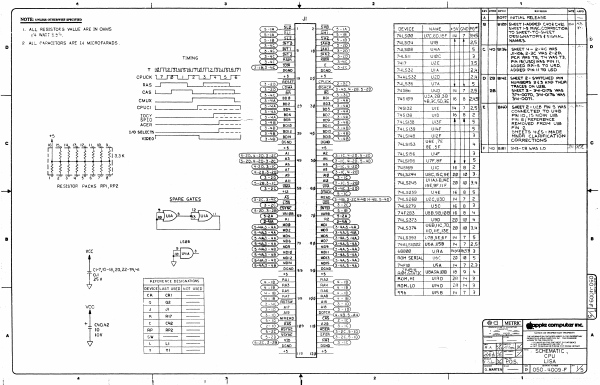
REv|zone| Ecoe REVISION barel arep \ NOTE: UNLESS OTHERWISE SPECIFIED Jl A 1BO97] INITIAL RELEASE. — NOTE es ee oe Bw ste __. B ai20| SHEET I-ADDED CHuoe CHa; fy [AE 1. ALL RESISTORS VALUE ARE IN OHMS Soa eg DEVICE NAME __}#5V|GNO|PG# SHEET AS misc. COMAECTION) | | ¥"" Ia TT + Ki - p-SHL CS Tip) = — EET “SH! i/4 WATT 25%, S rs cm 9 = # TYLSOO U7C,ED,ISF 114 | 7 B45 DESIGNATORS ¢ SIGNAL ey 2 ALL CAPACITORS ARE IN MICROFARADS . C3218 Te TAKO Coa8) : u ORS iT mses ul 25 > 9 pp AKL 3-20) 7ULSO U4A 5 [fC [yo lerse) SHEET 4- 2-4C WAS NT AKe "i Jl-l06, 2-3C WAS 2-20, TIMING S21O— sae ae C320) 7481! UIee 3 PCK WAS TS, TY WAS T3, Ca aI = 3-4) 7HI7 U2E 35 ee CEs "2 ~ 5D, T Wms emMemasustem GBS ~penp pong S25) 74LS32 UIA 24 ADDED PIN 11 TO USD CPUCK LZ TOLLS 2 lLasysois fe —SI 19 ear TUALS32 u2D 244] 0/25 level sueeT 2- SWITCHED PIN Ras _f [A Ca=25)-BESE CPUCK (330) 74LS38 U7A 5 None is tee C33) —LDMA BGACK (3-5 W2o8 S28) = : ON U2B. cas | a [ ian Fd 7USB6 UuD 4 | 7 j25 2B SHEET 3- 341-0175 WAS f eESerre por =) sig9 [UsA28,38 374-0070, BUI-O17% WAS = CMUX LL C3=5A ape : aaa 3 -4A) THSID' 4B,3C.50,3E. 16] 8 245 34-0071. (ELL ren CAL, - 7 mw 17 l25i{e BIO! SHEET 2-.UZB PIN 3 WAS Caza 08 BOS (Fu) pise oe 7 CONNECTED TO U4B EEC?) aoe Pererry) 74S138 uID lo | 8 42 PIN 10, 1S NOW UIB men) 74.136] vise 5 ae ate Bo? 7HLSI39 UIME 5 eer rernes Ca=45) 39 3) 2 Es = 7HLSINe Ul2F 3 MINOR CLARIFICATION PSNe suLgis3 | USE 7E 4 CORRECTIONS c +5 BE SF F /40 Jeiet| SH3-cB WAS 1.0 72 FETE E THLSI56 USE 3 Ge20.u=20.3-20)— 449 AS Gai 0205-40 usi66__| U7F,8F. 5 ag ye Set 20) 745169 uIC 16} 842 4220: 5280 he ad penne 7uiszuu_[usc,15c,9e| 20] 10 | 3- = AN Az UNIAN BIWE RESISTOR PACKS RPI,RP2 ee Wh_|.5 oof eee THLS245 ice ge tie | 22 | 12 [34 +12 TACK (~E— T4LS259 USE ie| 845 j+— 5-1C $ SPARE GATES (CIGEELIG ae READ Gide 3-2cuuD ue. 5-a) | 7urs260_|v2c,uso_ [iw [7 |2 : 2 C3 -20-Fe far oasis 74LS279 usc__ jie} | 3 June fs Juia > Ey ws - LS 74F283 | usB.sBioBL 16 | 8 | 4 MOI MO ESTRETTN Mes Mola =A) zurs374 | VEB:IC,70) 29 | 1g 3.4 G=4A3 4A uD: 3-4A.5-4A) HD WE ISE tse 5-4A3 4A ce oe 3-4A,5 -4A) 74LS393__{U7B,5E6F [iy | 715 B 9 YA g |? 88 og HAD 74acsiae2 [ueA,USB_ [14 | 7 [2,5 Use fiajusa ) 68000 uA na654 3 Rom Serta] vec f 20 fe | 5 V T4FIO usa [7 [2.3 CI-7,10-18, 20,22-39, 41 T4g-H cnn aaSitic | sagas | i8 | 9 | sv REFERENCE DESIGNATIONS Rom, HI UIBD_ [28 | 4 | 3 3a DEVICE|LAST USED| NOT USED ROM. LO UIHD 28} 413 oy 556 vise [uw f7 [3 i cR CRI RAZ RAS 8 a8) 499 19d Ca i) 9 Q a2 — Cra) BSW ad ars 2 = =) ite) vec =e ne a 2 = fa paren — R RI7 oe C3=10 READ a 4-48,5-A¥) iS = * > Cane =e eae Aap (ePPIc computer 2-10 199 ug —-C3- ic) ne my Aap_| pee | —— i a EB cerca) lov a Tayi oh 5 TOE OF ORME PROT A —— Cs=2) ee) eee era —_ 5-20, 3-28 p— C3 -1C) L Lt 3 END Benn 4 Y At — +8 lig sagt #5 =~ SCHEMATIC , CPU LISA c.marten! —— ]>] 050-4o009-F | 14) NOTE: UNLEss OTHERWISE SPECIFIED RPI 2 LSI69 RI3 . aa 20.37594 MHz | Jrefeone] econ] REVISION ic zap BUST rs SEE SHT. | | S09 | 11 i 10 7 Wi…

Showing first 3,000 characters of 10,451 total. Open the full document →
Subscribe to Lisa
mp.ls