
Home Documents Lisa LisaTerminal Installation Instructions
LisaTerminal Installation Instructions
LisaTerminal Installation Instructions

Lisa · 1983 · PDF
FilenameLisaTerminal_Installation_Instructions.pdf
Size0.11 MB
Year1983
Subsection office_system
Downloads3
Enjoying MacTrove? Anonymous downloads are free and unlimited. Create a free account to track favorites, contribute metadata corrections, and join the community chat.
Reader
LisaTerminal Installation Instructions
/
Loading…
OCR / Text contents
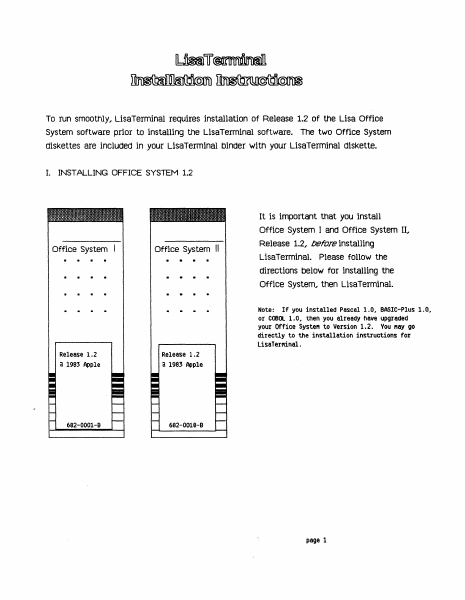
To run smoothly, LisaTerminal requires installation of Release 1.2 of the Lisa Office System software prior to installing the LisaTerminal software. The two Office System diskettes are included in your LisaTerminal binder with your LisaTerminal diskette. I. INSTALLING OFFICE SYSTEM 1.2 It is important that you install Office System Office System II • Office System I and Office System II, Release 1.2, before installing LisaTerminal. Please follow the directions below for installing the Office System, then LisaTerminal. Note: If you installed Pascal 1.0# BASIC-Plus 1.0, or COBOl 1.0, then you already have upgraded your Office Syste" to Version 1.2. You "ay go directly to the installation instructions for LisaTerMinal. Release 1.2 a 1983 Apple Release 1.2 a 1983 Apple 682-0001-B 682-0018-9 page 1 To install trle office systern software wltnout erasIng trle startup proFile.. 1) If the Lisa is on, turn it off by pressing the on-off button once; 2) Insert the diskette labeled Office System I into the upper built-in floppy disk drive. 3) Insert the diskette labeled Office System II into the lower built-in floppy disk drive. 4) If the ProFile is off, turn it on. Wait until the ready light stabilizes. 5) Turn on the Lisa by pressing the on-off button once. 6) When you hear a click from the cabinet, hold down the Apple key while pressing 1 on the main keyboard -- not the 1 on the numeric keypad on the right of the Keyboard. wrlen this rnessage appears, clicK install. • eJz;:; Office System A4 [ Finished 1983 «apple computer inc. This diskette is used to repair the Lisa Office System startup ProFiles and to install the startup software. The ProFi Ie is attached to the built-in parallel connector on the bock of the Lisa. Repair Click Finished if you are finished. Click Repair to Fix any ProFile damage. CI ick Install to put new startup software on the ProFile. Click Restore to restore the ProFile from backup diskettes. [ Restore When this message appears, click Don't Erase. • page 2 00 you want the ProF i I e attached to the built-in parallel connector erased? Click Erase only if you are starting new work and want to destroy all information now on the ProFile! Erase When this message appears, click OK. II Th. "or'". 'oft......., b.,n 'o<'nll.d, ..," When this message appears, click Finished. • e3j;:i Office System R4 1983 «apple computer inc. This diskette is used to repair the Lisa Office System startup ProFi les and to install the startup software. The ProFile is attached to the built-in parallel connector on the bock of the Lisa. Repair [lick Finished iF you are Finished. [lick Repair to Fix any ProFile damage. Install J [I ick Install to put new startup software on the ProFile. [) ick Restore to restore the ProFi Ie From backup diskettes. Restore When this message appears, click Start Up. OFF Should Lisa turn oFF or start up From the ProFile? • This procedure removes the Lisa Office Systern Release 1.0 software f…

Showing first 3,000 characters of 3,700 total. Open the full document →
Home Documents Lisa Baumwell Macintosh XL Hardware Information
Baumwell Macintosh XL Hardware Information

Baumwell Macintosh XL Hardware Information

Lisa · 1985 · PDF
FilenameBaumwell_-_Macintosh_XL_Hardware_Information_19850616.pdf
Size0.13 MB
Year1985
Subsection hardware
Downloads4
Enjoying MacTrove? Anonymous downloads are free and unlimited. Create a free account to track favorites, contribute metadata corrections, and join the community chat.
Reader
Baumwell Macintosh XL Hardware Information
/
Loading…
OCR / Text contents
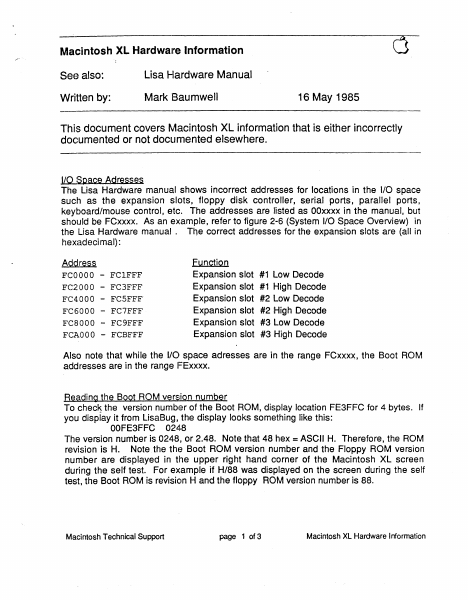
Macintosh XL Hardwaire Information See also: Lisa r.lardware Manual Written by: Mark 13aumwell 16 May 1985 This document covers Macintosh XL information that is either incorrectly documented or not documented elsewhere . .ILQ_Space Adresses The Lisa Hardware manual shows incorrect addresses for locations in the 1/0 space such as the expansion slots, floppy disk controller, serial ports, parallel ports, keyboard/mouse control, etc. The addresses are listed as OOxxxx in the manual, but should be FCxxxx. As an example, refer to figure 2-6 (System 1/0 Space Overview} in the lisa Hardware manual . The correct addresses for the expansion slots are (all in hexadecimal}: AQQr~~§ FCOOOO FC2000 FC4000 FC6000 FC8000 FCAOOO - FClFFF FC3FFF FCSFFF FC7FFF FC9FFF FCBFFF Function Expansion slot #1 Low Decode Expansion slot #1 High Decode Expansion slot #2 Low Decode Expansion slot #2 High Decode Expansion slot #3 Low Decode Expansion slot #3 High Decode Also note that while the 1/0 space adresses are in the range FCxxxx, the Boot ROM addresses are in the range IFExxxx. Reading the Boot ROM version number To checJs the version numb1er of the Boot ROM, display location FE3FFC for 4 bytes. If you display it from LisaBug, the display looks something like this: OOFE3FFC 0248 The version number is 0248, or 2.48. Note that 48 hex =ASCII H. Therefore, the ROM revision is H. Note the thE~ Boot ROM version number and the Floppy ROM version number are displayed in the upper right hand corner of the Macintosh XL screen during the self test. For example if H/88 was displayed on the screen during the self test, the Boot ROM is revision H and the floppy ROM version number is 88. Macintosh Technical Support page 1 of 3 Macintosh XL Hardware Information ,,,...- '·. Bfiading Parallel Interface Gard ROM version numbers Note that if a Parallel lnt1arface Card is installed, you can check its ROM version number by adding FF8 to the start of the Low Decode address of the slot the card is in and then displaying the resulting location for 4 bytes. To interpret the version number, look at the low order byte, of each word. For example, to check the ROM version number of a Parallel Interface Card in slot 2, display location FC4FF8 for 4 bytes. If you display it fr9m LisaBug, the display looks something like this: OOFC4FF8 0001 0007 Since the ROM is on the lower half of the data bus, the upper half of the data bus should be interpreted as don't cares. Therefore, the version number is 0107, or 1.07. Parallel Interface Card VIA offsets Each Parallel Interface Card has two 6522 Versatile Interface Adapters (VIAs}, one for each parallel port. The address of the VIAs is found by adding constants to the Expansion slot decodes as described below. Add 2000 hex to the slot low decode to get to the lower VIA base address. Add 2800 hex to the slot low decode to get to the upper VIA base address. For example: FC2000 is the slot 1 lower VIA base address. FC2800 is the slot 1 upper VIA …

Showing first 3,000 characters of 4,329 total. Open the full document →

Subscribe to Lisa
mp.ls