Home Documents Lisa Toolkit 3.0 Diskette Catalogs
Toolkit 3.0 Diskette Catalogs

Toolkit 3.0 Diskette Catalogs
Lisa · PDF
FilenameToolkit_3.0_Diskette_Catalogs.pdf
Size0.31 MB
Subsection toolkit_3.0
Downloads3
Enjoying MacTrove? Anonymous downloads are free and unlimited. Create a free account to track favorites, contribute metadata corrections, and join the community chat.
Reader
Toolkit 3.0 Diskette Catalogs
/
Loading…
OCR / Text contents
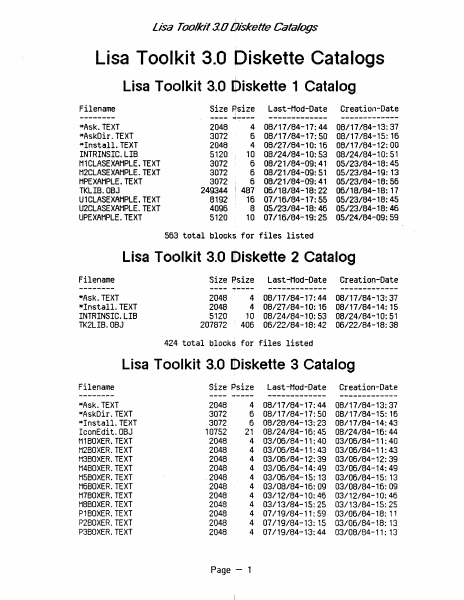
lisa Toolkit 3.0 Oiskette Catalogs Lisa Toolkit 3.0 Diskette Catalogs Lisa Toolkit 3.0 Diskette 1 Catalog Filename -------*Ask. TEXT *AskDir.TEXT *Install. TEXT INTRINSIC. LIB H1CLASEXAHPLE. TEXT M2CLASEXAMPLE.TEXT HPEXAHPLE. TEXT TKLIB.OBJ U1CLASEXAHPLE. TEXT U2CLASEXAHPLE. TEXT UPEXAHPLE. TEXT Size Psize , ---- -+---- 2048 3072 2048 5120 3012 3072 3012 249344 8192 4096 5120 Last-Had-Date ------------- Creation-Date ------------- 4 08/11184-11:44 08/11184-13:31 6 08/11184-11:50 08/11184-15: 16 4 08/21184-10: 16 08/11184-12:00 10 08/24/84-10:53 08/24/84-10:51 6 08/21/84-09:41 05/23/84-18:45 6 08/21/84-09:51 05/23/84-19: 13 I ~ 6 08/21/84-09:41 8 05/23/84-18:46 05/23/84-18:46 05123/84-18:56 481 06/18/84-18:22 06/18/84-18: 11 16 01116/84-11:55 05/23/84-18:45 10 07/16/84-19:25 05/24/84-09:59 563 total blocks for files listed Lisa TOtJlkit 3.0 [tliskette 2 Catalog Filename -------*Ask.TEXT *Install. TEXT INTRINSIC. LIB TK2LIB.OBJ Last-Mod-Date Creation-Date 08/17/84-17:44 08/27/84-10:16 10 08/24/84-10:53 406 06/22/84-18:42 08/17/84-13:37 08/17/84-14:15 08/24/84-10:51 06/22/84-18:38 Size Psize ---- ~---- 2048 2048 5120 207872 ------------- 4 4 ------------- 424 total blocks for files listed Lisa Toc)lkit 3.0 Diskette 3 Catalog Filename -------- *Ask. TEXT *AskDir. TEXT *Install. TEXT IconEdit.OBJ M1BOXER. TEXT H2BOXER. TEXT H3BOXER. TEXT M4BOXER. TEXT H5BOXER.TEXT H6BOXER. TEXT H7BOXER. TEXT H8BOXER. TEXT P1BOXER. TEXT P2BOXER. TEXT P3BOXER. TEXT Size Psize ---2048 4 3072 6 3072 6 10752 21 2048 4 2048 4 2048 4 2048 4 .2048 4 2048 4 4 2048 2048 4 2048 4 4 2048 2048 4 ~---- Page - 1 Last-Had-Date Creation-Date 08/11184-17:44 08/17/84-17:50 08/28/84-13:23 08/24/84-16:45 03/06/84-11:40 03/06/84-11:43 03/06/84-12:39 03/06/84-14:49 03/06/84-15: 13 03/08/84-16:09 03/12/84-10:46 03/13/84-15:25 01119/84-11:59 07/19/84-13: 15 07/19/84-13:44 08/17/84-13:37 08/17/84-15: 15 08/17/84-14:43 08/24/84-16:44 03/06/84-11:40 03/06/84-11:43 03/06/84-12:39 03/06/84-14:49 03/06/84-15: 13 03/08/84-16:09 03/12/84-10:46 03/13/84-15:25 03/06/84-18: 11 03/06/84-18: 13 03/08/84-11: 13 ------------- ------------- Lisa' Toolkit 3.0 Oiskette Catalogs P480XER.TEXT P5BOXER.TEXT P6BOXER.TEXT P7BOXER.TEXT P8BOXER.TEXT TK/ALERT.08J TK/COHP.TEXT TK/HAKE.TEXT TK/NullChange.OBJ TK/PABC.TEXT TK/UNITCHANGED.TEXT TK/WorkDir.OBJ TK/XRead.TEXT u1boxer.text U1BOXER2.TEXT u2boxer.text U2BOXER2.TEXT u3boxer.text U3BOXER2.TEXT u4boxer.text U4BOXER2. TEXT u5boxer.text U5BOXER2.TEXT u6boxer.text U6BOXER2.TEXT u7boxer.text U7BOXER2.TEXT U8BOXER.TEXT U8BOXER2.TEXT X1BOXER.TEXT X2BOXER.TEXT X3BOXER.TEXT X4BOXER.TEXT X5BOXER.TEXT X6BOXER.TEXT X7BOXER.TEXT X8BOXER.TEXT 2048 2048 2048 2048 2048 18432 2048 10240 2048 11264 3072 1024 ' 2048 3072 , 4096 3072 6144 4096 9216 4096 10240 5120 12288 6144 19456 7168 21504 10240 32768 2048 2048 2048 2048 2048 2048 2048 2048 4 07/19/84-13:44 4 07/19/84-13:45 4 07/19/84-14:03 4 07/20/84-11:50 4 07/20/84-11:58 36 05/15/84-15:4…

Showing first 3,000 characters of 10,829 total. Open the full document →
Home Documents Lisa 06 More On Debugging
06 More On Debugging

06 More On Debugging

Lisa · PDF
Filename06_More_On_Debugging.pdf
Size0.34 MB
Subsection toolkit_3.0 / Package_2_Examples
Downloads4
Enjoying MacTrove? Anonymous downloads are free and unlimited. Create a free account to track favorites, contribute metadata corrections, and join the community chat.
Reader
06 More On Debugging
/
Loading…
OCR / Text contents
More on Debugging Lisa Stack Frame Information Register US8g~ DO - D2 and An - Al DO - D3 and AD - A2 04 - 07 and A3 - A4 AS A5 A7 Can be used as user temporaries by your procedure Used for c~iler t~rarie$ Compiler uses for locals and pointers Pointer to global stack frame (for main proor.-) Pointer to current local stack frame (current procedure) Pointer to the top of stack (Supervisor if domain • 0 otherwise user) 4 bYte pointers ::::::::::::::::::::::::::::;:::::::::::::::::::::::::::::::::::;:::::::::::::::::::::: one entry for each intrinsic ...ut, each entry : address of start of intrinsic glOO4l variables for that intrinsic ...i t. Global~ Stack Frame: I :::.~~~..~.J~.~.~~:.:: i!ill~it;I,~Z;illi!1 ::::::::::::Size of table depends on ::::::::::::: :::::::~I"of";""""""'in""""""""'r":':':~j{ ·...·..............J~ .....~.P..~..... : : : : : :; : ;: : ;: : : : : : : : : : : : : : : : : : : : ....................................................................................... ~aCk grows down from high address to low address Hij\ Address . . fixed Size <loader info abOUt .-re ~s are) Data Pu • e (512 bytes" up to 128 inuins1c "'its) Shared nain (GlObal) ParMS, 256 bYtes, WlteA use fmDOO--~~~~----~~~~----~~--~------~ AS _---t..1-__Pl'...;..,;;..iv...;,.au_tlain....;.;;,..·_(~G.;;;.;loba..;;..;;..;;.;l;..). ;. PIt.; . ; .,.,; ; aRS..; ;.;,.-".;;;.;2S6;...;....;;;bytes~;.;.,,_sys~teR~.;;;.;use~---f, nain progrM GlODalS Link A5#'" .. ~----------------~----------~------~. Regular lMi t Q1Gbals COMon Size ~------~----~~~--------~~----~ ~ ____--.__t--I_ntr __ inS1_·c_tm __"t_Gl_obal __S_.....---'I. . .~_-t>: SuR of Areas Referenced > > L.jtu:um ofT orO(Jl'lS ffffffff flOll A5 InclUdes regular wU t MthOd slice tables ~ncludes intrinsic Wlit Rethod slice tables 32K ... for Nib CORbined Local Stack Frame (usual case}: Hi. Address fWlCtion Result (0. 2 or ~ bytes) Par_ters (I bytes CleDendina on DIl_ter list) oor ~ I.lSt 7it...., is VIIiIYS SEI.F i' tJu~ SUtic Link (For local Drocs only.. Fra. proc defined inl Return Address 00 procedure that called this procedure) Old AI (fl_ Of proceGlre that called this proceGlre) Local variables of this procedure CoRpiler T~ries for this procedUre .. • AI (StICk rr inStlCk cr.l) is , &l1SC1J Mt/I()(/. ~ 4 Link Ai••... >~e$ • AT first Par_ter list Para.tU' Low ACldress Parameter Information: sed for PllaMtric Procedures Met Fen:tions: Address of procedUre body • Static Link. valCJe = 0 if this is not a local, procedure ~ Stack Frame of TSamVie.,MousePreSSj A7 ~ Defore cal1 to Hi" Address Address Of IIOUSeLPT IIoUSePress SElf Return Addless (To procedure that called JIOUSePress) Old AI (fr. . of procedure that called this procedure) COpied local Yenion Of - ~ AI5 (StICk f r. . in Stack Cr.l) A7- __LPT ,.tlMtar Nne1 pidcSelecUcrt ,ictce&lJox stcetchSelection 1heKind 4 • •• I ~~e • During JIOUSePras Local VlIilbln Stack Area loll Address Local Vari…

Showing first 3,000 characters of 9,713 total. Open the full document →

Home Documents Lisa 04 Lisa Toolkit Self Paced Training
04 Lisa Toolkit Self Paced Training

04 Lisa Toolkit Self Paced Training

Lisa · PDF
Filename04_Lisa_Toolkit_Self-Paced_Training.pdf
Size10.15 MB
Subsection toolkit_3.0 / Package_2_Examples
Downloads7
Enjoying MacTrove? Anonymous downloads are free and unlimited. Create a free account to track favorites, contribute metadata corrections, and join the community chat.
Reader
04 Lisa Toolkit Self Paced Training
/
Loading…
OCR / Text contents
LISA TOOLKIT SELF-PACED TRAINING Preface. This self-paced training comprises eleven self-study segments. The intent of these segments is to get you started designing applications with the ToolKit. Although the initial segments have no code associated with them, the latter segments include labs allowing you to experiment with actual appl ication code. A single application is used as the context for this training. This is the Boxer appl ication. Boxer is implemented in stages over 8 of the eleven segments. The result is an application that exhibits the essential features of typical ToolKit appl ications. What those are is the subject of this training. CONTENTS The following table I ists the segments, labs, and the code associated with them: segftent nuftber seQ~ent na~e lab code stage Conceptual Foundation of the ToolKit no 1 Introduction to the ToolKit no 2 What is a Document? no 3 Creating from the Generic Application yes 4 BlankStationery no 5 6 Intro to the Boxer Appl ication yes 2Boxer Selections and Highl ighting in Boxer yes 3Boxer 7 Mov i ng Boxes yes 4Boxer 8 Creating a Box, A Second Selection Class yes 5Boxer 9 Recoloring .. Dupl icating.. and Clear All yes 6Boxer 1Boxer Commands with Undo 10 Filters yes 7Boxer 11 Cut & Paste and Mouse Key Events yes 8Boxer as Commands; Advanced Commands. The recommended sequence of segments is to start with "Conceptual Foundation of the ToolKit", and then continue sequentially with segments 1 through 11. PREREQUISITES You are expected to have read the following documents before starting this self-study: o Introduction to Clascal o WorkShop Manual, especially the QuickDraw and Pascal language sections To your future as II grellt ToolKit IIPPlic4tion designer! Conceptual Foundation of the ToolKit The ToolKit is en object-orierKlNi development system. This means that the . code to be executed is selected through the data, which is packaged into record-like constructs called Db~cts. This is in direct contrast to a procedure-oriented system. In that kind of' system the code to be called is tixed by the designer. The data must fit the celled code, rather than vice versa. The following discussion and slides provide a conceptual foundat ion for an object-oriented system, and how it contributes to the structure of' the ToolKit. Conceptual Foundations T<X>LJ<IT APPLICATION DESIGN The ToolKit is best described as a collection of interlocking hiererchies of classes. One special ToolKit class, TObject, is the ancestor of every other class. As the slide: The TooJ~~':jt ltpp/ieMi()f1 ,.1odtl showS, a user application is a collection of classes as well. Specifically it is 8 layer of' class hierarchies descended from those of the ToolKit. The user application 18y'er may either abut the ToolKit l~er directly, or have one or more building block layers of insulation. In either case, the user application may create subclasses from any classes in or above its layer. …

Showing first 3,000 characters of 371,089 total. Open the full document →
Home Documents Lisa 12 Text Building Block
12 Text Building Block

12 Text Building Block

Lisa · 1984 · PDF
Filename12_Text_Building_Block.pdf
Size1.48 MB
Year1984
Subsection toolkit_3.0 / Package_2_Examples
Downloads4
Enjoying MacTrove? Anonymous downloads are free and unlimited. Create a free account to track favorites, contribute metadata corrections, and join the community chat.
Reader
12 Text Building Block
/
Loading…
OCR / Text contents
Text Building Block To: From: Date: Subject: Users of the TOOlKit's Text Building BloCk 21 Marcr! 1984 How to use the Text Building Block (TK8E) (draft version 3) ==============================================:====================-========:== When reading this document it is suggested that you have a copy of the UText interface available for reference. The Text Building Block allows users to specify an LRect in their view irl w~ii:~;ri m..Jltiple paragraphs may be entered either from the keyooara or pasted frOlT tne clipboard. "i thin this box, te>tt klill word klrap based on the bounos of t!'"l~ b:JY and optional 1ndentation fields 1n the TPara=ornet object. Trlese fields oe-foiJl t to zero, thus if the values are not Changed, the text kl1ll fit tig!"ltly 11.:1 tnir: the LRect specified. (Currently only left justified text is supported so trtere klill be a ragged right edge.) Application programmers must create a TTextlmage for eaCh separate grouo Of te~t they wiSh to display. The CREATE method expects an LReet within its vie~. Ir: adOi tion, the 1sGro~le ooolea!! parameter speCifies Whether or not tr,e LRect can grow at the bottom if text that is oisplayea cannot fit in the spe:ifiEJ LRect. Textlmages display TText Objects. A TText Object contains a list Of TParagr~~ oOjects. EaCh TParaglaph Object contains the characters ana typeStyle 1nformation for one paragraprl. Associated wit~ eaCh paragraph is a TParaImage wrl1c~ 1s stored 1n a list Of TParaImages in TTextlnage. A TParaImage cO;ltains all Of the display specific information about a particular paragraptl suerl a~ where each line ends and tne pixel height of the displayed paragratJn. Wrte:-I a TIextlmage is created, 1t nust have an 1nit1al TText object. Ttle next oeject, in turn, rust nave at least one paragraph 1n its paragraph l1st. Also, eaCf, paragrap~ points to a TParaFormat, Whicrl spec1fies margins, taos, paragraph spacing and other formatting Characteristics. TParaFormats are stored in a TStyleSheet, WhiCh is simply a list Of TParaFormats. Since the list is an indexed list, one can store commonly U$eo form&ts at known posi tioras in ttte list for rapia retrieval when reformatting a part1CUlar paragraph. Typically, app11cations store a single styleSrleet in a fie10 Of their applicat10n windOW. Eacn TText ooject, 1n adaition to containing a 11st -Of paragraphS also points to a styleSheet. By storing ttle styleSheet in the w1naow, eaCh next Object can refer-ence tr.e sarne styleStleet. Text Butldlrtg BlOCk ••••••••••••••.•••.•.••.•..•..•...•....•.....••••.•.....•.•..••.....•••.•................... PaQe 1 The typical order of allocation is then: Create a waraFormat. tnen create a TStyleSheet and install the paraFormat in its list. Set TAppllnaow.styleSheet to tne ne:J) stylesr'eet. create a paragraptl, passing the paraFormat just createa. Create a next ObJect and install the parag~ just created in its paragraphs list and trle set styleSheet field to the new styleSheet. Now cr…

Showing first 3,000 characters of 69,498 total. Open the full document →
Home Documents Lisa 09 Printing
09 Printing

09 Printing

Lisa · 1984 · PDF
Filename09_Printing.pdf
Size0.35 MB
Year1984
Subsection toolkit_3.0 / Package_2_Examples
Downloads3
Enjoying MacTrove? Anonymous downloads are free and unlimited. Create a free account to track favorites, contribute metadata corrections, and join the community chat.
Reader
09 Printing
/
Loading…
OCR / Text contents
PRINTING --------...-----------------------------~----- From: To: Date: Subject: ToolKit Users 12 May 1984 - - Draft: 00:30 ToolKit Printing - Notes Printing in the ToolKit is organized around the concept of the View. Every panel's View is either "printable" or "not printable". The actual code to image a view on the printed page is the same TView.Draw which is used to image the view on the screen; the ToolKit takes care of differences between the resolution of the printer and that of the screen.form8tted Printing issues for a printable view are handled by its PrintManager. Each printable view in an appl ication has its own PrintManager, but usually an application which has more than one printable view wi II use an instance of the same TPrintManager subclass for each of its printable views. When creating a view (using TPanel.NewView or, in special cases, TView.CREATE), the application specifies the PrintManager to be used with it. Specifying NIL for the PrintManager indicates that the view is not to be printable. If a view is to be printable, there are three basic choices for its PrintManager: (1) The vanilla printManager, obtained by calling TPrintManager.CREATE - - this gives you printing but no faci lity for speCifying headings or margins. (2) The 'standard' printManager, of class TStdPrintManager, obtained by can ing TStdPrintManager.CREATE. This printManager gives the user of the apprication an interactive Headings and Margins facility. An application wishing to use this PrintManager must USE the Dialog Building Block, UDialog. (3) If an appl ication is not content with either of the above, it can define its own subclass of TPrintManager (or of TStdPrintManager). TPrintt1anager Class: SUperClass: TObject Defined Subclass: TStdPrintnanager (defined in the Dialog Building Block) Data fields: view: pageView: breakS: The view Whose printing is "anaged The view which draws the headings in the "argins of the page {the size of this view is the size Of one page} ARRAY(vhSelect] Of TArray {of LONGINT} The vertical and horizontal pagebreaks which parti tion the view up into pieces WhiCh will fit onto indivldual pages. (note: breaks[v) hOlds infor"ation for page bre~kS w~ich When drawn on the screen. are represented by verucalllnes). The represe~tation is; the absolute value gives ~he location in the vlew; the Slon tells Whether the break 1S an autOf'auc one (nonnegative) or a "anual (user-set) one (negative) The page Aargins to use when fitting view pieces onto pages; top and left are positive and botto" and right are negative. These TView TView ToolKit Printing Notes - 12 Kay 1084 - 00: 30 - Page 1 of 5 headings: canEdi tPages: Tust {of THeacling} BOOLEAN layoutDialogBox:TDialogBox fra"eBody: BOOLEAN paperLRect: LRect printableLRect: LRect contentLRect: LRect pageRiseDirection: YhSelect nuPtbers are in View resolution. hence the LRect even though the actual nURbers involvecl will be very Sf'all. The heaclings to be printed on the p…

Showing first 3,000 characters of 13,134 total. Open the full document →
Home Documents Lisa 03 Clascal Syntax Diagrams
03 Clascal Syntax Diagrams

03 Clascal Syntax Diagrams

Lisa · PDF
Filename03_Clascal_Syntax_Diagrams.pdf
Size0.11 MB
Subsection toolkit_3.0 / Package_2_Examples
Downloads7
Enjoying MacTrove? Anonymous downloads are free and unlimited. Create a free account to track favorites, contribute metadata corrections, and join the community chat.
Reader
03 Clascal Syntax Diagrams
/
Loading…
OCR / Text contents
Clascal Syntax Diagrams Preface The following three pages define the syntax of the final version of Clascal. Ieiacat ,. 1 Of 3I set-type file-type truetured-type-identifie'It------1 '-----class-typet---------- claas-t lass~identifie "-,...,.ethod -interfac-----4. class-identifier .J. .. I ---4". --------~ldentifler .... ~ method-interface I eiasc.t ,. 201 I, ----4_ variable-identifier ~­ ~va.r.~'J::~:.:b.::.1e:..-..:~~~:...;f*e.:;.:~..;;;,~:.:~.:;;...ce~_ _.. function-call "---.. function-method-call ...:..:=.:..::..:::..;~..;;;.;.;.:...:.:.;...-~--.. qualifier variable-reference function-call ~-~ '---- class-identifier L . - . _ - ' ---------', procedure-statement -_. ..:!p.~~:...:'O:.:'C.:..ed::.~=-.:'e:.....-.:..;;m.:..;:e....tl1_od_.-_~_ii_~J-""::::::--1'" variable-reference class-identifier ~~~~~~~~--------~~identifierL---------------------r-9 class-identifier . formal-parameter-list ~~~~~~~-----------~~identifier class-identifier result-type . I elllC.t ,. i if i I resu1t-type .... -~ ordinal-type-identifier ~ ~ real-type-identifier ~ '" im iementation- J ~ pointer-type-identifier.~ :-1 class-type-identifier} implementation constarit-declaration-partt----'I type-declaration-part 1 - - - - - - ' 1 variable-declaration-part..-.--,· subroutine-part1-------"" -s--u;.;;;;;bro---u--ll.-.;r.n---e-...........-----,-.~..procedure-declaration~~-.... function-declaration method-block 1----- lass-identifie procedure-and-function-declaration-part creation-block I - - - -........c creation-block "iblock I .. - ~
Home Documents Lisa 17 Lisa Development System Internals Documentation Feb84
17 Lisa Development System Internals Documentation Feb84

17 Lisa Development System Internals Documentation Feb84

Lisa · 1984 · PDF
Filename17_Lisa_Development_System_Internals_Documentation_Feb84.pdf
Size3.83 MB
Year1984
Subsection toolkit_3.0 / Package_2_Examples
Downloads3
Enjoying MacTrove? Anonymous downloads are free and unlimited. Create a free account to track favorites, contribute metadata corrections, and join the community chat.
Reader
17 Lisa Development System Internals Documentation Feb84
/
Loading…
OCR / Text contents
DeveJopn18I1t SystBl11 DOCUMENTA TION ., DeveJq:ment TOOls Grotp FIRST CRAFT--FetuuBty 1984 Preface The purpose of this document is to explain the internal structures and algorithms used by the Lisa's run-time environment and development tools, and the internal library units (such as OBJIOLIB) that are related only to Lisa systems software. It is actually a collection of documents and memos, any of which can be used separately, all relating to different aspects of the system. This is a reference document for programmers working on the following: * Maintaining or enhancing existing lisa development software. * Writing compilers or utilities for the Lisa Workshop, either on contract with Apple or as third-party independants. * .riting assembly-language programs that will interfaced with our compiled code. How will they benefit from this document? * It will save the people maintaining tools the trouble of looking through the code themselves to find information. * It will save outside programmers, who don't have access to the code, from calling us to ask questions about things that ,ehave to look up in the code. * Perts of it will be included es e reference section in technical contracts that we assign to outside programmers. * It will provide assembly-language programmers with such specifics as register conventions, parameter-passing techniques, and memory layouts used by the conmpiler for different types of arrays and structures. * It cen be used to trein new systems softwere programmers on the existing internals of the system. Contents Lisa Development Software Documentation: A Road Map Pascal Compi ler Directives Pascal Code-Cruncher's Handbook The Last Whole Earth Text File Format Pascal's Packing Algorithm PASLIB Procedure Interface PPaslibC Unit: Privileged PASLIB Calls Execution Environment of the Pascal Compiler Intrinsic Units Mechanism (overview) IUManager (old and "spring release" versions) Object Fi Ie Formats Inbterface to OBJIOLIB Format of .SYMBOLS File Shell-Writer's Guide 17/~. L Lisa Development Software Documentation: A Road Map Irtroduction Thh roed map was designed to help you to rind your w~ around the verious documents describing program development for the Lisa. It will help you decide which software you need to learn more about, which software you can ignore for the moment, and how you should proceed in stuctying the rest of the technical documentation. General CWerview cI the Erwirormertl Available lhere are 8., many way~ of writing programs as t.here are creative programmers. However, Apple supports only three general $tyles of programs that you can Yflite for the Lhe.: those written for 1) the Workshop environment, 2) the QuickPort environment, and 3) the ToolKit erwironment. Programs written tor eny of these environments can use most of the. same units and libraries, but there ere lome important differences of which you should be ewere. The Workshop (Figure 1) provides e simple non-window, character and gr…

Showing first 3,000 characters of 130,540 total. Open the full document →

Home Documents Lisa 05 The Lisa Applications Toolkit Reference Manual
05 The Lisa Applications Toolkit Reference Manual

05 The Lisa Applications Toolkit Reference Manual

Lisa · PDF
Filename05_The_Lisa_Applications_Toolkit_Reference_Manual.pdf
Size12.53 MB
Subsection toolkit_3.0 / Package_2_Examples
Downloads3
Enjoying MacTrove? Anonymous downloads are free and unlimited. Create a free account to track favorites, contribute metadata corrections, and join the community chat.
Reader
05 The Lisa Applications Toolkit Reference Manual
/
Loading…
OCR / Text contents
by Jonathan D. Simonoff for Macintosh User Education Apple Computer, Inc. ~=========~- The Usa Applications .ToolKit Reference ~ ~ for SOftware Oevelqes ~le has.8 low-cost l1cens~ progJarlt, Which permtts deVelopers Of software for the Lisa to lrlCOrporate ~1e-deVelq)ed libraries code files am ooject Into their pl'tlOJets. Both In-twJuse n2 external distribution l8(JJlre a llcense. Before d1st.rlbut1~ eI'ly procl.Cts that lrmrporate ~le software, please contact SOftware Llcens~ at the dJIess below for bOth llcens~ ens tecmlcal lnformatlcn el983 by ~le ~r, 1m 20525 Martel'll AVfnIJ ~rt1ro, California 9501" (408)996-1010 ~le, LIsa, am the ~le 10',1) are tradellmkS of ~le ~r, 1m Sirrulta'leOUSly pt.a)lished In the USA am C8aada. o.tmner satlsfactkIl If you discover physical defects In the fTlEI'U8ls dlst.rlbuted wltn a Lisa ~ or In the media on Whidl a software procl.lct Is dlstrlbuted, ~le will replace the doa.mentatlon or media at no aage to you ~ the 9O-day periOd after yoo pulctaseeJ the procl.Ict. In acJdlUoo, If ~le releases a correcUve l4)date to a software ~t ~ tne 9O-day periOd after you purchased the SOftwre, ~e ~. replace the appllcable dlSkettes n:J doa.mentaUoo with the revised version at no Charge to you (ln1ng tile six maltns after tile date of pulChaSe. In scme COU'ltries tile replacement periOd may be different; CheCk with your auttoriZed LIsa dealer. Return 8l)' Item to be replaced with proof of pUJChase to ~eor to CI'l auttorlzed Usa dealer. UmltaUm m W8rIaltJes 8'ld LJabWty . All lrT1lUecJ ~tles concerning tnts rnerud and media, inclUdIng lrT1l11ed warrantles of merchantablllty ns ntness for a particular purpose, are llmltecl In maration to ninety (90) days fnm the date of original retall purchaSe of tnlsprocl.lcl Even tI'loUCJ1 ~le teas tested the software deSCrlbed In this fTlEI'U8l em revte'Ned its CCIltents, ne1tner ~le ror Its SOftware ~llers make 81y warranty or representatlo\ eltner ~ress or lrT1l11ed, with respect to this mcrual or to the software CleSCrlbed In tills rnn.taL tnetr quality, perforrrsa, merchantabWty, or fltness fOr any particular purpose. ~ a result, this SOftware a'O fTlEI'U8l are sold -as Is,: am you the purchaSer are asst.mlrYJ tne enUre rlsk as to their quality and peJ'fOrmallC8. In ro event will ~le or Its software ~llers be 11able for dlrect, lndlrect, special, lrotdentaL or ca aseQJenUal da'nageS resultlBJ fnrn CI'ly defeet In tne software or rnn.taL even· If they haVe been adVlsed of the possibility Of sucn dErnages. In particular, they shall haVe no llabllity for any prograns or data stored In or used wttn ~e ~ts, Iroludlr¥J the costs of recovering or reprocl.lc~ these PTOQJCITlS or data. The warranty and remedies set forth aboVe are excluslw and In lieu of all others, oral or written., express or lrT1l11ed. ~ ~le dealer, agent or ~loyee Is authorlzed to make SlY modlflcatlon, exta.slon or ardtlon to this warranty. some states do not allow the exclus100 or llmltatloo of lrT1lUed…

Showing first 3,000 characters of 409,751 total. Open the full document →

Home Documents Lisa 01 Contents
01 Contents

01 Contents

Lisa · PDF
Filename01_Contents.pdf
Size0.38 MB
Subsection toolkit_3.0 / Package_2_Examples
Downloads8
Enjoying MacTrove? Anonymous downloads are free and unlimited. Create a free account to track favorites, contribute metadata corrections, and join the community chat.
Reader
01 Contents
/
Loading…
OCR / Text contents
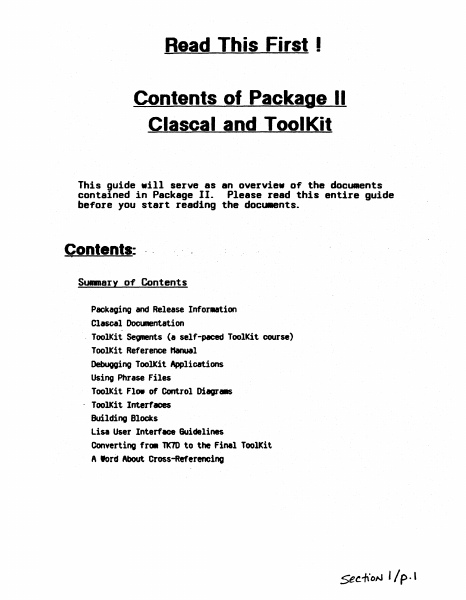
Read This First I Contents of Package II elaseal and ToolKit This guide .ill serve as an overvie. o~ the documents contained in Package II. Please read this entire guide before you start reading the docu.ents. Contents: .. Summary of Contents Packaging and Release Infor..tion Clascal Docllll8l1tation - ToolKit Se~s (I self-paced ToolKit course) ToolKit Reference Hanual Debuooing ToolKit Applications Using Phrase Files ToolKit Flo. of Control Diagr. . - ToolKit Interfaces Building Blocks Lisa User Interfeoe Guidelines Converting fr. TK7D to the Finel ToolKit A lord About Cross-Referencing 5ee1\ON '/p.' Packaging and Release Infol1l8tion 1. In thI, package you IhoUld have the followIng piece,: I. In~tallition Instruction~ b. The Introduction to Cla.cal Hanual. c. Clascal Syntax Diagr_. d. The Lisa ToolKit Self-Paced Training. e. The Lisa Applications ToolKit Reference "anual. f. Hore on Debugging. g. A Phrase File ~t h. A Printing Document i. A Class Hierarchy DocuMent j. lIlbject, lIlr., and ~ interfaces. k. lIlialog docunentation .-.d interface. 1. UText docl.IIIentation" and interface for UText. and. WnivText.. . m.lfstings of SamPle"ToolKit progra.6 n. DocllRentation on converting frOlll older versions of the ToolKit to ToolKit 3. O. o. Icon editor documentation. p. lisa User Interface 6uidelines. q. Lisa Internals. r. A Flow of Control DiagraM (poster). s. Five (5) ToolKit Release Diskettes. 2. To use the ToolJCit, you need to have the folltMfing: a. A one _gabyte Lisa with A least one 5 t1egabyte profile. Two 5 t1egabyte profiles or one built-in 10 t1egabyte hard disk is better. Ie stronoly discourage using just one 5 t1egabyte profile; a single profile leaves very little space 1n which to work. b. The Lisa Office Syst., version 3. o. c. The lisa hrkshop develOpMent environMnt. version 3. o. 3. ToolKit 3. 0 HelHSe Notes.. This IIeIK) describes the ToolKit release you were sent and how to·install it on your MChine along with the other software you have purchased. Please read it carefully and CCJRpletely and follow the instructions exactly. This will give your 1/ p. z. Lisa the standard ToolKit davalopaent configuration a'ld .aka it aasier to find problellS if they occur. Clasoal Docu.entation 1.M IntrodUCtion to C16SC~1. This explains the elaseal language and why we are using it to ~la.ent the ToolKit. (read this first) 2. C1~SC6l Synt6X Di6gT'" This short MnUal contains all the syntax diagrallS for Clascal. ToolKit Sea-ents (a salf-paced ToolKit coursa) The ToolKit Segments are a self-paced tutorial explaining most of the concepts you need to know to use the ToolKit. You should read this section after you have ..stered the elaseal documentation above. The segments start out with the very Simple ToolKit concepts and build t.Ottards IDOre complicated ·subjects as "your knoWledge of the "ToolKit grad. Included with the 8egnents are listings of actual ToolKit salllPle programs. These sMIPle proor- are also included on the disks w…

Showing first 3,000 characters of 12,469 total. Open the full document →

Home Documents Lisa 02 An Introduction To Clascal Jul84
02 An Introduction To Clascal Jul84

02 An Introduction To Clascal Jul84

Lisa · PDF
Filename02_An_Introduction_To_Clascal_Jul84.pdf
Size2.17 MB
Subsection toolkit_3.0 / Package_2_Examples
Downloads8
Enjoying MacTrove? Anonymous downloads are free and unlimited. Create a free account to track favorites, contribute metadata corrections, and join the community chat.
Reader
02 An Introduction To Clascal Jul84
/
Loading…
OCR / Text contents
An Introduction to Clascal Susan Keohan nacintoshUser Education Apple Co.puter, Inc. Preface This is a conceptual introduction to ClascaL not a reference manual. Example programs and syntax diagrams follow the text. The purpose of this document is to introduce experienced Pascal programmers to the concepts necessary to make the transition from a traditional procedure-oriented environment to Clascal's . object-oriented environment. This document assumes you are familiar with Lisa Pascal and QuickDraw. All programs and program fragments are boldface in this document. for example, thisShape.Erase is a program fragment. Table of Contents Introduction ...... . Comparing Pascal and Clascal Pascal. Clascal Class Types. Objects Methods 1 1 ••2 ••4 . , ,. 8 ·.9 12 SELF. 16 Class Hierarchy and Inheritance Assignment Checking and Typecasting . . Creating and Freeing Objects StPERSELF and Extensibility ..... . Clascal vs. Pascal .....•.. Clascal and the Lisa Applications ToolKit. .hen to Use the Clascal Extensions Advanced Topics .... The Example Programs 17 20 21 22 25 26 26 27 30 .. J./~ AI7 InlrDtb:fion to CI6SC61 "1y198*, An Introduction to Clascal Introduction ellsoll is I set of extensions to Lisl Pasoal that adds objects and classes of objects to the language. The sesaantic extensions of elascal were inspired by the language s.Blltalk 76. The syntactic extensions were influenced by the language SillJII 67.. It is not necessary to know s.alltalk or Simula before learning elascal. elascal differs little fro. Pascal syntactically. The ..jor difference between the languages is in progr_ing technique. bn you write a Pascal proor., your procedure and fooction specifications are separate fro. your data structure specifications. When a Pasoal proor. is rCA data is passed to a procedure or function, and the procedure or function acts on the data. In elascal the data structures of an object and its procedures and functions'ar~ specified together 1n a class declaration. Ihen the program is rWl, objects are created. These objects use the functions and procedures that the program.er specified when defining the data structure. All the operations that an object eM perf0111 are defined by the object's class. As a result, progr.. modularity is i~roYed. In Pascal, to add new variations to an old data type, you ..st either define new types inc~atible rith the old type, or. edit existing code to add new cases to a variant record type and to procedures that act on that type. In ClasoaL you can define subclasses of existing classes without editing existing code Met without introducing incDq)atible types. As a result, progr_ extensibility is illproved. CCJIIparing Pasc.l and Clascal Clascal is a superset of Lisa Pascal. Because the readers of this doc\IIent are Pascal progr...ers, CI.scal oonoepts are CGIIPIred to Pascal concepts throughout. this doouIent. As a Pascal progrlllller, you should have little difficulty adjusting to ClesoaL because III)St of w…

Showing first 3,000 characters of 62,562 total. Open the full document →

Subscribe to toolkit_3.0
mp.ls