Home Documents Lisa 10 UObject Classes
10 UObject Classes

10 UObject Classes

Lisa · 1984 · PDF
Filename10_UObject_Classes.pdf
Size3.46 MB
Year1984
Subsection toolkit_3.0 / Package_2_Examples
Downloads3
Enjoying MacTrove? Anonymous downloads are free and unlimited. Create a free account to track favorites, contribute metadata corrections, and join the community chat.
Reader
10 UObject Classes
/
Loading…
OCR / Text contents
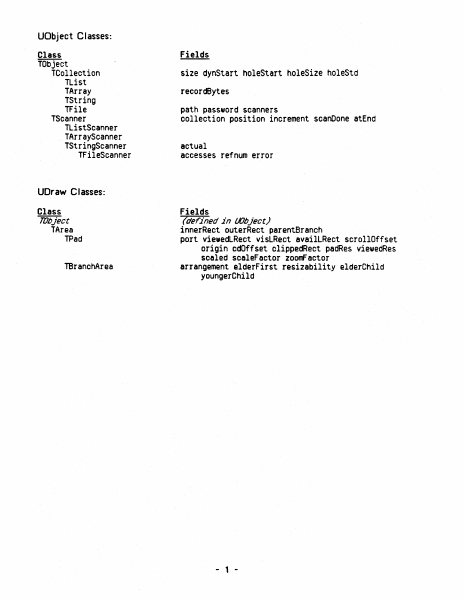
UObject Classes: Class TObject TCollection TList TArray TString TFile TScanner TListScanner TArrayScanner TStringScanner TFileScanner Fields size dynStart holeStart holeSize holeStd recordBytes path password scanners collection position increment scanOone atEnd actual accesses refnum error UDraw Classes: Class Fields TlJbject TArea TPad TBranehArea (de;ined in {}Object) innerReet outerReet parentBraneh port viewedLReet visLRect 8vailLRect scrollOffset origin edOffset clippedRect padRes viewedRes seeled sceleFactor zoomFactor arrangement elderFirst resizability elderChild youngerChild - 1 - UABC Classes: Class fields TObject TProcess TDocDirectory TDocManager TClipboard TConmand TCutCopyConmand TPasteConmand Tlmage TView TPaginatedView TPageView THeading TPrintManager TSelection 'Area TWindow TDialogBox TBand TSideBand TPanel !Pad TPane TMarginPad TBodyPad TScroller TScrollBar THenuBar (deFined in Wbject) (global variables) window classWorld files dataSegment docHeap window pendingNote openedAsTool ' hasView hasPicture hasUniversalText haslcon cuttingTool cuttingProcessID clipCopy cmdNumber image undoable doing revelation unHiliteBefore hiliteAfter iSCut extentlRect view allowMouseOutside panel clickLPt printManager res screenPad fitPagesPerfectly isPrintable iSMainView stdScroll scrollPastEnd unpaginatedView pageSize workinglnMargins printManager pageAlignment offsetFromAlignment oddOnly evenOnly minPage maxPage view pageView breaks pageMargins headings canEditPages layoutDialogBox frameBody paperLRect printableLRect contentLRect printerMetrics pageRiseOirection . .. window panel view kind anchorLPt currLPt boundLRect coSelection canCrossPanels (defined in lLJr811) panels panel Tree dialogBox selectPanel undoSelPanel olickPanel undoClickPanel selectWindow undoSelWindow wmgrID isResizable believeWmgr maxlnnerSize changes lastCmd printerMetrics pgSzOK pgRgOK panelToPrint objectToFree keyResponse menuResponse downlnMainWindowResponse freeOnDismissal window panes panel scroller scrollOir topOrLeft window panes currentView view paginatedView selection undoSelection bands scrollBars abilities minlnnerOiagonal resizeBranch zoomed zoomFactor previewMode lastClick contentRect tlSideBandSize brSideBandSize deletedSplits (defined in tLJra,) currentView panel view pageNumber bodyPad marginPad nonNullBody scrollBar band sBoxID firstBox isVisible isLoaded mapping numMenus numCommands - 2 - UUnivText Classes: fields Class TlJbject (defined in Wbject) TTKUnivText paragraphDescriptor characterDescriptor maxOataSize data itsOurTString buffer columnCount dataBeforeTab TTKReadUnivText TTKWriteUnivText UT ext C I asses: Class fields TObject (defined in Wbject) TParaFormat dfltTStyle wordWrap quad firstlndent leftlndent right Indent spaceAbovePara spaceBelowPara lineSpacing tabs refCount permanent styleSheet TCollection TString (defined in Wbject) (defined in Wbject) TParagraph TEditPara TLinelnfo TIlIJ8ge TParalmage TTextl…

Showing first 3,000 characters of 172,679 total. Open the full document →

Home Documents Lisa 08 PABC
08 PABC

08 PABC

Lisa · 1984 · PDF
Filename08_PABC.pdf
Size0.21 MB
Year1984
Subsection toolkit_3.0 / Package_2_Examples
Downloads3
Enjoying MacTrove? Anonymous downloads are free and unlimited. Create a free account to track favorites, contribute metadata corrections, and join the community chat.
Reader
08 PABC
/
Loading…
OCR / Text contents
PABC PBBC. TEXT 22 .Rug 1984 10: 43: 57 PMC. TEXT Copyri~t 1983, 1984 by Apple CoIIputer, Inc. l'-Apr-84: added phrases 44 • 4S 16-Apr-84: added heap scralllbling co.ands 13-Apr-84: added phrase 43 1l-Apr-84: ratnove blank line before sign strings: fixup cl ipboard fUe/print MnU llApr84: added phrases 132 and 41 • 42 ;Thts Is the generic phrase fUe included by ToolKit application phrase fUes ; NOTE: The wording of the alerts _y not confor'll to the standards of the first release appl ieations ~ WAIT STOP NOTE CAUT ION Cancel OK 1 note alert ~lert TN has no _tehing entry in the phrase fUe. fl The last e~nd was 1C. 2 stop alert 10 is experiencing technical difficulties in accessing the disk that has the 10 tool. fl fl It woul d probabl y be a good idea for you to Put Back your doc~ts one at a t 1_ or to push the on-o ff but ton to save thelll all. fl fl If the probl . . recurs, refer to ~ndlx 1, Error t1es sages , ln the 10 _nual. 9 x~x phWordOel illl1ters- phTrouble io stop alen ~ 9; x9x x$x x'x x.9 x., 9,9 WA A-A AlA ~IA A.A • 10: {The tool is having trouble} 1s experiencing technical difficulties, phUnknOIoIn - 11; ~ has an unknown error, h stop alen (phrase(error) 1s undef1ned for this error} ; phNoText (font change or style changed command uas done with no text selected) - 21; 21 stop alen You cannot do that because no text ls selected. : phNoSel - 22; £the appl icat ion coul d not do the COlMland • there was no sel eet ton} PROCEDURE lTSelection'jeantDoIt : ; PROCEDURE TSelect ion. OoCutCopy : PROCEDURE TSelect ion. DoKey ; PROCEDURE TWlndow, }NewStdCoMMand 22 stop alen You cannot do that because nothing is selected, ; phNo InsPt - 23; 23 stop alen You cannot do that because .there 1s no insenion polnt, PROCEDURE (TDocument. } RevenVers ion phReve n - 24; 24 eautlon cancel alert 00 you want to revert to the vers ion saved n? ; phRevBI ank - 25; 25 caution cancel alen 00 you want to revert to a blank docu.nt? ; phunkCIIId • 26: {the appl icat ion coul d not handle a part lcular menu command) ; PROCEDURE {TSelection, JNewCOlllllland 26 stop al en 10 cannot do .. Tl" : phSelCant • 27: [same as 22. except there was a selection} : PROCEDURE {TSel ect ion. JCantDoIt 27 stop alen You cannot do that to this kind of selection. ; phUnchanged • 28: (used in both save' continue and reven to previous version) The docu.nt has not changed since you lISt saved it. 28 note alen ; phSav ing • 29; 29 wait alert 10 is saving the new version of your document. fltL To terainate the operation, hold down the Apple key while you type a period, : phTerwinated • 30: 30 stop alert 10 terainated the operat ion because you typed Appl e-period. : I')hEd 1t Clip • 31; : PROCEDURE (TSelection. }DoKey : FUNCT ION {TPanel, }downAt 31 stop alert You camot ed it on the Cl lpboa rd. phNoCl lp • 32: 32 stop alen There is nothing on the Clipboard to Paste. ; : phUnkCl ip - 33: (the appl ication could not understand Yhat was on the cllpboard} 33 stop al…

Showing first 3,000 characters of 9,209 total. Open the full document →

Home Documents Lisa 11 Dialog Building Block
11 Dialog Building Block

11 Dialog Building Block

Lisa · PDF
Filename11_Dialog_Building_Block.pdf
Size2.59 MB
Subsection toolkit_3.0 / Package_2_Examples
Downloads3
Enjoying MacTrove? Anonymous downloads are free and unlimited. Create a free account to track favorites, contribute metadata corrections, and join the community chat.
Reader
11 Dialog Building Block
/
Loading…
OCR / Text contents
Dialog Building Block Toolkit Dialog Building Block Dialog Boxes A Dialog Box on the lisa is a speclal window WhiCh, ,hen displayed, is as .ide as the screen, and hangs down right below the menu bar. D1alog boxes can be used as alternat1ves to menu commands when an application needs to gather more detail from 1ts user than can be conven1ently packaged 1n a menu. A ToolKit application can put up a Dlalog Box any time 1ts .1ndow is active. The D1alog Build1ng Block provides basic structures sufficient to define dialogs, to display them, to specify special behav10ur within them, and to interrogate them. Read No Further The intended audlence for th1s document is current or prospective direct users of the Dialog Building Block. A basic famil1ari ty .i th the 1deas behind the ToolKi t and the CLASCAL language is assumed. ToolKit jargon 15 unavoidable in a document such as thi s. Compalion Doclmentation The primary documentation for the Dialog Building Block consists Of three parts. I l1st them here 1n descending order of 1mportance and authori ty. (8] The source list1ng of the INTERFACE of uD1alog [b) The source lIstings Of the ToolK1t sample programs, USample and UsamD1alog. [c 1 Th1 s document, plus subsequent addenda/errata. How To Do It Simple use of the DIalog Build1ng BloCk involves allocatIng a TDialogwlndow, installing a TOialog, and add1ng dialog components (d1aloglmages) to the d1alog to define its display and behaviour. In a typical dialog Box., an Application and 1ts user aHree that Whatever the user does up In the dialog box Is not for real- until the OK button (or some other action button) 15 pressed. Each standard kind of dialog component carries .i ttl 1t some basic assumptions about mouse- and cursor-behaviour. It is Lisa Tooll1t Dlalog lul1d1ng 110Ck - 71 lIarCl\ 19M - pegt 1 or II Toolkit Dialog Building Block an inherent property of the TCluster component, for example, that one and only one Of its checkboxes is selected at anyone moment. You do not progralll this behaviour--you select It by the very act of Choosing to use a TCluster component. Thus, an application typically defines the for.. and behaviour of a d1alog box by the s1mple act of allocating its components. The real action, whereby the App1icatlon actually does something to 1ts data structures, 1s precipi tated by the user' s pr~sslng a Button in the dialog. The Application 15 able to capture control at button-pushing time In elther of two ways: [a] By redefining TD1alog.ButtonPushed, or [b) by assoclating a command number with a button, and then fielding that command in the Ne.Command methods of Its subclasses of el ther TSelection or Tllndow. Formally, a Dialog is an Object which resides In a Dla10gview, which in turn is installed in some panel of some lindow. Beginning users may think of the Dialog, the Dialogview, and the DialogWindow as confusingly overlapping In function. It Is hoped the explanations below, combined with the streamlined functlonality of the…

Showing first 3,000 characters of 110,618 total. Open the full document →

Subscribe to Package_2_Examples
mp.ls