Home Documents Lisa Sun 20 Controller.Zip
Sun 20 Controller.Zip

Sun 20 Controller.Zip

Lisa · ZIP archive
FilenameSun_20_Controller.zip
Size4.39 MB
Subsection sun_remarketing / Sun_MFM_Controller
Downloads2
Enjoying MacTrove? Anonymous downloads are free and unlimited. Create a free account to track favorites, contribute metadata corrections, and join the community chat.
About this file

This is a ZIP archive — a binary artifact that can't be previewed in the browser. Unzip with any archive tool (The Unarchiver, built-in Finder on macOS, unzip on Linux).

Home Documents Lisa Sun MFM Top.Jpg
Sun MFM Top.Jpg

Sun MFM Top.Jpg

Lisa · JPG
FilenameSun_MFM_Top.jpg
Size0.45 MB
Subsection sun_remarketing / Sun_MFM_Controller
Downloads2
Enjoying MacTrove? Anonymous downloads are free and unlimited. Create a free account to track favorites, contribute metadata corrections, and join the community chat.
Image
Sun MFM Top.Jpg

Click to open at full size in a new tab.

Home Documents Lisa Sun MFM Bot.Jpg
Sun MFM Bot.Jpg

Sun MFM Bot.Jpg

Lisa · JPG
FilenameSun_MFM_Bot.jpg
Size0.50 MB
Subsection sun_remarketing / Sun_MFM_Controller
Downloads2
Enjoying MacTrove? Anonymous downloads are free and unlimited. Create a free account to track favorites, contribute metadata corrections, and join the community chat.
Image
Sun MFM Bot.Jpg

Click to open at full size in a new tab.

Home Documents Lisa SUN MFM Ref F.BIN
SUN MFM Ref F.BIN

SUN MFM Ref F.BIN

Lisa · MacBinary / raw
FilenameSUN_MFM_Ref_F.BIN
Size0.02 MB
Subsection sun_remarketing / Sun_MFM_Controller
Downloads2
Enjoying MacTrove? Anonymous downloads are free and unlimited. Create a free account to track favorites, contribute metadata corrections, and join the community chat.
About this file

This is a MacBinary / raw — a binary artifact that can't be previewed in the browser. MacBinary or raw binary — The Unarchiver handles the MacBinary variant.

Home Documents Lisa Sun Remarketing MFM Rev C 2.JPG
Sun Remarketing MFM Rev C 2.JPG

Sun Remarketing MFM Rev C 2.JPG

Lisa · JPG
FilenameSun_Remarketing_MFM_Rev_C_2.JPG
Size0.72 MB
Subsection sun_remarketing / Sun_MFM_Controller
Downloads2
Enjoying MacTrove? Anonymous downloads are free and unlimited. Create a free account to track favorites, contribute metadata corrections, and join the community chat.
Image
Sun Remarketing MFM Rev C 2.JPG

Click to open at full size in a new tab.

Home Documents Lisa Sun 20 Code.Zip
Sun 20 Code.Zip

Sun 20 Code.Zip

Lisa · ZIP archive
FilenameSun_20_Code.zip
Size0.06 MB
Subsection sun_remarketing / Sun_MFM_Controller
Downloads2
Enjoying MacTrove? Anonymous downloads are free and unlimited. Create a free account to track favorites, contribute metadata corrections, and join the community chat.
About this file

This is a ZIP archive — a binary artifact that can't be previewed in the browser. Unzip with any archive tool (The Unarchiver, built-in Finder on macOS, unzip on Linux).

Home Documents Lisa 820 4009 B CPU F.Jpg
820 4009 B CPU F.Jpg

820 4009 B CPU F.Jpg

Lisa · JPG
Filename820-4009-B_CPU_f.jpg
Size0.94 MB
Subsection sun_remarketing / pcb_pictures
Downloads2
Enjoying MacTrove? Anonymous downloads are free and unlimited. Create a free account to track favorites, contribute metadata corrections, and join the community chat.
Image
820 4009 B CPU F.Jpg

Click to open at full size in a new tab.

Home Documents Lisa Sun Remarketing Catalog Summer
Sun Remarketing Catalog Summer

Sun Remarketing Catalog Summer

Lisa · 1988 · PDF
FilenameSun_Remarketing_Catalog_Summer_1988.pdf
Size27.26 MB
Year1988
Subsection sun_remarketing
Downloads2
Enjoying MacTrove? Anonymous downloads are free and unlimited. Create a free account to track favorites, contribute metadata corrections, and join the community chat.
Reader
Sun Remarketing Catalog Summer
/
Loading…
OCR / Text contents
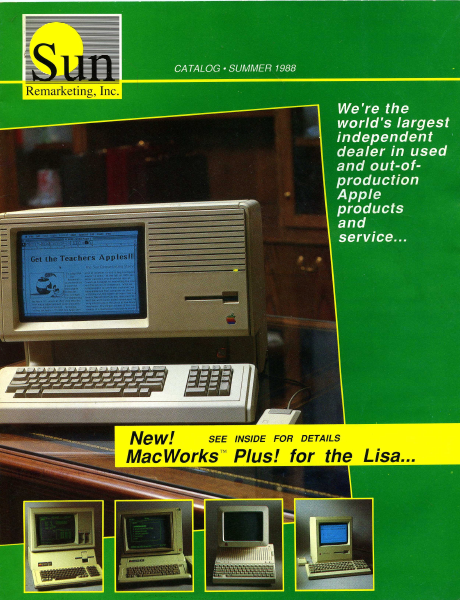
CATALOG * SUMMER 1988 We're the world's largest independent dealer in used and out-of- production * Apple products and service... New! SEE INSIDE FOR DETAILS MacWorks”™ Plus! for the Lisa... i. ea ee no one does it better than Sun Remarketing, Inc. : : », knowl ledgeable Sometimes J 7 ine telephone can eon the ot wines ve all the fear out of buying ¢ comp! CUSTOMER SERVICE 801-752-7631 Questions/Service FAX 801-563-3226 ORDERLINE 1-800-821- 3221 For Orders Only Fast, Reliable Service. It's been more than three years since we began our support of Apple's used and out-of-production equipment. In the beginning it was just the Apple ///. Now our products cross the Apple II and Macin- tosh lines. Over the years we found out that the typical Apple user is really not that typical. They seem to have a love affair with their com- puters. So, when they want them updated, serviced, or added to, they want the best! At Sun, we too share that same passion for the Apple line of computers. We have specialized in supplying hard-to-find products for your Apple computer. We have also gone beyond simple resale and have provided support to out-of-production Apple equipment by developing innovative new add-on products that help keep your Apple up to date. You'll find our prices to be low, our service to be fast, and our people to be excited to help you. Our concept of remarketing goes beyond just "liquidating" or just "selling"... we offer a service like no one else can!!! If You Like our Great Service on other products - Call us for your Mac Software or Apple Il product needs! Our New MacWorks Plus! turns your Lisa into a Macintosh Plus Sun offers more for your Lisa’ than anyone else... Sun Remarketing is really different. And this catalog proves it. It can help you get the most out of your Apple computer investment. Our commitment to even out-of-produc- tion machines is evidenced on almost every page. New...MacWorks™ Plus! The dream of almost every Lisa and Macintosh XL user, lately, has been to be able to run al/ Macintosh appli- cations under MacWorks. With a larger 12" screen the newer pro- grams would be even better than on a regular Macintosh Plus. How about HyperCard, MultiFinder, or AppleShare on the Lisa! Well, that dream is now a reality. Run programs like HyperCard, MultiFinder, Illustrator and more on your Lisal[MacxXL! Sun has just released what we call MacWorks™ Plus! This new emula- tion program is an exciting extention to Apple's MacWorks 3.0. With it, your Lisa or Macintosh XL will have the ability to run any software that will run on the Macintosh Plus. Programs like, Full Write, Adobe Illustrator, Cricket Draw and more! The new program will run on either floppy or on a hard disk, and is auto-booting. It even comes with a simple auto-install program. It will include HFS, will recognize mul- tiple hard disks, and will address the Lisa's parallel card slots without the use of Two Port Install. MacWorks Plus! is of…

Showing first 3,000 characters of 28,081 total. Open the full document →

Home Documents Lisa MacWorks Plus Technical Overview By Chuck Lukaszewski
MacWorks Plus Technical Overview By Chuck Lukaszewski

MacWorks Plus Technical Overview By Chuck Lukaszewski

Lisa · PDF
FilenameMacWorks_Plus_Technical_Overview_by_Chuck_Lukaszewski.pdf
Size4.23 MB
Subsection sun_remarketing
Downloads3
Enjoying MacTrove? Anonymous downloads are free and unlimited. Create a free account to track favorites, contribute metadata corrections, and join the community chat.
Reader
MacWorks Plus Technical Overview By Chuck Lukaszewski
/
Loading…
OCR / Text contents
MACWORKS PLUS TECHNICAL OVERVIEW Charles T. Lukaszewski Sun Remarketing, Inc. Logan, Utah MacWorks Plus Technical Overview Sun Remarketing, Inc. Page 1 o ON OO oO FF WO DN = CONTENTS Introduction Organization of MacWorks Plus Source Code MacWorks Plus Software Implementation The MacWorks Plus Installation Program List of Known Incompatibilities Issues in Transporting the Macintosh ROM Software Problem Report Summary Software Problem Reports With Corrective Measures Pending Software Problem Reports MacWorks Plus Technical Overview Sun Remarketing, Inc. Page 2 INTRODUCTION MacWorks Plus is the implementation of the Macintosh Plus 128K ROM for the Apple Macintosh-XL and Lisa-2 computers. MacWorks Plus was developed by a programming team at Sun Remarketing lead by Charles Lukaszewski. The project's design goal is one-hundred percent compatibility with software that operates on the Macintosh Plus. MacWorks Plus is based on reverse-engineered 128K Macintosh ROM code, reverse-engineered device drivers from the original MacWorks program, and modified versions of current System Software resources. The chief difference between MacWorks Plus and its predecessor is a brand-new hardware interface whose low-level interface to the 128K ROM operating system is identical to that in the Macintosh Plus. All in all, there are about 50 source files which contain some 23,000 lines of source code. The project is managed with the aid of the Macintosh Programmers Workshop (MPW) version 2.0.2. The code can be easily extended to accommodate future enhancements, should they be desiredt, including SCSI support, extended sound compatibility, and addition of 256K ROM (Macintosh SE and Macintosh Il) routines. This document is intended to provide an introduction to the MacWorks Plus code for both the programmer and the layman. The programmer should consult this document prior to making any modifications to the source code. MacWorks Plus Technical Overview Sun Remarketing, Inc. Page 3 ORGANIZATION OF MACWORKS PLUS SOURCE CODE MacWorks Plus is generated from 50 source files which can be broadly classified into five categories: ROM image files, hardware kernel files, installer files, user tools and generation utilities. The process of creating executable MacWorks Plus programs has been completely automated through the use of the Macintosh Programmers Workshop ‘make’ utility. Location of Source Files In order to compile the project with MPW, all of the source files must be located in a folder called 'MacWorks+' that resides in the MPW folder (defined by the MPW shell variable {MPW}). The ‘MacWorks+’ folder contains the following items: =) MacWorks+ BE a cy Makefile installer kernel rom_image _ pp_driver >. edev utilities includes rez doc GTE obj Ist bin — Wa KI ec The ‘Makefile’ is the master control file for MPW. Performing a ‘make all’ at this di- rectory level will build all segments of MacWorks Plus. The folders contain source code or compiler outpu…

Showing first 3,000 characters of 15,587 total. Open the full document →

Home Documents Lisa MacWorksPlusInstall
MacWorksPlusInstall

MacWorksPlusInstall

Lisa · PDF
FilenameMacWorksPlusInstall.pdf
Size0.72 MB
Subsection sun_remarketing
Downloads3
Enjoying MacTrove? Anonymous downloads are free and unlimited. Create a free account to track favorites, contribute metadata corrections, and join the community chat.
Reader
MacWorksPlusInstall
/
Loading…
OCR / Text contents
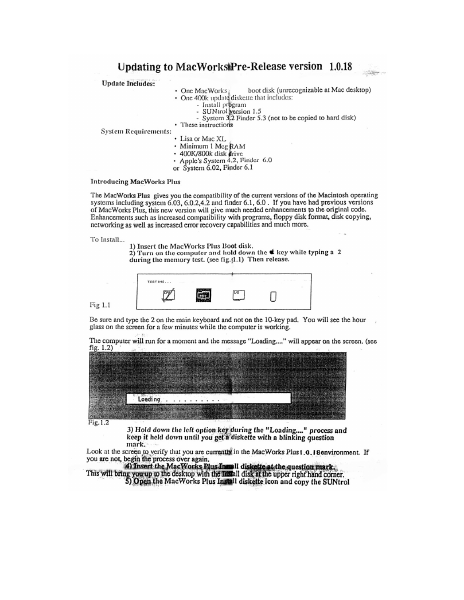
Updating to MacWorkstPre-Release version 1.0.18 Update Includes: + One MacWorks boot disk (unrecognizable at Mac desktop) * One 400k updatg diskette that includes: - Install program - SUNtrol Version 1.5 - System 3,2 Finder 5.3 (not to be copied to hard disk) + These instructions System Requirements: * Lisa or Mac XL + Minimum 1 Meg RAM + 400K/800k disk rive + Apple's System 4.2, Finder 6.0 or System 6.02, Finder 6.1 Introducing MacWorks Plus The MacWorks Plus gives you the compatibility of the current versions of the Macintosh operating systems including system 6.03, 6.0.2,4.2 and finder 6.1, 6.0. If you have had previous versions of MacWorks Plus, this new version will give much needed enhancements to the original code. Enhancements such as increased compatibility with programs, floppy disk format, disk copying, networking as well as increased error recovery capabilities and much more. To Install... 1) Insert the MacWorks Plus Boot disk. . 2) Turn on the computer and hold down the € key while typing a 2 during the memory test. (see fig.{1.1) Then release. TESTING. .. 2meaia Fig 1.1 ; Be sure and type the 2 on the main keyboard and not on the 10-key pad. You will see the hour glass on the screen for a few minutes while the computer is working. The computer will run for a moment and the message “Loading...” will appear on the screen. (see fig. 1.2) * Loadi ng 3) Hold down the left option key during the "Loading..." process and keep it held down until you get # diskette with a blinking question mark, Look at the screen to verify that you are currently in the MacWorks Plus1.¢.1@environment, If you are not, begin the process over again, ‘)Insert ic Wor Hl di e. question mark. This will ; myn ees iam dake upright and ea ‘Open.the MacWorks Plus Ingtill diskette icon and copy the SUNtrol 1.5 icon to the system folder on the hard disk. After the copy is ” 6) Double click on MacWorks Elus maenl program: The progam wil sn begin and the first screem you see pean yor thet this program cc ies bee : rio System to.thé hil disk and asks you.on which device you to ave it 5 7) Select the device that you wish to install the Macworks Plus on. or select “Cancel” if you wish to cancel. If you only have one hard disk connected, “Internal Hard Disk” will be your only choice other then “Cancel”. The next screen will ask if you want to “Update”, “Tnitialize” or “Cancel”. The Initialize option will completely reformat your hard disk. A reformat will crase the entire hard disk. For aa ar of this update, we suggest you update. }) Choose “ Update” If you choose to initialize, the uter will rentind you that the disk is about to be erased and will give you a second chance to cancel The process of updating will take a few minutes. After the update has completed you will be given the option to "Continue" back to the finder or to "Shut Down" and restart the m: ¢ under 1.0.14. We su; that you shut down. 9) Select "Shut down" From this point you can turn …

Showing first 3,000 characters of 5,161 total. Open the full document →
Subscribe to sun_remarketing
mp.ls