Home Documents Lisa The LisaTalk Report V02 N02
The LisaTalk Report V02 N02

The LisaTalk Report V02 N02
Lisa · 1986 · PDF
FilenameThe_LisaTalk_Report_V02_N02_1986_Summer.pdf
Size67.92 MB
Year1986
Subsection lisaTalkReport
Downloads3
Enjoying MacTrove? Anonymous downloads are free and unlimited. Create a free account to track favorites, contribute metadata corrections, and join the community chat.
Reader
The LisaTalk Report V02 N02
/
Loading…
OCR / Text contents
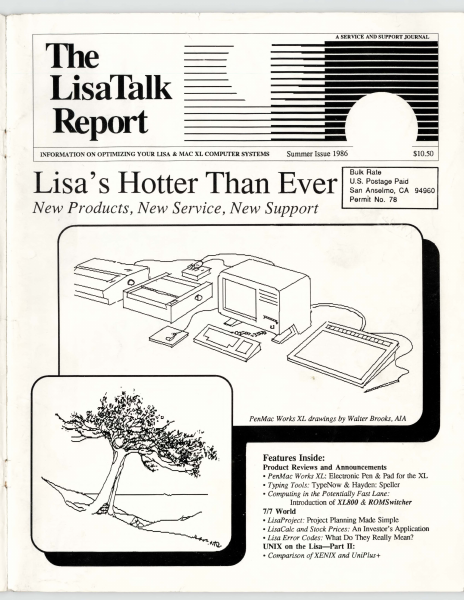
A SERVICE AND SUPPORT JOURNAL The LisaTalk Report INFORMATION ON OPTIMIZING YOUR LISA & MAC XL COMPUfER SYSTEMS --- -- Summer Issue 1986 Lisa's Hotter Than Ever New Products, New Service, New Support $10.50 Bulk Rate U.S. Postage Paid San Anselmo, CA 94960 Permit No. 78 PenMac Works XL drawings by Walter Brooks, AJA Features Inside: Product Reviews and Announcements • PenMac Works XL: Electronic Pen & Pad for the XL • Typing Tools: TypeNow & Hayden: Speller • Computing in the Potentially Fast Lane: Introduction of XL800 & ROMSwitcher 7/7 World • LisaProject: Project Planning Made Simple • LisaCalc and Stock Prices: An Investor's Application •Lisa Error Codes: What Do They Really Mean? UNIX on the Lisa-Part II: • Comparison of XENIX and UniPlus+ ROMSwitcber™ enables Lisa/XL users to switch between the Lisa Operating System (7n, Pascal WorkShop, Unix & Xenix) and MacWorks with a proper pixel proportioned full sized screen under either mode. ROMSwitcherJM allows you to install your existing F,G or H ROMS and add the 3A ROMS that come with the Apple Mac XL Screen Fix Kit, together with their respective video chips for total screen c9ntrol. Installs piggyback onto the CPU board with an external toggle switch, controllable when power is off. Installation by a technician may be required. Dafax also offers the Macintosh XL Screen Modification Kit with the 3A Roms. Introductory Price...................................................................................$129.95 AVAILABLE NOW! SCUZZI XI:? The "eXLent Solution™ SCSI Mass Storage System" for the Lisa I Mac XL!!! Available soon. We are accepting orders now. SCVZZI PLUS? The Mac Office Lives! The Amazing Three to One Touch Board™ turns your Mac into a l .6Mb-2.5 Mb Speed Demon. Adds l .5Mb SIM RAM, External Ports, Space for 512k of ROM, and a 12MHz Co-Processor. Effectively doubles processing speed, and is AppleTalk™ Compatable with 128k ROMS installed. Available now for the Mac 128k, Mac 512k and Mac 512k Enhanced, with optional SCSI interface coming soon. And, the Three to One Touch Board™ will be available soon for the Mac Plus! Add superfast reliable SCSI HD Drives and Tape Back-Up from AST, LoDOWN, Mirror Technology, and SuperMac. We can help you obtain the maximum performance and efficiency from your AppleTalk Network or Stand-alone WorkStation. MacServe™ enables you to interface your XL easily into the Macintosh Office and take advantage of the latest technology. 14 NO. DR •MALBA NY•11357•718-746-8220 ... A SERVICE AND SUPPORT JOURNAL The LisaTalk RepOrt --- INFORMATION ON OPTIMIZING~~~ LISA " MAC XL COMPurER SYSTEMS ~l ·~ Publishers: The NetWorkers-The Lis~Talk Report President: Lewis Guice VP-Operations: Roxane M. Schwabe :f ~· VP-Finance: John A. Zimmerman Devil's Advocate: Robert W. Johnson · Editor-In-Chief: Roxane M. Schwabe Chief Technical. Advisor: Lewis Guice Assistant Editor: Patricia Dine · .. · Contribunng Editors/Technical Advisors: Walter T. Brook…

Showing first 3,000 characters of 301,730 total. Open the full document →
Home Documents Macintosh MPW 3.0 Assembler Reference
MPW 3.0 Assembler Reference

MPW 3.0 Assembler Reference

Macintosh · 1988 · PDF
FilenameMPW_3.0_Assembler_Reference_1988.pdf
Size16.20 MB
Year1988
Subsection developer / MPW
Downloads2
Enjoying MacTrove? Anonymous downloads are free and unlimited. Create a free account to track favorites, contribute metadata corrections, and join the community chat.
Reader
MPW 3.0 Assembler Reference
/
Loading…
OCR / Text contents
ti® Macintosh® Macintosh Programmer's Workshop 3.0 Assembler Reference ti APPLE COMPUTER, INC. This manual and the software described in it are copyrighted, with all rights reserved. Under the copyright laws, this manual or the software may not be copied, in whole or part, without written consenr of Apple, except in the normal use of the software or to make a backup copy of the software. The same proprietary and copyright notices must be affixed to any permitted copies as were affixed to the original. This exception does not allow copies to be made for others, whether or not sold, but all of the material purchased (with all backup copies) may be sold, given, or loaned to another person. Under the law, copying includes translating into another language or format. You may use the software on any computer owned by you, but extra copies cannot be made for this purpose. © 1985-88 Apple Computer, Inc. 20525 Mariani Ave. Cupertino,Caluornia 95014 (408) 996-1010 Pascal Compiler © 1982-88 Apple Computer, Inc. © 1981 SYS, Inc. Apple, the Apple logo, AppleShare, AppleTalk, A/UX, ImageWriter, I.aserWriter, Lisa, MacApp, Macintosh, and SANE, are registered trademarks of Apple Computer, Inc. MPW, QuickDraw, ResEdi!, APDA, and SADE are trademarks of Apple Computer, Inc. MacDraw, MacPaint, and MacWrite are registered trademarks of Claris Corporation. Microsoft Word is a trademark of Microsoft Corporation. ITC Garamond and ITC Zapf Dingbats are registered trademarks of International Typeface Corporation. POSTSCRIPT is a registered trademark of the Adobe Systems Incorporated. Adobe Illustrator 88 is a trademark of Adobe Systems Incorporated. ImageStudio is a trademark of Esselte Pendaflex Corporation in the United States, of LetraSet Canada Limited in Canada, and of Esselte LetraSet Limited elsewhere. Motorola is a trademark of Motorola, Inc. MathType is a trademark of Design Science, Inc. QMS is a registered trademark of QMS, Inc. UNIX is a trademark of AT&T Bell laboratories. Simultaneously published in the United States and Canada. MPW sample programs Apple Computer, Inc. grants users of the Macintosh Programmer's Workshop a royalty-free license to incorporate Macintosh ~rammer's Workshop sample programs into their own programs, or to modify the sample programs for use in their own programs, provided such use is exclusively on Apple computers. For any modified Macintosh Programmer's Workshop sample program, you may add your own copyright notice alongside the Apple copyright notice. Contents Figures and tables xiii Preface About This Manual xv What this manual contains xvii Other reference materials xviii Notation conventions xix Aids to understanding xix Courier typeface xx Italic xx Fields xxi Delimiter symbols xxi Braces xxii Brackets xxii Ellipses xxiii Underlining xxiii For more information xxiv Part I Using the Assembler 1 1 About the Assembler 3 General characteristics 5 Overview of the assembly process 6 Assembly files 7 Programming for the …

Showing first 3,000 characters of 500,000 total. Open the full document →
Home Documents Macintosh MacSE Prototype Developer Manual
MacSE Prototype Developer Manual

MacSE Prototype Developer Manual

Macintosh · 1986 · PDF
FilenameMacSE_Prototype_Developer_Manual_1986.pdf
Size9.46 MB
Year1986
Subsection prototypes / 1986_Freeport
Downloads2
Enjoying MacTrove? Anonymous downloads are free and unlimited. Create a free account to track favorites, contribute metadata corrections, and join the community chat.
Reader
MacSE Prototype Developer Manual
/
Loading…
OCR / Text contents
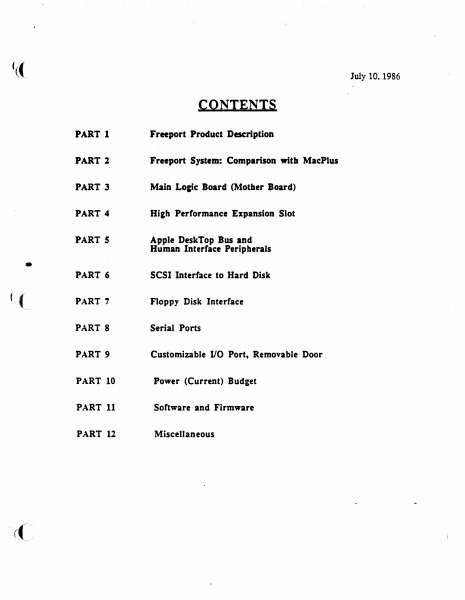
'(( July 10, 1986 CONTENTS • (":(~ PART 1 Freeport Product Description PART 2 Freeport System: Comparison with MacPlus PART 3 Main Lo&f c Board (Mother Board) PART 4 Hi&h Performance Expansion Slot PART 5 Apple DeskTop Bus and Human Interface Peripherals PART 6 SCSI Interface to Hard Disk PART 7 Floppy Disk Interface PART 8 Serial Ports PART 9 Customizable VO Port, Removable Door PART 10 Power (Current) Bud1et PART 11 Software and Firmware PART 12 Miscellaneous ( f PART 1 Freeport Product ·Description - 7-10-86 PART 1 Freeport Product Description General l=reepon is an enhanced Macintosh Plus that suppons internal and extrmal customized expansion options includina: from Apple Computer.Inc. • Inu:mal 20MB Hard Disk or a Second Internal Sony Floppy Disk Drive and from third party vendors • • External Video Board • Ethernet/Token Ring Interface Board I, ~; • Modem Board • Accelerator/Coprocessor Boards • Etc.(This list is suggestive only, not limiting) Freepon suppons the same peripherals as Macintosh Plus except that the keyboard and mouse follow the new corporate Apple DeskTop Bus design. ',r' ! Product Desi2n External Features • Same overall form factor as Macintosh Plus • Apple DeskTop Bus keyboard and mouse (two connectors at rear) • Floppy disk slot meam1ined. compatible wilh new fro& styling •Restyled front bezel and rear housing, ventilalion slots added for better cooling • Optional pluggable slot in front housing, for a second internal floppy disk drive • Plastic snap-out door at rear to support out-of-box I/O Internal Features • Optional hard disk or optional second Sony, above the standard Sony disk drive - • Higher capacity power supply to support die optional floppy or hard disks •Connectors for the optional floppy, optional ~CSI hard disk. and expansion hardware (daughterboard or external) • Fan for cooling •New swing-away logic board mounting to allow insertion with third-party daughterboard present Hardware Logic Board • 8 MHz 68000 CPU • Enhanced memory access yields 16.8% increase.cl speed when operating from RAM • Gate array implementation of PAL and discrete logic devices * Seven year lithium bane:y for clock and calendar * Internal- two Floppy Disk and SCSI connectors • Extcmal--two Serial, two Apple DeskTop Bus, SCSI, Floppy Disk. and Sound pon connectors Analo& Section * New 80 Wan. wide input range power supply * Improved display sweep section *Fan Software System * New ROM with minimum changes from Macintosh Plus * Changes include new SCSI manager, support for Apple DeskTop Bus, and modifications to the AppleTalk drivers to support the new Apple serial pon azchiteemrc Application • r·· '· * Boot chooser to allow stan·up drive selection * Compatible with Macintosh Plus Options • Internal 20 Megabyte SCSI hard disk compatible with SCSI HD-20, or a second SOOK internal floppy disk drive Freeport FRONT BEZEL '( .. . .... ..... ~ ~ .. . . . • : .. T~ YE…

Showing first 3,000 characters of 218,100 total. Open the full document →
Home Documents Lisa Toolkit 3.0 Diskette Catalogs
Toolkit 3.0 Diskette Catalogs

Toolkit 3.0 Diskette Catalogs

Lisa · PDF
FilenameToolkit_3.0_Diskette_Catalogs.pdf
Size0.31 MB
Subsection toolkit_3.0
Downloads3
Enjoying MacTrove? Anonymous downloads are free and unlimited. Create a free account to track favorites, contribute metadata corrections, and join the community chat.
Reader
Toolkit 3.0 Diskette Catalogs
/
Loading…
OCR / Text contents
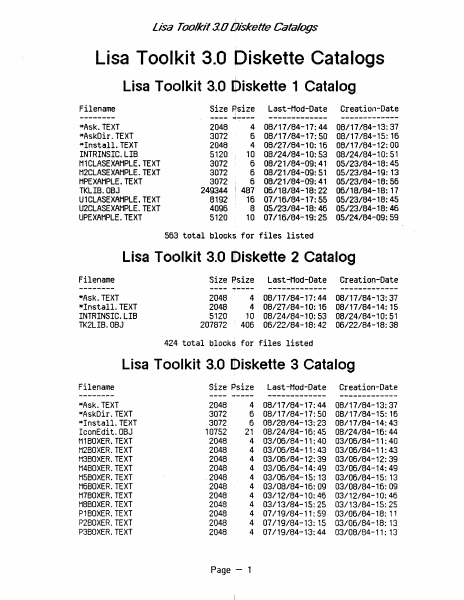
lisa Toolkit 3.0 Oiskette Catalogs Lisa Toolkit 3.0 Diskette Catalogs Lisa Toolkit 3.0 Diskette 1 Catalog Filename -------*Ask. TEXT *AskDir.TEXT *Install. TEXT INTRINSIC. LIB H1CLASEXAHPLE. TEXT M2CLASEXAMPLE.TEXT HPEXAHPLE. TEXT TKLIB.OBJ U1CLASEXAHPLE. TEXT U2CLASEXAHPLE. TEXT UPEXAHPLE. TEXT Size Psize , ---- -+---- 2048 3072 2048 5120 3012 3072 3012 249344 8192 4096 5120 Last-Had-Date ------------- Creation-Date ------------- 4 08/11184-11:44 08/11184-13:31 6 08/11184-11:50 08/11184-15: 16 4 08/21184-10: 16 08/11184-12:00 10 08/24/84-10:53 08/24/84-10:51 6 08/21/84-09:41 05/23/84-18:45 6 08/21/84-09:51 05/23/84-19: 13 I ~ 6 08/21/84-09:41 8 05/23/84-18:46 05/23/84-18:46 05123/84-18:56 481 06/18/84-18:22 06/18/84-18: 11 16 01116/84-11:55 05/23/84-18:45 10 07/16/84-19:25 05/24/84-09:59 563 total blocks for files listed Lisa TOtJlkit 3.0 [tliskette 2 Catalog Filename -------*Ask.TEXT *Install. TEXT INTRINSIC. LIB TK2LIB.OBJ Last-Mod-Date Creation-Date 08/17/84-17:44 08/27/84-10:16 10 08/24/84-10:53 406 06/22/84-18:42 08/17/84-13:37 08/17/84-14:15 08/24/84-10:51 06/22/84-18:38 Size Psize ---- ~---- 2048 2048 5120 207872 ------------- 4 4 ------------- 424 total blocks for files listed Lisa Toc)lkit 3.0 Diskette 3 Catalog Filename -------- *Ask. TEXT *AskDir. TEXT *Install. TEXT IconEdit.OBJ M1BOXER. TEXT H2BOXER. TEXT H3BOXER. TEXT M4BOXER. TEXT H5BOXER.TEXT H6BOXER. TEXT H7BOXER. TEXT H8BOXER. TEXT P1BOXER. TEXT P2BOXER. TEXT P3BOXER. TEXT Size Psize ---2048 4 3072 6 3072 6 10752 21 2048 4 2048 4 2048 4 2048 4 .2048 4 2048 4 4 2048 2048 4 2048 4 4 2048 2048 4 ~---- Page - 1 Last-Had-Date Creation-Date 08/11184-17:44 08/17/84-17:50 08/28/84-13:23 08/24/84-16:45 03/06/84-11:40 03/06/84-11:43 03/06/84-12:39 03/06/84-14:49 03/06/84-15: 13 03/08/84-16:09 03/12/84-10:46 03/13/84-15:25 01119/84-11:59 07/19/84-13: 15 07/19/84-13:44 08/17/84-13:37 08/17/84-15: 15 08/17/84-14:43 08/24/84-16:44 03/06/84-11:40 03/06/84-11:43 03/06/84-12:39 03/06/84-14:49 03/06/84-15: 13 03/08/84-16:09 03/12/84-10:46 03/13/84-15:25 03/06/84-18: 11 03/06/84-18: 13 03/08/84-11: 13 ------------- ------------- Lisa' Toolkit 3.0 Oiskette Catalogs P480XER.TEXT P5BOXER.TEXT P6BOXER.TEXT P7BOXER.TEXT P8BOXER.TEXT TK/ALERT.08J TK/COHP.TEXT TK/HAKE.TEXT TK/NullChange.OBJ TK/PABC.TEXT TK/UNITCHANGED.TEXT TK/WorkDir.OBJ TK/XRead.TEXT u1boxer.text U1BOXER2.TEXT u2boxer.text U2BOXER2.TEXT u3boxer.text U3BOXER2.TEXT u4boxer.text U4BOXER2. TEXT u5boxer.text U5BOXER2.TEXT u6boxer.text U6BOXER2.TEXT u7boxer.text U7BOXER2.TEXT U8BOXER.TEXT U8BOXER2.TEXT X1BOXER.TEXT X2BOXER.TEXT X3BOXER.TEXT X4BOXER.TEXT X5BOXER.TEXT X6BOXER.TEXT X7BOXER.TEXT X8BOXER.TEXT 2048 2048 2048 2048 2048 18432 2048 10240 2048 11264 3072 1024 ' 2048 3072 , 4096 3072 6144 4096 9216 4096 10240 5120 12288 6144 19456 7168 21504 10240 32768 2048 2048 2048 2048 2048 2048 2048 2048 4 07/19/84-13:44 4 07/19/84-13:45 4 07/19/84-14:03 4 07/20/84-11:50 4 07/20/84-11:58 36 05/15/84-15:4…

Showing first 3,000 characters of 10,829 total. Open the full document →
Home Documents Macintosh BIGMAC VTG
BIGMAC VTG

BIGMAC VTG

Macintosh · PDF
FilenameBIGMAC_VTG.pdf
Size0.19 MB
Subsection prototypes / 1985_Big_Mac
Downloads3
Enjoying MacTrove? Anonymous downloads are free and unlimited. Create a free account to track favorites, contribute metadata corrections, and join the community chat.
Reader
BIGMAC VTG
/
Loading…
OCR / Text contents
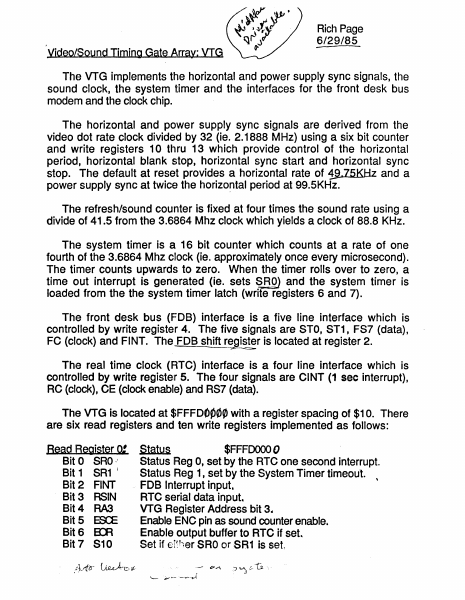
Rich Page 6/29/85 Yideo/Sound Timing Gate Array: VIG The VTG implements the horizontal and power supply sync signals, the sound clock, the system timer and the interfaces for the front desk bus modem and the clock chip. The horizontal and power supply sync signals are derived from the video dot rate clock divided by 32 (ie. 2.1888 MHz) using a six bit counter and write registers 10 thru 13 which provide control of the horizontal period, horizontal blank stop, horizontal sync start and horizontal sync stop. The default at reset provides a horizontal rate of 1!l.75KHz and a power supply sync at twice the horizo~tal period at 99.5KHz. The refresh/sound counter is fixed at four times the sound rate using a divide of 41.5 from the 3.6864 Mhz clock which yields a clock of 88.8 KHz. The system timer is a, 16 bit counter which counts at a rate of one fourth of the 3.6864 Mhz clock (ie. approximately once every microsecond). The timer counts upwards to zero. When the timer rolls over to zero, a time out interrupt is generated (ie. s,ets ~ROJ and the system timer is loaded from the the system timer latch (write registers 6 and 7). The front desk bus (FOB) interface is a five line interface which is controlled by write register 4. The five signals are STO, ST1, FS7 (data), FC (clock) and FINT. The, FOB shift register is located at register 2. --===-;z The real time clock (RTC) interface is a four line interface which is controlled by write register 5. The four signals are CINT (1 sec interrupt), RC (clock), CE (clock enable) and RS7 (data). The VTG is located at $FFFOOP0~ with a register spacing of $10. There are six read registers and ten write registers implemented as follows: Bead Register 0: Status $FFFOOOO 0 Bit 0 SRO Status Reg 0, set by the RTC one second interrupt. Bit 1 SR1 ( Status Reg 1, set by the System Timer timeout. Bit 2 FINT . FOB Interrupt input. Bit 3 RSIN RTC serial data input. Bit 4 RA3 VTG Register Address bit 3 .. Bit 5 ES:E Enable ENC pin as sound counter enable. Bit 6 ErA Enable output buffer to RTC if set Bit 7 S10 Set if er~her SRO orSR1 is set. J ..- 17.-"\ Bead Register 2: FDa Shifter Beacf Begister 4: Number..LQw po~ $FFFk 1..0 This register allows the FOB shift register to be read. $FFF~O This register allows the low byte of the number register to be read. Numberliigb $FFFdbso tou"S1J This register allows the high byte of the number register to be read. Bead Register 5: Read Register 6: Timer L~ $FFFD060 \?60 &0 This register allows the low byte of the sy~~em timer to be read.J7'~ Bead Register 7: Timer Hlgh $FFFD070 bClO 1 0 This register allows the high byte of the system timer to be read V , Write Register 0; Bit 0 SRO , Bit 1 SR1 Bit 4 RA3 Bit5 ~ Status $FFFDOOOO RTC one second interrupt bit. System Timer timeout bit. VTG Register Address bit 3. Enable ENe pin as Sound Counter Enable. Note: This register must be initialized at system reset. The remaining bits should be zero when written. $FFFOcfuO wit…

Showing first 3,000 characters of 5,035 total. Open the full document →

Home Documents Lisa The Pascal Development System Manual Feb82
The Pascal Development System Manual Feb82

The Pascal Development System Manual Feb82

Lisa · PDF
FilenameThe_Pascal_Development_System_Manual_Feb82.pdf
Size4.07 MB
Subsection pascal_monitor
Downloads3
Enjoying MacTrove? Anonymous downloads are free and unlimited. Create a free account to track favorites, contribute metadata corrections, and join the community chat.
Reader
The Pascal Development System Manual Feb82
/
Loading…
OCR / Text contents
THE PASCAL DEVELOPMENT SYSTEM MANUAL BillSchottstaedt Ext. 2379 16-Feb-82 The Pascal Development System Manual 16-Feb-82 TABLE OF CONTENTS The Monitor • ., 1 The Pascal Compiler • • 7 .. The Linker • 15 The Assembler. LisaBug • • 23 ., ., • 37 The Symbolic Debugger • 47 The Filer. • 53 The Editors The Lisa Editor " The UCSD Editor. " 59 63 " " Utilities • 71 Segmentation and Intrinsic Unit Management IUManager • • '72 ChangeSeg • •• .., ., 74 SegMap • • • ., • • 74 System Configuration Configure • Contrast SetSP • ChangeMem • Flip4 • MoveSoroc • .. File Transfer FileDiv • FileJoin ·.. ·· .. .. Source File Debugging Diff " FindID Pret ty Lis t " PascalRef " . . . . "•" 757675 . . •• "7676 " • '76 • 77 " "77 . Object File Debugging DumpOBJ " DumpHex " • " • Patch " OBJDiff " ByteDiff GXRef • • 78 " 80 " 81 " 82 " 87 88 89 " 90 " 90 " 90 16-Feb-82 The Pascal Development System Manual Hardware Debugging LisaTest . . . • • • • • .• • • • 91 Performance Measurement Perform • • • • • Coverage Analysis • • • • • • • • • 93 • • • • • • 94 Document Compiler Script • • • • • • • • • • • • • • ~ 96 Other Terminal Emulator • • • • • • • • • • 98 Error Mes sages • • • • • • • • • • • • • • • 101 16-Feb-82 The Pascal Development System Manual MONITOR The ~tonitor is an operating system for the Lisa computer. Its user interface is patterned after that of the UCSD system on the Apple II. There are several possible system configurations. A standard one is: I Disk I +--------+ I Sorpc I I Disk I 1 for I I Debugger I +------1+-...----+ (or a hard disk) +---------+ +----+- 1 +- --+ I I+-- I J v +---------+ I Apple II 1<1- I +----------+ I v +-----.. --+ I I I I Soroc t or I Apple II I monitor 1 ......---------+ I UART I I -I ->1 I I LISA 1 I I I --+ I +---------+ I Corvus I I or I Profile I I +--------+ --------+ II I Keyboard +---------+ The hard disk can be connected directly to the Lisa, or it can be accessed through the Apple II. It can also be omitted. BOOTING THE MONITOR To boot from a diskette based Apple II, first power up the Apple II with the male boot diskette in drive #4:. Insert the female boot in drive #5: and power up the Lisa. The female boot volume can also reside on a hard disk. SYSTEM.STARTUP on the male boot volume automatically executes MONBOOT, the program that starts up the Monitor on the Lisa. If you type space during the boot process, MONBOOT is not executed. If you type 'D' during the boot process, the debugging version of the Monitor is booted. Page 1 16-Feb-82 The Pascal Development System Manual The Moni tor comes up on the Lisa scret!n. If you want it to appear on the Apple II monitor or the Soroc (~onnected to the UART port, change the MON.STARTUP program as follows: 1) for the Apple window: remo",e MON. STARTUp· 2) for the Lisa window (the dE~fault): transfer MONSTARTl.OBJ to MON.STARTUP 3) for the UART window: transj:er MONSTART2.0BJ to MON.STARTUP …

Showing first 3,000 characters of 157,990 total. Open the full document →

Home Documents Lisa The LisaTalk Report V01 N02
The LisaTalk Report V01 N02

The LisaTalk Report V01 N02

Lisa · 1985 · PDF
FilenameThe_LisaTalk_Report_V01_N02_1985_Winter.pdf
Size62.93 MB
Year1985
Subsection lisaTalkReport
Downloads3
Enjoying MacTrove? Anonymous downloads are free and unlimited. Create a free account to track favorites, contribute metadata corrections, and join the community chat.
Reader
The LisaTalk Report V01 N02
/
Loading…
OCR / Text contents
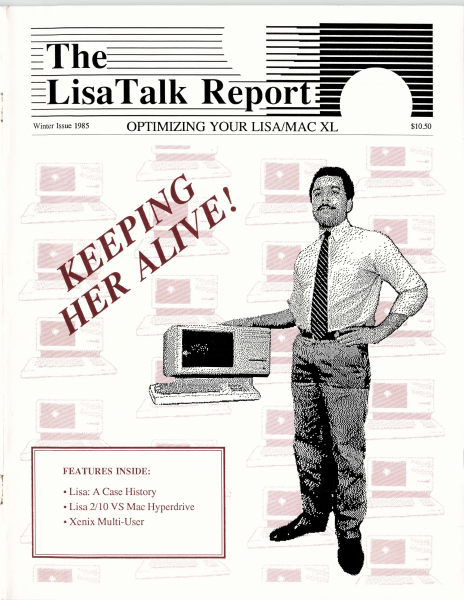
The--- - .- I l ~ ...- Winter Issue 1985 OPTIMIZING YOUR LISA/MAC XL . ." ' \·::·:·:":....: FEATURES INSIDE: • Lisa: A Case History • Lisa 2/10 VS Mac Hyperdrive •Xenix Multi-User $10.50 =----!IPll.._E The-~LisaTalk Reporf :if OPfIMIZING YOUR LISNMAC XL Publishers: The NetWorkers-The LisaTalk Report President: Lewis Guice VP-Operations: Roxane M. Schwabe, VP-Finance: John A. Zimmerman Limited Partner: Robert W. Johnson Administrative Assistant: Carole Crawford Staff Assistant: Dan Schwabe Editor in Chief· - The LisaTalk Report is published on a quarterly basis by The NetWorkers-The LisaTalk Report in Marin County of California. Copyright 1985, The NetWorkers-The LisaTalk Report, all rights reserved. Business and Editorial Offices: 21 Canyon Road, San Anselmo, California 94960. Telephone (for Marin County businesses and residents outside Marin County): (415) 258-9152. Telephone (for San Francisco businesses and residents): (415) 550-1710. The NetWorkers Financial Office is located at 345 Lorton Avenue, Suite 200, Burlingame, California 94010. Telephone: (415) 258-9152. Lewis Guice Associate Editor: Roxane M. Schwabe Assistant Editor: Patricia Dines Contributing Editors: Diane Bums Joan D. Dickey Patricia Dines John C. Draper Rob Graner Gary Ingram Samuel Neulinger David Redhed Robert Reed Fred Reitberger S. Venit Art & Production: The NetWorkers-The LisaTalk Report TechArt of San Francisco, Kim Payne and Diane Bums Tribute To The Lisa - Photographs by Joel Abramson The LisaTalkReport is an independent journal, not affiliated in any way with Apple Computer, Inc. Apple is a registered trademark of Apple Computer, Inc. Lisa and Mac XL are trademarks licensed to Apple Computer, Inc. All other product names are trademarks of those companies indicative of the possessive. Some of the views expressed by contributors may not be representative of the views held by The NetWorkers-The LisaTalk Report. For Writer's Guidelines or for Advertising Rates, write: The NetWorkers-The LisaTalk Report, 21 Canyon Road, San Anselmo, California, 94960, or call (415) 258-9152. U.S. SUBSCRIPTION rates are $42.00 per year for four quarterly issues. Single copy price is $10.50. For subscriber service questions, write: The NetWorkers-The LisaTalk Report, 21 Canyon Road, San Anselmo, California, 94960. Printed in the United States of America. Copyright 1985, The NetWorkers-The LisaTalk Report. All rights reserved. POSTMASTER: Send address changes to: The N etWorkersThe LisaTalk Report, 21 Canyon Road, San Anselmo, California, 94960. On The Cover: Lewis Guice and the orphan Lisa Computer, photograph by Joel Abramson, digitized by TechArt, San Francisco, California. In This Issue: All text within this issue of The LisaTalk Report was produced using PageMaker, by Aldus Corporation, and printed in its entirety on the Apple LaserWriter printer. Text within each article and columns was formatted using the Times 10-point font. The LisaTalk Report• Winter…

Showing first 3,000 characters of 253,326 total. Open the full document →

Home Documents Lisa Workshop Users Guide 3.0 Release Notes
Workshop Users Guide 3.0 Release Notes

Workshop Users Guide 3.0 Release Notes

Lisa · PDF
FilenameWorkshop_Users_Guide_3.0_Release_Notes.pdf
Size0.66 MB
Subsection workshop_3.0
Downloads3
Enjoying MacTrove? Anonymous downloads are free and unlimited. Create a free account to track favorites, contribute metadata corrections, and join the community chat.
Reader
Workshop Users Guide 3.0 Release Notes
/
Loading…
OCR / Text contents
Workshop User1s Guide 3.0 Release Notes These release notes reflect changes and additions to the Lisa Workshop Environment 3.0 release software. The notes update the the following chapters: Chapter 2, The File Manager; Chapter 4.. The Editor; Chapter 5" The Pascal Compiler; Chapter 6" The Assembler; Chapter 7.. The Linker; Chapter 8.. The Debugger; and Appendix D. . Common Problems. Please look over the notes and place them with the corresponding chapters in your binder for easy reference. TIJe FIle Hanager Chapter 2 The File Manager overview Of a&QeS to me FDe McI.ager The significant Changes to the Flle Manager Involve: • The Operating system·s new hierarChical catalog structure. • TrcrlSfer operations onto more ttsl one micro diskette. • Password protection. • The new OS deVice names. The Operating System uses new physical device names, bUt still supports the Old names as device aliases. YOU can specify a device using eltner the name or the alias; the OS refers to devices by name. The table shows new names. DevIce NEmes Sld Phases DevIce #10#1 RS232A ser1al Port A #10n RS232B senal POrt B #11 PARN>ORT Parallel COmector (LIsa 1) #12 lPPER or PAR.APORT Bullt-In hard disk (LIsa 2) #13 LOWER Micro diskette drive #15#1 ALTC~E Alternate console #15#2 MAI~E Maln console #x SLOTx Peripheral at expa'lSlon slot x #x#y SLOT~y Per1pheral at expansion slot x, connector y #x#y#z SLOT~yCEVZ Peripheral at expansion slot X, connector y, deVice z MCatalog COO..aMl Files on a voltme can now be arranged under catalogs and SUbCatalogs. The AtkCatalog command lets you create new catalogs. The pathname you specify for a catalog shOUld refer to a volume that has been Inltiallzed using the Release 3.0 SOftware. TIle hyp/len is the catalog delimiter" so a file name referring to a file In a catalog might look lil<e -vol-cat-flle or -vol-catt-cat2-f1le, and so on. A fUe name of the form cat-file is Interpreted relative to the current prefix and thUs might refer to -vol-cat-flle or -vol-catt-cat-flle, depending on Whether the prefix is set to a voltme or to a catalog. A catalog specified by a pathname without a volume part will be created using the current main prefix. There is no special command to put a fUe In a catalog. once a catalog nas been created, new files get put into it in two ways: f\btes 2-1 TIle File ft1anager • If the new file's name Is specified by a fUll patlTtCme with volU'Tle and catalog parts, the file Is put In the specified catalog. (A catalog rrust exist before a file can be put Into It.) • If the new file's name Is a partial patlTtCme wltnout a volt.me part, and the current prefix Is a catalog, the file Is put In the prefix catalog (or a Sltlcatalog, If the file's patlTtCme inclUdes a catalog part~ When the OS tries to find a file glven a partial patlTtCme, the file wUl be fOll1d only if (1) the pathname has no catalog part and Is located in the prefix volt.me or catalog, or (2) the patlTtCme has a catalog part corresponding to a path…

Showing first 3,000 characters of 25,476 total. Open the full document →

Home Documents Macintosh MacApp 2.0 Object And Method Reference
MacApp 2.0 Object And Method Reference

MacApp 2.0 Object And Method Reference

Macintosh · PDF
FilenameMacApp_2.0_Object_and_Method_Reference_198810.pdf
Size3.08 MB
Subsection developer / MacApp / MacApp_2.0b5
Downloads2
Enjoying MacTrove? Anonymous downloads are free and unlimited. Create a free account to track favorites, contribute metadata corrections, and join the community chat.
Reader
MacApp 2.0 Object And Method Reference
/
Loading…
OCR / Text contents
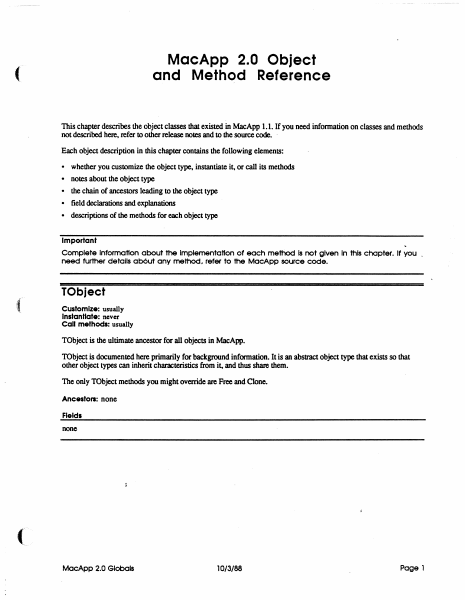
MacApp 2.0 Object and Method Reference ( This chapter describes the object classes that existed in MacApp 1.1. If you need infonnation on classes and methods not described here, refer to other release notes and to the source code. . Each object description in this chapter contains the following elements: • • • • • whether you customize the object type. instantiate it, or call its methods notes about the Object type the chain of ancestors leading to the object type field declarations and explanations descriptions of the methods for each object type Important Complete Information about the Implementation of each method Is not given In this chapter. It you _ need further details ab6ut any method, refer to the MocApp source code. TObject Customize: usually Instantiate: never Call methods: usually TObject is the ultimate ancestor for all objects in MacApp. TObject is documented here primarily for background information. It is an abstract object type that exists so that other object types can inherit characteristics from it, and thus share them. The only TObject methods you might override are Free and Clone. Ancestors: none Fields none MocApp 2.0 Globels 10/3/88 Page 1 Clone FUNCTION TOb ject. Clone: TOb ject; The return value An exact copy of the calling object Purpose To clone dependent objects referred to by the fields of an object as well as cloning the object itself. An object is dependent on another object when the second object has the only (or the only important) reference to the fU'St object Dependency is a relatively vague condition; when you override this method. you need to determine what objects are dependent on SELF. The default version Calls ShallowClone. and thus clones only the object itself Override Sometimes Call Sometimes Free PROCEDURE TObject.Free; Purpose To free the calling object and any dependent objects referred to by its fields. An' object is dependent on another object when the second object has the only (or the only important) reference to the fU'St object Dependency is a relatively vague condition; when you override this method. you need to determine what objects are dependent on SELF. The default version Calls ShallowFree Override Often. Your version should free any dependent objects you have added for your customization and then call INHERITED Free so that any ancestor methods can free other dependent objects. The chain of INHERlTED calls leads to TObjectFree. which calls TObject.ShallowFree. which frees SELF. Call Often ShallowClone FUNCTION TObject.ShallowClone: TObject; The return value Purpose This is the lowest-level method for copying an object Called by TObjectOone The default version Calls HandToHand. an Inside Macintosh routine, to copy the object data Override Never Call Rarely MacApp 2.0 Globals 10/3/88 Page 2 Shallow Free PROCEDURE ( TObject.ShallowFree; Purpose This is lhe lowest-level method for freeing an object Called by TObjecLFree The default v…

Showing first 3,000 characters of 78,076 total. Open the full document →

Home Documents Macintosh MacApp 2.0 Globals
MacApp 2.0 Globals

MacApp 2.0 Globals

Macintosh · 1988 · PDF
FilenameMacApp_2.0_Globals_1988.pdf
Size1.56 MB
Year1988
Subsection developer / MacApp / MacApp_2.0b5
Downloads2
Enjoying MacTrove? Anonymous downloads are free and unlimited. Create a free account to track favorites, contribute metadata corrections, and join the community chat.
Reader
MacApp 2.0 Globals
/
Loading…
OCR / Text contents
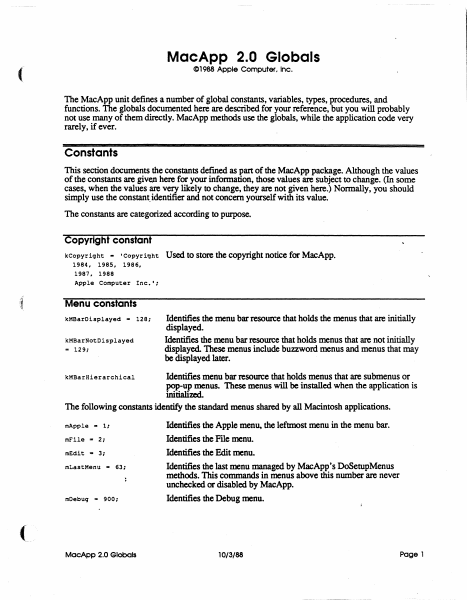
MacApp 2.0 Globals C1988 Apple Computer. Inc. ( The MacApp unit defines a number of global constants, variables, types, procedures, and functions. The globals documented here are described for your reference, but you will probably not use many of them directly. MacApp methods use the globals, while the application code very rarely, if ever. Constants This section documents the constants defmed as part of the MacApp package. Although the values of the constants are given here for your information, those values are subject to change. (In some cases, when the values are very likely to change, they are not given here.) Normally, you should simply use the constant. identifier and not concern yourself with its value. The constants are categorized according to purpose. Copyright constant kCopyriqht - 'Copyright 1984, 1985, 1986, 1987. 1988 Apple Computer Inc.'; ,t Used to store the copyright notice for MacApp. Menu constants kMBarDisplayed - 128; kMBarNotDisplayed .. 129; Identifies the menu bar resource that holds the menus that are initially displayed. Identifies the menu bar resource that holds menus that are not initially displayed. These menus include buzzword menus and menus that may be displayed later. Identifies menu bar resource that holds menus that are submenus or pop-up menus. These menus will be installed when the application is initialimL The following constants identify the standard menus shared by all Macintosh applications. kMBarHierarchical mApple - 1: mFile - 2: mEdit - 3; mLastMenu '" 63: mDebuq '" 900: MacApp 2.0 Globals Identifies the Apple menu, the leftmost menu in the menu bar. Identifies the File menu. Identifies the Edit menu. Identifies the last menu managed by MacApp's DoSetupMenus methods. This commands in menus above this number are never unchecked or disabled by MacApp. Identifies the Debug menu. 10/3/88 Page 1 Command numbers The command numbers listed here are passed to your methods, generally to gTargetDoMenuCommand Most are passed as a result of the user picking a menu command; command numbers are alsO used for other types of commands, such as typing or mouse commands. When the description says "MacApp catches this," that means that the MacApp DoMenuCommand methods will handle those command numbers, often by calling application methods. cNoCommand Command number representing no command. MacApp catches this. cAboutApp Identifies the About <AppNme>..• command. MacApp catches this. File menu commands Identifies the New command MacApp catches this. (See also cNew .. 10; cNewLast.) cNewLast - 19; cSave .. 30; cClose - 31; cSaveAs .. 32; cSaveCopy - 33; cRevert .. 34; cOpen - 20; cOpenLast .. 29; cPaqeSetup - 176; cPr intOne - 177; cPrint - 178; cPrintToFile - 179; cPrFileBase - 176; cPrFileMax .. 195; cPrViewBase .. 201; cPrViewMax .. 250; cQuit - 36; MacApp 2.0 Globais Identifies the last New command MacApp provides a range of New commands for applications that have diff…

Showing first 3,000 characters of 37,364 total. Open the full document →

Subscribe to PDF
mp.ls