Home Documents Macintosh Inside Macintosh Promotional Edition
Inside Macintosh Promotional Edition
Inside Macintosh Promotional Edition

Macintosh · 1985 · PDF
FilenameInside_Macintosh_Promotional_Edition_1985.pdf
Size51.39 MB
Year1985
Downloads4
Enjoying MacTrove? Anonymous downloads are free and unlimited. Create a free account to track favorites, contribute metadata corrections, and join the community chat.
Reader
Inside Macintosh Promotional Edition
/
Loading…
OCR / Text contents
A Letter from the Macintosh Developers Group 15 March 1985 DearReader: After many months of work the Macintosh Division’s User Education Group (responsible for all the Macintosh documentation) has completed the manuscript for Jnside Macintosh. We’ve finalized production arrangements with a major publisher and you can expect to see the final edition at better bookstores everywhere by late summer ’85. However, we can’t wait that long and don’t expect you to either. We’ ve therefore produced this special Promotional Edition to handle the demand for Inside Macintosh until the final edition becomes available. The contents of this edition are still preliminary and subject to change; the final edition will include many updates and corrections. The production quality of the final edition will be significantly improved from this inexpensive edition. Now, here are answers to some questions we anticipate: Q.I purchased the three-ring binder version of Inside Macintosh from your mail-house for $100 and also bought the Software Supplement for $100. Is this Promotional Edition the final copy I’m supposed to receive for purchasing the Software Supplement? A.No. As promised, Supplement owners will receive a copy of the final version when it’s available. Q. How can I get Macintosh developer utilities, example programs, example source code, the libraries I need to do Lisa Pascal/Macintosh cross-development work, and additional copies of this manual? A.The Software Supplement consists of: 1) useful Macintosh utilities, example programs, and example source code, 2) the interface files, equate files, and trap definitions in both Macintosh and Lisa readable format, 3) all of the libraries required for Lisa Pascal/Macintosh cross-development, 4) a new Lisa Pascal Compiler, which supports SANE numerics, and 5) a copy of the final published edition of Inside Macintosh (this will be sent to you when available). The price for the Software Supplement is $100. As of April ’85 the Software Supplement has been frozen to correspond to /nside Macintosh and automatic updates will no longer be included in the Software Supplement price. We will, however, inform Supplement owners of other products and utilities as they become available. You may also order additional copies of this special Promotional Edition of Inside Macintosh for $25 per copy. You can order the Software Supplement and/or copies of this Promotional Edition of Inside Macintosh by writing to (California residents please add 6.5% sales tax) : Apple Computer, Inc. 467 Saratoga Avenue Suite 621 San Jose, CA 95129 (408) 988-6009 Q. Is there a good way to keep up-to-date with new utilities and technical notes and at the same time stay in touch with other developers? A. We’ve found that electronic distribution is a very cost-effective, timely way to keep the developer world up-to-date. At least two major on-line services, Delphi and Compuserve, host the MicroNetworked Apple Users’ Group (MAUG)--an electronic s…

Showing first 3,000 characters of 16,373 total. Open the full document →
Home Documents Macintosh Dbg Init
Dbg Init

Dbg Init

Macintosh · PDF
Filenamedbg-init.pdf
Size0.79 MB
Subsection prototypes / 1985_YACC / firmware / yaccsbug
Downloads3
Enjoying MacTrove? Anonymous downloads are free and unlimited. Create a free account to track favorites, contribute metadata corrections, and join the community chat.
Reader
Dbg Init
/
Loading…
OCR / Text contents
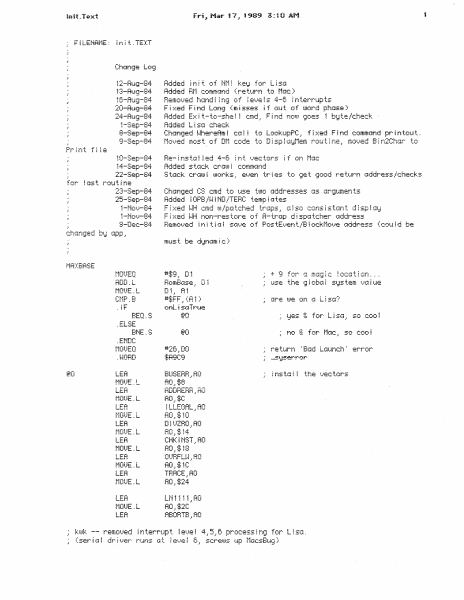
F!LEMRME: !nit.TEXT 12-Ru=;i-84 i :3-Aui;i-84 1C:-AuQ-B4 20-AUi;l-84 24-Au•;:-B4 1-Sep-84 8-Sep-84 9-Sep-84 10-Sep-B4 14-Sep-84 22-Sep-84 2:~;-Sep-84 25-Sep-84 i-Ni:;;.}-84 1-No:.}-84 Adc!ed ~ n i t of t·it·1 ~ keiJ for L i sci Added Fit·1 cc1mmc~nd (re tt~rn tc1 t·1(:tC: ) Bemc!t.Jed hGnd i ~ rI:~ of ~ e'.)e i s 4-C: j r1 ter·r·up ts F i ::-::ed F i r·;d Lon9 ( mi sses i f out of word pni:Jse ..! Added Exit-to-she! Added Lisa check cmd, Find now goes to Disp!ayMem routine, Be- i fiS t(~ i i ed 4-6 i n t '-}ec tors i f on f·1::JC; Ad:je!j s tcK::k c:rG!JJ 2 c:::1mmG:nd S t=:Jc:k c:r(~~JJ i morks ,: ei. .hE!t-t t..r ~ es to 1;ie t 1;ocu:J re turn c.iddres.s l c:hec:ks Chcin:;ied CS e:md tc~ t4s:e t1JJ0 Gddresses c~s (~r·:;tt~mer1 ts Added ~ OPB/~-~ I ND/TEHC: temp f (~tes F ~ ::-::ed i.JH cmd tu :lpr1 tched tra.Aps .= Gi so cons i s tGn t lJ i sp ~ Gs~ F i ::-::ed ~~H nor1-res tore of A-trGp d i spG tcher Gddr·ess Hemc:1.....1ed in~ ti ci i s::::p.}e of PostEi.}ent/B i c;c~:Jio 1..}e !:.iddress (eou id be + 9 for a magic location. use the =;1 j obci ~ siJs tem :.}::~ i t~e MOf..JEQ ADD . L Di .. Ai #$FF_. (R 1) onL. i S•:A True . !F are we on a Lisa? @O BEQ.S cg c·c . !-L..·-'i- BNE. S *"'-d= ru-: ~:._:._! ·' LH_! :iA9C;;i t·10t)EQ "=""" . t~ORD LEA BUSEBH . =AO f·iOi.)E ~ L . -....-. •+••-.. MU . ;~=V LEA ADDHEHF~ ·' AO AO_,:t:c LEA ~ LLEGAL .: AO r~101..JE. L RO.~ $10 LEA DIl..JZHO .• RO LER AO_, $14 CHK I MST_: AO RO.i$18 LEA nUHFi ...... -·t.J·::.·Rn ·- LEH AO_.$K THACE .:AO A0 .. $24 - t·10t.JE. L LEA MOUE.L LEA to ABORTB.:AO interrupt for lF AO_. i;?O level 4 interrupt vector ~ e:.}e i 5 i n ter·rup t 1.}ec tor I e•.)e i 6 ~ nt...errupt 1.)ector A0.:~£;74 i·iOt.JE. L A0.=$78 ~ EfiDC level 7 interrupt vector LER trap F :...i!;:c tor f c~r brr=:cikpe: i n ts CHKBP,AO AO_. :!;Bi:: LEA SAi..JEA .• AO LEA $28.: <AO) 5=] 1.ie ct~r~ren t T:.-: in . . rt:u get trap intercept AO.J$2H ~ fiS i.1:.i i i HEGPC.lAO #db9i-lrdC:n t- 1) DO (twm) c!ear out globals -.:-u-li A trcsp ours (f!O)+ DBFiA DO.: lMiT rsoTerm screeni. .J(:n..·s .: RO LEA CLB~L (AO>+ .._,,. #:dOf fset . . <RO)+ #dL i ties.! (RO) offset .··.l, ·= ·-· !.!=r! iF Ni·1i key = t·mUEQ THAPTO .ENDC (~t-id set ~ t . . -r ~- .:i ! ! C'U '-i-: i rS!:JSC:mds A 1 #0.iDO #s j zeCmds .•DO .1 ll:' i! nr1C1t"7: i..:i-::....:::_: set up keyboard constants #~:.bdRo i I .= KE:i:JHO x/50 ro! lover va ue for #kbdi·k:i i t . Kei::1l·k~ .ENDC BTS This al This 1s the command table which gets moved into the top of the global area. i f i:JOiJ Gdd or si.~b t.:rcK: t a commc~nd _, remember to Gd j us t the S i zeCmds constGnt in EOt·14EQU. '!!M' .A:3C! l ! ;~ r :i ,_-.:-·: :_....:: .ENDC ,,.... n- ODBG !r,n :-n...: . 1 .A8Ci i =KRt . ASCl l , K!-J • . ~-~ORO C"t·lni-~ .. L-: u...u_. Register commands .RSC! i . i-JOHD .RSCi l -~·40RD .ASCi ~ :D€:' SETD-S lSCt·iDS 1 .. 'F@' ::;ETA-S\':3CMD…

Showing first 3,000 characters of 16,053 total. Open the full document →
Home Documents Macintosh U94205 01A Taligent Tools For AIX
U94205 01A Taligent Tools For AIX

U94205 01A Taligent Tools For AIX

Macintosh · 1994 · PDF
FilenameU94205-01A_Taligent_Tools_for_AIX_1994.pdf
Size29.08 MB
Year1994
Subsection pink
Downloads5
Enjoying MacTrove? Anonymous downloads are free and unlimited. Create a free account to track favorites, contribute metadata corrections, and join the community chat.
Reader
U94205 01A Taligent Tools For AIX
/
Loading…
OCR / Text contents
di Taligent. TALIG E · TT TOOLS FOR AIX ® TOOLS TESTING ENVIRO SNIFF+·· DocuM E MENT TATION TALIGENT TOOLS FOR AIX TALIGENT, INC. 10201 NORTH DE ANZA BOULEVARD 95014-2233 CUPERTINO, CALIFORNIA USA (408) 255-2525 PRELIMINARY TALIGENT CONFIDENTIAL: REGISTERED INFORMATION TALIGENT TOOLS FOR AIX Copyright© 1994 Taligent, Inc. All rights reserved. 10201 N. De Anza Blvd., Cupertino, California 95014-2233 U.S.A. Printed in the United States of America. This manual and the software described in it are copyrighted. Under the copyright laws, this manual or the software may not be copied, in whole or part, without prior written consent of Taligent. This manual and the software described in it are provided under the terms of a license between Taligent and the recipient and its use is subject to the terms of that license. RESTRICTED RIGHTS LEGEND: Use, duplication, or disclosure by the government is subject to restrictions as set forth in subparagraph ( c) (1) (ii) of the Rights in Technical Data and Computer Software clause at DFARS 252.227-7013 and FAR 52.227-19. The product described in this manual may be protected by one or more U.S. and International Patents. TRADEMARKS: Taligent and the Taligent logo are registered trademarks of Taligent, Inc. All other trademarks belong to their respective owners. TALIGENT CONFIDENTIAL: REGISTERED INFORMl'.TION PRELIMINARY CONTENTS Preface ............................................................................................................ xrrr Part 1 Tools ...............................................................................................................................................2 Chapter 1 Introduction .........................................................................................................5 Chapter 2 The build environment .....................................................................................7 Taligent build terminology .................................................................................. 7 The build process .................................................................................................. 8 Makefiles ................................................................................................................ 9 Makefile description syntax ........................................................................... 9 Target types .................................................................................................... 9 Makeit ................................................................................................................. 10 Passing options to make ............................................................................. 11 Creating makefiles ... ......... .............. .................. ............................... ... ........ I I Universal.Make ............................................................................................ 11 Environment variables ........…

Showing first 3,000 characters of 424,316 total. Open the full document →
Home Documents Macintosh MacSE Prototype Developer Manual
MacSE Prototype Developer Manual

MacSE Prototype Developer Manual

Macintosh · 1986 · PDF
FilenameMacSE_Prototype_Developer_Manual_1986.pdf
Size9.46 MB
Year1986
Subsection prototypes / 1986_Freeport
Downloads2
Enjoying MacTrove? Anonymous downloads are free and unlimited. Create a free account to track favorites, contribute metadata corrections, and join the community chat.
Reader
MacSE Prototype Developer Manual
/
Loading…
OCR / Text contents
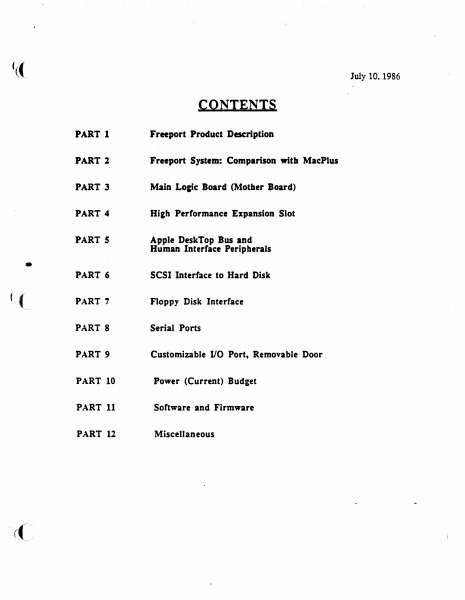
'(( July 10, 1986 CONTENTS • (":(~ PART 1 Freeport Product Description PART 2 Freeport System: Comparison with MacPlus PART 3 Main Lo&f c Board (Mother Board) PART 4 Hi&h Performance Expansion Slot PART 5 Apple DeskTop Bus and Human Interface Peripherals PART 6 SCSI Interface to Hard Disk PART 7 Floppy Disk Interface PART 8 Serial Ports PART 9 Customizable VO Port, Removable Door PART 10 Power (Current) Bud1et PART 11 Software and Firmware PART 12 Miscellaneous ( f PART 1 Freeport Product ·Description - 7-10-86 PART 1 Freeport Product Description General l=reepon is an enhanced Macintosh Plus that suppons internal and extrmal customized expansion options includina: from Apple Computer.Inc. • Inu:mal 20MB Hard Disk or a Second Internal Sony Floppy Disk Drive and from third party vendors • • External Video Board • Ethernet/Token Ring Interface Board I, ~; • Modem Board • Accelerator/Coprocessor Boards • Etc.(This list is suggestive only, not limiting) Freepon suppons the same peripherals as Macintosh Plus except that the keyboard and mouse follow the new corporate Apple DeskTop Bus design. ',r' ! Product Desi2n External Features • Same overall form factor as Macintosh Plus • Apple DeskTop Bus keyboard and mouse (two connectors at rear) • Floppy disk slot meam1ined. compatible wilh new fro& styling •Restyled front bezel and rear housing, ventilalion slots added for better cooling • Optional pluggable slot in front housing, for a second internal floppy disk drive • Plastic snap-out door at rear to support out-of-box I/O Internal Features • Optional hard disk or optional second Sony, above the standard Sony disk drive - • Higher capacity power supply to support die optional floppy or hard disks •Connectors for the optional floppy, optional ~CSI hard disk. and expansion hardware (daughterboard or external) • Fan for cooling •New swing-away logic board mounting to allow insertion with third-party daughterboard present Hardware Logic Board • 8 MHz 68000 CPU • Enhanced memory access yields 16.8% increase.cl speed when operating from RAM • Gate array implementation of PAL and discrete logic devices * Seven year lithium bane:y for clock and calendar * Internal- two Floppy Disk and SCSI connectors • Extcmal--two Serial, two Apple DeskTop Bus, SCSI, Floppy Disk. and Sound pon connectors Analo& Section * New 80 Wan. wide input range power supply * Improved display sweep section *Fan Software System * New ROM with minimum changes from Macintosh Plus * Changes include new SCSI manager, support for Apple DeskTop Bus, and modifications to the AppleTalk drivers to support the new Apple serial pon azchiteemrc Application • r·· '· * Boot chooser to allow stan·up drive selection * Compatible with Macintosh Plus Options • Internal 20 Megabyte SCSI hard disk compatible with SCSI HD-20, or a second SOOK internal floppy disk drive Freeport FRONT BEZEL '( .. . .... ..... ~ ~ .. . . . • : .. T~ YE…

Showing first 3,000 characters of 218,100 total. Open the full document →
Home Documents Macintosh MPW 3.0 Assembler Reference
MPW 3.0 Assembler Reference

MPW 3.0 Assembler Reference

Macintosh · 1988 · PDF
FilenameMPW_3.0_Assembler_Reference_1988.pdf
Size16.20 MB
Year1988
Subsection developer / MPW
Downloads2
Enjoying MacTrove? Anonymous downloads are free and unlimited. Create a free account to track favorites, contribute metadata corrections, and join the community chat.
Reader
MPW 3.0 Assembler Reference
/
Loading…
OCR / Text contents
ti® Macintosh® Macintosh Programmer's Workshop 3.0 Assembler Reference ti APPLE COMPUTER, INC. This manual and the software described in it are copyrighted, with all rights reserved. Under the copyright laws, this manual or the software may not be copied, in whole or part, without written consenr of Apple, except in the normal use of the software or to make a backup copy of the software. The same proprietary and copyright notices must be affixed to any permitted copies as were affixed to the original. This exception does not allow copies to be made for others, whether or not sold, but all of the material purchased (with all backup copies) may be sold, given, or loaned to another person. Under the law, copying includes translating into another language or format. You may use the software on any computer owned by you, but extra copies cannot be made for this purpose. © 1985-88 Apple Computer, Inc. 20525 Mariani Ave. Cupertino,Caluornia 95014 (408) 996-1010 Pascal Compiler © 1982-88 Apple Computer, Inc. © 1981 SYS, Inc. Apple, the Apple logo, AppleShare, AppleTalk, A/UX, ImageWriter, I.aserWriter, Lisa, MacApp, Macintosh, and SANE, are registered trademarks of Apple Computer, Inc. MPW, QuickDraw, ResEdi!, APDA, and SADE are trademarks of Apple Computer, Inc. MacDraw, MacPaint, and MacWrite are registered trademarks of Claris Corporation. Microsoft Word is a trademark of Microsoft Corporation. ITC Garamond and ITC Zapf Dingbats are registered trademarks of International Typeface Corporation. POSTSCRIPT is a registered trademark of the Adobe Systems Incorporated. Adobe Illustrator 88 is a trademark of Adobe Systems Incorporated. ImageStudio is a trademark of Esselte Pendaflex Corporation in the United States, of LetraSet Canada Limited in Canada, and of Esselte LetraSet Limited elsewhere. Motorola is a trademark of Motorola, Inc. MathType is a trademark of Design Science, Inc. QMS is a registered trademark of QMS, Inc. UNIX is a trademark of AT&T Bell laboratories. Simultaneously published in the United States and Canada. MPW sample programs Apple Computer, Inc. grants users of the Macintosh Programmer's Workshop a royalty-free license to incorporate Macintosh ~rammer's Workshop sample programs into their own programs, or to modify the sample programs for use in their own programs, provided such use is exclusively on Apple computers. For any modified Macintosh Programmer's Workshop sample program, you may add your own copyright notice alongside the Apple copyright notice. Contents Figures and tables xiii Preface About This Manual xv What this manual contains xvii Other reference materials xviii Notation conventions xix Aids to understanding xix Courier typeface xx Italic xx Fields xxi Delimiter symbols xxi Braces xxii Brackets xxii Ellipses xxiii Underlining xxiii For more information xxiv Part I Using the Assembler 1 1 About the Assembler 3 General characteristics 5 Overview of the assembly process 6 Assembly files 7 Programming for the …

Showing first 3,000 characters of 500,000 total. Open the full document →

Home Documents Macintosh BIGMAC VTG
BIGMAC VTG

BIGMAC VTG

Macintosh · PDF
FilenameBIGMAC_VTG.pdf
Size0.19 MB
Subsection prototypes / 1985_Big_Mac
Downloads3
Enjoying MacTrove? Anonymous downloads are free and unlimited. Create a free account to track favorites, contribute metadata corrections, and join the community chat.
Reader
BIGMAC VTG
/
Loading…
OCR / Text contents
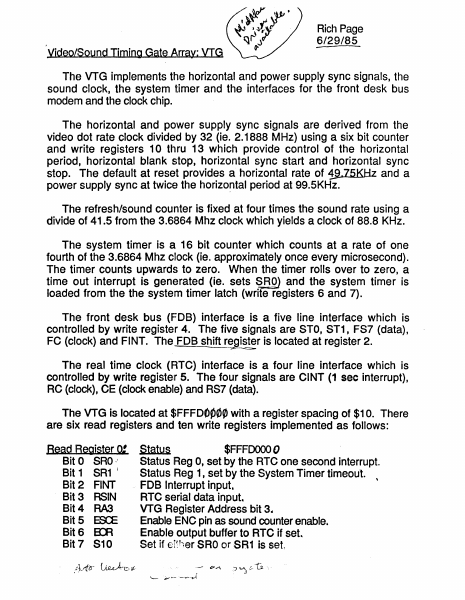
Rich Page 6/29/85 Yideo/Sound Timing Gate Array: VIG The VTG implements the horizontal and power supply sync signals, the sound clock, the system timer and the interfaces for the front desk bus modem and the clock chip. The horizontal and power supply sync signals are derived from the video dot rate clock divided by 32 (ie. 2.1888 MHz) using a six bit counter and write registers 10 thru 13 which provide control of the horizontal period, horizontal blank stop, horizontal sync start and horizontal sync stop. The default at reset provides a horizontal rate of 1!l.75KHz and a power supply sync at twice the horizo~tal period at 99.5KHz. The refresh/sound counter is fixed at four times the sound rate using a divide of 41.5 from the 3.6864 Mhz clock which yields a clock of 88.8 KHz. The system timer is a, 16 bit counter which counts at a rate of one fourth of the 3.6864 Mhz clock (ie. approximately once every microsecond). The timer counts upwards to zero. When the timer rolls over to zero, a time out interrupt is generated (ie. s,ets ~ROJ and the system timer is loaded from the the system timer latch (write registers 6 and 7). The front desk bus (FOB) interface is a five line interface which is controlled by write register 4. The five signals are STO, ST1, FS7 (data), FC (clock) and FINT. The, FOB shift register is located at register 2. --===-;z The real time clock (RTC) interface is a four line interface which is controlled by write register 5. The four signals are CINT (1 sec interrupt), RC (clock), CE (clock enable) and RS7 (data). The VTG is located at $FFFOOP0~ with a register spacing of $10. There are six read registers and ten write registers implemented as follows: Bead Register 0: Status $FFFOOOO 0 Bit 0 SRO Status Reg 0, set by the RTC one second interrupt. Bit 1 SR1 ( Status Reg 1, set by the System Timer timeout. Bit 2 FINT . FOB Interrupt input. Bit 3 RSIN RTC serial data input. Bit 4 RA3 VTG Register Address bit 3 .. Bit 5 ES:E Enable ENC pin as sound counter enable. Bit 6 ErA Enable output buffer to RTC if set Bit 7 S10 Set if er~her SRO orSR1 is set. J ..- 17.-"\ Bead Register 2: FDa Shifter Beacf Begister 4: Number..LQw po~ $FFFk 1..0 This register allows the FOB shift register to be read. $FFF~O This register allows the low byte of the number register to be read. Numberliigb $FFFdbso tou"S1J This register allows the high byte of the number register to be read. Bead Register 5: Read Register 6: Timer L~ $FFFD060 \?60 &0 This register allows the low byte of the sy~~em timer to be read.J7'~ Bead Register 7: Timer Hlgh $FFFD070 bClO 1 0 This register allows the high byte of the system timer to be read V , Write Register 0; Bit 0 SRO , Bit 1 SR1 Bit 4 RA3 Bit5 ~ Status $FFFDOOOO RTC one second interrupt bit. System Timer timeout bit. VTG Register Address bit 3. Enable ENe pin as Sound Counter Enable. Note: This register must be initialized at system reset. The remaining bits should be zero when written. $FFFOcfuO wit…

Showing first 3,000 characters of 5,035 total. Open the full document →

Home Documents Macintosh MacApp 2.0 Object And Method Reference
MacApp 2.0 Object And Method Reference

MacApp 2.0 Object And Method Reference

Macintosh · PDF
FilenameMacApp_2.0_Object_and_Method_Reference_198810.pdf
Size3.08 MB
Subsection developer / MacApp / MacApp_2.0b5
Downloads2
Enjoying MacTrove? Anonymous downloads are free and unlimited. Create a free account to track favorites, contribute metadata corrections, and join the community chat.
Reader
MacApp 2.0 Object And Method Reference
/
Loading…
OCR / Text contents
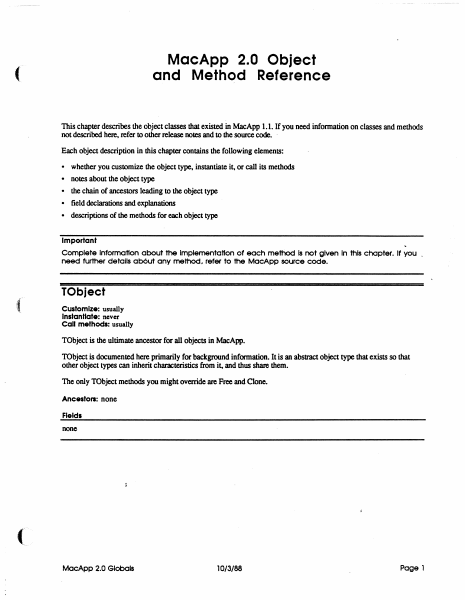
MacApp 2.0 Object and Method Reference ( This chapter describes the object classes that existed in MacApp 1.1. If you need infonnation on classes and methods not described here, refer to other release notes and to the source code. . Each object description in this chapter contains the following elements: • • • • • whether you customize the object type. instantiate it, or call its methods notes about the Object type the chain of ancestors leading to the object type field declarations and explanations descriptions of the methods for each object type Important Complete Information about the Implementation of each method Is not given In this chapter. It you _ need further details ab6ut any method, refer to the MocApp source code. TObject Customize: usually Instantiate: never Call methods: usually TObject is the ultimate ancestor for all objects in MacApp. TObject is documented here primarily for background information. It is an abstract object type that exists so that other object types can inherit characteristics from it, and thus share them. The only TObject methods you might override are Free and Clone. Ancestors: none Fields none MocApp 2.0 Globels 10/3/88 Page 1 Clone FUNCTION TOb ject. Clone: TOb ject; The return value An exact copy of the calling object Purpose To clone dependent objects referred to by the fields of an object as well as cloning the object itself. An object is dependent on another object when the second object has the only (or the only important) reference to the fU'St object Dependency is a relatively vague condition; when you override this method. you need to determine what objects are dependent on SELF. The default version Calls ShallowClone. and thus clones only the object itself Override Sometimes Call Sometimes Free PROCEDURE TObject.Free; Purpose To free the calling object and any dependent objects referred to by its fields. An' object is dependent on another object when the second object has the only (or the only important) reference to the fU'St object Dependency is a relatively vague condition; when you override this method. you need to determine what objects are dependent on SELF. The default version Calls ShallowFree Override Often. Your version should free any dependent objects you have added for your customization and then call INHERITED Free so that any ancestor methods can free other dependent objects. The chain of INHERlTED calls leads to TObjectFree. which calls TObject.ShallowFree. which frees SELF. Call Often ShallowClone FUNCTION TObject.ShallowClone: TObject; The return value Purpose This is the lowest-level method for copying an object Called by TObjectOone The default version Calls HandToHand. an Inside Macintosh routine, to copy the object data Override Never Call Rarely MacApp 2.0 Globals 10/3/88 Page 2 Shallow Free PROCEDURE ( TObject.ShallowFree; Purpose This is lhe lowest-level method for freeing an object Called by TObjecLFree The default v…

Showing first 3,000 characters of 78,076 total. Open the full document →

Home Documents Macintosh MacApp 2.0 Globals
MacApp 2.0 Globals

MacApp 2.0 Globals

Macintosh · 1988 · PDF
FilenameMacApp_2.0_Globals_1988.pdf
Size1.56 MB
Year1988
Subsection developer / MacApp / MacApp_2.0b5
Downloads2
Enjoying MacTrove? Anonymous downloads are free and unlimited. Create a free account to track favorites, contribute metadata corrections, and join the community chat.
Reader
MacApp 2.0 Globals
/
Loading…
OCR / Text contents
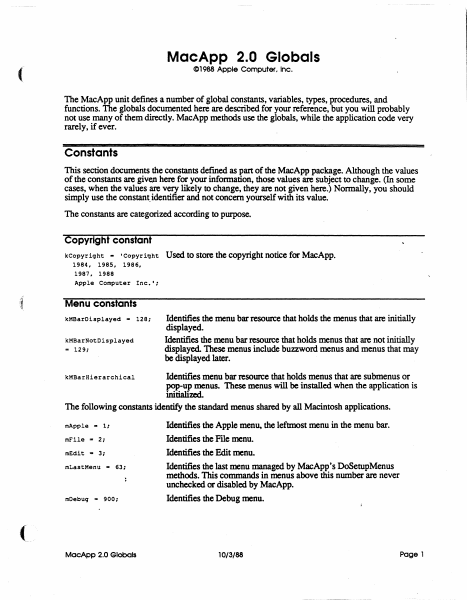
MacApp 2.0 Globals C1988 Apple Computer. Inc. ( The MacApp unit defines a number of global constants, variables, types, procedures, and functions. The globals documented here are described for your reference, but you will probably not use many of them directly. MacApp methods use the globals, while the application code very rarely, if ever. Constants This section documents the constants defmed as part of the MacApp package. Although the values of the constants are given here for your information, those values are subject to change. (In some cases, when the values are very likely to change, they are not given here.) Normally, you should simply use the constant. identifier and not concern yourself with its value. The constants are categorized according to purpose. Copyright constant kCopyriqht - 'Copyright 1984, 1985, 1986, 1987. 1988 Apple Computer Inc.'; ,t Used to store the copyright notice for MacApp. Menu constants kMBarDisplayed - 128; kMBarNotDisplayed .. 129; Identifies the menu bar resource that holds the menus that are initially displayed. Identifies the menu bar resource that holds menus that are not initially displayed. These menus include buzzword menus and menus that may be displayed later. Identifies menu bar resource that holds menus that are submenus or pop-up menus. These menus will be installed when the application is initialimL The following constants identify the standard menus shared by all Macintosh applications. kMBarHierarchical mApple - 1: mFile - 2: mEdit - 3; mLastMenu '" 63: mDebuq '" 900: MacApp 2.0 Globals Identifies the Apple menu, the leftmost menu in the menu bar. Identifies the File menu. Identifies the Edit menu. Identifies the last menu managed by MacApp's DoSetupMenus methods. This commands in menus above this number are never unchecked or disabled by MacApp. Identifies the Debug menu. 10/3/88 Page 1 Command numbers The command numbers listed here are passed to your methods, generally to gTargetDoMenuCommand Most are passed as a result of the user picking a menu command; command numbers are alsO used for other types of commands, such as typing or mouse commands. When the description says "MacApp catches this," that means that the MacApp DoMenuCommand methods will handle those command numbers, often by calling application methods. cNoCommand Command number representing no command. MacApp catches this. cAboutApp Identifies the About <AppNme>..• command. MacApp catches this. File menu commands Identifies the New command MacApp catches this. (See also cNew .. 10; cNewLast.) cNewLast - 19; cSave .. 30; cClose - 31; cSaveAs .. 32; cSaveCopy - 33; cRevert .. 34; cOpen - 20; cOpenLast .. 29; cPaqeSetup - 176; cPr intOne - 177; cPrint - 178; cPrintToFile - 179; cPrFileBase - 176; cPrFileMax .. 195; cPrViewBase .. 201; cPrViewMax .. 250; cQuit - 36; MacApp 2.0 Globais Identifies the last New command MacApp provides a range of New commands for applications that have diff…

Showing first 3,000 characters of 37,364 total. Open the full document →

Home Documents Macintosh Macintosh Allegro Common LISP Foreign Function Interface
Macintosh Allegro Common LISP Foreign Function Interface

Macintosh Allegro Common LISP Foreign Function Interface

Macintosh · PDF
FilenameMacintosh_Allegro_Common_LISP_Foreign_Function_Interface.pdf
Size1.44 MB
Subsection developer / Macintosh_Allegro_Common_LISP
Downloads2
Enjoying MacTrove? Anonymous downloads are free and unlimited. Create a free account to track favorites, contribute metadata corrections, and join the community chat.
Reader
Macintosh Allegro Common LISP Foreign Function Interface
/
Loading…
OCR / Text contents
é Macintosh? Allegro Common LISP Foreign Function Interface Overview The Foreign Function Interface (FFI) lets Allegro CL call functions written in C, Pascal, Assembler, and other languages (such functions are called foreign functions). Foreign functions can, in turn, make calls back to Lisp. To take advantage of the high-level functions described below, the foreign function code must be compiled into Macintosh Programer’s Workshop (MPW™) object file format. Any compiler which produces object files of the MPW format may be used. Machine code produced by other compilers or assemblers can only be accessed using the low-level function ff-call. The Foreign Function Interface provides two interface syntaxes. The primary syntax is designed specifically for use with Allegro CL on the Macintosh; this is the syntax described by the major portion of this document. The secondary syntax (Franz syntax) was implemented for compatibility with versions of Allegro CL running on other computers; this syntax is described in Franz Inc’s Allegro CL User Guide, with supplemental notes provided at the end of this document. Using foreign functions from Allegro CL involves the following steps: * Write and compile the foreign functions using a compiler which produces MPW object Files. ¢ Run Allegro CL and load the Foreign Function Interface fas! files. ¢ Load the MPW object files with the function f£-1load. * Define an interface for each foreign function you wish to call. (This is done with defffun.) Call the foreign functions from Lisp using Lisp syntax. A call from Lisp to a foreign function looks exactly like a call to another Lisp function. The Lisp function which makes the call (and, for that matter, the programmer) doesn’t even need to Allegro Foreign Function Interface know that the function called was written in a different language. Installation The files required to use the foreign function interface are found in the folder "Foreign Function Folder." You may wish to move the files "££.fasi" and "defforeign.fas1" into a directory included in your *module-search-path*. To use the foreign function interface, run Allegro CL and load the file "££.fasl". If you wish to use Franz syntax, you must also load the file "defforeign.fasl". Foreign Function Interface Operations £f£-load files &key :entry-names :libraries [Function] :library-entry-names :ffenv-name :replace loads the MPW object files specified by files, and returns a foreign function environment. The foreign function environment returned consists of code segments, a jump table, a static data area, and a collection of active entry point names. Dead code removal is performed so that only code and data reachable from the active entry points will be included in the environment. files should be a filename, pathname or a list of filenames and pathnames of MPW object files. :entry-names a list of strings naming all the entry points in files which should be active. If :ent ry-names is not specif…

Showing first 3,000 characters of 22,104 total. Open the full document →

Home Documents Macintosh Macintosh Allegro Common LISP Version 1.2 Release Notes
Macintosh Allegro Common LISP Version 1.2 Release Notes

Macintosh Allegro Common LISP Version 1.2 Release Notes

Macintosh · PDF
FilenameMacintosh_Allegro_Common_LISP_Version_1.2_Release_Notes.pdf
Size4.03 MB
Subsection developer / Macintosh_Allegro_Common_LISP
Downloads2
Enjoying MacTrove? Anonymous downloads are free and unlimited. Create a free account to track favorites, contribute metadata corrections, and join the community chat.
Reader
Macintosh Allegro Common LISP Version 1.2 Release Notes
/
Loading…
OCR / Text contents
é Macintosh® Allegro Common LISP Version 1.2 Release Notes Overview This is the first Apple release of Macintosh Allegro Common Lisp Version 1.2 (software version 1.2.2). This product was previously sold in three separate modules by Coral Software; Allegro CL Version 1.2, Foreign Function Interface, and Stand-Alone Application Generator. Any references to Coral Software are inadvertent and should be disregarded. The sections in this document follow the same order as the chapter of the Allegro CL User’s Guide. Getting Started Installation This section supersedes the section “Installing Allegro CL” on page ii of the main manual. The following procedure installs Allegro CL as well as the Foreign Function Interface and the Stand-Alone Application Generator. Allegro CL ships on two floppy disks. Neither disk includes a system file. To use Allegro CL, you will need a hard disk with a system file installed. Simply copy the files from both Allegro CL disks to a single folder on your hard disk. If you have older versions of Allegro CL on your disk, you may wish to remove (or archive) them. This will guarantee that when you double-click a document, it will open with the right version of Allegro CL. The Help File Allegro CL now includes documentation strings and argument list information for many built in functions (though not all of them). These are accessible through the Fred commands control-x control-d (documentation) and control-x control-a (argument list). The documentation strings are stored in a separate file, Allegro Help. If this file is not in the cel; logical directory, Allegro will ask you to help locate it the first time you attempt to use documentation strings or argument lists. Allegro CL 1.2 Release Notes The disassembler Because of size constraints, the disassemble feature has been moved from the main Allegro CL application into a fasl file. This file is in the library folder. It will be loaded automatically (using require) when disassemble is called. The only constraint is that it be kept ina folder directly accessible to Allegro CL. *abort-character* The variable *abort-character* has been removed from Allegro CL. This function is now only performed by command-period. The variable was removed so that control-g could be used by ed-abort-listener- input. This command, when typed in the Listener, aborts the current input and prints a new Listener prompt. The old input is not deleted, so that you can go back to it later. Allegro CL Menus There have been several changes in the arrangement of the menubar. In the Edit, the Change Font and Insert Killed String... menu-items have been removed. These are now available as example files. The Documents... menu-item has been removed (because the ccl-doc folder has also been removed). In the Eval menu, menu items have been added for step and trace. The Step... menu-item lets the user input a string, which is read and then stepped. The Trace... menu-item brings up a dialog box gi…

Showing first 3,000 characters of 23,686 total. Open the full document →

Subscribe to Macintosh
mp.ls