
Thread
Identify this Board!
Does anyone know what the heck this is?? I am trying to find drivers for this accelerator board, but have no idea what it is.. The S/N is blank, and it has no writing on it that can identify it.. Plus it has these odd wires and orange chip looking thing on the back side...
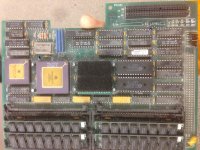
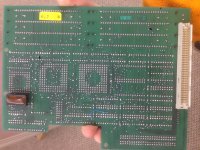
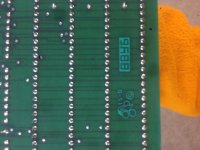
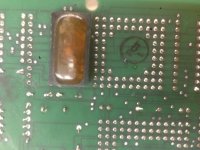
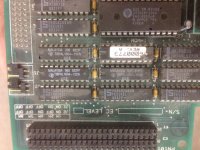
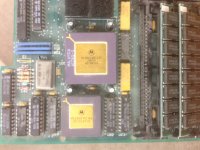
well i tried messing around with it, the board includes spots for 2 rom chips, so I have the rom chips in the regular board AND in this board, plus ram in each board..
Should I be removing the ram/rom chips from the main board and only using them in the accelerator? It does boot up but I am not sure how I can tell if it is working
Should I be removing the ram/rom chips from the main board and only using them in the accelerator? It does boot up but I am not sure how I can tell if it is working
that is a pretty good question.
https://drive.google.com/folderview?id=0B49Tq8u-p8sKRjhwZ3l6clJkcjA&usp=sharing
dl this and run system info.
https://drive.google.com/folderview?id=0B49Tq8u-p8sKRjhwZ3l6clJkcjA&usp=sharing
dl this and run system info.
You can find Conectix Compact Virtual 3.0.2 over on Gamba's page
http://home.earthlink.net/~gamba2/71more.html
http://home.earthlink.net/~gamba2/71more.html
Did you folks figure out which one is in the OP yet? Some of these cards were done in 68020, 68020/68030 and 68030 versions. Macs cost a fortune, all really capable computers did in that time frame. Macs held their resale value well and there was a ready market for upgrades in order to get the RAM starved, slotless Compacts up to the task of early DTP production.
It was a great time!
It was a great time!
So it has a "Floating Point Processor" for calculations eh? what does it normally say? under FPU? How can I test it?

Also I need to check a disk (or repair it, scsi hdd) what's a good program and where can I get it? I was looking for Norton Disk Doctor because I remember using that in the past. Suggestions?
These upgrade cards provide more RAM than the host machine allows. The host machine has an address/memory map built into its ROMs which controls where everything can be in address/memory space. This memory map has no provision for the extra memory that these upgrades provide.
So, the upgrade treats the extra memory as a RAM Disk, without ever being RAM. Then the Virtual software converts the RAM disk into virtual memory. So in a backwards way, the machine sees the extra memory as disk space, then uses a form of virtual memory to treat the disk space as RAM/memory and hence the extra memory is converted into usable memory in a round-a-bout way.
Awesome! Thanks for this.
Anyone have any ideas on what program to scan/repair a Mac SE hard drive?? It wont install or initialize, but it already has files on it and they can be read... its probably near EOL (end of life) but worth a shot.. thoughts? I was looking for norton disk tools but couldnt find it!
Matter of fact, where is the best place to search for software?
Anyone have any ideas on what program to scan/repair a Mac SE hard drive?? It wont install or initialize, but it already has files on it and they can be read... its probably near EOL (end of life) but worth a shot.. thoughts? I was looking for norton disk tools but couldnt find it!
Matter of fact, where is the best place to search for software?
I installed Connectix Virtual Ram and tried installing for the gemini board but it gives me this error.
"Virtual did not load because this machine lacks the proper hardware to support virtual memory (EC030 or 040 processor).
Also I notice that even though the board has a 68881 FPU it does not show under system info. It is still using the software FPU. So I am not sure if I am missing a driver or maybe even an actual setting on the board itself.. Strange that the CPU is working but not the FPU.
any thoughts?
"Virtual did not load because this machine lacks the proper hardware to support virtual memory (EC030 or 040 processor).
Also I notice that even though the board has a 68881 FPU it does not show under system info. It is still using the software FPU. So I am not sure if I am missing a driver or maybe even an actual setting on the board itself.. Strange that the CPU is working but not the FPU.
any thoughts?
Still cant get the Mac SE to recognize any of the extra ram on this accelerator. Compact Virtual Doesnt run, gives me an error. Ramdoubler wont run while an accelerator is plugged in. System info recognizes the accelerators CPU but not the FPU, which still says "Software" in system info, rather than 68881 FPU
Any ideas for more software?? Could this be an accelerator for a different mac??
Any ideas for more software?? Could this be an accelerator for a different mac??
Yea, with accelerators you have to have certain patches/traps to the system ROM and toolbox so the OS can identify the card, and its peripherals properly. Thats what the drivers do.
My Plus has an 030 accelerator, but its generic and I have no drivers. So, its detected as an 020, with no MMU, no FPU, and no RAM. which it has it all.
My Plus has an 030 accelerator, but its generic and I have no drivers. So, its detected as an 020, with no MMU, no FPU, and no RAM. which it has it all.
This board came out of an SE with a "badge" on it that said Hypercharger 020. BUT today I ripped off the velcro that was covering the middle socket and it said MacPeak underneath it. After searching it looks like you are right, this is the Orion 25 card. Any idea on where I can find drivers for this? Anyone!?
Yes they need them sometimes to activate certain features (that is a really poor explanation, but simple)
While messing with it today I was able to get it to activate "unknown FPU" and 68020 @14mhz with the Total Systems "Gemstart 3.0" drivers (according to the little system info program) It also tested very close to the same score I got with the radius 25 accelerator.
http://www.3rz.org/mirrors/macdrivermuseum/accel.shtml
http://www.3rz.org/mirrors/macdrivermuseum/accel/gemstart3.sit (the actual link on the page is broken, but I figured it out this is a direct link)
That's the driver that works (somewhat)
While messing with it today I was able to get it to activate "unknown FPU" and 68020 @14mhz with the Total Systems "Gemstart 3.0" drivers (according to the little system info program) It also tested very close to the same score I got with the radius 25 accelerator.
http://www.3rz.org/mirrors/macdrivermuseum/accel.shtml
http://www.3rz.org/mirrors/macdrivermuseum/accel/gemstart3.sit (the actual link on the page is broken, but I figured it out this is a direct link)
That's the driver that works (somewhat)
MacPeak Systems, Spyglass, Austin, Texas originally sold these cards for the SE as Orion accelerators (from about 1988 onwards). They were about $800. They then discontinued (or renamed) the Orion and sold the next version as the Irwin accelerator. Owners of the Orion could upgrade to the Irwin relatively cheaply for about $300. I suspect both the Orion and the Irwin had associated (but distinct) utilities diskettes (3.5" 800K). I definitely still have the Irwin utilities disk, but I am not sure about whether I still have the Orion utilities disk. I also think I have the Irwin utilities programme file (something like a Control Panel device ?) on a Mac CD-ROM I had made (at some expense, by a bureau, back in about 1999). All that gear is in Australia, and I am in Denmark, but I should return to Australia in mid-November - if you want to follow this up.
With the Irwin utilities (but not the Orion utilities ?? unsure) you could adjust the setting for RAM speed, eg. 65ns 80ns 100ns etc, you could also adjust the processor and co-processor speed settings, eg 25Mhz, 20Mhz, 16Mhz, 8Mhz, you could also adjust the (processor) cache size, or turn off the (processor) cache entirely. Some application software needed the cache disabled for that software to work.
There is also at least an Irwin users manual (which I should still have ?), and almost certainly an Orion installation manual.
Beware though the standard power supply in a Mac SE is 100 Watts, and installing an accelerator in an SE increases power consumption, and that can reduce the life expectancy of the power supply. I think Apple and other firms made a special heavy duty replacement SE power supply, maybe 120 or 125 Watts ? These beefed up power supplies are probably quite scarce...
Donald
With the Irwin utilities (but not the Orion utilities ?? unsure) you could adjust the setting for RAM speed, eg. 65ns 80ns 100ns etc, you could also adjust the processor and co-processor speed settings, eg 25Mhz, 20Mhz, 16Mhz, 8Mhz, you could also adjust the (processor) cache size, or turn off the (processor) cache entirely. Some application software needed the cache disabled for that software to work.
There is also at least an Irwin users manual (which I should still have ?), and almost certainly an Orion installation manual.
Beware though the standard power supply in a Mac SE is 100 Watts, and installing an accelerator in an SE increases power consumption, and that can reduce the life expectancy of the power supply. I think Apple and other firms made a special heavy duty replacement SE power supply, maybe 120 or 125 Watts ? These beefed up power supplies are probably quite scarce...
Donald
I still have most (all) of my correspondence with the makers of the Orion/Irwin in disk (text) files, which I carry around with me on a 64GB USB, along with most of my other correspondence and files going back to 1981. Unfortunately using a USB drive (and not having a Macintosh in Denmark) means the MacOS system files etc are not here, and even if they were on the USB they would be half missing because of the resource fork / data fork format (unless I copied them as .hqx or binaries ?)
Some corrections (errors and omissions excepted):
The Orion SE was sold by MacPeak Systems, 1201 Spyglass, Austin, Texas, and came out in the second half of 1987. I think the Mac SE came out in the first half of 1987. The original price of a Orion SE at 16MHz was $1195. By the time I bought one in early 1988 they were $795. There were various optional extras which originally could drive the price much higher than $1195.
Although the Orion SE came with a utilities disk, the utilities disk I received only had a desktop file on it, no other software. I wrote 3 or 4 or 5 or 6 times to someone called Simon Brown at MacPeak asking for a replacement utilities disk, but this request was always ignored, leading me now to suspect in retrospect that there never was any (working) utilities software for the Orion. The last I saw of my Orion utilities disk was when I posted it back to MacPeak with one those 3 4 5 or 6 written requests for a replacement. Perhaps MacPeak had gone out of business before they received my dud utilities disk.
The Irwin Xcelerator upgrade was sold by Workstation Inc. 3160 Bee Caves Road Austin, TX 78746 (presumably a phoenix-like resurrection of MacPeak Systems). Originally the upgrade of the Orion SE to the "Irwin Xcelerator" was $295, circa August 1989, in February 1990 when I received one the price was $275. After you received the upgrade you were obliged to post the old board back to Workstation.
I think the highest price Irwin Xcelerator ran at 25MHz, cost over $3000, and had a lot of RAM aboard as well. In this version it made the upgraded SE somewhat faster than a Macintosh II.
Some other options were 68881 mathematics coprocessor, about $250, and 68851 paged memory management unit $595, (which you needed if you wanted to use 32MB of RAM on the daughterboard).
The Irwin Xcelerator came with a utilities disk with software (that worked) to change settings as described in my earlier posting. N.B. With processor speed settings you could slow a 25MHz chip to lower speeds - down to 8MHZ, but with a 16MHz chip you could not ramp it up to 20 or 25 MHz.
There was a SIMM price war between Japan and the US at the time. The Japanese RAM manufacturers had initially succeeded in ruining US RAM manufacturers by dumping RAM on the US at below cost. Once the US firms stopped making RAM the Japanese / Koreans were able to monopolise the market and prices of SIMMs went way way up, for a while, something like a roller coaster.
I now see on ebay you can buy 1TB (sic) USB volumes for about $15. One Terrabyte is a million Megabytes, but the catch is that these are made in China, and they are rejects that may only store say 8 useful GB of data, the other 1022 GB of storage on a $15 1TB USB drive is WORN storage. (WORN is the acronym for Write Once Read Never, a Chinese proprietory standard).
I wonder what happened to Simon Brown, MacPeak Systems, Workstation Inc ?
You would never guess, but while all this was happening I was an Australian Volunteer Abroad (like Peace Corps) working at the Public Service Commission in Apia, Western Samoa. Western Samoa is known as the Cradle of Polynesia, but it could also be described as the Graveyard of Computers, due to a combination of the tropical climate and a problematic mains electricity grid.
The nearest Mac dealership was a place called Island Printing in Pago Pago, American Samoa, run by a fairly knowledgeable and helpful person: Bill Hyman.
Some corrections (errors and omissions excepted):
The Orion SE was sold by MacPeak Systems, 1201 Spyglass, Austin, Texas, and came out in the second half of 1987. I think the Mac SE came out in the first half of 1987. The original price of a Orion SE at 16MHz was $1195. By the time I bought one in early 1988 they were $795. There were various optional extras which originally could drive the price much higher than $1195.
Although the Orion SE came with a utilities disk, the utilities disk I received only had a desktop file on it, no other software. I wrote 3 or 4 or 5 or 6 times to someone called Simon Brown at MacPeak asking for a replacement utilities disk, but this request was always ignored, leading me now to suspect in retrospect that there never was any (working) utilities software for the Orion. The last I saw of my Orion utilities disk was when I posted it back to MacPeak with one those 3 4 5 or 6 written requests for a replacement. Perhaps MacPeak had gone out of business before they received my dud utilities disk.
The Irwin Xcelerator upgrade was sold by Workstation Inc. 3160 Bee Caves Road Austin, TX 78746 (presumably a phoenix-like resurrection of MacPeak Systems). Originally the upgrade of the Orion SE to the "Irwin Xcelerator" was $295, circa August 1989, in February 1990 when I received one the price was $275. After you received the upgrade you were obliged to post the old board back to Workstation.
I think the highest price Irwin Xcelerator ran at 25MHz, cost over $3000, and had a lot of RAM aboard as well. In this version it made the upgraded SE somewhat faster than a Macintosh II.
Some other options were 68881 mathematics coprocessor, about $250, and 68851 paged memory management unit $595, (which you needed if you wanted to use 32MB of RAM on the daughterboard).
The Irwin Xcelerator came with a utilities disk with software (that worked) to change settings as described in my earlier posting. N.B. With processor speed settings you could slow a 25MHz chip to lower speeds - down to 8MHZ, but with a 16MHz chip you could not ramp it up to 20 or 25 MHz.
There was a SIMM price war between Japan and the US at the time. The Japanese RAM manufacturers had initially succeeded in ruining US RAM manufacturers by dumping RAM on the US at below cost. Once the US firms stopped making RAM the Japanese / Koreans were able to monopolise the market and prices of SIMMs went way way up, for a while, something like a roller coaster.
I now see on ebay you can buy 1TB (sic) USB volumes for about $15. One Terrabyte is a million Megabytes, but the catch is that these are made in China, and they are rejects that may only store say 8 useful GB of data, the other 1022 GB of storage on a $15 1TB USB drive is WORN storage. (WORN is the acronym for Write Once Read Never, a Chinese proprietory standard).
I wonder what happened to Simon Brown, MacPeak Systems, Workstation Inc ?
You would never guess, but while all this was happening I was an Australian Volunteer Abroad (like Peace Corps) working at the Public Service Commission in Apia, Western Samoa. Western Samoa is known as the Cradle of Polynesia, but it could also be described as the Graveyard of Computers, due to a combination of the tropical climate and a problematic mains electricity grid.
The nearest Mac dealership was a place called Island Printing in Pago Pago, American Samoa, run by a fairly knowledgeable and helpful person: Bill Hyman.
Hrmmm, bbraun said he doesn't think the SE has an implementation of Slot Manager, so there'd not necessarily be a DeclROM as such on its PDS cards. IIRC. SlotInfo in one of the usual Card ID/DeclROM Spelunking Tools does a PDS report, so that might work by reading the Card's ROM, however it's set up. It'll be interesting to see results from both tools.
The first image is a scan of the back of the box for an Irwin XL 20 Excelerator, which shows a board that is nearly identical to the board pictured in the original posting. Judging by the numbering I can see, the board I have here may be one produced about 400 boards after the one in the original posting.

[SIZE=10pt]I found I had multiple Irwin and Orion utilities diskettes, 4 in total, probably spanning a 3 to 4 year period and 3 revisions, although whether there is anything on the first dubious Orion utilities diskettes I cannot tell, yet, as I do not have the power on at home, yet. There definitely was (I can remember) the utility software on the Irwin diskette.[/SIZE]

[SIZE=10pt]I also have one version of the Irwin Excelerator Installation and User's Manual (36 pages), but there are likely differences between the Irwin and the Orion, so the Irwin manual is not completely valid for the Orion, although some of the information would be the same. I suspect there could be still later versions of the Irwin manual as the daughterboard I have has a connector for output to a large format display grand-daughterboard (?), yet there is nothing about this grand-daughterboard mentioned in the version of the manual here. I would be happy to scan the entire manual, when I can find a scanner that handles its specific page format correctly. I am not sure what the authority's ideas are on members scanning and uploading manuals ?[/SIZE]

[SIZE=10pt]I may have a sheet or leaflet of instructions for the Orion version of the accelerator. I should have it, but I have not found it yet. I also should have, but have yet to locate, a roundup of SE accelerator cards issued as a special report by either MacWorld or MacUser (published both in the monthly magazine, and published separately as contemporary standalone guide to all known accelerator cards).[/SIZE]
The piggyback connector at top right is for a "grand-daughterboard" PowerView large screen video system, which is not mentioned at all in the version of the manual / user guide / installation instructions I have found.
People with this daughterboard are far better off with the later FDHD / Superdrive version of the Mac SE, because (from memory) the earlier versions of the SE had a motherboard that slid in on rails, which makes things difficult, compared to later versions of the SE which had a combined pivoting (like a hinge) & sliding arrangement for inserting the motherboard. What I mean is: if someone is going to install this card in an SE, it is preferable to find a later SE to do the installation with.
[SIZE=10pt]I am back in Australia and feeling sick of it already after only one day in my home town. When I did this the last time, which was a year ago, the sickness was almost immediate, it only took me about 45 minutes to start feeling sick last year, by which I mean 45 minutes after the aeroplane landed in Sydney, which is about 7 hours before I reached my home town 600 km from Sydney. Maybe my former limited immunity to Australia is increasing with repeated annual exposure to Australia.[/SIZE]
[SIZE=10pt]But the good news is none of the two Mac SE motherboards or the one SE/30 motherboard here has suicide battery syndrome. But the SE/30 capacitors are ailing.[/SIZE]
[SIZE=10pt]I found I had multiple Irwin and Orion utilities diskettes, 4 in total, probably spanning a 3 to 4 year period and 3 revisions, although whether there is anything on the first dubious Orion utilities diskettes I cannot tell, yet, as I do not have the power on at home, yet. There definitely was (I can remember) the utility software on the Irwin diskette.[/SIZE]
[SIZE=10pt]I also have one version of the Irwin Excelerator Installation and User's Manual (36 pages), but there are likely differences between the Irwin and the Orion, so the Irwin manual is not completely valid for the Orion, although some of the information would be the same. I suspect there could be still later versions of the Irwin manual as the daughterboard I have has a connector for output to a large format display grand-daughterboard (?), yet there is nothing about this grand-daughterboard mentioned in the version of the manual here. I would be happy to scan the entire manual, when I can find a scanner that handles its specific page format correctly. I am not sure what the authority's ideas are on members scanning and uploading manuals ?[/SIZE]
[SIZE=10pt]I may have a sheet or leaflet of instructions for the Orion version of the accelerator. I should have it, but I have not found it yet. I also should have, but have yet to locate, a roundup of SE accelerator cards issued as a special report by either MacWorld or MacUser (published both in the monthly magazine, and published separately as contemporary standalone guide to all known accelerator cards).[/SIZE]
The piggyback connector at top right is for a "grand-daughterboard" PowerView large screen video system, which is not mentioned at all in the version of the manual / user guide / installation instructions I have found.
People with this daughterboard are far better off with the later FDHD / Superdrive version of the Mac SE, because (from memory) the earlier versions of the SE had a motherboard that slid in on rails, which makes things difficult, compared to later versions of the SE which had a combined pivoting (like a hinge) & sliding arrangement for inserting the motherboard. What I mean is: if someone is going to install this card in an SE, it is preferable to find a later SE to do the installation with.
[SIZE=10pt]I am back in Australia and feeling sick of it already after only one day in my home town. When I did this the last time, which was a year ago, the sickness was almost immediate, it only took me about 45 minutes to start feeling sick last year, by which I mean 45 minutes after the aeroplane landed in Sydney, which is about 7 hours before I reached my home town 600 km from Sydney. Maybe my former limited immunity to Australia is increasing with repeated annual exposure to Australia.[/SIZE]
[SIZE=10pt]But the good news is none of the two Mac SE motherboards or the one SE/30 motherboard here has suicide battery syndrome. But the SE/30 capacitors are ailing.[/SIZE]
Killer stuff, good to see so much information come to light, nice job! Glad to get confirmation that the inter-board connector in the corner was for a graphics card. You don't happen to have that do you?
I envied folks who got later accelerators such as yours for the SE that supported onboard RAM and Compact Virtual. Mine came with the Radius16, 68020 installed, which had no provisions for the Virtual Memory hack. The speed was great, but it was the FPU that gave vectorization/vinyl plotting a huge kick in the pants. It made TypeStyler usable on the SE as well, heard it was a real pig on a stock SE. Never did get the FPD I always wanted, graduated to a low rent TPD when I got the used Mac IIx. What a difference, it was like moving from a sleeping pad for backpacking to a king size mattress after having been stuck doing graphic design on the SE's Periscope.
Sorry about not having clarified, I was in the process of going AWOL for a few months right after that, so I wasn't paying strict attention. As I understand it, there must be drivers in ROM on your Accelerator to turn off the 68000 and run the 68020 in its place. In the case of my Radius16, a driver was required to do this, IIRC.
As for the second sentence: NuBus Mafia PDS Accelerators . . .
. . . and oblique reference to using the DuckDuckGo search engine as opposed to the personal info hoover that is Google.
I envied folks who got later accelerators such as yours for the SE that supported onboard RAM and Compact Virtual. Mine came with the Radius16, 68020 installed, which had no provisions for the Virtual Memory hack. The speed was great, but it was the FPU that gave vectorization/vinyl plotting a huge kick in the pants. It made TypeStyler usable on the SE as well, heard it was a real pig on a stock SE. Never did get the FPD I always wanted, graduated to a low rent TPD when I got the used Mac IIx. What a difference, it was like moving from a sleeping pad for backpacking to a king size mattress after having been stuck doing graphic design on the SE's Periscope.
This didnt really make sense to me. So you are saying that I have to keep ram/rom in both boards correct?? No idea what that second sentence means..
Sorry about not having clarified, I was in the process of going AWOL for a few months right after that, so I wasn't paying strict attention. As I understand it, there must be drivers in ROM on your Accelerator to turn off the 68000 and run the 68020 in its place. In the case of my Radius16, a driver was required to do this, IIRC.
As for the second sentence: NuBus Mafia PDS Accelerators . . .
. . . and oblique reference to using the DuckDuckGo search engine as opposed to the personal info hoover that is Google.

As odd as it sounds, my Hypercharger 020 has no ROM on it but works without the software installed. The 68881 won't work even with the software though and I've yet to find what the jumpers do.
Interesting, I'm wondering if there's an interrupt somewhere on the SE's PDS that a processor card can yank on and hold onto right from the get go in order to disable the 68000 on the MoBo without need of a driver?
edit: just noticed, there's no MMU or provision for one on your board. Can the SE address 8MB without using Compact Virtual? My PowerBook_100 did and the Portable addressed 9MB without one if memory serves.
What's the memory config for your system?
edit: just noticed, there's no MMU or provision for one on your board. Can the SE address 8MB without using Compact Virtual? My PowerBook_100 did and the Portable addressed 9MB without one if memory serves.
What's the memory config for your system?
I regret I do not have the video card / adaptor. I think the manufacturer should have included information about it in the Excelerator manual, and that way more people would have known about its existence and perhaps increased sales of it ?? But they didn't... I do have the 68851 though, and a 16MHz 68881.
I uploaded some of the more significant and less intuitive pages of the manual. The SIMM distribution on the motherboard (two SIMMs, and two SIMMs only, have to be on the motherboard) is different depending on which version of the SE motherboard is present, i.e. front row for one SE motherboard version, and back row for the other SE version.


There is going to be more information in a separate thread on 1988 SE accelerators in general which I am about to try to create.
In this other thread, where I am uploading a report, there is a picture of the early 1988 Orion accelerator in the bottom right on the second page of the report. If that picture is compared with the pictures of the board at the start of this thread you can see they are two different but similar boards. The main difference is that the 68851 is located between the 68020 and 68881 on one version of the board, but the 68020 is located between the 68851 and 68881 on another version of the board. The board in the original pictures in this thread and the board I have both are the 68020 between the 68851 and 68881 type, although there is at least one other difference.
As mentioned, the strength of this accelerator in particular is that unlike its competitors at the time it had 8 SIMM sockets, the others didn't, mostly the others carried no provision for memory expansion.
Interesting, the 16MHz Excelerator was a 68000 based design that could make use of a 68881 as if it were a 68020?
I think I finally figured out why the Radius16 needed a driver to work and these Accelerators don't. The 16 was originally a Killy Klip add-on to the 128k-Plus architecture from long before the SE's release. Being piggy-backed to the MoBo CPU meant that one had to be turned off for the Accelerator to run.
Later boards designed for the SE PDS with provision for RAM expansion required the SE's ROMs to be moved from the MoBo to the Accelerator. Moving the ROMs off the MoBo means its CPU just lies there like a Lox while the Accelerator boots from the relocated ROMs! No muss, no fuss, no driver required.
Later accelerators for the L2 Cache Slots of the 6360/6400/6500/5400/5500/TAM also require a driver to shut down the MoBo proc like their Killy Klipped kin.
I think I finally figured out why the Radius16 needed a driver to work and these Accelerators don't. The 16 was originally a Killy Klip add-on to the 128k-Plus architecture from long before the SE's release. Being piggy-backed to the MoBo CPU meant that one had to be turned off for the Accelerator to run.
Later boards designed for the SE PDS with provision for RAM expansion required the SE's ROMs to be moved from the MoBo to the Accelerator. Moving the ROMs off the MoBo means its CPU just lies there like a Lox while the Accelerator boots from the relocated ROMs! No muss, no fuss, no driver required.
Later accelerators for the L2 Cache Slots of the 6360/6400/6500/5400/5500/TAM also require a driver to shut down the MoBo proc like their Killy Klipped kin.
Couple of points brought up in that Excelerator XL 20 information.
Two 256k SIMMs required on the MoBo, position dependent upon SE Revision. WAG: the SE's frame buffer a/o memory used during boot was moved from one physical bank to the other in revision?
Max. memory config is 8MB, which means that it's 24bit only. Makes sense as this would be of a 2nd or 3rd generation of SE accelerators, dunno where to make the divisions. Connectix released Virtual in 1989 and MODE32 in 1991. Compact Virtual would have released at some point after those, being something of a combination of both by my read.***** High capacity "Silicon Disk" Virtual Memory hacks for addressing additional RAM in the last generation of SE Accelerators lay a couple of years into the future when this Accelerator was current.
IOW, you can probably forget about addressing anything more than 8MB on your accelerator, minus whatever Frame Buffer memory space remains hardwired to the SE's Video Subsystem on the MoBo in those two slots.
***** As trag mentioned, the memory addressing scheme of Accelerators would be based on any given card's ROM, not Apple's flawed Color ROMs. So, dunno how the Dirty ROM fiasco might have affected Accelerators for the SE? Was the SE FDHD ROM based on subset of the Mac II ROM or a patch made on the SE ROM? Curious.
Two 256k SIMMs required on the MoBo, position dependent upon SE Revision. WAG: the SE's frame buffer a/o memory used during boot was moved from one physical bank to the other in revision?
Max. memory config is 8MB, which means that it's 24bit only. Makes sense as this would be of a 2nd or 3rd generation of SE accelerators, dunno where to make the divisions. Connectix released Virtual in 1989 and MODE32 in 1991. Compact Virtual would have released at some point after those, being something of a combination of both by my read.***** High capacity "Silicon Disk" Virtual Memory hacks for addressing additional RAM in the last generation of SE Accelerators lay a couple of years into the future when this Accelerator was current.
IOW, you can probably forget about addressing anything more than 8MB on your accelerator, minus whatever Frame Buffer memory space remains hardwired to the SE's Video Subsystem on the MoBo in those two slots.
***** As trag mentioned, the memory addressing scheme of Accelerators would be based on any given card's ROM, not Apple's flawed Color ROMs. So, dunno how the Dirty ROM fiasco might have affected Accelerators for the SE? Was the SE FDHD ROM based on subset of the Mac II ROM or a patch made on the SE ROM? Curious.
Yeah, pixels were in very short supply back in the day. :

In your Accelerator Test post, none of the Accelerators were tested with any significant amount of RAM on board. 2.5MB max. in only one case, with most having 2MB split between MoBo and Accelerator. In 1988, RAM wasn't quite the big deal it became after System 7 began hoovering it up. For second and third generation Accelerators it became a very important indeed. Heck, 1MB was standard equipment for the top of the line Mac II at that time.


