
Thread
Finally Back With Some News! 475
So I am finally back to working on my 475, the one I posted about back in December. Still the same death chime issue. I decided to hunt down the data sheet for the on board ram, which is Samsung brand. It was actually easy to find. Maybe I can hunt down this issue soon.

Time to give this one more try. I noticed that the corrosion that I attempted to clean off of U5 is still there pretty bad.
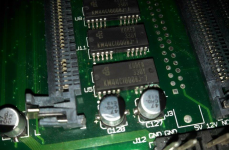
So I gave it another scrub and no luck. Im still guessing that the problem is somewhere in this area since it was the worst when I originally cleaned the board. As far as traces go, everything I have checked so far is fine.
So I gave it another scrub and no luck. Im still guessing that the problem is somewhere in this area since it was the worst when I originally cleaned the board. As far as traces go, everything I have checked so far is fine.
This is good information to look into. Though I scrubbed and recapped my 475 board in Nov. It's still dead so one of the lines had to have corroded and I'm suspecting its in this area.
Got your PM today, post up pics of your repair work so we can examine it for notes like a good medical school cadaver dissection.
Got your PM today, post up pics of your repair work so we can examine it for notes like a good medical school cadaver dissection.
I am going to try to keep this easy to understand. Hopefully some of this information below is useful for elfen, even though he is not receiving the death chime.
My story: I got this computer about a few months ago. I cleaned the board, recapped, and still had a death chime indicating ram failure. A few times I didn't get the death chime, but didn't have any video on the screen (even after doing the power on/off/on trick).
The fix:
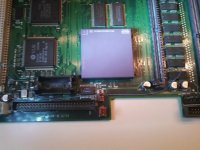
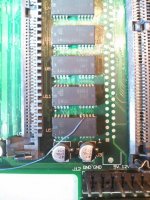
Apple did not make a wise decision with having 8 vias right under one cap (The right cap under U5). It is also difficult that the traces shift as they pass under each ram chip.
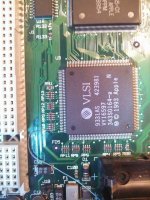
Addresses 0-7 on U5 lead to here (RP9 and RP10). In my case, pin 14 of the ram chip went to the bottom of RP10.
RP12, RP13, and the others.... Not sure where they go, but might be just as important.
This was also very helpful for the pinouts of the RAM: http://www.datasheetarchive.com/dl/Scans-065/DSA2IH00163574.pdf
My story: I got this computer about a few months ago. I cleaned the board, recapped, and still had a death chime indicating ram failure. A few times I didn't get the death chime, but didn't have any video on the screen (even after doing the power on/off/on trick).
The fix:
Apple did not make a wise decision with having 8 vias right under one cap (The right cap under U5). It is also difficult that the traces shift as they pass under each ram chip.
Addresses 0-7 on U5 lead to here (RP9 and RP10). In my case, pin 14 of the ram chip went to the bottom of RP10.
RP12, RP13, and the others.... Not sure where they go, but might be just as important.
This was also very helpful for the pinouts of the RAM: http://www.datasheetarchive.com/dl/Scans-065/DSA2IH00163574.pdf
here is 128 meg simm pretty reasonable
http://www.ebay.com/itm/128MB-EDO-MEMORY-NON-PARITY-60NS-SIMM-72-PIN-5V-32X32-/350478815002?pt=LH_DefaultDomain_0&hash=item519a2a4f1a
http://www.ebay.com/itm/128MB-EDO-MEMORY-NON-PARITY-60NS-SIMM-72-PIN-5V-32X32-/350478815002?pt=LH_DefaultDomain_0&hash=item519a2a4f1a
your gonna want to get ahold of Olepigeon and have him get you a ROM simm slot… so you can solder it on to your mb there… then get ahold of dougg3 get you a 2mb rom simm… then get ahold of bbraun.. and have him send you the lc475 /ram check disable image… then you will be golden!
Interesting......I would have never gave that a thought.....So I have a Performa 475 that does the same thing, Chimes of death after start up chime.
I also noticed what Snake88 was talking about with being under the cap....I found two pots that looked green/corroded. Hmmm.....Now I wonder if those could be the issue.
Excellent information, gave me new hope for the Machine! glad you got your computer up and running again.
You could snip the legs off the chips one by one and then clean up desoldering the legs that remains.
For me personally, I'd keep the RAM to make sure I have a minimal base system to test with no RAM on the SIMM Slot. BUT you will always need VRAM on the VRAM Slots or it will boot with no video or video with stripes like a bad classic B/W Mac.
For me personally, I'd keep the RAM to make sure I have a minimal base system to test with no RAM on the SIMM Slot. BUT you will always need VRAM on the VRAM Slots or it will boot with no video or video with stripes like a bad classic B/W Mac.