Thread
Mac Hardware Hacking Ideas
Yup, I've seen that pin in the VIA - but that's only on Macs that have a soft PSU, right? Those Macs don't actually need a Power Key. So the question is how can you build something that provides soft OFF behavior to Macs that don't have a soft PSU.
Well the SE/30 didnt have a soft PSU, but it did have a power-off signal routed from one of the VIAs to the PDS. So he just made an extension to actually toggle this pin when the machine was chosen to shutdown.
This pin is used in combination with your own circuit to hard-cut the power to the power supply, Still need some sort of a standby supply built to handle it, or use a battery like the Mac IIx. Basically a relay stuck inside the original power supply to cut-off the AC supply to the main power supply unit. This relay would be connected to your own logic circuit powered by either a standby supply, or the PRAM battery. Two wires from this circuit would then go to the ADB power-key, and the VIA pin. It would be a hack for sure, and something is definitely NOT solderless.
For a plus or SE, if there are no extra pins available to a VIA, it would be a fair assumption a 3rd via would need added to add some expandability to the machine for this type of setup. And an extension written to be aware of the new addon circuit.
This pin is used in combination with your own circuit to hard-cut the power to the power supply, Still need some sort of a standby supply built to handle it, or use a battery like the Mac IIx. Basically a relay stuck inside the original power supply to cut-off the AC supply to the main power supply unit. This relay would be connected to your own logic circuit powered by either a standby supply, or the PRAM battery. Two wires from this circuit would then go to the ADB power-key, and the VIA pin. It would be a hack for sure, and something is definitely NOT solderless.
For a plus or SE, if there are no extra pins available to a VIA, it would be a fair assumption a 3rd via would need added to add some expandability to the machine for this type of setup. And an extension written to be aware of the new addon circuit.
Here's another one, how about a Stylewriter emulator? Something to connector modern printers? I know it would be difficult to support every printer but you could pick a few popular models...
I would suggest running this addon in parallel with the power button... Basically, you'll have the option to turn it on using the power button on the back or you can trigger the relay by pressing the power button... Using a circuit like this
 Although I'm sure you'll have to amplify the on/of signals to trigger the relays)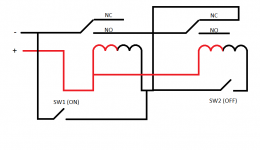
Would be easier just using a single relay, a D-Type flipflop with a Set-Reset input, and a transistor/relay. That way the power key can trigger the flip flop, latch it in and engage the relay. Its always on no matter what. Then the VIA pin is hooked to Reset, so when mac shuts down, it clears the flipflop which shuts off the relay. Relay then cuts power to the mac, allowing the Reset line to go back to a floating state for you to press the power key again.
Now, the other option is use a microcontroller, that way, you can press and continuously hold the power key to force a power-off in case of a hard freeze.
Now, the other option is use a microcontroller, that way, you can press and continuously hold the power key to force a power-off in case of a hard freeze.
Better yet, why not use a latching relay?
Like most (if not all) Macs made within the last 18 years?
Interesting idea. How would that work? Instead of the flip-flop, the signal coming from the LB controls the relay directly (or through a simple transistor)?
c
It would be cool to be able to toggle the disk images in the Floppy EMU from the Mac itself, via a program or control panel. Then you could tuck it away internally if you'd like and sort of use it like a hard drive. This goes along with the headless version idea.
I also like the idea of being able to interface a compact mac video out to an LCD for CRT/Analog board replacement.
I also like the idea of being able to interface a compact mac video out to an LCD for CRT/Analog board replacement.
Alright, Time for a new idea... How about a scsi/floppy convertor! This will connect to a Macintosh 2MB floppy drive on one side and convert it to 50 pin scsi so that a plus or a non FDHD could read 2mb disks...
Those already exist, but they're expensive. They're for use in industrial settings. There's also a Floptical disk drive, which doubles as a regular floppy.
However, none of them can read/write 400K/800K floppies, though.
Yes, I know, I have a SCSI floptical... I more suggesting a convertor for existing hardware...
That would be nice.
I'm not quite sure what the point of a SCSI floppy would be, really. It'd need a driver to work and probably wouldn't be bootable, and if you want it to transfer data you can do that with, well, a, LocalTalk cable, FloppyEMU or, with slightly more fiddling, a SCSI->flash hard drive emulator. Not many modern machines are equipped with floppy drives anymore so it's not as if having it would make it convenient to sneakernet to a modern machine.
Steve,
We've corresponded via e-mail about this already, but I have to throw my vote in for Number 4, the adapter allowing modern USB devices to plug into ADB Macs. The prices of ADB keyboards are quite high on the general market and the devices themselves are growing older (some of those membranes must be starting to age). I would love to grab up my USB (or even PS/2) keyboard and mouse and be able to plug them into my old Mac - it would also allow me to minimise the amount of junk I have lying around (my other half already wonders where all of these Macs are supposed to go). So, here's my order of interest:
I. Number 4 (USB devices to ADB computer)
II. Number 8 (68k 20MHz accelerator for compact Macs)
III. Number 10 (LocalTalk server 'thingy')
Runners up:
- Number 7 (ROM-inator for LC (and/or Classic, but definitely LC!)
- Number 9: Video out for compact Macs (this would be useful for that fateful day when the CRTs actually burn out)
Oh, and, I would like you to impart some of your magic on me. Perhaps you could start a web-based course? I'd pay per session/term/semester/etc.
Regards,
Steve
We've corresponded via e-mail about this already, but I have to throw my vote in for Number 4, the adapter allowing modern USB devices to plug into ADB Macs. The prices of ADB keyboards are quite high on the general market and the devices themselves are growing older (some of those membranes must be starting to age). I would love to grab up my USB (or even PS/2) keyboard and mouse and be able to plug them into my old Mac - it would also allow me to minimise the amount of junk I have lying around (my other half already wonders where all of these Macs are supposed to go). So, here's my order of interest:
I. Number 4 (USB devices to ADB computer)
II. Number 8 (68k 20MHz accelerator for compact Macs)
III. Number 10 (LocalTalk server 'thingy')
Runners up:
- Number 7 (ROM-inator for LC (and/or Classic, but definitely LC!)
- Number 9: Video out for compact Macs (this would be useful for that fateful day when the CRTs actually burn out)
Oh, and, I would like you to impart some of your magic on me. Perhaps you could start a web-based course? I'd pay per session/term/semester/etc.
Regards,
Steve
Haven't caught up on the thread yet but here are my thoughts in regards to the first post:
1 & 2. Yes please
4, 5 & 9. Mostly tidying up other people's work, which if that interests you, sure, but as you say, they're mostly done already.
7. Would be a boon to many of us and promote further hacking
8. Don't really see the benefit @20Mz. The SE already runs at 16MHz if someone wants a slightly faster 68000 Mac.
On the other hand there are FPGA softcore binary-compatible 68000s (ie, actual 6800s, not 020/030 etc) that can run at much higher clock rates, like, IIRC, 150MHz ish. Building one of those onto an plug-in 40 pin DIP module with suitable cache and glue logic could be interesting.
10. Again, bbraun has been working on this.
If I might add a slightly off the wall suggestion of my own:
Now that you have µcLinux working on 68Katy - port it to a 68000 Mac
1 & 2. Yes please
4, 5 & 9. Mostly tidying up other people's work, which if that interests you, sure, but as you say, they're mostly done already.
7. Would be a boon to many of us and promote further hacking
8. Don't really see the benefit @20Mz. The SE already runs at 16MHz if someone wants a slightly faster 68000 Mac.
On the other hand there are FPGA softcore binary-compatible 68000s (ie, actual 6800s, not 020/030 etc) that can run at much higher clock rates, like, IIRC, 150MHz ish. Building one of those onto an plug-in 40 pin DIP module with suitable cache and glue logic could be interesting.
10. Again, bbraun has been working on this.
If I might add a slightly off the wall suggestion of my own:
Now that you have µcLinux working on 68Katy - port it to a 68000 Mac
Those are both excellent reasons
How about a Compact Mac to VGA adapter? Something you can plug into the motherboard of a 128k through SE/30, then connect to VGA.
For a compact Mac->VGA adapter, if you were going to make it a plug and play device, you'd need to pick a generation of compact Mac to start with. The 128-Plus had one kind of connector from the LB to the AB, the SE-SE/30s had another, and the Classic & CII had the same as the SE only wired completely differently. You might be able to make something with one connector and an SE/Classic switch...
I'd start with the SE/x family simply because you could make a nice plate to mount on the back.
I'd start with the SE/x family simply because you could make a nice plate to mount on the back.
SE/30 would benefit from it immediately, wouldn't it? It already supports Color QuickDraw. Would be cool if there's an adapter you could plug in, then stick a color VGA LCD or CRT in there.
But for other Compacts, it would make it easy to install LCDs or smaller yoke CRTs for easier/better hackability.
But for other Compacts, it would make it easy to install LCDs or smaller yoke CRTs for easier/better hackability.
Yeah, compact Mac VGA out was on my original list, #9. There are a couple of ways to go about it. I like the thought of tapping the logic board connector on the 128K/512K/Plus, since there are already video out solutions for the other compacts.
I have another idea, do you have any idea if it would be possible to make 1mb vram simms?
Now... wait a minute. Can you put Color QuickDraw on the ROMinator, then install a Grayscale display in a 128k/512k/Plus? :O
Probably not. I was thinking of vampire tapping the video signal on the logic board connector, and that's just a B&W signal, which I'm 99% sure is generated in hardware where no amount of ROM code changes will make a difference. But if you tapped into the CPU bus, and snooped writes to the video memory, you theoretically could build something that generates a video signal in whatever format you want. Or just transmit the video memory contents to a PC for remote display. That's the approach bbraun has taken with his video project for the Mac SE.
You'll need to make some of these:

Except with a VGA port instead!
Except with a VGA port instead!
Why not both?
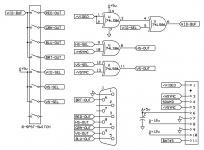
The circuit below gets you EGA out, then one of those Chinese CGA/EGA video game converters gets you to VGA - at the original monochrome resolution.
Without something like VRAM, a new video output circuit, and system software drivers, you won't get greyscale, colour or higher res. Then you're basically building a new PDS card and drivers - which is not to say that's a bad aim in itself, especially if instead of requiring an actual PDS slot, it can hijack the 68000 CPU socket.
For those Macs which do have PDS slots, cards and known-good drivers exist, rare as they might be.