Thread
PowerBook 3400c Repair Stories
Thanks!
I'm sure there is something similar. Scrubbing Bubbles for sure is copyrighted and therefore is imported directly from the U.S. That makes the price.
But what to do with the corroded vias?
Could some of them disappear when cleaning the board?
I'm sure there is something similar. Scrubbing Bubbles for sure is copyrighted and therefore is imported directly from the U.S. That makes the price.
But what to do with the corroded vias?
Could some of them disappear when cleaning the board?
Well... remove the corrosion and see what happens. If the vias or traces are bad then that poses a bigger problem. But again - my board did not originally have video, and washing it -scrubbing bubbles and eventually the dish washer- well ultimately fixed taht.
OK. Thanks!
So let‘s see…
BTW: Here's a new version of the Kanga logic board pic with some labeling.
Could not edit the old post.
http://www.mediafire.com/download/cb2726zofowbqkg/PowerBook_G3_Kanga_Logic_Board_HiRes.jpg
Mike
So let‘s see…
BTW: Here's a new version of the Kanga logic board pic with some labeling.
Could not edit the old post.
http://www.mediafire.com/download/cb2726zofowbqkg/PowerBook_G3_Kanga_Logic_Board_HiRes.jpg
Mike
Is there a size cap on uploading photos? It's not a big deal it's just somewhat awkward to keep downloading.
Also, your board's main damage is surprisingly far to the right. I've pointed out (above) some damage farther left, but just keep in mind that whole area (like the upper left quarter) probably needs to be clean.
Also, your board's main damage is surprisingly far to the right. I've pointed out (above) some damage farther left, but just keep in mind that whole area (like the upper left quarter) probably needs to be clean.
"far to the right"
Do you mean the left or right picture (upper or lower side of the board)?
"size cap"
In my experience many forums reduce the size of uploaded pics, so a reduced picture doesn't help anybody, as it's only a colored something when zoomed in.
Do you mean the left or right picture (upper or lower side of the board)?
"size cap"
In my experience many forums reduce the size of uploaded pics, so a reduced picture doesn't help anybody, as it's only a colored something when zoomed in.
That's fine. I was just curious.
Thank you!
That's the video part, which is faulty. So I have to look if there is a short circuit.
That's the video part, which is faulty. So I have to look if there is a short circuit.
I got a new PowerBook 3400c/200 (my second) - the Kanga must wait some more days, as it has more bugs.
So the 3400c was said to have a buggy keyboard, nearly all keys don't work...
The truth was, the PRAM battery leaked and dripped down around the keyboard connections. So I disassembled the whole PB, additionally repairing some different bugs (missing rear feet and feet housing etc.).
Then I carefully cleaned the board, keyboard connectors and flex cables. After that the keyboard worked 90 percent. So I swapped it with a 5300 keyboard and now only 3 rightmost keys don't work.
One of them is the return key, arrrrrrgh!!
So, do you have any ideas, what to do now?
So the 3400c was said to have a buggy keyboard, nearly all keys don't work...
The truth was, the PRAM battery leaked and dripped down around the keyboard connections. So I disassembled the whole PB, additionally repairing some different bugs (missing rear feet and feet housing etc.).
Then I carefully cleaned the board, keyboard connectors and flex cables. After that the keyboard worked 90 percent. So I swapped it with a 5300 keyboard and now only 3 rightmost keys don't work.
One of them is the return key, arrrrrrgh!!
So, do you have any ideas, what to do now?
you will need to replace the keyboard connector itself, as its likely corroded and not making contact.
[(I agree with Techknight, but As a note - Is the 5300 keyboard fully compatible with the 3400c? (just as a warning - i don't think i'd personally leave it in there permanently - but i'm not 100% sure about compatibility, but I don't think they are - it also may not matter much. They are labeled differently in the 5300 and 3400c manuals, respectively [i think the Kanga keyboard may also be labeled differently]).]
As a note - Is the 5300 keyboard fully compatible with the 3400c? (just as a warning - i don't think i'd personally leave it in there permanently - but i'm not 100% sure about compatibility, but I don't think they are - it also may not matter much. They are labeled differently in the 5300 and 3400c manuals, respectively [i think the Kanga keyboard may also be labeled differently]).]
To replace the keyboard connector would be a bad thing.
I found the keyboard compatibility here:
http://www.welovemacs.com/9223109.html
I found the keyboard compatibility here:
http://www.welovemacs.com/9223109.html
Good to know. Thank you.
I misread Techknight. I would clean the connector really well with Scrubbingbubbles... or whatever you use, since I know you said that's not possible in Austria.
I'm afraid if it's not the keyboard connector it's probably something worse.
I misread Techknight. I would clean the connector really well with Scrubbingbubbles... or whatever you use, since I know you said that's not possible in Austria.
I'm afraid if it's not the keyboard connector it's probably something worse.
I used a fiber optics eraser first to remove the verdigris and then water and after that Isopropyl alcohol.
But I forgot to look on the bottom side, although I held the logic board in my hands to take pictures.
Yes I know: it's crazy!
But I forgot to look on the bottom side, although I held the logic board in my hands to take pictures.
Yes I know: it's crazy!
I think I'll try the keyboard from my working PB 3400c first.
I‘m proud to say: the Kanga is working again!

What I did:
I used a Scratch Brush
http://www.amazon.com/Scratch-Brush-Fiberglass-Colors-vary/dp/B0019V18D2/ref=pd_bxgy_469_img_y
first to remove the verdigris and then water and after that Isopropyl alcohol.
But the most important tool was a magnifying glass and very good light. :
Didn‘t realize, that my eyes went older...
So thanks for your help!
Next to do: still the PB 3400c and several 5300 … :rambo:
Congrat !
Will try that Scratch Brush on one of my 3400/240 boards . Only tried with a tooth brush, and it couldn't reach every places.
Will try that Scratch Brush on one of my 3400/240 boards . Only tried with a tooth brush, and it couldn't reach every places.
Good luck! I doubt to be successfull with mine, as the leaking PRAM battery was above the keyboard connectors and video part. The worst place ever!
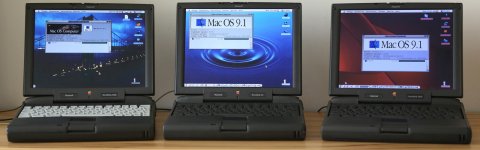
All three PowerBooks (PB 3400c + PB G3 "Kanga" + PB 3400c) are booting to desktop, the left one still with faulty keyboard connectors.