
Thread
LazarusNine's Acquisitions
Hello all,
This is a start to my acquisitions thread. I've snagged a few 'new' old Macs in the last few weeks, which I'll perhaps detail in subsequent posts. However, as I've just completed a purchase, I figured that would be the first one to mention. Interestingly, it's not a 68k machine (those are my preferred models). However, it is a first generation PPC Mac, so I feel like I can justify the purchase in my own warped little brain.
I was the winning (and sole) bidder on a Power Macintosh 7100/AV with monitor, mouse and keyboard for £25 + £10 delivery. The machine looks lightly used and the seller (an original owner) claims that it was not heavily used even when first purchased. The first thing I'll do when it arrives is get that PRAM battery out of there post haste! I'll glance at the capacitors, though I imagine the 7100 won't be high on my recap list, as I still have an LC III to get done (among others). Anyway, thanks for allowing me to share. I'll post pics when it arrives.
Regards,
LazarusNine
This is a start to my acquisitions thread. I've snagged a few 'new' old Macs in the last few weeks, which I'll perhaps detail in subsequent posts. However, as I've just completed a purchase, I figured that would be the first one to mention. Interestingly, it's not a 68k machine (those are my preferred models). However, it is a first generation PPC Mac, so I feel like I can justify the purchase in my own warped little brain.
I was the winning (and sole) bidder on a Power Macintosh 7100/AV with monitor, mouse and keyboard for £25 + £10 delivery. The machine looks lightly used and the seller (an original owner) claims that it was not heavily used even when first purchased. The first thing I'll do when it arrives is get that PRAM battery out of there post haste! I'll glance at the capacitors, though I imagine the 7100 won't be high on my recap list, as I still have an LC III to get done (among others). Anyway, thanks for allowing me to share. I'll post pics when it arrives.
Regards,
LazarusNine
The most common failure I"ve seen in PM7100s is for the heat sink grease to turn to powder and then the machine overheats after a few minutes of operation.
The results can be very frustrating, as the failure manifests like a corrupt OS install. So one reinstalls the OS, only that may or may not finish because of the overheating time. Etc. The time I was cursed with this, I only figured it out because once, I got screen artifacts of a type which I had seen before from overheating PPC601s.
Anyway, while you're changing that PRAM battery, pull the heat sink, clean off the old grease (powder residue, unless someone else already refreshed it) and apply new heat sink grease. Be careful not to apply pressure to the CPU, they're prone to cracking, and do not over-apply the replacement grease, nor get any on the pins of the CPU. I killed a PPC601 that way once, by getting heat sink grease all over the pins. Sigh.
I just had a nice conversation with the guy who originally bought the 7100. He worked as an architect and bought the computer and all of the gear that came with it for a colleague - that colleague subsequently left four months after the purchase and the computer has gone largely unused in all this time! What a shame for the guy who paid something like £4500 for everything altogether right when the PPCs came out.
Well, I got extremely lucky. It turns out that the 7100 came with the Apple Extended Keyboard II, the last mechanical keyboard Apple made. I would have paid £25 just for that. Instead, I got the 7100, keyboard, mouse and the Apple Multiple Scan 17" Monitor for £25. Some people would think this purchase was crazy - I'm over the moon! =)
Here are a few photos, but they don't really get across just how clean and generally unused this Mac is:
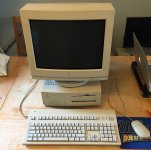
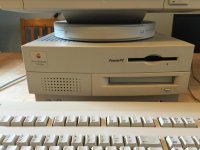
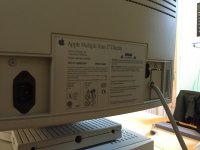
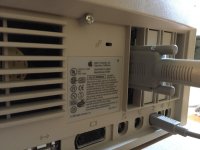
Here are a few photos, but they don't really get across just how clean and generally unused this Mac is:
I know they're a dime a dozen, but I grabbed up a 1.25GHz dual-processor Power Mac G4 on eBay. I had the single processor version released in 2003 that I use to bridge my old Macs with the new, but was eager for a bit more of the power that can be eked out of the dual-processor version that came out the year before. No hard drive, but I grabbed an IDE to SATA converter (which was cheaper than an IDE HDD) so I can throw an old 160GB SATA drive in there.
Yeah, the Dual 1.25 processors do help it out, especially in Mac OS X (the extra processor is basically useless in OS 9, save for the very few applications that actually use it). My first one was also a Single 1.25 GHz machine, which I subsequently sold after I got my current Dual machine.
Mine has two 250 GB drives on the internal bus, and a 1 TB drive on a SATA card. It's no speed demon by modern standards, but it's no slouch, either. The SATA card, even though it's only 1.5 Gbps, is substantially faster than the internal ATA buses, so you might eventually consider getting one.
You could also overclock the CPUs a bit, if you have the skill to do it. I think you can get them up to 1.5 GHz (or maybe 1.4x), which would be a nice boost. I would do this, but I don't have the nerve.
c
Mine has two 250 GB drives on the internal bus, and a 1 TB drive on a SATA card. It's no speed demon by modern standards, but it's no slouch, either. The SATA card, even though it's only 1.5 Gbps, is substantially faster than the internal ATA buses, so you might eventually consider getting one.
You could also overclock the CPUs a bit, if you have the skill to do it. I think you can get them up to 1.5 GHz (or maybe 1.4x), which would be a nice boost. I would do this, but I don't have the nerve.
c
Oh CC_333, I hadn't even thought of a SATA PCI card. That's a brilliant idea. So you think 'any old one' will do, or is there such a thing as a Mac-specific one? I know that I had hit and miss luck with USB 2.0 PCI cards in my single core MDD - it would be nice if I could get the PCI SATA card on the cheap. 
Just be careful popping the clips out from the back of the logic board. Pretty much means pulling the logic board from the machine.
The heat sink has four metal clips that pass through holes in the logic board. On the front they're part of a band of metal that holds the heat sink on the CPU. They just pass through the logic board holes an 1/8" or so.
Found this on Amazon UK. This look right to you?The Sata cards are mac specific, but you can team a £5 PC Sil 3112 card with a £1 flash chip and flash the mac firmware onto the card to get a mac compatible sata card on the cheap
http://www.amazon.co.uk/gp/aw/d/B00O615S60/ref=mp_s_a_1_1?qid=1426202741&sr=8-1&pi=AC_SX200_QL40&keywords=sil3112&dpPl=1&dpID=41pjmPUdX1L&ref=plSrch
I nearly went for this one, but canceled the order as I didn't know if it was flashable:
http://www.amazon.co.uk/gp/aw/d/B00NNR0C6E/ref=mp_s_a_1_2?qid=1426203014&sr=8-2&pi=AC_SY200_QL40&keywords=PCI+sata&dpPl=1&dpID=51a%2BPisfgUL&ref=plSrch
How would I go about searching for an appropriate flash chip and indeed get the software needed to flash the card?
That card looks good to me
You need to find one of 3 flash chips supported by the firmware, these are the AM29LV040, PM39LV040, MX29LV040. And either flash it externally or stick it on the card blank and flash the card with the DOS flashing program, just be aware it is a PLCC32 chip which can be a bit tricky to solder. The only problem is none of these chips are easy to find in the UK, so you need to order them from china or the US (I do have a tube of the AM29LV040's though, so i could send you one)
Have a read of this thread, it details everything you need to know to flash the cards
You need to find one of 3 flash chips supported by the firmware, these are the AM29LV040, PM39LV040, MX29LV040. And either flash it externally or stick it on the card blank and flash the card with the DOS flashing program, just be aware it is a PLCC32 chip which can be a bit tricky to solder. The only problem is none of these chips are easy to find in the UK, so you need to order them from china or the US (I do have a tube of the AM29LV040's though, so i could send you one)
Have a read of this thread, it details everything you need to know to flash the cards
That card looks good to me
You need to find one of 3 flash chips supported by the firmware, these are the AM29LV040, PM39LV040, MX29LV040. And either flash it externally or stick it on the card blank and flash the card with the DOS flashing program, just be aware it is a PLCC32 chip which can be a bit tricky to solder. The only problem is none of these chips are easy to find in the UK, so you need to order them from china or the US (I do have a tube of the AM29LV040's though, so i could send you one)
Have a read of this thread, it details everything you need to know to flash the cards
Hey Max, thanks for the link to the thread - there's a wealth of information there and it makes a lot more sense to me. I'm not too familiar with how to flash a card externally, but perhaps getting the chip onto the card and then plugging it into my PC and flashing the appropriate firmware that way is an option I can consider.
I'm naturally very interested in one of your AM29LV040 chips. Should we keep it in the back of our minds for one of the inevitable purchases I make off you?
 If it turns out I haven't found anything else to pick up, perhaps in a few weeks, we can come back to the subject of the chip? Thanks once again for all your assistance.
yeah that's fine with me, just send me a PM whenever you are readyHey Max, thanks for the link to the thread - there's a wealth of information there and it makes a lot more sense to me. I'm not too familiar with how to flash a card externally, but perhaps getting the chip onto the card and then plugging it into my PC and flashing the appropriate firmware that way is an option I can consider.
I'm naturally very interested in one of your AM29LV040 chips. Should we keep it in the back of our minds for one of the inevitable purchases I make off you?
I'm quite pleased with this eBay purchase - looking forward to receiving it. It's a whole LC 475 system with monitor, external CD drive and StyleWriter printer. £24.99 + £18.00 shipping. Could have done a lot worse in my book!
http://pages.ebay.com/link/?nav=item.view&alt=web&id=171911956874&globalID=EBAY-GB

http://pages.ebay.com/link/?nav=item.view&alt=web&id=171911956874&globalID=EBAY-GB

Was waiting to boot this to ensure it worked before posting, but I'm very pleased to now possess a Quadra 700. Needs a new floppy drive in my estimation, as it barely manages to pull a disk in; reading is flaky. All else is fine, though! Got the battery out and will need to recap the PSU in the near future. It's amazing how 'little' there is in this case. If it wasn't for the Nubus capability, this could have been in a much more compact case:


I may regret this if it IS completely dead; I'm hoping a re-cap is all it needs. Crossing my fingers that it's not an exploded battery. £62 including shipping:
http://www.ebay.co.uk/ulk/itm/131598868866

http://www.ebay.co.uk/ulk/itm/131598868866

Got myself an SE/30 - just waiting for it to arrive. Likely going to need some TLC, but the SE/30 is one I've been after for a while - just been distracted by other models.
Also picked up a G4 Mac Mini to act as a Mac OS 10.4 file server capable of talking to the vintage Macs. Felt like the G4 MDD was a bit of overkill as a repository for all of the old Mac apps I like to access over OpenTransport/AppleTalk.
Also picked up a G4 Mac Mini to act as a Mac OS 10.4 file server capable of talking to the vintage Macs. Felt like the G4 MDD was a bit of overkill as a repository for all of the old Mac apps I like to access over OpenTransport/AppleTalk.
First time in a while that a compact Mac has booted without incident. I did, however, give it an isopropyl bath before even attempting to power on. Don't worry - I'm changing the caps ASAP. What are the power supplies like in the SE/30? As bad as Aztecs in the LC's? Does the analogue board often need recapping as well?

What are the power supplies like in the SE/30? As bad as Aztecs in the LC's? Does the analogue board often need recapping as well?
Eww. I don't like how that screen's adjusted. You should fix that ASAP.
For the compacts, I prefer how the factory had them set. A bit of a gap on the sides with a slightly bigger gap on the top/bottom. Looks like someone went out of their way to stretch out the screen. I'd imagine the aspect ratio is a little off as a result.
That aside, very nice! It will be 2-3 months before I will get my SE/30. Lucky you.
For the compacts, I prefer how the factory had them set. A bit of a gap on the sides with a slightly bigger gap on the top/bottom. Looks like someone went out of their way to stretch out the screen. I'd imagine the aspect ratio is a little off as a result.
That aside, very nice! It will be 2-3 months before I will get my SE/30. Lucky you.
Thanks, Apache! You're correct on all counts - I'll make those adjustments after the recap - I'm just pleased it works.That aside, very nice! It will be 2-3 months before I will get my SE/30. Lucky you.
____
In other news, shipping's a b***h. Gorilla Glue solved this little tragedy, though.

Yeah, for sure. I was pretty impressed with the seller's packing, but it could well have been a perfect storm of events. I think this delivery service was DPD, supposedly 'award winning' (according to "Which?", basically the equivalent of Consumer Reports). Oh well, not irreparable, so I'm not too bothered! Glad to hear your SE arrived safely with you.
Glad to hear your SE arrived safely with you.Yeah. Some of the horizontal desktop machines are ok with me. But I definitely have a preference for the LCs for that category of desktops. Besides the all-in-one Macintoshes, The LC "pizza box" machines have sentimental value to me because the elementary school I went to used them in their computer classes. My main class had a Performa all-in-one with some Apple IIe's. I don't recall what model Performa it was. But I do know it had a PowerPC upgrade because Graphics Calculator worked on it. What was the earliest model of Performa in the all-in-one design that supported a PowerPC upgrade card?
I know the 575 does, but I don't think that was the one. It's definitely not the Peforma 5200's because the case design is radically different from what I remember it looking like in my class.
The school I went to that had these machines is just 36 miles away from me in a nearby city. I think I visited that school in the 2012-2014 range (I forget exactly when) and visited the class I went to. They still had the machines and besides the Apple IIe that I secretly removed a memory upgrade card from when I was a kid, they all still worked. (I was like 8 at the time I originally went to class there and thought the upgrade card might work in my Sega Genesis for some stupid reason. The Apple IIe still worked, but a lot of software would no longer boot on it. )
I know the 575 does, but I don't think that was the one. It's definitely not the Peforma 5200's because the case design is radically different from what I remember it looking like in my class.
The school I went to that had these machines is just 36 miles away from me in a nearby city. I think I visited that school in the 2012-2014 range (I forget exactly when) and visited the class I went to. They still had the machines and besides the Apple IIe that I secretly removed a memory upgrade card from when I was a kid, they all still worked. (I was like 8 at the time I originally went to class there and thought the upgrade card might work in my Sega Genesis for some stupid reason. The Apple IIe still worked, but a lot of software would no longer boot on it.
)The Performa all in ones are:
Performa 200 aka Classic II
Performa 250 aka Colour Classic
Performa 275 aka Colour Classic II
Performa 5xx aka LC 520, 550, 575, 580, etc
Performa 5xxx aka Power Mac 5xxx
If it was PowerPC Performa, it must have been an upgraded 5xx series or a 5xxx series. If it wasn't necessarily a Performa and those case designs don't match, perhaps it was a Power Mac G3 AIO?
Performa 200 aka Classic II
Performa 250 aka Colour Classic
Performa 275 aka Colour Classic II
Performa 5xx aka LC 520, 550, 575, 580, etc
Performa 5xxx aka Power Mac 5xxx
If it was PowerPC Performa, it must have been an upgraded 5xx series or a 5xxx series. If it wasn't necessarily a Performa and those case designs don't match, perhaps it was a Power Mac G3 AIO?
I'm pretty sure it was a Performa though.
It was definitely not a G3. It looked more like the 5xx series. If not the 575, something older in that line perhaps. It could have been a 580 if those were around in the USA. They look very similar to the older 5xx series. It would make sense if it was an upgraded 5xx series. The fact they still had them in in 2012-2014ish means they had a limited budget, so they would not have gotten a full on PowerPC machine. I distinctly recall running Graphics Calculator on it, so it had to have had a PowerPC in there somewhere.
It had MacOS 7, I'm thinking somewhere in the 7.5 family of MacOS (or perhaps 7.6 if the GUI was the same). But was definitely MacOS 7. MacOS 8+ had a distinct look that I don't recall that machine having.
I think it was late 90's when I first went to school there. '97 or 98' and even then that machine was probably outdated. (and that's ignoring the fact they still had Apple IIe's. )
It was definitely not a G3. It looked more like the 5xx series. If not the 575, something older in that line perhaps. It could have been a 580 if those were around in the USA. They look very similar to the older 5xx series. It would make sense if it was an upgraded 5xx series. The fact they still had them in in 2012-2014ish means they had a limited budget, so they would not have gotten a full on PowerPC machine. I distinctly recall running Graphics Calculator on it, so it had to have had a PowerPC in there somewhere.
It had MacOS 7, I'm thinking somewhere in the 7.5 family of MacOS (or perhaps 7.6 if the GUI was the same). But was definitely MacOS 7. MacOS 8+ had a distinct look that I don't recall that machine having.
I think it was late 90's when I first went to school there. '97 or 98' and even then that machine was probably outdated. (and that's ignoring the fact they still had Apple IIe's.
)It was probably a PPC 5xxx. A lot of schools had those. I remember the school my mom taught at had a 5200 LC, which I believe were only sold in the education market. I remember it had a 75Mhz processor, though we all know now how gimped the 5200 series was except maybe the 5260.
Anyway, here's another recent acquisition. It's intended to be an always-on file server for my classic Macs. OS X 10.4.11 is great, because it is the perfect bridge between OpenTransport on System 7x and modern OSs like Yosemite. Up until now I was using a MDD, but I disliked having to boot it up every time (and it's not exactly a machine you'd like to hear running 24/7, not to mention the electricity draw!).
Mac Mini G4, 1.25Ghz, 1GB RAM

Anyway, here's another recent acquisition. It's intended to be an always-on file server for my classic Macs. OS X 10.4.11 is great, because it is the perfect bridge between OpenTransport on System 7x and modern OSs like Yosemite. Up until now I was using a MDD, but I disliked having to boot it up every time (and it's not exactly a machine you'd like to hear running 24/7, not to mention the electricity draw!).
Mac Mini G4, 1.25Ghz, 1GB RAM

Purchased yet ANOTHER LC 475 today (that makes 3). I have total buyer's remorse about it, because I don't need it, but with so little time left on the auction, I was afraid it might end up in a waste pile if it didn't sell. It was complete sans HDD for £12 (+£9 shipping).