

Thread
galgot's "new" stuff
Hi, so here I'll list the last machines I've added to my collection if you don't mind.
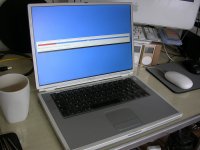
Few days ago got another Ti 1ghz (have two already, but working so-so) , mint condition.
beautiful, was just needing some cleaning and the missing rubber foot I had as spare.
Here it is installing Debian Wheezy, with Tiger already on the other partition.
Same day , received a PowerBook 3400c, sold 20€ as "good shape, would not start". In my quest for working 240Mhz model , I couldn't resist. Turned out it would start, but nothing would show on screen.
Tried swapping the screen with a knowned good one but it would stay black… no way to know if it's a 240Mhz model, and anyway seems the graphic card is kaput. Another one on my stack of non-working 3400s. But the good thing is , there was that sweety in there :
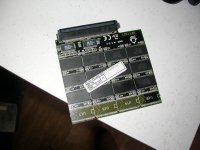
Already plugged in one of my working 3400c
A week earlier (maybe…, or was it two?), got that one PB 100 :
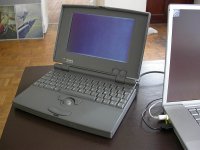
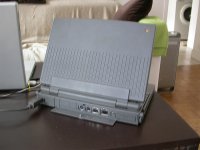
Very good condition , with the floppy drive, only the right foot a bit loose. As you can see on the pict, I managed to boot it, but to a blank screen. I can hear the HD starts spinning then stops…
Tried booting from a floppy, can hear the floppy running as like a boot, but still blank screen.
I suppose it need a recap, and will really have to learn that some day.
Much earlier, finally got a Asante Micro EN/SC to plug in the Newer-Tech SCSI MicroDock for my Duo 270c.
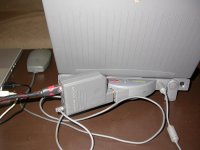
Here it is connected to the www :
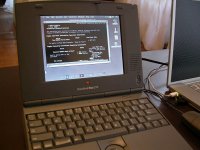
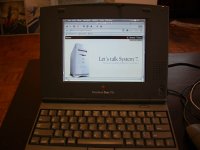
It's sloowwww, but it's fun
Voilà...
Few days ago got another Ti 1ghz (have two already, but working so-so) , mint condition.
beautiful, was just needing some cleaning and the missing rubber foot I had as spare.
Here it is installing Debian Wheezy, with Tiger already on the other partition.
Same day , received a PowerBook 3400c, sold 20€ as "good shape, would not start". In my quest for working 240Mhz model , I couldn't resist. Turned out it would start, but nothing would show on screen.
Tried swapping the screen with a knowned good one but it would stay black… no way to know if it's a 240Mhz model, and anyway seems the graphic card is kaput. Another one on my stack of non-working 3400s. But the good thing is , there was that sweety in there :
Already plugged in one of my working 3400c
A week earlier (maybe…, or was it two?), got that one PB 100 :
Very good condition , with the floppy drive, only the right foot a bit loose. As you can see on the pict, I managed to boot it, but to a blank screen. I can hear the HD starts spinning then stops…
Tried booting from a floppy, can hear the floppy running as like a boot, but still blank screen.
I suppose it need a recap, and will really have to learn that some day.
Much earlier, finally got a Asante Micro EN/SC to plug in the Newer-Tech SCSI MicroDock for my Duo 270c.
Here it is connected to the www :
It's sloowwww, but it's fun
Voilà...
Sweet Gael,
Love the Powerbook 100, the rear latch is present, so it's a bonus.
If you need help on the recap, let me know... i am becoming pretty good.
The 3400 has probably the same kind of failure, the memory worth probably the 20 euros anyway.
Love the Powerbook 100, the rear latch is present, so it's a bonus.
If you need help on the recap, let me know... i am becoming pretty good.
The 3400 has probably the same kind of failure, the memory worth probably the 20 euros anyway.
Good luck with the recap - I've recapped two PowerBook 100s and there's around ~35 capacitors to replace! Eurgh.
If you need diagrams/parts list I know I posted one, and I think Uniserver posted a better one a few years back.
If you need diagrams/parts list I know I posted one, and I think Uniserver posted a better one a few years back.
Wait there are model-specific memory cards for the 3400c?? Why would that be the case?
@ bibilit and james_w , thanks both for the offer. Good to know who I can ask when I'll start recap adventure
@ raoulduke , Yes 3400c use specific memory cards. They were expensive, and hi capacity ones are still expensive. AFAIK last Powerbook to use specific model is the Kanga, then Apple switched to industry standard 144-pin SDRAM SO-DIMM Starting from the Wallstreet.
@ raoulduke , Yes 3400c use specific memory cards. They were expensive, and hi capacity ones are still expensive. AFAIK last Powerbook to use specific model is the Kanga, then Apple switched to industry standard 144-pin SDRAM SO-DIMM Starting from the Wallstreet.
Wait. I'm asking if - as you seemed to say - the /180 memory cards cannot be used on a /240...? Kanga and 3400c modules are not exactly cross-compatible.
Nvm. I see what you were saying - talking about the machine not the card
Nvm. I see what you were saying - talking about the machine not the card
Mmmh what are /180 and /240 ? You mean PowerBook 180 and PowerBook 2400 ? I don't know if their memory cards are cross compatible… But I know until the Kanga , Apple used specific memory modules for PowerBooks. But I may be wrong, someone more knowledgeable than me here could tell you...
Yes I know Kanga and 3400c are not swappable , but there is a thread here of someone who managed to make one modified 3400c card work on a Kanga.
Yes I know Kanga and 3400c are not swappable , but there is a thread here of someone who managed to make one modified 3400c card work on a Kanga.
I believe he swapped the caps. By /180 I meant a Powerbook 3400c/180.
Ah ok. Slow brain I have
Was there an HD in the non-working 3400c?
And I'd so how big was it?
And I'd so how big was it?
There was one , 2Gb.
3400c/200
Hi,
Bought two other oldies yesterday, with dead HDs unfortunately .
That is a Powerbook 180c, and a 170. The two are booting alright on floppy or zip.
The 170 attracted my eyes cause it as a video expansion card for external screen :
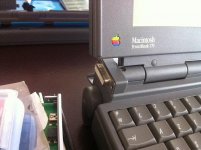
here a pict of the card:
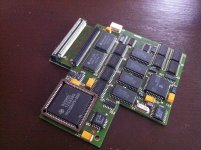
It's apparently the same as here :
https://68kmla.org/forums/index.php?/topic/23282-powerbook-170-mirror-powervision-external-display-adapter-card/
other than that , pretty standard:
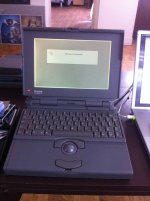
The 180c had a loose screen bezel cause of broken screw placements, it's in the repair shop now :
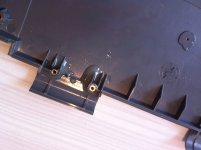
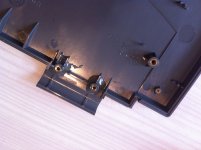
Otherwise boots ok on floppy:
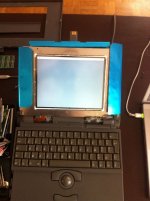
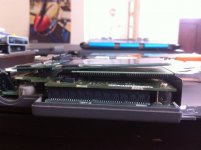
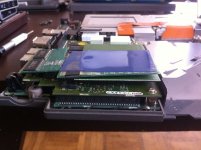
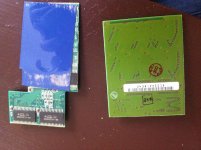
It also had two strangely placed expansions cards ,one above the other, but not well fitting , i suppose one is RAM, but what is the other ? Could you help me identify these ? :
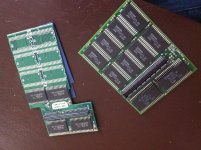
Bought two other oldies yesterday, with dead HDs unfortunately .
That is a Powerbook 180c, and a 170. The two are booting alright on floppy or zip.
The 170 attracted my eyes cause it as a video expansion card for external screen :
here a pict of the card:
It's apparently the same as here :
https://68kmla.org/forums/index.php?/topic/23282-powerbook-170-mirror-powervision-external-display-adapter-card/
other than that , pretty standard:
The 180c had a loose screen bezel cause of broken screw placements, it's in the repair shop now :
Otherwise boots ok on floppy:
It also had two strangely placed expansions cards ,one above the other, but not well fitting , i suppose one is RAM, but what is the other ? Could you help me identify these ? :
Fairly certain both of those are RAM. I don't see anything other than RAM ICs anyways.
Thanks. I thought PB180 had only one RAM slot.
I think it does, but apparently, one can piggyback a second RAM card if the first has the conjector for it.
c
c
I think it does, but apparently, one can piggyback a second RAM card if the first has the conjector for it, which is what you have it seems.
c
c
Yes but these are not connected together. Each are slotted on a separate slot on the board. That bright green one on a side slot, and the one with the blue plastic on a top horizontal slot.
Thanks to Techknight, now whenever I see an LCD, I want to add a EL Sheet backlight to it.
Video RAM perhaps?
CHEERS !!
Been able to boot the 180c HD !
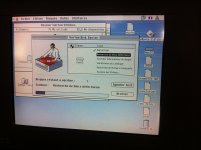
After disassembly, cleaning, shocking the hd on the sides a bit, repairing the screen bezel, I tried booting from a zip, was working ok, but hd was doing strange noises for some time during boot. Then on another try I booted but the zip was not yet in the zip drive, but the happy Mac appeared !
It wouldn't boot to the desktop at first, saying the system was not compatible with the machine (?), then after booting from a diskette and running Disk first aid, it booted fine
Don't know if it'll last, but happy anyway
Been able to boot the 180c HD !
After disassembly, cleaning, shocking the hd on the sides a bit, repairing the screen bezel, I tried booting from a zip, was working ok, but hd was doing strange noises for some time during boot. Then on another try I booted but the zip was not yet in the zip drive, but the happy Mac appeared !
It wouldn't boot to the desktop at first, saying the system was not compatible with the machine (?), then after booting from a diskette and running Disk first aid, it booted fine
Don't know if it'll last, but happy anyway
I would backup anything you have on that HDD before it goes. Because its gonna go... its probably got a quantum or a conner in it, which again, melted rubber will crash the heads soon enough.
I would think a 180 would have an IBM drive in it? I'm about 95% sure mine does.
Yes all those hard drives are on their last legs, tested a IIsi this WE (with a Conner on it) and the HD refused to work properly.
Yeah it will fail sooner or later… but anyway, still booted this morning.
It's a Quantum GO160 161mb.
Btw, noticed something funny, when it's running there is a smell like ... rotten fish, coming from the screen !
It's a Quantum GO160 161mb.
Btw, noticed something funny, when it's running there is a smell like ... rotten fish, coming from the screen !
The capacitors inside the display assembly are leaking!, that's where the smell comes from
!! Will open it this evening and see that. Thanks.
Yes i agree, caps leaking.
Okayyyy…. opened that screen again . Old herring smell 
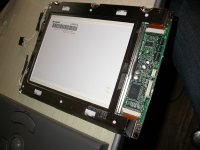
First look seems ok, but indeed when I zoom on these caps :
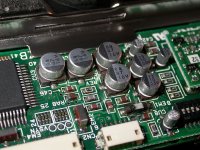
Misty and dirty… Do you think a good cleanup with alcohol would do for the moment ?
The other board (power I think) seems Ok , no smell, and it's clean.
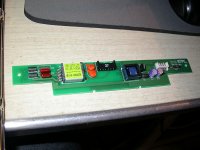
First look seems ok, but indeed when I zoom on these caps :
Misty and dirty… Do you think a good cleanup with alcohol would do for the moment ?
The other board (power I think) seems Ok , no smell, and it's clean.
Won't last for a long time but do it anyway.