
Thread
Performa 200
Started on the performa 200
The board as I got it.

caps removed

board cleaned

Recapped the board but no chime.
Compared my performa 200 to this one and noticed the roms were in backwards and 1 pin in the wrong direction. So I put them in the same as on my board.

still no chime.
Found 2 shorts on the cpu and fixed thoes

still no chime.
Im wondering.........could the roms have been damaged if it was powered up with the roms in backwards??
any ideas people?
The board as I got it.
caps removed
board cleaned
Recapped the board but no chime.
Compared my performa 200 to this one and noticed the roms were in backwards and 1 pin in the wrong direction. So I put them in the same as on my board.
still no chime.
Found 2 shorts on the cpu and fixed thoes
still no chime.
Im wondering.........could the roms have been damaged if it was powered up with the roms in backwards??
any ideas people?
cant see any heat exposure anywhere 360alaska. !! - where do you mean ?
-
just removed battery holder..........this board is in perfect condition. No acid leak what so ever.
-
rollermanz did a pretty good job recapping this one.....I took off all the caps to clean it ............no pads lifted.........nothing
-
all I found wrong was roms in backwards...........and 2 pins of cpu shorted ( im pretty sure they were anyway..........they are not now)
-
still no chime
-
just removed battery holder..........this board is in perfect condition. No acid leak what so ever.
-
rollermanz did a pretty good job recapping this one.....I took off all the caps to clean it ............no pads lifted.........nothing
-
all I found wrong was roms in backwards...........and 2 pins of cpu shorted ( im pretty sure they were anyway..........they are not now)
-
still no chime
Ya, That thing took some heat. ROM sockets even show signs. Not to mention the board label.
I am sure you do not have a spare set of ROMS from a Classic II, etc? Im not sure how the ROMS would respond to be in wrong. They can certainly be in the wrong sockets and come out fine.
I am sure you do not have a spare set of ROMS from a Classic II, etc? Im not sure how the ROMS would respond to be in wrong. They can certainly be in the wrong sockets and come out fine.


see what you mean - the ram holders have signs of melting as well.........but this board is small and to hold the board in your hand you would not see it.
the pictures show every detail. Its was the pictures that I saw the short on the cpu from.
jesus.......if this was cooked like the color classic then there might be SM components missing on the back.
-
have already gone over the whole board with the magnifying glass and found nothing.
I did find that I put C4 in backwards......was sure that was it..........put in a new 47uf ....correctly........but still no joy.
-
this board looks brand new. Its in better condition than mine.........
-
ahhhhhh .........this is the slow bit..........look,look,look
the pictures show every detail. Its was the pictures that I saw the short on the cpu from.
jesus.......if this was cooked like the color classic then there might be SM components missing on the back.
-
have already gone over the whole board with the magnifying glass and found nothing.
I did find that I put C4 in backwards......was sure that was it..........put in a new 47uf ....correctly........but still no joy.
-
this board looks brand new. Its in better condition than mine.........
-
ahhhhhh .........this is the slow bit..........look,look,look
great idea Elfen.......ill do that.
-
360..........yep........that's the one I saw....plus another, 2 pins to the left. Have since gone over every chip looking for more........but nothing
-
again people...........these are not my boards.......im trying to fix them for a chap in the uk
-
360..........yep........that's the one I saw....plus another, 2 pins to the left. Have since gone over every chip looking for more........but nothing
-
again people...........these are not my boards.......im trying to fix them for a chap in the uk

Elfen - good call - I swapped the roms over to my good board and good chime
-
roms are back in the bad board now.
-
I am beginning to agree with you lads..............the back of the board has some strange shapes on the solder on all the resistor connections
-
hang on..........ill get a picture of the back
-
looks like its been baked.............Ive never seen solder in that shape on the back of a board.
-
Looks like it was molten...............after its manufacture.
-
That's 3 boards and I only got 1 working.
-
the classic and color classic are even worse.
-
OOOOOOHHHHHHH DEAR


-
roms are back in the bad board now.
-
I am beginning to agree with you lads..............the back of the board has some strange shapes on the solder on all the resistor connections
-
hang on..........ill get a picture of the back
-
looks like its been baked.............Ive never seen solder in that shape on the back of a board.
-
Looks like it was molten...............after its manufacture.
-
That's 3 boards and I only got 1 working.
-
the classic and color classic are even worse.
-
OOOOOOHHHHHHH DEAR


jasus - just had a futher look with magnifying glass.
-
there are via's on the underside where the solder has 'dripped' off. Most of the via's are like little balls of solder under the board.
-
from the top (cpu side) all the via's are sunken
-
well done 360............correct diagnosis id say
-
this baby is toast
......................
-
for the laugh............I might put it in an oven the other way up see if can...........................eeehhhh.....................naaaa
-
feck it
-
next!!!!!!!!!!!!!!
-
there are via's on the underside where the solder has 'dripped' off. Most of the via's are like little balls of solder under the board.
-
from the top (cpu side) all the via's are sunken
-
well done 360............correct diagnosis id say
-
this baby is toast
......................
-
for the laugh............I might put it in an oven the other way up see if can...........................eeehhhh.....................naaaa
-
feck it
-
next!!!!!!!!!!!!!!


just metered c66 and its good. looks like the solder was molten, flowed down with gravity, but there appears to be a thin layer of solder making the connections on most of them,
-
no...........im not going there
-
theres hundreds of resistors, caps, diodes ............there all the same............
-
-
no...........im not going there
-
theres hundreds of resistors, caps, diodes ............there all the same............
-
Guys no i never baked this board .. I am 200% sure i never baked this board.. I got this board with its orignal capaictors on, when turned on no chime and a blank screen.. i then took them off, washed the board, left it outside for 2 days drying up then still used a hair deyer to dry the ports and all to make sure theres no water in it then recapped and put it in still no joy.. I then tried with different roms and still didnt work.. Which i where i think i put the roms upside down.. I then googled and found out that some vias need re soldering or renewing the joints so i took a soldering iron and renewed EVERY SINGLE JOINT on this board.. NO BAKING AT ALL .. The first and last time i ever baked a board in the oven was the cc board thats all.. I never believed in baking it anyways but when guys insisted on this then i tried with the cc and made it worse .. So no baking at all.. Whatever you see on this board, is me renewed the joints thats all .. Dont worry i did dry the board with leaving it outside .. I did not bake it ..
**unless you used heat gun instead of a hair dryer.
or the person before you baked it.
letting a board sit wet for 2 days is really not cool... always compressor dry these things off right after a wash.
there looked like 2 shorted areas on the cpu legs fallen.
also the sound I/C controls reset with these , many times i'v had to hot air off the sound IC, only to find rotted up traces, roted up pads. under it.
also I believe U14
ram chip goes bad, from the cap goo. its in other classic ii threads, i think the first 2 ram chips closest to the caps there can be subject to cooked ram chips. ( witch the bad ram shows no physical signs of being dead, just maybe some rot on the legs.
so i think you should start with the ASC.
u14 maybe u13(replace)*1, then ASC pads and traces (have to remove the IC), EGRET *2
are all issues that arise with the Classic II.
Also BOMARC just completed his final Documentation and is going to be drafting up a schematic for this classic II
well the 4 rom chip version but they are mostly close enough...
*1 you can scavenge a ram chip from a basically any mac that has 4mb soldered onboard.
even the 6100 with 8mb soldered on board. even a LC depending on what parts boards you have lying around.
*2 EGRET, you can use the EGRET from LC-I / LC-II if needed. not sure if the EGRET from LC-3 works...
however i do think the EGRET from a LC-III will work with the Color Classic, those also have ERGET issues ( cap goo related )
or the person before you baked it.
letting a board sit wet for 2 days is really not cool... always compressor dry these things off right after a wash.
there looked like 2 shorted areas on the cpu legs fallen.
also the sound I/C controls reset with these , many times i'v had to hot air off the sound IC, only to find rotted up traces, roted up pads. under it.
also I believe U14
ram chip goes bad, from the cap goo. its in other classic ii threads, i think the first 2 ram chips closest to the caps there can be subject to cooked ram chips. ( witch the bad ram shows no physical signs of being dead, just maybe some rot on the legs.
so i think you should start with the ASC.
u14 maybe u13(replace)*1, then ASC pads and traces (have to remove the IC), EGRET *2
are all issues that arise with the Classic II.
Also BOMARC just completed his final Documentation and is going to be drafting up a schematic for this classic II
well the 4 rom chip version but they are mostly close enough...
*1 you can scavenge a ram chip from a basically any mac that has 4mb soldered onboard.
even the 6100 with 8mb soldered on board. even a LC depending on what parts boards you have lying around.
*2 EGRET, you can use the EGRET from LC-I / LC-II if needed. not sure if the EGRET from LC-3 works...
however i do think the EGRET from a LC-III will work with the Color Classic, those also have ERGET issues ( cap goo related )
I didnt use a heat gun either .. That tiny bit of plactic melted on the floppy drive connector is when i was put the capacitors on, i touched the soldering iron my accident .. Ni heat gun or baking and i made sure t was fully dry before i flogged it into the machine ..
oh well those picture show that it was cooked.. its ok... wither you did it or the holy ghost did it, its been cooked.
but it doesn't look to be that bad from my perspective.
i think fallen's IRISH insanity... + Bulldog like determination will make it work before too long... no worries.
but it doesn't look to be that bad from my perspective.
i think fallen's IRISH insanity... + Bulldog like determination will make it work before too long... no worries.
rollermanz - its not a witch hunt............its all good fun
-
you did a great job on the recap......your best of the 5. Better than most of my recaps in my first few months.
-
uniserver has put up some good things I can check..........so we'll have a look later.
-
for all we know apple may have had a blown thermocouple on the day it was built. Could be something silly
-
well have another go at it later on
-
cheers
-
you did a great job on the recap......your best of the 5. Better than most of my recaps in my first few months.
-
uniserver has put up some good things I can check..........so we'll have a look later.
-
for all we know apple may have had a blown thermocouple on the day it was built. Could be something silly
-
well have another go at it later on
-
cheers

You never know if it sat in a car in direct sunlight in the middle of summer or a metal container in an attic, it could get hot enough to melt things. Not knowing the total history its possible it could have been in an environmental situation where it got hot enough to cause this, its unlikely, but it is possible.
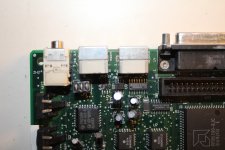
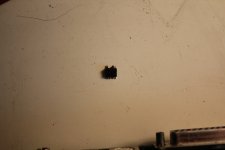
you can still run a wire from pin 22 of U4 to the negative pad of c4, removing the c4 cap. and you will still get audio out of the speaker and headphone jack but at about 50 percent of previous volume all the way up.
with u1 being gone. the computer will still work but you really want to remove U4 and inspect the pads and traces.
with u1 being gone. the computer will still work but you really want to remove U4 and inspect the pads and traces.
Well..........heres what happened today folks
-
this is part 1
-
again.....please excuse my French..........will have to start putting bleeps in my vids............but then again these vids are not for kids
-
yet again.you have to click 'Show All Content' on the bottom of the screen to see the vid............is this the same for all users here!!!!!
-
-
this is part 1
-
again.....please excuse my French..........will have to start putting bleeps in my vids............but then again these vids are not for kids
-
yet again.you have to click 'Show All Content' on the bottom of the screen to see the vid............is this the same for all users here!!!!!
-
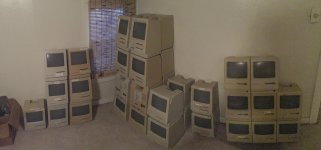
hey unity.all mine are up in the attic.Tried to count them yesterday while I was getting performa and classic's. I have over 30 macs (thought I had way more!)...........Im planning on taking everything down some day and setting them all up in 1 room, connect them all to 1 power supply, roll the camera and hit the power.would be cool.
I have apple ii's, Osborne 1's, oric atmos, commorode 64, spectrum 48k's..............basically all the stuff from my teens
-
is there a way to mail the admin of this forum............I cant find a way to change my online status......always says im offline even when im online!!
-
wonder is it because im in Ireland!
-
second vid is uploaded........processing away..takes another 10-15 min id say
I have apple ii's, Osborne 1's, oric atmos, commorode 64, spectrum 48k's..............basically all the stuff from my teens
-
is there a way to mail the admin of this forum............I cant find a way to change my online status......always says im offline even when im online!!
-
wonder is it because im in Ireland!
-
second vid is uploaded........processing away..takes another 10-15 min id say

I don't know techknight............
-
not only do my vids not show, but I cant past anything into a post. I have to use the replace command in the tool bar to paste links.
-
maybey that's why it happens.
-
I logged out tonight and back in and now I appear as online!.
-
will try paste a link in the following line
nothing appeared for me
-
but ill post it to see
-
not only do my vids not show, but I cant past anything into a post. I have to use the replace command in the tool bar to paste links.
-
maybey that's why it happens.
-
I logged out tonight and back in and now I appear as online!.
-
will try paste a link in the following line
nothing appeared for me
-
but ill post it to see
no link!!!!!!!!
-
I have no idea why I cant paste links into the posts except for using the replace command. ( I type xxx where I want the link, then I goto replace....it asks for what you want to replace (xxx) then the second box asks 'with what'... that's where I paste the link. That gets the link to appear. Why cant I paste links here??
-
do me a favour............use the replace command above ( its left of the binoculars......and post a link the same way......see if it comes up the same.
-
anyway.......................
-
will have to get onto the site admin and ask him to check my user status
-
I have no idea why I cant paste links into the posts except for using the replace command. ( I type xxx where I want the link, then I goto replace....it asks for what you want to replace (xxx) then the second box asks 'with what'... that's where I paste the link. That gets the link to appear. Why cant I paste links here??
-
do me a favour............use the replace command above ( its left of the binoculars......and post a link the same way......see if it comes up the same.
-
anyway.......................
-
will have to get onto the site admin and ask him to check my user status
the high frequency sound ? ........I thought the same........as it is not right..........
-
I havnt opened it up yet...but looks like I will have to...........the drive is dieing..........and it was full of software.
-
any suggestions?...........it is either a particle trapped between the head and the platter of a mark on the platter. But even if I open it.....what can I do
-
feck...........chances are that allot of my drives will be the same.
-
I plan on taking down each machine in the next week or so and removing every drive.............all I can do is keep them in a room with a more stable temprature
-
-
I havnt opened it up yet...but looks like I will have to...........the drive is dieing..........and it was full of software.
-
any suggestions?...........it is either a particle trapped between the head and the platter of a mark on the platter. But even if I open it.....what can I do
-
feck...........chances are that allot of my drives will be the same.
-
I plan on taking down each machine in the next week or so and removing every drive.............all I can do is keep them in a room with a more stable temprature
-
just sent Bunsen a request to check my profile status.........try and resolve it
-
I use win7 64 bit ......and 32 from time to time...........I have no idea........I doubt its OS as I ghost my machine back to fresh install every few months
-
I can post pictures no problem , but only on the 'more reply options' as there is no 'attach' command on this reply box
-
-
I use win7 64 bit ......and 32 from time to time...........I have no idea........I doubt its OS as I ghost my machine back to fresh install every few months
-
I can post pictures no problem , but only on the 'more reply options' as there is no 'attach' command on this reply box
-
unity - how do you paste a utube link..is it on the standard reply box?..right click and click paste?..........cause that will not work for me.
-
Do I appear online down below as a member.....all along I appeared as anonymous...............even though Im a member..........am I a member??? ....
-
ah..........Bunsen will sort it out hopefully
-
Do I appear online down below as a member.....all along I appeared as anonymous...............even though Im a member..........am I a member??? ....
-
ah..........Bunsen will sort it out hopefully


Just wanted to say gee thanks for posting that performa tour cause I had to sit and watch all 23 minutes of it since it was there haha... On a side note when I'm using Internet explorer I have to click show all content to see videos but on my iPhone they just show up as they should.
thanks jhorvath911 ........... started to think I was going crazy there..you see 'Show all content' as well........its probally antivirus, or firewall crap so.....cheers man
-
Uniserver I just want to confirm this before I try it
pin 22 of u4 to negative of c4 and remove c4. Are you pretty sure this wont blow anything else up!!!!
-
do I have this right?
-
cheers uniserver

-
Uniserver I just want to confirm this before I try it
pin 22 of u4 to negative of c4 and remove c4. Are you pretty sure this wont blow anything else up!!!!
-
do I have this right?
-
cheers uniserver

Uniserver............U the Man!!!
-
worked exactly as you said
-
1 wire, 2 connections and she is chiming at half volume just as you said.
-
That wraps it up for the performa200........it is done....it is for me anyway
-
thanks for all your help folks
-
last pictures of the 'mostly' restored performa
-
weh hey!


-
worked exactly as you said
-
1 wire, 2 connections and she is chiming at half volume just as you said.
-
That wraps it up for the performa200........it is done....it is for me anyway
-
thanks for all your help folks
-
last pictures of the 'mostly' restored performa
-
weh hey!