

Thread
IDE > SD
Hey Elfen, btw, I don't know where I'm going to put this but how do you mount them physically inside the cases? Tape into the um like HD bracket? (I forget what the gray case thing that holds the HD is called. It's not really a caddy.)
I use 2-sided tape for a "permanent" set up. The two sided foam tape, not the thin clear one used in gift wrapping.
Use 2 or 3 pieces to make sure the solder contacts on the back side you are taping is covered. You do not want it shorting out against the metal casing. The HD Casing would be a great place for it.
Use 2 or 3 pieces to make sure the solder contacts on the back side you are taping is covered. You do not want it shorting out against the metal casing. The HD Casing would be a great place for it.
Great news to hear! Hope you resolve it soon!
(Sounds like a formatting/partition issue - a 1.7GB partition is what older Macs with older systems like.)
Is it possible that OS 8 at some point won't boot properly (or let's say might not) if formatted with HFS - or (I assume) vice versa, pre-OS 8.1 won't boot properly if formatted with HFS+.
Presuming the option remains default, my setup with 8.5.1 formats as HFS by default. And 7.6(.1?) I installed and booted (sort of); whereas whatever probably 8.5/9 and possibly 8.1 didn't. But 8 might not have worked either. I'll try 7.5.something next.
Presuming the option remains default, my setup with 8.5.1 formats as HFS by default. And 7.6(.1?) I installed and booted (sort of); whereas whatever probably 8.5/9 and possibly 8.1 didn't. But 8 might not have worked either. I'll try 7.5.something next.
Using an emulator may cause odd behavior. Why? Because many of them do some pretty bizarre things in terms of storage, like presenting disk images as giant floppy disks to the emulated system instead of real hard drives. Generally a classic MacOS hard drive has an Apple Partition Map layout with a driver partition for the controller you are using followed by data partitions. Drive Setup is supposed to install it when a drive is initialized, but emulators may trip it up.
What versions of Drive Setup are you trying? You should be able to patch 1.x under an emulator using ResEdit although I would give un-patched 1.7.3 a shot first.
http://download.info.apple.com/Apple_Support_Area/Apple_Software_Updates/English-North_American/Macintosh/Utilities/Drive_Setup/Drive_Setup_1.7.3.smi.bin
Also, I would stick to SD cards 8GB and under. Apple's IDE implementation is more brain dead then you think. Somehow the PC specific Int 13h limit of 8.4GB shows up in early Apple IDE hardware. It may be flipping out dealing with a larger drive (variables are likely overflowing)
https://groups.google.com/forum/#!topic/comp.sys.mac.hardware.storage/LdK3lWqVFGw
What versions of Drive Setup are you trying? You should be able to patch 1.x under an emulator using ResEdit although I would give un-patched 1.7.3 a shot first.
http://download.info.apple.com/Apple_Support_Area/Apple_Software_Updates/English-North_American/Macintosh/Utilities/Drive_Setup/Drive_Setup_1.7.3.smi.bin
Also, I would stick to SD cards 8GB and under. Apple's IDE implementation is more brain dead then you think. Somehow the PC specific Int 13h limit of 8.4GB shows up in early Apple IDE hardware. It may be flipping out dealing with a larger drive (variables are likely overflowing)
https://groups.google.com/forum/#!topic/comp.sys.mac.hardware.storage/LdK3lWqVFGw
yeah - HFS+ will not work on 8.0 or before, they require HFS. From 8.1 to 9.22, HFS+ is needed if you are using a Hard drive larger than 2GB.
NJRoadFan is right, Apple's IDE implementation is really brain dead and this affects machines up to the G4 Laptops (up to the G3 Blue&White Tower with desktops).
NJRoadFan is right, Apple's IDE implementation is really brain dead and this affects machines up to the G4 Laptops (up to the G3 Blue&White Tower with desktops).
Cool. I'll check that out next time I try. Just ordered a 128mb 100x CF card and CF to IDE adapter because at that speed/size CF is cheaper. [it's for a 5300cs I bought as a parts repository for a 5300c, but they both work well at the moment.]
Fully agree.They work in old Amiga 1200 immediately, but never in my PowerBooks.
I also tried a microSD to Compact Flash adapter, whereas the microSDs can be formatted on a PC, they didn't work PROPERLY in PowerBooks (and Amiga 1200): always read/write errors later on.
BTW: interesting thread!

You bought 100 CF's? Damn! Depending on the system, it might not fit on 128MB. I know System 7 will not fit on 64Megs without some trimming of the system and removal of a lot of extensions and control panels. I have 3 PCMCIA flash memory cards as emergency boot disks if the hard drive fails on some of my laptops.
The PCMCIA Cards is like this (I seen SanDisk make up to a 1.2GB Unit):

The CF > PCMCIA Adapter (works with most CF's I tried, though the CFs have to be properly partitioned and formatted):

On most Mac Laptops, I find that the PCMCIA boots faster than on the IDE, even with the same CF Cards. This is because the PCMCIA is connected directly to the Databus while the IDE has to go through a series of buffers that slows things down.
You can check out this link, it was for a 1400 > CF/IDE set up and I helped out with a few details:
https://68kmla.org/forums/index.php?/topic/23406-booting-from-a-compact-flash-drive/page-2&do=findComment&comment=244873
The 5300 and others set up the same way.
Glad you like it. I like to know what others are doing with Macs, PCs and others with various forms of SSDs. This information is great to pass down to others.Fully agree.
They work in old Amiga 1200 immediately, but never in my PowerBooks.
I also tried a microSD to Compact Flash adapter, whereas the microSDs can be formatted on a PC, they didn't work PROPERLY in PowerBooks (and Amiga 1200): always read/write errors later on.
BTW: interesting thread!
Thanks!
A month ago I posted a little CF/SSD/HD test here:
http://forums.macrumors.com/threads/powerbook-g3-compare-harddisk-compact-flash-ssd.1879029/
http://forums.macrumors.com/threads/powerbook-g3-compare-harddisk-compact-flash-ssd.1879029/
Those are some interesting numbers. But at the same time, the tests says one thing and how the powerbook behaves is another. As I seen it, the SSD (Cf or SSD) is a lot faster than the HD, in all cases. I think it is because the tests are using short data blocks and SSDs prefer large data blocks.
Care to post those graphs up here?
Care to post those graphs up here?
lol Elfen! I bought a 128mb 100x (speed) CF card.
Here it is,
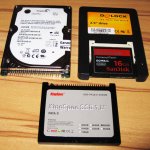
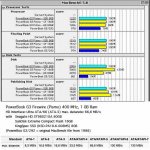
I‘ve compared Harddisk, Compact Flash and SSD in two different PowerBooks G3.
First (pic 1+2)
PowerBook G3 Firewire (Pismo) 400 MHz, 1 GB Ram (ATA-5 HD interface)
with 3 data-storages, which still are available at this time:
Seagate HD ST980210A 80GB
SanDisk Extreme Compact Flash 16GB
KingSpec SSD (KSD-PA18.6-008MS) 8GB
*
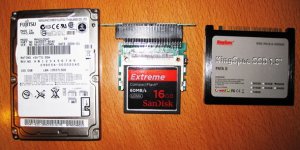
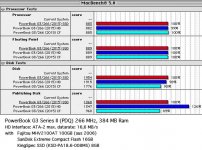
The second test (pic 3+4) is different, because of the ATA interface:
PowerBook G3 Series II (PDQ) 266 MHz, 384 MB Ram (ATA-2 HD interface)
Same CF and SSD but older harddisk from 2006: Fujitsu MHV2100AT 100GB
Mike
Funny, I use the same King Spec PATA II SSD. As for the CF, I use the Ultra by SanDisk though the Ultra's and the Extreme's I find to be about the same.
That makes a lot sense now! LOL!
100X Speed is just a bit faster than a hard drive. A 200X would be the best for anything up to a G3-WallStreet, that is from a PB 520 to a G3 Wallstreet. 133X and 150X are good, but not as fast as a 200X. 400X are best for the G3 Prismo/Lombards and on, though a 200X is comfortable in those machines - all of these will be faster than hard drive.
Price and Speed is a factor.
Technically 100X is supposed be as fast as a hard drive but I find an old 75X to be equal to a hard drive; the data speed might be the same but the hard drive is doing a lot of buffering before sending and that slows it down, especially with the old hard drives. Thus 200X is a bit more than double the hard drive speed, and 400X about 4 times. Just drop the 00's.
Thing is, because many adapters wont have True IDE/DMA/UDMA support without a bit of hacking to the interface, but as is, it should be fine up to a G3 Wallstreet.
See: http://www.fccps.cz/download/adv/frr/cf.html
In my older PowerBooks - I own about 20 working PowerBooks now - I mostly use 4GB normal SanDisk CF cards and I'm very satisfied with them.
For one of my PB 540c I would like to get this:
http://pages.ebay.com/link/?nav=item.view&alt=web&id=261922955509
CF PowerMonster II CF-2.5" SCSI Converter Card
but they are so expensive and the old SCSI harddisk still works.
For one of my PB 540c I would like to get this:
http://pages.ebay.com/link/?nav=item.view&alt=web&id=261922955509
CF PowerMonster II CF-2.5" SCSI Converter Card
but they are so expensive and the old SCSI harddisk still works.
I did some similar testing using a Powermac 6400 and a few drives I had on hand, Sandisk Ultra CF card, 1.2 gig Fireball HDD and a 60 gig 7.2k IBM Deskstar. In my test the CF card was the worst of the bunch, but that might be from me using a precreated image and dding it to the drives, not sure.
Here's a link to the graphs. I might redo it later using another system, such as the Powerbook 1400 or see if I can get the Mactel working.
http://imgur.com/a/JxMVa
Here's a link to the graphs. I might redo it later using another system, such as the Powerbook 1400 or see if I can get the Mactel working.
http://imgur.com/a/JxMVa
That's because of this, Compgeke:
http://www.fccps.cz/download/adv/frr/cf.html
Though Apple IDE is brain dead on many levels, it does try to cheat in access DMA in the drive. Also, like I stated, these tests tend to use short blocks of data and SSDs, especially CFs, want large data blocks.
My tests is this: How fast does it boot from Happy Mac to Desktop, how fast does it load an app, how fast does it load a large file, how fast does it take to save that file, how fast does it quit the app, and how fast it shuts down. Using a ThinkPad 190E (a 20 year old MMX 120MHz Pentium (1) Laptop loading Win 98, MS Word, it takes seconds. 12 seconds to boot - DAMN! It is faster than my i5 PC and Laptop! OSX on a G3 Dual USB takes 30 seconds, and System 7.6 on a 1400 takes 25 second. Though there is a long pause in the System 7.6 1400 from "Welcome to Macintosh" to the first extension loading up; I figure that without that pause the 1400 could boot in 15 seconds or less. Using a hard drive on these systems then the numbers of wait is in the minutes.
But I'm glad to see those numbers.
http://www.fccps.cz/download/adv/frr/cf.html
Though Apple IDE is brain dead on many levels, it does try to cheat in access DMA in the drive. Also, like I stated, these tests tend to use short blocks of data and SSDs, especially CFs, want large data blocks.
My tests is this: How fast does it boot from Happy Mac to Desktop, how fast does it load an app, how fast does it load a large file, how fast does it take to save that file, how fast does it quit the app, and how fast it shuts down. Using a ThinkPad 190E (a 20 year old MMX 120MHz Pentium (1) Laptop loading Win 98, MS Word, it takes seconds. 12 seconds to boot - DAMN! It is faster than my i5 PC and Laptop! OSX on a G3 Dual USB takes 30 seconds, and System 7.6 on a 1400 takes 25 second. Though there is a long pause in the System 7.6 1400 from "Welcome to Macintosh" to the first extension loading up; I figure that without that pause the 1400 could boot in 15 seconds or less. Using a hard drive on these systems then the numbers of wait is in the minutes.
But I'm glad to see those numbers.
Short of laboriously (and dangerously, considering the fragile case plastics) opening my 540c to see what kind of hard drive it has, is there any way to tell whether it has an IDE or a SCSI hard drive? I vaguely recall that the earliest Mac IDE implementations masqueraded as SCSI to the system software, so I don’t believe the machine could tell me from its own knowledge, even if I were to find a System Profiler workalike that old.
I had to scour the net and the forum. The 520 - 550c uses SCSI hard drives. This I have to apologize for. Sorry for the screw up.
But here is the basis of that screw up, there are a couple of old posts of members using the Aztec CF Monster Laptop SCSI Adapter to use a CF in a powerbook. CFs are IDE in nature.
I've seen these adapters on Ebay go for $120 or so from a couple of Japanese sellers.
Regarding dual CF adapters, the dual CF -> SCSI adapters work in my 540c, no problem. So, it must be an IDE thing.