
Thread
Powerbook 100 full recap and ghosting
Ok, just finished a full recap on two of my powerbooks 100s. Got a little lazy and just used Uni's cap reference page since I just got too excited and pulled every cap off without making a cap reference sheet  I replaced all caps on logic board, daughter card, and LCD screen. Except the ones on inverter board and the ball pointer. Anyway later on when i got to the second powerbook, i realized two of the references didn't match. a 220uF should be listed as 330uf, and one of the small 1uF should have been listed as 10uF. Laptop is working great even with the incorrect values on those two but i see some minor ghosting on the screen. I haven't ordered the 330uf yet, but I'm at least going to fix the 10uf one. Still would this be the cause of ghosting, i have my doubts since they are both located on logic board and not lcd? Or is it just an issue this would have been there even when the thing was brand new?
Anyway i'll update once i get more free time to fix this up. Next thing on my list, run the thing on a scsi2sd, I have too many to play with and the tinkerer in me wants to make a big thing fit where its not suppose to. so I'm going to get creative with the dremmel and make one of the 3.5" fit in there, even if i have to bypass cutoff traces! If i manage to get this to work i'll post some pics lol . BTW i know there is a new version out there that will work and is designed for 2.5", but I have too many of the old version to tinker with so why not I say!
I replaced all caps on logic board, daughter card, and LCD screen. Except the ones on inverter board and the ball pointer. Anyway later on when i got to the second powerbook, i realized two of the references didn't match. a 220uF should be listed as 330uf, and one of the small 1uF should have been listed as 10uF. Laptop is working great even with the incorrect values on those two but i see some minor ghosting on the screen. I haven't ordered the 330uf yet, but I'm at least going to fix the 10uf one. Still would this be the cause of ghosting, i have my doubts since they are both located on logic board and not lcd? Or is it just an issue this would have been there even when the thing was brand new?Anyway i'll update once i get more free time to fix this up. Next thing on my list, run the thing on a scsi2sd, I have too many to play with and the tinkerer in me wants to make a big thing fit where its not suppose to. so I'm going to get creative with the dremmel and make one of the 3.5" fit in there, even if i have to bypass cutoff traces! If i manage to get this to work i'll post some pics lol . BTW i know there is a new version out there that will work and is designed for 2.5", but I have too many of the old version to tinker with so why not I say!
i noticed they change values on the PB100 mb's there was like different revisions… i think the PB100 was rushed to production. i had one MB that had like 20 diodes hand soldered on the bottom to various spots.
make sure to get all that cap goo out of all the sneaky spots where cap go to resides.
You are so right about that, the rosin core flux actually spilled a bit into the screen and it looked like a small blob on the screen ( I always taught you can never use too much flux but in this case i did lol). I didn't realize this until i turned it on, the fix up actually made it look worse! I taught I messed up the polarity of one of the capacitors initially since it looked like a burned spot. I was about to give it up when i decided to pull the whole thing apart, the flux actually got sucked up behind the glass and the paper cover sheet. Took me a while to clean up but screen looked good as new once i did. I would have been easier to solder with the plastic piece removed but that is also a hassle on the LCD since I didn't want to deal with dirt getting on the glass. Regarding the original caps I always clean up with cotton swabs and make the original pads and surrounding areas as clean as possible so shouldn't be an issue there. btw I pulled a third powerbook and the LCD screen looks like it has a pink spot on it I hear this is common for the powerbook 100's from an old thread on here.
I didn't realize there were multiple versions of this board. I think mine are newer since nothing looked like it was modified or tweaked. Both original hard drives still boot and have some nice old games I was fiddling with. I also took 3 of the power bricks with me to work last friday and cracked them open using a technique from a user on 68klma here, plastic didn't break! Still on my waiting list for recap, Sometimes I wish I had more time for this hobby!
I never use flux at all unless absolutely necessary. The solder itself has its own.
can you take a picture of the ghosting? because it is a passive matrix display…. passive matrix displays do ghost.
LOL
gosh.. i feel old...

LOL
gosh.. i feel old...
i just had a realization that he may have never used a passive matrix screen.
Passive matrix screens = puke.
My first laptop I had ever owned, which was a Presario 1247. Got it new for christmas in 99 I believe. It had a passive matrix screen, and that drove me nuts. it was a 400Mhz K62, and I still kept finding myself at the 200Mhz desktop PC because of it.
My first laptop I had ever owned, which was a Presario 1247. Got it new for christmas in 99 I believe. It had a passive matrix screen, and that drove me nuts. it was a 400Mhz K62, and I still kept finding myself at the 200Mhz desktop PC because of it.
Passive matrix may be less pretty, but they don't tunnel as they age like the active matrix units are doing. :-/
That is true. Well, so far... lets see in another 10 years what happens.
I know vintage transflective LCDs from the late 70s (multimeters) arnt holding up.
I know vintage transflective LCDs from the late 70s (multimeters) arnt holding up.
Hmm that might as well be it, the only laptops I've used have been post 2000 so that could be. My initial taught was that since this laptop is so old perhaps the screen is meant to work like this . I ended up with a stack of 20 powerbooks on one of my conquests and have been ignoring repairs on them until memorials weekend.
I been using my phone to light me up under the car hood and has gotten the camera lens so scratched my pics wouldn't be clear. Been holding on getting a new one since Verizon we screw me out of my unlimited data plan. iPhone 4 is feeling old haha.
. I ended up with a stack of 20 powerbooks on one of my conquests and have been ignoring repairs on them until memorials weekend.I been using my phone to light me up under the car hood and has gotten the camera lens so scratched my pics wouldn't be clear. Been holding on getting a new one since Verizon we screw me out of my unlimited data plan. iPhone 4 is feeling old haha.
Not if you buy a phone outright and transfer your current account. Its when you get one on contract they screw ya.
Ok.. a little help.. I didn't take a photo either before removing the caps... I saw the pic of the cap at C20 which should be 10uf 16v rather than the 1uf 50v.. So I have a question.. what is the true value at C43?? Right now I have a 1uf 50v there... but the other guy here has it marked as a 10uf 16v.. Does anyone know the correct cap for C43 on the PB100 board? I pulled my old caps out of the trash barrel to try process of elimination.. and sure enough I am missing one bad cap so I don't know what belongs there..
i don't have a board handy… but i think he is correct a 10 uf should be there..
Just found it in the trash!!! It should be 1uf 50v... Since I found (5) 10uf 16v's and (5) 1uf 50v's... It looks like we really need a correct PB100 recap photo...I have another PB100 in storage so I will open her up and take a photo showing the values...
Uni on your chart it does show 1uf 50v... The ones that need correction from your photo is C23 should be a 330 16v and C20 should be 10uf 16v.. and also the keyboard cables on your photo are blocking C6 which should be 47uf 16v....
well i think they changed the values , they did that as well with the Classic Anolog boards…. there was one spot they were using a 450uf 35v, then later on they started using 1000uf 35v… the boards can be either or.
ah cool… maybe some day ill update it right now i have the recaps in my head
right now i have the recaps in my head
LOL!!!
FWIW I paid around $2300 for a PB100 w/floppy in 1/20 configuration on launch day or pretty close to it. Basically a modernized Mac Portable built for Apple by Sony. Got a ton of use out of it, and by the time I sold it, the case plastics had been repaired a number of times. Had to drill out the hard drive mounting brackets when I installed a 40 MB drive there, I guess the hole patterns weren't really standardized then. Really liked it when I had it!
yeah i agree, with the exception of the cap issues. The PB100 really is a nice computer.
I just rebuilt 3.... Here is one working great!!! All 3 had bad Connor hard drives... I threw in a SCSI from an old 180.. now it's an 8/80 config... I did the caps on the screen and the main board.. There are only 3 electrolytic replacements in there!!! The others are all tantalum.... And the screen two caps are tantalum.. so don't have to open that bad boy back up again for ever I hope... Now for the battery rebuild... thank god I have this aftermarket one that comes apart..
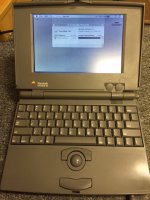
i remember the pb 100 screen having 8 - 3.3 uf's
Yes there are like a bunch of 6 on the side of the screen.. but those didn't appear electrolytic... They appeared tantalum already.. I did check them... but not very closely.. again they didn't appear electrolytic..
yeah change them because they are lytic and bad. the package is unique. you think they are tantalum but they are all LYTICS>
Ok... since I like tantalums is it ok to stick with those?? And Uni do you know the values???
Matt
Matt
From reading a few other boards it appears they are 3.3uf at 3.5v.. I found some 3.3 at 16v b case replacements...
3.3 uf 35v, i use MLCC's for those
Wow those little sneaky bastards!!!! Yes they are small caps inside a square case similar to a tantalum... SNEAKY... and LEAKY!!!! Little time bombs.. they are ALL coming off right now!!! LOL!
Yeah, there are more than a few cases here where screens went weird, and it was those nasty little caps in the screen.