
Thread
AAUI adapters and 10/100(/1000) Ethernet switches
I bought what turned out to be a matched pair of extremely basic Farallon AAUI adapters, unlabelled with any kind of model number either inside or out, off eBay a year or two back (maybe they just wanted rid of them so gave me two for one?), and was dismayed that I could not get them to work with any of my supposedly 10bT-compatible networking gear. A friend in the Seattle Retro-Computing Society later told me that those things vary from model to model and maker to maker in how they will interact with newer, faster hubs or switches, and generously gave me one that actually works (an Asanté FriendlyNet unit, as it happens).
Recent Googling turned up a few hints that something may be going awry with the unusable models of AAUI pod when they try to negotiate link parameters with a newer-model Ethernet switch, but no one seems to have any source on which to base this supposition, nor was I able to learn anything more detailed about it.
Does anyone know more about this subject? Many questions come to mind. For example: Are there certain models of AAUI adapter that are known to work, or not work, other than the two I’ve already mentioned? Does it depend on what brand of 10/100 or 10/100/1000 switch you use? (Mine, purely by coincidence, are all Netgear switches—not a mere hub among them. That company makes pretty reliable equipment in my limited experience, at least the business-grade stuff.) Are there any models of plain 10bT switch or hub that, like their newer and faster cousins, won’t work either? Are all AAUI-equipped Macs equal in this regard? What exactly is going hinky with the not-working AAUI adapters that makes you have to dig up a plain-Jane 10bT switch from somewhere to interpose between them and the faster parts of your network? I could go on, but I think that’s a good start.
Recent Googling turned up a few hints that something may be going awry with the unusable models of AAUI pod when they try to negotiate link parameters with a newer-model Ethernet switch, but no one seems to have any source on which to base this supposition, nor was I able to learn anything more detailed about it.
Does anyone know more about this subject? Many questions come to mind. For example: Are there certain models of AAUI adapter that are known to work, or not work, other than the two I’ve already mentioned? Does it depend on what brand of 10/100 or 10/100/1000 switch you use? (Mine, purely by coincidence, are all Netgear switches—not a mere hub among them. That company makes pretty reliable equipment in my limited experience, at least the business-grade stuff.) Are there any models of plain 10bT switch or hub that, like their newer and faster cousins, won’t work either? Are all AAUI-equipped Macs equal in this regard? What exactly is going hinky with the not-working AAUI adapters that makes you have to dig up a plain-Jane 10bT switch from somewhere to interpose between them and the faster parts of your network? I could go on, but I think that’s a good start.
Dont look at the adapter, look at the cables. Its been years since I made cables though, so this may be a bit off. But long, long ago ethernet cables could be made certain ways. And in many cases, they had to be made a specific way depending on the application. Then came along tech that allows auto-sensing of the cable being used. For example, long ago if you wanted to connect to computers you had to use a cross-over cable. If you used a straight, it would not work.
Again, with all this new auto-sense stuff I think most cables made are now cross-over style. So if the cable is too "modern" for the adapter, it may not work right. Google ethernet cable types and check the ends. Its why they are made clear after all!
Again, with all this new auto-sense stuff I think most cables made are now cross-over style. So if the cable is too "modern" for the adapter, it may not work right. Google ethernet cable types and check the ends. Its why they are made clear after all!
Farallon also made some unconventional Ethernet devices (expansion cards and AAUI transceivers) branded EtherWave. These have two utp connectors and are designed to be daisy chained, with a maximum of eight devices on a chain. This is way from standard Ethernet and best avoided except for experimentation. Farallon EtherMac products are standard Ethernet.
Asante helped define the 100Mbps Fast Ethernet standard, so all of their later devices should work correctly. There is a known negotiation problem with older Asante cards which is fixed by inserting a dumb hub in the network between card and switch.
Asante helped define the 100Mbps Fast Ethernet standard, so all of their later devices should work correctly. There is a known negotiation problem with older Asante cards which is fixed by inserting a dumb hub in the network between card and switch.
I've got 2 different brands of these adapters. A couple Danya Communications EasyNet and one Asante Friendlynet. I've never had any issues with them on Macs or modern networking hardware. I use one of the Danya to connect the LaserWriter 12/640PS directly to the quad G5 and its great in that application as well.
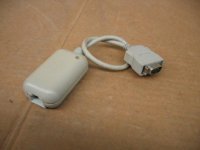
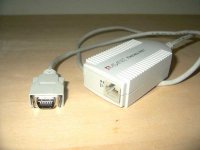

That’s the one I have! Can’t make it work with either my Q840AV or my new PB540c, at least with a Netgear switch. So you think it might be only a half-duplex unit? Dang, that sucks, I’ll have to replace it with a better one now. Bah. Yet another thing to put on my watch list on fleaBay. Does anyone know a way to check the duplexity of one of these things?
(If duplexity isn’t a word, it is now. :¬Þ)
My network is actually a little on the complex side. We have a Comcast *spit* all-in-one cable modem / IP telephony terminal adapter / 4-port gigabit/wireless-N router unit where the cable service comes into the house, with a gigabit wired network between various devices downstairs (my wife’s Windows box, the hulking all-in-one-except-double-sided-printing scanner/printer her office got rid of a few years ago, the boys’ elderly Wintel laptops during the 50% of the time that their wireless connections are acting flaky, and so on). Then there’s a wireless-N connection to various devices throughout the house, including my 2007 Mac Mini (which I’m pretty sure can only do wireless-G) upstairs. The Mini then shares its AirPort connection to its wired network interface, off which is hung a 5-port 10/100/1000 switch, off which is hung an 8-port 10/100 switch, the latter of which is seriously overkill most of the time, but I have a few vintage 10bT devices that get connected to the 10/100 switch (though usually only one is powered up at a time, so it really is overkill). Still, better to have it and not need it than the reverse, say I.
Looking at this it seems my only options are (1) replace the AAUI dongles to match the known-working Asanté unit or Hrududu’s Dayna ones, (2) get a plain 10bT switch to use in place of the 10/100 unit (but I still don’t know if that would definitely work—how sure are you, Unknown_K, and does it have to be a 3Com?), and (3) get an actual router matching dafoomie’s known-working configuration to use in place of the 10/100 switch. That last one sounds like a lot of trouble to go to.
Can anyone else recommend known-working brand combinations?
I've be using the same Farallon AAUI pod on one of my machines for over 10 years on a variety of nertworking gear, including my current where everything passes through an autonegotiating 3Com gigabit switch. The only times I did have problems was when either I used a crossover cable by accident (but you are positive you are not using that) or I messed up a crimp.
See if you can pester Ian to test it for you.
See if you can pester Ian to test it for you.
Unlike some other NICs*, 10 Mbps utp or thinwire AAUI transceivers cannot be configured by the host Mac. They just work (or not work) out of the box. So you have to look at what the hub or switch can do to help you.
Hubs or bridges do not manage Ethernet traffic. The device has no IP address and there is no console. They just rumble along at 10 Mbps, squirting packets down the ports. My favourite hubs/bridges have utp and thinwire interfaces.
An unmanaged switch does not have an IP address and there is no console. However it tries to manage traffic based on MAC address. The instructions may claim that the device will auto negotiate with hosts, but if it fails there is little you can try as a fix other than a firmware upgrade. You cannot tell the switch that the NIC connected to Port 3 is unable to negotiate a speed setting; the solution is to place a hub or bridge between the NIC and switch.
A managed switch has an IP address and can be configured in various ways. Depending on the model, you may be able to tell the switch that the NIC connected to Port 3 is running at 10 Mbps half duplex. Managed switches are expensive when new, cheap when obsolete. Check how much power they consume if you are worried about electricity bills.
---
In practice, most networking kit just works. There are a lot of non-standard Ethernet and non-standard LocalTalk tweaks out there, but you won't find them on many Macs. Some older 10 Mbps utp Mac NICs can be problematic, so buy a cheap hub while they are still around. Pick up a few lengths of thinwire, T-pieces and terminators, just in case.
---
* If you have an Intel NIC in your desktop or laptop Windows or Mac OS X PC, you may be able to configure its speed in the advanced settings. The default is auto negotiation, but you can experiment. Other manufacturers provide similar functionality.
Hubs or bridges do not manage Ethernet traffic. The device has no IP address and there is no console. They just rumble along at 10 Mbps, squirting packets down the ports. My favourite hubs/bridges have utp and thinwire interfaces.
An unmanaged switch does not have an IP address and there is no console. However it tries to manage traffic based on MAC address. The instructions may claim that the device will auto negotiate with hosts, but if it fails there is little you can try as a fix other than a firmware upgrade. You cannot tell the switch that the NIC connected to Port 3 is unable to negotiate a speed setting; the solution is to place a hub or bridge between the NIC and switch.
A managed switch has an IP address and can be configured in various ways. Depending on the model, you may be able to tell the switch that the NIC connected to Port 3 is running at 10 Mbps half duplex. Managed switches are expensive when new, cheap when obsolete. Check how much power they consume if you are worried about electricity bills.
---
In practice, most networking kit just works. There are a lot of non-standard Ethernet and non-standard LocalTalk tweaks out there, but you won't find them on many Macs. Some older 10 Mbps utp Mac NICs can be problematic, so buy a cheap hub while they are still around. Pick up a few lengths of thinwire, T-pieces and terminators, just in case.
---
* If you have an Intel NIC in your desktop or laptop Windows or Mac OS X PC, you may be able to configure its speed in the advanced settings. The default is auto negotiation, but you can experiment. Other manufacturers provide similar functionality.
Thanks for the reminder, Unkown_K.
Yonks ago, I helped change a lab of ISA bus PCs with 3C509 NICs to PCI bus PCs with the 3Com 10/100 card which normally worked (not the 3C590). We thought it was a safe move. It had worked previously.
Using a 16 bit DOS TCP/IP stack, we re-imaged the new PCs. That worked smoothly. Then we booted the PCs using Windows 2000 and 32 bit NIC drivers and TCP stack. Which didn't work out well. Owing to auto negotiation problems, we had a lab where half of the PCs communicated with the domain and half failed randomly.
Our network team had the answer, to swap the switch supporting the lab for a different model. Auto negotiation failure was about differing understanding of standards by 3Com and Cisco. It happens all of the time.
Yonks ago, I helped change a lab of ISA bus PCs with 3C509 NICs to PCI bus PCs with the 3Com 10/100 card which normally worked (not the 3C590). We thought it was a safe move. It had worked previously.
Using a 16 bit DOS TCP/IP stack, we re-imaged the new PCs. That worked smoothly. Then we booted the PCs using Windows 2000 and 32 bit NIC drivers and TCP stack. Which didn't work out well. Owing to auto negotiation problems, we had a lab where half of the PCs communicated with the domain and half failed randomly.
Our network team had the answer, to swap the switch supporting the lab for a different model. Auto negotiation failure was about differing understanding of standards by 3Com and Cisco. It happens all of the time.
That’s only half the equation, though. Unless your machines all have 10baseT on the motherboard you will need some kind of adapter to connect them to the Ethernet cables. If any of your machines use AAUI adapters, with which brands of AAUI adapter are you achieving success?
http://www.ebay.com/itm/Farallon-AAUI-RJ45-Ethernet-Transceiver-6070631-00-01-/191252926653
I have no doubt extremes might produce incompatibility. But as I said, and as I think Dafoomie was saying as well, I personally have plug and play ethernet using this with a Verizon FIOS stock router (I don't administer the router, so I don't know anything about it), a new ethernet cable and a Powermac 7100. The adapters in the pic are advertised as transceivers.
[it's super ironic. If I'd've had this in 2000 when I got my grape iMac DV, internet would have worked immediately, perfectly and (for the time) super-fast. I might not have returned it and become a Mac person then and there. Oh well...]
I have no doubt extremes might produce incompatibility. But as I said, and as I think Dafoomie was saying as well, I personally have plug and play ethernet using this with a Verizon FIOS stock router (I don't administer the router, so I don't know anything about it), a new ethernet cable and a Powermac 7100. The adapters in the pic are advertised as transceivers.
[it's super ironic. If I'd've had this in 2000 when I got my grape iMac DV, internet would have worked immediately, perfectly and (for the time) super-fast. I might not have returned it and become a Mac person then and there. Oh well...]
If it helps my Allied Telesyn International adapter has a SQE heartbeat switch on one side re: http://www.cisco.com/c/en/us/support/docs/lan-switching/ethernet/46786-12.html
"The SQE heartbeat is designed to fix the problem in earlier versions of Ethernet where a host does not know if a transceiver is connected. It does this by providing about one usec of collision after the end of a transmission. The Ethernet controller in the host will record this event, and set a flag where the host can check on it.
Heartbeat/SQE is only returned from the transceiver to the host or unit to which it is connected. It is not put on the net.
Heartbeat must be disabled for repeaters or the net will go down, due to repeaters repeating the carrier. It does not matter what type of carrier, they just repeat it. If heartbeat is on, the following occurs:
At times, a host will record this event as a collision or framing error, and think the packet will have to be resent, wasting more bandwidth. It might even think that there are no good packets, and that all of them have errors.
If there are two stations with heartbeat on, then the extended fragments will collide with each other. After 32 transmits to the pair, both segments will shut down due to auto-partition. This will happen almost immediately after the first packet is sent, since they will be echoing back and forth the same fragment until one or both segments partition.
At times, a host will record the returned extended fragment heartbeat as a collision, framing error, or slot violation, and believe that it will have to retransmit, using more bandwidth.
Summary
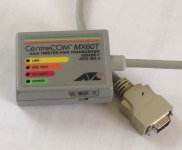
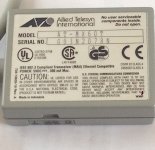
"The SQE heartbeat is designed to fix the problem in earlier versions of Ethernet where a host does not know if a transceiver is connected. It does this by providing about one usec of collision after the end of a transmission. The Ethernet controller in the host will record this event, and set a flag where the host can check on it.
Heartbeat/SQE is only returned from the transceiver to the host or unit to which it is connected. It is not put on the net.
Heartbeat must be disabled for repeaters or the net will go down, due to repeaters repeating the carrier. It does not matter what type of carrier, they just repeat it. If heartbeat is on, the following occurs:
Repeater transmits to port A.
- Repeater stops transmit to port A.
- Port A returns heartbeat.
- Repeater indicates carrier.
- Repeater repeats carrier to all other ports and does a fragment extend which expands the 1 usec to 9.6 usec.
At times, a host will record this event as a collision or framing error, and think the packet will have to be resent, wasting more bandwidth. It might even think that there are no good packets, and that all of them have errors.
If there are two stations with heartbeat on, then the extended fragments will collide with each other. After 32 transmits to the pair, both segments will shut down due to auto-partition. This will happen almost immediately after the first packet is sent, since they will be echoing back and forth the same fragment until one or both segments partition.
At times, a host will record the returned extended fragment heartbeat as a collision, framing error, or slot violation, and believe that it will have to retransmit, using more bandwidth.
Summary
- The heartbeat is local only between the transceiver and some sort of host system.
- If the host system is a computer, bridge, or router, the heartbeat is a function of whether the user enables it, and whether the software and hardware support SQE.
- If the host system is a repeater, hub, or concentrator, the heartbeat must be off. This also includes concentrators with internal briges or routers.
Huh! Very interesting! The article I was reading about the internals of UTP Ethernet (I think it was on Wikipedia, was about a week ago and I forget the details) mentioned a heartbeat, but made it sound like the function is inherent to every Ethernet link (the point-to-point part, not the whole network). Who knows, maybe on the newer stuff it is.
I just made an interesting (if potentially embarrassing) discovery. Both of my dud Farallon transceivers have a teeny little slide switch recessed into one side. I’m guessing, from the relative ages of things people have posted pictures of in this thread, that it is likely a heartbeat on/off switch. I wouldn’t have discovered it save for the fact that both units have unsealed cases, i.e., some prior owner cracked the plastic welds that hold the clamshells on, so they fall apart if shaken around. The switch is so small and deeply recessed that you can’t tell it’s there with the shell on even when you already know about it. Alas, the two remain duds regardless of the switch position—looks like I’ve quite definitely been had.
Looking on the bright side, I picked up a second Asanté transceiver for about a dollar from the AS-IS bins at Re-PC, and it even works! SUCCESS!
Looking on the bright side, I picked up a second Asanté transceiver for about a dollar from the AS-IS bins at Re-PC, and it even works! SUCCESS!

Ha, I have the same glasses.
I like the idea of a cord bin. I maintain my own, but I'm always looking for rare cords. One absolutely never knows when they might need a given cable. I have run into some pretty bizarre situations in the past where I had a very odd cable that saved the day.
I like the idea of a cord bin. I maintain my own, but I'm always looking for rare cords. One absolutely never knows when they might need a given cable. I have run into some pretty bizarre situations in the past where I had a very odd cable that saved the day.
I haven't ever had any problems with any AAUI transceiver. It's literally just an Ethernet cable with special ends. The two-port EtherWave ones are sort of weird, but really, it's just wired up as a hub.
It's also a bad idea to use a hub these days, so take that for what you wil. A couple of old Macs that you just want to chain together for whatever reason will probably not suffer that much.
I have connected my 6100 to the gigabit Ethernet ports on my CenturyLink/Qwest branded Actiontec VDSL2 modems with no problems. (I have also connected an Asante EN/SC Micro on the back of my PowerBook 180, both directly to the modem, and through the EtherWave on the 6100, with no troubles.)
The real problem with some networking kit begins with (usually) third party Ethernet cards and adapters that contain live equipment (Hubs, etc) that did not properly conform to Ethernet standards. So it probably depends on which particular machine or Ethernet adapter you used. The solution there tends to be to just connect those devices to a hub, through an Etherwave (heh) or to a 10/100 or 10-megabit switch.
Also, it is of course possible to just get non-working AAUI adapters, in the same way that an Ethernet cable can go bad.
It's also a bad idea to use a hub these days, so take that for what you wil. A couple of old Macs that you just want to chain together for whatever reason will probably not suffer that much.
I have connected my 6100 to the gigabit Ethernet ports on my CenturyLink/Qwest branded Actiontec VDSL2 modems with no problems. (I have also connected an Asante EN/SC Micro on the back of my PowerBook 180, both directly to the modem, and through the EtherWave on the 6100, with no troubles.)
The real problem with some networking kit begins with (usually) third party Ethernet cards and adapters that contain live equipment (Hubs, etc) that did not properly conform to Ethernet standards. So it probably depends on which particular machine or Ethernet adapter you used. The solution there tends to be to just connect those devices to a hub, through an Etherwave (heh) or to a 10/100 or 10-megabit switch.
Also, it is of course possible to just get non-working AAUI adapters, in the same way that an Ethernet cable can go bad.
Which Farallon ones? The EtherWaves with two RJ45 connectors, or the simpler ones?
Even with more complexity than a simple cable, they're definitely media adapters for what's ultimately the same logical data transmission format, which just happens to have been carried over a few different physical media at the time.
Even with more complexity than a simple cable, they're definitely media adapters for what's ultimately the same logical data transmission format, which just happens to have been carried over a few different physical media at the time.
As was mentioned briefly much earlier in the thread, these are not Etherwave units, just the plain-Jane Farallon AAUI transceivers with no special model name. I suppose all those chips could be line drivers and such. It just seemed like a surprising amount of complexity for something without, so far as I am aware, a microcontroller in it.
Haha! Techknight, it's the 'A' configuration that's ingrained in my mind:
g/w, g, o/w, b, b/w, o, br/w, b.
Reverse the green and orange pairs for 'B'. 'A' on one end, 'B' on the other makes a crossover cable. I seem to remember the 'A' configuration was slightly superior for riser (vertical) runs, but I suspect that textbook was written in Cat-3 days.
g/w, g, o/w, b, b/w, o, br/w, b.
Reverse the green and orange pairs for 'B'. 'A' on one end, 'B' on the other makes a crossover cable. I seem to remember the 'A' configuration was slightly superior for riser (vertical) runs, but I suspect that textbook was written in Cat-3 days.
Pretty much everything is wired for 568B these days. The most annoying job site I encountered was when a jerk wired RJ-45 jacks in a non-standard way, likely in a bid to maintain job security (he was fired about a month before I got there). I was wondering why none of the plugs I made worked, well the wiring at the switch end was.... interesting. Plus he didn't even punch down all the pairs! He only wired two pairs and if I recall, they weren't even matched twisted pairs. Ugh.