

Thread
128k logic board problem
hello!
recently i got a another 128k.
i like best 128k. and this is my 4th 128k.
but it has some problem on the logic board.
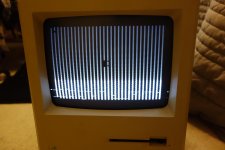
there are no bong sound, but something was came up on the screen.
maybe ram problem? anther issue?
thanks for reading.
nomally this pattern was on the screen.

but sometime this pattern was on the screen too.

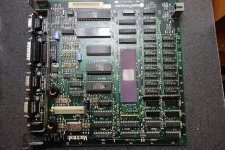
early cpu type.

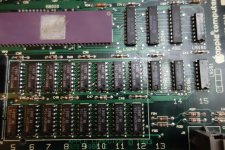
oki 3764 ram.

recently i got a another 128k.
i like best 128k. and this is my 4th 128k.
but it has some problem on the logic board.
there are no bong sound, but something was came up on the screen.
maybe ram problem? anther issue?
thanks for reading.
nomally this pattern was on the screen.
but sometime this pattern was on the screen too.
early cpu type.
oki 3764 ram.
Most of the time it is the RAM, like in 95% of the cases. But sometimes the 74XXX's chips to either side of the RAM can be bad in 4.95% of the time and in .05% a solder joint or trace goes bad. So check the RAM first, then the 74XXX's chps and finally the solder joints with a multimeter.
i finished replacing the ram. (16ea)
i found that this computer booting nomally except the screen.
just screen is not nomall.
screen was not changed, still has vertical lines.
i cant hear bong sound because sound was too low (soft?).
i guess this is not about ram problem.
do you have any idea? please tell me more


I believe he stated the RAM was replaced (at $16 each? DAMN!).
Replacing a few IC fixed it so it now boots but Video is still bad.
If the CPU was bad, it would not be booting the machine. Does it have sound ("Bong" on power up)?
If it as a SE or SE\30, then it would be simple. What's the circuit that does the display on the 128K/512K/Plus?
Also, looks like the raster is too high - time to look at the analog board for that. Darken the screen to near black and then turn it up until you see a screen image but the unlit areas are as dark as possible from the control knob on the front and then adjust the analog board from there. Replace caps and de-seolder/re-solder joints as needed.
Replacing a few IC fixed it so it now boots but Video is still bad.
If the CPU was bad, it would not be booting the machine. Does it have sound ("Bong" on power up)?
If it as a SE or SE\30, then it would be simple. What's the circuit that does the display on the 128K/512K/Plus?
Also, looks like the raster is too high - time to look at the analog board for that. Darken the screen to near black and then turn it up until you see a screen image but the unlit areas are as dark as possible from the control knob on the front and then adjust the analog board from there. Replace caps and de-seolder/re-solder joints as needed.
i replaced all of it, but i did not use new ram.
that is the reaseon why apple logo still there.
every ram was tested on the another board using the slot.
(i mean 16 number of ram, not 16$
)Elfen //
thanks for your comment.
i also think about that. "adjusting voltage and brightness."
but when i connect another 128k logic board with machine, everything was fine.
so i guess the problem is not on the analog board.
and there is bong sound but very very soft (low).
i'm tracing the strange signal for using the osiloscope.
but i can't find the culprit at this time.
i will update as soon as possible.
thanks all.
i replaced all of it, but i did not use new ram.
that is the reaseon why apple logo still there.
every ram was tested on the another board using the slot.
(i mean 16 number of ram, not 16$
)Elfen //
thanks for your comment.
i also think about that. "adjusting voltage and brightness."
but when i connect another 128k logic board with machine, everything was fine.
so i guess the problem is not on the analog board.
and there is bong sound but very very soft (low).
i'm tracing the strange signal for using the osiloscope.
but i can't find the culprit at this time.
i will update as soon as possible.
thanks all.
Edited by gooddi, Today, 04:58 AM.
This post reminds me of a 128K upgraded to 512k I got a while ago. After a good cleanup dusting and reflowing cold joints in analog board it got a similar screen. I actually always heard a very loud and clear bong with the screen flashing but vertical lines. Almost as if it was a flashing disk normally seen at boot up but with the vertical bars. I figured it was a memory problem so I replaced all the IC's with 4164 RAM and returned the mac to its original configuration without the 512k upgrade. Did not change a thing, still same screen. I spent all saturday replacing the ram,and I just gave up on it after that. I figured it was some other IC or perhaps a trace on the memory chips that was damaged but I had spent too much time and left it, never got around to tackling it again. Hopefully this thread will provide a more clear fix for my own lol so I can go back end perhaps get it up and running.
Things that were done,
Tested Analog board with a mac plus logic board and it booted fine so isolated issue to the 128K logic board.
Took ROM chips from PLUS and inserted them into 128K board but same artifacts on screen, so original ROMS are good.
Removed all memory ICs and replaced ( huge pain! ) but no improvement.
Clear BONG every time for me but vertical bars always present.
Some pics..
Things that were done,
Tested Analog board with a mac plus logic board and it booted fine so isolated issue to the 128K logic board.
Took ROM chips from PLUS and inserted them into 128K board but same artifacts on screen, so original ROMS are good.
Removed all memory ICs and replaced ( huge pain! ) but no improvement.
Clear BONG every time for me but vertical bars always present.
Some pics..
wow.. same pattern on the screen.
before i replaced the LS166 that pattern was on my screen. 100% same thing.
even if i could not find culprit too, i guess you need to replace the LS166, LS244.
the path is "ram-ls166-ls244-cpu"
so we need to focus this line first.
good luck!!
you may need 512k board than plus.I'll have to see if an SE or a SE/30 donor board will have compatible chips ( i have two of those from leaked battery units), id hate to pull them from my working plus
when i try to replace LS166 with plus's ic, it does not works.
i hope you get the result finally.
thanks for reading.
you forgot the 74F253s. Those are the muxes for the row/column address strobes for the RAM, if those are bad, youll get this screen as well as sad macs, depending on which ones bad.
Also, Keep in mind you may need to start looking at the PALs. These machines are old enough that if they were stored in a moisture laden environment for 30 years, they will seep through the epoxy and start attacking the silicon die, and you get this....
Also, Keep in mind you may need to start looking at the PALs. These machines are old enough that if they were stored in a moisture laden environment for 30 years, they will seep through the epoxy and start attacking the silicon die, and you get this....
thans for your very useful information.
i will investigate 74F253S.
and which one is PAL ? Please tell me more about PAL.
did you mean ASG? i can't find PAL on my logic board.
WIKIPEDIA say that about PAL
- BMU0/1, TSM, TSG,LAG,.....
RIGHT?
Thanks again, techknight.
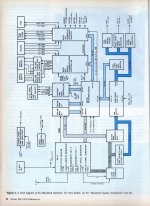
PAL - Programmable Arith-Logic Unit, similar to an EPROM/ROM. They only contain a few bytes of code (less than 500 bytes, but some can be 2 - 4 kb in size) usually for the I/O Chips and not the main CPU. They also behave like tiny cpus - 4 bit jobs like in a calculator, doing repetitive loops with the I/O Chips.thans for your very useful information.
i will investigate 74F253S.
and which one is PAL ? Please tell me more about PAL.
did you mean ASG? i can't find PAL on my logic board.
WIKIPEDIA say that about PAL
- BMU0/1, TSM, TSG,LAG,.....
RIGHT?
Thanks again, techknight.
Fun Stuff they are.
Side-Rant-o-Fact - the Apple II Disk Drive Card has 2 PALs for the Disk Read/Writes. (I forget which ones) If one blows, it becomes a killer card that kills a couple of chips inside the Disk Drive itself. If the other one blows, any disk you put to either drive, that disk gets erased.
I did a good check with magnifying glass and even traced a good chunk of connections using schematics found at this forum but everything checked out. So I see why everyone says cold solder joints and traces are rarely a problem. I have two working 512ks somewhere in my pile. When I get some free time il have to try and use one of them as a donor board.
Teknight, I can't think of anyone else more qualified to get to the bottom of this. But I'm curious what your troubleshooting process is. Do you get a jig extension and power the board up while probing every chip for expected logic output? Is an oscilloscope your best bet, or perhaps a logic analyser? Or desolder one chip at a time and put it on a breadboard to test it's full functionality against its data sheet/logic truth table. If only that equipment was not so expensive I would think it fun to get to the bottom of the issue.
Some IC somewhere in these boards has gotten nasty bit rot I say!
Teknight, I can't think of anyone else more qualified to get to the bottom of this. But I'm curious what your troubleshooting process is. Do you get a jig extension and power the board up while probing every chip for expected logic output? Is an oscilloscope your best bet, or perhaps a logic analyser? Or desolder one chip at a time and put it on a breadboard to test it's full functionality against its data sheet/logic truth table. If only that equipment was not so expensive I would think it fun to get to the bottom of the issue.
Some IC somewhere in these boards has gotten nasty bit rot I say!
I look up the function of each and every IC in the datasheet, and follow the truth table.
Then, i hook up an o-scope, 1 channel on an input, and 1 channel on an output. I basically figure out if the chip is following its truth table. If not, then its bad and has to be replaced.
And this is the hard way. The better way is have a working board side-by-side and compare scope shots, its really easy to figure it out at that point.
Then, i hook up an o-scope, 1 channel on an input, and 1 channel on an output. I basically figure out if the chip is following its truth table. If not, then its bad and has to be replaced.
And this is the hard way. The better way is have a working board side-by-side and compare scope shots, its really easy to figure it out at that point.
Thanks for that technight, I just got me a cheap oscilloscope this weekend (birthday present from wife ) now looking forward to tackling this board some more. Even got me a cheap USB based logic analyzer! But that's still in its way. I'll update this thread if anything new develops!
) now looking forward to tackling this board some more. Even got me a cheap USB based logic analyzer! But that's still in its way. I'll update this thread if anything new develops!