

Thread
Sil3112 flashing (SATA)
Yep, that got it 
EDIT: seems I was jumping ahead of myself saying the crashes where down to the card, just found the last stick of ram was bad (oddly it passes memory tests, but fails in the real world). Noticed it would crash when it got down to the last 10mb of free ram
EDIT: seems I was jumping ahead of myself saying the crashes where down to the card, just found the last stick of ram was bad (oddly it passes memory tests, but fails in the real world). Noticed it would crash when it got down to the last 10mb of free ram
Bad, or rejected by a B&W G3 ?
It's not the same :lol:
Those seem to become pickier about ram quality.
It's not the same :lol:
Those seem to become pickier about ram quality.
It was actually bad,
Yesterday i was haveing some boot troubles after a clean install of osx (no chime, nothing onscreen) i tried reseating the ram and ended up putting the first stick into the last slot, and that caused it to boot.
booted into single user and ran a 5 pass mem test, every test compleated just fine, so i thought no more of it
then it started crashing again, no kp's but just hard lockups whenever i got down to about 10mb free ram. so i pulled the last stick out and it booted just fine, no lockups.
At least it is just a 64Mb stick would have been gutted if it was one of my few 512mb sticks
Yesterday i was haveing some boot troubles after a clean install of osx (no chime, nothing onscreen) i tried reseating the ram and ended up putting the first stick into the last slot, and that caused it to boot.
booted into single user and ran a 5 pass mem test, every test compleated just fine, so i thought no more of it
then it started crashing again, no kp's but just hard lockups whenever i got down to about 10mb free ram. so i pulled the last stick out and it booted just fine, no lockups.
At least it is just a 64Mb stick
would have been gutted if it was one of my few 512mb sticks
Socket is already soldered. Now I'm waiting for the right chip 
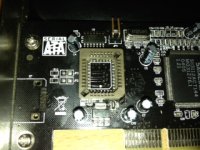
ooh, nice, seems they will fit then
did you set the voltage jumper? looks like the 5v one is still jumped there
Anyone know if there is a updater fro the later version of the firmware (the one that is shipped on the cards)?
did you set the voltage jumper? looks like the 5v one is still jumped there
Anyone know if there is a updater fro the later version of the firmware (the one that is shipped on the cards)?
Yes it's 5V now but I have access to change to 3V
Sorry to bump an old thread, but I thought I'd share my experience flashing one of these cards.
I picked a fairly cheap SIL3112 card up off eBay for about £10 (http://www.ebay.co.uk/itm/400502065376). I could have spent less had I bought it directly from China, but I wanted it quickly. The flash-ROM chip on the card is 128k.
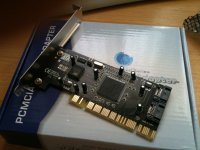
I used the WiebeTech 3112 PCI firmware to flash the card with, although I had to get it from the Internet Archive as the download is no longer listed on WiebeTech's site. (http://web.archive.org/web/20081205192504/http://www.wiebetech.com/download.php?id=120) The next hurdle I ran into was that the included firmware flashing utility didn't want to work for me. Instead, I used a hex editor to join the two 64k ROM images into one large 128k image. Having done this, I used the UPDFLASH.EXE utility on a DOS boot floppy and an old PC to flash the card with the new firmware.
Once this was done, I tried it out in my FW800 G4 and it had worked perfectly, and I was able to boot from a SATA drive connected to the card:
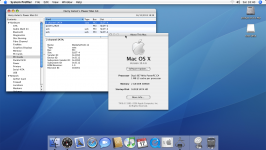
The whole process was far simpler than I had imagined it might be - I didn't even have to turn on the soldering iron once!
I picked a fairly cheap SIL3112 card up off eBay for about £10 (http://www.ebay.co.uk/itm/400502065376). I could have spent less had I bought it directly from China, but I wanted it quickly. The flash-ROM chip on the card is 128k.
I used the WiebeTech 3112 PCI firmware to flash the card with, although I had to get it from the Internet Archive as the download is no longer listed on WiebeTech's site. (http://web.archive.org/web/20081205192504/http://www.wiebetech.com/download.php?id=120) The next hurdle I ran into was that the included firmware flashing utility didn't want to work for me. Instead, I used a hex editor to join the two 64k ROM images into one large 128k image. Having done this, I used the UPDFLASH.EXE utility on a DOS boot floppy and an old PC to flash the card with the new firmware.
Once this was done, I tried it out in my FW800 G4 and it had worked perfectly, and I was able to boot from a SATA drive connected to the card:
The whole process was far simpler than I had imagined it might be - I didn't even have to turn on the soldering iron once!
intresting....
You shouldn't need to join the two files, as one is the pc firmware and one is the mac one, just pad out the mac image
oh, and i don't know if this would work for you, but i found getting the webie flasher to write a blank 128k file and then haveing it write a padded out mac firmware got it to work (nothing else would get it to work)
You shouldn't need to join the two files, as one is the pc firmware and one is the mac one, just pad out the mac image
oh, and i don't know if this would work for you, but i found getting the webie flasher to write a blank 128k file and then haveing it write a padded out mac firmware got it to work (nothing else would get it to work)
Padding out the Wiebe firmware should be enough. If you look at the end of it in a hex editor you can see that it's already been padded out to 64k. Just add another 64k of Fs to it until the firmware is 128k (131072 bytes) in size and then flash with updflash from a DOS bootdisk.
I inserted the padding before the last line. I'm not exactly sure what that string at the end is for but all the SATA roms have the same value, regardless of the version. The RAID one I checked has two bytes changed so perhaps it's related to the device ID.
If only we could get a firmware from the Mathey MSATA-P02MAC. That supports OS9 booting and the eeprom is only 512k so it'll easily fit on most 3112s.
I inserted the padding before the last line. I'm not exactly sure what that string at the end is for but all the SATA roms have the same value, regardless of the version. The RAID one I checked has two bytes changed so perhaps it's related to the device ID.
If only we could get a firmware from the Mathey MSATA-P02MAC. That supports OS9 booting and the eeprom is only 512k so it'll easily fit on most 3112s.
The last 16 bytes of the flash chip contain some configuration values for the Sil3112 according to the Sil3112 datasheet. It sets stuff like the PCI ID and some register options in the chip. It reads backwards from the end of the chip looking for these bytes (very last byte first, then second to last byte, and so on...):
Code:
0xAA (data signature)
0x55 (data signature)
flash speed (0xAA = 120 ns, otherwise 240 ns)
0x55 (data signature)
PCI device ID bits 23:16
PCI device ID bits 31:24
PCI class code bits 15:8
PCI class code bits 23:16
PCI sub-system vendor ID bits 7:0
PCI sub-system vendor ID bits 15:8
PCI sub-system ID bits 23:16
PCI sub-system ID bits 31:24
SATA PHY config bits 7:0 (default: 0xF1)
SATA PHY config bits 15:8 (default: 0x80)
SATA PHY config bits 23:16 (default: 0x00)
SATA PHY config bits 31:24 (default: 0x00)Aha! Mystery solved. Thanks for filling me in on that.