
Thread
Apple IIc won't boot?
Im not too familiar with Apple II items but here it goes. So I got this Apple IIc machine years back from a flea market for I think $10 or so. It had no power cord, just the other day my friend sent me one to try. So I plug in the AC adapter and - well the power light goes on, but that about it. No beeps, no noises, not even from the built in disk drive. No flashing of the red "Disk Use" light either.
I can't even get video out. Tried hooking it up via an RF cable (Same as I use for my Atari and NES) but no video even on channels 2, 3, or 4. Also tried an Apple II RF modulator adapter with the NES RF cable - nothing. Even used a composite cable to the TV's AUX jack - but nothing
Any ideas? I tried putting a disk in but that didn't change anything. Maybe there's a switch or something or it's just dead. Any help would be great, thanks!
I can't even get video out. Tried hooking it up via an RF cable (Same as I use for my Atari and NES) but no video even on channels 2, 3, or 4. Also tried an Apple II RF modulator adapter with the NES RF cable - nothing. Even used a composite cable to the TV's AUX jack - but nothing
Any ideas? I tried putting a disk in but that didn't change anything. Maybe there's a switch or something or it's just dead. Any help would be great, thanks!
Well I disconnected the disk drive and the keyboard. Plugged it back in and - BAM it booted up!!
Now it just says "Check Disk Drive" for the internal drive. Then I plugged in a IIGS external drive I had. It doesn't seem to read the disk either, although the light blinks.
However after reading this article: http://support.apple.com/kb/TA27890 It may not support a Unidisk drive. The external drive I'm using is an "Apple 5.25 Drive" Model A9M0107 - do I need a ROM upgrade? Blah... I just wanted to try Ms. Pac-Man that my IIgs was able to play.
Any thoughts?
Now it just says "Check Disk Drive" for the internal drive. Then I plugged in a IIGS external drive I had. It doesn't seem to read the disk either, although the light blinks.
However after reading this article: http://support.apple.com/kb/TA27890 It may not support a Unidisk drive. The external drive I'm using is an "Apple 5.25 Drive" Model A9M0107 - do I need a ROM upgrade? Blah... I just wanted to try Ms. Pac-Man that my IIgs was able to play.
Any thoughts?
Can you break in with the keyboard attached? If so, what does PRINT PEEK(64447) give you?
You can order ROM upgrades from ReactiveMicro:
http://www.reactivemicro.com/product_info.php?cPath=1_28&products_id=53
But alas, "dealer upgrades" are no longer free. ;-)
It sounds like your 5.25" floppy disk is the next thing to worry about. It can also be taken apart and treated to TLC: reseating of chips, etc.
- if PRINT PEEK(64447) returns 255, you have an original IIc (ROM revision '255').
- if PRINT PEEK(64447) returns 0, you have an Apple IIc with UniDisk 3.5 inch drive support (ROM revision '0').
- if PRINT PEEK(64447) returns 3, you have an Apple IIc with memory expansion support (ROM revision '3').
- if PRINT PEEK(64447) returns 4, you have an Apple IIc with a modified/fixed version of memory expansion support (ROM revision '4').
You can order ROM upgrades from ReactiveMicro:
http://www.reactivemicro.com/product_info.php?cPath=1_28&products_id=53
But alas, "dealer upgrades" are no longer free. ;-)
It sounds like your 5.25" floppy disk is the next thing to worry about. It can also be taken apart and treated to TLC: reseating of chips, etc.
Hi David,
It returned 255. After I did that the TV screen went fuzzy and turned black. I tried to reboot the machine and the floppy drive once again has stopped working. I wonder what is wrong with the machine. I'm certainly curious. Before typing the command it seemed to be okay aside from the floppy drive.
I'll try reseating some chips, although I didn't get to doing that previously before it "fixed" itself. Maybe I'll focus on the disk drive... if the IIc boots again that is.
Thanks for your help, I'd love to play around with this machine and use the Joystick and Ms. Pac-Man disk I got working with my IIgs. :b&w:
Update: I took out and placed back in all the removable chips and the system booted normally, still the disk drive acts up. I'll try to open that next, however it doesn't seem to have any "fixable" bits that can fall off, besides the cable.
Update 2: Opened the disk drive, reconnected cables and re-tightend screws, no change. Oh well... maybe getting the new ROM will let the IIc work with my IIGS external drive? Or no? This ebay auction http://cgi.ebay.com/c-ENHANCEMENT-ROM-CHIP-APPLE-IIC-ADDS-UNIDISK-3-5-/320598237598?pt=LH_DefaultDomain_0&hash=item4aa524e19e#ht_994wt_1141 for an enhanced chip says "Not sure" (Under questions section.)
I think I have a 3.5 disk drive... maybe I'll see if that will work.
Thanks
Thanks,
-Steve
It returned 255. After I did that the TV screen went fuzzy and turned black. I tried to reboot the machine and the floppy drive once again has stopped working. I wonder what is wrong with the machine. I'm certainly curious. Before typing the command it seemed to be okay aside from the floppy drive.
I'll try reseating some chips, although I didn't get to doing that previously before it "fixed" itself. Maybe I'll focus on the disk drive... if the IIc boots again that is.
Thanks for your help, I'd love to play around with this machine and use the Joystick and Ms. Pac-Man disk I got working with my IIgs. :b&w:
Update: I took out and placed back in all the removable chips and the system booted normally, still the disk drive acts up. I'll try to open that next, however it doesn't seem to have any "fixable" bits that can fall off, besides the cable.
Update 2: Opened the disk drive, reconnected cables and re-tightend screws, no change. Oh well... maybe getting the new ROM will let the IIc work with my IIGS external drive? Or no? This ebay auction http://cgi.ebay.com/c-ENHANCEMENT-ROM-CHIP-APPLE-IIC-ADDS-UNIDISK-3-5-/320598237598?pt=LH_DefaultDomain_0&hash=item4aa524e19e#ht_994wt_1141 for an enhanced chip says "Not sure" (Under questions section.)
I think I have a 3.5 disk drive... maybe I'll see if that will work.
Thanks
Thanks,
-Steve
Hey,
You also know, right, that you don't need a disk to have fun with the Apple IIc...I mean sure, with disks and whatnot it can run some pretty cool stuff, but I just use my IIc to practice my skills at the Applesoft BASIC programming language.
When you start it up and see "Check disk drive", hit the key combination Control + Reset.
When you see the bracket-shaped cursor, type home and hit Enter.
Now you should just have the cursor at the top of the screen, and from here you are free to plug away at Applesoft BASIC. I've done some pretty cool stuff with it actually.
So I hope this helps..at the very least it's something to do if you get tired of Ms. Pac-Man.
-Apostrophe
You also know, right, that you don't need a disk to have fun with the Apple IIc...I mean sure, with disks and whatnot it can run some pretty cool stuff, but I just use my IIc to practice my skills at the Applesoft BASIC programming language.
When you start it up and see "Check disk drive", hit the key combination Control + Reset.
When you see the bracket-shaped cursor, type home and hit Enter.
Now you should just have the cursor at the top of the screen, and from here you are free to plug away at Applesoft BASIC. I've done some pretty cool stuff with it actually.
So I hope this helps..at the very least it's something to do if you get tired of Ms. Pac-Man.
-Apostrophe
Thanks for the Control-Reset tip! I would have never gotten anywhere without it.
Well I ordered a ROM chip online from the previous eBay link I mentioned. I installed the chip and the system works. I can use the Color Checkerboard test and it says "SYSTEM OK".
Now my problem is still booting to a disk drive. With the internal drive plugged in it gives me a 'CHECK DISK DRIVE' message. If I remove the internal drive I can't seem to boot to my external 5 1/4 drive. (Which works fine on my IIGS). I tried turning on my system, it hangs, so I press Control-Reset, then I try typing PR#5 and my disk drive will blink, and then it will say 'CHECK DISK DRIVE". So I'm stuck. Maybe I have more bad chips or something wrong with my Apple IIc?
I'd really love to get this thing to work. Please let me know if you have any ideas. Thanks!
Well I ordered a ROM chip online from the previous eBay link I mentioned. I installed the chip and the system works. I can use the Color Checkerboard test and it says "SYSTEM OK".
Now my problem is still booting to a disk drive. With the internal drive plugged in it gives me a 'CHECK DISK DRIVE' message. If I remove the internal drive I can't seem to boot to my external 5 1/4 drive. (Which works fine on my IIGS). I tried turning on my system, it hangs, so I press Control-Reset, then I try typing PR#5 and my disk drive will blink, and then it will say 'CHECK DISK DRIVE". So I'm stuck. Maybe I have more bad chips or something wrong with my Apple IIc?
I'd really love to get this thing to work. Please let me know if you have any ideas. Thanks!
I have very similar project going on, i am an Apple II-newbie so forgive for silly comments. I recently got an Apple //c + monitor + laser 5.25" external drive + lots of original manuals + system disks etc.
BUT:
No picture from boot (using normal RCA-cable to hook it up with the monitor as the original cable was broken), have random lines on monitor ("no signal" type), no boot, no red light on 5.25" led.
Opened up the case, find out that the 344-0023-A OU 50Hz PAL chip was bit up, took it up, showed two bent legs, managed to stranghten up one, but the another one was so fragile already, it broke down easily. Anyway, put the chip back on and booted up, i got :
- no signal to monitor, same "no signal" type noise
- brief red light on 5.25" and some noise, no boot with disk
-Does it actually help if booting without 5.25" drive?
-Am i totally silly for trying with RCA cable?
-Worth trying to find the IO chip, or replacement 5.25" drive?
BUT:
No picture from boot (using normal RCA-cable to hook it up with the monitor as the original cable was broken), have random lines on monitor ("no signal" type), no boot, no red light on 5.25" led.
Opened up the case, find out that the 344-0023-A OU 50Hz PAL chip was bit up, took it up, showed two bent legs, managed to stranghten up one, but the another one was so fragile already, it broke down easily. Anyway, put the chip back on and booted up, i got :
- no signal to monitor, same "no signal" type noise
- brief red light on 5.25" and some noise, no boot with disk
-Does it actually help if booting without 5.25" drive?
-Am i totally silly for trying with RCA cable?
-Worth trying to find the IO chip, or replacement 5.25" drive?
So we give some soldering iron to the additional piece to the chip's leg at work. Took the machine home and tried it on.. it started. The picture went up and down but that was matter of adjustment. But. It doesn't start any software from the disk, giving some cryptic error codes. Need to get back into this. Atleast the picture is coming up!
Haven't done the "Color Checkerboard test" yet. That's for tomorrow.
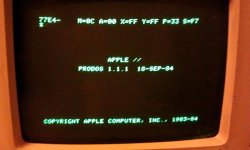
Haven't done the "Color Checkerboard test" yet. That's for tomorrow.
Forgot to mention, no beebs of anykind when powering up. Just noise from the 5.25" drive, sounds like trying to read something few times, the head moving few times loudly? Got one software (forgot the title) boot up a bit, but giving only black screen with one square green block. The hardware reset is needed tonight (unless i start playing with the Windows 8 public beta wich is due tonight)...
Did the hardware test by pressing both apple-keys at start-up, i got garbage screen and then (see picture) error : RAM 0000100.
So the problem is the RAM. Bummer. Impossible to fix. I'll however try taking whole machine to parts, cleaning up and checking the RAM solderings, if anything could be done. But this machine starts to look like an "parts only" and need of a replacement motherboard is in place.
Good link i found :
http://support.apple.com/kb/TA38047?viewlocale=en_US
I got my hopes up getting and working Apple II-family machine. Now i really need to find working //c or an IIe !
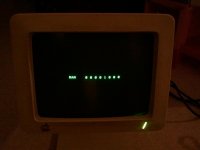
So the problem is the RAM. Bummer. Impossible to fix. I'll however try taking whole machine to parts, cleaning up and checking the RAM solderings, if anything could be done. But this machine starts to look like an "parts only" and need of a replacement motherboard is in place.
Good link i found :
http://support.apple.com/kb/TA38047?viewlocale=en_US
I got my hopes up getting and working Apple II-family machine. Now i really need to find working //c or an IIe !
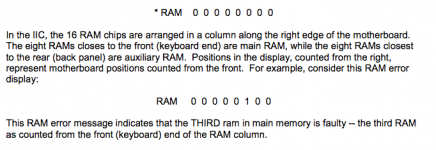
Wow, thanks for all the posts!!
I have tried to have a disk inside the IIc when I turn on the system. I even tried some external drives (which work fine on my IIGS), nothing seems to work. I'm sort of at a loss here, my hope is to one day pickup an Apple IIc Plus one day, but for now I want to try and get this one working.
Even though the above posts aren't directly related to my original issue, this makes me excited again to work on my IIc.
I'll ask my parents to bring out my Apple IIc, I'm really interesting in playing with it now that I have some more information. I hope I can get this baby working.
Thanks!
-Steve
I have tried to have a disk inside the IIc when I turn on the system. I even tried some external drives (which work fine on my IIGS), nothing seems to work. I'm sort of at a loss here, my hope is to one day pickup an Apple IIc Plus one day, but for now I want to try and get this one working.
Even though the above posts aren't directly related to my original issue, this makes me excited again to work on my IIc.
I'll ask my parents to bring out my Apple IIc, I'm really interesting in playing with it now that I have some more information. I hope I can get this baby working.
Thanks!
-Steve
Got an another //c yesterday wich outputs only "garbage" (i.e. random characters) on screen. Opened up the machine and cleaned up, pressed the chips. Will try today again with another monitor, cable and power supply. Or are we looking at ROM problem or so? The board itself is clean, no leaks, no corrosion etc.
Anybody have any experience with such "garbage" on screen problems with //c ?
Anybody have any experience with such "garbage" on screen problems with //c ?
Swapping parts, i won't take that road, i don't want to risk breaking the old chips. If can find replacement CPU that's an option for sure.
Need to test with another internal power converter as well, it might be out of specs/half dead as now on power-up it will only display slight narrow "jumping" line in the middle. No noise from the disk drive etc. Not a good sign.
Need to test with another internal power converter as well, it might be out of specs/half dead as now on power-up it will only display slight narrow "jumping" line in the middle. No noise from the disk drive etc. Not a good sign.
Well I took this out of storage again to play with it.
Still no luck. Cleaned the floppy drive head but no luck. Also doesn't explain why a known-good external drive won't work.
However... I was reading online someone had a similar issue. The problem was the IWM chip (Integrated Wozniak Machine) which apparently controls the floppy disk drive. That could be why the system
always thinks there is no disk drive is installed. I'll keep my eye out at yard sales for a spare IIc or IIc plus. I'd love to have a working one, I have a stack of floppies just waiting to play with... I do have a working IIGS.
However in the apartment it's nicer to have a compact machine like the IIc or IIc plus.
Still no luck. Cleaned the floppy drive head but no luck. Also doesn't explain why a known-good external drive won't work.
However... I was reading online someone had a similar issue. The problem was the IWM chip (Integrated Wozniak Machine) which apparently controls the floppy disk drive. That could be why the system
always thinks there is no disk drive is installed. I'll keep my eye out at yard sales for a spare IIc or IIc plus. I'd love to have a working one, I have a stack of floppies just waiting to play with... I do have a working IIGS.
However in the apartment it's nicer to have a compact machine like the IIc or IIc plus.
I think my Apple IIc has faulty RAM chips and I would like to exchange them.
Which RAM chips should I use?
In particular, which is the right speed?
I checked my Apple IIc RAM chips and in the middle there is Apple logo followed by "mT 4264".
On the top of the chips is written, with a very little font, "8448".
There are no values such -20, -15, -1,2 -10, -8 to know their speed.
Which RAM chips should I use?
In particular, which is the right speed?
I checked my Apple IIc RAM chips and in the middle there is Apple logo followed by "mT 4264".
On the top of the chips is written, with a very little font, "8448".
There are no values such -20, -15, -1,2 -10, -8 to know their speed.
Which RAM chips is faulty? Not all? Replace just the broken one. You get the error code on screen wich shows the location of the fauwlty RAM?
I had one replaced on my //c about an year ago and i think i used one of these:
Vintage MICRON 4264P RAM MT4264-15 16-PIN DIP NOS
http://viewitem.eim.ebay.fi/Vintage-MICRON-4264P-RAM-MT426415-16PIN-DIP-NOS/370632681775/item
I had one replaced on my //c about an year ago and i think i used one of these:
Vintage MICRON 4264P RAM MT4264-15 16-PIN DIP NOS
http://viewitem.eim.ebay.fi/Vintage-MICRON-4264P-RAM-MT426415-16PIN-DIP-NOS/370632681775/item