

Thread
G3/L2 Upgrades on Ebay
http://cgi.ebay.com/Sonnet-BG3-400-512-Crescendo-L2-G3-Mac-Processor-Card-/380308799315?pt=LH_DefaultDomain_0&hash=item588c2bbf53
No relationship or knowledge of the seller. I was searching for one for myself and found this seller with ten+ and the price seems good to me, so I figured someone here would probably be interested.
On the down side, it's only 512KB cache. On the bright side, the L2 upgrades seem pretty hard to find at all any more.
No relationship or knowledge of the seller. I was searching for one for myself and found this seller with ten+ and the price seems good to me, so I figured someone here would probably be interested.
On the down side, it's only 512KB cache. On the bright side, the L2 upgrades seem pretty hard to find at all any more.
is this for the PM 6500? if it is, it's mine!!!
scored! sweet my PM 6500 is complete!!!
Yeah, those are a great deal - almost tempted to get one in case I get another compatible machine in here sometime...
Available quantity reduced by two! Now my 6360 won't have to go without and the $4.95 lidless 6400 can have one of these too. 
Gotta figure out if there's much difference in performance between these and my G3/466/1MB Crescendo on the 6500 MoBo, it clocks down to 400 MHz on the 50 MHz Bus, but goes full bore on the 6360's 40 MHz Bus. :?:
Thanks for the heads up, comrade trag! :approve:
Gotta figure out if there's much difference in performance between these and my G3/466/1MB Crescendo on the 6500 MoBo, it clocks down to 400 MHz on the 50 MHz Bus, but goes full bore on the 6360's 40 MHz Bus. :?:
Thanks for the heads up, comrade trag! :approve:
You're welcome. I ordered two as well. Now my equipment for my small 7.6.1 machine is complete. All that remains is to do the work...Available quantity reduced by two! Now my 6360 won't have to go without and the $4.95 lidless 6400 can have one of these too.
Gotta figure out if there's much difference in performance between these and my G3/466/1MB Crescendo on the 6500 MoBo, it clocks down to 400 MHz on the 50 MHz Bus, but goes full bore on the 6360's 40 MHz Bus. :?:
Thanks for the heads up, comrade trag! :approve:
I've been looking into upping the cache to 1MB from 512KB. It looks like the 512KB cache chips are still available from Digi-Key. They're about $10 - $15 each (two needed). I actually have about 50 chips on hand with the needed capacity, but they're only rated for 166 MHz and I think one needs 200MHz for this application?
I see two obstacles to such an upgrade.
1) Those cards are usually really crowded. Soldering on them is therefore more challenging because of nearby components and tight clearances.
2) I don't know if there are resistors which must be changed on the card for 512KB cache vs. 1MB cache. How does the CPU know the amount of cache present? Does the software enabler tell it? If so, how does the software know? Are there ID resistors (PDD)?
I have a datasheet from Motorola for the G3 ZIF module (they call it something else) and that module does have ID pins on board to indicate the size and speed of the cache. Interestingly, the ZIF module is also designed to accept a 604e according to the datasheet. But I don't know if that's relevant to how Sonnet would have designed their L2 upgrade.
Anyone have a 400/1MB card or 500/1MB card of which they'd like to make a high resolution scan of both sides? I'd bet that Sonnet used the same board for all three models, which would mean that any necessary differences should be apparent on the higher end boards.
I received my two L2/G3 upgrades today. Although listed as Used, they look new or unused. The antistatic bags are sealed. The innards are shrink wrapped. This could just be good repackaging, but it could also be that the seller happened on some unsold stock.
I took the heat sinks off. The PPC750s on the cards have '350' on them, implying that they are actually rated for 350MHz rather than 400MHz. The stickers and everything else say these are 400MHz cards.
I recall that there was a todo several years back about Sonnet selling upgrades make with CPUs which were rated slower than the upgrade. Sonnet said that the chips were actually rated for the higher speed. Consumers complained. Given the relationship between speed and temperature ratings, it is possible that Sonnet was telling the truth. But I think they gave up the practice.
These could be unsold stock left over from that debacle.
I have not actually stuck them in a computer yet to test their operation. I like to let my Ebay purchases sit around unused (or even unopened) for months, so when/if there is a problem I have no recourse.
The L2 cache chips are Micron MT58L64L32P - 7.5A chips which are listed as 113MHz on the datasheet and 8.8ns cycle time but 7.5ns access time.
Now I just can't make heads or tails of this. I thought I read that the cache on these things ran at 1/2 the CPU speed. That would be 200MHz. But even if it was 1/3, it should still need 133MHz cache RAM.
Still more confusing, IBM's datasheet lists L2 clock ratios (to CPU core clock) of 1/1, 1/1.5, 1/2, 1/2.5 and 1/3. So 1/3 is the slowest L2 clock ratio. 1/1 is the fastest. Yet, IBM also lists 250MHz as the fastest supported L2Clock speed on a datasheet for a CPU which runs at least up to 500MHz. I guess they could mean that those L2 clock ratios are supported, but don't run the L2 clock faster than 250MHz.
Okay, so taking that interpretation, and adding tha tthe IBM datasheet shows "L2 Cycle Time" as a simple recipricole of the clock speed, that would mean that 8.8ns cycle time and 113MHz do go together.
So, I think this SRAM is a little underrated for the speed it probably runs at. On the other hand, that 'P' suffic on the part number has me wondering. I have only been able to find a datasheet for the 'F' suffix, and that is listed as commercial temperature range. I wonder if the P might be industrial or military. A wider temperature range will usually run fine at higher speeds in a narrow temperature range environment.
I have 48 Galvantech 128K X 32 SRAM chips on hand, but they're rated for 10ns cycle time/100 MHz operation. Even slower (though not by much) than the Micron chips on the board. However, they are twice the capacity and they are rated for Industrial temperatures, rather than commerical.
Digikey has some nice Cypress CY7C1347, 128K X 32 chips rated for 250MHz for $11+ each. I may pick up a few of those and try them.
I took the heat sinks off. The PPC750s on the cards have '350' on them, implying that they are actually rated for 350MHz rather than 400MHz. The stickers and everything else say these are 400MHz cards.
I recall that there was a todo several years back about Sonnet selling upgrades make with CPUs which were rated slower than the upgrade. Sonnet said that the chips were actually rated for the higher speed. Consumers complained. Given the relationship between speed and temperature ratings, it is possible that Sonnet was telling the truth. But I think they gave up the practice.
These could be unsold stock left over from that debacle.
I have not actually stuck them in a computer yet to test their operation. I like to let my Ebay purchases sit around unused (or even unopened) for months, so when/if there is a problem I have no recourse.
The L2 cache chips are Micron MT58L64L32P - 7.5A chips which are listed as 113MHz on the datasheet and 8.8ns cycle time but 7.5ns access time.
Now I just can't make heads or tails of this. I thought I read that the cache on these things ran at 1/2 the CPU speed. That would be 200MHz. But even if it was 1/3, it should still need 133MHz cache RAM.
Still more confusing, IBM's datasheet lists L2 clock ratios (to CPU core clock) of 1/1, 1/1.5, 1/2, 1/2.5 and 1/3. So 1/3 is the slowest L2 clock ratio. 1/1 is the fastest. Yet, IBM also lists 250MHz as the fastest supported L2Clock speed on a datasheet for a CPU which runs at least up to 500MHz. I guess they could mean that those L2 clock ratios are supported, but don't run the L2 clock faster than 250MHz.
Okay, so taking that interpretation, and adding tha tthe IBM datasheet shows "L2 Cycle Time" as a simple recipricole of the clock speed, that would mean that 8.8ns cycle time and 113MHz do go together.
So, I think this SRAM is a little underrated for the speed it probably runs at. On the other hand, that 'P' suffic on the part number has me wondering. I have only been able to find a datasheet for the 'F' suffix, and that is listed as commercial temperature range. I wonder if the P might be industrial or military. A wider temperature range will usually run fine at higher speeds in a narrow temperature range environment.
I have 48 Galvantech 128K X 32 SRAM chips on hand, but they're rated for 10ns cycle time/100 MHz operation. Even slower (though not by much) than the Micron chips on the board. However, they are twice the capacity and they are rated for Industrial temperatures, rather than commerical.
Digikey has some nice Cypress CY7C1347, 128K X 32 chips rated for 250MHz for $11+ each. I may pick up a few of those and try them.
I'll get shots of the 466/1M card up ASAP. How hard is it to remover the heat sink? I'd rather leave it alone, it has been running flawlessly for over ten years. [ ] ]'>
] ]'>
Since the demise of Radius, I've acquired more than a few cards directly from Sonnet and none has ever had any shrink wrap anywhere in the packaging. So when my cards arrive, I'll let you know if it looks like NIB packaging or merely excellent re-packaging.
As a Crescendo side note: I also scored a PCI Crescendo G4/800/1M upgrade for another shot at the PExBOOT project. IIrc, I've got an unused Sonnet IDE Card in the 466DA as well. I'd like to talk to one of their engineers again to see if I can load the Sonnet Divers for those Two Cards, RadiusWare for my pair of PCI VidCards and a Bootstrap Routine to get the Crescendo talking to the IDE Card onto a custom ROM SIMM. That's the only viable plan I nave in order to finally get past the Boot Chimes on my *&%^&^$^%$#^ PEx board. [}] ]'>
] ]'>Since the demise of Radius, I've acquired more than a few cards directly from Sonnet and none has ever had any shrink wrap anywhere in the packaging. So when my cards arrive, I'll let you know if it looks like NIB packaging or merely excellent re-packaging.
As a Crescendo side note: I also scored a PCI Crescendo G4/800/1M upgrade for another shot at the PExBOOT project. IIrc, I've got an unused Sonnet IDE Card in the 466DA as well. I'd like to talk to one of their engineers again to see if I can load the Sonnet Divers for those Two Cards, RadiusWare for my pair of PCI VidCards and a Bootstrap Routine to get the Crescendo talking to the IDE Card onto a custom ROM SIMM. That's the only viable plan I nave in order to finally get past the Boot Chimes on my *&%^&^$^%$#^ PEx board. [}
] ]'>I don't think I need a scan after all, so please do not disturb what has been working for years.I'll get shots of the 466/1M card up ASAP. How hard is it to removerthe heat sink? I'd rather leave it alone, it has been running
flawlessly for over ten years. [
The PPC750 is told the L2 cache size by software (or perhaps it detects it), but in any case, there is no pin which indicates the size. So there couldn't be a resistor on a pin to the PPC750 which needs changing. The only difference between the pinout of the larger and smaller L2 cache chips is one address line. So I guess there could be a resistor in the center of those two (one per two chips) address lines. But I think it would be unnecessary.
One last possibility is that Sonnet uses a resistor to tell some register on the card the L2 size and the software reads that register before configuring the L2Cache Register in the PPC750. But why do that when they can just program the Flash/EEPROM on the card as needed? Of course, I'm assuming there's a flash on there somewhere. I didn't actually look for one.
But, to answer your question, there are four screws which go through the PCB and thread into the heat sink. They can be a little hard to turn, so it's good to use the proper size screwdriver on them. There are also (on this model) little white plastic spacers around the screws between the PCB and the heat sink. So, after extracting the screws, be careful not to lose the spacers. They're easy to overlook.
The tricky part is getting the thing back together. I held the circuit board so that its long edge was vertical (parallel to the direction of gravity) and inserted one screw at a time, putting the spacer on each screw before moving on to the next. Then using my three arms, I brought the heat sink up and barely threaded one screw. Then another, etc. There's a lot of abitility to move the heat sink around when the screws are loosely threaded. I was even able to push the heat sink out of the way enough to get the spacer back on the fourth screw after two of them were already threaded.
I think I actually held the PCB and the heat sink in one hand while turning the screw driver with the other, but it felt like I needed three hands...
Anyway, if you want to make a scan, that would be great, but I think the most prudent course, would be for me to try replacing the memory chips and do some testing. And then, if I can't get the extra memory recognized, I'll go looking for a scan.
I doubt anyone was paying enough attention for this to confuse them, but just in case...
A couple message back I mentioned having about 50 166MHz SRAM cache parts and in the previous post I mentioned having 48 parts rated for 100MHz and Industrial temperatures.
They're two different sets of parts. I have 48 Galvantech parts which are 128K X 32 and rated for 100MHz at industrial temperatures. These may be too slow to run at 200MHz (1/2) or even 133MHz (1/3), although if 113MHz Micron parts work....
I also have 53 Samsung parts which are rated for 166MHz at commercial temperatures (0C - 70C). However, the Samsung parts had me fooled for a bit. Their datasheet states 256K X 18 or 128K X 36, so I thought they could be configured as either. But it turns out that it is one datasheet for two different but related parts. The parts I have are the 256K X 18, so they would not work. One needs X32 or X36. The X36 parts are just like the X32 but with parity data bits, which the upgrade card would probably ignore.
So the Galvantech parts may be too slow , and the Samsung parts are just the wrong bit arrangement. So I'll probably need to buy the Cypress parts from DigiKey if I do this experiment.
The nice thing is that the Cypress parts are described very very similarly to the Micron parts in their respective datasheets, which gives me much more confidence that they will substitute successfully. There's a certain amount of standardization to memory parts, so one expects substitutes to work, but a little reassurance never hurts. The functional block diagrams in the two datasheets are nearly identical.
A couple message back I mentioned having about 50 166MHz SRAM cache parts and in the previous post I mentioned having 48 parts rated for 100MHz and Industrial temperatures.
They're two different sets of parts. I have 48 Galvantech parts which are 128K X 32 and rated for 100MHz at industrial temperatures. These may be too slow to run at 200MHz (1/2) or even 133MHz (1/3), although if 113MHz Micron parts work....
I also have 53 Samsung parts which are rated for 166MHz at commercial temperatures (0C - 70C). However, the Samsung parts had me fooled for a bit. Their datasheet states 256K X 18 or 128K X 36, so I thought they could be configured as either. But it turns out that it is one datasheet for two different but related parts. The parts I have are the 256K X 18, so they would not work. One needs X32 or X36. The X36 parts are just like the X32 but with parity data bits, which the upgrade card would probably ignore.
So the Galvantech parts may be too slow , and the Samsung parts are just the wrong bit arrangement. So I'll probably need to buy the Cypress parts from DigiKey if I do this experiment.
The nice thing is that the Cypress parts are described very very similarly to the Micron parts in their respective datasheets, which gives me much more confidence that they will substitute successfully. There's a certain amount of standardization to memory parts, so one expects substitutes to work, but a little reassurance never hurts. The functional block diagrams in the two datasheets are nearly identical.
I ended up contacting the seller, but hurry up and test yours. Mine arrived DOA. As soon as sonnet INIT/Extension kicks in, my PowerMac 6500 locks up HARD. Test yours, I imagine I got a defective one, and seeing that mine was sealed, it is hard for them to test them. I don't know how they can say they are tested working when I still had the freaking OEM shrinkwrap on mine.
Test yours quick, just to make sure they work!
Test yours quick, just to make sure they work!
AFAIK, Sonnet doesn't put shrinkwrap on their cards, they have always come in a static free bag with a square yellow ESSD Sticker holding it closed at the fold flap. My two packages processed through the sort facility at Greensboro today, if so, I may have them as early as tomorrow. I can test them in a know good system setup on the 6360 MoBo that my 466 has been using for many years.
I was referring to the box the sonnet card came in. It's like the shrinkwrap you would take off say a product on a retail store.
Btw, I think I figured out the issue. When the card was put together, I don't think they actually tightened the heatsink down, and the didn't use heatsink compound.
I took the heatsink off, and found ZERO heatsink compound, where reports online suggested that it should be on there. I applied goo, put it together, made sure the heatsink fit properly (overtighten it and it will bow the card).
So I will be putting it through a battery of tests. Btw, if anyone wants the updated software for it, you can find it on softpedia, or I can put it up on my server.
Btw, I think I figured out the issue. When the card was put together, I don't think they actually tightened the heatsink down, and the didn't use heatsink compound.
I took the heatsink off, and found ZERO heatsink compound, where reports online suggested that it should be on there. I applied goo, put it together, made sure the heatsink fit properly (overtighten it and it will bow the card).
So I will be putting it through a battery of tests. Btw, if anyone wants the updated software for it, you can find it on softpedia, or I can put it up on my server.
Holy Jeebus this thing is fast!!!
I am running with the following setup (will post pr0n pics of the logic board from my PC)
Power Macintosh 6500/225Mhz/50Mhz FSB
Sonnet Cressendo L2 G3 @400Mhz/512KB L2
128MB 60ns RAM (2x 64MB)
PCI ATI Rage 128 Pro 16MB VGA
PCI Sonnet Tempo SATA card
160GB SATA 7200RPM/16MB HDD / 15GB Maxtor ATA-3 HDD
DVD-RAM + CD-RW + CD-ROM + Zip 100
Comm Slot II 10-BaseT Ethernet card
Mac OS 9.1
Posting this from IExplorer 4.1
EDIT: Pic of cramped space
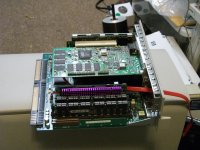
I am running with the following setup (will post pr0n pics of the logic board from my PC)
Power Macintosh 6500/225Mhz/50Mhz FSB
Sonnet Cressendo L2 G3 @400Mhz/512KB L2
128MB 60ns RAM (2x 64MB)
PCI ATI Rage 128 Pro 16MB VGA
PCI Sonnet Tempo SATA card
160GB SATA 7200RPM/16MB HDD / 15GB Maxtor ATA-3 HDD
DVD-RAM + CD-RW + CD-ROM + Zip 100
Comm Slot II 10-BaseT Ethernet card
Mac OS 9.1
Posting this from IExplorer 4.1
EDIT: Pic of cramped space
Nice! Nearly a full house, now all you need is the Apple TV/Video System to complete your setup. 
It's a very good thing that the Crescendo uses less power and runs cooler than the MoBo Proc!
It's a very good thing that the Crescendo uses less power and runs cooler than the MoBo Proc!
Wow, that is cramped.
I received mine yesterday - I'm convinced it's brand spankin' new! :O
sticker wasn't even used, eh?
I think I have to take the Rage 128 out of mine. It seems to overheat the system with it, either power instability. How much power does the PCI Rage 128 Pro chew through?
I think I have to take the Rage 128 out of mine. It seems to overheat the system with it, either power instability. How much power does the PCI Rage 128 Pro chew through?
My two cards came in today, I'm almost certain that the packaging in NOT Vanilla Sonnet, but I've been known to be mistaken. The only thing that leads me to believe that one might be unused is that there was a hole in one of the two sealed bags that the card slipped out of easily. The seals are different from any I've seen on a Sonnet Anti-Static Bag before, but these are earlier cards than my 466.
Under an 8x Slide Loupe, both cards appear to have been in a PDS Slot at least once. This could be factory testing or from being used in an IT environment, which might explain the retention of the original packaging. One of my boxes came in sans slip sleeve, but I got the "Powered by Sonnet" stickers, manuals and a Crescendo "Encore" Install Diskette 1.4.5 in each box.
My 466 came with the same manual, but the Crescendo "Encore" Install Diskette 1.4.4. The slip sleeve is very different, displaying the Mac OS 9 Compatible icon and a nifty "Zooming Illustration" of a partial board shot rather than a pic of the actual card.
Considering the newer rev. "Driver Diskette" packaged with the older cards, along with the identical Y2K copyright date/rev 1.0 manual for all three cards, I'd say these are packages that were RMA'd under Sonnet's 30 Day Trial Policy. They were likely tested, repackaged with the most recent driver rev. Install Diskette, possibly the latest manual available and any missing "Powered by Sonnet" stickers, then liquidated in a package deal to be sold off as warranty free "used" merchandise by a third party.
Dunno, just guessing! )
)
Under an 8x Slide Loupe, both cards appear to have been in a PDS Slot at least once. This could be factory testing or from being used in an IT environment, which might explain the retention of the original packaging. One of my boxes came in sans slip sleeve, but I got the "Powered by Sonnet" stickers, manuals and a Crescendo "Encore" Install Diskette 1.4.5 in each box.
My 466 came with the same manual, but the Crescendo "Encore" Install Diskette 1.4.4. The slip sleeve is very different, displaying the Mac OS 9 Compatible icon and a nifty "Zooming Illustration" of a partial board shot rather than a pic of the actual card.
Considering the newer rev. "Driver Diskette" packaged with the older cards, along with the identical Y2K copyright date/rev 1.0 manual for all three cards, I'd say these are packages that were RMA'd under Sonnet's 30 Day Trial Policy. They were likely tested, repackaged with the most recent driver rev. Install Diskette, possibly the latest manual available and any missing "Powered by Sonnet" stickers, then liquidated in a package deal to be sold off as warranty free "used" merchandise by a third party.
Dunno, just guessing!
)
I contacted Sonnet a while back, and they said some company came and bought out their old stock. I am guessing this is sonnet's old stock. They said they purchased 20-30 Sonnet L2 G3 upgrade cards. This very well could have been the buyer. It wasn't as if Sonnet was going to make much of a profit. These were probably cluttering up the office.
Another thing that springs to mind is reviewers. AKA they send these "Samples" to mac magazine people, they test them, rate them in the magazine, and send them back. We may have modules that were used in test machines to report on the speed/worthiness off the upgrade to people.
Another thing that springs to mind is reviewers. AKA they send these "Samples" to mac magazine people, they test them, rate them in the magazine, and send them back. We may have modules that were used in test machines to report on the speed/worthiness off the upgrade to people.
btw, my Rage 128 caused the hang up. Must've kept the G3 from getting proper cooling. I also heard of conflicts on 6400zone between the G3 cards and the Rage 128. Coincidence?
A number of years back on ebay a company was flooding the market with "new" 10/100 Nubus ethernet cards that seemed to be old returns sold off by whoever got the warehouse stock from the older defunct company (Fallaron maybe?). One of the units I got was DOA.
There are more than a few companies selling Sonnet Accelerators for MUCH higher prices than they can be had on Sonnet's own site/online store! 8-o
If these cards are simply "old stock," why would they ship with a higher rev driver diskette than a newer model? Something about that scenario does NOT compute!
If these cards are simply "old stock," why would they ship with a higher rev driver diskette than a newer model? Something about that scenario does NOT compute!
I hope it wasn't Asante. I have a box full of NuBus 10/100 cards in the attic which I bought on Ebay from what appeared to be an Asante ID liquidating "Refurbished" stock. I tried to use one in a PM8100/110 with a NewerTech G3 and OS 8.mumble or maybe 9.something and it didn't work.
This left me wondering if the driver for the card works past 7.6.1 but I was actually trying to use it to move files to an MDD, so I gave up on the ethernet card at that point and moved on to other matters.
One of these days I'll take up the 10/100 ethernet cards as a topic, and I hope I don't find that they're defective...
What is the latest version of the software? Or is that it?
Wondering if I need to download newer software or just use what's in the box.
I find those funny when I see them. The NuBus accelerator is the one that springs to mind. The 400MHz version is what?, $30 on Sonnet's site with another $20 for the PDS passthrough adapter. Ebayers are often asking $100 for them.
Even funnier is that Sonnet's on-line store has two different prices.
Let's see:
https://secure1.sonnettech.com/index.php?cPath=22_91&osCsid=72c98574cc51e982e02b9602e5919b81
has the adapter for $19.95 and the G3 upgrade for $29.95.
But https://secure1.sonnettech.com/index.php?cPath=51_52&osCsid=72c98574cc51e982e02b9602e5919b81
has the G3 upgrade for $39.95.
A few months ago that was reversed. The "Special Deals" link was $10 less than the regular CPU upgrades link. Now it's the other way around. I wonder what the price would be on the phone...
However, I can't see much point in putting a G3 upgrade in a NuBus machine these days when One could buy a G3 or G4 machine in similar box for much less.
For special cases/form factors such as the 6500, and the 20th anniversary, and maybe the 6100 I can see it. But not for something like a 7100 or 8100. And even with the 6100, I'd be tempted to hack a Beige G3 board into a low profile case or something.
My feeling about earlier Macs is similar. I can see putting a Turbo040 in an SE/30 because it's such a cool form factor, it's worth adding performance and keeping the original look and feel of the machine. But for a IIci or some such, why not just get a Q650 (or hack a Q650 logic board into a Q700 case)?
Since you bring it up I can't see spending $25 for a G3 in a 6400/6500 either, they are just too RAM limited. Or worse you could get a G4 upgrade for a Nubus PPC machine, what would be the point of that?
Some upgrades are more usable then others, but we each have a price point in mind to where we say what the hell and just do it.
Some upgrades are more usable then others, but we each have a price point in mind to where we say what the hell and just do it.
Honestly, I feel much the same, but there are some 6500 fans on this thread... And the 6500 is an interesting machine--not especially interesting to me, but the built-in subwoofer and video capabilities interest a number of people.
My interest arose because of my "smallest 7.6.1" computer project. I want PPC power, so a 6500 logic board seems the way to go, and to get the best performance possible, I need a G3/L2 upgrade. Of course a 500MHz, 1MB L2 upgrade would be better, but for $20 vs $100+ I'll settle for 400MHz and a 512KB cache which I may be able to upgrade to 1MB later.
Also, I think I'll be able to get the ram up to 160MB from 128MB. I have this 32MB EDO DIMM which seems to have exactly the kind of memory chips for which the logic board has pads...
That would still be kind of low for OS9, but for 7.6.1 I think it's probably plenty.
I caught the Specials/Regular pricing boo-boo on Sonnet's site too! )
As far as the NuBus G3 & HPV Adapter, I got those for my Radius 81/110, which is waaaayyyyy cooler than an 8100. I'll get an HPV Card and get this up and running some day for VidCap Playtime.
Meanwhile I'm setting up either my 8500 in its own skin for PCI era VidCap or my 9600 inside a fake Radius 81/110, just like the one I'm building for my UbuntuGIMPbox™. If I can find a fourth front Panel I'll have the Columns for the start of a MacShelf unit to display some Compact Macs including:
The http://68kmla.org/forums/viewtopic.php?f=29&t=12737 and some relatively stock 128k/Plus Conversions, my 8500 and IIsi.
The reason the 6400/6500 boards are worth upgrading is that they're fun to play with using the TV Tuner/CD/Power-on-off features of the TV Tuner's remote control. This makes a nifty little AV Setup. The CC guys were doing the 6400/6500 based "Takky" hack for the longest time. Other than a Mac Mini, the 6400/6500<->Q630 boards are the only worthwhile MoBos that'll fit into a Compact Mac case for a "Short Bed Takky" hack.
Anyway, there's a lot of fun to be had stuffing these little puppies into all kinds of places. Two PCI Slots and a CommSlot II 10/100bT card cost less and are a lot more interesting than playing with a Mac Mini, IMHO! [] ]'>
) As far as the NuBus G3 & HPV Adapter, I got those for my Radius 81/110, which is waaaayyyyy cooler than an 8100. I'll get an HPV Card and get this up and running some day for VidCap Playtime.
Meanwhile I'm setting up either my 8500 in its own skin for PCI era VidCap or my 9600 inside a fake Radius 81/110, just like the one I'm building for my UbuntuGIMPbox™. If I can find a fourth front Panel I'll have the Columns for the start of a MacShelf unit to display some Compact Macs including:
The http://68kmla.org/forums/viewtopic.php?f=29&t=12737 and some relatively stock 128k/Plus Conversions, my 8500 and IIsi.
The reason the 6400/6500 boards are worth upgrading is that they're fun to play with using the TV Tuner/CD/Power-on-off features of the TV Tuner's remote control. This makes a nifty little AV Setup. The CC guys were doing the 6400/6500 based "Takky" hack for the longest time. Other than a Mac Mini, the 6400/6500<->Q630 boards are the only worthwhile MoBos that'll fit into a Compact Mac case for a "Short Bed Takky" hack.
Anyway, there's a lot of fun to be had stuffing these little puppies into all kinds of places. Two PCI Slots and a CommSlot II 10/100bT card cost less and are a lot more interesting than playing with a Mac Mini, IMHO! [
] ]'>Same here, but they're just so frickin' rare, I couldn't NOT buy one.