

Thread
6 PowerBook 100's.... but not one works!

I have 6 PowerBook 100's.... All not functioning.
This weekend I tried to make out of all these one which would work....
No succes!! xx(
I tried to combine hard disks and motherboards without any succes.
I heared disk spinning but then stop agian, etc....
Who knows how to handle this bette??. I cannot imagine that out of 6 not one will work!
I also looked at my power. But that gives 7.5 volts as it should.
Where should I start!

IF you have:
PB SCSI <-> DB25 or Centronics 50 Cable
A pair of terminators (one of them pass-through)
SCSI CD-ROM Drive
Boot CD (preferably) OS 7.0.1 and use 7.1 or 7.6 if you don't have 7.0.1.
ADB KBD/Mouse
THEN hook 'em all up and let the testin' begin! }
Doing this will be taking most of the wild cards out of play for your troubleshooting sessions.
If you STILL can't get a Combo100 to boot, unhook the KBD, Trackball, HDDs and any modems or RAM upgrades present. Repeat testing, or alternatively, give it a whirl that way right from the start! :approve:
PB SCSI <-> DB25 or Centronics 50 Cable
A pair of terminators (one of them pass-through)
SCSI CD-ROM Drive
Boot CD (preferably) OS 7.0.1 and use 7.1 or 7.6 if you don't have 7.0.1.
ADB KBD/Mouse
THEN hook 'em all up and let the testin' begin! }
Doing this will be taking most of the wild cards out of play for your troubleshooting sessions.
If you STILL can't get a Combo100 to boot, unhook the KBD, Trackball, HDDs and any modems or RAM upgrades present. Repeat testing, or alternatively, give it a whirl that way right from the start! :approve:
OK!
I have a PB SCSI adapter and a 50 to 25 cable.
I could hook it up to a Daynaport SCSI LINK 3 (as a kind of in between adapter to hook all the cables in....not directly to use) and add a external HD with System 7.1 on it. The disk is terminated and now works on a Plus.
Like this:
P100 (PB-SCSI to 50 with female)----------(25 SCSI male)---[DaynaPORT]---(25 SCSI)---------(50 SCSI)------[sC-HD20 with 7.1]
No CD rom unfortunatly. Keybord and mouse no problem.
Will this work also???
I have a PB SCSI adapter and a 50 to 25 cable.
I could hook it up to a Daynaport SCSI LINK 3 (as a kind of in between adapter to hook all the cables in....not directly to use) and add a external HD with System 7.1 on it. The disk is terminated and now works on a Plus.
Like this:
P100 (PB-SCSI to 50 with female)----------(25 SCSI male)---[DaynaPORT]---(25 SCSI)---------(50 SCSI)------[sC-HD20 with 7.1]
No CD rom unfortunatly. Keybord and mouse no problem.
Will this work also???
Sounds like a plan! The instructions say to put an additional Pass-Through Terminator on the end of the PB SCSI Cable, if you have any problems with what you've set up, try that.
Make sure your 7.1 System is installed: For ANY Macintosh! If not, re-install it that way before proceeding.
Use an ADB KBD/Mouse and you're good to go from what I can tell.
The secret to troubleshooting is to eliminate as many variables as possible, isolating your initial testing to "known good" external peripherals, unhooking everything but the Logic Board, LCD and connector ribbon cable between them OUGHT to net you at least one working MLB/Cable/LCD trio to begin scrounging about for working examples of the built in "peripherals" of the BabyPB!
Good luck, trooper! [ ] ]'>
] ]'>
Make sure your 7.1 System is installed: For ANY Macintosh! If not, re-install it that way before proceeding.
Use an ADB KBD/Mouse and you're good to go from what I can tell.
The secret to troubleshooting is to eliminate as many variables as possible, isolating your initial testing to "known good" external peripherals, unhooking everything but the Logic Board, LCD and connector ribbon cable between them OUGHT to net you at least one working MLB/Cable/LCD trio to begin scrounging about for working examples of the built in "peripherals" of the BabyPB!
Good luck, trooper! [
] ]'>
Just checking in to see if you've had a chance to try your new testing set up as yet? :?:
I'll bet you're waiting for the weekend, so let me know how if, or how, it works out! :quadra:
I'll bet you're waiting for the weekend, so let me know how if, or how, it works out! :quadra:
Just a side note:
ive noticed the PB100 photos you have, there are aluminum electrolytics in there. couple of them whcih dont look too shiny on thier pins anymore.
Might want to investigate.
ive noticed the PB100 photos you have, there are aluminum electrolytics in there. couple of them whcih dont look too shiny on thier pins anymore.
Might want to investigate.
Ok!
I start with this coming weekend.
@techknight
I'm not sure which parts you mean....
Could you add an arrow on the Pictures?
I start with this coming weekend.
@techknight
I'm not sure which parts you mean....
Could you add an arrow on the Pictures?
As I remember of my PB100 didn't start if there was no main battery inside, even if it was dead, also check the clock batteries, whic can be replaced
Interesting point, I'll test mine later to see how those two factors affect the process of troubleshooting. ISTR that those "clock batteries" kept the System Ram alive when BabyPB was shut down and poweredup (the process that normally blows out RAM's contents. IIRC, the PB100 was the first Mac to have a nonvolitile RAMDisk capability.
drooling of the sight of 2.5" SCSI HDDs :lol:
OK!
I start testing NOW....
First one...no luck!
Screen lits up...and I hear the startup sound... but nothing happens...
Keybord and trackball are detached and external attched...and a pass true SCSI terminator is in place.
Also a battery in the PB....
Next!
I start testing NOW....
First one...no luck!
Screen lits up...and I hear the startup sound... but nothing happens...
Keybord and trackball are detached and external attched...and a pass true SCSI terminator is in place.
Also a battery in the PB....
Next!
GRRRRRRRRRRRRRRRR!!!!!!!!!!!!
Absolute and total failure.
2 are dead as a dodo.... and four will lit up a litle...but nothing happens...
Only thing I can think of now is a power failure in both of my adapters... but I guess I'm running out of options!
xx( xx( xx( xx( xx( xx(
Absolute and total failure.
2 are dead as a dodo.... and four will lit up a litle...but nothing happens...
Only thing I can think of now is a power failure in both of my adapters... but I guess I'm running out of options!
xx( xx( xx( xx( xx( xx(
The best thing to do in situations like this, is do one thing at a time.
Take the machine that appears "the most alive" and work with that.
Take the machine that appears "the most alive" and work with that.
Here is a pic of what i was talking about
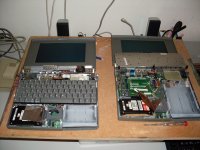
I would suggest taking the main battery from the one that lights up and put it into the 2 dead ones. Perhaps they have completely dead batteries. It might work!
@technight
Thanks for the excelent advice added to the picture! If these parts are broken..then I understand that everything will fail!
I didn't do much with a soldering iron but maybe this is a good start. The PowerBook are lost anyway.... If will see if they all are bad on al the boards.
Thanks for the excelent advice added to the picture! If these parts are broken..then I understand that everything will fail!
I didn't do much with a soldering iron but maybe this is a good start. The PowerBook are lost anyway.... If will see if they all are bad on al the boards.
if the solder joints on the SMD electrolytics look tarnished, as they do in the pictures, they are bad and will need replaced.
If you dont want to tackle this, there may be someone in the forum who would for a small fee
If you dont want to tackle this, there may be someone in the forum who would for a small fee
Yes... that could be a very good option...
If anyone is capable....just let me know!
If anyone is capable....just let me know!
BIG SUCCES!!!!!! 
One of my PowerBook 100 is back from the grave!
Nothing worked but I couldn't give up....
I know from some electrical parts that they work better if the temprature is right ...so I got my wifes hairdrayer and heated the MB a little bit... And...yes! I had a blinking floppy.
Now I'm testing HD's and found one to work!
YES YES YES!!!
Will post some pictures later.
Booting from the external SCSI disk didn't work. I got a walking SCSI sign with number 6 and sometimes number 1 in my screen. This stayed also so if I detached the HD but left the adapter in the PowerBook.
One of my PowerBook 100 is back from the grave!
Nothing worked but I couldn't give up....
I know from some electrical parts that they work better if the temprature is right ...so I got my wifes hairdrayer and heated the MB a little bit... And...yes! I had a blinking floppy.
Now I'm testing HD's and found one to work!
YES YES YES!!!
Will post some pictures later.
Booting from the external SCSI disk didn't work. I got a walking SCSI sign with number 6 and sometimes number 1 in my screen. This stayed also so if I detached the HD but left the adapter in the PowerBook.
The SCSI Numbers flashing across the screen mean that you have the wrong cable for using an external drive on your BabyPBs.
That cable is the one you use to put the PB100 into SCSI Disk Mode. When you use it correctly, the PB100's HDD looks like an external SCSI Drive to another Mac. It's probably a lot harder to come by than the standard kind! [ ] ]'>
] ]'>
Great work, Comrade! :approve:
That cable is the one you use to put the PB100 into SCSI Disk Mode. When you use it correctly, the PB100's HDD looks like an external SCSI Drive to another Mac. It's probably a lot harder to come by than the standard kind! [
] ]'>Great work, Comrade! :approve:
I revived a second one! Same method. Put the hear dryer for 30 second on all the parts on the MB and ...BINGO!! A floppy with a question mark!
Now I can hook up an external floppy driive or the one HD that is working. 4 others spin...but are not working
@Trash80toHP_Mini
Thanks for the compliment and thanks also for the explanation about the adapter. I will try to use it like that later. Will be handy if I like to add a new system to the disk!
Some pictures:
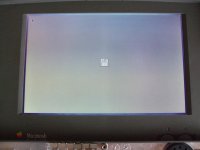
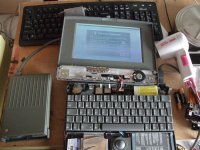
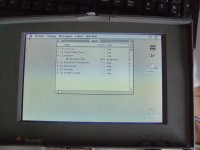
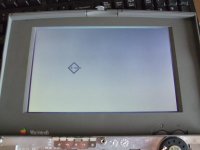
Now I can hook up an external floppy driive or the one HD that is working. 4 others spin...but are not working
@Trash80toHP_Mini
Thanks for the compliment and thanks also for the explanation about the adapter. I will try to use it like that later. Will be handy if I like to add a new system to the disk!
Some pictures:
De nada, you did great! I've got some BabyPB Hackin' to do soon too. I'm getting a dead LCD PB100 off eBay and I'll put the LCD from my original, very first PB into it. BabyPB has already had a 2300c LCD installed in her lid, so the original Lid Stuffings are stored in one of the magic plastic drawers. If successsful, I'll have the one, maxed out, working PB100 that I've got now and another repaired one, hopefully fully functional, as a long term PartsBook in whatever config it arrives. Meanwhile the BabyPB/2300cHack™ that's been on the back burner for a few years now . . .
. . . just might be moved higher up on the agenda! }
. . . just might be moved higher up on the agenda! }
Are the 1xx series particularly prone to failure? I see listing after listing on ebay with weird things like: "great shape", "nice condition" - and the descriptions say: "does not boot". I wonder if people rate the 1xx on a different standard, almost as if the expect them not to work. I don't see this so much with Duos and 5xx. Is it unusual to just buy a working 1xx?
The hairdryer is reforming the bad capacitors.
As i said in the beginning, YOU HAVE TO CHANGE ALL THE CAPACITORS.
Soon as the capacitors get cold, it will fall back to its old ways again. until they warm up.
They also smell like fish when they get hot.
As i said in the beginning, YOU HAVE TO CHANGE ALL THE CAPACITORS.
Soon as the capacitors get cold, it will fall back to its old ways again. until they warm up.
They also smell like fish when they get hot.
@CJ_MIllar
As far as I can see the PowerBook 100 is indeed not a very reliable machine....
As I told in this posting I collected over the past 15 years 6 PowerBook 100's. My first one, bought way back in 1996, booted with a blinking disk but the hard drive was not working. The Macintosh sysop I worked with had a lot of experience with PB100 and told me I had to smack on the back of the laptop to get some movement in the reading head of the SCSI disk. And yes.. it worked! The PB100 booted from hard disk. The official PowerBook 100 FAQ has called this method after my sysop:
Over the years I forgot to use it and when I tried to start it it failed. Also back in these days I put the PB100 on a radiator of our central heating system to warm and then it booted. Last time I tried to boot it that alsofailed. I have send it to a Macintosh repair service but they couldn't do much.
So I started to buy other PB100. I bought 4 which where officially declared dead and where sold for parts. But... I thought ( how naive... ) that I could easily made at least one good working one. Last month I bought one which booted if you tried it many times (should have been a warning....). This was the one I started my test with. When I tried it last month it booted after 20 times trying... now it boots only after the hair dryer trick. Out of four spinning hard disks only one works.
This means that there are at least two vital parts on a PB100 which could fail easily. The capacitors on the motherboard and the SCSI disk.
So yes... the PowerBook 100 is definitive not the best ever lasting machine Apple build..... If you have a working one ... cherish it and keep your
fingers crossed every time you boot it.
@techknight
I'm afraid that you are right...
Here is no quick win solution possible...
For the moment I can live with a laptop which needs special treatment like this but for the long term a capacitors change is necessary.
But I have to say....it is very nice to see the laptops boot now! I now know for sure that the rest of the parts are fine. I can test HD,etc.
About recapping. I found this manual to do it:
http://450.servehttp.com/reference/caps/
Is this the way to go? But then again... a friend of mine with lots of experience in electronics told me that it would be better just to solder the faulty capacitors out and then replace them.
What is best?
In general I like to add some things.
- I got the advice to leave the main batteries in the PowerBook and also the backup lithium batteries. This is not neccessary. It will also boot without them.
- To troubleshout I connected an external keybord and mouse and removed internal keybord and trackball. So basicly only a motherbord and LCD screen where attached.
- The PowerBook still boots fine. maybe the capacitors are revived enough to last a little bit longer. Although I also think that replacement is better.....
As far as I can see the PowerBook 100 is indeed not a very reliable machine....
As I told in this posting I collected over the past 15 years 6 PowerBook 100's. My first one, bought way back in 1996, booted with a blinking disk but the hard drive was not working. The Macintosh sysop I worked with had a lot of experience with PB100 and told me I had to smack on the back of the laptop to get some movement in the reading head of the SCSI disk. And yes.. it worked! The PB100 booted from hard disk. The official PowerBook 100 FAQ has called this method after my sysop:
http://www.open.ou.nl//psl/pb100/
Over the years I forgot to use it and when I tried to start it it failed. Also back in these days I put the PB100 on a radiator of our central heating system to warm and then it booted. Last time I tried to boot it that alsofailed. I have send it to a Macintosh repair service but they couldn't do much.
So I started to buy other PB100. I bought 4 which where officially declared dead and where sold for parts. But... I thought ( how naive... ) that I could easily made at least one good working one. Last month I bought one which booted if you tried it many times (should have been a warning....). This was the one I started my test with. When I tried it last month it booted after 20 times trying... now it boots only after the hair dryer trick. Out of four spinning hard disks only one works.
This means that there are at least two vital parts on a PB100 which could fail easily. The capacitors on the motherboard and the SCSI disk.
So yes... the PowerBook 100 is definitive not the best ever lasting machine Apple build..... If you have a working one ... cherish it and keep your
fingers crossed every time you boot it.
@techknight
I'm afraid that you are right...
Here is no quick win solution possible...
For the moment I can live with a laptop which needs special treatment like this but for the long term a capacitors change is necessary.
But I have to say....it is very nice to see the laptops boot now! I now know for sure that the rest of the parts are fine. I can test HD,etc.
About recapping. I found this manual to do it:
http://450.servehttp.com/reference/caps/
Is this the way to go? But then again... a friend of mine with lots of experience in electronics told me that it would be better just to solder the faulty capacitors out and then replace them.
What is best?
In general I like to add some things.
- I got the advice to leave the main batteries in the PowerBook and also the backup lithium batteries. This is not neccessary. It will also boot without them.
- To troubleshout I connected an external keybord and mouse and removed internal keybord and trackball. So basicly only a motherbord and LCD screen where attached.
- The PowerBook still boots fine. maybe the capacitors are revived enough to last a little bit longer. Although I also think that replacement is better.....
the sideways cutters IMHO is a BAD idea. ive broken lots of traces this way.
In a cramped circuit board like that, then the easiest thing to do is use 2 soldering irons at once, or a pair of SMD tweezer irons, and remove each capacitor that way.
then you can follow the rest of that guide to replace them.
Once you replace those capacitors, i bet everyone of those machines will boot.
Cant say much about the SCSI drives. they will all fail eventually. getting old.
Im working on a replacement for that......
In a cramped circuit board like that, then the easiest thing to do is use 2 soldering irons at once, or a pair of SMD tweezer irons, and remove each capacitor that way.
then you can follow the rest of that guide to replace them.
Once you replace those capacitors, i bet everyone of those machines will boot.
Cant say much about the SCSI drives. they will all fail eventually. getting old.
Im working on a replacement for that......
Thanks techknight for the advice!
I guess I have to find someone to help me with this because it is not a simple soldering job.....
About the SCSI disks... You make me very curious!!
Could you reveal a little bit where you are working on???
It would be fabulous if there will be an alternative for these faulty SCSI disks.
I found two more disks in my spare parts box....also dead like a dead parrot....
I guess I have to find someone to help me with this because it is not a simple soldering job.....
About the SCSI disks... You make me very curious!!
Could you reveal a little bit where you are working on???
It would be fabulous if there will be an alternative for these faulty SCSI disks.
I found two more disks in my spare parts box....also dead like a dead parrot....
Has anyone done a FAQ on:
Which Macs from 1984-> _?_ Absolutely NEED re-capping no matter what?
Which Macs from _?_ -> _?_ May NEED re-capping, depending upon which types of Capacitors Apple MAY have used?
Which Macs from _?_ -> _?_ Probably DON'T NEED re-capping do to use of newer technology capacitors?
Which Macs from _?_ -> _?_ Definitelly DON'T NEED re-capping do to use of newer technology capacitors?
:?:
Which Macs from 1984-> _?_ Absolutely NEED re-capping no matter what?
Which Macs from _?_ -> _?_ May NEED re-capping, depending upon which types of Capacitors Apple MAY have used?
Which Macs from _?_ -> _?_ Probably DON'T NEED re-capping do to use of newer technology capacitors?
Which Macs from _?_ -> _?_ Definitelly DON'T NEED re-capping do to use of newer technology capacitors?
:?:
No, because i havent seen EVERY mac. and some of the ones ive seen in the past i dont remember.
But regardless, anything with an electrolytic capacitor needs replaced eventually.
Anyone that dabbled into restoring tube type equipment should know this as well as the same rules apply.
I am not sure what the average lifepsan of the capacitor is, but i do know that alot of the modern ones are VERY short. some under a year. the chinese junk ones.
unless you get the high quality united chemicon or rubycon/nichicon authentics, not clones. They have about the same life span as the old ones.
STAY away from capxon, sanwha, etc etc etc, they all used ripped off electrolyte formulas with missing ingredients or bad mixtures that cause early electrolysis evaporation, in other words, they dry out way early. sometimes you can physically see the buldge, sometimes not.
But judging by the electronics repair experience that i have, Any vintage computer from the mid 90s and earlier need recapped by now. maybe even later models if exposed to extreme temperature gradients or low quality capacitors.
Any and all SMD electrolyics will need changed by now. standard radials on a day-by-day basis, but if i were to restore something to preserve and use it, i recap it anyway .
But regardless, anything with an electrolytic capacitor needs replaced eventually.
Anyone that dabbled into restoring tube type equipment should know this as well as the same rules apply.
I am not sure what the average lifepsan of the capacitor is, but i do know that alot of the modern ones are VERY short. some under a year. the chinese junk ones.
unless you get the high quality united chemicon or rubycon/nichicon authentics, not clones. They have about the same life span as the old ones.
STAY away from capxon, sanwha, etc etc etc, they all used ripped off electrolyte formulas with missing ingredients or bad mixtures that cause early electrolysis evaporation, in other words, they dry out way early. sometimes you can physically see the buldge, sometimes not.
But judging by the electronics repair experience that i have, Any vintage computer from the mid 90s and earlier need recapped by now. maybe even later models if exposed to extreme temperature gradients or low quality capacitors.
Any and all SMD electrolyics will need changed by now. standard radials on a day-by-day basis, but if i were to restore something to preserve and use it, i recap it anyway .
Funny, I've got to replace a pair of caps in my tube amp... But failed more due to being under speced(68v rated in a 70v circuit) lasted 14 years though...