

Thread
2.5" SCSI SSD Project
So, now its time to open the thread for this project.
For those of us that are less-fortunate to have a working SCSI HDD, and for those who DO have them and are failing, have failed, (like me). this thread is for you too.
I am in the process of routing the PCB. Problem now lies in the actual SCSI connector. the WDS-280 has a 48 pin AMP connector.
40 of those pins are for the SCSI interface, the other 8 are for the SCSI ID, Busy LED, and other odds/ends.
Now, the dilemma: Does anyone have the AMP part #, or possibly the solder pitch/spacing/dimensions for the AMP connector?
I cant route the SCSI connection without this, so i cannot finish this design.
Any contributions or help will be appreciated.
For those of us that are less-fortunate to have a working SCSI HDD, and for those who DO have them and are failing, have failed, (like me). this thread is for you too.
I am in the process of routing the PCB. Problem now lies in the actual SCSI connector. the WDS-280 has a 48 pin AMP connector.
40 of those pins are for the SCSI interface, the other 8 are for the SCSI ID, Busy LED, and other odds/ends.
Now, the dilemma: Does anyone have the AMP part #, or possibly the solder pitch/spacing/dimensions for the AMP connector?
I cant route the SCSI connection without this, so i cannot finish this design.
Any contributions or help will be appreciated.
Hi techknight, and thanks a lot for that project. I followed the beginning of the discussion in the other thread, and I'm very interested in it! I won't be of any help for technical stuff, though. But if and when the project leads to a product, I'll have a bunch of early PowerBooks with failing drives that'll happily discover the pleasures of SSD! And my compacts as well!
I've been searching for a SCSI-SSD solution for a couple of months. The best starting point I found is in our wiki. But of all the solutions listed, only the Acard is still manufactured ansd sold new, but so expensive it's no more an option, at least for me. One can still find plenty of references on online fora about getting those for about $20 each a couple of years ago, now the easily go for $150.
I thought I'd point you to that thread I found during my searches, with a similar effort going on.
I've been searching for a SCSI-SSD solution for a couple of months. The best starting point I found is in our wiki. But of all the solutions listed, only the Acard is still manufactured ansd sold new, but so expensive it's no more an option, at least for me. One can still find plenty of references on online fora about getting those for about $20 each a couple of years ago, now the easily go for $150.
I thought I'd point you to that thread I found during my searches, with a similar effort going on.
Theres only one difference. "My Effort" is going to follow through. Why? because it has to. i have no working SCSI HDD and id rather spend $150 into a project that would be worthwhile, and I have some control of.
As long as i have you guys for collaboration, i need to get data for certain things.
Looks like im gonna have to buy a set of calipers. sheesh.
As long as i have you guys for collaboration, i need to get data for certain things.
Looks like im gonna have to buy a set of calipers. sheesh.
I've been poking around in the Magic Boxen for some 8-10 year old AMP catalogs . . . no joy so far . . . but "I have not yet begun to fight!" }
Can you post piccies of the half of the connector pair that you have or of the side that you're actually looking for? :?:
Can you post piccies of the half of the connector pair that you have or of the side that you're actually looking for? :?:
Weird, I typed a reply earlier, but it vanished.
They are just standard 2mm pin headers, aka .079", 50-pin, I am guessing you'd want a right-angle variety. Not to dissuade you from pursuing AMP, but here is a page of similar things.
http://www.mouser.com/catalog/630/1124.pdf
They are just standard 2mm pin headers, aka .079", 50-pin, I am guessing you'd want a right-angle variety. Not to dissuade you from pursuing AMP, but here is a page of similar things.
http://www.mouser.com/catalog/630/1124.pdf
I will be watching this thread to sure! Particularly since I haven't heard a thing from artmix, guessing those adaptors are now NLA.
Ok, thanks for the tips guys. GREATLY appreciated.
So far, here is progress day period 1:
This is a routing NIGHTMARE..... I may have to do 2 boards. I am running out of room quickly. Probably going to have to make a 2-board sandwich, and just stack them together with interconnecting header pins.
Was trying to avoid this. I still need to route the MCU and transceivers that sit on the SCSI bus.
But this is a picture of the Compact Flash MCU routing nearly complete.
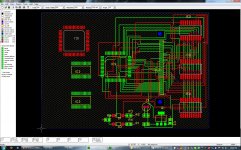
So far, here is progress day period 1:
This is a routing NIGHTMARE..... I may have to do 2 boards. I am running out of room quickly. Probably going to have to make a 2-board sandwich, and just stack them together with interconnecting header pins.
Was trying to avoid this. I still need to route the MCU and transceivers that sit on the SCSI bus.
But this is a picture of the Compact Flash MCU routing nearly complete.
Basically, I am trying to find a datasheet/measurement chart for the connector thats on the back of the old time SCSI 2.5 HDDs, or at least a source for new ones + datasheet.I've been poking around in the Magic Boxen for some 8-10 year old AMP catalogs . . . no joy so far . . . but "I have not yet begun to fight!" }
Otherwise, how in tarnations are you going to connect it to the powerbook SCSI ribbon?
Got a little bit more routing and parts adding done tonight before i head off to bed.
Day 1, part 2:
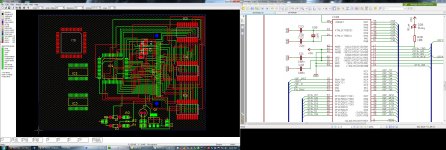
Day 1, part 2:
I've got Digital Calipers, so I'll check out an old drive.
IIRC, they're standard .05" O.C. Headers, the same as on a PC Card . . .
. . . but sometimes IDRC! :disapprove:
IIRC, they're standard .05" O.C. Headers, the same as on a PC Card . . .
. . . but sometimes IDRC! :disapprove:
Yes, i think so too. But i am not sure the solder-pin-pad length, width, and spacing that mounts onto the board. Because i have to make a solder zone to mount the header pins. i need those dimensions in MM not mils.
Also, I have done a little bit more routing today, finished the CompactFlash card side. YAHOOO.... and started routing in the SCSI interface MCU.
If someone can find a modern connector with the specs of the old connector, that would be a better route to go, than scrapping them off of old dead SCSI drives.
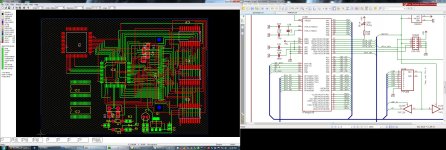
Also, I have done a little bit more routing today, finished the CompactFlash card side. YAHOOO.... and started routing in the SCSI interface MCU.
If someone can find a modern connector with the specs of the old connector, that would be a better route to go, than scrapping them off of old dead SCSI drives.
They are really not a specialized part!
If you really need to know the exact dimensions, just find somebody who makes 2MM right-angle, 50-pin headers, and get their data sheet which has the exact measurements. Then you either find a part in your CAD library, or make a template yourself, which for two evenly spaced rows of 25 pins is not difficult. Based on the pin spacing and layout you can then choose a trace width which you are comfortable with and can have fabricated.
Example - I am going to run with the 3M part I linked to before, just because it is the first one I found in the five minutes or so I looked. I am not endorsing 3M, I am sure there are dozens of companies who make these headers.
http://multimedia.3m.com/mws/mediawebserver?mwsId=66666UuZjcFSLXTt4Xfy5xz6EVuQEcuZgVs6EVs6E666666--
Scroll to page three, and there are your specifications. This is standard, the only other thing you need to watch out for is pin length, but this doesn't come into play with your layout yet.
I am surprised that you folks are fussing over it so much. I am a circuit layout n00b and designing and laying out a SCSI circuit is completely beyond me. But the dimensions of the connector are quite tangible. This weekend I actually happened to find a barely-used SCSI drive in my basement which a friend had given to me from his short-lived PowerBook. I thought I had lost it years ago! It is an Apple branded Connor CP2045, 40 MB. The connector is a standard, unmarked 50-pin right angle header, 2MM variety. I have some 2.5" SCSI-IDE bridges, and their connectors are the same. Hope this helps!
If you really need to know the exact dimensions, just find somebody who makes 2MM right-angle, 50-pin headers, and get their data sheet which has the exact measurements. Then you either find a part in your CAD library, or make a template yourself, which for two evenly spaced rows of 25 pins is not difficult. Based on the pin spacing and layout you can then choose a trace width which you are comfortable with and can have fabricated.
Example - I am going to run with the 3M part I linked to before, just because it is the first one I found in the five minutes or so I looked. I am not endorsing 3M, I am sure there are dozens of companies who make these headers.
http://multimedia.3m.com/mws/mediawebserver?mwsId=66666UuZjcFSLXTt4Xfy5xz6EVuQEcuZgVs6EVs6E666666--
Scroll to page three, and there are your specifications. This is standard, the only other thing you need to watch out for is pin length, but this doesn't come into play with your layout yet.
I am surprised that you folks are fussing over it so much. I am a circuit layout n00b and designing and laying out a SCSI circuit is completely beyond me. But the dimensions of the connector are quite tangible. This weekend I actually happened to find a barely-used SCSI drive in my basement which a friend had given to me from his short-lived PowerBook. I thought I had lost it years ago! It is an Apple branded Connor CP2045, 40 MB. The connector is a standard, unmarked 50-pin right angle header, 2MM variety. I have some 2.5" SCSI-IDE bridges, and their connectors are the same. Hope this helps!
Pardon, I probably missed something in this thread. Could you please drop a line about the goal of the project or a link to the previous thread? Is it about designing a SCSI SSD from scratch or just about interfacing an existing storage device?
Did someone recently ask for availability of CF Powermonster at http://www.artmix.com? This device is the SSD solution with the lowest list price I know (about USD 100 + shipping + any CF card). The performance is quite reasonable for any PowerBook with internal SCSI.
Did someone recently ask for availability of CF Powermonster at http://www.artmix.com? This device is the SSD solution with the lowest list price I know (about USD 100 + shipping + any CF card). The performance is quite reasonable for any PowerBook with internal SCSI.
I've tried contacting artmix, I have not gotten any response. Seems to me that solution is now NLA.
nobody is "fussing" about anything. And about the artmix guys, i have tried to get in contact with them months ago, and haven't heard anything. I was just hoping i would get a little bit more enthusiasm and appreciations for the efforts put into this project. This is not an easy project, and has taken alot of time so far, and still taking time. xx(
This device uses two 8-bit AVR micros to get the job done, and whilst it may not have the best performance, it WILL work. Its better than having nothing at all, right?
Yes, this is based on a previous GPL'd project that has been done in a full-scale manor, so the only thing that is truly "mine" is the on-going board design, plus several schematic edits/changes that i am reworking to better suit my/our needs.
about the 2mm connector thing, youll have to excuse my "knowledge" about the connector, as i have no calipers to gauge mine so i can draw a footprint in CAD, and i must have overlooked the entities in the 3M 2MM ones you had mentioned about. Sorry. I will look further into that, since obtaining a modern connector will be much easier, I was just hoping to just re-use my old one. less parts i have to buy.
Besides, after this one works out, i will design a NEW board that supports SD cards. since they are much cheaper, and extremely plentiful. the only downside is speed.
This device uses two 8-bit AVR micros to get the job done, and whilst it may not have the best performance, it WILL work. Its better than having nothing at all, right?
Yes, this is based on a previous GPL'd project that has been done in a full-scale manor, so the only thing that is truly "mine" is the on-going board design, plus several schematic edits/changes that i am reworking to better suit my/our needs.
about the 2mm connector thing, youll have to excuse my "knowledge" about the connector, as i have no calipers to gauge mine so i can draw a footprint in CAD, and i must have overlooked the entities in the 3M 2MM ones you had mentioned about. Sorry. I will look further into that, since obtaining a modern connector will be much easier, I was just hoping to just re-use my old one. less parts i have to buy.
Besides, after this one works out, i will design a NEW board that supports SD cards. since they are much cheaper, and extremely plentiful. the only downside is speed.
P.S. I am trying to find the right angle SMD ones.
The ones from the 3M link you sent are right angle, through hole, and SMD streight.
The ones from the 3M link you sent are right angle, through hole, and SMD streight.
Since SCSI is an open standard, there are probably specs for the connector available online, if not an actual CAD layout. I don't have time to google for such and I'm still offline at home. Maybe some othe comrade could hunt down the specs for you.
The other notion was to look through the TechNotes for early PowerBooks . . . :?:
The other notion was to look through the TechNotes for early PowerBooks . . . :?:
I am very enthused, and appreciative. It is one of the more awesome undertakings I have heard of in a long time!
You lost me there, I don't believe in SMD for connectors. Guess that's the extra wear and expense of my road warrior lifestyle. The project does still interest me just the same, I have never heard of anybody doing SCSI this way.
I may have jumped the gun a little bit in my last post as well, because its hard to read peoples emotions/feelings through a keyboard ;-)
I dont like SMD either, but for a board size this small, with these dimensions, i found it better suited. BUT i can use through-hole as well, but i would have to make a sandwich board to support it, as there isnt enough room as it sits right now to route traces around a through-hole connector.
I dont like SMD either, but for a board size this small, with these dimensions, i found it better suited. BUT i can use through-hole as well, but i would have to make a sandwich board to support it, as there isnt enough room as it sits right now to route traces around a through-hole connector.
I updated the wiki page to reflect this project as well...
I appreciate the project as well, techknight, thank you a lot in putting that much effort into the solution. The artmix thing seems not to be available anymore and other much more expensive solutions are out of stock and not likely to go into production again. So what you are doing is exactly what we need and includes an option to derive further solutions on demand.
Again: I love such project and also will happily buy a working board as long as the price is not much more than for the artmix device.
Thank you for spending your time and please go on!
Again: I love such project and also will happily buy a working board as long as the price is not much more than for the artmix device.
Thank you for spending your time and please go on!
I think it's a cool project too. At first I kind of wondered what the point was, given the cards available from Acard, but I had not been to their site in a while. Wow! Their prices have gone up by a factor of 2.5 in the last five years or so and a lot of stuff just isn't available any more. What was $70 is now $200. Eeeek!
Definitely worth having a homebrew solution at those prices.
What I would really like to see is a requirements document, detailing what signals are expected from each direction and how they must be translated. From that kind of thing, one could generate whatever hardware solution is the most interesting to the person doing the work.
Definitely worth having a homebrew solution at those prices.
What I would really like to see is a requirements document, detailing what signals are expected from each direction and how they must be translated. From that kind of thing, one could generate whatever hardware solution is the most interesting to the person doing the work.
Instead of Thru-Hole or standard SMD connectors, if you can use a thin enough board, it's possible to use Thru-Hole Headers as "Edge Card Connectors."
There are standard "adapter cards" that use this method. In this way you can avoid the problem of passing traces between teeny tiny pads, using VIAs well away from congestion to get the correct signals to the correct pins.


With a thin enough "connector PCB" you could probably use the same method with the smaller 2.5" SCSI pins. If you're doing a two board system, it might just work out. If you (or another comrade) can find the edge-mount pins to match the female connector used for the 2.5" laptop drive adapter in the lower pic, they'll probably have the proper "offset" built in for straddling standard thickness FRP PCB Material.
Just a thought! }
There are standard "adapter cards" that use this method. In this way you can avoid the problem of passing traces between teeny tiny pads, using VIAs well away from congestion to get the correct signals to the correct pins.
With a thin enough "connector PCB" you could probably use the same method with the smaller 2.5" SCSI pins. If you're doing a two board system, it might just work out. If you (or another comrade) can find the edge-mount pins to match the female connector used for the 2.5" laptop drive adapter in the lower pic, they'll probably have the proper "offset" built in for straddling standard thickness FRP PCB Material.
Just a thought! }
the thickness of the PCB depends on whos manufacturing it i guess, I havent picked one final yet, but i have been leaning towards olimex. prices seem reasonable.
im sure there are cheaper places. Also keep in mind that this project is open source as well, under the GPL. So once a final produced board is completed, you can do modifications to your hearts content.
as far as SCSI goes, command/data structure is in teh form of CDB commands. like Read(6), Read(10), Inquiry, etc etc etc.
Whats expected/inside the "Read" and "write" commands, depends highly upon the the driver using the SCSI bus. as SCSI can work with anything.
only thing is mac has native, is a disk driver. so it expects LBA/sector data from the Read/Write commands. and HDD LBA size, etc from the Inquiry commands.
The possibility of what can be done with SCSI is endless. even though its a slow buss on these old machines, You can use SCSI as an "encapsulation" mechanism bus. So then all you need is a processor at the tail end of the SCSI just "decaps" the capped SCSI CDBs, and they become new commands, which could be commands to drive, say a Wi-Fi chipset. or a realtek LAN chipset.
So in a nutshell, the a "specific" driver could target the SCSI bus, and encapsulate a command inside the SCSI system. the command would get de-capsulated at the target device, back into a regular command, as if the hardware were connected direct to the driver
im sure there are cheaper places. Also keep in mind that this project is open source as well, under the GPL. So once a final produced board is completed, you can do modifications to your hearts content.
as far as SCSI goes, command/data structure is in teh form of CDB commands. like Read(6), Read(10), Inquiry, etc etc etc.
Whats expected/inside the "Read" and "write" commands, depends highly upon the the driver using the SCSI bus. as SCSI can work with anything.
only thing is mac has native, is a disk driver. so it expects LBA/sector data from the Read/Write commands. and HDD LBA size, etc from the Inquiry commands.
The possibility of what can be done with SCSI is endless. even though its a slow buss on these old machines, You can use SCSI as an "encapsulation" mechanism bus. So then all you need is a processor at the tail end of the SCSI just "decaps" the capped SCSI CDBs, and they become new commands, which could be commands to drive, say a Wi-Fi chipset. or a realtek LAN chipset.
So in a nutshell, the a "specific" driver could target the SCSI bus, and encapsulate a command inside the SCSI system. the command would get de-capsulated at the target device, back into a regular command, as if the hardware were connected direct to the driver
It's midnight, I'm tired and can barely see straight, but I put digital calipers to a 40 pin PowerBook Female Header Connector on a flex circuit. Dunno what 'Book or Drive Type, but they're definitely 2 mm spacing and it looks & feels right to use these:

from here:
http://www.engineeringlab.com/jumpers-cables-headers.html
to solder the Tails to Edge Connector Pads on either side of a standard FRP PCB to get your "plug" for a PowerBook Flex Circuit HDD Cable.
jt, signing off to get some sle . . . zzzzzzzzzzzzzzzzzzzzzzzzzzz . . . :scrambled:
from here:
http://www.engineeringlab.com/jumpers-cables-headers.html
to solder the Tails to Edge Connector Pads on either side of a standard FRP PCB to get your "plug" for a PowerBook Flex Circuit HDD Cable.
jt, signing off to get some sle . . . zzzzzzzzzzzzzzzzzzzzzzzzzzz . . . :scrambled:
You think that's bad... I am probably a high-functioning autistic, or nearly so. People don't find me much easier to read in person! And then if I try to compensate by offering a detailed explanation of my state of mind for them to work with, they look even more perplexed and worried! Many have even told me that I am more expressive in text than in person. Ah yes people are weird. No worries!
These days, "standard" FR4 circuit board is .063" thick. If you want something else, e.g. .050" for 30 pin SIMMs or old ROM modules, then the cost usually goes up.
And it's not really so much that the price goes up. It's more that there's normally priced PCB fabrication and then there are all the specials and deals that are available. And virtually all of the specials or deal insist that you take "standard" .063" thick board.
So, for example, you can get .032" or even .020" thick board but you probably can't find as good of a price on it. The thinner board might be useful in your application where vertical space is extremely limited and, presumably, the board will be screwed to the bottom of a hard drive and so not allowed to flex much.
been some long days at work, so ive not had much time.
I did manage to get the SCSI connector footprint added in, and some more routing and netting done.
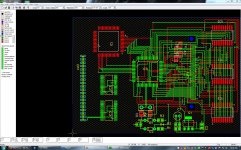
I did manage to get the SCSI connector footprint added in, and some more routing and netting done.
awwwwwwwwwww maaaannnn...........
I am gonna have to start ALL OVER AGAIN... I just relized something. the compact flash card is going to be too long. itll hang over the edge of the board, and it wont fit into a 2.5 drive bay :-( NOT GOOD....
I am gonna have to start ALL OVER AGAIN... I just relized something. the compact flash card is going to be too long. itll hang over the edge of the board, and it wont fit into a 2.5 drive bay :-( NOT GOOD....
I feel for ya! :disapprove: NOT GOOD!
