
Thread
Macintosh IIfx no hard drive
Hi All,
Picked up a Mac IIfx off of Craigslist. The owner couldn't get it started and it had a cap corrode in it at C42. It was a botched up job and one of the pads is completely gone but I think I got it to work. While the batteries test out okay, they don't work. I had to jumpstart it via 5v on pin 15 of the power supply and all was well. The positive pad is gone on C42. Anyone know what it does off-hand?
It's got some unmarked SuperMac video card in it that I'll post a pic later on and all 8 slots full of memory (both 8 pin but one set of four has an extra empty memory chip socket that I'm assuming is for parity) but I can't boot it up to see how much memory because it has no hard drive.
I thought I'd use a Mac II hard drive but the cable is different. The IIfx has some sort of contraption on the SCSI port that I'm guessing is a terminator. Is it possible these came without a hard drive?
Anyway, I'll need to find a hard drive power cable, internal SCSI cable and a sled to get this running. If anyone has a set to sell, please PM me. Is it possible to boot it from a floppy? If so, what version of MacOS will fit on a floppy and boot one of these?
Any help is much appreciated as always.
Picked up a Mac IIfx off of Craigslist. The owner couldn't get it started and it had a cap corrode in it at C42. It was a botched up job and one of the pads is completely gone but I think I got it to work. While the batteries test out okay, they don't work. I had to jumpstart it via 5v on pin 15 of the power supply and all was well. The positive pad is gone on C42. Anyone know what it does off-hand?
It's got some unmarked SuperMac video card in it that I'll post a pic later on and all 8 slots full of memory (both 8 pin but one set of four has an extra empty memory chip socket that I'm assuming is for parity) but I can't boot it up to see how much memory because it has no hard drive.
I thought I'd use a Mac II hard drive but the cable is different. The IIfx has some sort of contraption on the SCSI port that I'm guessing is a terminator. Is it possible these came without a hard drive?
Anyway, I'll need to find a hard drive power cable, internal SCSI cable and a sled to get this running. If anyone has a set to sell, please PM me. Is it possible to boot it from a floppy? If so, what version of MacOS will fit on a floppy and boot one of these?
Any help is much appreciated as always.
If you are like me (and let's face it, if you are reading this, you probably are), you have at least one Mac running OS 8 or 9 and another running OS X. If you want to transfer files between the two, you may have experienced this:
The Mac OS X machine acts as the server, and you are trying to transfer files to or from the client OS 9 machine. After you get about a megabyte transfered, the OS X machine unexpected disconnects, and you are left holding the bag with a few partially transfered and corrupted files...
So how do you fix this problem? I've spent what seems like forever trying to figure out how to fix it, and I almost always settle on a workaround like enabling File Sharing on the OS 9 box and connecting to it from the OS X box. That works, but it isn't always ideal. And then one day when I was just fooling around, I found this page on Apple's support site.
The article purports to be for OS X Server on 10.4.9, but I have conclusively demonstrated that the solution proposed in this article also works for bog-standard Mac OS X 10.4.10 (not the server version). Since applying the "defaults method" to my OS X machine, I have yet to have an OS 9 client disconnect while transfering files.
Much better!
Hope that helps.
Peace,
Drew
_________________
Power to the PowerPC!
The Mac OS X machine acts as the server, and you are trying to transfer files to or from the client OS 9 machine. After you get about a megabyte transfered, the OS X machine unexpected disconnects, and you are left holding the bag with a few partially transfered and corrupted files...
So how do you fix this problem? I've spent what seems like forever trying to figure out how to fix it, and I almost always settle on a workaround like enabling File Sharing on the OS 9 box and connecting to it from the OS X box. That works, but it isn't always ideal. And then one day when I was just fooling around, I found this page on Apple's support site.
The article purports to be for OS X Server on 10.4.9, but I have conclusively demonstrated that the solution proposed in this article also works for bog-standard Mac OS X 10.4.10 (not the server version). Since applying the "defaults method" to my OS X machine, I have yet to have an OS 9 client disconnect while transfering files.
Much better!
Hope that helps.
Peace,
Drew
_________________
Power to the PowerPC!
The problem is not one that I have met. There are 32 Macs in my LAN, embracing seven OS X machines (only one with Tiger) and 25 with a system between System 6.0.8 and OS 9.2.2. As long as the oldies can 'do' TCP/IP they can deferentially approach even Tiger as clients. And OS X Macs can find all of the OS 9 Macs as servers with no trouble. Oldies without TCP/IP just do a double-hop from selves to TCP/IP-capable intermediaries, and then onward to OS X Macs. Admittedly, this latter is rare, because it is usually the OS X Macs that download software to distribute to the oldies, which also usually is done through an intermediary Team Leader (yecch!), or father confessor and backup server. Because all 32 Macs are never up and gabbling to each other at the same time, I don't use AppleTalk zones, but I could.
I use manual IP address allocation and whole-drive filesharing, but those should not have any effect on negotiations.
de
_________________
(60x) 13DT + 3PB + PTPro; (G3) 7DT/MT; (G4) 3T + PB. System 8.1 to OS 10.5.8
I use manual IP address allocation and whole-drive filesharing, but those should not have any effect on negotiations.
de
_________________
(60x) 13DT + 3PB + PTPro; (G3) 7DT/MT; (G4) 3T + PB. System 8.1 to OS 10.5.8
After creating a 7.1 boot floppy, it has 20MB of memory. While the batteries seem okay (can they still be good from 1990?) I hooked up two little plastic (2 x AA battery) enclosures to the two battery terminals and it won't boot either by keyboard or power button on the back. It does boot up by applying one of my (2 x AA battery) enclosure fro pin 15 on the power supply to a ground source.
C42 is definitely suspect but the board dis require cleaning so I may need to do some more cleaning in case it's other capacitors? I definitely needs a re-cap.
If anyone has seen this, I appreciate any hints.
C42 is definitely suspect but the board dis require cleaning so I may need to do some more cleaning in case it's other capacitors? I definitely needs a re-cap.
If anyone has seen this, I appreciate any hints.
The IIfx will boot off 6.04 from a floppy. Mine was tested on from a hard drive with System 6.07 from an LC with a dead PSU and it booted just fine!
The IIfx is a bit more sensitive to signal bounce on the scsi port, so it has a terminator on the inside scsi port, leave it there. It you remove it, your scsi port will slow down as it tries to fllter out bounced signals echoing on the cable. This is normal on all SCSI systems, but for some reason the IIfx is more sensitive to it and the reason why that filter/terminator is there.
I'm glad you got it running. Let me check on that cap location for you.
The IIfx is a bit more sensitive to signal bounce on the scsi port, so it has a terminator on the inside scsi port, leave it there. It you remove it, your scsi port will slow down as it tries to fllter out bounced signals echoing on the cable. This is normal on all SCSI systems, but for some reason the IIfx is more sensitive to it and the reason why that filter/terminator is there.
I'm glad you got it running. Let me check on that cap location for you.
OK, this is what I found, C42 is a 1000µf @ 10V, its + is connected a bottom leg of D6. D6 is connected to the top of D5, and the bottom of D5 goes to UJ18. I think its part of the start up circuitry, but I do not have a schematic to verify it. C42 looks like it is connected to the top ground plane on the - side but it is not. Be careful not to short it out here when you replace it.
My little girl recapped my IIfx while I was away, and she did a great job. It's C29 and C4 (I think on both) that are the leaky caps that plague Macs all over - the 47µf @ 16V. Trag go me a couple of Black Tantalum Caps to recap the board and and they look great! Since the rest of the IIfx use black caps, these two look like they are right at home!
My little girl recapped my IIfx while I was away, and she did a great job. It's C29 and C4 (I think on both) that are the leaky caps that plague Macs all over - the 47µf @ 16V. Trag go me a couple of Black Tantalum Caps to recap the board and and they look great! Since the rest of the IIfx use black caps, these two look like they are right at home!
Sorry to SPAM the Forum, but C4, the 47µf @ 16V is connected to the Power switch. If it has leaked then chances are its dead and wont turn on the IIfx from the power switch. Replacing it will fix that.
Don't know about the keyboard, I have that same problem too. It might be a PRAM setting issue.
Don't know about the keyboard, I have that same problem too. It might be a PRAM setting issue.
Thanks Elfen. Please spam away  C42 is part of the start up circuitry. At Gamba's site we have this:

I'll look into C4 but am I missing it in the schematic above? I have a bunch of caps for some other Macs I will eventually do so I do have parts.
Thanks for the reply.
C42 is part of the start up circuitry. At Gamba's site we have this:
I'll look into C4 but am I missing it in the schematic above? I have a bunch of caps for some other Macs I will eventually do so I do have parts.
Thanks for the reply.
Also check if the cap is shorted out or open. If you have an old analog meter, you should set it on resistance and see the needle jump up and drop down. If its shorted it will jump up to Zero resistance and stay there. If its open it won't jump at all, but some caps might look like they are open but are other wise fine, you will need a digital meter with capacitance to measure them.
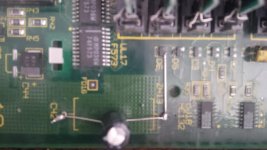
Well, D3 is gone along with the traces around it. Looks like one of the batteries leaked and caused corrosion around the batteries and there was a attempted fix that burned everything up around it because the traces were hardened due to corrosion.
Does anyone have a spare IIfx mother board as well as the hard drive power cable, scsi cable and mounting bracket/screws?
Thanks.
Does anyone have a spare IIfx mother board as well as the hard drive power cable, scsi cable and mounting bracket/screws?
Thanks.
How many traces are we talking about? Depending on that count, maybe you can patchwork the board with thin wire and put in D3 where is belongs in the circuit. It wont be pretty, but it should get it fixed. Then again, when I was a boy, I liked a girl with scabby knees...
Wirewrap wire makes pretty good rework wire on these old boards.
If you do give up on it, be sure to offer the broken board on the forum or somewhere, if you're not going to keep it. It would be a shame to send it to the dump or recycling when it can probably be fixed.
If you do give up on it, be sure to offer the broken board on the forum or somewhere, if you're not going to keep it. It would be a shame to send it to the dump or recycling when it can probably be fixed.