
Thread
SE/30 with Micron Xceed Grayscale & Socketed Daystar Acceler
The continuous vertical line pixels (the white dotted pixels shown at left in the following screen shot) do not move when I cut/paste or move the window (unlike the stray colored pixels shown at right in that same screen shot):
https://docs.google.com/leaf?id=0B3mQLg8d1xThM2MzNmQ5YTctZDdiMi00NTk4LWI3ZjUtNTU3M2JmNjg2ZTU2&hl=en_US
That remains true whether I am using Canvas 3.5 (which messes around with the grays/color palette) or when I am in another app or in the Finder. And as I said in previous posts on this topic, the visibility of that continuous vertical line of pixels depends on (a) the grays/color mode you are in (e.g., 4 grays, 16 grays, 256 grays, etc.) and ( B) the color/gray-shade of the background behind those pixels (for example, the dotted line of pixels at left in my screen shot are white, so if the background is white you cannot see the pixels over the white background until you bring a black or dark object into that area of the screen).
JDW, are you able to run the internal monitor at 640x480 in 256 shades? How does it look?
The internal CRT of the SE/30 is not capable of running at 640x480, nor does the Xceed video card allow changing of resolution. However, I can change between GRAYS or COLORS (even though I cannot display COLORS on the internal CRT), and then I can choose shades of those, such as 4 grays, 16 grays, 256 grays, etc.
Thanks, I saw some references to a 640x480 SE/30 hack, and it threw me off. How is your super SE/30 running?
In which combination of parts? :

I still haven't gotten the socketed Daystar accelerator to work, nor have I resurrected the socketed logic board -- both topics discussed earlier in this thread.
And I've still not fixed that vertical line problem on the Xceed (also mentioned earlier in this thread). I wish I knew enough on how to narrow that problem down to a specific chip or chips, so I could replace just those chips at a reasonable cost. But at $10 a pop, plus shipping, I don't want to replace all 16 chips on the card.
Sorry if the following doesn't make much sense, I just read thru the entire thread in one sitting and my head hurts!
I'm glad you used photoshop to identify the exact pixels. That's why I skimmed/read the thread sections that weren't way over my pay grade.
I was about to suggest examination of your screen shots in GraphicConverter. It'd be very easy to build a one pixel "staircase" with every ten pixel grouping dropped or raised and with every group of ten pixels dropped or raised. A subsequent screenshot of the "staircase" test pattern would easily identify any movement of the line and counting any changes of the "dashes" might be enlightening. Dunno, the ole' noggin's spinnin'-n-hurtin', as I said.
I use the "staircase" method to roughly determine the pixel height of the Menu Bar for any given oddball resolution in the process of wallpaper creation.
Silly questions:
Are the soldered CPUs and motherboards the same as the socketed CPUs and motherboards? :?:
If the same, has anyone removed the '030 and installed a socket?
If the boards are entirely different revs and the soldered CPUs are BGA instead of PGA, do the pads match the PGA layout?
I'm thinking in terms of a socket conversion hack in either case. }
I'm glad you used photoshop to identify the exact pixels. That's why I skimmed/read the thread sections that weren't way over my pay grade.
I was about to suggest examination of your screen shots in GraphicConverter. It'd be very easy to build a one pixel "staircase" with every ten pixel grouping dropped or raised and with every group of ten pixels dropped or raised. A subsequent screenshot of the "staircase" test pattern would easily identify any movement of the line and counting any changes of the "dashes" might be enlightening. Dunno, the ole' noggin's spinnin'-n-hurtin', as I said.
I use the "staircase" method to roughly determine the pixel height of the Menu Bar for any given oddball resolution in the process of wallpaper creation.
Silly questions:
Are the soldered CPUs and motherboards the same as the socketed CPUs and motherboards? :?:
If the same, has anyone removed the '030 and installed a socket?
If the boards are entirely different revs and the soldered CPUs are BGA instead of PGA, do the pads match the PGA layout?
I'm thinking in terms of a socket conversion hack in either case. }
The PCB layout isn't exactly the same even among soldered-CPU logic boards. And there are slightly different components used among different board revisions. But all the boards are "functionally" the same. Between the socketed CPU logic boards and soldered CPU versions, the only "major" difference that I can visually see (other than the CPU socket) is the location of capacitor C12. You can see this difference in the following photos:Are the soldered CPUs and motherboards the same as the socketed CPUs and motherboards? :?: If the same, has anyone removed the '030 and installed a socket?
If the boards are entirely different revs and the soldered CPUs are BGA instead of PGA, do the pads match the PGA layout?
I'm thinking in terms of a socket conversion hack in either case. }
Socketed CPU board (TOP):

Socketed CPU board (BOTTOM):

Soldered CPU board (TOP):

Soldered CPU board (BOTTOM):

And here is a different Socketed CPU board with CPU removed (click the tiny magnifying glass icon to zoom in further):
https://picasaweb.google.com/103365672326265854011/SE30MicronXceedGrayscaleVideoWithDaystarSnapOnAccelerator#5642529984101043730
But if you read through this thread, you will see that the socketed CPU board I tested the Daystar socketed accelerator in is a good board. Using the stock CPU, with or without a PDS accelerator attached, that socketed board performs flawlessly. That implies something must be wrong with the Daystar board. I just wanted to test the Daystar board in a DIFFERENT socketed CPU motherboard to be 100% sure. But since I cannot get my other socketed CPU board to work, even after a recap, I cannot test that. But if the Daystar board is bad, what could have killed it? Nothing is visually burned, nor have I been able to find any info online about manufacturing defects in that series of accelerators. And since those accelerators are so rare (and I mean R-A-R-E in the truest sense of the word), I really want to resurrect it if possible.
Now as to the vertical line problem on the Xceed video card. The pixel data I provided earlier in this thread is accurate. I just am not savvy enough to know which chip or chips on the Xceed video card is bad (and therefore causing that vertical line). I know that if I swap out all 16 chips on the video card (and if I do the job correctly), the problem would be solved. But I don't want to pay $160 + shipping for 16 of those chips! Plus my time in removing all the stock chips and soldering in the new ones! I am enthusiastic about doing one or two chips, but not all 16!
JDW, here is the socketed SE/30 motherboard I mentioned a while ago. If you want it, it's yours for the cost of shipping. I believe it needs to be recapped. It was working fine until a couple of months ago, when the SCSI stopped working. I don't see any visible damage or leakage on the motherboard.
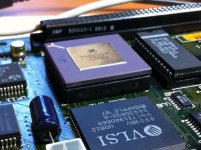
Thank you for the kind offer. I would also need to consider buying another round of capacitors from Trag, as I used all of them for my last recap (which sadly was not successful, as I have reported earlier in this thread). But before I proceed with this, I have a couple questions.
But I am curious, have you never seen any vertical lines or other on-screen pixel artifacts that are signs of SimasiMac? If not, it is quite curious to hear that only the SCSI on the board could have died. Had such been a result of leaked caps, I would also expect to see some signs of SimasiMac.
Also, what device did you have connected to your motherboard's SCSI port? And are you sure it is not a case of bad termination or a problem with your SCSI device?
But I am curious, have you never seen any vertical lines or other on-screen pixel artifacts that are signs of SimasiMac? If not, it is quite curious to hear that only the SCSI on the board could have died. Had such been a result of leaked caps, I would also expect to see some signs of SimasiMac.
Also, what device did you have connected to your motherboard's SCSI port? And are you sure it is not a case of bad termination or a problem with your SCSI device?
There were no vertical lines or other screen artifacts that I saw, no. Other symptoms were that the sound from the internal speaker was very faint, and ADB mouse and keyboard occasionally stopped working. The only attached SCSI device was the internal 40MB hard drive. After the SCSI failed, I also tested an external SCSI Zip drive without success. The 40MB internal drive was later transplanted to another computer and still works fine, so I think it must be a problem with the SE/30 SCSI. After the SCSI failure, the SE/30 would still boot and run OK from a floppy.
I no longer have the rest of the SE/30 this came from, so I can't boot it again for further tests, but if there's anything else you'd like me to check on the logic board or send a photo of, I'm happy to do so.
I no longer have the rest of the SE/30 this came from, so I can't boot it again for further tests, but if there's anything else you'd like me to check on the logic board or send a photo of, I'm happy to do so.
In another thread phreakout wrote the following:
When you have time (and please don't feel rushed), it would be appreciated if you could give me an estimate on how large the box would be for you to ship it, as well as the weight (which will vary by the box and packing you use). Since I am located in Japan, it may cost me a bundle to get the board over here, and my worry is that after I buy additional caps from Trag, even after I recap the board, will it function properly? If there is no eaten traces, and if the SCSI is down only due to insufficient capacitance and/or leaked fluid causing minor electrical anamolies, then the board could be repair. I then cannot say if it would get my DayStar board to work (since the Daystar board doesn't work in another of my good socketted boards). But testing is the only way to know.
Since it appears that you never had a problem booting, or with bright rasters, or with an arrow stuck in the upper left corner of your screen, I must assume the SCSI controller to still be good. Hence, the SCSI may have simply stopped working for the same reason your audio is bad -- the caps have leaked. But of course, it could also mean that a trace has been eaten through. And I honestly believe that to be the case for my other socketted logic board, which I recapped but sadly still doesn't work (won't boot at all).
When you have time (and please don't feel rushed), it would be appreciated if you could give me an estimate on how large the box would be for you to ship it, as well as the weight (which will vary by the box and packing you use). Since I am located in Japan, it may cost me a bundle to get the board over here, and my worry is that after I buy additional caps from Trag, even after I recap the board, will it function properly? If there is no eaten traces, and if the SCSI is down only due to insufficient capacitance and/or leaked fluid causing minor electrical anamolies, then the board could be repair. I then cannot say if it would get my DayStar board to work (since the Daystar board doesn't work in another of my good socketted boards). But testing is the only way to know.
I agree as well. Low audio is one symptom due to simasimac, so replacing the capacitors on the top side (C1 through C13) will help fix that problem. Regarding the ADB loss, it could be a cap or one of the fuses located near that side of the board; maybe even the ADB controller chip or, if it applies, a Bourns network filter. Regarding the SCSI chip, my suggestions are following what is listed on the "Repair Mac" page. But first, I would replace the caps, since they are the primary cause for most problems on the SE/30. Afterwards, if no success getting SCSI to work, you can then work on getting the chip replaced. Don't be surprised if you have to replace the Bourns network filter (RP3?) that sits inbetween the internal and external SCSI ports on the top side. I happened to read on an older post someone mentioned that if you remove the network filter, it disables the external port; the same applies also to the external floppy drive port.
I am currently trying to get one replaced on an SE/30 for another member on this forum, but this will be the ONLY one I'll work on. I just don't have the proper tool to do this better (hot air rework solder/desolder workstation) and those cost upwards of $400 dollars for a good one. Once I get enough money for one, I'll be glad to do this for anyone. Right now, I'm just relying on a few pencil soldering irons to get the job done. *Knocks on wood*
One tip, though. If you happen to replace a chip (or network filter) on the top side, make sure you add a chip socket between the board and the replacement part. This will make replacing the part again much more easier; you don't have to keep desolder/resoldering the old part out every time. One of my pet peeves with Apple. Why couldn't they just bite the cost and add sockets for ALL chips and the like is beyond me. > :?:
:?:
73s de Phreakout. :rambo:
I am currently trying to get one replaced on an SE/30 for another member on this forum, but this will be the ONLY one I'll work on. I just don't have the proper tool to do this better (hot air rework solder/desolder workstation) and those cost upwards of $400 dollars for a good one. Once I get enough money for one, I'll be glad to do this for anyone. Right now, I'm just relying on a few pencil soldering irons to get the job done. *Knocks on wood*
One tip, though. If you happen to replace a chip (or network filter) on the top side, make sure you add a chip socket between the board and the replacement part. This will make replacing the part again much more easier; you don't have to keep desolder/resoldering the old part out every time. One of my pet peeves with Apple. Why couldn't they just bite the cost and add sockets for ALL chips and the like is beyond me. >
:?: 73s de Phreakout. :rambo:
In the past I found my keyboard would lose connection with my SE/30 (and my mouse too because my mouse was connected to my keyboard), and I long thought it was the motherboard inside the SE/30. However, after thinking about it logically, reflecting upon how the SE/30 motherboards so often need their caps replaced, it finally made sense to me to open up my ADB keyboard (which happened to be a IIgs keyboard). And what do you know! I found leaked electrolytic caps inside my keyboard! So I desoldered them, cleaned the area with Dehydrated Ethanol, soldered in tantalum replacements, plugged everything back in, powered on the machine, and all was well! So it could be that the caps in the keyboard need replacing. And if the mouse was connected directly to the Mac, which knows, it could be that something in the mouse was bad. One cannot always say that the motherboard inside the SE/30 is to blame.
But he said his "INTERNAL" 40MB SCSI drive didn't work while connected internally to the SE/30, but that the same drive did work when he put it in another computer. So if the Bourns network filter affects the EXTERNAL SCSI, I assume it would not affect the internal SCSI. This seems to make logical sense as you often filter I/O outside your black box (because you never know what will flow in from outside), but you don't always filter the inside of your black box the same way (because you designed it and know what noise or signals or voltage spikes will appear within it). So it very well could be that the caps alone are the cause of the bad internal SCSI.
But going back to my reason for wanted to test another "known-good" socketed SE/30 logic board in the first place, I simply want to see if a good board would get my rare Daystar socketed accelerator board to function.
https://picasaweb.google.com/103365672326265854011/SE30MicronXceedGrayscaleVideoWithDaystarSnapOnAccelerator#5641720071352856226
https://picasaweb.google.com/103365672326265854011/SE30MicronXceedGrayscaleVideoWithDaystarSnapOnAccelerator#5641720098640690242
https://picasaweb.google.com/103365672326265854011/SE30MicronXceedGrayscaleVideoWithDaystarSnapOnAccelerator#5641720000463421602
https://picasaweb.google.com/103365672326265854011/SE30MicronXceedGrayscaleVideoWithDaystarSnapOnAccelerator#5641719875621289650
https://picasaweb.google.com/103365672326265854011/SE30MicronXceedGrayscaleVideoWithDaystarSnapOnAccelerator#5641719891108002018
However, logically speaking, since my existing socketed SE/30 motherboard works fine in the stock condition, and works fine when I use a DiiMO PDS accelerator card in it, I must assume it is in 100% perfect condition and therefore even if I try another socketed SE/30 motherboard with my Daystar card, the Daystar card probably would not work in that motherboard either. In which case I am left wondering the same thing as I was before: what specifically could be wrong with the socketed Daystar card?!
If the Daystar card were not so rare (I mean, really, how many of us here have even seen one of these outside the one I have?), I wouldn't care so much about it. But because if its rarity, I would like to get it to work. But when I put it in my socketed logic board (and yes I am inserting it correctly), the machine won't boot (as I have described in detail earlier in this thread).
Any thoughts would be appreciated.
I was thinking that it is sort of odd that you have two cards from the same machine that are acting slightly strange. Maybe they were both subjected to some sort of scenario that lead to higher stress, such as excessive heat over time or some kind of ESD-like event. Has anyone had an Xceed card go bad on them or DayStar '030 accelerator? I haven't really heard of many issues.
Both the Xceed card and the socketed Daystar accelerator are too rare to know much about. Few people have them, and sadly the ones out there who do own them refuse to talk about their machines! And when comparing the Xceed card to the socketed Daystar card, the Daystar card is far more rare. Indeed, I've never seen a single one appear on EBAY in my many years of searching EBAY! And when I purchased this SE/30, it was from a Craig's List seller who didn't advertise that his Mac had the Daystar card in it. I was totally shocked to find it in there. I simply bought it for the rare Xceed card, not knowing it also had the ultra rare Daystar card.
Keep in mind this is not your normal "PDS" style Daystar card. This card is very rare because it is the socketed type that, apparently, Daystar made very few of (probably because so few SE/30's had a socketed CPU and it was a lot of work to put a socket in).
Now you may be right about something having harmed the Xceed and possibly killed the Daystar. But I would like to troubleshoot the Daystar card to see if it can be resurrected. I just don't know where to start.
Keep in mind this is not your normal "PDS" style Daystar card. This card is very rare because it is the socketed type that, apparently, Daystar made very few of (probably because so few SE/30's had a socketed CPU and it was a lot of work to put a socket in).
Now you may be right about something having harmed the Xceed and possibly killed the Daystar. But I would like to troubleshoot the Daystar card to see if it can be resurrected. I just don't know where to start.
I'm aware it's the socketed version, but it appears to be very similar in design to the Universal PowerCache, and those seem to have been pretty common. Maybe the design under the chassis is not so great thermally and could lead to early failure compared to the common version. It kind of reminds me of the clip-on boards for the 128k/512k that people gripe about around the forums.
The Xceed adapter is sort of rare, but in it's time maybe not so much? I have an Xceed and Universal PowerCache, not that I have used them as much as I'd like since I have been holding out for my ultimate system like you have been able to gather, but from the use I have had, I have not noticed anything unusual. For the PowerCache, the first thing I would try is to swap out the CPU and FPU with the ones on the Diimo.
The Xceed adapter is sort of rare, but in it's time maybe not so much? I have an Xceed and Universal PowerCache, not that I have used them as much as I'd like since I have been holding out for my ultimate system like you have been able to gather, but from the use I have had, I have not noticed anything unusual. For the PowerCache, the first thing I would try is to swap out the CPU and FPU with the ones on the Diimo.
I pulled the CPU from the socketed Daystar board and put it into my socketed SE/30 motherboard. The motherboard booted just fine, proving that that chip is good. I couldn't do the same with the FPU because that chip is not socketed on the motherboard. If we assume a bad FPU would prevent booting, then I would need to confirm if my DiiMO board has a socketed FPU or soldered.
Yours is socketed since we have the same Diimo. Another simple component to replace would be the xtal(s). Check caps and resistors. Other than that, it gets dicey.
Just a few ideas... a couple of days ago we were talking about SCSI problems:
That made me think about the 53C80 being bad on the disk interface side -- maybe the internal line drivers and/or sense amplifiers are toast. Anyway, I was given here the sensible advice of checking all traces and connections to the chip, just in case... I haven't had the time and/or guts to do it, but I made this drawing in order to ease the task (it's attached for your convenience)
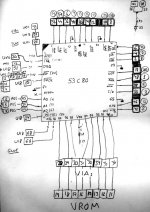
I think the aforementioned symptoms would arise if the SCSI chip was bad in the part that interfaces with the 68030 etc. But it could go wrong in many ways. Still not sure if it's the culprit, but my first, just recapped but SCSI-less SE/30 never did that -- just showed the floppy icon with blinking '?'. The funny part is that some abnormally terminated SCSI chains do show something on utilities like SCSI Probe... for instance, the drive model with some altered characters. Specifically, the bit 2 stuck high!
That made me think about the 53C80 being bad on the disk interface side -- maybe the internal line drivers and/or sense amplifiers are toast. Anyway, I was given here the sensible advice of checking all traces and connections to the chip, just in case... I haven't had the time and/or guts to do it, but I made this drawing in order to ease the task (it's attached for your convenience)
However... according to my SE/30 schematics, there is no Bourns network filter between internal and external SCSI ports! Both ports are directly connected to the 53C80. RP10 is however between the internal and external floppy ports. RP2 and RP3 manage, respectively, both serial ports.
Okay, my mistake. I had thought RP3 was in between the internal and external SCSI ports, but I have been corrected. That's what you get when you don't have the complete entire schematic of the logic board. I am trying to trace out an entire dead board and then transfer my findings into a home made schematic. When I have it complete (or for that matter, complete individual sections), I'll see about posting them for everyone's reference.
73s de Phreakout. :rambo:
73s de Phreakout. :rambo:
I downloaded my SE/30 schematics from http://dyne.org/museum/apple/stuff/mac/andreas.kann/schemat.html, but unfortunately it seems no longer available...
However, since this info may be of great interest for many of us, I have put a copy on my personal web server. Cannot guarantee continuous availabilty or download speed, though.
However, since this info may be of great interest for many of us, I have put a copy on my personal web server. Cannot guarantee continuous availabilty or download speed, though.
I think you'll find my comprehensive set of SE/30 schematics much more to your liking:
https://docs.google.com/open?id=0B3mQLg8d1xThNzQxMTA5ZGQtNmNlMy00MWUwLTg3YWMtMmE3MTc3ZjQxZTYz
They are hosted on my GoogleDocs account. Just click the File menu (in the browser window) and choose "Download Original." That will download the ZIP file to your hard drive and you can then see all the schematics.
That archive contains all the Apple schematics, but also non-Apple schematics. This is nice because it allows you to compare the two when troubleshooting.
Furthermore, I have combined all split-sheets, making it MUCH easier to read the schematics on-screen or when printing to large sheets of paper like A3. I have also cleaned some of the schematics. So even if you find the "originals" of these same schematics online, you'll find mine are better because I've improved them (as good as they will get, considering the shoddy scanning of the Apple schematics).
https://docs.google.com/open?id=0B3mQLg8d1xThNzQxMTA5ZGQtNmNlMy00MWUwLTg3YWMtMmE3MTc3ZjQxZTYz
They are hosted on my GoogleDocs account. Just click the File menu (in the browser window) and choose "Download Original." That will download the ZIP file to your hard drive and you can then see all the schematics.
That archive contains all the Apple schematics, but also non-Apple schematics. This is nice because it allows you to compare the two when troubleshooting.
Furthermore, I have combined all split-sheets, making it MUCH easier to read the schematics on-screen or when printing to large sheets of paper like A3. I have also cleaned some of the schematics. So even if you find the "originals" of these same schematics online, you'll find mine are better because I've improved them (as good as they will get, considering the shoddy scanning of the Apple schematics).
Hello, at the request of the original poster, I have some pics of my Xceed card and CRT adapter. I am pretty sure it is a "Color 30". Sorry the pictures are not better, the only camera I have is my iphone. Also, what does the pot on the CRT adapter do?
http://img46.imageshack.us/img46/9967/img0133ib.jpg
http://img412.imageshack.us/img412/6022/img0135hz.jpg
http://img38.imageshack.us/img38/2299/img0136jj.jpg
http://img708.imageshack.us/img708/7470/img0137c.jpg
http://img14.imageshack.us/img14/9320/img0138va.jpg
http://img600.imageshack.us/img600/395/img0139pr.jpg
http://img46.imageshack.us/img46/9967/img0133ib.jpg
http://img412.imageshack.us/img412/6022/img0135hz.jpg
http://img38.imageshack.us/img38/2299/img0136jj.jpg
http://img708.imageshack.us/img708/7470/img0137c.jpg
http://img14.imageshack.us/img14/9320/img0138va.jpg
http://img600.imageshack.us/img600/395/img0139pr.jpg
Interesting, it looks like you have a homemade grayscale adapter like the one Gamba used to make.
Oh my. Well, folks, it's been a heck of a long time, but I finally was able to make time to sit down and following this excellent and very logical advice. I previously had removed the CPU from the socketed Daystar PowerCache card (the one that affixes directly into the CPU socket of the SE/30 logic board), and I put that CPU directly into the SE/30 logic board. I had no problems booting the SE/30 via that CPU, so I assumed all to be well with it. However, today I took tt's words to heart, said "what the heck," and put the DiiMOs CPU into the Daystar board. I was pleasantly shocked and surprised to see it boot right away! I've been running MacBench 4 on it for the past hour, and so far all is well. I now need to test it with my Ethernet PDS MacCon card and also the Xceed. (Note that I left the FPU untouched, and it would not appear to be the source of my previous problem.)
Thank you, tt, for inspiring me to do the right thing!
But I must say it is strange. The CPU in the socketed Daystar PowerCache board has a number "50" in the part number on the chip itself (MC68030RC50B), which means it was originally tested for that speed. And despite the DiiMO board being clocked at 50MHz (like the Daystar PowerCache), the DiiMO's CPU has a "40" in it (MC68030RC40B), which means it was only certified to run at 40MHz. Even so, it would appear that something happened over time to the CPU in the Daystar board. Yet, the Daystar board's CPU still works at the stick SE/30 logic board clock of 16MHz, and there are no lockups at all when I use it in the SE/30. But I cannot boot off the Daystar PowerCache if that CPU is used in the PowerCache. But my question is WHY? Anyone care to guess?
Thanks.
Nice! Now you can see if you can find a 50MHz version for it at a decent cost.
My guess is the CPU went out of spec at 50MHz because it got cooked in there over time (inducing defects in the semiconductor materials), but it still works at lower frequencies. If you have a thermocouple, you could monitor the CPU case temp to see how hot it gets under the chassis when everything is assembled.
My guess is the CPU went out of spec at 50MHz because it got cooked in there over time (inducing defects in the semiconductor materials), but it still works at lower frequencies. If you have a thermocouple, you could monitor the CPU case temp to see how hot it gets under the chassis when everything is assembled.
I ran the 40MHz rated 68030 CPU from my DiiMO in the Daystar card for well over an hour, pounding on it hard with MacBench 4 the entire time. I then yanked the board and put my finger on the CPU. It was almost too hot to keep my finger on it, but not so hot I feel like my finger had been burned. I therefore must assume the temperature to be around 65 degrees C or so.
But will a CPU spec'd at 50MHz run cooler (without a heatsink) than a part certified at 40MHz? Or is it rather that they will heat up exactly the same, but the 40MHz part either won't work at all or is more likely to fail when run at 50MHz?
I've found some CPUs sold on EBAY, both the 40 and 50 versions. There also appear to be 3 revisions of the CPU: A, B and C. Both the CPU in my DiiMO and the CPU in my Daystar PowerCache were "B" revision parts. But the question at this point is, can any of the A or B or C revisions be used? I would think the "C" revision should definitely be able to be used, since it is the newest revision. But since I don't know the specifics of what those revisions mean, I'm leery about putting anything other than what was originally in there in the first place.
I would appreciate hearing your thoughts.
But will a CPU spec'd at 50MHz run cooler (without a heatsink) than a part certified at 40MHz? Or is it rather that they will heat up exactly the same, but the 40MHz part either won't work at all or is more likely to fail when run at 50MHz?
I've found some CPUs sold on EBAY, both the 40 and 50 versions. There also appear to be 3 revisions of the CPU: A, B and C. Both the CPU in my DiiMO and the CPU in my Daystar PowerCache were "B" revision parts. But the question at this point is, can any of the A or B or C revisions be used? I would think the "C" revision should definitely be able to be used, since it is the newest revision. But since I don't know the specifics of what those revisions mean, I'm leery about putting anything other than what was originally in there in the first place.
I would appreciate hearing your thoughts.
I can't tell for every single CPU model made, but generally speaking, and within a certain manufacturing process, heat dissipation depends on the actual clock input, no matter what the certified speed is. The latter parameter defines the propagation delays, which in turn increase with temperature, thus it makes some sense to build the fastest CPUs with revised technology in order to reduce power consumption (and thus heat) for a certain speed -- in other words, get the same temperature at higher speeds.
Not sure about the 68030, but some revisions of the 68040 (HRC) do dissipate less heat at the same speed, waiving the use of a heatsink @ 25 MHz.
Actual performance will vary from sample to sample... for instance, I have a Q840AV mobo without CPU, and tried it with three 68040's -- none of them rated 40 MHz
1) The XC68040RC25B from my old, trusty Quadra 700: does chime and the desktop pattern appears. I didn't want to fry this one (was my only '040 at the time) so I shut it down immediately without any further testing.
2) One MC68040RC33 does nothing -- no chimes, no video > But it works perfect on the Quadra 700 @ 25 MHz.
3) Another 33 MHz piece (same mask than 2) does chime and gets all the way to the blinking question mark floppy. But when it heats up (all three samples do get really warm } ) and the propagation delays increase, it's no longer able to chime or show video... but if I turn it off and let it cool down, it can chime again -- somehow expected behaviour.
Back to your original question, I believe a later revision could reduce heat dissipation or fix bugs, but they all should be 100% compatible -- as long as you keep it cool enough. Just downloaded the 68030's datasheet (3rd edition) and has no mention at all about revisions... but it says that the 50 MHz part specs are guaranteed up to 80ºC case temperature only, which confirms what I was taught in College
Not sure about the 68030, but some revisions of the 68040 (HRC) do dissipate less heat at the same speed, waiving the use of a heatsink @ 25 MHz.
Actual performance will vary from sample to sample... for instance, I have a Q840AV mobo without CPU, and tried it with three 68040's -- none of them rated 40 MHz
1) The XC68040RC25B from my old, trusty Quadra 700: does chime and the desktop pattern appears. I didn't want to fry this one (was my only '040 at the time) so I shut it down immediately without any further testing.
2) One MC68040RC33 does nothing -- no chimes, no video >
But it works perfect on the Quadra 700 @ 25 MHz.3) Another 33 MHz piece (same mask than 2) does chime and gets all the way to the blinking question mark floppy. But when it heats up (all three samples do get really warm }
) and the propagation delays increase, it's no longer able to chime or show video... but if I turn it off and let it cool down, it can chime again -- somehow expected behaviour.Back to your original question, I believe a later revision could reduce heat dissipation or fix bugs, but they all should be 100% compatible -- as long as you keep it cool enough. Just downloaded the 68030's datasheet (3rd edition) and has no mention at all about revisions... but it says that the 50 MHz part specs are guaranteed up to 80ºC case temperature only, which confirms what I was taught in College
FYI: I've got this exact configuration -- SE/30 with greyscale, socketed 50 MHz Daystar, fully loaded with 128MB RAM AND a solid-state HD -- listed on eBay now. No reserve. Ends Jan 23. See my post in the Trading Post forum for more info, link, & pix.
I'm having trouble harmonizing your two statements above. You first say the heat dissipation depends on the clock speed alone, and then you said you didn't want to fry your 25MHz rated CPU when clocked at 40MHz. But why did you worry about that? Or was it that you merely didn't have the 25 heatsinked?
geedubya, for the sake of saving everyone the trouble of needlessly jumping to another forum only to pick up your EBAY link, here it is:
http://www.ebay.com/itm/ws/eBayISAPI.dll?ViewItem&item=320831343359#ht_21309wt_1413
An interesting setup you have. It's almost exactly what I have, including the RAM. Your video card is different than mine though. Compare:
https://picasaweb.google.com/103365672326265854011/SE30MicronXceedGrayscaleVideoWithDaystarSnapOnAccelerator#5620905452158378386
Sure wish I could figure out how to solve the vertical line problem on my card. But I refuse to pay $160 to replace all those sinking memory chips to do it!