

Thread
Routes to upgrade a B/W Powermac
Update
Now running 9.2 along with OS X Tiger 10.4.11, so far so good. Seriously beginning to consider swapping the Rage 128 for a Radeon 9000.
Now running 9.2 along with OS X Tiger 10.4.11, so far so good. Seriously beginning to consider swapping the Rage 128 for a Radeon 9000.
I upgraded most of my PPC macs. Because of the issues of large SCSI hard drives, I purchased an IDE PCI card and put a 120 Gig 16Mb cache hard drive in. I then brought a 128 Mb AT graphic card. Then a firewire card then a huge ram upgrade where I managed to locate so big ram modules that take the ram up to 1.5 Gig
I also installed a Sonnet G4 800 MHz processor upgrade. And finally a Yamaha CD burner.
I also installed a Sonnet G4 800 MHz processor upgrade. And finally a Yamaha CD burner.
BTW: I upgraded my PowerBook G3 b/w RAM with 4 doublesided 256MB modules today and they worked immediately. I got them from fleabay:
http://pages.ebay.com/link/?nav=item.view&alt=web&id=271913467926&globalID=EBAY-AT
Second:
I swapped the ATI Rage 128 with a Radeon 7000 from here:
http://pages.ebay.com/link/?nav=item.view&alt=web&id=200710223413&globalID=EBAY-AT
which worked immediately in OS 9.2.2 and VGA mode.
A second Radeon 7000 from here
http://pages.ebay.com/link/?nav=item.view&alt=web&id=261435567084&globalID=EBAY-AT
did NOT work!
http://pages.ebay.com/link/?nav=item.view&alt=web&id=271913467926&globalID=EBAY-AT
Second:
I swapped the ATI Rage 128 with a Radeon 7000 from here:
http://pages.ebay.com/link/?nav=item.view&alt=web&id=200710223413&globalID=EBAY-AT
which worked immediately in OS 9.2.2 and VGA mode.
A second Radeon 7000 from here
http://pages.ebay.com/link/?nav=item.view&alt=web&id=261435567084&globalID=EBAY-AT
did NOT work!
Sorry, I meant PowerMAC G3. 
Thats a funny coincidence, I bought 2x256mb sticks from there and bought another 2 last night after I discovered the ram doesn't like sitting along side what is already in my G3. I was getting kernel panics left, right and centerSorry, I meant PowerMAC G3.

PC100 SDRAM are 2/2/2 while PC133 are CL 2.5 or worse.
Don't mix both PC100 & PC133 on BW PMG3.
Only 2/2/2 PC100 should be used as actually PC133 will be slower because of higher latency
Don't mix both PC100 & PC133 on BW PMG3.
Only 2/2/2 PC100 should be used as actually PC133 will be slower because of higher latency
PC133 compliant SDRAM should provide timings via the SPD EEPROM for at least 133 and 100MHz. Typical timings on a PC133 module are 3/3/3 at 133MHz, and 2/2/2 at 100MHz. I am aware of issues using some PC133 ram in the B&W G3s, but my experience has been that it works as long as modules aren't using higher density memory than the controller supports. PC133 is more recent than PC100, so you're more likely to run into 256Mbit chips on a DIMM. 128Mbit chips are the maximum supported, so 256MB modules must have 16 chips, no less.
Yes, single sided 256Mb Dimms won't work
And 3/3/3 PC133s cannot work at 2/2/2, thus if installed they will foce 2/2/2 dimms to work at 3/3/3 which could be problematic if not only slower. so i wouldn't mix CL2 PC100 & CL3 PC133.
there are CL2 PC100
http://eshop.macsales.com/MyOWC/Upgrades.cfm?sort=pop&model=41&type=Memory
there are CL3 PC133
http://eshop.macsales.com/item/Other World Computing/133SD256328/
best are CL2 PC133
http://eshop.macsales.com/item/Other%20World%20Computing/133SD2563282/
And 3/3/3 PC133s cannot work at 2/2/2, thus if installed they will foce 2/2/2 dimms to work at 3/3/3 which could be problematic if not only slower. so i wouldn't mix CL2 PC100 & CL3 PC133.
there are CL2 PC100
http://eshop.macsales.com/MyOWC/Upgrades.cfm?sort=pop&model=41&type=Memory
there are CL3 PC133
http://eshop.macsales.com/item/Other World Computing/133SD256328/
best are CL2 PC133
http://eshop.macsales.com/item/Other%20World%20Computing/133SD2563282/
About the 66Mhz PCI slot, I think that it is a different PCI controller than the lower two 33Mhz PCI slots ( like the PM 9600 that has two PCI "Bandit" controllers, one that works the 3 upper slots + motherboard SCSI & serial, another one that works the 3 lowers slots).
I'd stick with a 66Mhz Rage 128 in it, instead of a 33Mhz 9200 that will then work in 32 bits only.
An ATTO UL3 66 SCSI card will work great in the 66Mhz slot, and the 9200 Radeon will give its full power in one of the lower 33Mhz 64bits PCI slots.
I'd stick with a 66Mhz Rage 128 in it, instead of a 33Mhz 9200 that will then work in 32 bits only.
An ATTO UL3 66 SCSI card will work great in the 66Mhz slot, and the 9200 Radeon will give its full power in one of the lower 33Mhz 64bits PCI slots.
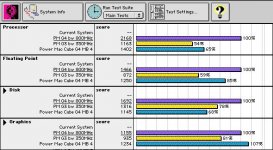
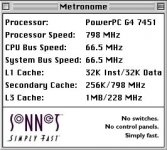
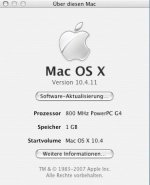
How do the numbers compare to a QS 800?
My memory's fuzzy but I think the B&W is slightly more (or less?) complicated than that. As I recall the 66Mhz slot is the on the "native" 32 bit-wide PCI bus provided by the MPC 106 ("Grackle") memory/PCI controller, while the 33mhz/64bit slots are all hanging on a PCI->PCI bridge that's essentially mapped into one of the native PCI controller's virtual card slots.
This is basically a bummer, because it means that aggregately the entire bus->memory/CPU bandwidth for all the slots is limited to essentially the best that a single 66mhz card can do, and it's shared between video and other functions. (A typical Pentium II/III PC of the era would have the AGP slot hanging directly off the "Northbridge", while the PCI controller would be in a "Southbridge" communicating with the NorthBridge over a proprietary bus. This, among other things, reduces contention between a video card that's fetching textures from RAM and other functions like the hard disk controller and whatever slots that are hanging off the PCI bus, even in cases where the Northbridge->Southbridge bus isn't any fatter than the B&W's PCI link. It's one of the reasons why it's of "questionable wisdom" to, for instance, use those hacks that enable Quartz Extreme over PCI on a B&W.)
Given that's a flaw in the machine you can't exactly fix it's not really worth losing sleep over or anything, but it does put real limits on how much improvement you can reasonably expect in upgrading one. The B&W basically took a 1996-era system design to its max out of the box; Sawtooth and later G4s have *substantially* better system architectures.
The Radeon 7000s I have work okay in the 66mhz slot; granted I have no idea if that applies to other models.
(Interestingly I did find something that says the original 128 *doesn't* run in one of the 33mhz slot, because those are keyed for 5v cards while the R128 supplied was 3.3v only. Part of me swears I put it one of the other slots, but I could be wrong thinking about it, as I don't think I ever put more than two heads on it and I had a pair of R7000s to do it with, both of which were dual-voltage tolerant.)
Well my question is now: Does the Radeon 7000 then work at 66Mhz or does it slow down the slot to 33 ?
About the original Rage 128, were those the ones with hardware MPeg2 decoder?
About the original Rage 128, were those the ones with hardware MPeg2 decoder?
The mpeg decoder was optional I think.
Pretty sure the 66mhz slot in the B&W has no capability to slow to 33mhz; a card stuck in it either has to be able to deal or it won't work. (I vaguely recall reading a tech note that specifically said the slot was PCI 2.1 compliant other than not supporting the speed selection mechanism.) Note that support for 66mhz PCI, at least for video cards, isn't that rare. Pretty sure the justification is so the cards can work in PCI-X systems without slowing them down excessively.
Edit: yes, the fixed speed thing is in the Apple service source document.
Edit: yes, the fixed speed thing is in the Apple service source document.
... a further note on this subject: it makes perfect sense that the 66mhz slot isn't capable of slowing down. Remember, it's not two independent PCI busses, the 64bit/33mhz slots are slaved off the 32bit/66mhz bus coming off the MPC 106 with a synchronous PCI bridge. (Do the math, of course, and you'll see that the theoretical total bandwidth of each type of slot is the same.) IF you were to force the 66mhz slot to slow to 33mhz you'd also halve the bandwidth available to the PCI bridge, so... what would happen in that case? Said bridge would either have to slow the slots down to 16mhz, which is out of spec, or disable the 64 bit extension.
Nice, would love to find a faster CPU for it. But dont processors above 700mhz cause the system bus to go slower? I'm sure I read that somewhere.
Yes, Sonnet upgrades 800MHz/1GHz:
http://www.xlr8yourmac.com/g3CARDS/G3_1.1GHz_vs_G4_1GHz_review/index.html
http://www.xlr8yourmac.com/g3CARDS/G3_1.1GHz_vs_G4_1GHz_review/index.html