
Thread
Apple Lisa video issue.
Here is the picture as promised.
Actually you cannot see it very well in this picture but it is displaced to the right and the whiter area located in the far right hand side is where the picture 'overlaps/folds over'. It's odd as if you move the mouse towards it it goes round the folded image with it.
Sorry for the bad descriptions but it's the best I can give.
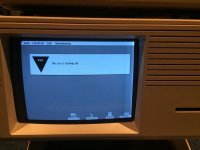
Actually you cannot see it very well in this picture but it is displaced to the right and the whiter area located in the far right hand side is where the picture 'overlaps/folds over'. It's odd as if you move the mouse towards it it goes round the folded image with it.
Sorry for the bad descriptions but it's the best I can give.
After unplugging everything...
Remove the back.
Pull out the card cage.
Remove the two screws that hold the top onto the chassis. They are captive screws, so they won't fall out once they are loosened.
Take off the top.
Notice the small board with pots on it right above the neck of the CRT.
Put the card cage back in the machine.
Put the back back on the machine (or stick something in the switch that cuts power when the back is off).
Plug everything back in, and turn on the machine with the top off.
Carefully adjust the pots to adjust the video alignment.
When done, power everything off and put the top back on the machine.
Of course, I don't have a reference handy on which pot is which, but I think they are marked.
Usual disclaimers about working near high voltage apply; however you shouldn't be getting very near the CRT for these adjustments.
Hope that helps.
Remove the back.
Pull out the card cage.
Remove the two screws that hold the top onto the chassis. They are captive screws, so they won't fall out once they are loosened.
Take off the top.
Notice the small board with pots on it right above the neck of the CRT.
Put the card cage back in the machine.
Put the back back on the machine (or stick something in the switch that cuts power when the back is off).
Plug everything back in, and turn on the machine with the top off.
Carefully adjust the pots to adjust the video alignment.
When done, power everything off and put the top back on the machine.
Of course, I don't have a reference handy on which pot is which, but I think they are marked.
Usual disclaimers about working near high voltage apply; however you shouldn't be getting very near the CRT for these adjustments.
Hope that helps.
Hi,
Thanks for the help, for now the Lisa seems to have corrected itself as it doesn't do it very often any more. I think I'll leave it for a while before I attempt to permanently fix it, but all seems okay at the moment. At least I now know how to repair it if it becomes a real problem.
Thanks again.
Thanks for the help, for now the Lisa seems to have corrected itself as it doesn't do it very often any more. I think I'll leave it for a while before I attempt to permanently fix it, but all seems okay at the moment. At least I now know how to repair it if it becomes a real problem.
Thanks again.

Hello,
Thanks for the help everyone and I have solved the problem.
It was indeed the horizontal phase potentiometer, the glue holding it in position came off and then it moved during shipping I guess.
The reason I too thought it may be a capacitor is it would sometimes got backwards and forward between being unfolded and then folded. In the end it remained in the folded position and I thought okay, it seems like it may be more like a potentiometer issue.
Thanks for the help!
Thanks for the help everyone and I have solved the problem.
It was indeed the horizontal phase potentiometer, the glue holding it in position came off and then it moved during shipping I guess.
The reason I too thought it may be a capacitor is it would sometimes got backwards and forward between being unfolded and then folded. In the end it remained in the folded position and I thought okay, it seems like it may be more like a potentiometer issue.
Thanks for the help!