
Thread
Kaleidoscope Scheme to Appearance Theme Conversion
Slowly but surely.
Check boxes and radio buttons are working now. I've never seen alternate checkbox styles activated in a theme, there's no option anywhere to turn them on, but I put them in there anyway.
Apparently the code only can convert Scherzo! now. OOPS
I have to build in a lot of exceptions, error handling, and check for scheme versions and such. I think I'll focus on this scheme for now and worry about all of that later.
My control.c file is getting enormous, I need to think about how to split that down because it will be many many times larger the way things are going.
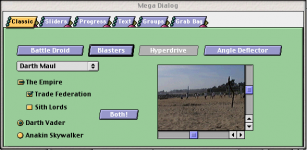
Check boxes and radio buttons are working now. I've never seen alternate checkbox styles activated in a theme, there's no option anywhere to turn them on, but I put them in there anyway.
Apparently the code only can convert Scherzo! now. OOPS
I have to build in a lot of exceptions, error handling, and check for scheme versions and such. I think I'll focus on this scheme for now and worry about all of that later.
My control.c file is getting enormous, I need to think about how to split that down because it will be many many times larger the way things are going.
I got the breakdown of control.cpp done. This is much more manageable now.
I ran into an issue with root menu item titles. In Kaleidoscope, the titles overlap by 1 pixel, by means of setting the left bound 1 pixel to the left of the default bounding box. When I attempt to do this in a theme, the extra pixel does not draw on the screen, nor will it draw if I attempt hanging off from the right side. So there's a little issue there, maybe something in the 'tinf' resource will help but I doubt it. I'll just play with it and see what happens.
I found something interesting in the Hi-Tech checkbox layo - they used a NULL type image to make the checkbox redraw, so maybe I'll try that.
I ran into an issue with root menu item titles. In Kaleidoscope, the titles overlap by 1 pixel, by means of setting the left bound 1 pixel to the left of the default bounding box. When I attempt to do this in a theme, the extra pixel does not draw on the screen, nor will it draw if I attempt hanging off from the right side. So there's a little issue there, maybe something in the 'tinf' resource will help but I doubt it. I'll just play with it and see what happens.
I found something interesting in the Hi-Tech checkbox layo - they used a NULL type image to make the checkbox redraw, so maybe I'll try that.
Here are the pull-down menus. You can see exactly all of the little things I can't do in themes here.
Depending on your browser, you may have to actually click the image to see it in normal size, otherwise it won't display correctly.
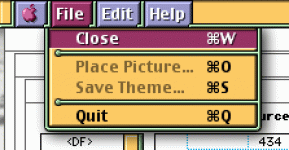
Depending on your browser, you may have to actually click the image to see it in normal size, otherwise it won't display correctly.
Ooo, very nice.
Tonight, Pop-up Buttons and Arrow Buttons are working, also extensive work was done to hush up all of the errors for non-Scherzo schemes so that it will work on all schemes again.
There's a lot left to do:
Substitute platinum with proper palette for missing items in schemes
Manage different scheme versions and default 'cinf's
Figure out where to find window background colors in newer schemes
layo
Fix ppat VH structure backgrounds (currently pattern starts from incorrect origin, must be fixed by using 'frme's. You can see this problem by converting Antique and looking at the tabs.)
All sliders
All scroll bars
Newer window frames (wnd#)
Disclosure triangle
Little Arrows
Progress bars, indeterminate progress bar
Image well
frme
Design a frame maker software module
Groups / separators
Edit Text frame
List box Frame
Dialog Content Edge
Window Header
Window Placard
I forgot to mention that I finally figured out how the 'tinf' resource works, so now the converter actually spits out a theme that runs all on its own once you run it through Rez and change the type/creator codes.
There's a lot left to do:
Substitute platinum with proper palette for missing items in schemes
Manage different scheme versions and default 'cinf's
Figure out where to find window background colors in newer schemes
layo
Fix ppat VH structure backgrounds (currently pattern starts from incorrect origin, must be fixed by using 'frme's. You can see this problem by converting Antique and looking at the tabs.)
All sliders
All scroll bars
Newer window frames (wnd#)
Disclosure triangle
Little Arrows
Progress bars, indeterminate progress bar
Image well
frme
Design a frame maker software module
Groups / separators
Edit Text frame
List box Frame
Dialog Content Edge
Window Header
Window Placard
I forgot to mention that I finally figured out how the 'tinf' resource works, so now the converter actually spits out a theme that runs all on its own once you run it through Rez and change the type/creator codes.
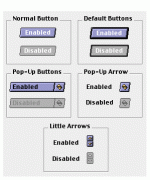
I ran into a glitch with popup buttons. Appearance manager uses clr# color IDs 0, 1, 2 for normal, inactive, and pressed text instead of 17, 18, 19. Because of this, popup button text shares the same color as Alert Window text! There's no fix for that short of hacking the appearance manager. I'm not that crazy.
So here it is, with the wrong text color (should be white)
So here it is, with the wrong text color (should be white)
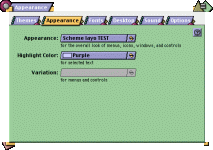
This is parsed directly from a wnd# resource. I have done non-stretching parts of the top and bottom.
Stretch regions are going to be tricky. Sides with 1 or 2 stretch regions should be possible. Because I can only split things in half proportionally in themes, I think that we're stuck with 2^n numbers of stretch regions, otherwise they won't be evenly spaced. Even with, say, 4 stretch regions, all of the little "islands" would have to be the same size. I can calculate anything I want in the converter program, but unfortunately I don't have math functions available directly in themes, all I can do is cut things in half. There may not be many schemes that use more than 2 stretch regions per side, though.
The Close, Zoom and Collapse boxes will require the same color table combination code as the scroll arrows before they will work properly.
This wnd# code is VERY MESSY, most of the code is switch statements. There is nothing done for stretch regions, islands, or left/right sides yet. I did it that way to avoid copy/pasting the same code chunks with little changes, but I think there comes a point where the copy/pasting has an advantage.
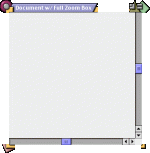
Stretch regions are going to be tricky. Sides with 1 or 2 stretch regions should be possible. Because I can only split things in half proportionally in themes, I think that we're stuck with 2^n numbers of stretch regions, otherwise they won't be evenly spaced. Even with, say, 4 stretch regions, all of the little "islands" would have to be the same size. I can calculate anything I want in the converter program, but unfortunately I don't have math functions available directly in themes, all I can do is cut things in half. There may not be many schemes that use more than 2 stretch regions per side, though.
The Close, Zoom and Collapse boxes will require the same color table combination code as the scroll arrows before they will work properly.
This wnd# code is VERY MESSY, most of the code is switch statements. There is nothing done for stretch regions, islands, or left/right sides yet. I did it that way to avoid copy/pasting the same code chunks with little changes, but I think there comes a point where the copy/pasting has an advantage.