

Thread
G3 Blue and White custom startup sound ROM hack -success!!
OK, so now I'm thinking of my next big startup sound hack and I want it to be a New World Mac. I have several New World G3/G4 Macs, but the Yosemite G3 seems like a nice candidate due to its logic board being so easy to access. It's the first brand-new Mac I ever bought. I still have the original box, packing materials, restore disk, manuals, keyboard, awful hockey puck mouse, power cord, internal 56k modem and Zip drive install kit boxes, etc. (yeah, I'm a pack rat) so I want to preserve it and don't exactly want to modify the stock hardware at all. With that said, I'm definitely up for grabbing a logic board on eBay to hack.
My hardware hacking capabilities start to diminish as we move toward miniature surface mount parts and BGA packages, but this one still seems pretty doable (if any hardware hacking is even necessary -- read on). The Blue and White G3 developer note points out that there is 1 MB of ROM on the logic board containing POST software, Open Firmware, and hardware specific drivers. In particular, the POST software contains a "boot beep" -- the startup chime.
I've found the chip on the logic board. It's a MIcron MT28F008B3 8 megabit (1 megabyte) flash chip in a Type I TSOP-40 package. I'm hoping I don't have to find any of these chips -- Digi-Key doesn't stock them anymore. The good news is that with the right adapter, my Willem programmer seems to support it.
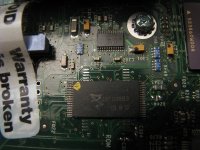
Looks like there might be pads for a different type of flash chip too...
I also got sneaky and downloaded the Power Macintosh G3 (Blue and White) Firmware Update 1.1. I have no idea if I actually ever installed this update on my G3, but its contents are interesting. After you mount the SMI file, you will find an installer and a file called G3 Firmware. The G3 Firmware file's data fork is plain text with Mac line endings. It appears to be a Forth script, which is probably run by Open Firmware. Unfortunately, I know nothing about Forth except that it uses reverse polish notation. Still, I can find some useful info in the file:
Lines 102 and 103:
(followed by a ton of data that appears to be encoded in some kind of ASCII format (maybe Ascii85?) -- it looks like it's calling a decode function called dc85 which is defined earlier in the file)
It also includes code for controlling AMD, Intel, Micron, Atmel, and Sharp flash chips (I think!).
So if I go through with this, I'll probably need to learn Forth (it's way different from anything I'm familiar with, but I'm still very curious to learn how it works--can't be too hard to learn it!) in order to figure out how to decode what appears to be the new ROM contents. If I can do this and modify the script, it might be possible to flash a custom startup chime without doing anything to the hardware...of course, if I fail, I'll have to manually desolder and reflash the chip with my programmer (no big deal there -- Chip Quik should work). I suppose I could find a TSOP ZIF socket to put on the logic board...I'm not sure if there's room for it because of how close some of the other components are, though.
Anyway, that's my plan right now! I don't know if/when I'll attack it, but I really wanted to get this all written down so I don't forget it and as info for anybody else who's been considering a similar feat.
My hardware hacking capabilities start to diminish as we move toward miniature surface mount parts and BGA packages, but this one still seems pretty doable (if any hardware hacking is even necessary -- read on). The Blue and White G3 developer note points out that there is 1 MB of ROM on the logic board containing POST software, Open Firmware, and hardware specific drivers. In particular, the POST software contains a "boot beep" -- the startup chime.
I've found the chip on the logic board. It's a MIcron MT28F008B3 8 megabit (1 megabyte) flash chip in a Type I TSOP-40 package. I'm hoping I don't have to find any of these chips -- Digi-Key doesn't stock them anymore. The good news is that with the right adapter, my Willem programmer seems to support it.
Looks like there might be pads for a different type of flash chip too...
I also got sneaky and downloaded the Power Macintosh G3 (Blue and White) Firmware Update 1.1. I have no idea if I actually ever installed this update on my G3, but its contents are interesting. After you mount the SMI file, you will find an installer and a file called G3 Firmware. The G3 Firmware file's data fork is plain text with Mac line endings. It appears to be a Forth script, which is probably run by Open Firmware. Unfortunately, I know nothing about Forth except that it uses reverse polish notation. Still, I can find some useful info in the file:
Lines 102 and 103:
Code:
 /L field >dir.BOOT-BEEP
/L field >dir.BOOT-BEEP-size
Code:
cr ." loading ROM-IMAGE, offset=00080000, size=00080000"It also includes code for controlling AMD, Intel, Micron, Atmel, and Sharp flash chips (I think!).
So if I go through with this, I'll probably need to learn Forth (it's way different from anything I'm familiar with, but I'm still very curious to learn how it works--can't be too hard to learn it!) in order to figure out how to decode what appears to be the new ROM contents. If I can do this and modify the script, it might be possible to flash a custom startup chime without doing anything to the hardware...of course, if I fail, I'll have to manually desolder and reflash the chip with my programmer (no big deal there -- Chip Quik should work). I suppose I could find a TSOP ZIF socket to put on the logic board...I'm not sure if there's room for it because of how close some of the other components are, though.
Anyway, that's my plan right now! I don't know if/when I'll attack it, but I really wanted to get this all written down so I don't forget it and as info for anybody else who's been considering a similar feat.
Awesome! Please keep us posted. Could this potentially open up the possibility of enabling native OS 9 booting on newer machines? Just curious.
Sadly, I doubt it -- the newer machines would need new hardware drivers to work in OS 9 (I think). I'm trying to avoid playing with code at all. It's likely beyond my capabilities...there's always a chance that the work could help someone with more intimate knowledge get closer to that goal, though. I dunno.
I did play around a little bit more with the ROM today. I was able to decode the data I mentioned earlier using this program. It's definitely Ascii85 encoding.
Code:
./ascii85 -d -n -y input.txt > output.binThe startup chime is at the end of the decoded binary file. I can tell it's sound data because it sounds like the startup chime, but I can't get the pitch to match up and it's pretty scratchy. I really hope it's not compressed...
Edit: Got the decoded binary length to match the length listed in the G3 Firmware file after running the decoder on Linux instead of Windows. I'm thinking redirecting stdout to a file in Windows does LF to CRLF conversions, so that probably broke it. Even with the match, there are still weird characters and the sound data is still strange. Next step is to get the Adler checksum to match...
Got the Adler checksum to match. it needed a small change to the Ascii85 algorithm. Ordinarily in Ascii85 encoding, a 'z' character means four 0s (NULL bytes) and a 'y' character means four spaces. Well, in Apple's implementation of Ascii85, a 'y' character means four 0xFFs. Probably makes sense considering unprogrammed flash is 0xFF. I was barely able to comprehend that from the Forth code. It really is a foreign syntax to me!
Plus, the checksum algorithm runs past the end of the decoded data. The decoded ROM image is 264,868 bytes, but the checksum is run for 0x7FFFC (524,284) bytes. Once I padded the rest of the decoded data with zerosn so the total length is 524,284, the checksum came out perfectly.
The sound data at the end is still not sounding correct, so it must be compressed or encoded in some way...
Plus, the checksum algorithm runs past the end of the decoded data. The decoded ROM image is 264,868 bytes, but the checksum is run for 0x7FFFC (524,284) bytes. Once I padded the rest of the decoded data with zerosn so the total length is 524,284, the checksum came out perfectly.
The sound data at the end is still not sounding correct, so it must be compressed or encoded in some way...
I was able to dump my G3's ROM and my G4 Mac mini's ROM, and I've confirmed that my decode of the G3 firmware update worked correctly.
I found two instances of an IMA ADPCM step table in the Blue and White G3's ROM. (It's also in the Mac mini's ROM twice in similar locations...) I'm now pretty sure the startup chime is IMA compressed, and the fact that the table is in ROM suggests to me that the decompression is most likely done in software.
I'm not sure why there are *two* step tables. One of them seems to be in a recovery section of the ROM, so it might just be different code for playing a startup sound in recovery mode.
The step table is probably a useful clue for where to look in ROM for the decoding algorithm. Chances are the code is nearby, or I can at least use the step table's known location to find code that references it. There are many implementations of IMA compression, but they all use the same basic algorithm -- it's the little details of the implementation like packet size and the format of the first few bytes per packet that I have to iron out. Hopefully some PowerPC disassembly will help with that. }
I found two instances of an IMA ADPCM step table in the Blue and White G3's ROM. (It's also in the Mac mini's ROM twice in similar locations...) I'm now pretty sure the startup chime is IMA compressed, and the fact that the table is in ROM suggests to me that the decompression is most likely done in software.
I'm not sure why there are *two* step tables. One of them seems to be in a recovery section of the ROM, so it might just be different code for playing a startup sound in recovery mode.
The step table is probably a useful clue for where to look in ROM for the decoding algorithm. Chances are the code is nearby, or I can at least use the step table's known location to find code that references it. There are many implementations of IMA compression, but they all use the same basic algorithm -- it's the little details of the implementation like packet size and the format of the first few bytes per packet that I have to iron out. Hopefully some PowerPC disassembly will help with that. }
dougg3, you amaze me - very cool project. That would be AWESOME to change the startup sound via firmware update. Maybe the next step after this is current Macs????? I smell bold disclaimers and shareware funds close by.
Doug - I'm down in Albany and I have a couple of B&W G3 parts machines. About the only good thing left on them are the logic boards and processors. If you want them, I'd be more than happy to donate them. PM me if you're interested.
Thanks Dennis Nedry! I think it would be AWESOME to hack the startup chime of current Macs. For me it becomes a monetary thing...once the technology gets cheap enough that it's easy to get a new motherboard when something goes wrong, then I'm comfortable hacking it
I have decoded the sound.
I started messing with disassembling, but I quickly realized that PowerPC assembly is a complete mess to try to read. There are so many freakin' instructions that do really crazy things! I started seeing instructions like rlwinm (Rotate Left Word Immediate then AND with Mask) and think "WTF?" Maybe it's just because I'm not familiar with the syntax like I am with Motorola and Intel code, but it turned me off pretty quickly. I found a place where it's writing to the sound chip but lost my patience and decided to try some other methods.
I figured Apple would probably use their own IMA 4:1 encoding standard (34-byte chunks -- 2 bytes of starting info followed by 64 nibbles of data), and it turns out that's exactly what they did. See this page for the header info, and this page for generic IMA decoding info. I took the code I had already written from experimenting with your Quadra 700 project, and made it work with Apple's IMA 4:1.
I didn't know exactly where the sound started, so I played with various starting points until I found one that didn't show any weird "index out of bounds" errors during decoding. Then I played back the resulting sound and BINGO. It's a little scratchy for my tastes, but I think it's correct. I'll post a recording and code later...
mcdermd -- WOW, thank you! I may indeed take you up on that offer once I'm comfortable with trying to inject my own sound
Edit: Here's the extracted chime. There may be some improvements needed to the decode algorithm because I don't think it's supposed to sound that scratchy. But it's pretty much correct.
I have decoded the sound.
I started messing with disassembling, but I quickly realized that PowerPC assembly is a complete mess to try to read. There are so many freakin' instructions that do really crazy things! I started seeing instructions like rlwinm (Rotate Left Word Immediate then AND with Mask) and think "WTF?" Maybe it's just because I'm not familiar with the syntax like I am with Motorola and Intel code, but it turned me off pretty quickly. I found a place where it's writing to the sound chip but lost my patience and decided to try some other methods.
I figured Apple would probably use their own IMA 4:1 encoding standard (34-byte chunks -- 2 bytes of starting info followed by 64 nibbles of data), and it turns out that's exactly what they did. See this page for the header info, and this page for generic IMA decoding info. I took the code I had already written from experimenting with your Quadra 700 project, and made it work with Apple's IMA 4:1.
I didn't know exactly where the sound started, so I played with various starting points until I found one that didn't show any weird "index out of bounds" errors during decoding. Then I played back the resulting sound and BINGO. It's a little scratchy for my tastes, but I think it's correct. I'll post a recording and code later...
mcdermd -- WOW, thank you! I may indeed take you up on that offer once I'm comfortable with trying to inject my own sound
Edit: Here's the extracted chime. There may be some improvements needed to the decode algorithm because I don't think it's supposed to sound that scratchy. But it's pretty much correct.
I discovered the reason for the scratchiness -- I had a typo in my code that decodes the nibbles. I think I screwed it up when I was copying the code over from the original IMA documentation. Here's the original code:
Here's the fixed code:
Stupid typos!
Here's the fixed chime, sounding MUCH better and probably perfect. Below is the complete working code:
I still get some warning printouts telling me the step index is less than 0 (which forces me to clamp it up to 0), but I think that's OK -- it's probably normal and just means the encoding wanted to keep it at 0. Anyway, great success on a Tuesday morning!
Code:
    int diff = 0;
   if (s & 4)
       diff += step;
   if (s & 2)
       diff += step >> 1;
   if (s & 4)
       diff += step >> 2;
   diff += step >> 3;
   if (s &
       diff = -diff;
Code:
    int diff = 0;
   if (s & 4)
       diff += step;
   if (s & 2)
       diff += step >> 1;
   if (s & 1)
       diff += step >> 2;
   diff += step >> 3;
   if (s &
diff = -diff;Here's the fixed chime, sounding MUCH better and probably perfect. Below is the complete working code:
Code:
#include
#include

static const int ima_index_table[] = {
 -1, -1, -1, -1, 2, 4, 6, 8,
 -1, -1, -1, -1, 2, 4, 6, 8
};

static const int ima_step_table[] = {
 7, 8, 9, 10, 11, 12, 13, 14, 16, 17,
 19, 21, 23, 25, 28, 31, 34, 37, 41, 45,
 50, 55, 60, 66, 73, 80, 88, 97, 107, 118,
 130, 143, 157, 173, 190, 209, 230, 253, 279, 307,
 337, 371, 408, 449, 494, 544, 598, 658, 724, 796,
 876, 963, 1060, 1166, 1282, 1411, 1552, 1707, 1878, 2066,
 2272, 2499, 2749, 3024, 3327, 3660, 4026, 4428, 4871, 5358,
 5894, 6484, 7132, 7845, 8630, 9493, 10442, 11487, 12635, 13899,
 15289, 16818, 18500, 20350, 22385, 24623, 27086, 29794, 32767
};
#define NUM_STEP_TABLE_ENTRIES (sizeof(ima_step_table)/sizeof(ima_step_table[0]))

static int predictor = 0;
static int step_index = 0;
static int step = 7;

void do_header(uint8_t h)
{
   predictor = (h << ;
   if (predictor & 0x8000)
   {
       predictor |= 0xFFFF0000;
   }
}

void do_header2(uint8_t h)
{
   predictor |= (h & 0x80);
   step_index = h & 0x7F;

   if (step_index >= NUM_STEP_TABLE_ENTRIES)
   {
       printf("Header out of bounds\n");
       step_index = NUM_STEP_TABLE_ENTRIES - 1;
   }

   step = ima_step_table[step_index];
}

void do_sample(uint8_t s, FILE *w)
{
   step_index += ima_index_table[(uint8_t)s];
   if (step_index < 0)
   {
       printf("Sample out of bounds < 0\n");
       step_index = 0;
   }
   if (step_index >= NUM_STEP_TABLE_ENTRIES)
   {
       printf("Sample out of bounds >= %d\n", NUM_STEP_TABLE_ENTRIES);
       step_index = NUM_STEP_TABLE_ENTRIES - 1;
   }

   // Sign-extend the nibble
   if (s & 0x08){ s |= 0xF0; }

   //int diff = (s + 0.5) * step / 4;
   int diff = 0;
   if (s & 4)
       diff += step;
   if (s & 2)
       diff += step >> 1;
   if (s & 1)
       diff += step >> 2;
   diff += step >> 3;
   if (s &
       diff = -diff;

   predictor = predictor + diff;
   if (predictor < -32768) predictor = -32768;
   if (predictor > 32767) predictor = 32767;
   step = ima_step_table[step_index];

   int16_t value = predictor;

   // This is me cheating to convert it back to big-endian for AIFF.
   // Probably don't need to do it the way I did it, but whatever...
   uint16_t tmpVal = (uint16_t)value;
   uint16_t tmpVal2 = ((tmpVal & 0xFF) <<  | (tmpVal >> ;

   fwrite(&tmpVal2, 2, 1, w);
}

int main(int argc, char *argv[])
{
  uint32_t headersFound = 0;
  uint32_t nibblesFound = 0;
  uint32_t upperHeadersFound = 0;

  FILE *f = fopen("SoundFile2.bin", "rb");
  FILE *w = fopen("SoundFile.out", "wb");
  int counter = 0;

  uint8_t s;

   while (fread(&s, 1, 1, f) > 0)
   {
       if ((counter % 34) == 0)
       {
           do_header(s);
       }
       else if ((counter % 34) == 1)
       {
           do_header2(s);
       }
       else
       {
           uint8_t s1 = s >> 4;  // Most significant nibble
           uint8_t s2 = s & 0x0F; // Least significant nibble

           do_sample(s2, w);
           do_sample(s1, w);
       }

       counter++;
   }

   fclose(f);
   fclose(w);
} pretty soon all my computers will sound like band of pirates. :lol: Can't wait!
Ha, yeah! There are so many different variants of New World Macs. I hope that getting the G3 to play a custom chime will help open up the door for people to figure out the rest of the New World Macs.
Some of them have firmware updates that Apple released. I'm assuming those will be the ones with the best chance of getting a custom chime. The ones that have never had a firmware update are probably capable of accepting a firmware update, but the jury is still out on whether it will actually be possible to flash them without sample Forth code showing how to update their firmware.
I'm in the middle of learning Forth. It's not half bad of a language! I can see why it's used -- it's pretty flexible and easy to parse. Once I'm done with learning Forth and completely figuring out what every line of the firmware update script does, I'll try to flash a custom chime to a G3 B&W. I already know exactly what I want to try, but I want to make sure there isn't a checksum somewhere that would ruin everything.
I've dumped the 1 MB boot ROM on all of my New World Macs (G3 Blue and White, Lombard PB G3, iMac G4, Mac mini G4) and they all store the startup chime in the same format--in fact, the bytes are exactly the same on all of them. That's a good sign that this should be possible on other Macs! I think for starters it will probably be best to stick with replacing the old chime with a chime that's exactly the same length. (We can pad a shorter sound with silence to make it the same length)
Some of them have firmware updates that Apple released. I'm assuming those will be the ones with the best chance of getting a custom chime. The ones that have never had a firmware update are probably capable of accepting a firmware update, but the jury is still out on whether it will actually be possible to flash them without sample Forth code showing how to update their firmware.
I'm in the middle of learning Forth. It's not half bad of a language! I can see why it's used -- it's pretty flexible and easy to parse. Once I'm done with learning Forth and completely figuring out what every line of the firmware update script does, I'll try to flash a custom chime to a G3 B&W. I already know exactly what I want to try, but I want to make sure there isn't a checksum somewhere that would ruin everything.
I've dumped the 1 MB boot ROM on all of my New World Macs (G3 Blue and White, Lombard PB G3, iMac G4, Mac mini G4) and they all store the startup chime in the same format--in fact, the bytes are exactly the same on all of them. That's a good sign that this should be possible on other Macs! I think for starters it will probably be best to stick with replacing the old chime with a chime that's exactly the same length. (We can pad a shorter sound with silence to make it the same length)
I'm sure you're aware that Sun developed Open Firmware (they call it OpenBoot) and licensed it to Apple and IBM. So after you learn some Forth, you can also apply your knowledge to non-Intel based Sun and IBM boxen.
Going off on a tangent here, but Open Firmware is a million times better than BIOS. After you compile Forth, FCode is platform independent. It doesn't care what architecture you're running, what instruction set you're using, or what memory hierarchy you're implementing. It just works. After reading Wikipedia, it's too bad Apple couldn't just continue using Open Firmware and leave Intel to their own idiocy.
I knew it was used by other stuff too...I doubt I'll ever need to know it for anything else though! It looks like the One Laptop Per Child project uses it also...
Open Firmware does seem pretty nice! You're right about the platform independence. Well, I have found a couple of places in the firmware updater where it reads a PowerPC-specific register, but that's kind of an edge case. There's no way I'll become a Forth expert during this whole project, but I'd at least like to have a decent idea about what the firmware updater is doing. Some of the syntax is challenging, but I'm slowly picking it up.
The basic structure of the update procedure seems to be:
I found an interesting error message in the update file that it prints if it can't find a flash chip it knows how to control...
It looks like the One Laptop Per Child project uses it also...Open Firmware does seem pretty nice! You're right about the platform independence. Well, I have found a couple of places in the firmware updater where it reads a PowerPC-specific register, but that's kind of an edge case. There's no way I'll become a Forth expert during this whole project, but I'd at least like to have a decent idea about what the firmware updater is doing. Some of the syntax is challenging, but I'm slowly picking it up.
The basic structure of the update procedure seems to be:
- Some basic setup
- Verify Adler32 checksum of entire firmware updater file
- Decode and load boot block, recovery, and ROM images into RAM, verifying individual adler32 checksum of each
- Some more setup
- Determine manufacturer of flash chip on logic board
- Do actual flashing of chips, drawing progress bar stuff while doing it
I found an interesting error message in the update file that it prints if it can't find a flash chip it knows how to control...
I don't know if this is handy or not but Oracle has the OpenBoot Command Reference Manual available as a pdf for free. My brother has a copy of the print version I've thumbed through a couple of times.
Thanks -- I've been using that PDF as a reference, found it yesterday in fact! It is very handy. Another good reference is the Apple Network Server 700/900 Open Firmware Read Me.
This is absolutely amazing, I might have to pull my B&W out of the basement if this becomes a sure thing. Keep up the great work doug.
Also, that is a very interesting reference to 2001: A Space Odyssey.
Also, that is a very interesting reference to 2001: A Space Odyssey.
Thank you! I'd definitely like to make it so people can choose their own chime, patch the firmware update, run it, and have a new chime
Thanks to mcdermd, I now have two G3 logic boards to try to patch with a custom chime! I'm thinking that I should be able to test this out fairly soon...thank you so much, mcdermd!
The two logic boards have Sharp flash chips as opposed to mine, which has a Micron flash chip. So Apple definitely used different brands throughout the production. That explains without a doubt why the firmware update code has so many cases for different chips. Anyway, just another little tidbit as I figure this stuff out!
Thanks to mcdermd, I now have two G3 logic boards to try to patch with a custom chime! I'm thinking that I should be able to test this out fairly soon...thank you so much, mcdermd!
The two logic boards have Sharp flash chips as opposed to mine, which has a Micron flash chip. So Apple definitely used different brands throughout the production. That explains without a doubt why the firmware update code has so many cases for different chips. Anyway, just another little tidbit as I figure this stuff out!
Hi,
As you become more experienced, perhaps maybe you can add patches which could restore OS 9 boot-ability on newer Macs (such as the FW800 MDD G4).
Keep up the good work!
c
As you become more experienced, perhaps maybe you can add patches which could restore OS 9 boot-ability on newer Macs (such as the FW800 MDD G4).
Keep up the good work!
c
YES, I have wondered about getting OS 9 booting on a newer MDD myself. One could simply flash it with firmware from an older MDD and "see what happens"! I have one of these MDDs myself but it's still too useful to experiment on.
From what I understand, these are the differences between them:
USB controller is USB 2.0 (though not implemented by Apple!! Runs only at 1.1)
Airport Extreme vs. normal AirPort
Bluetooth expansion port vs. no bluetooth
FireWire 800 vs FireWire 400 only
The logic boards appear nearly identical otherwise.
Also of note is that the Apple Hardware Test disc for the newer MDD boots the Mac using some conglomeration that involves an OS 9 System File and some open firmware script. If memory serves, the script is a hidden file on the disc. There is no OS X on this disc and it boots, so it's definitely something worth poking at. It's non-destructive if you play with it and keep re-burning a CD-RW.
From what I understand, these are the differences between them:
USB controller is USB 2.0 (though not implemented by Apple!! Runs only at 1.1)
Airport Extreme vs. normal AirPort
Bluetooth expansion port vs. no bluetooth
FireWire 800 vs FireWire 400 only
The logic boards appear nearly identical otherwise.
Also of note is that the Apple Hardware Test disc for the newer MDD boots the Mac using some conglomeration that involves an OS 9 System File and some open firmware script. If memory serves, the script is a hidden file on the disc. There is no OS X on this disc and it boots, so it's definitely something worth poking at. It's non-destructive if you play with it and keep re-burning a CD-RW.
Thanks for the sound bite. While I'm at work, I'm stuck on a winbox. I think I'll change the startup sound to this. Maybe it'll cheer me up in the morning to hear that soothing tone.
OpenFirmware seems pretty neat-o, though quirky. EFI is blech. It takes BIOS, which while crufty mostly works but needs updates, and then turns it into a monster; becoming a new OS layer entirely, providing drivers and other things which a HW init and bootstrapper should not do.
The extra patching to allow newer machines to use OS 9 is definitely interesting, but is not really something up my alley. I hope that someone else can step in to figure that kind of stuff out once I learn more about the firmware update code though! Just patching the startup sound is a lot easier than making code changes and shuffling drivers around... Maybe just flashing the old firmware over the new firmware would work, though (especially after what Dennis Nedry said above...).
I messed around this evening with forcing the updater to update the firmware despite the firmware already being up to date. It appears the firmware updater has a "whitelist" of known firmware versions it is allowed to update. I found it in the data fork--looks like just a bunch of NULL-terminated strings in the form of "Apple PowerMac1,1 1.0b4 BootROM built on 11/06/98 at 09:04:50" -- that's a sample from the list. I modified the last entry in that list to match the string from the latest firmware: "Apple PowerMac1,1 1.1f4 BootROM built on 04/09/99 at 13:57:32". That seemed to make the updater get past the "your firmware is up to date" message, and it gave me instructions on how to install the update (clicking a shut down button, holding down the programmer's button while powering it back up, and waiting for a long tone). I vaguely remember doing this process a long, long time ago. A progress bar came up and the chip was flashed. I *believe* it flashed from the standard G3 Firmware file that was in the same folder--that is the file I have to modify.
When the G3 finally booted back up, I got an error saying the firmware update failed, do you want to try again, blah blah blah, which now came up on every reboot. After playing around some more, I believe the problem is that because I've patched the updater to believe the most current version of the firmware is updatable, it doesn't think the update succeeded. What happens is the updater program copies itself into the Startup Items folder. When it runs from the startup items folder, it has a slightly different behavior than if it's just launched normally--it knows someone tried to update the firmware, so it checks the status of it. To get around that problem, I put the original unpatched updater program in its place and rebooted one more time -- it finally told me the firmware is up to date and removed itself from the Startup Items folder. I'm guessing I can just get away with removing it from the Startup Items folder, but there's always a chance it does something funky after detecting a successful firmware update -- so maybe it's a good idea to put the original updater back in to let it do any necessary cleanup. Not sure.
So bottom line is the next thing to try is: encode an IMA 4:1 sound of the same length as the original chime, put it in place of the original chime, re-encode the firmware with the Ascii85 encoding, recalculate the Adler-32 checksums, stick everything in the appropriate place in the G3 Firmware file, and try it out. I don't have everything ready to go quite yet, but it doesn't seem like it's going to be that bad. I just hope I'm not missing out on another checksum inside the ROM code. We'll find out depending on whether or not I brick the G3 motherboard!
Maybe just flashing the old firmware over the new firmware would work, though (especially after what Dennis Nedry said above...).Nice! Glad to be of assistance
I know that Open Firmware has drivers as well, but they are pretty minimal. I haven't looked much into EFI but I'll take your word for it!
I messed around this evening with forcing the updater to update the firmware despite the firmware already being up to date. It appears the firmware updater has a "whitelist" of known firmware versions it is allowed to update. I found it in the data fork--looks like just a bunch of NULL-terminated strings in the form of "Apple PowerMac1,1 1.0b4 BootROM built on 11/06/98 at 09:04:50" -- that's a sample from the list. I modified the last entry in that list to match the string from the latest firmware: "Apple PowerMac1,1 1.1f4 BootROM built on 04/09/99 at 13:57:32". That seemed to make the updater get past the "your firmware is up to date" message, and it gave me instructions on how to install the update (clicking a shut down button, holding down the programmer's button while powering it back up, and waiting for a long tone). I vaguely remember doing this process a long, long time ago. A progress bar came up and the chip was flashed. I *believe* it flashed from the standard G3 Firmware file that was in the same folder--that is the file I have to modify.
When the G3 finally booted back up, I got an error saying the firmware update failed, do you want to try again, blah blah blah, which now came up on every reboot. After playing around some more, I believe the problem is that because I've patched the updater to believe the most current version of the firmware is updatable, it doesn't think the update succeeded. What happens is the updater program copies itself into the Startup Items folder. When it runs from the startup items folder, it has a slightly different behavior than if it's just launched normally--it knows someone tried to update the firmware, so it checks the status of it. To get around that problem, I put the original unpatched updater program in its place and rebooted one more time -- it finally told me the firmware is up to date and removed itself from the Startup Items folder. I'm guessing I can just get away with removing it from the Startup Items folder, but there's always a chance it does something funky after detecting a successful firmware update -- so maybe it's a good idea to put the original updater back in to let it do any necessary cleanup. Not sure.
So bottom line is the next thing to try is: encode an IMA 4:1 sound of the same length as the original chime, put it in place of the original chime, re-encode the firmware with the Ascii85 encoding, recalculate the Adler-32 checksums, stick everything in the appropriate place in the G3 Firmware file, and try it out. I don't have everything ready to go quite yet, but it doesn't seem like it's going to be that bad. I just hope I'm not missing out on another checksum inside the ROM code. We'll find out depending on whether or not I brick the G3 motherboard!
and if you do, oh well. Pull the TSOP and reflash the baby with a willem EPROM programmer.
That's right techknight! Although I don't have an adapter for the TSOP to put in my Willem programmer, but oh well...can't be too bad to find.
HOWEVER, there's no need to worry about that now I have successfully changed the G3 blue and white's startup chime! It now starts with a Quadra 700 chime, taken directly from Dennis Nedry's latest decoding of the 16-bit version of the sound direct from the Quadra 700 ROM. WOOHOO!!!!
It's really as simple as the steps I said earlier. Now I just have to automate it instead of doing a bunch of crap manually -- right now I'm running it through a bunch of programs and then manually copying and pasting the new contents of the firmware update file to the existing G3 Firmware file using BBEdit Lite.
The first time I tried the update, nothing happened, but then I got the blinking question mark with folder icon, and shortly thereafter it booted back into OS 9--as I've now discovered, this is what happens if one of the checksums doesn't match. So whew...the updater doesn't destructively kill the machine if the checksum doesn't match. Once I fixed the checksum glitch, the update worked correctly and I now have a custom chime. The checksum glitch is too weird to explain in detail -- the short version is that I had the checksum calculated correctly, but because of the Ascii85 encoding and padding the end of the (new shorter) sound file with silence to make it the same length of the old sound, there were certain parts of RAM that needed to be explicitly reset back to zeros rather than just assuming it would already be zero (because the firmware update flashes a recovery partition that's about the same length as the firmware before actually flashing the firmware, but it reuses the same RAM while doing it).
BIG THANK YOU to mcdermd for getting those G3 logic boards to me quickly...it definitely sped up the project! YouTube video coming later...
HOWEVER, there's no need to worry about that now
I have successfully changed the G3 blue and white's startup chime! It now starts with a Quadra 700 chime, taken directly from Dennis Nedry's latest decoding of the 16-bit version of the sound direct from the Quadra 700 ROM. WOOHOO!!!!It's really as simple as the steps I said earlier. Now I just have to automate it instead of doing a bunch of crap manually -- right now I'm running it through a bunch of programs and then manually copying and pasting the new contents of the firmware update file to the existing G3 Firmware file using BBEdit Lite.
The first time I tried the update, nothing happened, but then I got the blinking question mark with folder icon, and shortly thereafter it booted back into OS 9--as I've now discovered, this is what happens if one of the checksums doesn't match. So whew...the updater doesn't destructively kill the machine if the checksum doesn't match. Once I fixed the checksum glitch, the update worked correctly and I now have a custom chime. The checksum glitch is too weird to explain in detail -- the short version is that I had the checksum calculated correctly, but because of the Ascii85 encoding and padding the end of the (new shorter) sound file with silence to make it the same length of the old sound, there were certain parts of RAM that needed to be explicitly reset back to zeros rather than just assuming it would already be zero (because the firmware update flashes a recovery partition that's about the same length as the firmware before actually flashing the firmware, but it reuses the same RAM while doing it).
BIG THANK YOU to mcdermd for getting those G3 logic boards to me quickly...it definitely sped up the project! YouTube video coming later...
That's awesome!
YAAAY! I'm assuming the same process should work with a QuickSilver?
I'm assuming the same process should work with a QuickSilver?
QuickSilvers don't have an existing firmware update it appears, so it isn't so easy 
Hopefully the existing G4 firmware update (for older G4 models) gives us a good foundation to experiment with. There is a risk of bricking the machine, though, so it might not be smart to try it without playing around with a spare motherboard (like I've been doing here).
Hopefully the existing G4 firmware update (for older G4 models) gives us a good foundation to experiment with. There is a risk of bricking the machine, though, so it might not be smart to try it without playing around with a spare motherboard (like I've been doing here).
Wait, what??
How very interesting.
I wonder if this is so for Aluminum PowerBooks as well? I'll have to take a look!
Hmmm.....
c