

Thread
Conquest: Powermac 9600
Scored a 350Mhz 9600 over the weekend on ebay for £50. Has 2 4GB SCSI drives, 512MB RAM and zip, cd and floppy as standard.
Quite pleased with myself, although I did bid more than I originally intended. But I'd had the thing in my watch list for the whole week and had slowly convinced myself of the essential nature of this purchase.
So, my retro setup now consists of my expanded Performa 460 and this 9600. I'm going to keep up the 460 project, still plenty to do in getting that system as epic as possible and will do likewise with the PowerMac. I'm thinking USB, Firewire and IDE boards are going to be my first purchases. Already got my eye on a G3 500Mhz Sonnet board too. Will look to max the RAM. Any other suggestions? What can I do with the video card, are there other options to the standard one?
Happy days. Pictures will follow when the package arrives!
S
Quite pleased with myself, although I did bid more than I originally intended. But I'd had the thing in my watch list for the whole week and had slowly convinced myself of the essential nature of this purchase.
So, my retro setup now consists of my expanded Performa 460 and this 9600. I'm going to keep up the 460 project, still plenty to do in getting that system as epic as possible and will do likewise with the PowerMac. I'm thinking USB, Firewire and IDE boards are going to be my first purchases. Already got my eye on a G3 500Mhz Sonnet board too. Will look to max the RAM. Any other suggestions? What can I do with the video card, are there other options to the standard one?
Happy days. Pictures will follow when the package arrives!
S
There are various ATi Radeons or Rage cards to pick from on the GPU front.
These are most likely the most expandable Mac's that will ever exist really (9x00). Nice find! Nice thing about the 9600 is how the case is not 100% made of brittle Spindler Plastic.
Mac OS 7.6 will be hyper-warp speed on an upgraded 9x00. I would give it a try before OS 8 or 9, just for fun.
These are most likely the most expandable Mac's that will ever exist really (9x00). Nice find! Nice thing about the 9600 is how the case is not 100% made of brittle Spindler Plastic.
Mac OS 7.6 will be hyper-warp speed on an upgraded 9x00. I would give it a try before OS 8 or 9, just for fun.
Thanks for the tip on video cards, will look that up now.
Yes, I'm going to have a small 7.6.1 partition for some ultra swift usage, and 9.2.2 on another.
Yes, I'm going to have a small 7.6.1 partition for some ultra swift usage, and 9.2.2 on another.
The 9600 is such a beast, and probably the most expandable Mac ever (Quadra 950 close second). I've found suitable upgrades come up real cheap on eBay from time to time (eg. accelerators, RAM, video cards), if you take your time looking out. Last upgrade for my 9600/350 was the full gamut of RAM (and more!), coming out to under $5 a stick.
A suitable video card is a PC ATI Radeon 7000 (flash it yourself), or I've seen the Mac Edition 9200s kicking around too. Even cheaper, a 3dfx Voodoo 3000 PCI card (again flash it yourself), good for games. A Mac compatible IDE/SATA card is also a must, and any generic PCI USB 1.1 card will probably work fine too. I'd hold out for a G4 accelerator card, the Sonnet ones come up from time to time (I've a 1Ghz G4 in mine which cost ~ $80 a couple of years ago).
JB
A suitable video card is a PC ATI Radeon 7000 (flash it yourself), or I've seen the Mac Edition 9200s kicking around too. Even cheaper, a 3dfx Voodoo 3000 PCI card (again flash it yourself), good for games. A Mac compatible IDE/SATA card is also a must, and any generic PCI USB 1.1 card will probably work fine too. I'd hold out for a G4 accelerator card, the Sonnet ones come up from time to time (I've a 1Ghz G4 in mine which cost ~ $80 a couple of years ago).
JB
Well scored! The 350MHz ones in particular are fairly rare.
Are you sure about reflashed units? I never tested an original mac firmware one but a reflashed 7000 I own worked in the PowerMac G3 but was not detected at all in my 9600.
Yes, I've used two different PCI PC-flashed Radeon 7000s in my 9600. I think the 7000 is a good card to flash as most are of reference design.
The 9600 is picky about card placement; I recall the MACH-V based variant is even pickier. It takes some shuffling of cards to get things right sometimes. IIRC the top slot is bus-mastered and takes highest priority, so best for ATA/SATA/SCSI cards, and then the video card, next up things like FW/USB/lesser cards.
JB
The 9600 is picky about card placement; I recall the MACH-V based variant is even pickier. It takes some shuffling of cards to get things right sometimes. IIRC the top slot is bus-mastered and takes highest priority, so best for ATA/SATA/SCSI cards, and then the video card, next up things like FW/USB/lesser cards.
JB
How do you like the Radeon 7000? How does it compare to the Rage PCI series?
I think I saw some (NIB?) Mac Radeon 7000s on eBay at what I'd consider a reasonable price.
I think I saw some (NIB?) Mac Radeon 7000s on eBay at what I'd consider a reasonable price.
Think of the Radeon 7000 as an "enhanced" Rage 128, but running almost as cool. 2D is the same, but 3D stuff/games is definately snappier. I think with the ATI control panel installed it also has some DVD/MPEG hardware decoding support under OS 8/9. The AGP Radeon 7500 is a good cheap upgrade for the G4 Cube, provided you put a fan on it or have some nearby airflow.
I sort of figured the extra VRAM on the PCI Radeon 7000s must be for 3D. You sure don't need that much for 2D Graphics.
I flashed scores of PCI R7000s made by Sapphire and they all worked just like an ATI built unit, but with twice the VRAM.
However, on the ones I flashed, I physically removed the 25P05 serial flash chip and replaced it with the larger capacity 25P10 serial flash which the Mac firmware needs. I think a lot of the folks who flashed those kept the 25P05 and used a hacked/reduced version of the R7000 Firmware which squeezed into the smaller flash and probably didn't work as well.
[NITPICK]I know that bus mastering canard has been quoted at xlr8yourmac.com and propagated from there, but it just isn't true. Or rather, it is true, but not relevant.
All the PCI slots in any Mac are bus mastering slots. Every last one of them.
There are two possible reasons (and perhaps other undocumented ones) why a PCI card might work best in the first slot.
1) The firmware for the cards is loaded at boot time in order. Being in the first slot means that your firmware gets loaded first. This shouldn't matter, but it might.
2) A specific way in which #1 matters is that (IIRC, this is documented in Apple's PCI slot materials) block transactions (I think) are only available to the first card to reserve an area of address space corresponding to some cache line or lines. If a later card comes along whose address space has the same corresponding cache lines, then block transfers are disabled for that card.
I may have explained that completely wrong. The memory is really hazy, but that's the gist, possibly with all the terms such as block transfers and cache lines wrong.
In theory, in the 9500/9600, the best PCI performance should be found in the lower three slots, and amongst those, in the first one. So slot 4 should probably have the best performance.
You see, the upper three slots are really the upper four slots, with the fourth upper slot being all of the 9600's built-in I/O. The Grand Central chip is a PCI device, and it shares bandwidth with the upper three slots.[/NITPICK]
Good score. I'm using a 9600 running OS 9 for a few games and other things. It has a 400 or 450mhz G3, can't recall which. I'm booting off a compact flash card on an ATA 100 card. I was using a 9200 video card but needed it elsewhere so I switched to a R7000 which does just as well for my uses. Also have USB and firewire cards.
At times I'm tempted to add more but then I'd need to pull the parts out of something else. For my uses i don't think it'd make a lot nof difference
At times I'm tempted to add more but then I'd need to pull the parts out of something else. For my uses i don't think it'd make a lot nof difference
Morning folks.
Yesterday was a good day... She arrived.
It was just the 9600 tower that I'd bought, so hooked her up to my old Apple monitor and keyboard and mouse and... she works! Has 8 64MB sticks of RAM installed for 512MB RAM, but... I'd already lucked into some more RAM!
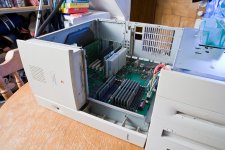
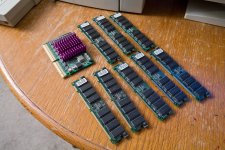
Conquest 2 - 8 x 128MB for 1GB RAM, 400Mhz G3 Sonnet board (and not pictured, VRAM and maths co-processor). All this was scored for £11, listed on ebay as pulled from a dead 8500. The VRAM (and maths board I guess) are of no use to the 9600 but the RAM and G3 board most certainly are!
Only issue so far is that it seems 3 of the RAM slots aren't happy about having RAM in them. I need to do further research and testing before I draw any conclusions though. As it stands, I've got 1GB RAM total in there and she FLIES! Just installed 7.6.1 on one of the other partitions and it's like lightening. Will fit the G3 board today, although I believe that will rule out using 7.6.1?
Anyway, brilliant stuff.
S
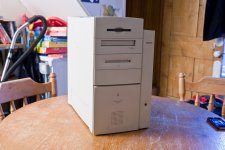
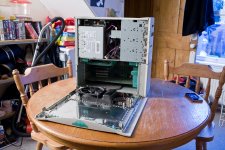
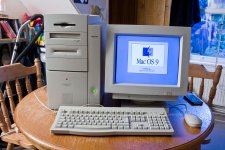
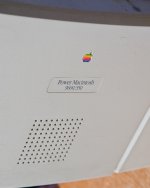
Yesterday was a good day... She arrived.
It was just the 9600 tower that I'd bought, so hooked her up to my old Apple monitor and keyboard and mouse and... she works! Has 8 64MB sticks of RAM installed for 512MB RAM, but... I'd already lucked into some more RAM!
Conquest 2 - 8 x 128MB for 1GB RAM, 400Mhz G3 Sonnet board (and not pictured, VRAM and maths co-processor). All this was scored for £11, listed on ebay as pulled from a dead 8500. The VRAM (and maths board I guess) are of no use to the 9600 but the RAM and G3 board most certainly are!
Only issue so far is that it seems 3 of the RAM slots aren't happy about having RAM in them. I need to do further research and testing before I draw any conclusions though. As it stands, I've got 1GB RAM total in there and she FLIES! Just installed 7.6.1 on one of the other partitions and it's like lightening. Will fit the G3 board today, although I believe that will rule out using 7.6.1?
Anyway, brilliant stuff.
S
G3 and RAM:
I would keep the original 350 604EV installed, RAM can go to 1.5GB (12x128MB) but I don't see the need for it. They are very cool OS 7 machines if you have the need to use all the slots or need that extra RAM. I have two of them, both AVID machines.
Check the RAM placement (paired) and refresh rate of the modules, they should be 2K refresh, not 4K (so slightly faster modules than what might usually work in lesser PowerMacs).
Great pics! With all that RAM installed what a powerful beast it is!
As long as you have the drivers for the sonnet G3 card installed, 7.6.1 will run like Usain Bolt!
With so many PCI slots, perhaps an ACARD AEC-6890M for lots and lots of storage?
You can still use the G3 with 7.6.1, I'm using my G3 upgraded Power Mac 8500/180 with System 7.5.3, and my G3 upgraded Power Mac 7100 with 7.1.2. Those OS fly on a G3. 
System 7.1 on a G3 upgraded NuBus PowerMac...you have no idea just how much I would *love* to try that....even just so that I could say I've done it.
That would be awesome!
+ it appears to be possible!
http://www.welovemacs.com/cfg31m300r.html
Anyone on here got a sonnetized nubus rig and Mac OS 7.1.2 to tell us just how awesome it might be?
I could make a video of it running on my PM 7100 if you would like.
I made a video showing the boot times using the stock 66mhz 601 and the sonnet G3 Card under system 7.1.2
Interesting...for some reason I actually thought the bootup would've been a tad quicker, but still, very impressive!
I think it's mostly due to the fact that I haven't installed anything yet, it's still a clean install from a year ago.
Amazing the difference a few hundred megahertz will make!
Thanks for going to the effort of showing us the difference in speed between the two processors.
Do you think that the speed doubler software would rev things up more?
Thanks for going to the effort of showing us the difference in speed between the two processors.
Do you think that the speed doubler software would rev things up more?
I'm not sure, but I don't have a copy of speed doubler to test it out with.
Isn't speed doubler a disk caching program? I never actually used it.
Isn't speed doubler a disk caching program? I never actually used it.
Yes, disk caching software it is.
For Mac OS 7.1.2 it will improve performance for 68k apps (how many applications for 7.1.2 were PPC native?), particularly on nubus machines.
This seller on ebay has a copy if you are interested:
http://www.ebay.com.au/itm/NEW-Speed-Doubler-2-RAM-Doubler-2-Macintosh-LAST-one-sale-/150865057798?pt=AU_software&hash=item2320421806
For Mac OS 7.1.2 it will improve performance for 68k apps (how many applications for 7.1.2 were PPC native?), particularly on nubus machines.
This seller on ebay has a copy if you are interested:
http://www.ebay.com.au/itm/NEW-Speed-Doubler-2-RAM-Doubler-2-Macintosh-LAST-one-sale-/150865057798?pt=AU_software&hash=item2320421806
On the X100 machines Speed Doubler is much more than disk caching software. It changes the 680x0 code emulator from an interpreting emulator (translates each instruction as it goes, if it's in a loop, every instruction will be translated every time through the loop) to more of a compiler, by which the 680x0 code is converted to PPC and a chunk of it is retained in memory. If the program loops, most of the instructions' translations are still around and the translation needn't be repeated.
This can do things like double the speed of emulation of 680x0 code.
On later machines (x500, x600) Apple used the same kind of scheme; they may have licensed Connectix's code, I'm not sure.
So the place Speed Doubler really shines is on X100 machines. Sure, it still has some nifty copy and disk caching functions on later machines, but it really speed things up on the 6100, 7100, 8100 and related clones.
This can do things like double the speed of emulation of 680x0 code.
On later machines (x500, x600) Apple used the same kind of scheme; they may have licensed Connectix's code, I'm not sure.
So the place Speed Doubler really shines is on X100 machines. Sure, it still has some nifty copy and disk caching functions on later machines, but it really speed things up on the 6100, 7100, 8100 and related clones.
Awesome, I'll have to try it out soon, and see the difference, I've got a lot of 68k applications that I can throw at it.
Have had a busy few weeks and haven't had much time to tinker with this beast but I've just managed to have a little play with her.
OS7.6.1 is amazing on this monster. Everything happens INSTANTANEOUSLY! I run an expanded Amiga 1200 too and the Amiga OS is famous for being super responsive, and OS7 on the 9600 feels very much like that, stuff loads almost before you've double clicked it!
Got OS9.2.2 installed on another partition, using OS9 Helper. Works fine, but is sluggish compared to the other system on the computer, but still a very nice OS9 experience.
The bad news though is that there are some annoying stability issues. It all just hangs from time to time. The PRAM battery is dead, so I'll replace that first to see if that helps, but i suspect there's some bad RAM in there somewhere.
I made a couple of videos last night. I was mildly boozed up, so they do ramble a little. Peppered with foul language too I'm afraid, so NSFW...
http://www.youtube.com/watch?v=jxlQSyYHzzk
http://www.youtube.com/watch?v=MfH11Rx-Hw0
Not the greatest or most enlightening vids perhaps, but I'm treating them as an experiment and will do some more in depth and sober ones at some point soon.
S
OS7.6.1 is amazing on this monster. Everything happens INSTANTANEOUSLY! I run an expanded Amiga 1200 too and the Amiga OS is famous for being super responsive, and OS7 on the 9600 feels very much like that, stuff loads almost before you've double clicked it!
Got OS9.2.2 installed on another partition, using OS9 Helper. Works fine, but is sluggish compared to the other system on the computer, but still a very nice OS9 experience.
The bad news though is that there are some annoying stability issues. It all just hangs from time to time. The PRAM battery is dead, so I'll replace that first to see if that helps, but i suspect there's some bad RAM in there somewhere.
I made a couple of videos last night. I was mildly boozed up, so they do ramble a little. Peppered with foul language too I'm afraid, so NSFW...
http://www.youtube.com/watch?v=jxlQSyYHzzk
http://www.youtube.com/watch?v=MfH11Rx-Hw0
Not the greatest or most enlightening vids perhaps, but I'm treating them as an experiment and will do some more in depth and sober ones at some point soon.
S