
Thread
The Beige Knight Rises - PPC 7100/66
Hello all! I am a long time reader of this AWESOME forum, but new to posting here.
I want to tell you all about my favourite new project; my old powermac 7100, but first a story.
When I was a young lad I spent many a night in the glow of my trusty viewsonic CRT and my beloved powermac 7100/66. I would creep silently to the computer room, placing my headphones in the phone slot so as to mute that massive and booming "BONG" startup. There with nothing but my self, some oreos, and my mac; creating worlds with Infini-D 4.5 and Bryce, pretending I was in space with Marathon and Escape Velocity, who knows what else. My halcyon days, those were. But time has a way of ripping us from our happy place, and soon the world had moved on. 66 Mhz was a paltry excuse for a computer according to some, and I listened. I got a shiny rev b green iMac and I moved on into the world of TLAs like USB and PCI, and eventually BSD and X86. But that 7100 never left my mind, even if it left my house. It was a hand me down computer from my dads office, anyways. So back it went, and served 5 long years as little more than an accounting computer, only to be replaced by a LCD iMac g4 when they were tossed to the wolves. So she sat, silently, in a storage locker out of the city. Waiting for the day when she would be useful again. Well ladies and gentlemen that day has come!!
I have recovered my beloved Butthead Astronomer, and I am struggling to bring her back into the fleet. Alongside a black 07' Macbook, a Dell Vostro 220, a Macintosh Classic II, and various and sundry other little computers along the way.
Loadout and Procedures:
As far as I can tell she is a standard 66 Mhz Powermac 7100, with 8 megs of ram.
She has only one card installed, it appears to be a VGA video card, but I dont recall installing it.
Battery is in decent condition, I have removed it to ensure it does not explode.
despite minor case scuffing she is in pretty good shape structurally, with no broken or bent plastic or metal components.
Problems:
- She lacks a modern Ethernet port.
- Her hard drive is no longer serviceable, I have replaced it with a Quantum 80meg drive out of an LC-3 I have.
- She lacks any modern db-15 VGA port
- No CD drive.
Intentions:
- She needs to run 7.6 at the very least, system 8 would be nice too, but without a CD drive I am limited.
- I will load it up as best I can with games and apps from my past.
- I will use it to organize a simple file server for shits and giggles
- try and get some light web-serving enabled?
- I want it to be network enabled to allow for the use of Appletalk to transfer items easily.
Secondary Equipment:
- I have a db-15 to db-whatever adapter, so she works with a standard LCD monitor.
- I have localtalk cables.
- I have a USB floppy drive
- I have a USB Zip Drive (and somewhere a SCSI one too!!)
- I have a mac with MacFUSE and FuseHFS installed so I can open and edit HFVolumes, and a windows PC with HFV Explorer.
Status:
- used my floppy drive to copy the system 7.5 install disks and installed system 7.5.? on the 80 meg drive with minor errors. Doing the installation in pieces made things easier.
- Have been able to boot into system 7.5 successfully.
- Having some headaches getting the myriad different disk image formats to write successfully onto my floppies.
To do:
- Need to find AAUI adapter (hopefully the one being offered in the trading post will materialize).
- Eventually need to figure out how to write floppies without issue. Sometimes I get them to work using HFV Explorer on windows, and sometimes using the DD terminal command on OS X. Never 100% success rating, problem seems to be the format of the disk image. With HFV Explorer .dsk images write without error, so I am using Mini vMac to help me organize and package disk images in a virtual mac and then burn them to a physical floppy with HFV Explorer. Not an ideal workflow.
- Find my SCSI Zip Drive.
ANY ADVICE RELATED TO MODERNIZING OLD MACS WOULD BE APPRECIATED! PICTURES TO COME!
I want to tell you all about my favourite new project; my old powermac 7100, but first a story.
When I was a young lad I spent many a night in the glow of my trusty viewsonic CRT and my beloved powermac 7100/66. I would creep silently to the computer room, placing my headphones in the phone slot so as to mute that massive and booming "BONG" startup. There with nothing but my self, some oreos, and my mac; creating worlds with Infini-D 4.5 and Bryce, pretending I was in space with Marathon and Escape Velocity, who knows what else. My halcyon days, those were. But time has a way of ripping us from our happy place, and soon the world had moved on. 66 Mhz was a paltry excuse for a computer according to some, and I listened. I got a shiny rev b green iMac and I moved on into the world of TLAs like USB and PCI, and eventually BSD and X86. But that 7100 never left my mind, even if it left my house. It was a hand me down computer from my dads office, anyways. So back it went, and served 5 long years as little more than an accounting computer, only to be replaced by a LCD iMac g4 when they were tossed to the wolves. So she sat, silently, in a storage locker out of the city. Waiting for the day when she would be useful again. Well ladies and gentlemen that day has come!!
I have recovered my beloved Butthead Astronomer, and I am struggling to bring her back into the fleet. Alongside a black 07' Macbook, a Dell Vostro 220, a Macintosh Classic II, and various and sundry other little computers along the way.
Loadout and Procedures:
As far as I can tell she is a standard 66 Mhz Powermac 7100, with 8 megs of ram.
She has only one card installed, it appears to be a VGA video card, but I dont recall installing it.
Battery is in decent condition, I have removed it to ensure it does not explode.
despite minor case scuffing she is in pretty good shape structurally, with no broken or bent plastic or metal components.
Problems:
- She lacks a modern Ethernet port.
- Her hard drive is no longer serviceable, I have replaced it with a Quantum 80meg drive out of an LC-3 I have.
- She lacks any modern db-15 VGA port
- No CD drive.
Intentions:
- She needs to run 7.6 at the very least, system 8 would be nice too, but without a CD drive I am limited.
- I will load it up as best I can with games and apps from my past.
- I will use it to organize a simple file server for shits and giggles
- try and get some light web-serving enabled?
- I want it to be network enabled to allow for the use of Appletalk to transfer items easily.
Secondary Equipment:
- I have a db-15 to db-whatever adapter, so she works with a standard LCD monitor.
- I have localtalk cables.
- I have a USB floppy drive
- I have a USB Zip Drive (and somewhere a SCSI one too!!)
- I have a mac with MacFUSE and FuseHFS installed so I can open and edit HFVolumes, and a windows PC with HFV Explorer.
Status:
- used my floppy drive to copy the system 7.5 install disks and installed system 7.5.? on the 80 meg drive with minor errors. Doing the installation in pieces made things easier.
- Have been able to boot into system 7.5 successfully.
- Having some headaches getting the myriad different disk image formats to write successfully onto my floppies.
To do:
- Need to find AAUI adapter (hopefully the one being offered in the trading post will materialize).
- Eventually need to figure out how to write floppies without issue. Sometimes I get them to work using HFV Explorer on windows, and sometimes using the DD terminal command on OS X. Never 100% success rating, problem seems to be the format of the disk image. With HFV Explorer .dsk images write without error, so I am using Mini vMac to help me organize and package disk images in a virtual mac and then burn them to a physical floppy with HFV Explorer. Not an ideal workflow.
- Find my SCSI Zip Drive.
ANY ADVICE RELATED TO MODERNIZING OLD MACS WOULD BE APPRECIATED! PICTURES TO COME!
If you can network the 7100 to another machine, or get it on the web, it might be easier to copy disk image files and make floppies on the 7100 itself (using Disk Copy). That's what I do. Mind you, there aren't many installers from that period that you could not fit on a 100mb zip drive.
A CD drive is desirable, all the same; then, more RAM (4x32MB=128MB would be good), a cache card or perhaps a G3 accelerator, and a Jackhammer SCSI card with a 68pin drive would make the thing fly a little faster....
Location would be useful if you are looking for any gear from fellow members.
A CD drive is desirable, all the same; then, more RAM (4x32MB=128MB would be good), a cache card or perhaps a G3 accelerator, and a Jackhammer SCSI card with a 68pin drive would make the thing fly a little faster....
Location would be useful if you are looking for any gear from fellow members.
My SR-7100 is a 7100/66 that got an HPV A/V card, a full RAM loadout, a 24x CD-ROM and a 400MHz G3. Even with all that it's still not as zippy as my 7300 (and the 7300 now has a G4/800, so the differential is even wider), but it'll make a nice server if the IIci handing AppleTalk has a stroke.
Thanks for the tips everyone, its helping me tons! More amazing news!
Went to look through the remaining storage shed and found two SCSI zipdrives, and a Mac HD 20. Though this will not help with my disk formatting woes, it will make it a lot easier to transfer things to my 7100.
I forgot to mention also that I have rescued the following macs from my father's office storage:
-Mac classic 1 and 2
-Mac se/30 - simasi but on the docket to fix once I get a suitable torx 15
-Mac plus!!!
-Macintosh portable
-PowerBook 140, 170, 540 and a 5300c
so these should come in handy if I need intermediary 68k comps.
Went to look through the remaining storage shed and found two SCSI zipdrives, and a Mac HD 20. Though this will not help with my disk formatting woes, it will make it a lot easier to transfer things to my 7100.
I forgot to mention also that I have rescued the following macs from my father's office storage:
-Mac classic 1 and 2
-Mac se/30 - simasi but on the docket to fix once I get a suitable torx 15
-Mac plus!!!
-Macintosh portable
-PowerBook 140, 170, 540 and a 5300c
so these should come in handy if I need intermediary 68k comps.
If you have frequent system freezes with the 7100, or if you start to do so, then pull the logic board, remove the heat sink and clean and replace the heat sink grease. The heat sink grease has mostly turned to powder on 7100s and isn't doing a very good job any more.
Thanks Trag, I'm writing myself a google doc with a bunch of advisories about this machine, that one is going near the top. I plan to do some basic servicing on the machine once I have some free time, maybe it would be a good idea to replace the thermal paste even if it looks fine?
;D ;D ;D ;D
GUYS! Using those zipdisks I got OS 8 installed thanks to the the most amazing disk image I have ever encountered; The Apple Legacy Recovery Disk! It includes LISA software, and even a copy of A/UX! I had to mount the zip on my old headless G4 powerbook, it still had x.4 on it, which meant it could mount and modify my HFS zip disks. Copying the OS8 image on the powerbook to the zip and then putting the zip into the powermac I was able to mount the OS 8 Installer on my desktop and run it!

I have a fully functional Powermac 7100! I am so stoked. But now the real fun begins; playing with ZIPs is nice but I want network access. Next step is acquire an AAUI adapter!
;D ;D ;D ;D
GUYS! Using those zipdisks I got OS 8 installed thanks to the the most amazing disk image I have ever encountered; The Apple Legacy Recovery Disk! It includes LISA software, and even a copy of A/UX! I had to mount the zip on my old headless G4 powerbook, it still had x.4 on it, which meant it could mount and modify my HFS zip disks. Copying the OS8 image on the powerbook to the zip and then putting the zip into the powermac I was able to mount the OS 8 Installer on my desktop and run it!
I have a fully functional Powermac 7100! I am so stoked. But now the real fun begins; playing with ZIPs is nice but I want network access. Next step is acquire an AAUI adapter!
Or a Nubus ethernet card.
I haven't really looked into that.
Are they easier/cheaper to acquire?
Are they easier/cheaper to acquire?
6 of one and 1/2 dozen of the other.
Check your PMs, by the way.
Check your PMs, by the way.
I got my adapter! I plugged it in and was expecting to get an IP in the tcp/ip panel and when I didn't I freaked out and went to the IRC channel where the folks there steered me straight! Long story short, AAUI Adapter works great, but I am not so sure about my own critical thinking skills.
Surfing on this guy is such a reminder of bygone days. When it was my primary computer we used a modem and connected to AOL over dialup. Oh how things have changed.
I used Netscape 2.0 for a while, but it threw up TONS of javascript errors. Upgraded the 4.8, and it's butter. Well, buttery smooth as can be for a guy with a 601 and 40 megs of ram can be!
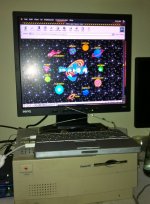
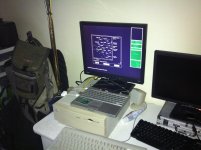
I am really grateful to the help from all of you here, this community has been on my radar for years as these things sat in a storage shed, and now I can finally get to work fixing up the compact macs and getting them out the door!
Next up, OrangeMicro NUBUS DOS card, powerbook hard drive data siphoning, Simasi Mac SE/30 repair! Woo hoo!
Surfing on this guy is such a reminder of bygone days. When it was my primary computer we used a modem and connected to AOL over dialup. Oh how things have changed.
I used Netscape 2.0 for a while, but it threw up TONS of javascript errors. Upgraded the 4.8, and it's butter. Well, buttery smooth as can be for a guy with a 601 and 40 megs of ram can be!
I am really grateful to the help from all of you here, this community has been on my radar for years as these things sat in a storage shed, and now I can finally get to work fixing up the compact macs and getting them out the door!
Next up, OrangeMicro NUBUS DOS card, powerbook hard drive data siphoning, Simasi Mac SE/30 repair! Woo hoo!
Slightly off-topic...I still can't believe that the page for Space Jam is still up. It is awesome though. 
Either way, good work, must be nice to have your first Mac back.
Either way, good work, must be nice to have your first Mac back.
Yeah I am really happy! It's funny I sit infront of a much more powerful computer all day, but all I can think about is when 5 o'clock rolls around and I can go home and play with my powermac again. :lol:
I'm starting an Infini-D Project tonight to get some of my old 3d Models modernized with techniques I've learned since 1999, I'll be sure to post up some screenies! I'm gonna need to get some ram for the old girl, and I bet a g3 card would be awesome.
Anyone know if an orangemicro card and a g3 accelerator could be installed in the same machine?
I'm starting an Infini-D Project tonight to get some of my old 3d Models modernized with techniques I've learned since 1999, I'll be sure to post up some screenies! I'm gonna need to get some ram for the old girl, and I bet a g3 card would be awesome.
Anyone know if an orangemicro card and a g3 accelerator could be installed in the same machine?
ARGH!
Last night when I was installing a new SCSI cable I was taking the metal enclosure off the 7100 and SNAPPED the back bezel off! The screw column that secures it to the back panel just snapped right off the panel. I could probably fuse it back together somehow.
looks like my plan for a perfectly restored 7100 is borked.
Can you even find these pieces anymore?
Last night when I was installing a new SCSI cable I was taking the metal enclosure off the 7100 and SNAPPED the back bezel off! The screw column that secures it to the back panel just snapped right off the panel. I could probably fuse it back together somehow.
looks like my plan for a perfectly restored 7100 is borked.
Can you even find these pieces anymore?
Got my eMate working with the 7100, using it as my daily journal. Plan to use it to keep service journals for all the macs I will restore.
I have been having a blast using this little guy to get back into bad 90's 3d rendering. My lovely lady friend suggested finding a modern practical use for the 3d renderings, so I decided to start a draft for an image that would go on her cheese party invitations.
Solution in search of a problem, but what are ya gonna do?

I have been having a blast using this little guy to get back into bad 90's 3d rendering. My lovely lady friend suggested finding a modern practical use for the 3d renderings, so I decided to start a draft for an image that would go on her cheese party invitations.
Solution in search of a problem, but what are ya gonna do?
Ha! That's awesome!
Got a new 7100! A 7100/80 with 100MB ram (the dual 64MB ram wouldn't work for some reason  )
)
I did some rendering/usability tests last night; its slightly faster at raytracing than Carl (the 7100/66)! I intend to link both 7100's together and use network rendering to improve performance!
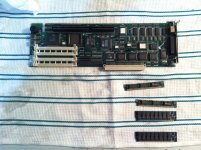
I got an OrangeMicro 486 card. Need to find the software for it!
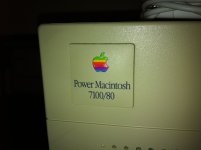
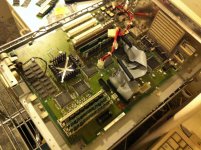
)I did some rendering/usability tests last night; its slightly faster at raytracing than Carl (the 7100/66)! I intend to link both 7100's together and use network rendering to improve performance!
I got an OrangeMicro 486 card. Need to find the software for it!
I´m not familiar with Nubus PC cards, but did you try the waybackmachine?
http://web.archive.org/web/20000815224254/http://www.orangemicro.com/updates.html
Small files are usually well preserved from vanished sites, some basic files seem to be still there, nb application disk and Win95 boot disk - does that sound about right?
Good luck!
Such a shame the math coprocessor is missing!
http://web.archive.org/web/20000815224254/http://www.orangemicro.com/updates.html
Small files are usually well preserved from vanished sites, some basic files seem to be still there, nb application disk and Win95 boot disk - does that sound about right?
Good luck!
Such a shame the math coprocessor is missing!
I had not tried that!
Thank you very much that looks almost perfect, I'm going to look it over!
http://web.archive.org/web/20000817221815/http://www.orangemicro.com/orangepc_300_nubus_updates.html
Looks like my card falls in there. going to try downloading that software when I get home! Thanks again!
Thank you very much that looks almost perfect, I'm going to look it over!
http://web.archive.org/web/20000817221815/http://www.orangemicro.com/orangepc_300_nubus_updates.html
Looks like my card falls in there. going to try downloading that software when I get home! Thanks again!
Thats what I would have guessed, 300 Series. Stuffit7 seems to unpack the MacBinary from Wayback all right.
Muliport cable? Did you get one of those?
Muliport cable? Did you get one of those?
All I have is what I photographed.
I'll see what happens tonight. The page linked with the picture of 300 series card mentions nothing about a Math-Coprocessor nor does it really look like the one I have.
I'm starting to wonder if this is a rare one off.
I'll see what happens tonight. The page linked with the picture of 300 series card mentions nothing about a Math-Coprocessor nor does it really look like the one I have.
I'm starting to wonder if this is a rare one off.
Yours is not the 340, obviously. Looks like that one had a 80586 (with built in FPU).
Still your card might fit in an (earlier) 3X0 series.
If there is a VGA conector on the card, a seperate monitor should work instead of the multiport thing.
Had a similar setup with my Amiga2000 and a 80386 card with a display selector switch.
I would cross-post at Macintoshgarden, some people over there may recall about orangemicro stuff.
Still your card might fit in an (earlier) 3X0 series.
If there is a VGA conector on the card, a seperate monitor should work instead of the multiport thing.
Had a similar setup with my Amiga2000 and a 80386 card with a display selector switch.
I would cross-post at Macintoshgarden, some people over there may recall about orangemicro stuff.
Installed the OrangeMicro software for 300 series cards. No joy. Tells me there are no identifiable cards present in any slot.
Apple System Profiler reads the card on the far slot $D I think, with a vendor name of OrangeMicro, an ID of 1152 and a card version of 1.0.
Bummer.
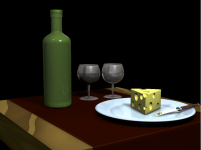
I did manage to get some more work done on my rendering! I figure I'm gonna stick both my 7100's together over localtalk and use Infini-D's net rendering tools! Haha PPC render farm!
Apple System Profiler reads the card on the far slot $D I think, with a vendor name of OrangeMicro, an ID of 1152 and a card version of 1.0.
Bummer.
I did manage to get some more work done on my rendering! I figure I'm gonna stick both my 7100's together over localtalk and use Infini-D's net rendering tools! Haha PPC render farm!
I think it's a 340 card. They came in both 486 and 586 editions. Up to 120MHz, 64MB SVGA, Serial & Parallel port.
What does the CPU say on top of it? Could also be a low-range 210-card with 486SX/33 CPU.
Also, try to find a model number on the card itself.
What does the CPU say on top of it? Could also be a low-range 210-card with 486SX/33 CPU.
Also, try to find a model number on the card itself.
Appreciate the help!
I will collect that info when I get a chance, thanks!
I will collect that info when I get a chance, thanks!
Argh I'm a fool!
So I tried it with 200 series software and it just worked. Awesome!
Thanks everyone, here's some screenies for the trouble!
Downloaded the 300 series software
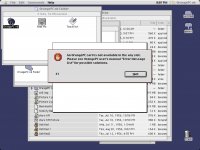
Huh? What does system profiler say?
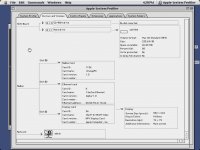
Hmmm... it's there.
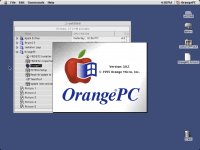
Sweet! Now I just need some windows floppies!
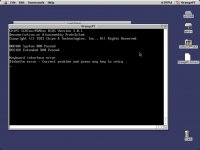
So I tried it with 200 series software and it just worked. Awesome!
Thanks everyone, here's some screenies for the trouble!
Downloaded the 300 series software
Huh? What does system profiler say?
Hmmm... it's there.
Sweet! Now I just need some windows floppies!
Congratulations and thanks for the screenshots!
My A2000 PC-card had a dual ported memory feature (Janus) enabling mouse and keyboard switching to and from the PC card with Janus software. Was like walking through tar, but working. I would guess that orangemicro had a similar solution to tell the PC the keyboard was there.
Do you plan for DOS/Windows3.1 or WIN95? I could donate Win95A with floppy, unfortunately its a German localized one.
My A2000 PC-card had a dual ported memory feature (Janus) enabling mouse and keyboard switching to and from the PC card with Janus software. Was like walking through tar, but working. I would guess that orangemicro had a similar solution to tell the PC the keyboard was there.
Do you plan for DOS/Windows3.1 or WIN95? I could donate Win95A with floppy, unfortunately its a German localized one.
Being a Mac user from day one I missed out on the salient events of the windows evolution. As a result I'm hoping to try out windows 3.1 first then move onto 95. Thanks for the offer but I have a windows savvy friend who's sourcing me some floppies!
So my next problem!
Okay. So I have a working CD drive, I can confirm that. OS 8 loads up the System 9 Disc I have and puts it on the desktop. The problem is it takes quite some time for it to spin it up.
When I hold down CMD-OPT-SHIFT-DELETE at startup it sits there until I remove my hand from the keyboard and then just boots from the Hard Drive. Is there any reason why it would be so slow to load and then refuse to boot?
Okay. So I have a working CD drive, I can confirm that. OS 8 loads up the System 9 Disc I have and puts it on the desktop. The problem is it takes quite some time for it to spin it up.
When I hold down CMD-OPT-SHIFT-DELETE at startup it sits there until I remove my hand from the keyboard and then just boots from the Hard Drive. Is there any reason why it would be so slow to load and then refuse to boot?
Isn't it CMD C?
If you're loading the system from a bootable CD, have you tried selecting it as the startup volume in the startup disk control panel?
Not on that model. But it does sound like the CD is not mounting well. Dirty optics? Bad stepper?
Yep, I'd say that there's something up with the CD-ROM drive. Try another disc or drive if you can. Also, is the OS 9 CD a real one or a burnt copy? Just wondering - I've had trouble booting old Macs from CD-Rs in the past, especially if they're more than a couple of years old.
Also, its not Command-C, its just the C key, though I've had better luck with Cmd-Shift-Option-Delete on pre-G3 Macs. With my machines, as a rule I use Command-Shift-Option-Delete on pre-G3 Macs, and C on G3 onwards Macs with an ATAPI drive.
Also, its not Command-C, its just the C key, though I've had better luck with Cmd-Shift-Option-Delete on pre-G3 Macs. With my machines, as a rule I use Command-Shift-Option-Delete on pre-G3 Macs, and C on G3 onwards Macs with an ATAPI drive.
Okay well that will have to wait...
Dunno why, but when I went home last night with an eMate wireless card in hand and about 4 hours of free time to get it networked, that was the time my new(to me) drive decided that it wanted to start being weird. At least I think its the drive. Its a 230MB drive that is pretty beat up, but it runs!
So I boot it up and it sits there. I hear the drive spin and grind. Happy mac. We get to the desktop. Desktop elements aren't loading... it sits there. I move the mouse and the wristwatch appears and the mouse freezes. No sounds. Then minutes (feels like hours) later suddenly some more disc grinding.. the mouse moves a bit. Then wristwatch again. I got to reboot.
Three finger salute, no response. Shift at startup- doesn't work.
So... DAMN. I guess my drive is going? Only thing I did recently:
Installed OrangePC software, Newton Connection Utilities, and changed my desktop picture to a file held on a network file share (could that be causing it to be weird?)
Dunno why, but when I went home last night with an eMate wireless card in hand and about 4 hours of free time to get it networked, that was the time my new(to me) drive decided that it wanted to start being weird. At least I think its the drive. Its a 230MB drive that is pretty beat up, but it runs!
So I boot it up and it sits there. I hear the drive spin and grind. Happy mac. We get to the desktop. Desktop elements aren't loading... it sits there. I move the mouse and the wristwatch appears and the mouse freezes. No sounds. Then minutes (feels like hours) later suddenly some more disc grinding.. the mouse moves a bit. Then wristwatch again. I got to reboot.
Three finger salute, no response. Shift at startup- doesn't work.
So... DAMN. I guess my drive is going? Only thing I did recently:
Installed OrangePC software, Newton Connection Utilities, and changed my desktop picture to a file held on a network file share (could that be causing it to be weird?)
tell me about scsi drives going bad, !! my powerbook 540c use to work just fine, now it sits there and makes a very odd Sweeping Squelch sound from the had drive, almost like something you would pick up with a ham radio. it does this over and over, finally i flipped the laptop upside down so i could see if i can hear the HD spin, and then it started to boot.
also , the 160mb quantum in the LC-II it is now doing the spin up and spin down thing.
also , the 160mb quantum in the LC-II it is now doing the spin up and spin down thing.
I think I'm just going to breakdown and get the cf adapter.
This kinda stuff is ridiculously frustrating and I have big plans.
This kinda stuff is ridiculously frustrating and I have big plans.
You could try a low level format and start from scratch, but it does sound like the drives are indeed gone bad. Sorry about that!
Not your fault beachy cove!
I'll try and get a SCSI adapter and get that honking big server drive you gave me going!
I'll try and get a SCSI adapter and get that honking big server drive you gave me going!
Sourcing Hard Drive adapters.
I have a SCSI Seagate Barracuda server drive with one of those quick removal connectors you see on servers.

Pretty sure its the 68pin connector shown here.
SO I am looking at one of these guys. Anything I should know before I pull the trigger?
I have a SCSI Seagate Barracuda server drive with one of those quick removal connectors you see on servers.
Pretty sure its the 68pin connector shown here.
SO I am looking at one of these guys. Anything I should know before I pull the trigger?
Quick removal was 80pin SCA mostly, I thought.
There must be adapters with or without termination. If the drive in question was the last in the chain you will rather want one with termination, unless you dont mind a 50pin tail with a terminator on it. Such tails should better be avoided, but its done that way in most old SCSI-1 external cases.
There must be adapters with or without termination. If the drive in question was the last in the chain you will rather want one with termination, unless you dont mind a 50pin tail with a terminator on it. Such tails should better be avoided, but its done that way in most old SCSI-1 external cases.
Updates.
Hit a bit or a weirdness patch recently. Don't know if its a prevailing trend of poor luck, or the hardware. Basically as it stands;
7100/66 "Arroway" - Drydocked/awaiting new orders
I have had to remove her main drive to get the power-house 80Mhz 7100 working.
7100/80 "Hadden" - Critical Care
This guy suffered drive failure and I was forced to remove the disc containing an install of MacOS8.5.1, move back to my 80MB 8.5 drive. :disapprove:
This install is unstable (I get Address errors at boot, am able to boot in safe mode), so I have had to disable some stock extensions as the mish-mash is surely causing conflicts. There are doubles of extensions for instance; Apple Built In Ethernet, and Ethernet (Built In). Then there are things like Ethertalk 2, which I'm not even sure I NEED anymore. Can anyone tell me what the bare minimum extensions I need for network communication would be?
AppleTalk is having problems connecting to my G4 Powerbook running 10.4. It never remembers to keep Ethernet as the default Appletalk connection, but even after resetting I can no longer get my server to mount. Even when presented with the dialogue box to enter my username and password I always end up being told the that "connection was severed unexpectedly."
Hit a bit or a weirdness patch recently. Don't know if its a prevailing trend of poor luck, or the hardware. Basically as it stands;
7100/66 "Arroway" - Drydocked/awaiting new orders
I have had to remove her main drive to get the power-house 80Mhz 7100 working.
7100/80 "Hadden" - Critical Care
This guy suffered drive failure and I was forced to remove the disc containing an install of MacOS8.5.1, move back to my 80MB 8.5 drive. :disapprove:
This install is unstable (I get Address errors at boot, am able to boot in safe mode), so I have had to disable some stock extensions as the mish-mash is surely causing conflicts. There are doubles of extensions for instance; Apple Built In Ethernet, and Ethernet (Built In). Then there are things like Ethertalk 2, which I'm not even sure I NEED anymore. Can anyone tell me what the bare minimum extensions I need for network communication would be?
AppleTalk is having problems connecting to my G4 Powerbook running 10.4. It never remembers to keep Ethernet as the default Appletalk connection, but even after resetting I can no longer get my server to mount. Even when presented with the dialogue box to enter my username and password I always end up being told the that "connection was severed unexpectedly."
A productive night!
The network issues went away when I used the following extension profile
I managed to succesfully install MS-DOS 6.1 on the OrangePC Card...
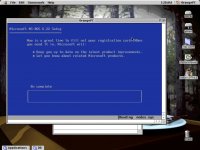
And managed to get to the Windows 3.1 Install Setup
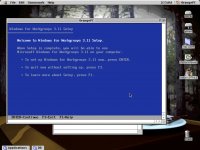
But that's where I ran into trouble with my emulated C-Drive files on my Network drive. Also I am swapping two floppies for 7 images I have. Its a bit of a hassle. Decided to leave it for another night. In the meantime I got my old copy of soundjamMP working.
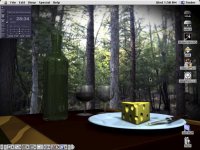
Plays M3u Streams pretty well, doesn't drop playback when its crunching away on something else, but you can feel the burden on it when you try to do too much else. Things are looking up!
The network issues went away when I used the following extension profile
Code:
Extensions
------------------------------------------------------------------
------------------------------------------------------------------
Apple Built-In Ethernet	41,145 bytes	1.0.5	comd	enbi
Apple CD/DVD Driver	103,149 bytes	1.0.1	INIT	psap
Apple Enet	379,066 bytes	2.0	ndrv	cfrg
Apple Ethernet NB	20,214 bytes	1.0.3	comd	ennb
AppleShare	456,101 bytes	3.8.1	RDEV	afpt
AppleTalk ADSP Tool	36,375 bytes	1.0.1	cbnd	ctbc
Application Switcher	87,023 bytes	1.0	appe	apsw
Contextual Menu Extension	74,773 bytes	1.0.2	INIT	cmnu
Control Strip Extension	70,244 bytes	2.0	appe	sdev
Ethernet (Built-In)	134,454 bytes	2.1	ndrv	cfrg
EtherTalk Phase 2	15,203 bytes	2.5.7	adev	et20
File Sharing Extension	194,076 bytes	7.6.2	INIT	hhgg
File Sharing Library	94,404 bytes	8.0.1	shlb	cfrg
Iomega Driver	66,824 bytes	6.0.1	INIT	gZip
Location Manager Extension	75,110 bytes	2.0	AINI	fall
Open Tpt AppleTalk Library	502,792 bytes	2.0.1	libr	OMGR
Open Tpt Internet Library	461,056 bytes	2.0.1	libr	OMGR
Open Transport Library	524,771 bytes	2.0.1	libr	OMGR
OpenTptAppleTalkLib	53,529 bytes	2.0.1	otsl	otan
OpenTptInternetLib	263,587 bytes	2.0.1	otsl	otan
OpenTransportLib	524,420 bytes	2.0.1	otsl	otan
QuickTime™	2,794,226 bytes	3.0.2	INIT	ånd6
QuickTime™ PowerPlug	2,525,156 bytes	3.0.2	INIT	ånd8
Shared Library Manager	168,325 bytes	2.0.1	INIT	OMGR
Shared Library Manager PPC	211,694 bytes	2.0.1	INIT	OMgr
SLPPlugin	147,613 bytes	1.0	shlb	nslp
SOMobjects™ for Mac OS	134,932 bytes	2.0.8	shlb	cfmg
Sound Manager	377,882 bytes	3.3	INIT	sad
XTND Power Enabler 6,582 bytes 1.0 shlb cfmgAnd managed to get to the Windows 3.1 Install Setup
But that's where I ran into trouble with my emulated C-Drive files on my Network drive. Also I am swapping two floppies for 7 images I have. Its a bit of a hassle. Decided to leave it for another night. In the meantime I got my old copy of soundjamMP working.
Plays M3u Streams pretty well, doesn't drop playback when its crunching away on something else, but you can feel the burden on it when you try to do too much else. Things are looking up!
Having more problems with my OrangePC setup.
I am trying to share a volume as a drive but when I access it on the DOS side it keeps telling me:
I read about this executable called OSHARE.EXE in the manual, but don't know what to make of it. Can some OrangePC guru give me a hand?
I really want to get win95 installed.
I am trying to share a volume as a drive but when I access it on the DOS side it keeps telling me:
Code:
C:\>D:
Invalid drive specification
I really want to get win95 installed.
Updates!
I managed to get one of the CD drives I have working on the 7100/80. It appears as though I had the wrong version of foreign access enabled, and now they pop up on the desktop no problem... we'll see if it lasts.
Still no luck getting OrangePC shared volumes to work, nor CDs so windows is still very much on hold. I really wish there was an easy way to open these Windows emulated disks. I'm hoping when I get my Aztec CF adapter I can keep a partition that will be accesible by the program... but I'm not holding my breath.
I managed to get one of the CD drives I have working on the 7100/80. It appears as though I had the wrong version of foreign access enabled, and now they pop up on the desktop no problem... we'll see if it lasts.
Still no luck getting OrangePC shared volumes to work, nor CDs so windows is still very much on hold. I really wish there was an easy way to open these Windows emulated disks. I'm hoping when I get my Aztec CF adapter I can keep a partition that will be accesible by the program... but I'm not holding my breath.
Well I got Windows 95 to install onto the emulated C-drive! I get through the installer, the setup and everything comes up asking me the date and when I provide it the whole thing falls apart due to illegal operation.
I can get to the desktop, play around with the start menu and everything but then it falls apart.
Oh well, maybe I'll try windows 3.1.
I can get to the desktop, play around with the start menu and everything but then it falls apart.
Oh well, maybe I'll try windows 3.1.
Y2K updates?
Thats what I'm wondering now too.
I will try it again one last time and enter a less post-millennial date, will report back. Getting closer though...
Also started trying out RayDream Studio. Pretty awesome application!!
I will try it again one last time and enter a less post-millennial date, will report back. Getting closer though...
Also started trying out RayDream Studio. Pretty awesome application!!
Here's a shotty of Win95 as it looks at start-up. As I mentioned before trying to do anything always leads to errors, I shall try again soon.
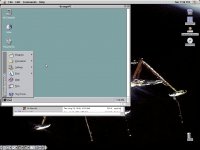
I got the card working much better now.
Using the win3.1 setup disk acquired from archive.org's time machine I was able to install the necessary drivers to get win3.1 up and running in much better shape than win95.
Programs run, things work. But its clear I will need a co-processor to do anything really exciting with it. Still, I press on!
Questions for the informed:
-I have seen discussion online of the PowerMac 7100 being overclocked. Does anyone have any links where I could find more information? Everything I find discusses the why and what, but not the how.
-Does anyone have any advice what kind of coprocessor I should be looking for? More details and photos could be provided.
Using the win3.1 setup disk acquired from archive.org's time machine I was able to install the necessary drivers to get win3.1 up and running in much better shape than win95.
Programs run, things work. But its clear I will need a co-processor to do anything really exciting with it. Still, I press on!
Questions for the informed:
-I have seen discussion online of the PowerMac 7100 being overclocked. Does anyone have any links where I could find more information? Everything I find discusses the why and what, but not the how.
-Does anyone have any advice what kind of coprocessor I should be looking for? More details and photos could be provided.