

Thread
This disk is unreadable
Hi,
I'm working on reviving an old SE/30. I've got it to the stage where I've had the motherboard recapped and am running on a SSD drive, however I have one big problem.
On occasion, and then persistently, I get an error that states "The disk is unreadable: Do you want to initialize it?" with Eject and Initialize buttons underneath. The icon shows what appears to be a Mac with an external floppy drive, with an error over the external drive. If you click Initialize, you get an error that the drive is write protected. If you click Eject the message goes away, the system works find for about 6 seconds and then it comes back up.
This error appears under both System 6 and System 7 (up to 7.5 - though you can do less in between on 7.5).
I can stop the error by running TechTools and clicking Clean on the Floppy Drive section.
I still get the error if I disconnect the SATA and boot from a floppy.
Any ideas?
The annoying thing is that sometimes the error just goes away for a period of time, but then it comes back again.
I'm working on reviving an old SE/30. I've got it to the stage where I've had the motherboard recapped and am running on a SSD drive, however I have one big problem.
On occasion, and then persistently, I get an error that states "The disk is unreadable: Do you want to initialize it?" with Eject and Initialize buttons underneath. The icon shows what appears to be a Mac with an external floppy drive, with an error over the external drive. If you click Initialize, you get an error that the drive is write protected. If you click Eject the message goes away, the system works find for about 6 seconds and then it comes back up.
This error appears under both System 6 and System 7 (up to 7.5 - though you can do less in between on 7.5).
I can stop the error by running TechTools and clicking Clean on the Floppy Drive section.
I still get the error if I disconnect the SATA and boot from a floppy.
Any ideas?
The annoying thing is that sometimes the error just goes away for a period of time, but then it comes back again.
Interestingly, if I pull the floppy drive I get two messages, one for the internal drive and one for the external drive. I assume I've got a bad floppy controller???
Sounds like someone attached a UniDisk drive to the external floppy port and it blew the controller.
Well, I haven't - and I don't think I saw this from the start - only recently.
I have attached an external SCSI CD Drive.
I have attached an external SCSI CD Drive.
Have you tried cleaning the drives heads?
No, but the issue comes up without the floppy connected.
Is the error message you're getting in response to the floppy drive or the SSD drive? How did you pull off getting a SSD in there? It sounds to me that that would cause some weird results depending on what kind a adapters/converters you're using.
I'd try a regular SCSI drive with the floppy and see if the error goes away, this way you can see if the error is truly coming from the floppy controller or if it's the SSD that's totally confusing the machine.
I'd try a regular SCSI drive with the floppy and see if the error goes away, this way you can see if the error is truly coming from the floppy controller or if it's the SSD that's totally confusing the machine.
I've tried it with a scsi drive connected and no drive connected. Get the same problem. Ironically I never have a problem booting.
I'm using a SATA to SCSI acard adapter.
I came home to it working, only for it to start again a few restarts later.
Also, have booted system 7.5 disk tools and can see the apparently connected external drive flash on and off.
I'm using a SATA to SCSI acard adapter.
I came home to it working, only for it to start again a few restarts later.
Also, have booted system 7.5 disk tools and can see the apparently connected external drive flash on and off.
Here's a screenshot.
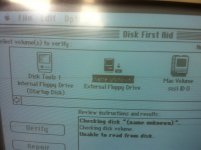
i had this issue with a Macintosh FDHD,
i poped the roms out and the floppy chip, put them into a se board,
witch fixed it of corse,
some people were saying there is a filter chip that goes bad causing this.
i poped the roms out and the floppy chip, put them into a se board,
witch fixed it of corse,
some people were saying there is a filter chip that goes bad causing this.
I have ordered a new filter chip, but I'm not sure if it's pop-out-able? Will look at the board.
Also, I've removed and reset the ROM. Not sure if the floppy controller is pop-out-able either... I very much doubt I could buy a replacement chip anyway.
Got the chip, only to discover it needs to be soldered (something I'm not comfortable doing). Also, I think there are two of these filters on the board, based on the existing chip numbers and this page: http://www.biwa.ne.jp/~shamada/fullmac/repairEng.html which indicates which chip the filter is (though none of the numbers on the chips match those on my board.
So, I either spend money on another chip and send them and the board to the electrician who changed the caps for me (which was costly) or I buy another mac, take the board out and get that re-capped (also costly).
This project has been heartbreaking at times.
Is there anyone in the UK who's good with these boards?
So, I either spend money on another chip and send them and the board to the electrician who changed the caps for me (which was costly) or I buy another mac, take the board out and get that re-capped (also costly).
This project has been heartbreaking at times.
Is there anyone in the UK who's good with these boards?
If you were in the USA, I'd volunteer.
Ah - thanks. I could post it, but it would probably cost a fortune. That said, you're probably more likely to get it working than anyone here. Love your website by the way!
I also think RP10 ( M/C 8902L ) is the problem. Is this the chip you have ?
If it''s not caused by something else, like a bad floppy drive controller, I can repair your board.
I'm located the Belgium. PM me if you're interested.
I've won a working SE/30 on eBay so am going to abandon this board and get another one recapped. While I'm at it I might get the filters changed, unless there's a reason not to. Seems to make sense to get as much fixed as possible preemptively. I'm justifying the purchase using the fact it'll give me a bunch of spares for the future.
Thanks for all your help! I hope to start a post once I'm done with the refurb, then the fun starts - programming. I've ordered some books from Amazon and am hoping the C writing will come back to me (I'm more C# these days). I had high hopes for a SMB client, but having looked at the protocol I think there may be a reason there's nothing existing.
Thanks for all your help! I hope to start a post once I'm done with the refurb, then the fun starts - programming. I've ordered some books from Amazon and am hoping the C writing will come back to me (I'm more C# these days). I had high hopes for a SMB client, but having looked at the protocol I think there may be a reason there's nothing existing.
There is one individual on this board who is someone familiar with the EE principles and has the schematics for the SE/30 and probably could zero down on the culprit(s) fairly quickly. I'm sure he can find this thread if the time is right for him, he's overloaded right now.
Given the rate of death on these machines, it's in your interest to try to repair the board, if it is feasible. Any good board without capacitor or battery damage that just has a minor issue should be a candidate for repair.
Given the rate of death on these machines, it's in your interest to try to repair the board, if it is feasible. Any good board without capacitor or battery damage that just has a minor issue should be a candidate for repair.
I guess there's no reason why I can't get the filters changed on the other board too and hope that works. Here they're only a few pounds.
The problem is if it's the floppy controller - they're not something you can get anymore.
The problem is if it's the floppy controller - they're not something you can get anymore.
Most of the time the Bourns filter of the Floppy drive goes bad due to a bad FDD cable/drive or a loose connection.
I killed one a while ago on an SE board because the cable of the floppy drive was not plugged in 100% and so not all pins made connection.
I got the "Disk unreadable, Eject/Initialize" error upon next boot but it was already too late: the bourns filter of the FDD was gone.
Changing the filters together with the capacitors in not necessary. You can test the Bourns filters and if they are still good, leave them as in the end they are not exactly cheap. They don't go bad without a cause.
I killed one a while ago on an SE board because the cable of the floppy drive was not plugged in 100% and so not all pins made connection.
I got the "Disk unreadable, Eject/Initialize" error upon next boot but it was already too late: the bourns filter of the FDD was gone.
Changing the filters together with the capacitors in not necessary. You can test the Bourns filters and if they are still good, leave them as in the end they are not exactly cheap. They don't go bad without a cause.
Thanks for that. I'll get the electrician to check them for me - I've got the wiring diagram for them. I was lead to believe they can expire like caps? I think we're lucky here in the UK as RS stock the filters for £3ish each, and we have an account with them at work where we get a discount and I can save on the delivery costs.
One thing I can say on this, if the drive is bad, you can swap it out for one out of pretty much any other Mac model with a floppy SuperDrive. The only drawbacks are that the newer models used floppy drives with manual injection, plus you might have to modify the front plastic bezel if the slot for the disk doesn't line up perfectly.
I do have a copy of the entire SE/30 schematics, but it's on the server at home. Let me get there and I'll post an update of my trace.
73s de Phreakout. :rambo:
I do have a copy of the entire SE/30 schematics, but it's on the server at home. Let me get there and I'll post an update of my trace.
73s de Phreakout. :rambo:
I haven't tried another floppy, but I believe the one I have is actually from a Classic II as the one that came with the SE/30 didn't work (or I didn't trust it).
Thanks guys for all your help.
Thanks guys for all your help.
All Superdrives in the Compact Mac series, from an SE FDHD to Color Classic, are identical.
Once the Bourns RP is gone, changing the floppy drive is too late...
I would buy a few spare Bourns filters as if the floppy drive or cable is the problem, the new chip will be gone almost instantly.
It's probably a good idea to solder an IC socket on the PCB for the Bourns RP so it can be easily exchanged.
I can't work out which IC socket I would need. The chip is here: http://uk.rs-online.com/web/p/rc-network-capacitors/6909903
Any ideas?
Any ideas?
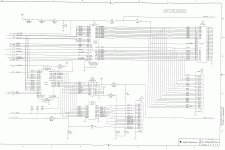
Okay. Some of this may be a bit backwards, but I was able to trace through to what parts make up the floppy portion of the SE/30. Here it goes:
- J6 (external 19-pin connector) links up to F2 (fuse, 1A), C51 (capacitor, 0.01 mF? uF?), C52 (capacitor, same as C51), L16 (inductor, unknown value) and L17 (inductor, unknown value).
- J6 also links up with R30 (resistor, 22 K-ohm? 22-ohm?), C67 (33 pF), RP10 (Bourns network filter), J8 (internal floppy connector), L22 (inductor, unknown value), UJ11 (SWIM chip), L21 (inductor, unknown value), UI12 (53C80 SCSI Controller Chip), L8 through L10 (inductors, unknown value), C47 (capacitor, same value as C51), D3 (diode, 1N4001), F3 (fuse, 1A), J4 (External SCSI connector) and J5 (Internal SCSI connector).
I've included a page of the schematic. I hope that's okay with the mods. If not feel free to omit. It was posted a while back to this site, so I figured it is safe to repost.
73s de Phreakout. :rambo:
- J6 (external 19-pin connector) links up to F2 (fuse, 1A), C51 (capacitor, 0.01 mF? uF?), C52 (capacitor, same as C51), L16 (inductor, unknown value) and L17 (inductor, unknown value).
- J6 also links up with R30 (resistor, 22 K-ohm? 22-ohm?), C67 (33 pF), RP10 (Bourns network filter), J8 (internal floppy connector), L22 (inductor, unknown value), UJ11 (SWIM chip), L21 (inductor, unknown value), UI12 (53C80 SCSI Controller Chip), L8 through L10 (inductors, unknown value), C47 (capacitor, same value as C51), D3 (diode, 1N4001), F3 (fuse, 1A), J4 (External SCSI connector) and J5 (Internal SCSI connector).
I've included a page of the schematic. I hope that's okay with the mods. If not feel free to omit. It was posted a while back to this site, so I figured it is safe to repost.
73s de Phreakout. :rambo:
ive seen this on several occasions, the bourns network matching filter is the culprit usually. the SWIM rarely goes bad, you would literally have to do something WAY wrong to fry it.
Not having seen the actual parts, this looks like an ordinary DIP socket to me.
phreakout: That's amazing. I can pass that on to the electrician so he can trace he problem. Thanks!
techknight: That's very good news - it means I'm not wasting my time. Excellent.
Dennis Nedry: The RS website has so many DIP sockets and to my untrained eye I couldn't see one that looked right. (P.S. Like the website)
Once I get the SE30 I won I'll get these bits off to the electrician. He should be able to work out the IC socket.
Ant
techknight: That's very good news - it means I'm not wasting my time. Excellent.
Dennis Nedry: The RS website has so many DIP sockets and to my untrained eye I couldn't see one that looked right. (P.S. Like the website)
Once I get the SE30 I won I'll get these bits off to the electrician. He should be able to work out the IC socket.
Ant
phreakout: Just noticed the floppy connects to the SCSI controller? I wonder why?