

Thread
IIcx Power Woes
So, I've been doing rounds with this Iicx I've got. I know there are a ton of tips on IIcis with capacitor and Astec power supply problems but this IIcx has been fully recapped and has a GE power supply. I've opened the power supply and don't see any physical damage to any components. The old capacitors didn't appear to do any damage to the logic board when they leaked.
When I plug it in, there's no sign of life. No clicks, pops, blinks — nothing. If I leave it plugged in for 15 minutes or so, it will start on it's own. When I select Shut Down, it will complete the shut down, then immediately restart. It has the exact same behavior when I plug in the power supply from my PM 7100. This seems in line with the problems I read about with IIcis and Astec power supplies.
Ideas?
When I plug it in, there's no sign of life. No clicks, pops, blinks — nothing. If I leave it plugged in for 15 minutes or so, it will start on it's own. When I select Shut Down, it will complete the shut down, then immediately restart. It has the exact same behavior when I plug in the power supply from my PM 7100. This seems in line with the problems I read about with IIcis and Astec power supplies.
Ideas?
WAGs:
When you say "turn it on," how are you doing so, power strip KBD or power switch on the back?
From the behavior, it says "mechanical" to me, Soft Power circuit/thermal expansion related.
Swap the KBDs and see if the problem moves?
Check the MoBo for a cold solder joint gone bad on the connector or soft power circuitry?
When you say "turn it on," how are you doing so, power strip KBD or power switch on the back?
From the behavior, it says "mechanical" to me, Soft Power circuit/thermal expansion related.
Swap the KBDs and see if the problem moves?
Check the MoBo for a cold solder joint gone bad on the connector or soft power circuitry?
I'm attempting power on from both the keyboard and the physical switch in the back.
I can look for cold joints but I am doubtful it would be the cause. Once it has been plugged in a while and started up, it acts like the button is always on. It is pretty much the same as if the power button was in the locked position.
I can look for cold joints but I am doubtful it would be the cause. Once it has been plugged in a while and started up, it acts like the button is always on. It is pretty much the same as if the power button was in the locked position.
PRAM battery's good, right? That is a weird one, for sure.
-J
-J
Maybe the switch is bad?
I am not very educated in these matters, but perhaps you can remove the switch and see what happens.
c
I'm thinking, in line with Trash80toHP_Mini, that it could be a cracked track. I'm thinking of a connection around the power button connection that's open when it's cold, but then warms up and then closes, staying closed permenantly.
Did you re-cap the power supply too? The Aztecs may be harder on the capacitors, but the other brands aren't immune to trouble. Capacitor failure in switchmode power supplies is extremely common, and ESR typically drops as the caps warm up. It's the usual cause of equipment that's cranky when cold but improves gradually as it warms up.
I'm watching this thread closely as the one I got turns on but doesn't chime and stays on.
Since you've tried a (known working?) 7100 power supply and it does the same thing, I doubt the power supply is the problem. I would have to guess something is messed up in the power circuitry on the logic board. Here's a schematic from Gamba's site--
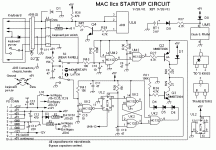
Unfortunately trying to read a schematic like that is complete gobbledygook to me--maybe someone with more electronics knowledge might have an idea of where to look...
If you still want to prove the power supply is not the problem, there's a way to "jump start" it similar to what you can do on modern ATX power supplies. It won't work all the way because it needs a load attached to work correctly, but it should at least confirm that the power supply works. You can do it by shorting the /PFW and the +5V trickle pins together with a paperclip or something. Pins 9 and 10 on the power supply. When I do this on my working IIci power supplies, I hear a relay click (or something) and the fan starts spinning slowly and silently. The power supply won't start up all the way and the output voltages won't be correct (due to no load being attached, I believe) but the spinning fan should at least confirm that the power supply's startup circuit works...here's a diagram I threw together. I *think* it's right according to pinouts I found online and my continuity tester, but I definitely tested shorting pin 9 and 10 as indicated on the picture.
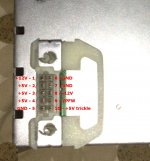
If that works, then I would almost certainly say it's something on the logic board...also, I can't speak for the IIcx, but the IIci doesn't need a working PRAM battery to boot.
Unfortunately trying to read a schematic like that is complete gobbledygook to me--maybe someone with more electronics knowledge might have an idea of where to look...
If you still want to prove the power supply is not the problem, there's a way to "jump start" it similar to what you can do on modern ATX power supplies. It won't work all the way because it needs a load attached to work correctly, but it should at least confirm that the power supply works. You can do it by shorting the /PFW and the +5V trickle pins together with a paperclip or something. Pins 9 and 10 on the power supply. When I do this on my working IIci power supplies, I hear a relay click (or something) and the fan starts spinning slowly and silently. The power supply won't start up all the way and the output voltages won't be correct (due to no load being attached, I believe) but the spinning fan should at least confirm that the power supply's startup circuit works...here's a diagram I threw together. I *think* it's right according to pinouts I found online and my continuity tester, but I definitely tested shorting pin 9 and 10 as indicated on the picture.
If that works, then I would almost certainly say it's something on the logic board...also, I can't speak for the IIcx, but the IIci doesn't need a working PRAM battery to boot.
Yep. It'll just sometimes take a little work to get going - the replacement IIci board that's in my main machine did take a few tries to get going with the dead PRAM battery installed. Strangely enough, that dead PRAM battery had enough juice to keep the original manufacture date intact. TechTool reports 4/22/90 as the manufacture date on my ci.
-J
-J
I doubt the power switch is at fault, but if you suspect it, measure it with an ohm meter. It's a double pole switch, both sets of contacts should have continuity when the button is pressed and open circuit when released.
You could always upgrade the Power Supply to an ATX. It's really straight forward (as in, just match the colors of the wires). I couldn't get the soft-power modification to work, but that's OK. My IIci now boots like an LC. 
After uniserver told me to go back and recheck all the traces in the soft power circuit one more tim, I saw it - a broken trace. I tested it with the meter and sure enough, it was bad. After a quick repair between vias (and putting caps C15 and C16 back on), it is working perfectly:
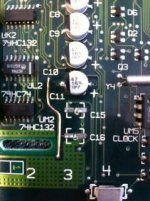
http://i46.tinypic.com/35mif7m.jpg
Time to seal it with nail polish and button it back up now.
http://i46.tinypic.com/35mif7m.jpg
Time to seal it with nail polish and button it back up now.
I am working on this IIci, I got it for free but the catch was, he had previously tried to recap it, it was bad, lifted pads, burned spots on the pcb, etc, I finally got it working. Traced the traces lol. sometimes you just gotta be patient.
I was having soft power issues my self with it, i ended up replacing the big round 470uf 16v caps and
all started working fine. Those caps looked just fine too.
Also i had a LC-II recapped, and after it didn't boot or anything…
i got frustrated… took a break came back… did some close inspection,
saw a tiny solder speck bridging 2 pins on the VLSI chip… picked it out with my dental pick.
and boom it booted and works fine. Its the little things that can get ya.
Frustration can get the best of you. and having the right tools for the job just stacks the cards for success in your favor.
even a experienced cap-tech can hit a wall, sometimes.
Heck, Sometimes a doctor needs a doctor
I was having soft power issues my self with it, i ended up replacing the big round 470uf 16v caps and
all started working fine. Those caps looked just fine too.
Also i had a LC-II recapped, and after it didn't boot or anything…
i got frustrated… took a break came back… did some close inspection,
saw a tiny solder speck bridging 2 pins on the VLSI chip… picked it out with my dental pick.
and boom it booted and works fine. Its the little things that can get ya.
Frustration can get the best of you. and having the right tools for the job just stacks the cards for success in your favor.
even a experienced cap-tech can hit a wall, sometimes.
Heck, Sometimes a doctor needs a doctor
This has been an incredibly helpful thread. I have been working through my own IIcx power issues, after I bought one on eBay a while back for the nubus cards inside and I thought it would be nice to get running. So far it looks like the power supply is good, I recapped it, replaced the PRAM battery, but it is still totally silent.
I'm still looking for that corroded or shorted something - just wanted to thank everyone for all the great ideas and info.
I'm still looking for that corroded or shorted something - just wanted to thank everyone for all the great ideas and info.
look for eaten up traces, also try to unplug the psu, then turn the power switch so it sticks in and stays fully engaged, then plug it in and wait, maybe after 30 seconds it will just come on .
worst case scenario you can short one of the pins on the power connector that will make it go on, per dougg3's graphic.
worst case scenario you can short one of the pins on the power connector that will make it go on, per dougg3's graphic.
Hi folks, just a quick reminder - whenever possible, it would be great if you could upload images to these threads as local files. Don't worry about space, we have plenty. This helps us not to lose relevant images in old threads.
I've localized a couple of images above, as noted in the edit comments.
Cheers.
I've localized a couple of images above, as noted in the edit comments.
Cheers.
Where'd you get that trick? The patch wires I've seen appear to have been tacked at the corners where the follow the paths of the subsurface traces.
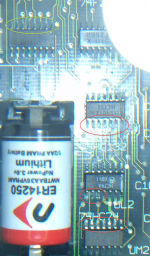
I still haven't found any bad traces, there are some mildly (surface) corroded pins on the chips (see pic, sorry about the flash,this was the best one - circled red ones are bad, green one is good) is there any way to get rid of the corrosion, do I need to re-solder these? I did clean the board when recapping, so there is no residue.
The power switch does not stay in without mechanically holding it in and does not power on the computer, even when left on for a good while. (I don't remember if that is normal behavior or not, was this switch supposed to actually 'catch' when pushed in and release when pushed again, or was the only way to keep it pushed in, to align the button so that it was in the 'latched' (vertical) position?
Shorting PSU pins 9/10 with the PSU plugged in and the board supported does work to power it on, and it appeared that the floppy drive was reading, but it did not chime, when I tried this. The power switch would not shut it off either (the only way was to unplug it).
The power switch does not stay in without mechanically holding it in and does not power on the computer, even when left on for a good while. (I don't remember if that is normal behavior or not, was this switch supposed to actually 'catch' when pushed in and release when pushed again, or was the only way to keep it pushed in, to align the button so that it was in the 'latched' (vertical) position?
Shorting PSU pins 9/10 with the PSU plugged in and the board supported does work to power it on, and it appeared that the floppy drive was reading, but it did not chime, when I tried this. The power switch would not shut it off either (the only way was to unplug it).
also have you tested the power supply to be good?
Yes, the trickle charge tested correctly, when plugged in and the PSU pins all test to the correct voltages, once it is 'jumped' into starting. The fan runs too.
double check this cap and the traces,
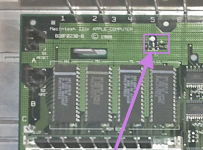
and check for debris and solder bridges around the legs of the rom chips and the CPU legs and other chip legs, take out the ram and closely inspect the slots for debris.
also pull the logic board out and inspect the bottom, make sure you didn't accidentally pop off any surface mount components.
and check for debris and solder bridges around the legs of the rom chips and the CPU legs and other chip legs, take out the ram and closely inspect the slots for debris.
also pull the logic board out and inspect the bottom, make sure you didn't accidentally pop off any surface mount components.
1) Double check this cap and the traces - traces appear intact, re-soldered cap to makes sure it was ok
2) Check for debris and solder bridges around the legs of the rom chips, CPU legs and other chip legs - there are a few chips that had some corrosion on the legs, I re-flowed the solder in those locations
3) Take out the ram and closely inspect the slots for debris - I saw nothing under the magnifying glass...
4) Pull the logic board out and inspect the bottom, making sure you didn't accidentally pop off any surface mount components. - checked, only one appears to not be installed (C17) on the bottom of the board, could someone confirm whether this is supposed to be there?
Looked at every trace across the board and did not see anything suspicious. Also checked the fuses - all ok
I will continue looking...
2) Check for debris and solder bridges around the legs of the rom chips, CPU legs and other chip legs - there are a few chips that had some corrosion on the legs, I re-flowed the solder in those locations
3) Take out the ram and closely inspect the slots for debris - I saw nothing under the magnifying glass...
4) Pull the logic board out and inspect the bottom, making sure you didn't accidentally pop off any surface mount components. - checked, only one appears to not be installed (C17) on the bottom of the board, could someone confirm whether this is supposed to be there?
Looked at every trace across the board and did not see anything suspicious. Also checked the fuses - all ok
I will continue looking...
question, did you change the big 470uf caps and the 220uf one?
those are very important, my CX and both of my ci's needed those caps to be changed in order for them to work properly,
C17 is not installed on my board, I just checked.
those are very important, my CX and both of my ci's needed those caps to be changed in order for them to work properly,
C17 is not installed on my board, I just checked.
Thanks, uniserver, I appreciate your other suggestions and that you took the time to check your board for the absence of C17. I did not replace those capacitors, when I originally recapped the board, but when I was going through this thread and I read your previous message about replacing those 4 larger caps (mine did not seem bad either), I immediately changed those out on mine as well, thinking that was an issue for me as well. I am still re-checking traces and trying to understand the startup circuit that was posted earlier.
my roms are soldered, would you happen to have a ROM simm from a SE/30
you can (disconnect the rom jumper first) right near the soldered roms, pop the se/30 rom in the rom simm slot,
and try it, not sure if it will work, but its worth a shot.
I have herd of peoples rom's going bad, not often but on this forum all you hear about usually is the strange odd issues people have.
sometimes people dishwasher their logic board and it makes it worse because they did not try it off completely,
then they power it up , and that is when some chips get cooked. or the water causes some really bad rust under bad caps or more corrosion.
or like you said the startup circuit maybe one of those chips cooked, if you you carefully follow some of the traces from some of the rom chips you will see they go all they way(under all the ram slots) over to the power up circuit (noticed this last night)
you can (disconnect the rom jumper first) right near the soldered roms, pop the se/30 rom in the rom simm slot,
and try it, not sure if it will work, but its worth a shot.
I have herd of peoples rom's going bad, not often but on this forum all you hear about usually is the strange odd issues people have.
sometimes people dishwasher their logic board and it makes it worse because they did not try it off completely,
then they power it up , and that is when some chips get cooked. or the water causes some really bad rust under bad caps or more corrosion.
or like you said the startup circuit maybe one of those chips cooked, if you you carefully follow some of the traces from some of the rom chips you will see they go all they way(under all the ram slots) over to the power up circuit (noticed this last night)
In going through the startup circuits with a continuity tester, I found one of the traces that was bad (it looks fine visually but does not conduct). It comes from R42 on the back of the board through to the front just above F3 and then along the pos. side of the row of capacitors, ending just above C9... I soldered on a jumper wire and now it powers up without any buttons (shortly after you plug it in, it just comes up), still no chime and no boot, but I am going to take it as progress. I'll need to continue following the traces, maybe there is one more that is messed up in the switch circuit.
I did not do the dishwasher thing (I know there are those that swear by it, but I like controlling what gets washed), but I did wash it and hopefully it was fully dried out before I tried to start it, but that was some time ago.
I have an SE/30 that needs analog board work, so I will steal the ROM from that and try it out. I assume that the jumper that you referred to is W1, correct?
Thanks again for your help and suggestions.
I did not do the dishwasher thing (I know there are those that swear by it, but I like controlling what gets washed), but I did wash it and hopefully it was fully dried out before I tried to start it, but that was some time ago.
I have an SE/30 that needs analog board work, so I will steal the ROM from that and try it out. I assume that the jumper that you referred to is W1, correct?
Thanks again for your help and suggestions.
yeah i think so.

I tried the ROM swap trick and it powered up the same - still no boot, chime etc. I have checked all the traces that were listed in the Gamba IIcx startup circuit, and except for the one trace that I fixed, the rest of them checked out OK (for continuity). I appreciate everyone's time and comments (especially Uniserver's). I did make some progress and although I don't have a booting computer yet, I have a better starting point for the next time I take it up.
Thanks!
Thanks!
what are you using for a video card and ram?
how many sticks of ram are you using? what bank?> a or b? or both?
try booting it up with out the video card in.
and just just4 1mb simms in bank a,
listen for bong.
how many sticks of ram are you using? what bank?> a or b? or both?
try booting it up with out the video card in.
and just just4 1mb simms in bank a,
listen for bong.