

Thread
Just acquired a Macintosh SE. Some questions I have...
Ok. I've removed the drive and took a closer look at it. I've disconnected the circuit board and noticed something:
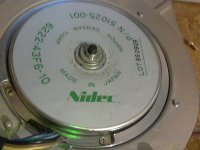
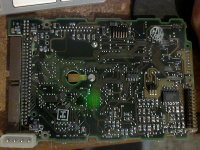
There is some "debris" near the center axle area that contacts a copper fin on the circuit board. Here's a photo of the underside of the circuit board:
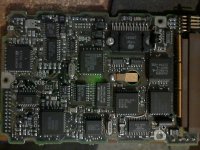
And here's a photo of the top IC. If it has capacitors, it doesn't appear to be using the type prone to leaking:
My main concern is that debris on the center axle. (the whole "disc" area rotates, so it rotates with the platters.
Maybe it's a lubrication issue?
EDIT:
Ok I powered it up with an external power adapter (It came with my IDE/SATA to USB adapter. So it was useful in this case. ).
).
I noticed the LED flashed 8 times. I found this awhile back:
http://stason.org/TULARC/pc/hard-drives-hdd/seagate/ST157N-0-49MB-3-5-HH-SCSI1-SE.html
Flashes -Failures codes
1 | Microprocessor/Internal Memory Test
2 | Microprocessor ROM Checksum Test
3 |Controller Chip Test
4 |Controller Program RAM Test
5 |Data Buffer RAM Test
6 |Spindle Speed Test
...| If the drive is unable to reach and maintain correct
...| spindle speed
8 |Read Operating System Microcode From Drive
...| If the controller is unable to read the operating system
...| from the drive
9 |Read Operating System Microcode From Drive
...| If the controller reads the operating system records,
...| but determines that they are invalid.
So the drive is telling me the error for number 8. "Read Operating System Microcode From Drive - If the controller is unable to read the operating system from the drive"
Not sure what this means exactly. Perhaps a LFF could fix it. Won't know till I get a mouse though.
That rules out motor sticking though as it would have given me error 6 instead if the spindle couldn't get up to speed. (and in that instance I would believe it would power down on that error)
Edit2: Powered it up a second time and it doesn't display a blinking LED code that time. Seems hit and miss. (mac still didn't boot from it though). I left it on and will see what Lido says this time.
There is some "debris" near the center axle area that contacts a copper fin on the circuit board. Here's a photo of the underside of the circuit board:
And here's a photo of the top IC. If it has capacitors, it doesn't appear to be using the type prone to leaking:
My main concern is that debris on the center axle. (the whole "disc" area rotates, so it rotates with the platters.
Maybe it's a lubrication issue?
EDIT:
Ok I powered it up with an external power adapter (It came with my IDE/SATA to USB adapter. So it was useful in this case.
).I noticed the LED flashed 8 times. I found this awhile back:
http://stason.org/TULARC/pc/hard-drives-hdd/seagate/ST157N-0-49MB-3-5-HH-SCSI1-SE.html
Flashes -Failures codes
1 | Microprocessor/Internal Memory Test
2 | Microprocessor ROM Checksum Test
3 |Controller Chip Test
4 |Controller Program RAM Test
5 |Data Buffer RAM Test
6 |Spindle Speed Test
...| If the drive is unable to reach and maintain correct
...| spindle speed
8 |Read Operating System Microcode From Drive
...| If the controller is unable to read the operating system
...| from the drive
9 |Read Operating System Microcode From Drive
...| If the controller reads the operating system records,
...| but determines that they are invalid.
So the drive is telling me the error for number 8. "Read Operating System Microcode From Drive - If the controller is unable to read the operating system from the drive"
Not sure what this means exactly. Perhaps a LFF could fix it. Won't know till I get a mouse though.
That rules out motor sticking though as it would have given me error 6 instead if the spindle couldn't get up to speed. (and in that instance I would believe it would power down on that error)
Edit2: Powered it up a second time and it doesn't display a blinking LED code that time. Seems hit and miss. (mac still didn't boot from it though). I left it on and will see what Lido says this time.
That means the drive's controller couldnt not read the system area track, or whats known as the negative cylinder/tracks. This is an array of tracks behind Track 0. tells the drive the G-List, P-List, geometry, and other low level information required.
It appears the ST-157N which I believe you have? is an early voice-coil actuated drive. Chances are, the heads crashed long ago.
It appears the ST-157N which I believe you have? is an early voice-coil actuated drive. Chances are, the heads crashed long ago.
I have two dead microdrive 8425s here. trust me, I know.
Yep that's the exact model. Although this one is a bit peculier. It has a black face plate on the front with LED. (so there is no connector to attach the SE's LED cord to. ).
It looks like this particular drive was meant to be in a server rack of some kind perhaps. Odd that it found it's way into an SE/30.
I've seen identical models on eBay that don't have this faceplate.
Damn, sounds like something that can't be fixed then. Data is gone for good it looks like.
).It looks like this particular drive was meant to be in a server rack of some kind perhaps. Odd that it found it's way into an SE/30.
I've seen identical models on eBay that don't have this faceplate.
Damn, sounds like something that can't be fixed then. Data is gone for good it looks like.
Without a working donor drive to borrow a headstack from? Yup...
Hi Apache Thunder,
Nice machine. I've still got the SE I bought as a teenager back in 1989, and bought an SE/30 along with it a while ago. On eBay they're expensive, but on local (online) markets they're still affordable; the going rate in my part of Europe (Netherlands/Germany) is around 75-100 euros for a good one. My own SE/30, a fine recapped specimen, set me back 75 euros. The keyboard wasn't contemporary (same one as yours, you might want to replace that), so I got an Extended Keyboard (M0115 "Saratoga") for another fifty. I guess shipping from Europe to the US would be expensive, but seeing the prices on eBay it might even be worth it.
Nice machine. I've still got the SE I bought as a teenager back in 1989, and bought an SE/30 along with it a while ago. On eBay they're expensive, but on local (online) markets they're still affordable; the going rate in my part of Europe (Netherlands/Germany) is around 75-100 euros for a good one. My own SE/30, a fine recapped specimen, set me back 75 euros. The keyboard wasn't contemporary (same one as yours, you might want to replace that), so I got an Extended Keyboard (M0115 "Saratoga") for another fifty. I guess shipping from Europe to the US would be expensive, but seeing the prices on eBay it might even be worth it.
Ok, my Macintosh SE is up and running now with a mouse, hard-drive, and a scsi zip drive I snagged off eBay for a cool $14 shipped. Aside from not having a PRAM battery for the thing yet (I have removed the Maxwell time bomb a few weeks ago. ), there are no issues I'm having. I created a thread in the conquests section that shows off this SE. If I encounter any issues specific to this machine, I will post again here.
By the way, anyone know of a way of converting a wav file to a snd file? (the sound files MacOS uses). I want to try and put in a custom beep sound for MacOS. As I understand it, the beep sounds in the sound control panel are stored in the System file. I can easily drop new ones in, but I need to find a way of generating new ones.
The format is pretty old and none of the audio converters I have have any idea how to convert to such an obsolete sound format. Perhaps some basic audio program for MacOS 7 that will run on my SE might be able to do it. I can convert the file locally on the SE if I have to.
The audio file I want to use is really short like the other ones, so I don't expect any problems using it on this machine. The SE doesn't have the Apple Sound Chip like the 030 based SE/30, so that might limit my choices of audio playback conversion if I were to try it locally on the SE.
), there are no issues I'm having. I created a thread in the conquests section that shows off this SE. If I encounter any issues specific to this machine, I will post again here. By the way, anyone know of a way of converting a wav file to a snd file? (the sound files MacOS uses). I want to try and put in a custom beep sound for MacOS. As I understand it, the beep sounds in the sound control panel are stored in the System file. I can easily drop new ones in, but I need to find a way of generating new ones.
The format is pretty old and none of the audio converters I have have any idea how to convert to such an obsolete sound format. Perhaps some basic audio program for MacOS 7 that will run on my SE might be able to do it. I can convert the file locally on the SE if I have to.
The audio file I want to use is really short like the other ones, so I don't expect any problems using it on this machine. The SE doesn't have the Apple Sound Chip like the 030 based SE/30, so that might limit my choices of audio playback conversion if I were to try it locally on the SE.
If you can get ahold of QuickTime's Movie Player 2.5, that I think will convert stuff to .snd files (I don't know about .wav to .snd specifically, but I think it does .aif/.aiff to .snd (AIFF is Apple's equivalent to Microsoft's WAV).
c
c
lol. I did not think to check the Quicktime software. I ran MoviePlayer (it would likely not run on an SE do to lack of color quickdraw) and it does support wave files. But I used AIFF anyways as I had already converted the file to that. Looks like I now have a "System 7 Sound" which is exactly what I need.
Saving SND files involves using the export menu instead of the save as menu.
Saving SND files involves using the export menu instead of the save as menu.
Ok came too late to edit so sorry about the double post. Finally got my System 7 sound to work on the SE. Turns out the SE was being picky. It has to be 8-bit 22khz Mono and I had to copy over a "alis" resource from an existing system sound using ResEdit. (though I'm not sure if that was actually needed or not, but did so anyways since I noticed the ones QuickTime made didn't have it).
I'm not sure if it had to be mono or not, but just did it based on the other sounds System 7.1.1 came with. Initially I was generating 16-bit wave files and that's a no no for an SE apparently.
After that my SE played the sound perfectly.
QuickTime Movie Player does indeed accept wave files. So just grab a wave file and give it "WAVE" file type and "TVOD" as the creator and it will see the wave file correctly.
I'm not sure if it had to be mono or not, but just did it based on the other sounds System 7.1.1 came with. Initially I was generating 16-bit wave files and that's a no no for an SE apparently.
After that my SE played the sound perfectly.
QuickTime Movie Player does indeed accept wave files. So just grab a wave file and give it "WAVE" file type and "TVOD" as the creator and it will see the wave file correctly.
Noticed this from a recent eBay listing of a Macintosh SE:
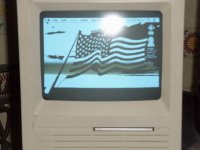
It appears to have a "wallpaper" set. However "Desktop Patterns" is the only Control Panel I know that can place graphics on the background (beyond basic patterns from the General Settings control panel) and it won't work on an SE (I tried. That and it can really only do tiling of small images. Nothing like the single large image being displayed on that photo)
But appearently there is other ways of doing this as that SE has a graphic in the background. Perhaps a special application, extension, or control panel can do this. It would be cool to have a background for my desktop. Any ideas on what was used on that SE to do that? (The seller doesn't appear to be aware of how either as he has no keyboard/mouse and can't do anything but boot it up)
All I can easily tell is that this SE is a SuperDrive like mine, but has two floppies instead of a hard-drive and floppy. The OS appears to be MacOS 7+ as the Finder Help icon is visible on the top right corner.
There is however an extra arrow icon beside the Apple Menu and that appears to be something added by a third party app. Can't be too complicated all that fits on a single floppy.
EDIT: Another interesting bit is that he appears to have a unit with 2 floppies and a hard-drive. I just noticed he only has one floppy inserted and there's two drive icons on the desktop. That and the floppy he inserted was for a "Crash and Burn" game which I doubt would be a bootable disk. He didn't mention having any external devices.
It's got that clock control panel added and I can already tell it probably still has the original PRAM battery as one with a missing/dead battery will always boot up showing Friday. I forget the exact time and date it resets to, but that date is always on a Friday.
It appears to have a "wallpaper" set. However "Desktop Patterns" is the only Control Panel I know that can place graphics on the background (beyond basic patterns from the General Settings control panel) and it won't work on an SE (I tried. That and it can really only do tiling of small images. Nothing like the single large image being displayed on that photo)
But appearently there is other ways of doing this as that SE has a graphic in the background. Perhaps a special application, extension, or control panel can do this. It would be cool to have a background for my desktop. Any ideas on what was used on that SE to do that? (The seller doesn't appear to be aware of how either as he has no keyboard/mouse and can't do anything but boot it up)
All I can easily tell is that this SE is a SuperDrive like mine, but has two floppies instead of a hard-drive and floppy. The OS appears to be MacOS 7+ as the Finder Help icon is visible on the top right corner.
There is however an extra arrow icon beside the Apple Menu and that appears to be something added by a third party app. Can't be too complicated all that fits on a single floppy.
EDIT: Another interesting bit is that he appears to have a unit with 2 floppies and a hard-drive. I just noticed he only has one floppy inserted and there's two drive icons on the desktop. That and the floppy he inserted was for a "Crash and Burn" game which I doubt would be a bootable disk. He didn't mention having any external devices.
It's got that clock control panel added and I can already tell it probably still has the original PRAM battery as one with a missing/dead battery will always boot up showing Friday. I forget the exact time and date it resets to, but that date is always on a Friday.
For system 6/7 there is DeskPicture. I used to have a link, can't find it at the moment...
Thanks! I ended up finding it on some site called MacGUI. There was two versions I found. One was an extension. Didn't really get that to work. But the second one went with the same name but with "v4.02" specified as it's version. Seems to be a seperate program from the other one I found. This one was a Control Panel (only available as shareware it seems. So I have to put up with a nag dialog box once a month on bootup. I suppose this is more then acceptable. I've seen other shareware have much worse nag screen policies and what not, so I won't complain. ).
It seems to take up 200k of ram though. But for the moment I still have 2.4MB of free ram so for now not an issue. (It does have an option of loading the image from disk instead of ram, so the picture I set only takes up 1K of additional ram).
I will try and find a more suitable wallpaper for it as I just used my avatar as a test.
Also this did not result in the addition of an arror icon near the Apple Menu, so somethine else is adding that in that photo from the seller. Not really something I'm interested in though just noting that the arrow seems to be something else unrelated to the wallpaper program.
).It seems to take up 200k of ram though. But for the moment I still have 2.4MB of free ram so for now not an issue. (It does have an option of loading the image from disk instead of ram, so the picture I set only takes up 1K of additional ram).
I will try and find a more suitable wallpaper for it as I just used my avatar as a test.
Also this did not result in the addition of an arror icon near the Apple Menu, so somethine else is adding that in that photo from the seller. Not really something I'm interested in though just noting that the arrow seems to be something else unrelated to the wallpaper program.
In the original picture of your Mac SE you have a good picture of the ball lightning produced in it, does the Mac happen to come from Area 51 ?
You may already know there is a hidden picture of the Mac SE development team in the SE ROM, and there is some way of activating (displaying) that picture during startup.
Vis-a-vis the 200K, a well-behaved application should let you configure the amount of RAM that individual application is allowed to use. You might be able to set it down to 128K or 64K ? I do not know (remember) what the lower limit is.
D
You may already know there is a hidden picture of the Mac SE development team in the SE ROM, and there is some way of activating (displaying) that picture during startup.
Vis-a-vis the 200K, a well-behaved application should let you configure the amount of RAM that individual application is allowed to use. You might be able to set it down to 128K or 64K ? I do not know (remember) what the lower limit is.
D