
Thread
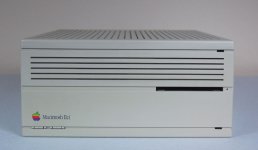
RAID IIci
I've started a new project. This one looks very doable. In the HDD area in the IIci, there's quite a bit of room, but not quite enough room for two HDDs.
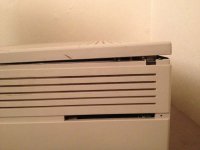
However, when I looked at the lid of the IIci, there's a 1/8" worth of ribbing on the inside.
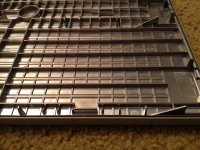
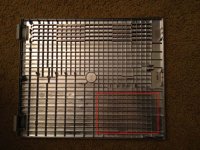
I think that if I cut out some of the ribbing on the inside, there should be enough room to put in 2 internal HDDs.
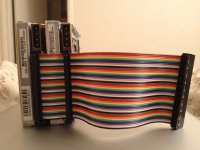
I created a custom SCSI cable for my IIci using my cable kit I bought, spacing the connectors just right to stack two HDDs. I then used FWB RAID ToolKit to create a striped RAID 0 with two 250MB Apple SCSI HDDs.
So far it runs great! Not sure if there's a noticeable speed difference, but it's more of a "because I can" project. Plus, I'm rather proud of my custom rainbow SCSI cable. Tomorrow I'll measure twice, then take my Dremel to the top of the case and cut out the ribs. I'd use a nibbler, but I don't have one. Maybe wire cutters will work; cut it into little pieces, then break them off with pliers.
However, when I looked at the lid of the IIci, there's a 1/8" worth of ribbing on the inside.
I think that if I cut out some of the ribbing on the inside, there should be enough room to put in 2 internal HDDs.
I created a custom SCSI cable for my IIci using my cable kit I bought, spacing the connectors just right to stack two HDDs. I then used FWB RAID ToolKit to create a striped RAID 0 with two 250MB Apple SCSI HDDs.
So far it runs great! Not sure if there's a noticeable speed difference, but it's more of a "because I can" project. Plus, I'm rather proud of my custom rainbow SCSI cable.
Tomorrow I'll measure twice, then take my Dremel to the top of the case and cut out the ribs. I'd use a nibbler, but I don't have one. Maybe wire cutters will work; cut it into little pieces, then break them off with pliers.Here's what I've done for rib removal:
Use a matte knife/utility knife:
Begin by carving a notch toward every intersection of the ribs at an angle . . .
. . . alternately cut straight down along each intersection . . .
. . . keep at it until you leave just a single square column standing, but it'll break off at the bottom before you really get down that far . . .
. . . and you'll have four V notched ribs that are no longer connected right down to the base of the intersection where the column disappeared . . .
Then all you need to do is score the joint between each side of each rib where it meets the bottom (of the top in your case) . . .
. . . then wiggle each one side to side until fatigue breaks it off flush with the bottom (inside of the top) and you're done.
Then again you could just grind the schiznit outta the thing with your rotary tool . . . I've done both. [} ] ]'>
] ]'>
When doing a lid like that, especially the front side with no protrusions. You can make a jig to keep a full size router within limits and supported at just the right height and blow all the ABS out of there in a couple of minutes, making it a bit deeper than the existing surface. [ ] ]'>
] ]'>
Use a matte knife/utility knife:
Begin by carving a notch toward every intersection of the ribs at an angle . . .
. . . alternately cut straight down along each intersection . . .
. . . keep at it until you leave just a single square column standing, but it'll break off at the bottom before you really get down that far . . .
. . . and you'll have four V notched ribs that are no longer connected right down to the base of the intersection where the column disappeared . . .
Then all you need to do is score the joint between each side of each rib where it meets the bottom (of the top in your case) . . .
. . . then wiggle each one side to side until fatigue breaks it off flush with the bottom (inside of the top) and you're done.
Then again you could just grind the schiznit outta the thing with your rotary tool . . . I've done both. [}
] ]'>When doing a lid like that, especially the front side with no protrusions. You can make a jig to keep a full size router within limits and supported at just the right height and blow all the ABS out of there in a couple of minutes, making it a bit deeper than the existing surface. [
] ]'>man I love that cabling...
I had to remove the fan shroud from the SE back case earlier, just used wire cutters and angled needle nose pliers but it looks like crap. It worked, just looks nasty. Gonna sand it next time I have it open.

I like what jt is saying to do.
I had to remove the fan shroud from the SE back case earlier, just used wire cutters and angled needle nose pliers but it looks like crap. It worked, just looks nasty. Gonna sand it next time I have it open.
I like what jt is saying to do.
:lol: Here it is! Quadra 700/7600/G4/800
That was the crazy time hack I got into last time I was home sick, had a cold that turned into bronchitis that time. This one started out as bronchitis . . .
. . . either way it's the friggin' PITs!
Hopefully tomorrow will be my last day "off" < snork! > from work. :-/
That was the crazy time hack I got into last time I was home sick, had a cold that turned into bronchitis that time. This one started out as bronchitis . . .
. . . either way it's the friggin' PITs!
Hopefully tomorrow will be my last day "off" < snork! > from work. :-/
Yeah, RAID-0 isn't really 'R'.
Early SCSI-1 hard drives are slow enough that you would see an improvement moving to RAID - but you'd see a bigger improvement by putting a later-model 7200 RPM (or, if you're nuts like me, 10K RPM,) drive on. Put a single drive on that is significantly faster than the bus, and you'll be good.
(Old parallel SCSI, like parallel ATA, is a "shared bus". Its maximum speed is shared among all devices on the cable. So if you put two "fast" hard drives on an old Mac's 5 MB/s SCSI bus, you're wasting it.)
Early SCSI-1 hard drives are slow enough that you would see an improvement moving to RAID - but you'd see a bigger improvement by putting a later-model 7200 RPM (or, if you're nuts like me, 10K RPM,) drive on. Put a single drive on that is significantly faster than the bus, and you'll be good.
(Old parallel SCSI, like parallel ATA, is a "shared bus". Its maximum speed is shared among all devices on the cable. So if you put two "fast" hard drives on an old Mac's 5 MB/s SCSI bus, you're wasting it.)
Judging from what I'm remembering of his toys:
I'm assuming oP's going for a JackHammer/RAID 0, Rocket (DSP DaughterCard?) GreenRadiusPixelRocket configuration. Now that he's got the ATX PSU hacked into the original IIci sheet metal, he feels the need-for-speed and the greed for . . . pushing it hard enough to make it sweat a bit.
That's a lot of iron in that thar IIci . . . have you got another PPC PDS Card up your sleeve or on the way, oP? [] ]'>
I'm assuming oP's going for a JackHammer/RAID 0, Rocket (DSP DaughterCard?) GreenRadiusPixelRocket configuration. Now that he's got the ATX PSU hacked into the original IIci sheet metal, he feels the need-for-speed and the greed for . . . pushing it hard enough to make it sweat a bit.
That's a lot of iron in that thar IIci . . . have you got another PPC PDS Card up your sleeve or on the way, oP? [
] ]'>I gave up on the PPC card, it was too much of a hassle. According to FWB, it doesn't play nice with their SCSI card (requires even more tweaks.) Plus, it would require additional changes to my ROM SIMM that I love so much. When I install the PPC card, it overrides everything, so I lose all my Piratey stuff. dougg3 was kind enough to work some magic with my SIMM so that I could keep all my Pirate IIci stuff while still using my Dayster 040 card.
Also, when all said and done, half my stuff either ran slower or didn't see any improvement, as was the case with the early PPC machines.
Unfortunately I can't use my Jackhammer card anyway because I don't have any terminators. I've been scouring the net, but no one makes them anymore. 110 Ohm 10 pin 9 resistor SIP. They're impossible to find.
I've found 1 store that claims to have them in stock, but they have a $50 minimum order amount. I called them and they refused to waiver on it.

Also, when all said and done, half my stuff either ran slower or didn't see any improvement, as was the case with the early PPC machines.
Unfortunately I can't use my Jackhammer card anyway because I don't have any terminators. I've been scouring the net, but no one makes them anymore. 110 Ohm 10 pin 9 resistor SIP. They're impossible to find.
I've found 1 store that claims to have them in stock, but they have a $50 minimum order amount. I called them and they refused to waiver on it.
Why do you need Terminators for the JackHammer, now you've got me worried.
How much is a set if it turns out I need them too? If they have any . . .
. . . straight wire Wrap EuroDin 96 (SE/30/IIsi PDS) connectors . . .
. . . I'm working on a list of crystals to order as well . . .
. . . SCSI controller ICs for the Plus . . .
. . . if their prices in general aren't too high , I can add any of the above/whatever else I can think of, to a combined list . . . [] ]'>
How much is a set if it turns out I need them too? If they have any . . .
. . . straight wire Wrap EuroDin 96 (SE/30/IIsi PDS) connectors . . .
. . . I'm working on a list of crystals to order as well . . .
. . . SCSI controller ICs for the Plus . . .
. . . if their prices in general aren't too high , I can add any of the above/whatever else I can think of, to a combined list . . . [
] ]'>The NuBUS Jackhammer doesn't auto-terminate like the PCI version. There are three spots for 3 terminator resistor packs (they're blue in color.) You have to take them out or put them in depending on the configuration you want for your card.
See here: http://picasaweb.google.com/lh/photo/aFy3q1qWvobqicTFhlp5Ng
3 blue resistors on the left side of the card. You may already have them.
See here: http://picasaweb.google.com/lh/photo/aFy3q1qWvobqicTFhlp5Ng
3 blue resistors on the left side of the card. You may already have them.
Yep, I figured I didn't need 'em because it came from a comrade. I take it you only need them in certain configs?
I still need to get a bunch of that other stuff if you want to try to get a $50 order together though.
p.s. I haven't looked yet . . . so if anyone knows where I might find wire wrap EuroDin Connectors to replace the soldertail connectors on my IIsi's PDS, please let me know.
I still need to get a bunch of that other stuff if you want to try to get a $50 order together though.
p.s. I haven't looked yet . . . so if anyone knows where I might find wire wrap EuroDin Connectors to replace the soldertail connectors on my IIsi's PDS, please let me know.
As others wrote, RAID doesn't help performance much, if at all, on the old Macs. Getting a more modern, faster single hard drive will do more than RAID will.
It's all about bottlenecks. When these machines were new, as slow as the SCSI was, the hard drives were actually slower. The hard drives got faster, but cards like the JackHammer became available, and the hard drives were still slower than the JackHammer.
For example, one of the very first Seagate Barracuda drives was the ST32550, which was a very nifty 7200RPM 2GB drive, back when 7200RPM was considered really, really fast.
However, the very best the ST32550 will deliver is about 6 MB/s. It doesn't matter whether you have the ST32550N or the ST32550W, narrow or wide electronics, the physical platters and heads can only manage 6 MB/s.
In IBM's hard drive specifications this is what is labeled the "media speed". Whatever else you say about IBM, the fact that they actually provided media speed numbers for their hard drives makes them worlds better than the other drive manufacturers in the specification department. It doesn't matter if your electronic interface will deliver 10 MB/s if your media speed is only 4 MB/s.
Anyway, so I put a NuBus Jackhammer in the Power 120 (120 MHz 8100 clone) back in the day. I put two ST32550W drives on it and built a striped array with FWB's RAID Toolkit. I got about 8 or 9 MB/s out of the combined drives. Added a third drive, and performance really didn't increase. Added a fourth drive, performance started decreasing.
So, I kept the two ST32550W (Fast & Wide) drives on the JackHammer, and put an ST32550N (Fast SCSI, Narrow) on the built-in Fast SCSI bus. This got me up to about 10 MB/s. Then I added another ST32550N to the Fast internal bus. No improvement.
Finally, I added an ST32550N to the internal/external SCSI bus. That got me up to 12 MB/s and that was the best I could ever do with ST32550 drives in the fastest NuBus machine available.
So distributing four ST32550 drives across three SCSI busses only bought me a 2X improvement in performance.
And now that years have passed, one could just buy any wide SCSI drive which supports single ended operation from the last ten years, and put it on the JackHammer and probably get better performance than I managed with that RAID.
Plus it will probably be pretty quiet. Those early 7200 RPM drives were **loud**.
It's all about bottlenecks. When these machines were new, as slow as the SCSI was, the hard drives were actually slower. The hard drives got faster, but cards like the JackHammer became available, and the hard drives were still slower than the JackHammer.
For example, one of the very first Seagate Barracuda drives was the ST32550, which was a very nifty 7200RPM 2GB drive, back when 7200RPM was considered really, really fast.
However, the very best the ST32550 will deliver is about 6 MB/s. It doesn't matter whether you have the ST32550N or the ST32550W, narrow or wide electronics, the physical platters and heads can only manage 6 MB/s.
In IBM's hard drive specifications this is what is labeled the "media speed". Whatever else you say about IBM, the fact that they actually provided media speed numbers for their hard drives makes them worlds better than the other drive manufacturers in the specification department. It doesn't matter if your electronic interface will deliver 10 MB/s if your media speed is only 4 MB/s.
Anyway, so I put a NuBus Jackhammer in the Power 120 (120 MHz 8100 clone) back in the day. I put two ST32550W drives on it and built a striped array with FWB's RAID Toolkit. I got about 8 or 9 MB/s out of the combined drives. Added a third drive, and performance really didn't increase. Added a fourth drive, performance started decreasing.
So, I kept the two ST32550W (Fast & Wide) drives on the JackHammer, and put an ST32550N (Fast SCSI, Narrow) on the built-in Fast SCSI bus. This got me up to about 10 MB/s. Then I added another ST32550N to the Fast internal bus. No improvement.
Finally, I added an ST32550N to the internal/external SCSI bus. That got me up to 12 MB/s and that was the best I could ever do with ST32550 drives in the fastest NuBus machine available.
So distributing four ST32550 drives across three SCSI busses only bought me a 2X improvement in performance.
And now that years have passed, one could just buy any wide SCSI drive which supports single ended operation from the last ten years, and put it on the JackHammer and probably get better performance than I managed with that RAID.
Plus it will probably be pretty quiet. Those early 7200 RPM drives were **loud**.
What is your guess for a single U160 or Compliant U320 Drive on the fast/narrow SCSI Cards:
PLI QuickSCSI
ATTO SiliconExpress II
Radius SCSI II DaughterCard
That last is on the 68040 Local Bus/PDS/whatever on the Rocket Board (ISTR them calling it a PDS)
. . . and the JackHammer makes four! ;D
I'd gone about 22 years dreaming of having even one SCSI II Card for the NuBus Architecture. [] ]'>
@ oP: How goes the IIci lid demolition?
PLI QuickSCSI
ATTO SiliconExpress II
Radius SCSI II DaughterCard
That last is on the 68040 Local Bus/PDS/whatever on the Rocket Board (ISTR them calling it a PDS)
. . . and the JackHammer makes four! ;D
I'd gone about 22 years dreaming of having even one SCSI II Card for the NuBus Architecture. [
] ]'>@ oP: How goes the IIci lid demolition?
Pretty good. It's looking like I'll have to file it completely down. After removing the ribs, there're still some slightly elevated areas cross hatching the plastic. It's a hair too high. The lid will close, but it bows a little bit. I wanna make it flat. Almost there.
Not bad, not bad at all . . .
Day>
. . . that'd be 24 resistors w/3 voltage lines, three 9 pin rows of Machine Pin Headers, a 6 x 9 piece of copper clad perf ProtoPCB, a little soldering . . .
. . . and a bit of pretty wire sculpture . . . [
] ]'>. . . me likes it! :approve:
oP, PM me an addy and I'll get the machine pins & perf board in the mail to you.
< fires up Adobe Illustrator >
Thanks for the offer, but probably don't need to. I'll hit my local surplus today and see what they have in terms of regular resistors.
I got my other 15K RPM SCSI drive, but it makes a weird noise after it spins up. Almost like a fart. It was funny at first, but now it's just damn annoying when I fire up my G4.
I think I'm going to just pay a few extra bucks and get a couple 68pin 15K RPM drive. They're $25 instead of $6, but it may be the price to pay to avoid headaches. Plus, I could use one in my vintage Mac just for kicks. Probably Fujitsu since that was the one I had before and it was whisper quiet. I don't think these adapters work too well, and I don't think the SCSI drives can detect what kind of HDD is on the chain (which screws up termination.)
I'll hit my local surplus today and see what they have in terms of regular resistors.I got my other 15K RPM SCSI drive, but it makes a weird noise after it spins up. Almost like a fart. It was funny at first, but now it's just damn annoying when I fire up my G4.
I think I'm going to just pay a few extra bucks and get a couple 68pin 15K RPM drive. They're $25 instead of $6, but it may be the price to pay to avoid headaches. Plus, I could use one in my vintage Mac just for kicks. Probably Fujitsu since that was the one I had before and it was whisper quiet. I don't think these adapters work too well, and I don't think the SCSI drives can detect what kind of HDD is on the chain (which screws up termination.)
Tadaaa! It fits!
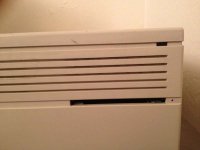
Here's a picture of the lid. I ended up drilling out the rest then did a rough sanding in the grooves. Looks pretty bad right now. But it's just in the testing phase.
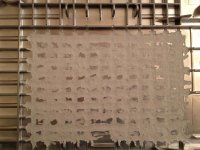
I'm going to fill the grooves with some putty, then very light coat of silver paint.
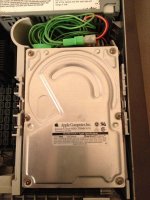
And a picture of the inside. I'm planning on installing my JackHammer card, then I'm going to test the speed difference between a single drive, 2 drives on the onboard SCSI, then 2 drives on the Jackhammer.
Here's a picture of the lid. I ended up drilling out the rest then did a rough sanding in the grooves. Looks pretty bad right now. But it's just in the testing phase.
I'm going to fill the grooves with some putty, then very light coat of silver paint.
And a picture of the inside. I'm planning on installing my JackHammer card, then I'm going to test the speed difference between a single drive, 2 drives on the onboard SCSI, then 2 drives on the Jackhammer.

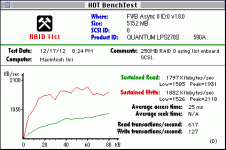
You might try Herb Johnson http://retrotechnology.com/herbs_stuff/ for the resistor packs. He sells a bunch of old stuff and might have them laying around.
Er, I admit I was thinking more like just literally jamming eight (not nine) resistors into the appropriate holes, crimp/twisting the ends together with a lead to the ninth hole.
RAID 1
http://en.wikipedia.org/wiki/RAID#Standard_levels
Wow so I was looking at your graph above,
On a percentage how much more throughput would you say your getting with the Stripe?
also, just a quick thought… would there be any heat build up concerns?
and yes that IIci case looks like it fits back together nicely, one would never know
well except the FCC, depending on how much of that metallic coating got scraped off in the mod LOL
all though, you would need some kind of special equipment to determine wether its emitting or accepting RF,
i wonder if you could hack a oscilloscope /w antenna to figure out this?
Its ok I will still keep my tinfoil hat on.

On a percentage how much more throughput would you say your getting with the Stripe?
also, just a quick thought… would there be any heat build up concerns?
and yes that IIci case looks like it fits back together nicely, one would never know
well except the FCC, depending on how much of that metallic coating got scraped off in the mod
LOLall though, you would need some kind of special equipment to determine wether its emitting or accepting RF,
i wonder if you could hack a oscilloscope /w antenna to figure out this?
Its ok I will still keep my tinfoil hat on.
Now my power supply stopped working.
All the turning on/off made it not power up anymore. If I leave it alone over night, it'll work for ONE power on, then not work again until the next day.
I'm beginning to suspect that's why that Dell machine was headed for the recycler. The PSU was going. Sigh.
I'm beginning to suspect that's why that Dell machine was headed for the recycler. The PSU was going. Sigh.
I found SCSI termination resistor packs. Details here:
http://68kmla.org/forums/viewtopic.php?p=203746#p203746
http://68kmla.org/forums/viewtopic.php?p=203746#p203746
Wrong resistance. Need 110 Ohm. I've searched high and low for them, and can't find any.
Also, I'm under the impression that my nubus Jackhammer card is broken anyway. I talked to Herb Johnson at Retro Technology, and he seemed to think that a 100 or 120 would probably work just fine. I tried them both, but the card still freezes up or gives me a Sad Mac with a BUS error code (presumably SCSI.)
When configured correctly with just the one resistor, it'll freeze after only a few minutes of use. So I guess the card is just broken. Keeping my eye out for another one, but they're not too common. I thought about using my toaster oven to "reflow" the board. Maybe it's a flaky solder joint somewhere.
Need 110 Ohm. I've searched high and low for them, and can't find any.Also, I'm under the impression that my nubus Jackhammer card is broken anyway. I talked to Herb Johnson at Retro Technology, and he seemed to think that a 100 or 120 would probably work just fine. I tried them both, but the card still freezes up or gives me a Sad Mac with a BUS error code (presumably SCSI.)
When configured correctly with just the one resistor, it'll freeze after only a few minutes of use. So I guess the card is just broken. Keeping my eye out for another one, but they're not too common. I thought about using my toaster oven to "reflow" the board. Maybe it's a flaky solder joint somewhere.

Why do you think that you need 110 ohm? Did FWB use a simple set of isolated or bussed resistors rather than a termination network? Were you able to read the part number off of an existing termination resistor pack?
If you simply took measurements on the pins of an existing termination network, I calculate that a 220/330 termination network will have a resistance of about 100 (98.5) between each of the center pins for a 10 pin network and 120 ohms between each of the center pins for an 8 pin network. Both of those are close enough to 110 ohms that you could probably get 110 ohm measurements, given the tolerances.
See page 2 of this document for the different diagrams:
http://www.bourns.com/data/global/pdfs/4300R.pdf
If you simply took measurements on the pins of an existing termination network, I calculate that a 220/330 termination network will have a resistance of about 100 (98.5) between each of the center pins for a 10 pin network and 120 ohms between each of the center pins for an 8 pin network. Both of those are close enough to 110 ohms that you could probably get 110 ohm measurements, given the tolerances.
See page 2 of this document for the different diagrams:
http://www.bourns.com/data/global/pdfs/4300R.pdf
I've been meaning to revisit this thread, suggestion:
Remove the termination resistors and hook up an internal drive to test to see if your card is good.
If it's the other way around, attach an external device with termination.
If terminated devices on both ends (without the resistor packs on board) won't work, I'd be suspecting that the card is bad. :-/
I've got a good card with the proper terminators to test it for you.
Remove the termination resistors and hook up an internal drive to test to see if your card is good.
If it's the other way around, attach an external device with termination.
If terminated devices on both ends (without the resistor packs on board) won't work, I'd be suspecting that the card is bad. :-/
I've got a good card with the proper terminators to test it for you.
As a side-note about installing a significantly more modern disk in the IIci, something like a 10k server disk from the last five to ten years, heat will be a concern if you put too many of them in (two might be too many) -- most of those disks were designed for equipment in air-cooled datacenters where the machines were designed with either more space between disks or where air flows over the disks then through the rest of the machine.
Also, a single 10k disk will probably completely saturate any NuBus SCSI controller.
Also, a single 10k disk will probably completely saturate any NuBus SCSI controller.
Yeah, I was thinking that I probably don't need to stripe two SCA drives in the StudioArray, even with NuBus 90 on the 81/110 . . . :-/ . . . but, might a Rocket doing NuBus block transfers to/from the JackHammer make setting up a second drive for RAID be worthwhile? :?:
Maybe even under the IIci's or IIcx NuBus implementation?
I'm also wondering if RAID using a pair of my 2.5" 10k U320 drives would be silly on the Fast/Narrow SCSI II bus of the Rocket's daughtercard?
I've been having some success with my FWB card. I went to Weird Stuff and bought some active terminators. They have boxes of them for $1 each for all different kinds. Passive, active, external, internal, etc. I also terminated the onboard SCSI at both the external and internal. After doing that, I was able to get my IIci to boot without a Sad Mac. I then even got it to boot off a 5400 RPM 68 Pin SCSI drive without freezing! Also got a centronics active terminator for my peripherals. With an active terminator, I'm going to give those other jumpers a try.
Unfortunately my last 15K RPM drive died. They keep dying on my G4. I don't know why. If I ever run into some extra money, I think I'll just bite the bullet and get a SATA card and a relatively cheap SSD for my G4. SCSI on that thing has become too expensive with my failed drives.
Unfortunately my last 15K RPM drive died. They keep dying on my G4. I don't know why. If I ever run into some extra money, I think I'll just bite the bullet and get a SATA card and a relatively cheap SSD for my G4. SCSI on that thing has become too expensive with my failed drives.
This depends on a lot of things! How old are those SCA disks? If they're SCA disks from the olden days when SCA was used in things like the original SGI Octane and the O2, they may actually benefit from being run in tandem. The first generation of SCA wasn't *that* fast.
However, if you're talking about U160 or newer disks that use the SCA connector, then essentially nothing Apple or any Mac clone that's beige can gain anything from running them in RAID from the onboard controller. If you have a good PCI controller, then it may be worth your time.
For what it's worth, in fact, I would be completely unsurprised that a fast 10/15k 2.5-inch U160 or U320 is faster than NuBus itself. But we're talking about a disparity of ten to fifteen years between "system" and "disks."
This is probably what I'd do if I had a Power Macintosh G4 on hand. Even a fresh 5400/5900 or 7200rpm spinning disk will be a large improvement over anything IDE, and if your scsi disks are dying, it may be faster than they are, too.
And of all the Macs ever, I'd argue that most Power Mac G4s are better at having some air to begin with, and pushing it through the enclosure. This is especially true in comparison to some of the more compact 68k Macs, such as the IIci.
If you wanted to be safe and have a number of fast old hot SCSI disks, you may look into something like one of the old Sun STOR-EDGE shelves or something like the Sun 711 disk pack, which had reasonably good cooling for what it presumed at the time was up to twelve half or full-height disks. You may even consider mounting them in an old AT PC case, or grabbing something like this if adequate cooling for a lot of SCSI disks is a priority.
One Mac I'd be interested in seeing the exact thermal performance of, or maybe just having one or two of so I could test this theory out, is the Quadra 950/AWGS95. The AWGS9150 would also be fun, and the combination of the 9150, system 8.1, and ASIP5 or ASIP6 could make a particularly good old server, especially given that the 9150 and 950 seem like they have a reasonable amount of air and a reasonable path for air to flow over the disks and out the back of the machine. Although I haven't looked in particular.
As a sidenote, one entertaining thing I've long wanted to do is grab an old disk shelf from a server (Something like any older Dell PowerVault enclosure, the 630f would be a good example) and rip most of its guts out, leaving just the structure for disk mounting, power and some fans, and adapting it to the task of holding modern disks.
Good luck on your SCSI adventures!
I'm talking about the 2.5" 10K U320 IBM/Seagate Savvio Drives we were ironing out termination issues with a bit ago. DOM: 06SEP2005
Specifically, I'm talking about:
1) Running them fast/wide off the JackHammer swappin' spit via NuBus Block transfer mode in the Radius 81/110 with a VideoVision Studio Card . . .
. . . I think that's how the VideoVision StudioArray works . . . [:I] ]'>
2) Running one (or two?) fast/narrow on a Rocket's '040 PDS SCSI II DaughterCard at the 33MHz system bus rate.
I would think it ought to be a fairly significant difference in throughput, maybe even a near equalizer against the JackHammer.
Just like piddling PDS VidCard/MoBo Video is faster than accelerated NuBus VidCard behemoths at smaller resolutions, the extra bandwidth of the '040 PDS on the Rocket should prove interesting for benchmarking against the NuBus JackHammer. Does the digital water flow more quickly at 16bit through the NuBus funnel at 10MHz or the 8bit funnel at the higher 33MHz flow rate of the '040 PDS.
16Gal at 10MHZ vs. 8Gal @ 33MHz
160 GPM vs. 264 GPM
Only the sha . . . erm . . . benchmnark know . . .
Just like piddling PDS VidCard/MoBo Video is faster than accelerated NuBus VidCard behemoths at smaller resolutions, the extra bandwidth of the '040 PDS on the Rocket should prove interesting for benchmarking against the NuBus JackHammer. Does the digital water flow more quickly at 16bit through the NuBus funnel at 10MHz or the 8bit funnel at the higher 33MHz flow rate of the '040 PDS.
16Gal at 10MHZ vs. 8Gal @ 33MHz
160 GPM vs. 264 GPM
Only the sha . . . erm . . . benchmnark know . . .