

Thread
Finally, a LUNCHBOX!
I'll crack the BEAST open and see what I've got here, I've been dying to since it arrived, but there's been no room at all to do it. My apartment looks like somebody tossed a couple of concussion grenades into uni's trailer ATM.
That's a tale on its own, let's see: while configuring the Beige_G3 as a temporary replacement for the recently deceased QS'02, after the diagnostics and od said '02, I managed to nuke the '02s big HDD in the large partition hostile G3 in the process. Then I tore up a couple of other setups to re-stuff the Beige with ATA-133, SCSI2 and USB/FW cards so I can back up the borked HDD. As an alternate, I've been setting up the Pismo500 as teh replacement graphics machine on the KVM setup with HP_Maxi in the bedroom, tearing it and the PDQ up after nuking the up Pismo's Classic deprived 10.4.11 trying to upgrade it to 9.2.1 in the process, (thanks again eudi. [ ] ]'> ) finally winding up with the PDQ's 9.2.1 HDD in the Pismo, happily discovering clamshell mode while researching the schiznit out of the hobbled Pismo.
It's been an interesting month or so. :
Forgot to mention, I've got to repack and re-stack close twenty different project boxes, finish reconfiguring the dining area HackLab and take the excess furniture and pile of accumulated junk to Goodwill. Luckily I'm bachin' it for the week before Thanksgiving!
IOW, it'll be a while before the internal piccie update. :lol:
@ NJRoadfan: I'm just going by the scrolling UNIX bootup .TXT and its mention of ESDI. Maybe there was some advantage in using ESDI under UNIX in 1994? More likely this Lunchbox iteration of Tekelec's diagnostic system was developed from an earlier Sewing Machine based system from the ESDI age?
Macht nichts für mich, the point of this evolution was configuration of one of my parallel port boxen with Win98 to run the ROM Burner. The only other licenses I have for Windows are 3/3.1, 7 on the Parallel port deprived Pavilion dm1 Netbook. There's the questionable transfer of the Win95 install on the Dell Pentium, but 95 and 7 inconveniently bookend the minimum requirements for said ROM Burner. The dedicated XP-Home3 for HP-Mini is way too new for the old boxen, even if I could manage to hoodwink the restore CD into installing on a different machine.
Add to that the very inconvenient loss of my Win98 package and the $60 support manual for it down the storage room whirlpool. The license didn't disappear, I just need to locate that legal backup of the media I vaguely recall making to the cloud ( . . . before it existed . . . erm . . . became popular . . . [}] ]'> ) back in the day.
@ Blinkenlightz: OS/2 8-o GAAHHHH!!!!!! I'm unloading my Sun collection rather than delving into yet another Neolithic OS, I gave up on Debian back in the day, I've managed to avoid loading AU/X to this point and there's no freakin' way I'm going to get start playing with OS/2, especially since it won't run the ROM Burner!
< wonders if crosses, garlic a/o wooden stakes might lay such evil time-suckers to rest? >
>
I've barely scratched the surface of ubuntu and I've been running it for over four years on HP_Mini for cripe's sake!
@ jr: cool beans! maybe if I can score a DX-2 this would run '98 acceptably for my purposes. I've got 32MB of PC RAM sitting on the old Rocket . . .
. . . and I'll go pretty far out of my way to keep that friggin' DIMENSION XPS D333 off my electronics bench. Blech!
I also like NJR's suggestion of a possible, if highly unlikely, Baby-AT refurb, but the config is all wrong. the BEAST is a cutting edge eight slot (seven accessible) chassis for a $47k industrial workstation. PCI came out in '93 so it's unlikely to be ISA and I've always wanted a Dual Voodoo-2 gaming rig. [ ] ]'>
] ]'>
That's a tale on its own, let's see: while configuring the Beige_G3 as a temporary replacement for the recently deceased QS'02, after the diagnostics and od said '02, I managed to nuke the '02s big HDD in the large partition hostile G3 in the process. Then I tore up a couple of other setups to re-stuff the Beige with ATA-133, SCSI2 and USB/FW cards so I can back up the borked HDD. As an alternate, I've been setting up the Pismo500 as teh replacement graphics machine on the KVM setup with HP_Maxi in the bedroom, tearing it and the PDQ up after nuking the up Pismo's Classic deprived 10.4.11 trying to upgrade it to 9.2.1 in the process, (thanks again eudi. [
] ]'> ) finally winding up with the PDQ's 9.2.1 HDD in the Pismo, happily discovering clamshell mode while researching the schiznit out of the hobbled Pismo.It's been an interesting month or so. :
Forgot to mention, I've got to repack and re-stack close twenty different project boxes, finish reconfiguring the dining area HackLab and take the excess furniture and pile of accumulated junk to Goodwill. Luckily I'm bachin' it for the week before Thanksgiving!
IOW, it'll be a while before the internal piccie update. :lol:
@ NJRoadfan: I'm just going by the scrolling UNIX bootup .TXT and its mention of ESDI. Maybe there was some advantage in using ESDI under UNIX in 1994? More likely this Lunchbox iteration of Tekelec's diagnostic system was developed from an earlier Sewing Machine based system from the ESDI age?
Macht nichts für mich, the point of this evolution was configuration of one of my parallel port boxen with Win98 to run the ROM Burner. The only other licenses I have for Windows are 3/3.1, 7 on the Parallel port deprived Pavilion dm1 Netbook. There's the questionable transfer of the Win95 install on the Dell Pentium, but 95 and 7 inconveniently bookend the minimum requirements for said ROM Burner. The dedicated XP-Home3 for HP-Mini is way too new for the old boxen, even if I could manage to hoodwink the restore CD into installing on a different machine.
Add to that the very inconvenient loss of my Win98 package and the $60 support manual for it down the storage room whirlpool. The license didn't disappear, I just need to locate that legal backup of the media I vaguely recall making to the cloud ( . . . before it existed . . . erm . . . became popular . . . [}
] ]'> ) back in the day.@ Blinkenlightz: OS/2 8-o GAAHHHH!!!!!! I'm unloading my Sun collection rather than delving into yet another Neolithic OS, I gave up on Debian back in the day, I've managed to avoid loading AU/X to this point and there's no freakin' way I'm going to get start playing with OS/2, especially since it won't run the ROM Burner!
< wonders if crosses, garlic a/o wooden stakes might lay such evil time-suckers to rest?
>I've barely scratched the surface of ubuntu and I've been running it for over four years on HP_Mini for cripe's sake!
@ jr: cool beans! maybe if I can score a DX-2 this would run '98 acceptably for my purposes. I've got 32MB of PC RAM sitting on the old Rocket . . .
. . . and I'll go pretty far out of my way to keep that friggin' DIMENSION XPS D333 off my electronics bench. Blech!
I also like NJR's suggestion of a possible, if highly unlikely, Baby-AT refurb, but the config is all wrong. the BEAST is a cutting edge eight slot (seven accessible) chassis for a $47k industrial workstation. PCI came out in '93 so it's unlikely to be ISA and I've always wanted a Dual Voodoo-2 gaming rig. [
] ]'>Well, that would be a modern era system, though big and without the charm of the lunchbox. It's pretty much the alternate universe counterpart to your beige G3. Digression: my favorite of that era was the Dimension L-series; small, almost cute, with a look like a correctly proportioned 6400.
Personally, I think you need to find yourself one of the old C-series Latitudes (P-III based) or something like a ThinkPad 600E or 600X.
If I had to guess, ESDI vs. IDE was probably about performance. It's possible the drive is still IDE since, IIRC, a lot of older disk drivers just treated MFM/ESDI/IDE all the same (emulation of some early WD controller).
Oh, the case is just fine, that's why I bought the turd . . . possible stealth PExBOX. :lol:
I'd bet three shiny new nickels it's IDE. ESDI was pretty much dead meat by the 486 era. (And yes, from a software standpoint IDE looks basically like a ESDI drive, both of which emulate (with extensions) the WD1003 used in the original IBM AT.)
AT motherboards have 8 slots  ATX motherboards only have 7.
ATX motherboards only have 7.
I've got a Pentium 3 gateway laptop laying around if you want a small machine that will boot 98 with a parallel port?
Thanks for the offer, comrade, but I can probably snag something suitable for less than the cost of shipping at a thrift in the area. What I'd really like to do is get the Tekelec or a nice Mobo I snagged off eBay a couple of years back up and running.
Well, I cleaned off a work surface to take some pics for the bigmess . . .
. . . and curiosity got the best of me. :lol:
I victimized myself with some sloppy thinking, was a bit disappointed that it's not PCI. It was actually the custom DSP and I/O cards that made this baby a heavy duty, high dollar diagnostics workstation. So it made exactly zero sense for Tekelec to have switched over to a PCI Architecture when simply downsizing the Chameleon Open from an AT Sewing Machine to to the Lunchbox form factor.
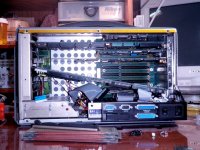
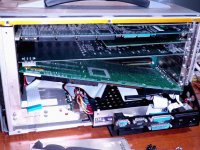
Nine slot passive backplane and a really nifty, upgradeable socketed 486 SBC in there though! [] ]'>
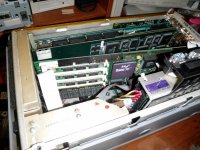
Three empty SIMM slots for what I hope to heck isn't custom RAM modules. It's odd that there doesn't appear to be a ninthe chip for parity, but the SIMM is undoubtedly meant only for the OS, the DSP and I/O cards would have any necessary memory on their own side of the AT Bus.
What kind of upgrades are available for that CPU socket, jr? [] ]'>
. . . and curiosity got the best of me. :lol:
I victimized myself with some sloppy thinking, was a bit disappointed that it's not PCI. It was actually the custom DSP and I/O cards that made this baby a heavy duty, high dollar diagnostics workstation. So it made exactly zero sense for Tekelec to have switched over to a PCI Architecture when simply downsizing the Chameleon Open from an AT Sewing Machine to to the Lunchbox form factor.
Nine slot passive backplane and a really nifty, upgradeable socketed 486 SBC in there though! [
] ]'>Three empty SIMM slots for what I hope to heck isn't custom RAM modules. It's odd that there doesn't appear to be a ninthe chip for parity, but the SIMM is undoubtedly meant only for the OS, the DSP and I/O cards would have any necessary memory on their own side of the AT Bus.
What kind of upgrades are available for that CPU socket, jr? [
] ]'>
Dunno brother, I'd say it looks like that card don't fit too good in der… lol
I bet if you get the manufacture/model numbers off the board you'll be able to Google up, if not a whole manual, at least a spec sheet for that board showing the jumper values, etc. (There are at least two *very large* databases of that sort of thing floating around.)What kind of upgrades are available for that CPU socket, jr? [
Just looking at it, being a non-ZIF socket, I'd say if you're talking about just a bare chip you'd be *probably* be limited to a 486-DX2. The faster 486 variants (DX4, AMD 5x86) use a 3.3v core voltage instead of 5v, which means *poof* if you plug them into a socket that doesn't support that. (They sold upgrades which sandwiched a voltage regulator board in-between the upgrade CPU and the socket, you could use one of those or, if you did track down the SBC's manual, see if it supports split-voltage CPUs.)
Anything faster than a DX will need a heat sink. Is there clearance for it in the slot the SBC was plugged into? (Or would the backplane allow you to move the SBC to another slot, IE, is it *completely* passive or does the slot the CPU card goes into have additional connectors on it beyond the 16 bit ISA plugs?)
(Of course, your other option in theory would be to replace the whole SBC with a faster one. It looks like they still make boards with ISA card edges on them *today*, with Atom CPUs. They are *not* cheap, however, and... how does the internal monitor wire up to that thing? Is there a VGA card it's connected to or is it connected to the SBC?)
Actually, it's not as bad as I thought. This one is "only" $320 for a dual-core 1.8Ghz model. That's surprisingly reasonable. Has a built-in LVDS monitor plug, so if you could find a higher-res panel with the same physical dimensions as the one that's in it you could really go nuts modernizing your lunchbox and have it be completely stealth.
 a MilSpec LAN party rig!
@ eudig: The white ribbon cable on the far left appears to carry the LCD and front panel signals, at least there are way too may lines to just be for the front panel bells-n-whisltes. The contrast slider obviously connects to the LCD, so it looks like there are plenty of lines for a monochrome LCD. Gotta count lines though, there's no telling what's going on under the cover panels of the BEAST..
The VGA connector on the backplane plate of the SBC appears to connect only to the VGA port on the back of the case. Since the setup verbiage lists three different Graphics standards, I'm hoping for spanned external monitor support, but mirrored would be fine. I'll be in the market for a True-Color 1600x1200 ISA VidCard. [
] ]'>Can't see the model number or name on the SBC yet, but the name Bustronic on the backplane looks like I'm in luck. [
] ]'>Ah. So it's likely the board has onboard a TTL LCD controller. That makes it a bit complex to use it with something newer. (That same place that has the ATOM card does still sell an SBC with a 300Mhz SOC on it that includes a TTL connector, you might be able to wedge that in there and use the original screen... I'd still say look for a higher-res LCD with the same dimensions as the original, though.
It's really unlikely in an ISA box that it supports anything other than mirroring (PC's *really* didn't meaningfully support multiple video cards before PCI, unless you count running a monochome text card alongside a graphics card), although it may support a higher resolution than the internal panel supports externally. Does the BIOS say how much RAM the VGA has? I'm betting no more than 512k.The VGA connector on the backplane plate of the SBC appears to connect only to the VGA port on the back of the case. Since the setup verbiage lists three different Graphics standards, I'm hoping for spanned external monitor support, but mirrored would be fine. I'll be in the market for a True-Color 1600x1200 ISA VidCard. [
1600x1200x24 in an ISA card is a pretty tall order; that's 6MB of video RAM. ISA cards with more than 2MB are rare as hen's teeth. (And heck, cards with more than 1MB aren't common.) And to do high/true color with many ISA video cards you have to create a "Memory hole" in bottom 16MB of address space because the cards won't do true color unless the chip is in "linear framebuffer" mode, which with many BIOS/hardware setups translates to not being able to use more than 12MB of RAM. Also keep in mind that 6MB of video RAM on an ISA card translates to about a second and a half per frame if you're updating the whole screen with a straight-up RAM-to-VRAM copy. (There's a lot of reasons ISA was clearly not a viable place to put video cards after about 1990.) If you want a graphics workstation you'd probably better look elsewhere.
(Or swap the CPU card for one with better video built in.)
Wishful thinking about 1600 x 1200, wasn't really holding my breath. ISA got nice cards for 800 x 600 @ 24bit? :?:
I got those ^*+&^%^$!!! boards out . . .
SBC ID blurb:
© 1993 HM SYSTEMS INC
UNITED COMPUTER TECHNOLOGY, LONDON
HMS-486 D
Proc: A80486DX-33, so a 486DX/2 66 will be nice enough.
There are four chips on the back of the SIMM, parity?
SIMM tag says: AVED4M36 LSM-70
The little ribbon cable turned out to be for the FDD.
Pics in the AM, if and when my eyes uncross. |)
< kicks self for strewing parts from yet another bronze age computer about the place. : >
I got those ^*+&^%^$!!! boards out . . .
SBC ID blurb:
© 1993 HM SYSTEMS INC
UNITED COMPUTER TECHNOLOGY, LONDON
HMS-486 D
Proc: A80486DX-33, so a 486DX/2 66 will be nice enough.
There are four chips on the back of the SIMM, parity?
SIMM tag says: AVED4M36 LSM-70
The little ribbon cable turned out to be for the FDD.
Pics in the AM, if and when my eyes uncross. |)
< kicks self for strewing parts from yet another bronze age computer about the place. :
>
800x600 24bit isn't happening without something like VLBus. ISA is just too slow to push any serious screen data. The fastest CPU that you can pop in there is a AMD 5x86-133Mhz with a 3.3v adapter in the CPU socket. Most of the CPU accelerator companies had kits that was plug-n-play that included the CPU and voltage adapter in one package.
Somehow I knew that would be the answer. No wonder the Mac was the 800 lb. gorilla of the graphics world in that era. I thought it would be cool to have the BEAST set up on the KVM'd 1600 x 1200 LCD along with HP_Maxi and the Pismo. But now that I think about it, that KBD ain't happenin' on this tiny desk.
I've got the day off, maybe I'll see if I can get to the HDD, swap in the Dell's Win95 drive and try that just to see what I've got. :-/
I've got the day off, maybe I'll see if I can get to the HDD, swap in the Dell's Win95 drive and try that just to see what I've got. :-/
Remember the machine's target market. Graphics weren't important. Your average circa 1993 486 usually had a VLBus graphics card with 1MB of RAM. High end machines came with 2MB (which can do 800x600x24bit). The cards performance on a local bus usually put the performance of EISA/MCA/Nubus cards to shame simply because they weren't bottle necked by the host bus.
The SBC showed remarkable stubbornness and voiced its displeasure with two beeps when summoned to boot in slot 6, so I'll be wrestling with that #V<&!^% VGA loopback cable just to get SBC out of and back into Slot 8 for something as simple as upgrading the memory . . .
. . . the VGA out connector has also been confirmed to be a B&W mirror of the LCD . . .
. . . such is life! :-/
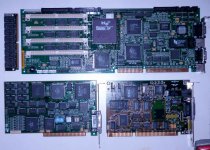
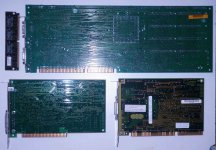
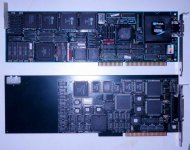
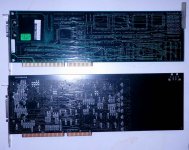
Did I mention that I haven't managed to put the BEAST down by poking around in there with my grubby little paws yet?
But I do have 17mm of clearance for a 486DX/2's heat sink, but right now it's time to see if Windows 95 can this thing!
. . . the VGA out connector has also been confirmed to be a B&W mirror of the LCD . . .
. . . such is life! :-/
Did I mention that I haven't managed to put the BEAST down by poking around in there with my grubby little paws yet?
But I do have 17mm of clearance for a 486DX/2's heat sink, but right now it's time to see if Windows 95 can this thing!
Gah!!!! : I figured out why I got the "no operating system" error from the BEAST with the HDD from the Dell from hell hooked up to it. It's password protected! Thank goodness the blasted thing (Dell PII) defiled my MacHackStation™ only long enough to figure that one out.
The open backed back is back on the BEAST . . . sort of. After hooking the UNIX drive back up and testing it, all is as well as it can be in the world of password protected $47,000 proprietary vertical market ISA UNIX boxen from 1993.
The four expansion cards, an appreciable percentage of the sheet metal and what feels like at least a quarter of the screws from the box are sorted out and stored in a file drawer. Now to find that dratted Win95 HDD so I can test and button the BEAST back up before I forget where all the screws go.
GAWD I hope I don't have to take the nauseating (if much easier) route and use the Win95 drive in that freakin' Dell to run the ROM burner.
Bleh!
I figured out why I got the "no operating system" error from the BEAST with the HDD from the Dell from hell hooked up to it. It's password protected! Thank goodness the blasted thing (Dell PII) defiled my MacHackStation™ only long enough to figure that one out.The open backed back is back on the BEAST . . . sort of. After hooking the UNIX drive back up and testing it, all is as well as it can be in the world of password protected $47,000 proprietary vertical market ISA UNIX boxen from 1993.
The four expansion cards, an appreciable percentage of the sheet metal and what feels like at least a quarter of the screws from the box are sorted out and stored in a file drawer. Now to find that dratted Win95 HDD so I can test and button the BEAST back up before I forget where all the screws go.
GAWD I hope I don't have to take the nauseating (if much easier) route and use the Win95 drive in that freakin' Dell to run the ROM burner.
Bleh!
I tried Windows 95 on a 486 someone gave me. Previously, all my experiences of 95 have been good overall, even a 300 MHz AMD K6 (aka NEC Ready 230T) seemed relatively speedy. But the 486, My Gosh! That thing was sooo sloww! I never believed Windows 95 could be that slow.
Anyway, I have a box full of old Windows 95 OSR 1 or 2 disks (complete with licenses; a local school was dumping them in preparation for moving to a new campus, and the computer lab aide rescued them for me).
If you can't find (or have lost) your disk/license, feel free to PM me, and I can send you one free for shipping.
By the way, in defense of the Dell, I also had a Dimension XPS D333, and it was a decent machine until the power supply died a few years ago (I got it at a yard sale back in 2007 for something like $15, so I think I got my money's worth out of it). I had fun with Windows NT Workstation 4.0 (of which I happened to have a valid license, which was bundled with a copy of Visual Basic 4 (or 5 or 6)). Sadly, I scrapped it, not knowing what else to do with it (I tried converting it to a regular motherboard/power supply, but I couldn't get it to fit properly, and I couldn't figure out how to connect the front panel lights and switches).
Managed to keep the nice 17" CRT, though.
c
Anyway, I have a box full of old Windows 95 OSR 1 or 2 disks (complete with licenses; a local school was dumping them in preparation for moving to a new campus, and the computer lab aide rescued them for me).
If you can't find (or have lost) your disk/license, feel free to PM me, and I can send you one free for shipping.
By the way, in defense of the Dell, I also had a Dimension XPS D333, and it was a decent machine until the power supply died a few years ago (I got it at a yard sale back in 2007 for something like $15, so I think I got my money's worth out of it). I had fun with Windows NT Workstation 4.0 (of which I happened to have a valid license, which was bundled with a copy of Visual Basic 4 (or 5 or 6)). Sadly, I scrapped it, not knowing what else to do with it (I tried converting it to a regular motherboard/power supply, but I couldn't get it to fit properly, and I couldn't figure out how to connect the front panel lights and switches).
Managed to keep the nice 17" CRT, though.
c
Thanks for the offer, but I'm only looking for the Win95 HDD for testing, I'll need anything from Win98 through XP to run the ROM Burner. Win98 is the only version for which I've got a license. Bought the OEM version along with the Socket 7 upgrade MoBo and stuffings for the 386 Mid-Tower under the Rug Rat's desk back in the day.
Dog slow '98 on a 486DX/2 in the BEAST for reading and burning ROMs ought to be plenty fast enough for me!
Back to the belly of the Beast: does that SIMM look like anything special? I can't imagine it's not a standard memory type. :?:
Dog slow '98 on a 486DX/2 in the BEAST for reading and burning ROMs ought to be plenty fast enough for me!
Back to the belly of the Beast: does that SIMM look like anything special? I can't imagine it's not a standard memory type. :?:
I ran IE3 on top of Windows 95 and it was adequate. I had a 75 Mhz DX4 though - maybe you had just a DX?
Don't know why you keep calling it a "UNIX box", Trash80. What you described way back at the start sounded like a perfectly normal PC BIOS startup.
Huh? :?:
Maybe I shouldn't have called them "BIOS Settings" on a Unix Box, could that be the confusion?
My mistake. I read the seemingly normal bootup stuff at the top and moved on.
I kind of figured as much. This thing is way cool. I need to hook it up to the 21" Mag test CRT with the resolution/frequency readout panel.
It appears that this LCD might be running off an HD-15 Analog VGA output. If it is really doing that, I can watch for a more current PCI architecture SBC and a backplane to install in this sucker! Heck, I can just feed the loopback cable from a VGA card in another computer and see what graphics might look like on the stock LCD. [}] ]'>
It appears that this LCD might be running off an HD-15 Analog VGA output. If it is really doing that, I can watch for a more current PCI architecture SBC and a backplane to install in this sucker! Heck, I can just feed the loopback cable from a VGA card in another computer and see what graphics might look like on the stock LCD. [}
] ]'>
I dunno, I used to have an IBM PS/2 486SX unit with 16MB of RAM, and windows 95 floppy version flew on that thing, didnt have any lack of speed whatsoever. it even had a SCSI bus. not ESDI.
I'm wondering about that ESDI part, I tried an IDE drive on the bus and came up with absolutamente nada! I need to look for my ISA SCSI controller, I've got a freakin' sack full of those teensy weensy little SCA server drives and a larger one of adapters!
Ugh, Windows 95, I wouldn't wish that on my worst enemy. That thing was more a conglomeration of bugs held together with tape than an actual OS.
Windows ME was the only MS OS to beat 95 in terms of how bad it was. At least they actively worked to fix 95, ME was just left to flop around like a 1/2 dead fish. I always laughed when people complained about Vista. I was like "Until you've had to deal with the first release of Win 95, or Windows ME, you have no idea what bad really is!"
Windows ME was the only MS OS to beat 95 in terms of how bad it was. At least they actively worked to fix 95, ME was just left to flop around like a 1/2 dead fish. I always laughed when people complained about Vista. I was like "Until you've had to deal with the first release of Win 95, or Windows ME, you have no idea what bad really is!"