

Thread
MAC SE/30 crash
hi,
now my mac is finally booting, after removing the vga card.
After starting the mac all seems working,
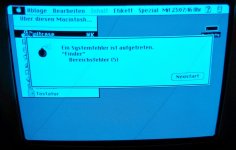
but after executing an program i get an crash (apple suitcase).
the crash is only after the first boot,
power off power on and all is working and i can execute the program.
if the mac some time off, and i power it on i get the crash again after executing the program.
removing ram and booting with only 2 modules, i got the same error.
its systemsoftware 7.5 installed.
thanks for your help!
now my mac is finally booting, after removing the vga card.
After starting the mac all seems working,
but after executing an program i get an crash (apple suitcase).
the crash is only after the first boot,
power off power on and all is working and i can execute the program.
if the mac some time off, and i power it on i get the crash again after executing the program.
removing ram and booting with only 2 modules, i got the same error.
its systemsoftware 7.5 installed.
thanks for your help!
how is the condition of your capacitors.
Are you sure you tried to boot the machine with only two (zwei, nicht vier) RAM modules? I thought the RAM had to be put in four at a time. If that's the case, perhaps you have some RAM that has bad contacts.
J White
J White
how would it even boot with 2 modules installed?
You need at-least 4 ram simms installed.
You need at-least 4 ram simms installed.
hi,
ups sorry i ve installed 4 modules for testing,
the mac have overall 8 modules installed.
i remove the last 4 modules, and test only the first 4 modules -> same error
i cant change the last 4 modules against the first 4 modules, because the last 4 modules to small to boot from, get an warning -> to few ram installed.
i ve change the smd capacitor from the logic board.
thx
ups sorry i ve installed 4 modules for testing,
the mac have overall 8 modules installed.
i remove the last 4 modules, and test only the first 4 modules -> same error
i cant change the last 4 modules against the first 4 modules, because the last 4 modules to small to boot from, get an warning -> to few ram installed.
i ve change the smd capacitor from the logic board.
thx
hi,
is there an possibility testing the ram?
like memtest for the x86?
Any other idea what the reason for the crash is?
thanks
is there an possibility testing the ram?
like memtest for the x86?
Any other idea what the reason for the crash is?
thanks
did you replace the big 220uf and 470ufcaps, techtool pro can check your ram for you
what numbers are you getting on your +12 +5 -5 rails?
IS your board the socketed cpu kind? maybe try to remove and re-seat your cpu?
what numbers are you getting on your +12 +5 -5 rails?
IS your board the socketed cpu kind? maybe try to remove and re-seat your cpu?
the 220uF and 470uF on the logic board?
no i replaced only the smd caps
no i replaced only the smd caps
I think you should change them.
You can just use radial's and bend the longer + lead over.
I know the axial's are harder to find locally and usually more expensive.
This issue might be a noise issue because of the degraded caps in the PSU, pushing more noise into the main board,
and because those 2 caps you you have not replaced are allowing the noise because they are degraded as well.
Also make sure to wipe the contacts of the RAM its self, sometimes skin oil + dust can make a poor connection.
But at-least your computer is mostly working… you should be happy for that
Could you post a picture of your main-board when you get a chance?
You can just use radial's and bend the longer + lead over.
I know the axial's are harder to find locally and usually more expensive.
This issue might be a noise issue because of the degraded caps in the PSU, pushing more noise into the main board,
and because those 2 caps you you have not replaced are allowing the noise because they are degraded as well.
Also make sure to wipe the contacts of the RAM its self, sometimes skin oil + dust can make a poor connection.
But at-least your computer is mostly working… you should be happy for that
Could you post a picture of your main-board when you get a chance?
Hello,
thanks for your help.
now i ve change both caps on the logic board,
but in the morning i got the same crash.
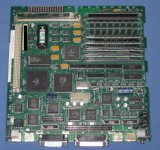
i attach an picture from the board, what is the reason that you want it?
greetings
thanks for your help.
now i ve change both caps on the logic board,
but in the morning i got the same crash.
i attach an picture from the board, what is the reason that you want it?
greetings
i wanted to have a look at your cap job...
it looks good.
Also i was going to steal and re-use your S/N but i see you already took care of that for me.
;-)
it looks good.
Also i was going to steal and re-use your S/N but i see you already took care of that for me.
;-)
i always like to have all my ram match, all being the same, brand type, chips.
my suggestion is to format and re-install the os and app,
Have you already tried this?
Have you already tried this?
hi,
i test the mac with the same ram and type,
but the same error see above.
howto reinstall os?
it is 7.5 installed is this the preferred version?
could the capacitor in power supply the reason?
thanks a lot for your help
i test the mac with the same ram and type,
but the same error see above.
howto reinstall os?
it is 7.5 installed is this the preferred version?
could the capacitor in power supply the reason?
thanks a lot for your help
what is your voltages ? +12 +5 -5?
checked?
does it only do that ... with that one application?
checked?
does it only do that ... with that one application?
Nope,
several application and several errors.
but the most time second or third boot all works.
thanks!
several application and several errors.
but the most time second or third boot all works.
thanks!
hi,
i measured the voltage at the harddisk connector:
+12,27V +5,00V
Thanks
i measured the voltage at the harddisk connector:
+12,27V +5,00V
Thanks
Does it seem like it works second or third boot because its now warmed up?
Could you turn it on(the first time), leave it on before you click on anything for about 5 min... then try to open the application?
See if it works.
Could you turn it on(the first time), leave it on before you click on anything for about 5 min... then try to open the application?
See if it works.
hi,
great idea i ll test it.
thanks
great idea i ll test it.
thanks
hello,
same error.
i power on the mac and wait 15 minute.
after that time i execute suitcase and get the same crash.
have you some more ideas?
thx a lot for your help!
same error.
i power on the mac and wait 15 minute.
after that time i execute suitcase and get the same crash.
have you some more ideas?
thx a lot for your help!
You have mixed SIMMs in one bank. And two chip/three chip SIMMs are known to be problematic on anything older than an LC. Have you tested using the bank of eight chip SIMMs?
hi,
yes see above i removed the other 4 modules for testing but the same problem.
i ve no other ram for testing.
thanks
yes see above i removed the other 4 modules for testing but the same problem.
i ve no other ram for testing.
thanks
So what happens when you boot with Extensions disabled?
I think it's interesting how on the 2nd or 3rd boot it works,
I wonder what is the total amount of ram you have?
and are you you using mode 32.
I wonder if you just have some bad ram.
maybe reboot it 10 times and document each try and what the result was.
I wonder what is the total amount of ram you have?
and are you you using mode 32.
I wonder if you just have some bad ram.
maybe reboot it 10 times and document each try and what the result was.
The error message is Bereichsfehler 5, a memory addressing problem. It's a pretty useless error report because it can mean almost anything.
The computer can boot System 7.5 (which requires more than 2MB RAM) without tripping up and becks has tried different RAM combinations.
---
I think becks needs to start from scratch, placing the four eight chip SIMMs in bank A (closest to ROM slot).
Boot from hard disk with Extensions OFF. Try running SimpleText or a similar small application. If that works, try something else. Probe whether the OS installation causes the memory error.
Boot from the Network Access Disk or Disk Tools (System 7.5 and earlier). Try running SimpleText or a similar small application. Probe whether applications run off a basic boot disk.
The computer can boot System 7.5 (which requires more than 2MB RAM) without tripping up and becks has tried different RAM combinations.
---
I think becks needs to start from scratch, placing the four eight chip SIMMs in bank A (closest to ROM slot).
Boot from hard disk with Extensions OFF. Try running SimpleText or a similar small application. If that works, try something else. Probe whether the OS installation causes the memory error.
Boot from the Network Access Disk or Disk Tools (System 7.5 and earlier). Try running SimpleText or a similar small application. Probe whether applications run off a basic boot disk.
Hi,
thanks again for the answer.
i ll try all extension off and test the mac.
i post the result.
thanks
thanks again for the answer.
i ll try all extension off and test the mac.
i post the result.
thanks
What is the prefered System (OS)
for the MAC SE/30 OS 7.1 or 7.5?
thx
for the MAC SE/30 OS 7.1 or 7.5?
thx
Either version of Mac OS will work for you. I have 7.5.5 on mine. You may prefer 7.1 though as it uses slightly less memory and is slightly faster.
7.1 is alot faster.
However if you have a NIC card in your SE/30 7.5 is nice because it had alot of the NIC drivers built into it.
If you can re-install the entire os, and boot it back up to the OS, with out any crashing…
my first thought says the machine is fine.
However if you have a NIC card in your SE/30 7.5 is nice because it had alot of the NIC drivers built into it.
If you can re-install the entire os, and boot it back up to the OS, with out any crashing…
my first thought says the machine is fine.
wow great forum!
1) After 6 boots -> crash -> it isnt allways the first boot. (extension was on)
i ll test more... ;-)
Installing system 7.1 isnt easy or?
i ve download MacOS7.1.sea but howto copy this on an floppy (own only windows and linux pc)?
thx again!
1) After 6 boots -> crash -> it isnt allways the first boot. (extension was on)
i ll test more... ;-)
Installing system 7.1 isnt easy or?
i ve download MacOS7.1.sea but howto copy this on an floppy (own only windows and linux pc)?
thx again!
argh found no help howto install mac system 7.1 or 7.5.3
some hints for me?
some hints for me?
you need to get your self a good bridge mac,
one that you can use to make disks, and maybe to local talk file transfers…
also SCSI Zip drives are great because they work even on machines as old as the Macintosh Plus. and are read/writeable all the way up to Mac OS 9.
one that you can use to make disks, and maybe to local talk file transfers…
also SCSI Zip drives are great because they work even on machines as old as the Macintosh Plus. and are read/writeable all the way up to Mac OS 9.
hello,
today i ve bought new ram.
first i check the Mac with the new ram.
today i ve bought new ram.
first i check the Mac with the new ram.
Hi,
same error with the new ram.
i ll install a clean mac os.
have sb an manual or howto create the mac os installation media with windows?
thx a lot
same error with the new ram.
i ll install a clean mac os.
have sb an manual or howto create the mac os installation media with windows?
thx a lot
Hi,
need some more help.
i ve download the MAC System 7.0.1 images.
extract the sea.bin files and write it with winimage on an floppy.
but the mac cant read the disk.
i ve insert an other floppy format it and it works.
the floppy was an 1.44MB floppy,
but the mac format it with 800k MAC Format.
Is the floppy drive only an 800k Floppy?
i find different pages and all describes the mac se/30 with an 1,44MB Floppy drive.
Some Idea
thx a lot
need some more help.
i ve download the MAC System 7.0.1 images.
extract the sea.bin files and write it with winimage on an floppy.
but the mac cant read the disk.
i ve insert an other floppy format it and it works.
the floppy was an 1.44MB floppy,
but the mac format it with 800k MAC Format.
Is the floppy drive only an 800k Floppy?
i find different pages and all describes the mac se/30 with an 1,44MB Floppy drive.
Some Idea
thx a lot
hi,
okay the answer @wiki:
Mac to include a 1.44 MB high density floppy disk drive as standard (late versions of the SE had one, but earlier versions did not).
How can i now install the mac os system 7.0.1?
okay the answer @wiki:
Mac to include a 1.44 MB high density floppy disk drive as standard (late versions of the SE had one, but earlier versions did not).
How can i now install the mac os system 7.0.1?
There are several options. You could find someone to send you some 800k system disks, or you could find another old Mac that has a 1.44MB floppy drive and use that to copy the files from the PC disks to 800k Mac disks. You could also use something like a Zip drive that you can copy files to from the PC and read on the Mac.
Easiest is probably to get some disks from another member here. Offer to pay for the blanks and the postage and I'm sure someone can help you out.
Easiest is probably to get some disks from another member here. Offer to pay for the blanks and the postage and I'm sure someone can help you out.