

Thread
PS2 Keyboard on Mac Plus
Well, sort of. The keypad sends a 0x79 response to the computer's Inquiry command, the computer then sends an Instant command, and then the keypad sends the key event. That's what I'm currently doing. But the physical keypads changed. The original keypad had arrow keys instead of the forward slash and some other keys. Then the Plus keyboard came along, and despite being in one keyboard, it still sent the keypad 0x79 response, and it had the forward slash instead of arrow keys since it had separate arrow keys. But the key codes it is documented to send for those keys are still the arrow key codes. Shift + those keys generate the characters, not the arrow keys.
So, AFAICT without actually having a keypad or a Plus keyboard and going purely from the documentation in IM Volume II and Guide to the Macintosh Family Hardware, the adapter is accurately emulating a separate keypad. I'm really not sure about the Plus keyboard since it was kind of a weird hybrid. I could change the behavior and instead of sending the keypad codes, send the non-keypad variants. forward slash on the keyboard is a different keycode than forward slash on the keypad, and the keyboard one works fine. I'm just not sure if any existing software wants it the way it is now.
True! The USB board is 60cm x 50cm and has all the same connectors. The 60cm is because the stm32f4's headers are farther apart, and I restricted the "height" of the board to 50cm to be within the 50cm x 100cm limits. Oh, except that one lacks the PS2 connectors, which saves a ton of space.
Bmow: I wouldnt use a relay. But I know too that its just a concept ;-)
I would use a 4053 mux or for low r-on use a max4619. Then there is the cbt3125. On and on it goes.... lol. I am pretty good at electronics design, just not so good (only knowing BASIC) with programming.
Using muxes you wouldn't have to alter any programming as the hardware will reroute signals correctly. Then maybe use an led to identify what cable type is being used/plugged in. Simple bi-color across cable pins 1/4 would suffice
Just my 2 cents
I would use a 4053 mux or for low r-on use a max4619. Then there is the cbt3125. On and on it goes.... lol. I am pretty good at electronics design, just not so good (only knowing BASIC) with programming.
Using muxes you wouldn't have to alter any programming as the hardware will reroute signals correctly. Then maybe use an led to identify what cable type is being used/plugged in. Simple bi-color across cable pins 1/4 would suffice
Just my 2 cents
Sorry, I meant on the PS2 end of things: I'm pretty sure the PS2 keyboard scan codes for the numeric keypad keys are multi-byte, whereas the regular alphabetic and number keys have single-byte scan codes.
The only Mac keyboard I have for testing is the Apple M0110, which doesn't have a keypad.
I'm not sure if you were referring the the PS2 keyboard's keypad here, or a Mac Plus keyboard keypad. I just tested this on my PS2 keyboard, and shift-/ types a /, like you said it should.
I would bet that all the bugs I'm seeing could be caused by a missed key event due to buffer overflow. If I type slowly and carefully, everything seems to work OK. But if I mash keys with my fist or do other crazy things, I start to see the types of bugs I mentioned.
But do the transistor-based solutions actually work? That's what I'm struggling with. For example, the 4053 datasheet says it has a maximum "on" resistance of 190 ohms at room temperature. What's going to happen if there's a 190 ohm resistance between the Mac's ground and the Discovery Board's ground? Will it still function as a return path? Will you end up with one ground at a slightly higher voltage than the other, skewing the thresholds for the digital signals? That's why I suggested a relay, for a true hard-wired ground-to-ground connection.
Edit: I should have read your entire sentence.
 So the Max4619 has an "on" resistance of 10 ohms. Is that low enough? I'm not sure how to determine it.
Ah, right, yes. There's lots of PS2 keys with multibyte scan codes. Some with as many as 6 bytes! That shouldn't be the issue here though. The code synchronously reads in the PS2 codes in the main loop, and the ADB and pre-ADB stuff is all handled asynchronously through a timer interrupt and some context state that keeps track of things. I believe most of the issues are between the adapter and the computer, not the adapter and the ps2 keyboard.
For the forward slash, there's some ambiguity in my reading of the Guide to the Macintosh Family hardware on how the original Mac keypad behaved and the Plus keyboard behaved for those keys. I believe the original Mac keypad had arrow keys where the forward slash and other problem keys are, and you pressed shift to get the forward slash instead of the arrow key. Then the Plus keyboard inverted the case sense since it had separate arrow keys? This is the part where I get fuzzy and wish for a physical keyboard to compare against. So, it is my understanding that with the current behavior the physical keys on the PS2 keypad are being mapped to the same keys in the same physical location on the original Mac keypad. Whether that's 'correct', or what the correct behavior should be is a little more ambiguous I think.
For the missed key events, do they happen when you mash on the non-keypad side of the keyboard, or is it limited to keypad. I have different depths for the keypad vs. keyboard.
Thanks for the feedback!
I just did some extended keyboard mashing, and the only bug I could get to occur was the one where the arrow keys stop working. This happened after smashing caps-lock, shift, letter keys, arrow keys, and keypad keys, all at the same time for several seconds. This bug happened three times, and each time, I was able to restore arrow key function only after pressing and releasing caps lock.
Frankly, it seems pretty robust. I'm not sure why I ran into more bugs yesterday than I did today, but for normal typing instead of crazy keyboard mashing, I don't think anyone would run into any problems.
Frankly, it seems pretty robust. I'm not sure why I ran into more bugs yesterday than I did today, but for normal typing instead of crazy keyboard mashing, I don't think anyone would run into any problems.
Looking further at techknight's suggestion, I believe the current in the ground line should be low enough that it would work. So if you prefer to use the MAX4619 chip instead of the relay, the circuit would look something like this:
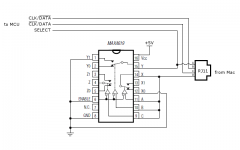
The cost is about the same either way, but the chip would be a little smaller than the relay. Both come in through-hole versions that are no more difficult to solder than the other connectors you've got already.
In your microcontroller software, at startup you'd look at the SELECT input to determine how to configure the CLK and DATA inputs. If SELECT is high, then expect CLK on line B and DATA on line C, or the opposite if SELECT is low.
This is the specific chip I looked at: http://www.digikey.com/product-detail/en/MAX4619CPE%2B/MAX4619CPE%2B-ND/1130171
The cost is about the same either way, but the chip would be a little smaller than the relay. Both come in through-hole versions that are no more difficult to solder than the other connectors you've got already.
In your microcontroller software, at startup you'd look at the SELECT input to determine how to configure the CLK and DATA inputs. If SELECT is high, then expect CLK on line B and DATA on line C, or the opposite if SELECT is low.
This is the specific chip I looked at: http://www.digikey.com/product-detail/en/MAX4619CPE%2B/MAX4619CPE%2B-ND/1130171
Regarding the pre-ADB keypad. I remember having the separate numeric keypad on my 512k, but the arrow keys didn't actually work as they should. I don't recall their behavior though. They may have inserted garbage characters instead of moving the cursor or done nothing at all.
Hah. Actually, the Plus keyboard is even wonkier. If a /(forward slash), *(asterisk), or +(plus) key is pressed on the Plus keyboard's keypad, the Plus keyboard inserts a shift down event into the stream. So, if you press any of those keys, the computer issues Inquiry, the keyboard responds with 0x71 (shift key down), then another Inquiry, then 0x79 (keypad event), then the computer issues an Instant command, the keyboard responds with the proper key code.
This is from Guide to the Macintosh Family Hardware.
But when I implement this, the OS believes the shift key is still held down, which is kind of intuitive unless MacOS is doing extra state tracking.
I'm guessing the keyboard is doing internal checking to see if either shift key is already held down, and if not, also inject a shift up event after the keypad response. It needs to handle the case of pressing shift keypad forward slash, and not inadvertently "release" the held down shift key.
So, I think the adapter needs to keep track of the ps2 keyboard's shift key state, and try to emulate what the Plus keyboard does here.
Super wonky that it's just those three keys, and they chose to inject shift key events.
This is from Guide to the Macintosh Family Hardware.
But when I implement this, the OS believes the shift key is still held down, which is kind of intuitive unless MacOS is doing extra state tracking.
I'm guessing the keyboard is doing internal checking to see if either shift key is already held down, and if not, also inject a shift up event after the keypad response. It needs to handle the case of pressing shift keypad forward slash, and not inadvertently "release" the held down shift key.
So, I think the adapter needs to keep track of the ps2 keyboard's shift key state, and try to emulate what the Plus keyboard does here.
Super wonky that it's just those three keys, and they chose to inject shift key events.
I just picked mine up at the mgt. office, very cool, bbraun!
I'm at the RTFM stage, I'll give it a try after work. Lookin forward to it. :approve:
I'm at the RTFM stage, I'll give it a try after work. Lookin forward to it. :approve:
Thanks! I hope it works for you.
I've made a smaller version of the board that will hopefully fit on top of the discovery board instead of on the bottom, like bigmessowires suggested. For now, I've just swapped the rj11 connector to be for the handset. Perhaps the MAX4619 can find a place on the bottom of the board, but in the smaller arrangement, there isn't as much extra space, since all the connectors are through hole.
For posterity, the section of Guid to the Macintosh Family Hardware (2e) that I'm looking at is Chapter 7, p283:
Also, dougg3 tested and had some problems with his PS2 mouse. The keyboard seemed to work fine for him. I've only tested with MS Intellimice, so I'm curious if there's a protocol problem. This friday I'm hoping to go get a hand full of different surplussed PS2 mice to test against.
I've made a smaller version of the board that will hopefully fit on top of the discovery board instead of on the bottom, like bigmessowires suggested. For now, I've just swapped the rj11 connector to be for the handset. Perhaps the MAX4619 can find a place on the bottom of the board, but in the smaller arrangement, there isn't as much extra space, since all the connectors are through hole.
For posterity, the section of Guid to the Macintosh Family Hardware (2e) that I'm looking at is Chapter 7, p283:
The figure is just the list of key codes.Implementing this verbatim results in the computer thinking the shift key is still down after releasing one of the above keypad keys. So, the proper solution AFAICT is to keep track of the PS2 keyboard's shift key, and if it is held down, just send the keypad code, followed by the key code. If it is not held down, send shift down, keypad code, key code, shift up. I'm not a huge fan of trying to keep additional state since it's just something else that could get out of sync, like the caps lock key, but that seems to be the thing to do here.
Also, dougg3 tested and had some problems with his PS2 mouse. The keyboard seemed to work fine for him. I've only tested with MS Intellimice, so I'm curious if there's a protocol problem. This friday I'm hoping to go get a hand full of different surplussed PS2 mice to test against.
For the mouse, do I need a straight-through DB9 cable, or a null modem cable?
Yet another cable polarity to get wrong. But it shouldn't hurt anything to use the wrong cable - it just won't work, right? Or you could add another jumper to select between null modem and straight through.
Edit: Sorry, you already said it was a straight-through cable.
Yet another cable polarity to get wrong.
But it shouldn't hurt anything to use the wrong cable - it just won't work, right? Or you could add another jumper to select between null modem and straight through.Edit: Sorry, you already said it was a straight-through cable.
I was tentitavely interested, but I kind of dropped it... :I
But anyway, I'd be willing to test it out, though it sounds like you all have it going pretty well (I suppose BMOW and dougg3 would be called Beta Testers? If you need another, I'm willing!)
I'll PM with more...
c
But anyway, I'd be willing to test it out, though it sounds like you all have it going pretty well (I suppose BMOW and dougg3 would be called Beta Testers? If you need another, I'm willing!)
I'll PM with more...
c
When it comes to the DE-9 cable, what's the maximum length? The cables I have on hand are fairly long and I don't want to overtax the cable drivers on the board.
I don't know the maximum length. I think I use a 3m cable.
bbraun and I figured out the PS/2 mouse problem. My mice take longer to reset than his, so I increased the timeout value and now they work fine! This is definitely a very cool project.
oh? How do you program these things. lol.
These directions I linked from the wiki page (and is included in the source, also linked from the wiki page) should cover everything necessary to build the source and program the device. Basically it uses the codesourcery gcc and openocd:
https://github.com/szczys/stm32f0-discovery-basic-template/blob/master/README.md
https://github.com/szczys/stm32f0-discovery-basic-template/blob/master/README.md
I finally got a DB-9 cable, and I can report that PS/2 mouse emulation works great! That is, after I finally found my PS/2 mouse buried in a box of unrelated stuff, and stopped trying to plug it into the ADB port on the board.
If it matters, this is a Logitech 2-button roller ball mouse. Using it with my Mac Plus is a pleasure. The real Mac Plus mouse feels like a lead brick in comparison.
While clicking around the Finder and reading the "about" box, I was reminded that the Mac I'm typing this on now has 2000x more RAM than the Mac Plus. Good times.
Once again, awesome stuff!
If it matters, this is a Logitech 2-button roller ball mouse. Using it with my Mac Plus is a pleasure. The real Mac Plus mouse feels like a lead brick in comparison.
While clicking around the Finder and reading the "about" box, I was reminded that the Mac I'm typing this on now has 2000x more RAM than the Mac Plus. Good times.
Once again, awesome stuff!
Thanks! Yeah, using a modern mouse on the Plus is suuuper smooth in comparison to the original mouse.
As dougg3 found (and fixed, thanks!) the time it takes to reset the mouse can vary, and some take longer than the time I originally waited. This should be fixed in the subversion repository, but if it's working for you, all is well!
Since really only openocd is needed to program the adapter, and that's just an 'apt-get install openocd' away, would it be helpful to anyone to provide a script and firmware binary, to update their adapter? Or a full Linux VM?
In other news, it looks like the usb adapter boards have finally cleared customs (apparently reduced processing capacity due to shutdown or something), and should be here in the next couple days. The smaller, top mounted PS2 adapter boards have been shipped, although ETA remains uncertain with the whole customs thing.
As dougg3 found (and fixed, thanks!) the time it takes to reset the mouse can vary, and some take longer than the time I originally waited. This should be fixed in the subversion repository, but if it's working for you, all is well!
Since really only openocd is needed to program the adapter, and that's just an 'apt-get install openocd' away, would it be helpful to anyone to provide a script and firmware binary, to update their adapter? Or a full Linux VM?
In other news, it looks like the usb adapter boards have finally cleared customs (apparently reduced processing capacity due to shutdown or something), and should be here in the next couple days. The smaller, top mounted PS2 adapter boards have been shipped, although ETA remains uncertain with the whole customs thing.
Arghh, customs!
I haven't tried reprogramming mine, since I haven't found the need. But I suspect the more turn-key you could make it, the better.
The only suggestion I can think of at this point is to change the DB-9 connector to a right-angle connector. That would require having it hang off one side of the board, or making the board wider than the Discovery Board so the DB-9 could be placed on the same edge as the ADB and RJ-11 connectors. As it is now, when all five cables are plugged in, the result is a little unwieldy because cables are sticking off in several different directions. It's not really a big deal, especially if the whole thing is hidden behind your Mac, but it would make it a little more streamlined.
I haven't tried reprogramming mine, since I haven't found the need. But I suspect the more turn-key you could make it, the better.
The only suggestion I can think of at this point is to change the DB-9 connector to a right-angle connector. That would require having it hang off one side of the board, or making the board wider than the Discovery Board so the DB-9 could be placed on the same edge as the ADB and RJ-11 connectors. As it is now, when all five cables are plugged in, the result is a little unwieldy because cables are sticking off in several different directions. It's not really a big deal, especially if the whole thing is hidden behind your Mac, but it would make it a little more streamlined.
Actually one more suggestion:
As it stands now, if I want to use this as a permanent solution, I either need to plug and unplug the Discovery Board, or just leave it turned on and running all the time. It would be great if it only turned on whenever my Mac was on. This would require putting a USB jack (or just a DC in jack) on your adapter board, and then connecting the power from that through a switch to the appropriate pins on the Discovery Board. Basically it would be giving the Discovery Board an on/off switch.
For double extra coolness points, you could replace the switch with a single transistor. Connect the collector to the new USB/DC power input, the emitter to the Discovery Board's power pin, and the base to the Mac's 5V line (from either the Mac keyboard or mouse or ADB connector). Then the Discovery Board would automatically be powered on only when the Mac is turned on.
As it stands now, if I want to use this as a permanent solution, I either need to plug and unplug the Discovery Board, or just leave it turned on and running all the time. It would be great if it only turned on whenever my Mac was on. This would require putting a USB jack (or just a DC in jack) on your adapter board, and then connecting the power from that through a switch to the appropriate pins on the Discovery Board. Basically it would be giving the Discovery Board an on/off switch.
For double extra coolness points, you could replace the switch with a single transistor. Connect the collector to the new USB/DC power input, the emitter to the Discovery Board's power pin, and the base to the Mac's 5V line (from either the Mac keyboard or mouse or ADB connector). Then the Discovery Board would automatically be powered on only when the Mac is turned on.
or.. we can just power it off the mac. But I dont know if the current consumption of that whole conglomeration would overtax the mac?
I believe bbraun said it draws more current than the Mac allows, which is the reason it uses external power.
I finally had a chance to try the keyboard/mouse adapter on an ADB Mac - a PowerMac 8500. Unfortunately it wasn't a total success: the mouse works, but the keyboard doesn't. In SimpleText, typing on the keyboard does nothing at all. In an Open File dialog, typing on the keyboard causes the Mac to play an error chime, or sometimes moves the mouse down by 50 pixels or so. This is with an old Compaq PS/2 keyboard.
Even stranger: after I disconnected the adapter board, and plugged in a real Mac ADB keyboard and mouse, this behavior persisted. So it seems to have left the Mac's ADB driver in a confused state. Rebooting fixed the problem.
I noticed there's an unpopulated 3-pin header on the board, labeled Mac on one side, and ADB on the other side. Do I need to connect a jumper here in order to make it work?
Another thought: the Power Mac 8500 doesn't have any way to force a reboot other than holding command-control-power on the keyboard. Is there a way to do that using your adapter? Which key on the PS/2 keyboard acts as the power key?
Even stranger: after I disconnected the adapter board, and plugged in a real Mac ADB keyboard and mouse, this behavior persisted. So it seems to have left the Mac's ADB driver in a confused state. Rebooting fixed the problem.
I noticed there's an unpopulated 3-pin header on the board, labeled Mac on one side, and ADB on the other side. Do I need to connect a jumper here in order to make it work?
Another thought: the Power Mac 8500 doesn't have any way to force a reboot other than holding command-control-power on the keyboard. Is there a way to do that using your adapter? Which key on the PS/2 keyboard acts as the power key?
I know some keyboards had hotkeys, like standby keys, etc... its probably easy to modify the code and allow a hotkey to be used as the power key maybe?
I believe bbraun has the power key mapped to shift-esc.
It's difficult to tell what the problem is there.
Does toggling the capslock key toggle the led? If so, then at least the adapter and ps2 keyboard are talking.
dougg3 also made a change to the firmware, where I had a pullup on the ADB power line. This didn't seem to affect my 9600, and obviously wouldn't affect an SE, but on his IIci it made it seem like the power key was always down.
And yeah, shift-escape is a power button press.
Does toggling the capslock key toggle the led? If so, then at least the adapter and ps2 keyboard are talking.
dougg3 also made a change to the firmware, where I had a pullup on the ADB power line. This didn't seem to affect my 9600, and obviously wouldn't affect an SE, but on his IIci it made it seem like the power key was always down.
And yeah, shift-escape is a power button press.
Been looking to build this since I thought I had the right Discovery board.
Turns out the board I have has a 24MHz STM32F100 (128kb flash, 8kb RAM, 64 pin package). Is there a chance it'll work?
I need it, since I seem to have lost my last ADB mouse during my last move (
(
Turns out the board I have has a 24MHz STM32F100 (128kb flash, 8kb RAM, 64 pin package). Is there a chance it'll work?
I need it, since I seem to have lost my last ADB mouse during my last move
(
The adapter board won't work on that discovery board, although the code should be the same except for a minor tweak to the system timer firing rate, so if you wanted to hack up some cables, you could probably make it work.