

Thread
Macintosh Portable Charger, 1500ma (MAX) Aftermarket Options
Do I need the 9V backup battery to be in circuit? Why is it that you can never find an alligator clip when you need one?
When I finally found the second one, the termination screw was missing, the iron's heating up ATM. :
When I finally found the second one, the termination screw was missing, the iron's heating up ATM. :
No liftoff t the Cape and no joy in Lugville, but I haven't let the battery try to charge up very long, but neither Portable is giving me a bong or showing any signs of life as yet. Time to get the meter out and test the original & new chargers. I should probably test the battery to get a baseline reading to check it later if it's really charging. continuity on the wires hasn't been tested yet either.
If anyone has any ideas, please lemme know!
If anyone has any ideas, please lemme know!
I received my portable from macdrone last night.
Went to Batteries Plus, bought that same 6v 5ah battery that is on ebay for $10 for $12(with my commercial discount), and a fresh 9v battery.
Installed the Re-capped m5120 main board, Put it all back together and it fired right up, I was even able to swap the 40 meg conner hard drive board. With the 40mb Conner that was in my Macintosh Classic.
With this portable, it was missing the OEM battery pack, I would assume he kept it to rebuild it for his other portables.
So I just laid a blotch of goop down, and use 2 alligator clips to go from the battery to the gold connectors on the bottom of the battery tray, from the keyboard, ( all the way to the left is + ) By the way. (all the way to the right is - ) Hooked up the alligator cables, set the battery in the tray on the blotch of goop, closed the battery cover.
Went to Batteries Plus, bought that same 6v 5ah battery that is on ebay for $10 for $12(with my commercial discount), and a fresh 9v battery.
Installed the Re-capped m5120 main board, Put it all back together and it fired right up, I was even able to swap the 40 meg conner hard drive board. With the 40mb Conner that was in my Macintosh Classic.
With this portable, it was missing the OEM battery pack, I would assume he kept it to rebuild it for his other portables.
So I just laid a blotch of goop down, and use 2 alligator clips to go from the battery to the gold connectors on the bottom of the battery tray, from the keyboard, ( all the way to the left is + ) By the way. (all the way to the right is - ) Hooked up the alligator cables, set the battery in the tray on the blotch of goop, closed the battery cover.
Nice!
It looks like I'll probably be recapping next . . . unless my sneaking suspicion turns out to be true. The last time I buttoned up the LunarLuggable, everything visible was unplugged, maybe the MOLEX connector for the power is disconnected as well?
Instead of alligator clips, I was thinking about rigging up a MOLEX connector test rig for the two battery connections.
Gotta get some Acetone later and try bonking one of my bats. [}] ]'>
It looks like I'll probably be recapping next . . . unless my sneaking suspicion turns out to be true. The last time I buttoned up the LunarLuggable, everything visible was unplugged, maybe the MOLEX connector for the power is disconnected as well?
Instead of alligator clips, I was thinking about rigging up a MOLEX connector test rig for the two battery connections.
Gotta get some Acetone later and try bonking one of my bats. [}
] ]'>
Yeah pop the plastic around the keyboard back off, and check if the power connector is plugged into the board.
Also there is a 7a fuse on the main board right near the power header, you can check continuity of that .
I'v seen that fuse blown a few times with some boards.
Also there is a 7a fuse on the main board right near the power header, you can check continuity of that .
I'v seen that fuse blown a few times with some boards.
I'll have to put my nerd goggles on to check that, nothing looks much like a fuse on the board with just reading glasses. What's the component designation on the silk screen layer?
Believe it or not, it's "F1" 
It might look like a green resistor.
They did that sometimes.
most of the time its yellow.
its ( F ) Something. forget the number its' literally right to the bottom of the 4 pin power connector from the battery.
They did that sometimes.
most of the time its yellow.
its ( F ) Something. forget the number its' literally right to the bottom of the 4 pin power connector from the battery.
The Borker's fuse is good, gotta crack the NASA Luggable open when I get a chance.
I was checking out the bottom of the chassis, it looks like it's be really easy to unhook the spade connectors from the battery contacts under there and crimp male female spade connectors matched to the cable contact wire's socket and the battery lug onto jumper wires for your GoopBat installation. Route them up through the molding hole for the MoBo clip and it would be a lot more robust than the alligator clip method.
I was gonna Acetone & thump one of my batteries this morning, but the dead-blow's MIA. I may try a rag-wrapped rubber mallet, that ought to work enough like a dead blow for the purpose and it might work even better. The rag would spread the impact of the mallet over time as in a dead blow thump and the rebound action of the rubber mallet after shock may have a better jarring effect.
I was checking out the bottom of the chassis, it looks like it's be really easy to unhook the spade connectors from the battery contacts under there and crimp male female spade connectors matched to the cable contact wire's socket and the battery lug onto jumper wires for your GoopBat installation. Route them up through the molding hole for the MoBo clip and it would be a lot more robust than the alligator clip method.
I was gonna Acetone & thump one of my batteries this morning, but the dead-blow's MIA. I may try a rag-wrapped rubber mallet, that ought to work enough like a dead blow for the purpose and it might work even better. The rag would spread the impact of the mallet over time as in a dead blow thump and the rebound action of the rubber mallet after shock may have a better jarring effect.
I had decent results removing the base of the trunk latch off the bottom of the Borker, but I'm not sure if it'll get the good one off cleanly enough to install it in the NASA Portable.
I made a mess out of the already munged up battery, but nothing that won't MEK weld back together acceptably. It's nice that the cover covers a multitude of sins. In retrospect, I should have bonked the bottom side so the batteries would have forced the top off the bottom section evenly . . .
. . . no patience applied . . . I bonked an angled screwdriver into the crack. 8-o
I made a mess out of the already munged up battery, but nothing that won't MEK weld back together acceptably. It's nice that the cover covers a multitude of sins. In retrospect, I should have bonked the bottom side so the batteries would have forced the top off the bottom section evenly . . .
. . . no patience applied . . . I bonked an angled screwdriver into the crack. 8-o
I only use the actual battery in the battery compartment, Because I do not have an actual portable battery to rebuild for it...
I literally took the actual 6v battery and dropped it into the compartment, with a blotch of goop and 2 alligator clips.
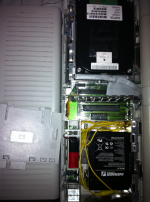
If i end up coming across a portable battery, you bet I will rebuild it.
When i rebuild the portable battery packs, i make up 2 wires, the ones to the battery get spade connectors, and the other side of the wire gets solderd to the gold plates, and the gold plates are gooped into the proper spots.
Then I use a nice strip of packing tape over the lid, that way in 2 or 3 years i can easily open the battery back up and replace
that 6v 5ah 10-12 dollar battery.
For the time being:
I like my alligator clip and goop in battery method, because the alligator clips come off,
the battery can battery ripped out, (goop will let loose) and when I get a real rebuildable portable battery pack
I can just pop it in, no more additional work for my self.
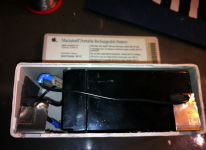
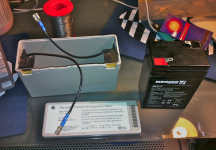
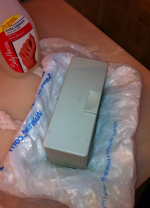
I literally took the actual 6v battery and dropped it into the compartment, with a blotch of goop and 2 alligator clips.
If i end up coming across a portable battery, you bet I will rebuild it.
When i rebuild the portable battery packs, i make up 2 wires, the ones to the battery get spade connectors, and the other side of the wire gets solderd to the gold plates, and the gold plates are gooped into the proper spots.
Then I use a nice strip of packing tape over the lid, that way in 2 or 3 years i can easily open the battery back up and replace
that 6v 5ah 10-12 dollar battery.
For the time being:
I like my alligator clip and goop in battery method, because the alligator clips come off,
the battery can battery ripped out, (goop will let loose) and when I get a real rebuildable portable battery pack
I can just pop it in, no more additional work for my self.
I just got done rebuilding my Portable's battery. The inside looks like uniserver's above with wires soldered onto the old terminals and run to the battery. Cracking the battery open was likely the hardest part. I did it with a small flat head screwdriver slowly working around the edge of the molding cracking the glue apart. I resealed the battery with some packing tape. Don't discard the white plastic shim that goes on the terminal side of the battery. It insulates the topside of those terminals from the battery and holds them in place.
ok good news, i pulled like 5 inductors and they all show between .13 to .18 mH
so i don't think any of them are bad.
also i have checked the diodes and they all seem to be good.
I have one portable here that had a no power on situation.
so i pulled the boost regulator.
and bam..it now boots. i have to do some more testing.. but its kind of good for me to know the boost regulator going bad can even keep the portable from coming on.
i'm making slow steady progress.
so i don't think any of them are bad.
also i have checked the diodes and they all seem to be good.
I have one portable here that had a no power on situation.
so i pulled the boost regulator.
and bam..it now boots. i have to do some more testing.. but its kind of good for me to know the boost regulator going bad can even keep the portable from coming on.
i'm making slow steady progress.
do you guys think this will work?
replacement for the boost regulator.
lt1070CT 5A and high efficiency switching regulator
http://www.ebay.com/itm/261241227357?ssPageName=STRK:MEWNX:IT&_trksid=p3984.m1497.l2649
replacement for the boost regulator.
lt1070CT 5A and high efficiency switching regulator
http://www.ebay.com/itm/261241227357?ssPageName=STRK:MEWNX:IT&_trksid=p3984.m1497.l2649
The original, non-backlit M5120 uses an LT1070CT at location VR1. I would bet those go bad there too.
I discovered this info this morning posting in the Almost had a working powerbook 150 thread:
Macintosh Portable Power Adapter = Model No: M5163 (SMP-10BB) = 7.5V x 1.5A = 11.5W :O
Is the 15W adapter for the Backlit Portable? :?: Mine's the original Luggable and the adapter's not even listed in the Apple table that mcd linked there.
Macintosh Portable Power Adapter = Model No: M5163 (SMP-10BB) = 7.5V x 1.5A = 11.5W :O
Is the 15W adapter for the Backlit Portable? :?: Mine's the original Luggable and the adapter's not even listed in the Apple table that mcd linked there.
: I didn't get much at all right this morning! Mine would be the same 5136 model as yours, I trasnposed the last two digits.
Is the power circuitry design so bad that a 15W supply could harm an 11.5W Portable? :?:
I didn't get much at all right this morning! Mine would be the same 5136 model as yours, I trasnposed the last two digits.Is the power circuitry design so bad that a 15W supply could harm an 11.5W Portable? :?:
I didn't send the battery as it was like a bunch more weight and I am cash strapped at the moment
The power circuits are not bad, they just were designed before anything else had been invented.
Really the kicker is, the portable mostly will not run with out a battery, However if you plug in the normal portable charger, you might even be able to power up the m5120 model with out the HD and FDD plugged in. And no battery.
but at this point the switching regulators are designed to have a battery. so they work, but for how long? well until V1M or VR1 decide to cook.
but it doesn't stop there.
People try to run this not only w/o a battery, but they want the HD to spin up and and they might also have the backlit model.
they achieve this by hooking up an 2.0 or 3.0 amp powerbook charger, at this point. I would say you have minutes before it pops.
the other scenario is... yeah.. i know... I know... I installed a battery in there... because we all know the silly portable is designed to run from battery anyways.
* but i am still using powerbook 100 charger *
This is also bad... because for what ever reason the charging circuit is only designed for 1.5 amps...
after about 45 minutes the battery is burning up, its being charged way to fast.
The circuit does not limit the current, why would they? when it was designed... there was no such thing as a powerbook 100 charger...
Because that's the way you design circuitry if it's done right, or so I would think.
If such were standard electrical engineering practice at the time I'd be surprised. Maybe not very surprised, since it was not much after the dawn of battery operated computing, but surprised nonetheless. At the price of a Luggable, you'd think they'd design it, its battery and its AC Adapter so that using it without a battery would be possible, much less a good chance at damaging the computer.
BAD Apple, bad design! :disapprove:
well the next product, the Powerbook 100... they were nice enough to include a switch allowing you to do so
Thanks SONY for making that possible
I don't think that was it at all, the 100 could run fine off the AC Adapter with no battery on board. That switch was for cutting the battery out of the circuit for any length of storage time in the computer in order to prevent the 100 from discharging it to death.
When a lead acid bat flatlines . . . it's dead for good.
When a lead acid bat flatlines . . . it's dead for good.
What blows when you use a charger that is over 1500ma?
Or try to run the portable with out a battery. Either or, both VERY BAD!
Basics:
Stage 1:
Q2 - Charging MOSFET - Symptoms: Will not charge the battery.
VR1 - 12v Boost Regulator LT1070 - Symptoms: Floppy buzzes will not boot, Hard Drive Will not power up
At this point, with these issues your board is still fixable.
Might still get video and sound etc, might sill work but just will not charge the battery any more...
IF VR1 is totally shorted out, the portable will not boot or show video or even power on. Just removing it, your computer should get video and sound at-least.
Stage 2: - (you are a little more screwed)
(IF previous is replaced or is now tested good)
I dont have info a ton of info at this stage , at this time... ( soon )
Symptoms:
No Video, dead, will not power up
or OR powers up but gets insto chime of death
or powers up boots hd/floppy... but after 10 seconds of being fully booted into the OS it throws its self into sleep mode, saying battery is dead.. when its fully charged.
I think these issues in the m5120 are related to the V1M HYBRID
I think these issues in the m5126 are related to the U5L Voltage Regulator
Have not confirmed but will.
Or try to run the portable with out a battery. Either or, both VERY BAD!
Basics:
Stage 1:
Q2 - Charging MOSFET - Symptoms: Will not charge the battery.
VR1 - 12v Boost Regulator LT1070 - Symptoms: Floppy buzzes will not boot, Hard Drive Will not power up
At this point, with these issues your board is still fixable.
Might still get video and sound etc, might sill work but just will not charge the battery any more...
IF VR1 is totally shorted out, the portable will not boot or show video or even power on. Just removing it, your computer should get video and sound at-least.
Stage 2: - (you are a little more screwed)
(IF previous is replaced or is now tested good)
I dont have info a ton of info at this stage , at this time... ( soon )
Symptoms:
No Video, dead, will not power up
or OR powers up but gets insto chime of death
or powers up boots hd/floppy... but after 10 seconds of being fully booted into the OS it throws its self into sleep mode, saying battery is dead.. when its fully charged.
I think these issues in the m5120 are related to the V1M HYBRID
I think these issues in the m5126 are related to the U5L Voltage Regulator
Have not confirmed but will.
Could any of these parts be failing due to age and being in circuit with bad caps for an extended period of time?
When something on the 12v rail was shorting, I got the Stage 1 symptoms except that the machine was properly charging the battery and booting fine. The 12v line was putting out battery voltage instead of the proper 12v. I think there is protection somewhere in the circuit that cuts off the VRMs to prevent damage but still passes through the input voltage. One thing that drives me crazy about this machine is resetting the PMU after completely removing battery power (I don't leave the gel cell in the machine if I don't use it for a few days). It takes me several tries with the reset button cycling power on/off until it finally resets and boots. Once its reset, the machine works 100% until I pull the battery again. I impressed 2 people and scared small children when I took the machine on the road last week. My back is still suffering though. I'd swear that a Mac Portable in its case weighs more than a maximum legal size overhead bin carry-on bag completely filled with clothes.
When something on the 12v rail was shorting, I got the Stage 1 symptoms except that the machine was properly charging the battery and booting fine. The 12v line was putting out battery voltage instead of the proper 12v. I think there is protection somewhere in the circuit that cuts off the VRMs to prevent damage but still passes through the input voltage. One thing that drives me crazy about this machine is resetting the PMU after completely removing battery power (I don't leave the gel cell in the machine if I don't use it for a few days). It takes me several tries with the reset button cycling power on/off until it finally resets and boots. Once its reset, the machine works 100% until I pull the battery again. I impressed 2 people and scared small children when I took the machine on the road last week. My back is still suffering though. I'd swear that a Mac Portable in its case weighs more than a maximum legal size overhead bin carry-on bag completely filled with clothes.
The 9v battery is what keeps your time while you are changing the battery.
Once you close the battery tray lid, and if there is no battery in the tray, your pmu settings will be reset.
I'm sure running the machine with bad caps is not good. running them with bad-caps + no battery + Powerbook 3a charger = very bad
I have 2 portables, a m5120 and a m5126, the m5120 does everything properly, i can leave the battery in and it will sit for weeks at a time and keep its charge.
My m5126 it works great, however it will kill a fully charged battery with in 3 days. if i leave it in, on the shelf.
I think with some portables there can be issues with the PMU that can kill your battery prematurely.
Is this same thing happening to you? Could also be related to a part on the PCB that is not doing what its suppose to be doing.
It will be nice one day to have a cross reference that compares all your Macintosh Portable
symptoms to the actual fixable issue.
Once you close the battery tray lid, and if there is no battery in the tray, your pmu settings will be reset.
I'm sure running the machine with bad caps is not good. running them with bad-caps + no battery + Powerbook 3a charger = very bad
I have 2 portables, a m5120 and a m5126, the m5120 does everything properly, i can leave the battery in and it will sit for weeks at a time and keep its charge.
My m5126 it works great, however it will kill a fully charged battery with in 3 days. if i leave it in, on the shelf.
I think with some portables there can be issues with the PMU that can kill your battery prematurely.
Is this same thing happening to you? Could also be related to a part on the PCB that is not doing what its suppose to be doing.
It will be nice one day to have a cross reference that compares all your Macintosh Portable
symptoms to the actual fixable issue.
I haven't actually left the machine with the battery in it for more than 2 days. The reason being that I don't want to kill the brand new battery I bought if I forget about the machine. What is the average life of a fully charged battery supposed to be if the machine is left on standby without being used?
AGM's are robust you can kill them alot.
I wouldn't worry about it too much.
Dylan keeps his battery in the portable and it works great, and its going on 5 years old now.
I wouldn't worry about it too much.
Dylan keeps his battery in the portable and it works great, and its going on 5 years old now.
I'll put the standby power to the test and see what happens.
ok great.