

Thread
Presenting -- Classic Mac Networking Guide 3.0!
How modern? MacOS X 10.4 (or was it 10.5?) and later dropped Appletalk support for file sharing. SMB/CIFS is the preferred method nowadays. A2SERVER has Samba installed for that reason.
OS 9 and older should work with A2SERVER without a problem.
OS 9 and older should work with A2SERVER without a problem.
The Chart basically tells us that that 10.6 is the last to work with OS 9.2.
Does anybody want to try out this? http://support.apple.com/kb/HT4700
I'd be interested to hear of the results. Pretty simple really, test if 10.7/10.8 can mount a OS 7.5.5 w/OT 1.3, 9, 9.1, and 9.2 system (each one in turn) and then test if OS 7.5.5 w/OT 1.3, 9, 9.1, and 9.2 can then mount the 10.7/10.8 share.
Does anybody want to try out this? http://support.apple.com/kb/HT4700
I'd be interested to hear of the results. Pretty simple really, test if 10.7/10.8 can mount a OS 7.5.5 w/OT 1.3, 9, 9.1, and 9.2 system (each one in turn) and then test if OS 7.5.5 w/OT 1.3, 9, 9.1, and 9.2 can then mount the 10.7/10.8 share.
actually, that will be very handy at work! Nice find. I'll try it this week, we have an older LaCie(7TB NAS) we store old files on, but LaCie dropped support for it under 10.7+ been using SMB, but there are file name issues that way, if I can get AFP access back that'll be perfect. (one of the reasons I've kept 10.6 on my workstation...)
AWESOME! My macbook running 10.7 connected to the LaCie now that I did the modifications in that link.
Great. Anybody else would like to do a test run for me on that? The Guide only mentions it for reference, but I'm interested to know how it actually works. I can make a little table in AppleWorks later that I can use to help y'all understand what has to be done a little easier. :approve:
EDIT: Here it is:
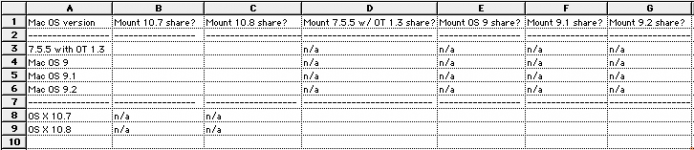
All you have to do is fill in yes or no for each appropriate field, and report any anomalies or unusuals. Shouldn't be that hard. I would do it but I don't have the hardware to do the OS 9.0/9.1 share, and I don't have 10.6, 10.7 or 10.8. (The Intel Mac mini I have maxes out at 10.6.)
Whosoever can do this will get credit for the new subsection for AFP for 10.7/10.8 . I may also need screenshots (like what I have up there already) on how to get the networking with AFP set up, so that all the steps are covered. Ideally we'd also verify that it works with Windows Server 2000/2003 Services for Macintosh but I have faith that it will work regardless, although three cool points, a bonus widget and a cookie are available to those who go that far. :b&w: Windows 2000 Server with SFM is actually fairly good, based on my testing. (2000 Server also has a unique feature to splice a file together from a separate resource fork and data fork into one file. Not sure if other Windows versions have this feature -- its done in the command line.)
EDIT: Here it is:
All you have to do is fill in yes or no for each appropriate field, and report any anomalies or unusuals. Shouldn't be that hard. I would do it but I don't have the hardware to do the OS 9.0/9.1 share, and I don't have 10.6, 10.7 or 10.8. (The Intel Mac mini I have maxes out at 10.6.)
Whosoever can do this will get credit for the new subsection for AFP for 10.7/10.8
. I may also need screenshots (like what I have up there already) on how to get the networking with AFP set up, so that all the steps are covered. Ideally we'd also verify that it works with Windows Server 2000/2003 Services for Macintosh but I have faith that it will work regardless, although three cool points, a bonus widget and a cookie are available to those who go that far. :b&w: Windows 2000 Server with SFM is actually fairly good, based on my testing. (2000 Server also has a unique feature to splice a file together from a separate resource fork and data fork into one file. Not sure if other Windows versions have this feature -- its done in the command line.)
Well I can tell you it does not work on the SE/30 at work with OS 7.5.3.  we'll see if I have time to play on my 180 when I get home.
*note: The 180 is running 7.6.1, OT 1.3, AppleShare 3.8.3, this was the minimum required to connect to 10.5.8 server.
we'll see if I have time to play on my 180 when I get home.*note: The 180 is running 7.6.1, OT 1.3, AppleShare 3.8.3, this was the minimum required to connect to 10.5.8 server.
7.5.3 with OT 1.3 or MacTCP? Nobody can mount each other?Well I can tell you it does not work on the SE/30 at work with OS 7.5.3.
MacTCP on the SE/30 no mounting in either direction(that sounds moderately dirty). SE/30 does not 'see' the LaCie either... I recall my Plus with 6.0.8 and MacTCP(same setup that sees a2server now, but somehow my appletalk is messed up after a few years sitting in storage) could 'see' and mount the LaCie I had at home, but it was a different model, at home I once had a 'd2 Network drive,' the one at work is a '5big storage server'.
actually, the SE/30 doesn't see the older LaCie network disk either... hummm. maybe the settings are wrong. going to check that again right now, since I'm waiting for some other work to come in right now.
actually, the SE/30 doesn't see the older LaCie network disk either... hummm. maybe the settings are wrong. going to check that again right now, since I'm waiting for some other work to come in right now.
Yup... forgot, no PRAM battery = automatic resetting of appletalk to the printer port
changed that and it does see the older LaCie drive no problem, getting stuck at the point it shows the available sharepoints, but that drive has like 25-30 separate share points so that may be the issue.
it does NOT see the newer LaCie drive nor my macbook. also after waiting for a few moments my macbook says it can't find a server running on the SE/30's IP address.
Appletalk version is 7.2 (as noted in the bottom left corner of the chooser)
changed that and it does see the older LaCie drive no problem, getting stuck at the point it shows the available sharepoints, but that drive has like 25-30 separate share points so that may be the issue.
it does NOT see the newer LaCie drive nor my macbook. also after waiting for a few moments my macbook says it can't find a server running on the SE/30's IP address.
Appletalk version is 7.2 (as noted in the bottom left corner of the chooser)
Thats a negative on 7.6.1 and OS 10.7, from the PB180 it says the afp server is incompatible on the macbook it says no server responded.
I found more interesting results using sheepshaver.
it does NOT see/connect to the Powerbook 180 nor the a2server. even using the IP address, says no server. BUT it does still connect fine to the 10.5server. Tried connecting to my intel mini(10. 8) , says it is an incompatible afp server... so it must require part of the host machines appletalk abilities to connect? Can't test more, 7.6.1/PB180 is as new a 'vintage' mac as I have and G4/OS 10.5 is as old of a 'modern' mac here.
I found more interesting results using sheepshaver.
it does NOT see/connect to the Powerbook 180 nor the a2server. even using the IP address, says no server. BUT it does still connect fine to the 10.5server. Tried connecting to my intel mini(10. 8) , says it is an incompatible afp server... so it must require part of the host machines appletalk abilities to connect? Can't test more, 7.6.1/PB180 is as new a 'vintage' mac as I have and G4/OS 10.5 is as old of a 'modern' mac here.
Righto
Could you also test 10.8 with 7.6.1 just to be sure with the "Legacy Mode"?
I'll mark off pre OS 9 systems, I figured that from the get-go because if you look at the Chart, 10.4 is right at the cut off. Anything higher and you need OS 9+. Didn't hurt to try 7.6.1, because you just never know. I've been surprised more than once on investigation procedures for the Guide.
Could you also test 10.8 with 7.6.1 just to be sure with the "Legacy Mode"?
I'll mark off pre OS 9 systems, I figured that from the get-go because if you look at the Chart, 10.4 is right at the cut off. Anything higher and you need OS 9+. Didn't hurt to try 7.6.1, because you just never know. I've been surprised more than once on investigation procedures for the Guide.
Yeah, definitely. I have to see how the rest of the week pans out and I'll give it a shot. It may be my last week to try(the 180 and EN/SC are on eBay).
Also, I forget if it was mentioned in the guide, but it would be good to mention 10.5 Server is a go with the setup I have on the PB180 so there is something the server version has that the 'regular' version of 10.5 does not... too bad it doesn't seem to work with anything less than Appleshare 3.8.3 (which is not compatible with 7.5.5, needs 7.6 IIRC) At least something added as a footnote...
Also, I forget if it was mentioned in the guide, but it would be good to mention 10.5 Server is a go with the setup I have on the PB180 so there is something the server version has that the 'regular' version of 10.5 does not... too bad it doesn't seem to work with anything less than Appleshare 3.8.3 (which is not compatible with 7.5.5, needs 7.6 IIRC) At least something added as a footnote...
In the footnotes, just below the Chart:
I'd love to cover OS X Server, but then I'd have to get Mac OS X Server 1.0, 10.0, 10.1, 10.2, 10.3, 10.4, 10.5, 10.6, 10.7, and 10.8. Then I'd have to get a Plus and then something that can run 7.6 through 9.2. Then run the tests on how to configure them and make them work, that would take at least a week straight.
Doh! Had this come up a couple of years ago, when I had versions 10.1 through 10.6 server... and a few more macs. All I have is 10.5 at home and 10.7 at work. I may have one last copy 10.2 server kicking around still, you can have it if I find it, don't think I have anything it runs on now. But generally if the consumer OS supported it, the server OS would too. only odd duck I've seen thus far is 10.5, Maybe because they left Appletalk in there for the printserver, some bits of file sharing were left too?
One thing I didn't try is the reverse, 10.5 server back to the PB180. I'll have to test that one before the PB is gone too.
One thing I didn't try is the reverse, 10.5 server back to the PB180. I'll have to test that one before the PB is gone too.
10.7 at work is the Server version?
What I could do is make a note in the 10.5 section (not in the Chart) that 7.6 with 3.8.3 will work with 10.5 Server. -shrugs- Not sure what that would do, as my OCD would kick in and I'd say "well what about 10.4 Server? 10.6 Server?" and so on.
Keep in mind, nearly every thing I talk about or discuss in procedure, I've done it myself just to make sure it works. (Most of the data from the Chart came from a healthy contribution of data from mcdermnd. I wouldn't have been able to do it myself without acquiring a few more machines, which would then be gathering dust). For example, I heard that afpfs-ng can mount AFP shares in Linux. Then I start to wonder: well, there's many kinds of AFP servers, starting with ASFS 2.0.1, then System 7. Can it mount those? (No.) How about Mac OS 7.6.1 with OT 1.3 and AS 3.8.3? (No.) Okay what about 9.2.2? (No.) OS X 10.2? (Yes, but it seemed to have trouble mounting the shares.) What about Windows 2K Server with SFM? (Same thing.)
I also heard about the pseudo-dialup network from this thread. Naturally, I had to try it out. For some reason 10.5 wouldn't work properly. No idea why. (I had tail -f /var/log/system.log running while I had it set up.) 10.4 worked fine. Ubuntu 10.04LTS did not. Ubuntu 9.10, after I fiddled around and put the connect-delay 5000 flag in, worked fine.
So it's imperative that we get it right, if we can, otherwise I'm inclined to only mention it in a passing reference, or not at all. I would ideally cover networking in a more expansive detail, covering SMB (Windows) and other stuff like SSH so it can be "the one, for all" -- but that would take too much time and there's plenty of adequate tutorials elsewhere.
What I could do is make a note in the 10.5 section (not in the Chart) that 7.6 with 3.8.3 will work with 10.5 Server. -shrugs- Not sure what that would do, as my OCD would kick in and I'd say "well what about 10.4 Server? 10.6 Server?" and so on.
Keep in mind, nearly every thing I talk about or discuss in procedure, I've done it myself just to make sure it works. (Most of the data from the Chart came from a healthy contribution of data from mcdermnd. I wouldn't have been able to do it myself without acquiring a few more machines, which would then be gathering dust). For example, I heard that afpfs-ng can mount AFP shares in Linux. Then I start to wonder: well, there's many kinds of AFP servers, starting with ASFS 2.0.1, then System 7. Can it mount those? (No.) How about Mac OS 7.6.1 with OT 1.3 and AS 3.8.3? (No.) Okay what about 9.2.2? (No.) OS X 10.2? (Yes, but it seemed to have trouble mounting the shares.) What about Windows 2K Server with SFM? (Same thing.)
I also heard about the pseudo-dialup network from this thread. Naturally, I had to try it out. For some reason 10.5 wouldn't work properly. No idea why. (I had tail -f /var/log/system.log running while I had it set up.) 10.4 worked fine. Ubuntu 10.04LTS did not. Ubuntu 9.10, after I fiddled around and put the connect-delay 5000 flag in, worked fine.
So it's imperative that we get it right, if we can, otherwise I'm inclined to only mention it in a passing reference, or not at all. I would ideally cover networking in a more expansive detail, covering SMB (Windows) and other stuff like SSH so it can be "the one, for all" -- but that would take too much time and there's plenty of adequate tutorials elsewhere.
True, but we don't want to lose that little tidbit of information either.
10.7 at work is the server version. running on 2011 mac mini. No way to test it now though, someone hit the BIN button on eBay late last night. So the 180 is in a medium flat rate box on its way to Illinois I did try reverse 10.5 server to 7.6.1 *early* this morning. that was a no go... forgot about trying 10.8 in legacy mode in all my running around this morning. sorry.
10.7 at work is the server version. running on 2011 mac mini. No way to test it now though, someone hit the BIN button on eBay late last night. So the 180 is in a medium flat rate box on its way to Illinois I did try reverse 10.5 server to 7.6.1 *early* this morning. that was a no go... forgot about trying 10.8 in legacy mode in all my running around this morning. sorry.
Modern as in 10.7/10.8, I tried connecting to a2server with smb, that doesn't work either. I'm down to just my plus with OS 6.0.8 and a dayna etherprint-T...
True, but we don't want to lose that little tidbit of information either.
10.7 at work is the server version. running on 2011 mac mini. No way to test it now though, someone hit the BIN button on eBay late last night. So the 180 is in a medium flat rate box on its way to Illinois I did try reverse 10.5 server to 7.6.1 *early* this morning. that was a no go... forgot about trying 10.8 in legacy mode in all my running around this morning. sorry.
10.7 at work is the server version. running on 2011 mac mini. No way to test it now though, someone hit the BIN button on eBay late last night. So the 180 is in a medium flat rate box on its way to Illinois I did try reverse 10.5 server to 7.6.1 *early* this morning. that was a no go... forgot about trying 10.8 in legacy mode in all my running around this morning. sorry.
Modern as in 10.7/10.8, I tried connecting to a2server with smb, that doesn't work either. I'm down to just my plus with OS 6.0.8 and a dayna etherprint-T...