

Thread
EtherWave Mac/PB Adapter and Classic Mac
Dynamite, congrats! :approve:
I'll have to go upload that file to Mac GUI so a copy will be around in the future.
Sorry that that image from my site never worked out, and now my site is also offline :/
I'm glad that you got this sorted out!
I'm glad that you got this sorted out!
Why is this? What happened??
I hope you get it back soon (assuming you didn't take it down intentionally, of course).
c
p.s. Did you ever sell your Plus?
Yes the plus was sold :'(
also the site is down on purpose because I couldn't afford the renewals and the hosting :'( :'(
It's all good. I have backups of everything and eventually it will go up on a free host.
also the site is down on purpose because I couldn't afford the renewals and the hosting :'( :'(
It's all good. I have backups of everything and eventually it will go up on a free host.
Is it a personal, non-profit site? If so, send me a PM.
Tested it today on 7.1 and 7.5. Both install without any problems. I used Shrinkwrap on 7.5 and Diskcopy 6.3.3 on 7.1
Setup MacTCp as Ethernet Build-In and use an IP adress from the normal Ethernet range. I use as DNS my MacIPgw, which has a name server on board.
So in my setup the PowerBook has 192.168.62.209, the router / gateway 192.168.62.1 and my MacIPgw (nameserver) 192.168.62.10
So...yes a EtherWave adapter can work with MacTCP without any gateway. It behaves as an Ethernet card.
I'm glad that I could have tested this now!
Setup MacTCp as Ethernet Build-In and use an IP adress from the normal Ethernet range. I use as DNS my MacIPgw, which has a name server on board.
So in my setup the PowerBook has 192.168.62.209, the router / gateway 192.168.62.1 and my MacIPgw (nameserver) 192.168.62.10
So...yes a EtherWave adapter can work with MacTCP without any gateway. It behaves as an Ethernet card.
I'm glad that I could have tested this now!
To round it up.
I bought the EtherWave adapter in June 2013. I didn’t work. A red light was burning. When I opened it up I found out that one of the capacitors was getting much to warm. I replaced it and I had green lights all over!
When I connected it without any driver it worked like a normal hardware LocalBridge. You see the AppleTalk network, but cannot use it as an Alternative Ethernet card or switch to it in network or MacTCP control panel.
Thanks to all our community I got the drivers. Many thanks for that again. I will attach the image I used for this on this post.
The rest is simple. Just mount this disk and install the drivers on 7.1 or 7.5. Startup with Extentions Off (hold shift when booting).
You see two images how the network control panel looks and the MacTCP control panel.
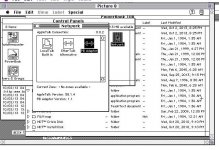
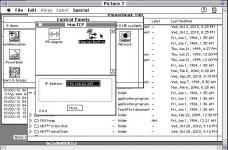
This is the image for the version 2.2.2.
FarallonEtherWave.zip
I bought the EtherWave adapter in June 2013. I didn’t work. A red light was burning. When I opened it up I found out that one of the capacitors was getting much to warm. I replaced it and I had green lights all over!
When I connected it without any driver it worked like a normal hardware LocalBridge. You see the AppleTalk network, but cannot use it as an Alternative Ethernet card or switch to it in network or MacTCP control panel.
Thanks to all our community I got the drivers. Many thanks for that again. I will attach the image I used for this on this post.
The rest is simple. Just mount this disk and install the drivers on 7.1 or 7.5. Startup with Extentions Off (hold shift when booting).
You see two images how the network control panel looks and the MacTCP control panel.
This is the image for the version 2.2.2.
FarallonEtherWave.zip
too bad these things dont show up anymore. and when they do, they go for high $$$ on ebay.
So that was the last stumbling block, running the installer with extensions turned off? With the extensions on it would give you that complaint about the disk not being an authentic disk?
I'm just glad that a copy of the installer is freely available again. That is going to be the major sticking point for anyone that wants to get one of these up and running.
I'm just glad that a copy of the installer is freely available again. That is going to be the major sticking point for anyone that wants to get one of these up and running.
No... the problem was that I copied the Installer files to a floppy. That didn't work.... Even with the correct floppy name.
I had to mount the disk image and install it from there.
And yes...then a successful installation is also only possible with extensions off.
The adapter is working fine now for several days. I noticed that the PowerBook and adapter work better under System 7.5 than under 7.1.
My web server responds even when screen is almost off and HD is off. It wakes up and serves a page.....
I had to mount the disk image and install it from there.
And yes...then a successful installation is also only possible with extensions off.
The adapter is working fine now for several days. I noticed that the PowerBook and adapter work better under System 7.5 than under 7.1.
My web server responds even when screen is almost off and HD is off. It wakes up and serves a page.....
I've noticed networking, in general, works better in 7.5. However, using OT 1.2.1 in 7.1.2P seems to work quite well, even if it uses 300-400k more RAM than MacTCP. However, having DHCP is indispensable.
If they could get Wi-Fi working on the PB500 series with a Rev-C PCMCIA card cage on 7.1.x, I'd be really interested, but it has not been possible, as far as I'm aware.
If they could get Wi-Fi working on the PB500 series with a Rev-C PCMCIA card cage on 7.1.x, I'd be really interested, but it has not been possible, as far as I'm aware.