

Thread
Quadra 950 ... Mostly Dead
Not all dead. MOSTLY dead. Looking for a clue here ...
I picked up a Quadra 950 last week and it game me half the chimes of death on the first boot. I removed four of the memory modules and it started booting normally so I figured it was good.
I took it apart today to give it a thorough cleaning as it was really filthy inside (giant dust bunnies). I put everything back together and now I get the second half of the chimes of death after the RAM check.I removed everything from the logic board except four 1 MB sticks of RAM and the power supply (no RAM, no VRAM SIMMs, no SCSI or floppy cables, no cards, no PRAM battery). All I get is a normal "bong" followed by the RAM check followed by the second half of the death chimes.
Any ideas? Is it checking VRAM next? SCSI chain?
I picked up a Quadra 950 last week and it game me half the chimes of death on the first boot. I removed four of the memory modules and it started booting normally so I figured it was good.
I took it apart today to give it a thorough cleaning as it was really filthy inside (giant dust bunnies). I put everything back together and now I get the second half of the chimes of death after the RAM check.I removed everything from the logic board except four 1 MB sticks of RAM and the power supply (no RAM, no VRAM SIMMs, no SCSI or floppy cables, no cards, no PRAM battery). All I get is a normal "bong" followed by the RAM check followed by the second half of the death chimes.
Any ideas? Is it checking VRAM next? SCSI chain?
Can a 950 boot with just four MB?
It does it with any brand or amount of RAM. It seems like it's passing the RAM tests. It shows a plain, grey screen without any sad/happy Mac and without a notched upper left corner. Without any RAM installed, I get the expected "bong" plus a full "death chime" and a black screen.
There are no electrolytic caps on the logic board so I don't think there is an issue there.
There are no electrolytic caps on the logic board so I don't think there is an issue there.
all right, breast-feeding! lol
oh... at 8 years old lol... haha.
http://www.youtube.com/watch?v=fxv6R9fUO74&list=FL2olURenU-oW2m04cnayXoQ
oh... at 8 years old lol... haha.
http://www.youtube.com/watch?v=fxv6R9fUO74&list=FL2olURenU-oW2m04cnayXoQ
at any point do you ever get video?
have your tried to boot it with a video card?
Rom? i wonder if there is a issue with rom?
http://support.apple.com/kb/TA34817?viewlocale=en_US&locale=en_US
i suppose it does have a rom slot.
have your tried to boot it with a video card?
Rom? i wonder if there is a issue with rom?
http://support.apple.com/kb/TA34817?viewlocale=en_US&locale=en_US
i suppose it does have a rom slot.
Yes, as I said, it goes to grey screen then the half-chime of death. No mouse pointer. No rounded let corner.
No, I have not tried a video card.
The ROMs are soldered.
After removing two pairs of RAM, it did boot the three or four times I tried it last week. The half-chime happened on the first boot attempt after bringing it home and now at every attempt after cleaning.
No, I have not tried a video card.
The ROMs are soldered.
After removing two pairs of RAM, it did boot the three or four times I tried it last week. The half-chime happened on the first boot attempt after bringing it home and now at every attempt after cleaning.
have you tried the hair dryer trick?
Sorry buddy but i think you got taken by that little old lady at the garage sale
also did you check the rails to see if they are outputting proper voltages?
3.3 / 5 /12 ?
might be hunks o crud in the psu?
Sorry buddy but i think you got taken by that little old lady at the garage sale
also did you check the rails to see if they are outputting proper voltages?
3.3 / 5 /12 ?
might be hunks o crud in the psu?
check the SCSI chain termination, etc...
If i remember those units required internal termination and ive seen that play havok.
Try flexing the PCB, all it takes is a hairline crack in one of the Vias.
If i remember those units required internal termination and ive seen that play havok.
Try flexing the PCB, all it takes is a hairline crack in one of the Vias.
I tried without the SCSI ribbon connected at all and also with the ribbon plugged in with only the stock terminator attached so I'm not sure it could be a SCSI termination issue. Also, if it was a termination issue, I would assume that the boot would hang instead of giving death chimes. But I'll look again.
The video comes to grey screen, so I would think the video subsystem is okay.
What if the SCSI chip was bad? NuBus?
It may come down to getting out the loupe and making my eyeballs hurt.
The video comes to grey screen, so I would think the video subsystem is okay.
What if the SCSI chip was bad? NuBus?
It may come down to getting out the loupe and making my eyeballs hurt.
acutely its doing the similar thing right now as that Macintosh SE board i sent you was doing.
humm i never thought to check the scsi chip.......
humm i never thought to check the scsi chip.......
Whatever it is, it went from sketchy to bad when I pulled the logic board from the machine.
Update:
With the onboard video, I get a bong, then grey screen, then a flash of SCSI activity and immediately the half-chimes-of-death
With a Radius NuBus card installed, I get a bong, then grey screen with the Radius splash, then a flash of SCSI activity and immediately the half-chimes-of-death
Never a happy or a sad Mac. Never any floppy activity. Never any keyboard response.
So, can I assume that this means that RAM, video and NuBus are all working correctly? Is it down to SCSI since it dies just as it accesses the disk? I've tried a couple of different disks and they all behave the same. The failure happens regardless of whether there is anything connected to the SCSI bus or not.
With the onboard video, I get a bong, then grey screen, then a flash of SCSI activity and immediately the half-chimes-of-death
With a Radius NuBus card installed, I get a bong, then grey screen with the Radius splash, then a flash of SCSI activity and immediately the half-chimes-of-death
Never a happy or a sad Mac. Never any floppy activity. Never any keyboard response.
So, can I assume that this means that RAM, video and NuBus are all working correctly? Is it down to SCSI since it dies just as it accesses the disk? I've tried a couple of different disks and they all behave the same. The failure happens regardless of whether there is anything connected to the SCSI bus or not.
Gray screen off the video port is a very good sign, but doesn't really mean the video is working properly. The Radius splash screen is right off the card's ROM and the card probably only needs power to plaster it on a working CRT, so NuBus power check is good, but it doesn't really mean more than that AFAIK.
Battery's good?
Is there SCSI voodoo goin' on with the empty, second SCSI Bus? Can you boot from that one with an internal terminator on the first one?
Battery's good?
Is there SCSI voodoo goin' on with the empty, second SCSI Bus? Can you boot from that one with an internal terminator on the first one?
I second checking termination on the scsi bus. Between the hard disk, cble and if you have a terminator you can put on the scsi port that wouldn't hurt either. My 140 powerbook would give me no sad or happy mac or even a chime with a spinning but dead hard disk. As soon as I pulled the hard drive bam happy mac. I have some working nubus video cards if you need one. My Rasters would pop up a splash and give a weird green hue screen after and then die so just beware of them.
Good Luck
Good Luck
Well, all of those bases were already covered -
NuBus video works so we know the NuBus is alright
I have tried with a good 3.6V battery and without a battery
I tried the primary internal SCSI with:
- a single hard drive and stock terminator on the last position
- a single hard drive and no terminator
- no ribbon, no hard drive, no terminator
- ribbon and terminator but no hard drive.
I also tried with a drive on the secondary internal SCSI and all of the above with an external CD with a terminator. I think the SCSI is okay because all three ping the SCSI devices before the chimes of doom.
The floppy never makes a move. There is a voltage regulator at U89 that's getting hot to the touch. When I remove it, the internal video stops working.
NuBus video works so we know the NuBus is alright
I have tried with a good 3.6V battery and without a battery
I tried the primary internal SCSI with:
- a single hard drive and stock terminator on the last position
- a single hard drive and no terminator
- no ribbon, no hard drive, no terminator
- ribbon and terminator but no hard drive.
I also tried with a drive on the secondary internal SCSI and all of the above with an external CD with a terminator. I think the SCSI is okay because all three ping the SCSI devices before the chimes of doom.
The floppy never makes a move. There is a voltage regulator at U89 that's getting hot to the touch. When I remove it, the internal video stops working.
So your 950 now does what both of mine do but instead of resetting or dropping the video with the brief disk activity yours completely crashes and burns.
Have you fed it a bootable floppy yet with no SCSI devices attached? In my case that would cause a flawless boot.
Have you fed it a bootable floppy yet with no SCSI devices attached? In my case that would cause a flawless boot.
I have an untested 950 motherboard if you want it. As I did not have a case and the power connection is almost proprietary it wasn't worth steal bay prices. Its yours if you want it. No processor on it as of course it had an FPU and I had something it would fit into. The guy mentioned the board worked when pulled it weird he removed it from the case. Kind of been a desk ornament for the past year, kinda dusty but all yours if you need it.
He said nothing at all from the floppy.
Just in case you skipped over that part.
Just in case you skipped over that part.
After the RAM tests come a series of other tests: SCC, VIAs, VRAM, Egret, PRAM, SCSI, and SONIC ethernet tests. Unfortunately it could be failing in any of these and there's not really a good way to differentiate.
On kind of a long shot, do you see anything on the Modem port if you connect at 9600 8n2?
There is a good chance the ROM knows what is failing, and can tell you over the Modem port, IF you can kick it into the right mode. There is a chance it's doing that automatically in this case. If not, the only way I know to force it into diagnostic mode is to ground the PA0 pin of VIA1. Unfortunately I don't have a 950 or even a high res picture of a logic board to help with that.
On kind of a long shot, do you see anything on the Modem port if you connect at 9600 8n2?
There is a good chance the ROM knows what is failing, and can tell you over the Modem port, IF you can kick it into the right mode. There is a chance it's doing that automatically in this case. If not, the only way I know to force it into diagnostic mode is to ground the PA0 pin of VIA1. Unfortunately I don't have a 950 or even a high res picture of a logic board to help with that.
Very nice to know, bbraun. I'll have a look when I am back at it tomorrow. Just to be clear, I'd be putting a null modem cable between the 950 and my machine running terminal emulation. Set the connection to 9600 with 8 bits, no parity and TWO stop bits? I should see some sort of diagnostics sent over the serial cable?
Macdrone: thanks! I'll shoot you a PM
EDIT: Perfect - thanks for the tip, bbraun. I found your page outlining the diagnostic mode:
http://mac68k.info/wiki/display/mac68k/Diagnostic+Mode
Macdrone: thanks! I'll shoot you a PM
EDIT: Perfect - thanks for the tip, bbraun. I found your page outlining the diagnostic mode:
http://mac68k.info/wiki/display/mac68k/Diagnostic+Mode
Great, glad you found it. I'm pretty sure it's a null modem connection, and it's using 2 stop bits. A client set to 1 stop bit might still show most of it though.
wow, the more i learn about these apple machines, the more i appreciate them.
i think that is a very nifty feature.
i think that is a very nifty feature.
Dylan can you please post screen shots i really want to see what the output says.
Sure. I'll try and get some time to have it setup tomorrow.
last ditch effort: hook a drive up that has its own termination power, and enable it along with its termination.
Well, Diag mode is interesting but without some sort of doc on the specifics, I'm not quite sure what to do with it. Here's what I did. Lines I typed are [in brackets]:
Version info:
Size Memory:
Data Bus Test:
Mod3 RAM Test:
Address Line Test:
ROM checksum:
RevMod3 RAM Test:
Extra RAM Test:
ModInv RAM Test:
Size video RAM:
Code:
*APPLE*876543210000*
*APPLE*876543210000*
*APPLE*876543210000*
*APPLE*876543210000*
[*S]
*S
Code:
[*V]
STM Version 2.1, Scott Smyers
CTE Version 1.5.1
ROM Version 7C 17F2
*V
Code:
[*A]
*A
[*T000000010000]
*ERROR**T
[*R]
00FFFFD40000*R
Code:
[*A]
*A
[*T000100010000]
*ERROR**T
[*R]
6E0708970000*R
Code:
[*A]
*A
[*T000200010000]
*ERROR**T
[*R]
FFF7BFFF0000*R
Code:
[*A]
*A
[*T000300010000]
*APPLE*00007FF40A00*
*APPLE*00007FF40A00*
*APPLE*00007FF40A00*
*APPLE*00007FF40A00*
[*S]
*S
Code:
[*A]
*A
[*T000400010000]
*T
[*R]
000000000000*R
Code:
[*A]
*A
[*T000500010000]
*ERROR**T
[*R]
FFFFFFFB0000*R
Code:
[*A]
*A
[*T000600010000]
*ERROR**T
[*R]
080700160000*R
Code:
[*A]
*A
[*T000700010000]
*APPLE*000025C40100*
*APPLE*000025C40100*
*APPLE*000025C40100*
*APPLE*000025C40100*
[*S]
*S
Code:
[*A]
*A
[*T000800010000]
*ERROR**T
[*R]
FFFFFFFF0000*R
Nice! Was the machine already in diagnostic mode, or did you have to do something to get it there?
Can you try to do the following:
*N008400010000
Then *R to get the return code.
This will run "non-critical" test 0x84 one time. I believe there are tests 0x84 through 0xA0 here, but some might be missing for specific machines. So if the above command seems to work, try running the other ones and seeing what happens.
Can you try to do the following:
*N008400010000
Then *R to get the return code.
This will run "non-critical" test 0x84 one time. I believe there are tests 0x84 through 0xA0 here, but some might be missing for specific machines. So if the above command seems to work, try running the other ones and seeing what happens.
I had to ground pin 2 of U44 (pin2 has a trace that runs to an edge connector J1 that conveniently has a ground point also).
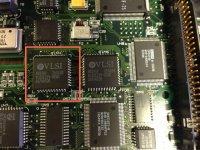
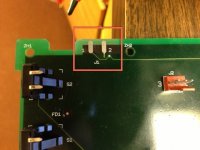
I attached my MacBook to the Quadra 950's modem port with a Keyspan serial to USB adapter and used screen to access it via terminal
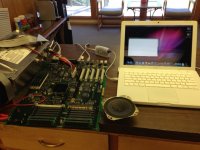
I attached my MacBook to the Quadra 950's modem port with a Keyspan serial to USB adapter and used screen to access it via terminal
Code:
screen /dev/ttyUSB28x1d1P1.1 9800 8N2
A lot of FFFFFFFF0000's and a few that came up with a "?" as a response
Code:
0x84 = 000000000000*R
0x85 = 000000000000*R
0x86 = 000000000000*R
0x87 = 000000000000*R
0x88 = *ERROR*  FFFFFFFF0000*R
0x89 = 000000000000*R
0x8A = *ERROR*  FFFFFFFF0000*R
0x8B = *ERROR*  FFFFFFFF0000*R
0x8C = *ERROR*  FFFFFFFF0000*R
0x8D = *ERROR*  FFFFFFFF0000*R
0x8E = *ERROR*  FFFFFFFF0000*R
0x8F = *ERROR*  FFFFFFFF0000*R
0x90 = *ERROR*  FFFFFFFF0000*R
0x91 = *ERROR*  FFFFFFFF0000*R
0x92 = *ERROR*  FFFFFFFF0000*R
0x93 = *ERROR*  FFFFFFFF0000*R
0x94 = 000000000000*R
0x95 = *ERROR*  00B080000000*R
0x96 = *ERROR* FFFFFFFF0000*R
0x97 = 000000000000*R
0x98 = *ERROR* FFFFFFFF0000*R
0x99 = *ERROR* FFFFFFFF0000*R
0x9A = *ERROR* 020004030000*R
0x9B = ?
0x9C = ?
0x9D = *ERROR* FFFFFFFF0000*R
0x9E = ?
0x9F = ?
0xA0 = ?