
Thread
Tunnel Vision On Monochrome Active Matrix Powerbooks
Has the true root cause of this ever been determined? It doesn't appear to be caps, nor the backlight. Is it a manufacturing defect of some kind? Is there any way to prevent it, or reverse it?
What model are you specifically talking about?
I was only aware of the PB 170 having this issue due to moisture contamination, bad seal on the LCD.
I was only aware of the PB 170 having this issue due to moisture contamination, bad seal on the LCD.
From searching the forum here, it appears people have encountered it on the 170, 180, Duo 280, 540, etc... It appears all the early monochrome active matrix monitors were impacted by it, but whether or when it happens to a given system seems to differ significantly.
All of them had the same symptoms, darkening at the four corners that tended to get worse the longer the affected system was used, and it persisted even after the display was turned off, but would eventually disappear if left alone long enough, with eventual deterioration to the point where it swallowed the entire screen. It seems to be a progressive and terminal condition once it appears.
I know in one of the threads someone has good pictures of what it looks like.
One can easily discount the backlight since that would have nothing to do with darkening after the system was turned off, and caps don't seem to be an issue, since that was ruled out in yet another thread on the topic. It seems to be some kind of defect in screen itself somehow.
Ah well that is the first I'v herd of that.
post the links to those posts if you ever come across them.
post the links to those posts if you ever come across them.
Here you go:
viewtopic.php?f=10&t=19829
viewtopic.php?f=10&t=17338
viewtopic.php?f=10&t=14421
viewtopic.php?f=3&t=5858
viewtopic.php?f=10&t=2555
In one post in this thread Bunsen mentions his impacted Duo 280:
viewtopic.php?f=10&t=11953
It is discussed here, mixed in with other things:
viewtopic.php?f=10&t=7408
You discussed it with regard to the 170 here, but it appears to impact all the other monochrome active-matrix models as well:
viewtopic.php?f=10&t=18921
Do you think it is the same moisture ingress as with the 170? Do the symptoms fit?
Ok great. Glad the Mac Portable doesn't have those issues.
Those consolidated threads in this one will be helpful.
Anyone have a vacuum pump that is large enough to accommodate a powerbook 170 LCD screen?
Those consolidated threads in this one will be helpful.
Anyone have a vacuum pump that is large enough to accommodate a powerbook 170 LCD screen?
I would like to add. I have a powerbook 180, my screen had the same issue. I bought a screen from another member on this forum that was tested in his powerbook 180 for hours and the issue did not occur. I got the screen, didn't have a chance to install for 6 months. When I did swap the screen with mine, the new screen had the exact same issue.
This leads me to believe the problem is seperate from the screen itself, somewhere in the lower section of the laptop.
My thread:
http://68kmla.org/forums/viewtopic.php?f=4&t=21754
This leads me to believe the problem is seperate from the screen itself, somewhere in the lower section of the laptop.
My thread:
http://68kmla.org/forums/viewtopic.php?f=4&t=21754
well that could be it or the seller told you a fib 
I had the exact same thought when I was looking into this issue. The oldest one amongst all of them doesn't have the issue, yet all the subsequent monochrome/grayscale active matrix panels in the portable/powerbook family do. I wonder what the difference is?
That is an interesting finding. That would be quite something if it turned out to be an issue with the circuity in the system rather than in the LCD itself. However, if it was in the system itself, wouldn't the other types of screen suffer from a similar fate? What makes the grayscale active matrix susceptible?
Really, the screen in the portable is quite beautiful 
9.8" Active Matrix, it's easy to see why the system cost so much.
I'd love to have one to add to my collection, but as a result of age, and design issues, they seem to be more trouble than I would want to deal with. They belong with better collectors than I.
I'd love to have one to add to my collection, but as a result of age, and design issues, they seem to be more trouble than I would want to deal with. They belong with better collectors than I.
i know a guy that might sell you one. his name is hap.
just throw a battery in it... if you are worried about the battery going bad just keep it plugged in...
mcdermd keeps his plugged in full time.
just throw a battery in it... if you are worried about the battery going bad just keep it plugged in...
mcdermd keeps his plugged in full time.
If the root cause is not delamination reducing capacitance, then it has to be to do with attenuation of the signals, and so most likely caps related. Or possibly gradual decline in the conductance of the traces leading to the screen edge connections to each matrix line. I haven't seen inside one of those, but if the traces on the connecting cable fan out from the centre, the traces to the corners will be longer, and attentuation would be seen there first.
Just speculation...
Rick
Just speculation...
Rick
Well because its only the active matrix, I am thinking the early transistors are going leaky on the internal plane. Either that, or LCD contamination due to bad edge seals. This fabrication process may have changed on the color displays so you dont see these faults.
All liquid crystals require AC drive, otherwise the pixels will supertwist and get stuck on, then fade.... Also when applied to DC, the liquid crystal begins to take on a di-electric property and hold a charge, and when the DC is removed it takes a bit for the charge to leak off. Which is what is happening. Also if the potential is high enough on DC it can actually damage the LC. This is why typically liquid crystals are driven with an AC signal.
im beginning to think its because the transistors are going leaky, so they are causing a DC bias on the AC signal. which is bad news for liquid-crystals.
DC can also cause electrolysis within the display, breaking down the conductive oxide electrodes.
The fact that this occurs on the edges does make me suspect that moisture has something to do with it. It isn't something I've seen before though, and I'm not sure why it would work ok for a while after being turned off.
The fact that this occurs on the edges does make me suspect that moisture has something to do with it. It isn't something I've seen before though, and I'm not sure why it would work ok for a while after being turned off.
As i said in another post, i baked my pb170 display for 20 min and it was about 20-30% better.. really, i'm not joking.
i do not have the laptop any more. if i did i would bake it even more...
again? what would a vacuum chamber do ?
Or a 5 gallon bucket of rice for a couple weeks?
i do not have the laptop any more. if i did i would bake it even more...
again? what would a vacuum chamber do ?
Or a 5 gallon bucket of rice for a couple weeks?
Well, if the display I ordered develops this, testing will be done, and if the case appears to be terminal, I will be happy to send it to whoever things they have the best chance of being able to determine exactly what is causing it. Then at least we may be able to mount a defense against, or at the very least, develop a better understanding of the syndrome.
Well, I have a good vacuum pump, but the chamber is the difficult part. Suck the air out of something and you end up with intense pressure trying to crush it. I don't know how an LCD panel would behave in a vacuum though, it may leak/boil out the liquid crystal compound.
Well, considering we don't have much else to go on, it's worth a shot if all else fails.
i agree, i think this is worth investigating.
i always like knowing what the problem is.
i always like knowing what the problem is.
Wonder if you bake it under a vacuum, kind of like a CRT, what would happen? hmmmm.....
I've had one with the bad tunneling. It was very bad when I first got it, it had been sitting in an unheated garage for quite some time (got it mid winter). I found it cleared up slightly after being in the house for a while. It wasn't completely fixed but it was not nearly as bad as when I first got it.
The other two I had did not have that issue. However, it seems over time one of them did develop tunneling(I sold the screen to Brooklyn).
Would be good to get to the bottom of the issue and figure out if there is a way to reverse it, or at least prevent it on ones that have yet to develop tunneling. Since it seems age is going to take out more and more of those screens.
Well, the screen I ordered has Tunnel Vision.
One thing I noticed on this screen, in the corners where the screen was turning "black", it wasn't losing the ability to display an image, but the polarity of the liquid crystals had inverted. When I moved my pointer into that area of the screen where it had darkened the color of the pointer inverted, but other than that it looked perfectly normal. When I moved the pointer into an area where that was unaffected by the darkening it went back to its typical color.
Does anyone know what could make the liquid crystals in the corners of the monitor invert their polarity like that?
Another bit of data for the mystery. I took the panel apart to see if I could find any physical defects. After removing the backlight, diffuser, etc... I was able to see through the panel and it was perfectly clear. I put it back together, put it in my powerbook and it looked great. After about 30 minutes the tunnel vision effect started to appear. I left it on for an hour after that to see how far it would progress. I the took the panel apart again and tried to see what it looked like now and I discovered something. Not only was the darkness at the corners and around the edges present, but the actual menu bar (which was extensively involved after an hour of darkening) was still present! I know it was the menu bar because I could easily read "File", "Special", Finder, etc... when I looked through the LCD. Somehow, whatever this is, can actually cause a complex image to be retained on the screen after power has been cut. So, does anyone know what could case a polarity inversion and allow a image to persist on a TFT-LCD after power is removed but eventually degrade to the point where the LCD looks completely normal, but have it come back again with use?
Because of crystal contamination, or a "charged" state of the Liquid crystal due to an un-wanted DC Bias. The liquid crystal is being driven with a large enough DC-offset most likely caused by leakage currents from either contamination/moisture, or failing TFT transistors in the substrate, this then causes the crystal to build a charge like a capacitor. And thats the effect you see.
Well, if heating helps, I'm inclined to believe it's moisture. I'm going to try baking the screen and see what happens
dont go too hot, itll melt the polarizing film on the panel. Youll need to heat it just under that softening/melting point and let it simmer for an hour or more.
I figure just above the boiling point of water should work. If that fails, I'll send it to James to shove in a vacuum.
In the name of science (and vintage computing)!
In the name of science (and vintage computing)!
here is your answer from above from techknight:
Yeah, but we have to hope it's moisture contamination causing it, otherwise it means it's a design defect and it can't be fixed.
shake n bake, and find out.
Based on the findings with your screen, Uniserver, what do you suggest, as far as temperature and time for the screen? I'm willing to give it a go today.
220F, for 45 minutes then let it cool and try it, if its better but still has a little.. then repeat the process again or go for 2 hours .
Sounds like a plan. I will report back as soon as I have info.
I decided to go full blast, 2 hours @ 350 F. I removed everything from the screen except for the actual liquid crystal panel itself and the attached control circuitry which cannot be removed. I shielded the control circuitry from the heat using a triple layer of tin foil (operating on the same theory as tin foil masking for a heat gun).
The panel has developed severe discoloration in several areas. Slightly concerned. Will shorten initial experiment to 45 minutes.
yeah i think 350 is a bit hot.. i would suggest a temperature just above boiling 212, that is why i ran mine at 220.
OMG, I totally misread that. I thought your post said 350! I am such a retard
I can say, likely, the screen is totally destroyed. It is pitch black.
At least now we know what happens when you bake a panel at 350 F for 45 minutes...
I can say, likely, the screen is totally destroyed. It is pitch black.
At least now we know what happens when you bake a panel at 350 F for 45 minutes...
Further investigation reveals that the screen is not dead! The polarizing film on each side was severely discolored/burned, but the liquid crystals and the electronics are still completely functional!
Since it still sorta works, I'm attempting to see if the baking was successful.
Also, it appears the screen can be saved, I just need to replace the polarizing film on each side... Does anyone know if that is even possible?
Since it still sorta works, I'm attempting to see if the baking was successful.
Also, it appears the screen can be saved, I just need to replace the polarizing film on each side... Does anyone know if that is even possible?
After running it for over an hour, I can confirm that baking the LCD does indeed work to treat (although hopefully it is a functional cure) what I like to call "The Creeping Black Plague"! Before if I had run it for 15 minutes The Plague appeared.
However, at the temp I used, 350 F, the polarizing film on each side of the screen was destroyed, although the actual liquid crystal and the electronics were intact. So, a lower temp of 220 is recommended (as was actually written above, which I completely misread, because I am apparently blind).
It looks like moisture contamination is indeed our culprit and it can be reversed!
No before and after pictures? Come one… Let us see the results
I'm too embarrassed given how it turned out as a result of the the temp I used being too high. It's a horrifying sight. 8-o
I am working on acquiring another 540, if that one needs to be baked, I will indeed use the correct temp and post before/after pictures
I am working on acquiring another 540, if that one needs to be baked, I will indeed use the correct temp and post before/after pictures
Let's re-think the temperature before you bake the second screen.
I'm not sure what the polarizing film is made from but here is common plastic film characteristics:
http://en.wikipedia.org/wiki/Polyethylene
There might be some differences between the powerbook 170 screen and the 540.
The screen does go all black(when baking), I do remember that when I baked mine.
I'm not sure what the polarizing film is made from but here is common plastic film characteristics:
http://en.wikipedia.org/wiki/Polyethylene
What is the lowest setting of your oven?
There might be some differences between the powerbook 170 screen and the 540.
The screen does go all black(when baking), I do remember that when I baked mine.
The "warm" settings on most ovens is usually somewhere between 160 to 200 degrees. (Which is, what, 70-ish to 95-ish C?) If the goal is to drive out moisture that's probably sufficient. (Just might take more time than a higher setting.) Damage to plastics aside it would seem to me that if the problem is actually water contamination the last thing you'd want to do is *boil* water that's trapped inside a glass sandwich. That sounds like a perfect recipe for cracking things. (Possibly on a microscopic scale.)
Yes, I agree, I would much rather you bake it at 190 for 3-4 hours then cause some damage.
I can tell you that the plastic turned a very deep amber color at 350, like a deep beer bottle brown with a prominent red hue to it. IDK if that helps us identify the plastic.
I think you are right about the screen itself cracking. After looking at it very closely, I noticed a 1/2 dollar sized region in the perfect center of the screen that had cracked. The crack(s) weren't visible, so it may have been a very fine crack, or a series of very small cracks, but either way, the liquid crystal escaped from that area.
Ah, see, I figured you'd need to boil the water out. Guess not...
Okay. If the next one is contaminated as well, we will try a lower temp, for a longer period of time. Something in the 180-190 region with examination every 15 minutes for at least an hour or two, longer if the screen doesn't appear to become perverted in any way.
If anyone else has any screens that are terminal, feel free to contribute to our process here as we work to hammer out the exact temp and duration necessary to fix this problem without damage to the screen itself. If you don't want to try it, I'm happy to accept screens and do it, in the name of science!
I have no idea what the lowest setting is, I'll have to check, I've never used it that low.
Another bit of info, at least at the higher temperature, it STINKS! I had to turn my exhaust fan on. It smelled like overcooked adhesive and plastic (no surprise, really)
here is some other basic info regarding LCD and temperature ranges.
LCD Family Item Celsius Fahrenheit
Standard STN Operating Range 0 to 50/60 32 to 122/140
Standard STN Storage Range -20 to 60 -4 to 140
Standard TFT Operating Range -10 to 70 14 to 158
Standard TFT Storage Range -20/-30 to 80 -4/-22 to 140
Wide Temp STN Operating Range -20 to 70 -4 to 158
Wide Temp STN Storage Range -25 to 75 -13 to 167
http://americas.kyocera.com/kicc/lcd/notes/tempconsider.html
Excellent find, Uni, although their temp conversions are retarded. 80 C is ~175 F, not 140.
Going based on that, we can probably safely take it to 175 without any risk.
My oven goes down to 170, so that will be our next test. 170, with checks every 15 minutes until the screen either gets perverted, or we get to 3-4 hours, whichever comes first.
Going based on that, we can probably safely take it to 175 without any risk.
My oven goes down to 170, so that will be our next test. 170, with checks every 15 minutes until the screen either gets perverted, or we get to 3-4 hours, whichever comes first.
got it… ok we get a 5 gallon bucket with a rubber sealing lid.
Fill it with rice, Then drill and tap a fitting into the lid and let (the LCD display) sit in a slight vacuum for X amount of time?
Fill it with rice, Then drill and tap a fitting into the lid and let (the LCD display) sit in a slight vacuum for X amount of time?
Is rice really hygroscopic enough to pull out such a small amount of water from a screen?
We might need something with more desiccating power than that.
But I agree, we are better off trying this first than another heat experiment. This fails, no harm. Baking fails again, we have another dead screen.
I need to bring my Classic II (and now my Plus) to you to have them recapped anyway, so I'll just hand off the screen to you if this one is contaminated as well.
This is really a top thread!
Thanks for the research and the extensive reporting!
Thanks for the research and the extensive reporting!
Can you scrape both sides of the LCD with a flat razor blade, getting that melted film off? Then just maybe get a nice clean sheet of paper and place it behind the LCD?
might look pretty decent?
might look pretty decent?
the vacuum pulls the water out.. the rice holds the water.
It actually has polarizing film on both sides of the liquid crystal plane. I tried removing a section of the polarizing film on just one side, no dice, nothing could be seen. I put the piece of film back, and the image in that area reappeared. I tried removing a section of the film front and back and still nothing. Apparently this type of LCD relies on a polarizing film both front & back in order to display an image.
Both films were definitely polarizing. If I held them up to my eye and rotated it in front of my LCD TV, the picture would either be present or disappear as a result of the rotation of the film.
I would actually try replacing the film if it wasn't for the fact that the liquid crystal panel was actually cracked in the center.
You can purchase polerizing film. I forget what sites, but they are out there. They sell them in ether rolls or sheets. They do this so you can replace totally /scratched film on regular color LCDs.
Holy crap! 350F is *WAY* too hot! When you bake out parts that have been exposed to moisture prior to reflow soldering, it's normally a few hours at just over 100C, or around 212F. Any hotter than that and you'll be wrecking things. Not to mention plastic outgasses all kinds of nasty substances when you get it that hot.
Yes, it has been well established that I am blind, and retarded.
That seems like it might be a problem with the polarizing films, not the liquid crystal layer.
Might.
I was wondering this as well. What if as the screen heats up from the backlight or something like that, the polarizing film is pulling away from the screen, or it's properties are being altered slightly.
Time to test that theory with an LED backlight! 
Well, I have another 540 on the way, so we have another potential victim... I mean screen... to test with. I will be much more careful with this one.
First test here will be to hand it off to UniServer to test with the vaccuum + rice. If that fails, baking, very low temp will be next.
In the name of science and vintage mac preservation!
First test here will be to hand it off to UniServer to test with the vaccuum + rice. If that fails, baking, very low temp will be next.
In the name of science and vintage mac preservation!
lol - it was just my idea,I do not have a any of what is needed laying around.
I suggest oven it for 190 for 2 hours, test.
OR if you want to purchase the supplies mentioned, Rice/Bucket/V-Pump/tube/fittings maybe you can be the certified tunnel vision screen fixer man. ?
Ah, I thought you had the stuff.
Yeah, if this next one has it I'll have to look into what I can do.
Yeah, if this next one has it I'll have to look into what I can do.
I have an extra 180 screen I can bake. 190 for 2 hrs?
Yes
mmmmm.... Whatcha cookin? LCD screens... We are having screens for dinner. LOL
A vacuum cleaner would do as a budget vacuum pump, if you can jury-rig something to seal the bucket once (partially) evacuated. Like a tennis-ball stop valve, or a simple faucet.
Refrigerator compression pumps work well, I hear.
Refrigerator compression pumps work well, I hear.
you gotta pump it down to at least, 30 maybe? I cant rememeber the scale but thats what it is for HVAC to boil water off... The stronger the vacuum, the more it pulls down the boiling point of water.
Anyone have a make and model of the LCD screens affected?
I have noticed PB180s that had tunnel visions, and ones that do not. For example, mine does not. But I noticed a difference in picture between the two. Like 2 different manufacturers.
Something to check...
I have noticed PB180s that had tunnel visions, and ones that do not. For example, mine does not. But I noticed a difference in picture between the two. Like 2 different manufacturers.
Something to check...
*looks at his Duo 230 passive matrix display and grins smugly*
Would cold temperature application help as well? I don't know how many specimens we have available but it would be interesting.
It could also be interesting to inspect color active matrix TFTs if they run extended intervals of greyscale or black & white.
Would cold temperature application help as well? I don't know how many specimens we have available but it would be interesting.
It could also be interesting to inspect color active matrix TFTs if they run extended intervals of greyscale or black & white.
I havent seen liquid crystal fail in color LCDs except the new shit. Ive seen plenty of those fail due to layer seperation or contamination. (but thats normal with new shit).
However only other thing to worry about is buffer drive IC failure in the LCD displays. (causes lines/stripes, and dead patches).
However only other thing to worry about is buffer drive IC failure in the LCD displays. (causes lines/stripes, and dead patches).
Vacuum cleaners move a lot of air volume, but they are about the worst thing you could find for pulling an actual vacuum, probably less effective than sucking the air out through a straw with your mouth.
A refrigerator compressor actually makes a pretty decent vacuum pump. The best I've found are the rotary compressors commonly used in window AC units. Those are about as good as you can get without springing for a real vacuum pump.
Refrigeration service pumps are two-stage vacuum pumps that will go down to a few microns in theory, although the rubber charging hoses and fittings are typically pretty leaky under vacuum. High vacuums are notoriously difficult, very *very* small leaks can spoil the fun and materials that normally seal end up being quite porous. Even stuff that doesn't leak may outgas for days and require steady pumping.
The biggest problem you will have trying to deal with any sort of decent vacuum is finding a suitable chamber to contain it. Pump down to anything resembling a vacuum and you end up with >14 lbs pushing in on every square inch of the chamber, and from this standpoint, the difference between a hand pump for bleeding brakes, testing automotive vac servos and such, and a fancy high vacuum rig with a diffusion or turbomolecular pump is actually very little. Think of how thick and heavy the glass of a CRT is and how violent the implosion can be if it breaks. That is the sort of forces you will be dealing with and most containers you'll find around will simply collapse.
That said, you may not need much of a vacuum to draw the moisture out if you are patient. I have done a bit of potting and casting in epoxy resin and used a plastic bucket with a hand pump to draw just enough vacuum to draw the resin into the nooks & crannies and draw out the air bubbles. Pumping it down to just the point where the sides of the bucket were starting to bulge in was adequate for that task.
A while back I saw a web page that explained the physics of it and can't find it so now but... yeah, it's actually impossible for a direct single-stage fan (which is what a normal domestic vacuum cleaner uses) to pull more than a few PSI against a closed air mass. A real vacuum pump needs a piston pump, multistage turbine, etc. And to vaporize water at "room temperature" you have to get down down to something like .5 psi, or around 29Hg of vacuum. That's actually a little more than is usually possible to achieve with something like a converted appliance pump.
(I know there's this video on Youtube showing a guy collapsing the walls of the "Spun steel pan" that makes up his homemade vacuum-cleaner-powered chamber but... there's a lot fishy about that video, and notable by its absence is a vacuum gauge. I'm thinking that's a *really* light gauge pan; even a pressure difference of a few PSI can deform something like that and that sort of pressure is of marginal use even for degassing castings. Vaporizing water? Fuggettaboutit.)
Vacuum cleaner companies love parlor tricks like picking up bowling balls with their vacuums but the notable thing there is that they always attach a *funnel* to the end of the hose. If their vacuum can pull even 1 PSI and they use a funnel 6 inches in diameter that's plenty enough to pick up a 12 pound bowling ball. A cleaner powerful enough to evacuate a vacuum chamber would have to be able to pick up that same bowling ball simply by pressing the crevice attachment snugly against it. That would be one scary vacuum cleaner.
(Edit: Granted technically you might indeed be able to somewhat accelerate the drying out of an object by putting it in a partial vacuum but you could get the same effect simply by raising the temperature a few degrees. Either way if you're putting the object in a sealed container you'll need to have some sort of desiccant in there with it to capture the water once it's out.)
So I finally got around to baking my PB180 display.
I cooked it for 30min at 190 and 90min at 180. 190 seemed a little hot to me, but actually it was fine.
The screen had no damage after the baking. The tunnel vision effect is reduced, but not eliminated. It is slowly coming back the longer I leave the system running. After 1 hour it is really noticeable.
I think I'll try another couple hours at 190 tomorrow and see if it helps more.
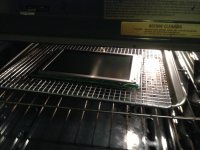
I cooked it for 30min at 190 and 90min at 180. 190 seemed a little hot to me, but actually it was fine.
The screen had no damage after the baking. The tunnel vision effect is reduced, but not eliminated. It is slowly coming back the longer I leave the system running. After 1 hour it is really noticeable.
I think I'll try another couple hours at 190 tomorrow and see if it helps more.
at that temperature, youll probably need to bake that thing for several hours. I recommend a dedicated toaster oven for this.
I ran it at 190 for 4 hours today, screen is further improved. After running laptop for hour + the tunnel vision is minor. I think this is the best it's going to get. The screen looses some "sharpness" after running for the hour also.
next we should try the bucket of rice for a week