
Thread
PB Duo: keyboard substitute
I've got one. Missing all the F keys, pulled it from an Snow 600MHz (Late-01) with bad video chip. Last time I checked, it worked. I can't get it to fit in the 500MHz model, so I have no use for it.
If you are interested, PM me. But shipping to Australia, I don't know what problems I might run into (never shipped over seas).
If you are interested, PM me. But shipping to Australia, I don't know what problems I might run into (never shipped over seas).
I wish I would have saved the old one when I replaced the one on my G4 iBook. The ribbon was shorter on the original one than the replacement one I bought (on eBay about 6 months ago), but they both had the same Apple part number. The new one doesn't fit in my machine worth anything because that ribbon cable is kinda bunched up under the center of the keyboard, causing a hump.
What kind of pictures of it are you looking for? It wouldn't be much trouble to post a few (or email them if you want higher res than what may be allowed here?)
J White
What kind of pictures of it are you looking for? It wouldn't be much trouble to post a few (or email them if you want higher res than what may be allowed here?)
J White
Quick reminder; this is a G-rated forum, more or less.
http://68kmla.org/wiki/68kMLA:Forum_Rules
* until the wiki is un-broken, we can't change that part, but we will do.
It may be, although we haven't configured it. I believe the intent early on was that we're all adults here and are generally capable of controlling our language when necessary. Especially given that nobody has since ruined the 30-minute post editing limit for everyone else, and you can draft forum posts outside of the web browser and proofread them for language, conventions, usage, etc.
I think we'd get more pushback if we enabled automatic censoring than if we just cleaned it up afterward.
I think we'd get more pushback if we enabled automatic censoring than if we just cleaned it up afterward.
A picture of the logic-board end of the ribbon cable would be a good start. Accurate dimensions of the actual keyboard plate as well.
I'll fess up - this is a crazyplan to replace the awful keyboard in the Powerbook Duo. Everymac tells me the case dimensions of the 12" iceBook and G4 Powerbook are a match, near enough. Yes, I know case surgery will be involved, even if they fit at all, and various other hacks and kludges - this is not a showstopper. And various sources tell me that the Powerbook keyboards used ADB up into the G4 era: I'm not sure exactly when the changeover happened to USB, so the earlier the model the better, just to be on the safe side.
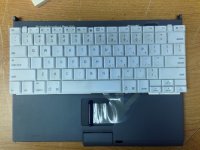
Take a look at the nice KBD of the 1400 for your hack.
I haven't looked into the rear section of the top deck issues yet, but I've been toying with the notion of grafting (just barely } ) a 1400 KBD onto a Duo. It's an exceedingly tight fit, but looks eminently doable in terms of trimming back the sides of the the top deck bezel, you might have to file the edges of the outboard keys a tad, but the wonderful metal chassis appears to fit without a problem.
I'm not sure about the feasibility of removing the function key row if it conflicts with the chassis or vice versa, but it might work out. I've got one disassembled that's been fitted to the shell of BabyPB, my first laptop, a remaindered PB100. I can dig it out and look at the circuitry. IIRC I was thinking about making new contacts to rearrange the matrix to match outputs, but getting it back together looked problematic. The color contrast looks fabulous, BTW, especially with nicely yellowed plastics.
edit: I just pulled out the boxes:
1) the front edge is still several times less flexible than the Duo's and ought to be fine if the back return is removed.
2) it looks like I can get a KeyCap off without breaking it, but I haven't figured out how to get it back on without borkage yet, so . . .
. . . reassembly using flat head machine screws in tapped holes drilled in the chassis appears to be out.
3) by scoring the chassis using a pointed bit on a router table and bending/fatiguing the function key section off looks like the best bet
4) scoring and snapping the plastic section of same is very doable
5) the flex circuit is a folded, one piece design, so it can likely be bent up, over and between chassis and top deck
6) it'll take some convoluted bending, but the flex cable looks like it'll stretch to a connector nestled under the video cable to the left side of the useless modem connector.
All in all, it looks very tight but good to go. The controller board from the right ADB KBD might fit in the modem bay and be tapped into ADB on docking connector. This would be perfect if you con't need to loose the function keys and a lot easier than getting the KeyMatrix signals to the Duo's MoBo. There's enough space in there for a matrix conversion setup as well, given the right controller. [}] ]'>
I haven't looked into the rear section of the top deck issues yet, but I've been toying with the notion of grafting (just barely }
) a 1400 KBD onto a Duo. It's an exceedingly tight fit, but looks eminently doable in terms of trimming back the sides of the the top deck bezel, you might have to file the edges of the outboard keys a tad, but the wonderful metal chassis appears to fit without a problem.I'm not sure about the feasibility of removing the function key row if it conflicts with the chassis or vice versa, but it might work out. I've got one disassembled that's been fitted to the shell of BabyPB, my first laptop, a remaindered PB100. I can dig it out and look at the circuitry. IIRC I was thinking about making new contacts to rearrange the matrix to match outputs, but getting it back together looked problematic. The color contrast looks fabulous, BTW, especially with nicely yellowed plastics.
edit: I just pulled out the boxes:
1) the front edge is still several times less flexible than the Duo's and ought to be fine if the back return is removed.
2) it looks like I can get a KeyCap off without breaking it, but I haven't figured out how to get it back on without borkage yet, so . . .
. . . reassembly using flat head machine screws in tapped holes drilled in the chassis appears to be out.
3) by scoring the chassis using a pointed bit on a router table and bending/fatiguing the function key section off looks like the best bet
4) scoring and snapping the plastic section of same is very doable
5) the flex circuit is a folded, one piece design, so it can likely be bent up, over and between chassis and top deck
6) it'll take some convoluted bending, but the flex cable looks like it'll stretch to a connector nestled under the video cable to the left side of the useless modem connector.
All in all, it looks very tight but good to go. The controller board from the right ADB KBD might fit in the modem bay and be tapped into ADB on docking connector. This would be perfect if you con't need to loose the function keys and a lot easier than getting the KeyMatrix signals to the Duo's MoBo. There's enough space in there for a matrix conversion setup as well, given the right controller. [}
] ]'>I just noted the bit about those later KBDs being ADB. That's not going to help much, the controller circuitry on the MoBo is ADB, but from the looks of mcd's pic, the keyboard itself remains your basic flex circuit KewSwitch matrix, which leads to the matrix conversion/ADB hack mentioned above.
Darn. Well that one's out then. Does anyone have the 12" Powerbook keyboard to compare?
For reference, the width of the Duo is 10.9" = 277mm
That's probably not a dealbreaker.
So is the one in the Duo, isn't it? No hack necessary - at worst, some software key remapping.
A later keyboard might work (11" MBA?) with a Key Warrior ADB, and a tap into the ADB lines on the dock connector.
I guess you could convert the flex circuit signals to match the Duo's inputs, but tapping into ADB with a KBD controller would be easier. That's the only way to add function key support if you don't need to lose that row to make it fit. I can't make heads or tails out of the KeyWarrior site, which IC would we need?
Unnecessary. If all the keys ID seperately but incorrectly, Keyquencer or other MacOS keymapping software can take care of the mapping.
TBH, if I need a Key Warrior anyway, there's no particular reason the donor keyboard needs to come from a Mac, except aesthetics. I figure the Powerbook G4 grey/silver might look good against the Duo's light charcoal.
Thanks, mcdermd!
Over there, back then:
Over there, back then:
Hm. Unless some of those are ground, power or something else (which seems likely) even the 20x12 Key Warriors won't have enough IO. More than that though, I'll need to find out which are which, or bypass the ribbon and head straight to the matrix PCB (possibly the better approach).
I guess I don't understand, the contacts are the keymatrix unless you're talking about fabbing a new flex circuit?
The 20x12 Key Warrior appears to be the best approach as I see it. Definitely the smallest. It's too bad the 1400's flex cable doesn't reach into the modem bay, but at least it leads to somewhere with vacant cubic for an intermediate connector/cable. [ ] ]'>
] ]'>
The 20x12 Key Warrior appears to be the best approach as I see it. Definitely the smallest. It's too bad the 1400's flex cable doesn't reach into the modem bay, but at least it leads to somewhere with vacant cubic for an intermediate connector/cable. [
] ]'>
Yes, that's about the size of it. (pun not intended)
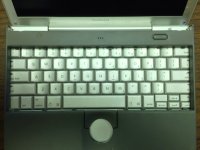
Thanks for the photo, mcdermd - I'd say that's the best candidate then. I'll start a new WTB thread and move this one over into Hacks.
Thanks for the photo, mcdermd - I'd say that's the best candidate then. I'll start a new WTB thread and move this one over into Hacks.
Looking at Mcdermd's picture it looks like you'd pretty seriously compromise the structural integrity of the Duo trying to fit that in there. I suppose I have to ask, since I never owned one... is the Duo keyboard *really* horrible enough to merit the level of destruction it'll take to get an alternative in there? The Powerbook G4 keyboards aren't exactly fabulous either. (Not terrible by laptop standards but... not great either.)
Just spitballing, how about a NetBook keyboard? Something like this looks to be about right, perhaps a little on the small size going by the stated external dimensions of the two systems?
Just spitballing, how about a NetBook keyboard? Something like this looks to be about right, perhaps a little on the small size going by the stated external dimensions of the two systems?
Bad, bad, but not all that bad, just really, really spongy. I've typed on much worse and the size is the largest problem with it.
My first laptop had almost that small a KBD so the transition wasn't too bad. I came to the PB100 from the membrane KBD of Sir Clive"s membrane KBD impaired masterpiece, the Cambridge Z88, so neither smaller KBD bothered me, nor does the downsized NetBook KBD of HP-Mini, on which I'm typing ATM . . .
. . . but this is much nicer than a spongy Duo KBD! :lol:
I don't think anyone will be carrying a Duo about where they'd need to worry about its structural integrity all that much. So long as it's dockable and sturdy enough to keep in a bag and type on, it's well worth grafting in a good KBD. The 1400's is that and a cool hack to boot. Any other would be nice as well, though the newer KBDs don't usually do a lot for me.
My first laptop had almost that small a KBD so the transition wasn't too bad. I came to the PB100 from the membrane KBD of Sir Clive"s membrane KBD impaired masterpiece, the Cambridge Z88, so neither smaller KBD bothered me, nor does the downsized NetBook KBD of HP-Mini, on which I'm typing ATM . . .
. . . but this is much nicer than a spongy Duo KBD! :lol:
I don't think anyone will be carrying a Duo about where they'd need to worry about its structural integrity all that much. So long as it's dockable and sturdy enough to keep in a bag and type on, it's well worth grafting in a good KBD. The 1400's is that and a cool hack to boot. Any other would be nice as well, though the newer KBDs don't usually do a lot for me.
Would a modern-ish netbook keyboard be a candidate? Some of those, especially the dell 11-inchers and Asus 10-inchers had very Mac (c.2011) like black chicklet keyboards, and should be about the right dimensions.
Sounds more like the ape in Kubrick's 2001: A Space Odyssey banging on bones with the femur of an ass (jawbone?) to me.
For the first two months I had my first "chicklet key" Unibody MacBook I kept knocking the Return key partially off. It wasn't that I was hitting it particularly hard or anything, there was just something about how I typed that had me hitting it at an angle the little clips weren't designed for, I guess.(?)
(Seriously, I don't know what the deal was. Maybe it was the angle, maybe I'd been catching my fingernail on it, no clue. It still happens once in a blue moon but whatever I was doing I've apparently managed to unconsciously moderate it. To say the least it left me with a rather poor opinion of Apple's toy keyboards. My desktop wallpaper and screen saver pictures consist entirely of pictures of cruddy chicklet-key home computers from the 80's, like the Tandy Color Computer.)
(Seriously, I don't know what the deal was. Maybe it was the angle, maybe I'd been catching my fingernail on it, no clue. It still happens once in a blue moon but whatever I was doing I've apparently managed to unconsciously moderate it. To say the least it left me with a rather poor opinion of Apple's toy keyboards. My desktop wallpaper and screen saver pictures consist entirely of pictures of cruddy chicklet-key home computers from the 80's, like the Tandy Color Computer.)
The first KBD I used at work was on the Gerber Sprint vinyl cutter, TERRIBLE! The mechanical keyswitches were sub-fair and they were soldered straight onto the logic board with no slant whatsoever . . .
. . . on a friggin' $20k workstation!

I've got nothing but good to say about HP's NetBook KBDs, .9x full size, but decent travel and feedback . . .
. . . then again I used Duos as my only laptop for something like 9 years. :lol:
. . . on a friggin' $20k workstation!
I've got nothing but good to say about HP's NetBook KBDs, .9x full size, but decent travel and feedback . . .
. . . then again I used Duos as my only laptop for something like 9 years. :lol:
I used a Rubbermaid "KBD" for a bit with HP_Mini in coffee shops for its PageNav keys before I decided I could live without ther rest bu using the space bar as page down. I guess starting out with crappy keyboards and using Duo KBDs more than any human should have to endure were good training for dealing with the roll up kind.
On the 1400 KBD/Duo hybrid setup I've got your classic good news/bad news situation to report:
1) I was looking at the flex cable setup upside down, it folds over to wind up inside the HDD bay which is more convenient . . .
2) It conflicts with the trackball . . .
3) If you can live with the 2300c's Horrid TrackPad, it will fold under the mechanism . . .
4) If you do so, it then conflicts with the TrackPad's flex cable to get there . . .
5) The caps under the chassis hump in the back preclude modifications to the Duo to implement the function key mod . . .
6) With a function key row-ectomy, it will fit front to back with little or no modification to the Duo's plastics . . .
7) Side to side will need modifications to the side of the Duo's plastics a/o keycaps if not outright removal . . .
. . . but the supports removed are unnecessary and the integrity of the plastics will remain acceptable. So if the 1400's KBD can be disassembled and reassembled (keycaps removed and replaced at minimum) in a workable fashion it's still a contender. I think the best approach is to fab a new flex circuit/cable for the top contacts and etch PCB for the bottom section, no remapping necessary in that case. This is something I've been considering for fixing the flex problem of the stock Duo KBD and to provide a connection path between the Docking Connector contacts the MoDem and HDD bays anyway.
The 1400 KBD graft remains a contender! ;D
And this hack dovetails very nicely with the PB100/2300c hybrid hack as well. }
On the 1400 KBD/Duo hybrid setup I've got your classic good news/bad news situation to report:
1) I was looking at the flex cable setup upside down, it folds over to wind up inside the HDD bay which is more convenient . . .
2) It conflicts with the trackball . . .
3) If you can live with the 2300c's Horrid TrackPad, it will fold under the mechanism . . .
4) If you do so, it then conflicts with the TrackPad's flex cable to get there . . .
5) The caps under the chassis hump in the back preclude modifications to the Duo to implement the function key mod . . .
6) With a function key row-ectomy, it will fit front to back with little or no modification to the Duo's plastics . . .
7) Side to side will need modifications to the side of the Duo's plastics a/o keycaps if not outright removal . . .
. . . but the supports removed are unnecessary and the integrity of the plastics will remain acceptable. So if the 1400's KBD can be disassembled and reassembled (keycaps removed and replaced at minimum) in a workable fashion it's still a contender. I think the best approach is to fab a new flex circuit/cable for the top contacts and etch PCB for the bottom section, no remapping necessary in that case. This is something I've been considering for fixing the flex problem of the stock Duo KBD and to provide a connection path between the Docking Connector contacts the MoDem and HDD bays anyway.
The 1400 KBD graft remains a contender! ;D
And this hack dovetails very nicely with the PB100/2300c hybrid hack as well. }
Looking at the flex circuitry of the 1400 KBD, it looks like the top layer half of the matrix is the 11 contact right hand side of the flex cable, which allows for removing the portion of the flex cable that interferes with both the TrackBall mechanism and the cable for that diabolical TrackPad in the custom bottom matrix PCB scenario.
It's too bad there's a numerical mismatch in key matrix signals that makes remapping the signals in software impossible. It's still very doable with the KeyWarrior option and there's a lot of available real estate on the underside of the custom KBD PCB for that chippie! [ ] ]'>
] ]'>
It's too bad there's a numerical mismatch in key matrix signals that makes remapping the signals in software impossible. It's still very doable with the KeyWarrior option and there's a lot of available real estate on the underside of the custom KBD PCB for that chippie! [
] ]'>My concerns about jumping to conclusions about this hack proved out:
Left and right sides of the cables/traces are intertwined. :-/ So it's back to folding the cable under and over to left or right. Mounting holes almost work with the 1400 flex circuit, dunno, it's really close. With cutouts in the copper heat spreader for more of the tallish components, a subterranean PCB or cable adapter might work out. If not, there might be room over shallower components for a cable conversion harness.
The one bit of good luck is that the connector/cable conversion might be doable straight back to the area of the CPU. It looks like it may not interfere with the video cable, but it's a tight squeeze on both sides if I have it positioned correctly by eyeball.
Lots of ifs and maybes, but the 1400 KB is still not out of the running. How's it looking from your end so far, B?
Left and right sides of the cables/traces are intertwined. :-/ So it's back to folding the cable under and over to left or right. Mounting holes almost work with the 1400 flex circuit, dunno, it's really close. With cutouts in the copper heat spreader for more of the tallish components, a subterranean PCB or cable adapter might work out. If not, there might be room over shallower components for a cable conversion harness.
The one bit of good luck is that the connector/cable conversion might be doable straight back to the area of the CPU. It looks like it may not interfere with the video cable, but it's a tight squeeze on both sides if I have it positioned correctly by eyeball.
Lots of ifs and maybes, but the 1400 KB is still not out of the running. How's it looking from your end so far, B?
Heck no. If I do this mod, I'm going to do it right
Thanks for investigating the 1400 keyboard. I am pretty sure I have one or two of those spare, and it would be a very nice addition. It does sound like the best option will be removing the flex cable and using a Key Warrior, with two lines from there to the ADB data pins on the dock port
