

Thread
Floppy Emu Disk Emulator Updates
It's been a long time and many late nights coming:
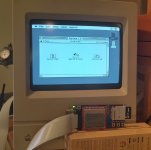
That's a Mac Classic booted from a System 7.0 high-density 1.44 MB emulated floppy. WOOOOO!
The same board now works on anything from a Mac 128K to the Mac II series (and beyond?), with 400K, 800K, and 1440K disk images in either raw or DiskCopy 4.2 format.
If you've got a board, you can try the new firmware here: http://www.bigmessowires.com/floppy-emu-1.0F-F7.zip
That's a Mac Classic booted from a System 7.0 high-density 1.44 MB emulated floppy. WOOOOO!
The same board now works on anything from a Mac 128K to the Mac II series (and beyond?), with 400K, 800K, and 1440K disk images in either raw or DiskCopy 4.2 format.
If you've got a board, you can try the new firmware here: http://www.bigmessowires.com/floppy-emu-1.0F-F7.zip
Wow, that is too cool that you got it working for 1.44 MB disks already!
The AVR firmware update (femu.bin) worked great, but I can't get the CPLD update to work. It says "could not open firmware.xvf" after I press NEXT to confirm that I want to update the CPLD. I even tried formatting my card and copying it again...any ideas?
I just tested and the previous firmware.xvf from the 64K update flashes, but I can't get the firmware.xvf from the linked floppy-emu-1.0F-F7.zip file to flash.
Final edit: Nevermind, got it to work. It's because the file was marked as locked on the SD card, and I noticed from the old floppy emu code that it tries to open the file read-write. So that's all the problem was Looks like the read-only flag is set on the file for some reason when I extract it from Windows. Now for testing!
Real final edit: It works! Just tested with a 1.44 MB Disk Copy 4.2 image I had sitting around. Yay! Thanks bigmessowires, nice work!
The AVR firmware update (femu.bin) worked great, but I can't get the CPLD update to work. It says "could not open firmware.xvf" after I press NEXT to confirm that I want to update the CPLD. I even tried formatting my card and copying it again...any ideas?
I just tested and the previous firmware.xvf from the 64K update flashes, but I can't get the firmware.xvf from the linked floppy-emu-1.0F-F7.zip file to flash.
Final edit: Nevermind, got it to work. It's because the file was marked as locked on the SD card, and I noticed from the old floppy emu code that it tries to open the file read-write. So that's all the problem was
Looks like the read-only flag is set on the file for some reason when I extract it from Windows. Now for testing!Real final edit: It works! Just tested with a 1.44 MB Disk Copy 4.2 image I had sitting around. Yay! Thanks bigmessowires, nice work!
Awesome, glad the 1.4 MB is working for you! But what's "already"? I've been wrestling with it for about a month, so I'm breathing a huge sigh of relief now.
I updated my blog with details about the 1.4 MB disk emulation support, if anyone's interested: http://www.bigmessowires.com/2013/11/01/1-4-mb-high-density-floppy-emulation/
I've been wrestling with it for about a month, so I'm breathing a huge sigh of relief now.I updated my blog with details about the 1.4 MB disk emulation support, if anyone's interested: http://www.bigmessowires.com/2013/11/01/1-4-mb-high-density-floppy-emulation/
Now, when do we get a Duo/100 plug adapter, and a PowerBook 2400c plug adapter? 
Oh man, I bet! Your hard work has ended up creating a working solution, so that's awesome. It just feels like you've gotten so much working on the floppy emu in the last month, it's very impressive!But what's "already"?
BMOW strikes again! The FloppyEmu V2, now a fully functional, fully compatible, fully bootable, fully usable floppy disk emulator for any Classic Macintosh!
Just like your CPU.
Just like your CPU.
Wooo! Freakin' awesome. 
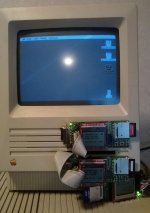
3 floppyemus on an SE!
Fantastic work, bigmessowires! This is such a wonderful tool to make OS installation and testing easy, on older Macs.
I've started the assembly, and got everything done, all the way through the programming of the AVR. However, after adding the 74LVC244, 10k resistor, and 0.1uF cap, I can't get anything to display on the LCD. Do you have any quick suggestions as to points to check, on the board? I've already reviewed my solder points pretty closely, though I don't have a 10x loupe, yet.
Thanks!
- Alex
I've started the assembly, and got everything done, all the way through the programming of the AVR. However, after adding the 74LVC244, 10k resistor, and 0.1uF cap, I can't get anything to display on the LCD. Do you have any quick suggestions as to points to check, on the board? I've already reviewed my solder points pretty closely, though I don't have a 10x loupe, yet.
Thanks!
- Alex
Haha bbraun, that's awesome!! What are you going to do with all that floppy power?
Alex - sent you a PM.
Alex - sent you a PM.
I'm not really sure, but since I had to custom make those cables through the floppy opening, since the IDC connector doesn't fit, I'm kind of committed!
Maybe I'll throw mmcmaster's SCSI2SD internally, use the USB to ADB adapter, and have the mega-SE. I still like the idea of using the SE as an initial step in bitbanging the PDS, since 1) it's 16bits wide, 2) it's slow, and 3) it has the connector allowing for easy access to the signals, so maybe I'll turn it into an experimentation box.
Maybe I'll throw mmcmaster's SCSI2SD internally, use the USB to ADB adapter, and have the mega-SE. I still like the idea of using the SE as an initial step in bitbanging the PDS, since 1) it's 16bits wide, 2) it's slow, and 3) it has the connector allowing for easy access to the signals, so maybe I'll turn it into an experimentation box.
Well, I checked for shorts with my multimeter, in continuity mode, and didn't find anything. I also re-soldered all of the joints that were the least bit questionable, and tested the screen, itself, using an Arduino. I'll include the pictures of the ATmega and the '244, here.
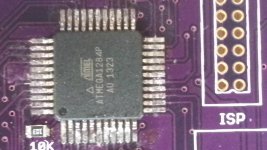
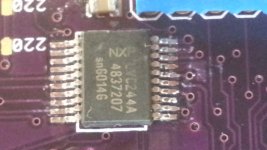
I also checked my solder joints with a loupe, and I couldn't find any bridges.
So, I am officially out of ideas.
Thanks!
- Alex
I also checked my solder joints with a loupe, and I couldn't find any bridges.
So, I am officially out of ideas.
Thanks!
- Alex
It's hard to tell, but some of the pins on the south side of the AVR look pretty close. But if it checks out with the continuity test, probably fine. Maybe double check the decoupling capacitors on the back of the AVR?
FWIW, I'm at 3 working out of 5 attempted builds. The very first one I attempted, I screwed up the AVR. At least when the AVR isn't functional, you can stop early. Then in the last batch I ruined the CPLD on one, removed it, replaced it with a new one, and AFAICT, it's all good except one CPLD pin is grounded that shouldn't be, and I have no idea where. That one is 100% assembled before finding the problem.
So, sorry about that. I can't really offer much advice, just empathy.
FWIW, I'm at 3 working out of 5 attempted builds. The very first one I attempted, I screwed up the AVR. At least when the AVR isn't functional, you can stop early. Then in the last batch I ruined the CPLD on one, removed it, replaced it with a new one, and AFAICT, it's all good except one CPLD pin is grounded that shouldn't be, and I have no idea where. That one is 100% assembled before finding the problem.
So, sorry about that. I can't really offer much advice, just empathy.
My problem turned out to be very simple/stupid: I did not solder the voltage regulator! With that in place, everything works file, so far.
I've found a great way to hand solder those surface mount ICs. If you drag-solder the chips to the board, and then use a power vacuum solder remover (I have a Hakko 808), the joints come out looking great.
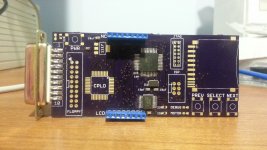
I can't manage to get my 0805s to lay perfectly flat, though. Those suckers are a pain!
Good luck!
- Alex
I've found a great way to hand solder those surface mount ICs. If you drag-solder the chips to the board, and then use a power vacuum solder remover (I have a Hakko 808), the joints come out looking great.
I can't manage to get my 0805s to lay perfectly flat, though. Those suckers are a pain!
Good luck!
- Alex
I added support for subdirectories on the SD card, because things were getting a little out of hand once you had more than a few dozen disk images.
This makes OS installs almost enjoyable! Just download the disk images from Apple, copy them to your SD card, boot the Mac from the Install Disk 1 image, and off you go.
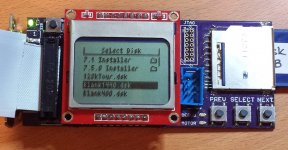
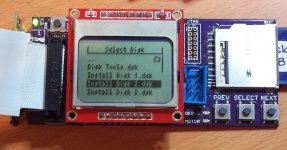
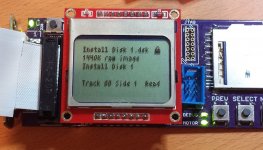
This makes OS installs almost enjoyable! Just download the disk images from Apple, copy them to your SD card, boot the Mac from the Install Disk 1 image, and off you go.
Oooo, it supports Disk Copy disk images? When did I miss that?!
Take my money already! :O
Take my money already! :O
I added Disk Copy 4.2 image support about a week ago, but it was buried in a footnote of another post. DC4.2 images are mounted as read-only, since the image is checksummed, and I'm not prepared to recompute the checksum on the fly.
I've ordered parts to build some more Floppy Emus, with a new v1.1 board that adds a couple of extra features. Hopefully I'll have some ready in a few weeks!
DC4.2 images are mounted as read-only, since the image is checksummed, and I'm not prepared to recompute the checksum on the fly.I've ordered parts to build some more Floppy Emus, with a new v1.1 board that adds a couple of extra features. Hopefully I'll have some ready in a few weeks!
With the HD-20 extension, could you mount larger images?
No, although it's physically connected to the floppy port, HD20 is a whole different animal.
I finally finished building my board (yay!), and it seems to work. I managed to load the CPLD firmware, successfully, and the board recognizes valid (it took me a while to figure out which disk images are supported) images just fine.
However, when plugged in to my test machine (a Mac IIci), every time I try to mount an image, I get the "This disk is unreadable by this Macintosh." dialog box. The images that I have tried, so far, come from Apple's legacy software archive, and are System 6.0.8 on 1.44mb floppies, and System 7.0.1, on the same. These appear to be Disk Copy 4.2 images, from what I can tell. The firmware on the board does indicate that they are Disk Copy images, and locks them, as the docs state.
I've also tried using Mini vMac's convertDC42 program to convert those images to raw images, but the resulting files aren't readable, to the board, and don't show up in the menu. Does anyone have any advice on creating the raw .dsk format images? I also tried downloading the Mini vMac "blanks" archive, and putting the 1.4MB image, on the card. That was indeed recognized as a raw disk image, but the lock symbol appeared, and I was again presented with the unreadable disk dialog.
Any ideas would be welcome. And thanks, again, to BMOW for such an incredible device!
- Alex
However, when plugged in to my test machine (a Mac IIci), every time I try to mount an image, I get the "This disk is unreadable by this Macintosh." dialog box. The images that I have tried, so far, come from Apple's legacy software archive, and are System 6.0.8 on 1.44mb floppies, and System 7.0.1, on the same. These appear to be Disk Copy 4.2 images, from what I can tell. The firmware on the board does indicate that they are Disk Copy images, and locks them, as the docs state.
I've also tried using Mini vMac's convertDC42 program to convert those images to raw images, but the resulting files aren't readable, to the board, and don't show up in the menu. Does anyone have any advice on creating the raw .dsk format images? I also tried downloading the Mini vMac "blanks" archive, and putting the 1.4MB image, on the card. That was indeed recognized as a raw disk image, but the lock symbol appeared, and I was again presented with the unreadable disk dialog.
Any ideas would be welcome. And thanks, again, to BMOW for such an incredible device!
- Alex
You're almost there! Your disk images are fine, but it sounds like there's a problem in the connections between the Mac floppy connectors and the CPLD, have you re-checked those? In particular, check PH0 through PH3, /WREQ, SEL, /ENABLE.EXT, and RD for opens or shorts between neighboring traces, for both connectors and the CPLD.
The Mini vMac "blank" images may have been read-only files, which is why you see the lock icon. Put the SD card in your PC, and clear the read-only flag for all the files.
The Mini vMac "blank" images may have been read-only files, which is why you see the lock icon. Put the SD card in your PC, and clear the read-only flag for all the files.
Here's my suggestion:
Automate long disk-swapping sessions by allowing the user to select two disks and then automatically switch between them when one is ejected.
A little while back I was working on a LEGO contraption to do it with real floppies, but that failed because LEGO and floppies don't fit well together :-/ .
Automate long disk-swapping sessions by allowing the user to select two disks and then automatically switch between them when one is ejected.
A little while back I was working on a LEGO contraption to do it with real floppies, but that failed because LEGO and floppies don't fit well together :-/ .
Thanks for the suggestions. I'm still checking everything, but I found that PH2 and PH3 are shorted to GND. Is that right? It appears that the pins on the board are connected, for those, on the pads near the edge of the board, in Eagle.
Thanks!
- Alex
And now I can't replicate the PH2/3 GND short. Odd.
All of the other signals check out OK, though.
- Alex
All of the other signals check out OK, though.
- Alex
And to reply to myself, again (I can't edit posts more than a couple minutes old, for some reason), I resoldered the CPLD, and now the board works perfectly!
Thanks again! I'm really looking forward to the code release that supports folders.
- Alex
Thanks again! I'm really looking forward to the code release that supports folders.
- Alex
Thats why you dont want to simply drag solder and use a vacuum desolderer to remove the excess. Because it mashes the solder down and creates shorts.
Best way: Use an SMD291/SMD294 flux from chipquik. You can lay down a tiny bead around the IC, and wet your tip with solder. slide the tip on the chip as you were doing, The flux will allow the solder to reflow properly and evenly. Remove any bridges/excess with solder braid! Then the removed areas, re-touch with the tip to straighten the flow. They will look machine assembled/soldered this way.
this is the best way to do it outside of using a stencil, and reflow/hotplate.
Best way: Use an SMD291/SMD294 flux from chipquik. You can lay down a tiny bead around the IC, and wet your tip with solder. slide the tip on the chip as you were doing, The flux will allow the solder to reflow properly and evenly. Remove any bridges/excess with solder braid! Then the removed areas, re-touch with the tip to straighten the flow. They will look machine assembled/soldered this way.
this is the best way to do it outside of using a stencil, and reflow/hotplate.
New software: app version 1.0H firmware 9. http://www.bigmessowires.com/floppy-emu-1.0H-F9.zip
The big update here is 1.44 MB floppy write support. WOOHOO! It was like peeling the layers of an onion, with one weird timing/logic bug hidden by another, layer after layer all the way down. At one point I'd just about given up on it ever working, but I'm glad I didn't.
This version also includes the support for subdirectories and long filenames on the SD card, that I posted photos of earlier.
I think the firmware has reached the max possible complexity limit for debugging without a real debugger. Troubleshooting weird timing and logic problems with print statements and blinking LEDs nearly drove me insane. Luckily there's not too much more to add at this point. Whew!
The big update here is 1.44 MB floppy write support. WOOHOO! It was like peeling the layers of an onion, with one weird timing/logic bug hidden by another, layer after layer all the way down. At one point I'd just about given up on it ever working, but I'm glad I didn't.
This version also includes the support for subdirectories and long filenames on the SD card, that I posted photos of earlier.
I think the firmware has reached the max possible complexity limit for debugging without a real debugger. Troubleshooting weird timing and logic problems with print statements and blinking LEDs nearly drove me insane. Luckily there's not too much more to add at this point. Whew!
8-o
"Well done!" is all I can say to this. Wow.
New software: app version 1.0I firmware 10. http://www.bigmessowires.com/floppy-emu-1.0I-F10.zip
This version extends compatibility to the Power Macintosh and Quadra series. Their ROMs do some track stepping recalibration stuff that was breaking earlier version of the Floppy Emu software.
Still waiting on parts delivery from China so I can build some more of these. xx(
This version extends compatibility to the Power Macintosh and Quadra series. Their ROMs do some track stepping recalibration stuff that was breaking earlier version of the Floppy Emu software.
Still waiting on parts delivery from China so I can build some more of these. xx(
All I can say is, what a fantastic product!
On a side note, how does everyone make DiskCopy 4.2 images? I assume that you use a real Mac with a real superdrive? I've been trying, with little success, to find an alternative. This would be especially handy since Apple has many Disk Copy 6.x images on their HTTP archive.
- Alex
On a side note, how does everyone make DiskCopy 4.2 images? I assume that you use a real Mac with a real superdrive? I've been trying, with little success, to find an alternative. This would be especially handy since Apple has many Disk Copy 6.x images on their HTTP archive.
- Alex