

Thread
hey B M O W ! :-) Apple IIgs support - Floppy Emu?
What do you think buddy?
Would it make the thing too complex?
Or maybe would you have to make up 2 separate floppy emu adaptors?
I know at-least with the IIgs the 800K Apple® 3.5 inch external is identical to the Macintosh…. they work for both machines.
Also I think a cable that comes from the rear to the front (for ease of use) where the nice LCD screen can be visible would be pretty nice?
Would it make the thing too complex?
Or maybe would you have to make up 2 separate floppy emu adaptors?
I know at-least with the IIgs the 800K Apple® 3.5 inch external is identical to the Macintosh…. they work for both machines.
Also I think a cable that comes from the rear to the front (for ease of use) where the nice LCD screen can be visible would be pretty nice?
The floppy emu should work fine as the IIgs uses the same IWM floppy controller as the Macintosh Plus and SE. He just needs to add support for mounting 2IMG format images, the standard used by Apple II emulators for 800k 3.5" disks.
http://apple2.org.za/gswv/a2zine/Docs/DiskImage_2MG_Info.txt
Recent implementations to follow for accessing 2IMG files
Ciderpress: http://sourceforge.net/projects/ciderpress/
Apple Commander: http://sourceforge.net/projects/applecommander/
http://apple2.org.za/gswv/a2zine/Docs/DiskImage_2MG_Info.txt
Recent implementations to follow for accessing 2IMG files
Ciderpress: http://sourceforge.net/projects/ciderpress/
Apple Commander: http://sourceforge.net/projects/applecommander/
Somebody with a IIgs just needs to try it out! 
If it doesn't already work, I think it could be done. Aside from the image file format, the other place where things might need adjustment is in the headers, footers, and checksums for each sector. I know the the IIgs uses the same method to read and write bits from the floppy, but it may still use a different header signature than the Mac, or have a different sector size, or a different checksum algorithm, or something like that. That stuff isn't part of the disk image file - it's generated on the fly by the Floppy Emu firmware.
A cable from the rear to the front is a handy accessory. You can buy one here: http://www.iec-usa.com/cgi-bin/iec/L1561
If it doesn't already work, I think it could be done. Aside from the image file format, the other place where things might need adjustment is in the headers, footers, and checksums for each sector. I know the the IIgs uses the same method to read and write bits from the floppy, but it may still use a different header signature than the Mac, or have a different sector size, or a different checksum algorithm, or something like that. That stuff isn't part of the disk image file - it's generated on the fly by the Floppy Emu firmware.
A cable from the rear to the front is a handy accessory. You can buy one here: http://www.iec-usa.com/cgi-bin/iec/L1561
does that mean that maybe it could also work with the
IIc or IIe as well?
IIc or IIe as well?
www.apple-iigs.info/doc/dociigs.htm
Buried in there is the Apple IIgs firmware and technical references. They are also on archive.org. The sector sizes should be the same.
Buried in there is the Apple IIgs firmware and technical references. They are also on archive.org. The sector sizes should be the same.
The Apple IIc, if it has ROM 0 or later, definitely will not work. It uses the SmartPort interface instead of directly accessing the drive since its too slow. Normally the Unidisk 3.5" is used on the IIc and with most IIe interface cards since it has an onboard CPU to handle all the decoding/encoding of data.
This is mostly for the slot-less Apple IIc, but it will work (slowly) on a IIgs: http://pcedric3.free.fr/SmartportVHD/
The Smartport interface is no barn burner in terms of performance. I have the Unidisk 3.5" to compare with the "dumb" Apple 3.5" drive and having the IWM directly control the drive is a heck of a lot faster. The fastest 3.5" controller by Apple had to have been the FDHD controller. It was more powerful than an Apple IIe! It reads disks about the same speeds as a modern Macintosh.
The Smartport interface is no barn burner in terms of performance. I have the Unidisk 3.5" to compare with the "dumb" Apple 3.5" drive and having the IWM directly control the drive is a heck of a lot faster. The fastest 3.5" controller by Apple had to have been the FDHD controller. It was more powerful than an Apple IIe! It reads disks about the same speeds as a modern Macintosh.
It doesn't appear that the unisdisk supports 3.5" emulation yet.
Has anyone bought one yet?
http://tulip-house.ddo.jp/DIGITAL/UNISDISK/english.html
Has anyone bought one yet?
http://tulip-house.ddo.jp/DIGITAL/UNISDISK/english.html
I can't get the floppy EMU to load up IIgs images
I made the IIgs images with disk copy 4.2
maybe that is the issue?
The floppy emu accepts DSK files and IMG files….
I do not know how to make a DSK file. How ever it must be more complicated then Disk Copy.
It just sits there Track 00 Side 0 Idle
i even connected the emu to the back of the 800k IIgs floppy drive… booted GOS, and does the same thing.
I made the IIgs images with disk copy 4.2
maybe that is the issue?
The floppy emu accepts DSK files and IMG files….
I do not know how to make a DSK file. How ever it must be more complicated then Disk Copy.
It just sits there Track 00 Side 0 Idle
i even connected the emu to the back of the 800k IIgs floppy drive… booted GOS, and does the same thing.
I think I found the problem. Apple defines pin #4 as chassis ground on Macs, but on an Apple IIgs it is defined for "3.5/5.25 Drive Select". Pin #9 is N/C on a Macintosh (some models provide power on this pin), while the IIgs defines it as "Drive 2 select". On the emulator schematics, pin 4 is grounded and pin 9 isn't connected to anything.
I have a feeling that this problem is related to why the 800k Macintosh 3.5" drive (M0131, the one without an eject button) doesn't work on a IIgs, but the 800k Apple 3.5" Drive (A9M0106 with eject button) does. I don't see any info in Apple IIgs docs on how Pin 4 is used to identify drive type. Pin 9 isn't used on Macs because they only support 2 total 3.5" drives in a given system.
Here is a summery of pin assignments from Apple regarding the IIgs are various Macintosh Models.
Apple IIgs: https://archive.org/stream/Apple_IIgs_Hardware_Reference#page/n87/mode/2up
Macintosh Plus and SE: https://archive.org/stream/apple-guide-macintosh-family-hardware/Apple_Guide_to_the_Macintosh_Family_Hardware_2e#page/n375/mode/2up
FDHD Equipped models: https://archive.org/stream/apple-guide-macintosh-family-hardware/Apple_Guide_to_the_Macintosh_Family_Hardware_2e#page/n387/mode/2up
Some additional info on other Apple II models: http://mirrors.apple2.org.za/ground.icaen.uiowa.edu/MiscInfo/Drives/pinouts.drives
I have a feeling that this problem is related to why the 800k Macintosh 3.5" drive (M0131, the one without an eject button) doesn't work on a IIgs, but the 800k Apple 3.5" Drive (A9M0106 with eject button) does. I don't see any info in Apple IIgs docs on how Pin 4 is used to identify drive type. Pin 9 isn't used on Macs because they only support 2 total 3.5" drives in a given system.
Here is a summery of pin assignments from Apple regarding the IIgs are various Macintosh Models.
Apple IIgs: https://archive.org/stream/Apple_IIgs_Hardware_Reference#page/n87/mode/2up
Macintosh Plus and SE: https://archive.org/stream/apple-guide-macintosh-family-hardware/Apple_Guide_to_the_Macintosh_Family_Hardware_2e#page/n375/mode/2up
FDHD Equipped models: https://archive.org/stream/apple-guide-macintosh-family-hardware/Apple_Guide_to_the_Macintosh_Family_Hardware_2e#page/n387/mode/2up
Some additional info on other Apple II models: http://mirrors.apple2.org.za/ground.icaen.uiowa.edu/MiscInfo/Drives/pinouts.drives
Interesting. I see several other differences in the floppy connector pin assignments between the IIgs and Mac. How are these ever able to use the same external drive?
4: IIgs is 3.5/5.25 Drive Select, Mac is GND
9: IIgs is Drive 2 Select, Mac is N.C.
10: IIgs is Write Protect, Mac is PWM
16: IIgs is Head Select, Mac is register select
17: IIgs is Drive 1 Select, Mac is external drive enable (is drive 1 external?)
Pin 10 is especially troubling, because it's an output on the Mac, and an input on the IIgs, and I don't see any way to reconcile those.
The others could work if Apple chose the right defaults. If GND = 3.5 inch drive, the external drive is drive 1, and head select can be re-mapped to register select in software.
Given that there are some real-world Apple floppy drives that will work on a Mac and a IIgs, this has to be possible somehow.
Here's some more info on Apple IIgs floppy cables that may be relevant: http://apple2.info/wiki/index.php?title=Pinouts#3.5_in._and_5.25_in._Drive_cable_pinouts
4: IIgs is 3.5/5.25 Drive Select, Mac is GND
9: IIgs is Drive 2 Select, Mac is N.C.
10: IIgs is Write Protect, Mac is PWM
16: IIgs is Head Select, Mac is register select
17: IIgs is Drive 1 Select, Mac is external drive enable (is drive 1 external?)
Pin 10 is especially troubling, because it's an output on the Mac, and an input on the IIgs, and I don't see any way to reconcile those.
The others could work if Apple chose the right defaults. If GND = 3.5 inch drive, the external drive is drive 1, and head select can be re-mapped to register select in software.
Given that there are some real-world Apple floppy drives that will work on a Mac and a IIgs, this has to be possible somehow.
Here's some more info on Apple IIgs floppy cables that may be relevant: http://apple2.info/wiki/index.php?title=Pinouts#3.5_in._and_5.25_in._Drive_cable_pinouts
PWM is only needed by 400k drives from what I read. The IIgs doesn't support them at all. Pin 10 may not be used by the IIgs despite having an assignment, I have used the A9M0106 800k drive on early 400k Macs without a problem despite the PWM signal being present. Its also possible that the write protect pin is used by the "smart" Unidisk 3.5" drive which can't be used on a Macintosh at all without risking stuff blowing up!
As for Drive 2 Select, the IIgs supports daisy chaining two 3.5" drives on its floppy port, something Macs can't do (there is no internal drive on the IIgs). The pass through board in the Apple 3.5" Disk (A9M0106) likely controls pin 9. It might not be required for the floppy emulator to work, but it might restrict the floppy port to just one drive.
Basically when the machine wants to access drive #2, it activates pin 9 instead of pin 17.
I still think the problem is with pin 4. Since the IIgs floppy port supports both drive types, it needs to be able to determine which type its talking to. The Apple IIgs Setup guide specifically states that all 5.25" drives must be connected after 3.5" drives on the chain. Its likely this pin is left floating on 3.5" drives, but I'll try and dig up more info on how it works. Uniserver could be daring and disconnect pin 4 from ground and see if it works.....
As for Drive 2 Select, the IIgs supports daisy chaining two 3.5" drives on its floppy port, something Macs can't do (there is no internal drive on the IIgs). The pass through board in the Apple 3.5" Disk (A9M0106) likely controls pin 9. It might not be required for the floppy emulator to work, but it might restrict the floppy port to just one drive.
Code:
"The UniDisk uses pin 9 to select the second drive. Inside each UniDisk, the signal from pin 9 at the computer is connected to pin 17 of the daisy- chain drive connector. When the computer selects drive 2 by activating pin 9, the first drive passes this through and the second drive sees its enable signal on pin 17. Thus all drives are identical."I still think the problem is with pin 4. Since the IIgs floppy port supports both drive types, it needs to be able to determine which type its talking to. The Apple IIgs Setup guide specifically states that all 5.25" drives must be connected after 3.5" drives on the chain. Its likely this pin is left floating on 3.5" drives, but I'll try and dig up more info on how it works. Uniserver could be daring and disconnect pin 4 from ground and see if it works.....
Code:
"Despite the IIgs having special functions for pins 4 and 16, they may be ignored when dealing with 5.25" drives, and treated as a UniDisk controller (i.e. connect pin 4 to ground, and pin 16 to +5V). The Apple 3.5 drive disconnects these signals internally, so that they will not interfere with its operation."
I know you were looking for this earlier, here is some protocol information regarding the IIgs and 3.5" disks: https://archive.org/stream/Apple_IIgs_Firmware_Reference#page/n133/mode/2up
Corrections: https://archive.org/stream/IIgs_2523025_Firmware_Reference#page/n3/mode/2up
Raw disk access info: http://wiretap.area.com/Gopher/Library/Techdoc/Hardware/iwmiigs.txt
And finally, information on what pin-4 does on the IIgs floppy port: https://groups.google.com/d/msg/comp.sys.apple2/WH3jr4M97AM/S5a1XIBgKz8J
Another reference to the 3.5" enable pin: https://groups.google.com/d/msg/comp.sys.apple2/VFZJeum2Cy8/NTqWfXrsCvkJ
Corrections: https://archive.org/stream/IIgs_2523025_Firmware_Reference#page/n3/mode/2up
Raw disk access info: http://wiretap.area.com/Gopher/Library/Techdoc/Hardware/iwmiigs.txt
And finally, information on what pin-4 does on the IIgs floppy port: https://groups.google.com/d/msg/comp.sys.apple2/WH3jr4M97AM/S5a1XIBgKz8J
Another reference to the 3.5" enable pin: https://groups.google.com/d/msg/comp.sys.apple2/VFZJeum2Cy8/NTqWfXrsCvkJ
i bet if we can make it work with IIgs, NJRoadfan will buy one haha
haha
I'm not sure I understand those docs about pin 4. So is it an input or an output for the IIgs? You're thinking that it should be left floating, rather than connected to GND on the Floppy Emu board? Or should it be driven high (to 5V)?
As a test, you could try physically cutting off pin 4 from Floppy Emu's DB-19, or use a cable and cut the pin 4 wire. It shouldn't affect the behavior when used on a Mac, since there are three other ground lines already.
As a test, you could try physically cutting off pin 4 from Floppy Emu's DB-19, or use a cable and cut the pin 4 wire. It shouldn't affect the behavior when used on a Mac, since there are three other ground lines already.
Perhaps...
Anyway, that 3.5DISK line and the head select line are not controlled by the IWM, but by the VGC (graphics chip). (See page 3 and 4)
www.classiccmp.org/cini/pdf/Apple/Apple ... ematic.pdf
Gotta love it when unrelated functions migrate into a chip. Anyway, looking at the hardware reference, the disk interface register (page 153) sets the status of those two pins on the connectors. 3.5DISK pin 4 is "1" (pulled high?) when using 3.5" disks, and Head Select pin 16 selects which head of the drive to use.
https://archive.org/stream/Apple_IIgs_Hardware_Reference_HiRes#page/n175/mode/2up
Anyway, that 3.5DISK line and the head select line are not controlled by the IWM, but by the VGC (graphics chip). (See page 3 and 4)
www.classiccmp.org/cini/pdf/Apple/Apple ... ematic.pdf
Gotta love it when unrelated functions migrate into a chip. Anyway, looking at the hardware reference, the disk interface register (page 153) sets the status of those two pins on the connectors. 3.5DISK pin 4 is "1" (pulled high?) when using 3.5" disks, and Head Select pin 16 selects which head of the drive to use.
https://archive.org/stream/Apple_IIgs_Hardware_Reference_HiRes#page/n175/mode/2up
I'm assuming that when a 3.5" drive is in use, the IIgs software uses pin 16 as a register select (like the Mac), not a direct head select. One of the drive registers is the head select, so the Mac doesn't need a separate pin for it.
OK, so pin 4 on the IIgs is an output, with an in-line series resistor according to the doc. And when the IIgs wants to enable a 3.5 drive, it sets pin 4 high, as well as setting either pin 17 or pin 9 low depending on whether it wants the first or second 3.5 drive. Does that sound right?
If that's the case, then because Floppy Emu ignores line 4, it's going to respond whenever the IIgs sets pin 17 low for either a 3.5 or a 5.25 drive. So it may be getting confused if it checks to see if there's a 5.25 drive connect and then Floppy Emu responds. Or maybe it tries to set pin 4 high, then checks the actual voltage on pin 4 (after the series resistor) to see if it's high or low, and if it's low it assumes there's a 5.25 drive rather than a 3.5 inch drive.
OK, so pin 4 on the IIgs is an output, with an in-line series resistor according to the doc. And when the IIgs wants to enable a 3.5 drive, it sets pin 4 high, as well as setting either pin 17 or pin 9 low depending on whether it wants the first or second 3.5 drive. Does that sound right?
If that's the case, then because Floppy Emu ignores line 4, it's going to respond whenever the IIgs sets pin 17 low for either a 3.5 or a 5.25 drive. So it may be getting confused if it checks to see if there's a 5.25 drive connect and then Floppy Emu responds. Or maybe it tries to set pin 4 high, then checks the actual voltage on pin 4 (after the series resistor) to see if it's high or low, and if it's low it assumes there's a 5.25 drive rather than a 3.5 inch drive.
As I think about it more, something doesn't quite add up here:
On a IIgs, a 3.5 drive must only respond when pin 4 is high.
On a Mac, pin 4 will always be low (GND). So a 3.5 drive designed for the IIgs will never respond.
But we know there are some floppy drives that work on both the IIgs and the Mac. How can that be? There doesn't seem to be any way the drive could know what kind of computer it's connected to.
Edit: Maybe the drive could internally have a pull-down resistor on pin 9. On the Mac that's a no-connect, so it would always be low. But on a IIgs it would normally be driven high. Then the drive could be designed to respond if pin 4 is high, pin 9 is high, and pin 17 is low (IIgs mode), or if pin 4 is low, pin 9 is low (thanks to the pull-down), and pin 17 is low (Mac mode). That seems pretty wacky, though.
On a IIgs, a 3.5 drive must only respond when pin 4 is high.
On a Mac, pin 4 will always be low (GND). So a 3.5 drive designed for the IIgs will never respond.
But we know there are some floppy drives that work on both the IIgs and the Mac. How can that be? There doesn't seem to be any way the drive could know what kind of computer it's connected to.
Edit: Maybe the drive could internally have a pull-down resistor on pin 9. On the Mac that's a no-connect, so it would always be low. But on a IIgs it would normally be driven high. Then the drive could be designed to respond if pin 4 is high, pin 9 is high, and pin 17 is low (IIgs mode), or if pin 4 is low, pin 9 is low (thanks to the pull-down), and pin 17 is low (Mac mode). That seems pretty wacky, though.
let me know if and what you want me to test on the IIgs, also will disk copy 4.2 be able to make a proper IIgs floppy image? or should i use, DiskDup+
I haven't found any documents clarifying the drive select pins role with 3.5" drives. I have to disassemble a drive and see how the pins are routed on the daisy chain board.
Looking at the Mac Plus schematics, it looks like pin 16 is head select and its controlled by the 6522 VIA. Besides the change in what chip is controlling it, it should use the same logic across both machines.
On Macs, the Drive Select 1 signal from the IWM is wired to the internal floppy header and Drive Select 2 is wired to pin 17 of the external floppy connector. On the IIgs, Drive Select 1 signal from the IWM is wired to pin 17 and Drive Select 2 is wired to pin 9.
I highly suspect that the 3.5 Disk Enable pin has logic on the floppy drive end. If the pin goes high, the Apple 3.5" drive responds to the machine, if its low it ignores it since the instructions are bound for 5.25" drives. What makes matters confusing is how does the Apple 3.5" drive work on a Mac if this pin is grounded and unused?
Looking at the Mac Plus schematics, it looks like pin 16 is head select and its controlled by the 6522 VIA. Besides the change in what chip is controlling it, it should use the same logic across both machines.
On Macs, the Drive Select 1 signal from the IWM is wired to the internal floppy header and Drive Select 2 is wired to pin 17 of the external floppy connector. On the IIgs, Drive Select 1 signal from the IWM is wired to pin 17 and Drive Select 2 is wired to pin 9.
I highly suspect that the 3.5 Disk Enable pin has logic on the floppy drive end. If the pin goes high, the Apple 3.5" drive responds to the machine, if its low it ignores it since the instructions are bound for 5.25" drives. What makes matters confusing is how does the Apple 3.5" drive work on a Mac if this pin is grounded and unused?
the only thing i have to offer is that i did notice when using the Apple® 800k floppy drive with the Macintosh 128k.
it works. @ as 400k drive.
but if i install that same 800k floppy drive internally i have to make sure to use a special cable that has pin 9 and pin 20 cut.. then the drive works. or else it will try to burn out the eject motor.
So the bridge board in the Apple® 3.5 800k external must also disable pin 9 and 20 as well. I don't know if that helps anything… lol
it works. @ as 400k drive.
but if i install that same 800k floppy drive internally i have to make sure to use a special cable that has pin 9 and pin 20 cut.. then the drive works. or else it will try to burn out the eject motor.
So the bridge board in the Apple® 3.5 800k external must also disable pin 9 and 20 as well. I don't know if that helps anything… lol
That would be interesting to see.
It's labeled HDSEL on some diagrams, but on the Mac it's just a generic output pin (input to the floppy drive), used in combination with the other pins to read/write one of the 16 internal drive registers. That's the part that Floppy Emu needs the CPLD for.
Exactly. My proposed pulldown solution would work, I think, but it feels too weird to be the right solution.
I tried hacking pin 4 off one of my Floppy Emus, but the spacing is too tight and I couldn't find any good way to do it without damaging stuff. If you have one of those extension cables from IEC, you could try cutting the wire for pin 4, and see how that affects Floppy Emu with the IIgs.
The daisy chain board is the key and likely controls the drive select logic. I don't want to be responsible for any damage, but its likely the floppy emulator will work on a IIgs, if you connect its internal header to a Apple 3.5" drive's daisy chain board. Using a multimeter, the 3.5 Select and Drive Select lines don't seem to be directly passed through the board. Pin 4 is not wired to chassis ground either.
ok i am going to test this.
Just a thought in my head on possible daisy chain board logic.
At the IIgs disk port:
If pin 4 is grounded on the port, first drive is 5.25" thus no 3.5" drives detected
If pin 4 is not grounded on the port and there is a ground present on some random pin, first drive is 3.5", probe to see if there are two drives
3.5" drive in the chain:
If pin 4 is grounded on daisy chain port, drive is 5.25", route drive select 1 signal to pin 17, only activate if input pin 4 is low from computer.
If pin 4 is not grounded on daisy chain port and there is a ground present on some random pin, drive is 2nd 3.5", route drive select 2 signal from pin 9 to pin 17 (this is how the drive avoids receiving the damaging PWM signal on a compact Mac, it never makes it to the floppy drive to begin with!)
If pin 4 is not grounded and there is no ground present on some random pin, drive is last in chain
This configuration only supports 2x3.5" drives per IIgs, since there is no drive select signal available on pin 9 to the second drive on the chain.
5.25" drives are dumb, they just pass input pin 9 to daisy chain port pin 17. Detecting one or two 3.5" drives connected is likely done by the IIgs firmware. 5.25" don't have auto detection due to their legacy nature.
At the IIgs disk port:
If pin 4 is grounded on the port, first drive is 5.25" thus no 3.5" drives detected
If pin 4 is not grounded on the port and there is a ground present on some random pin, first drive is 3.5", probe to see if there are two drives
3.5" drive in the chain:
If pin 4 is grounded on daisy chain port, drive is 5.25", route drive select 1 signal to pin 17, only activate if input pin 4 is low from computer.
If pin 4 is not grounded on daisy chain port and there is a ground present on some random pin, drive is 2nd 3.5", route drive select 2 signal from pin 9 to pin 17 (this is how the drive avoids receiving the damaging PWM signal on a compact Mac, it never makes it to the floppy drive to begin with!)
If pin 4 is not grounded and there is no ground present on some random pin, drive is last in chain
This configuration only supports 2x3.5" drives per IIgs, since there is no drive select signal available on pin 9 to the second drive on the chain.
5.25" drives are dumb, they just pass input pin 9 to daisy chain port pin 17. Detecting one or two 3.5" drives connected is likely done by the IIgs firmware. 5.25" don't have auto detection due to their legacy nature.
merry christmas and happy new year.
the first one i loaded, don't know what it was, but it booted and then stalled @ track 33.
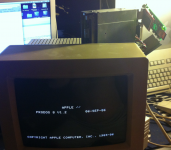
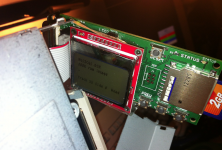
so i thought great! oh well !!!! its working!
so then i selected install.dsk witch looks to be gos 6.01 install disk
it works and boots up… my IIgs is acting up… there are some bad caps on the main board that i need to tend to at one point..
but the thing works!! using the 800k bridge board.
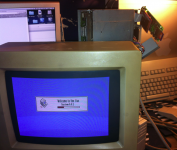
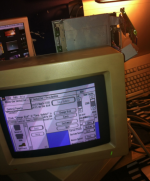
the first one i loaded, don't know what it was, but it booted and then stalled @ track 33.
so i thought great! oh well !!!! its working!
so then i selected install.dsk witch looks to be gos 6.01 install disk
it works and boots up… my IIgs is acting up… there are some bad caps on the main board that i need to tend to at one point..
but the thing works!! using the 800k bridge board.
Is the machine randomly crashing? Usually dumps to the "*" monitor prompt. Capacitors usually aren't a problem in these, but its possible after 25 years of service. Check the power supply too, they get dodgy with age.
Anyway, that confirms the daisy chain board in the Apple 3.5" drive is what handles the drive select logic.
Anyway, that confirms the daisy chain board in the Apple 3.5" drive is what handles the drive select logic.
there are visually bad caps on the board they are leaking
i have another Iigs in the garage with 2.25 megs ram. but too lazy to go get it.
what happens is if i click on any of the control panel items more then once it seems i hear the IIgs reboot beep… and the screen gui just locks, i think i can still move the mouse but i can't remember.. it was late and i was super tired. -- glad it works though… so i would assume this means we need to disconnect pin 4 on the floppy emu?
i have another Iigs in the garage with 2.25 megs ram. but too lazy to go get it.
what happens is if i click on any of the control panel items more then once it seems i hear the IIgs reboot beep… and the screen gui just locks, i think i can still move the mouse but i can't remember.. it was late and i was super tired. -- glad it works though… so i would assume this means we need to disconnect pin 4 on the floppy emu?
Yeah, its crashing to monitor, you'll see it briefly when you do the 3 finger salute. I would try disconnecting pin 4 and seeing if it works without the daisy chain board.